mcpd
Health Gecti
- License — License: Apache-2.0
- Description — Repository has a description
- Active repo — Last push 0 days ago
- Community trust — 144 GitHub stars
Code Gecti
- Code scan — Scanned 12 files during light audit, no dangerous patterns found
Permissions Gecti
- Permissions — No dangerous permissions requested
This tool acts as a daemon that manages your MCP servers via declarative configuration files. It bridges the gap between AI agents and infrastructure by spawning server subprocesses, handling their lifecycle, and proxying requests over clean HTTP endpoints.
Security Assessment
The daemon operates by spawning subprocesses and proxying network requests, which inherently requires careful execution. However, the light audit found no hardcoded secrets, no dangerous permissions requested, and no malicious code patterns in the scanned files. Because it manages environment variables and secrets for infrastructure bridging, it has access to potentially sensitive data, but it does so by design. Overall risk: Low.
Quality Assessment
The project is actively maintained, with its most recent code push happening today. It carries the permissive and standard Apache-2.0 license. The repository has garnered 144 GitHub stars, indicating a healthy and growing level of community trust. Furthermore, being backed by Mozilla AI adds an extra layer of organizational credibility.
Verdict
Safe to use.
Declaratively define and run required tools across environments, from local development to containerized cloud deployments.

Built by Mozilla AI
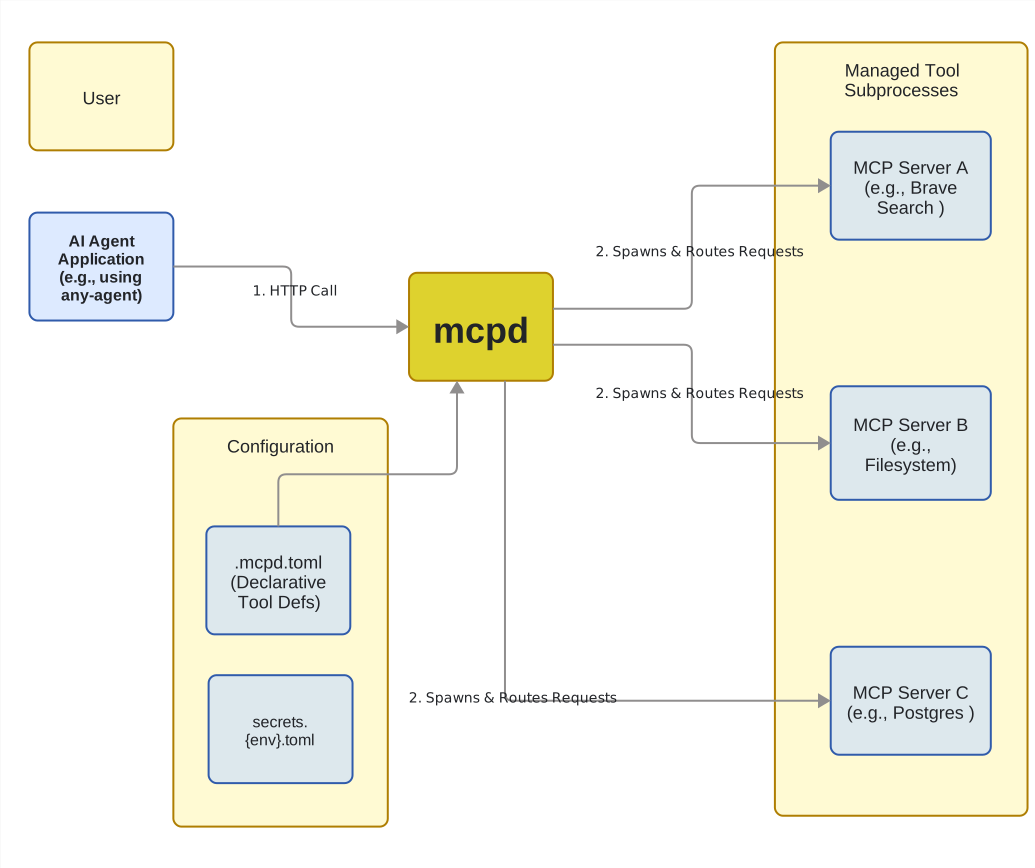
mcpd is a daemon that manages your MCP servers via declarative configuration, exposing them as clean HTTP endpoints. This bridges the gap between your agents and your infrastructure, handling the messy work of lifecycle management, secret injection, and environment promotion so you don't have to.
⚙️ How it Works
Under the hood, mcpd spawns MCP servers as STDIO subprocesses and proxies requests over HTTP.
🚀 Quick Start
Prerequisites
You need the following installed before running mcpd:
Installation
via Homebrew
(Works for both macOS and Linux)
Add the Mozilla.ai tap:
brew tap mozilla-ai/tap
Then install mcpd:
brew install mcpd
Or install directly from the cask:
brew install --cask mozilla-ai/tap/mcpd
Please read our docs to install via GitHub releases or local Go Binary build.
Using mcpd
# Initialize a new project and create a new .mcpd.toml file
mcpd init

# Add an MCP server to .mcpd.toml
mcpd add time

# Set the local timezone for the MCP server
mcpd config args set time -- --local-timezone=Europe/London

# Start the daemon in dev mode with debug logging
mcpd daemon --dev --log-level=DEBUG --log-path=$(pwd)/mcpd.log
Now that the daemon is running, let's call the get_current_time tool provided by the time MCP server
# Check the time
curl -s --request POST \
  --url http://localhost:8090/api/v1/servers/time/tools/get_current_time \
  --header 'Accept: application/json, application/problem+json' \
  --header 'Content-Type: application/json' \
  --data '{
  "timezone": "Europe/Warsaw"
}'
API docs will be available at http://localhost:8090/docs.
💡 Why mcpd?
Engineering teams build agents that work locally, then struggle to make them production-ready across environments. mcpd bridges this gap with declarative configuration and secure secrets management.
- Declarative & reproducible – .mcpd.toml defines your tool infrastructure
- Language-agnostic – Python, JS, Docker containers via unified HTTP API
- Dev-to-prod ready – Same config works locally and in containers
🏗️ Built for Dev & Production
| Development Workflow | Production Benefit |
|---|---|
mcpd daemon runs everything locally |
Same daemon runs in containers |
.mcpd.toml version-controlled configs |
Declarative infrastructure as code |
Local secrets in ~/.config/mcpd/ |
Secure secrets injection via control plane |
mcpd config export exports version-control safe snapshot of local configuration |
Sanitized secrets config and templates for CI/CD pipelines |
📦 SDKs
mcpd SDKs
| Language | Repository | Status |
|---|---|---|
| Python | mcpd-sdk-python | ✅ |
| JavaScript | mcpd-sdk-javascript | ✅ |
mcpd plugin SDKs
Plugin SDKs are built using the mcpd plugin Protocol Buffers specification.
| Language | Repository | Status |
|---|---|---|
| Go | mcpd-plugins-sdk-go | ✅ |
| .NET | mcpd-plugins-sdk-dotnet | ✅ |
| Python | mcpd-plugins-sdk-python | ✅ |
💻 Development
If you are developing mcpd, you will need:
- Go (v1.26.0+ recommended)
Build local code:
make build
Run tests:
make test
Validate Mozilla AI registry (when modifying registry files):
make validate-registry
Run the local documentation site (requires uv), dynamically generates command line documentation:
make docs
🧩 The Mozilla.ai Stack
mcpd is the "Tooling Layer" of the Mozilla.ai ecosystem. These tools are designed to work together or standalone.
| Layer | Tool | Function |
|---|---|---|
| Compute | llamafile | Local LLM inference server |
| Interface | any-llm | Unified Python library for LLM inference |
| Logic | any-agent | Orchestration and agent loops |
| Tools | mcpd | (You are here) Tool sandbox & router |
| Safety | any-guardrail | Input/Output validation |
🤝 Contributing
Please see our Contributing to mcpd guide for more information.
📄 License
Licensed under the Apache License 2.0.
Yorumlar (0)
Yorum birakmak icin giris yap.
Yorum birakSonuc bulunamadi