zim-claude
Health Uyari
- No license — Repository has no license file
- Description — Repository has a description
- Active repo — Last push 0 days ago
- Low visibility — Only 7 GitHub stars
Code Basarisiz
- rm -rf — Recursive force deletion command in tests/run-tests.sh
- Hardcoded secret — Potential hardcoded credential in tests/run-tests.sh
Permissions Gecti
- Permissions — No dangerous permissions requested
Bu listing icin henuz AI raporu yok.
UNLIMITED CLAUDE CODE / CLAUDE DESKTOP
zim-claude
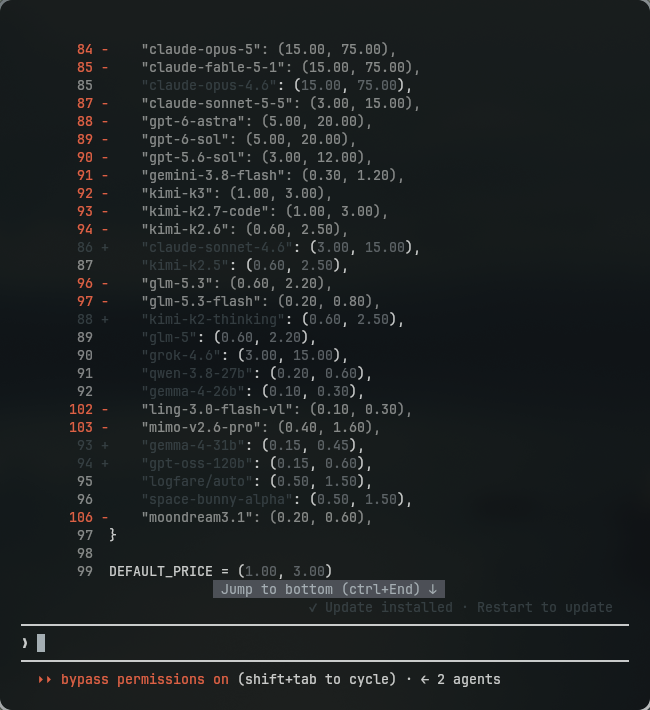
Claude Code, pointed at a local LiteLLM proxy.
Same flags, same subcommands, same interactive UI as claude —
it just talks to a proxy on localhost:4000 instead of Anthropic.



What it is
A drop-in replacement for claude. Every flag and subcommand passes through untouched:
zim-claude                                  # interactive session
zim-claude --dangerously-skip-permissions   # any claude flag works
zim-claude -p "explain this function"       # non-interactive
zim-claude mcp list                         # any claude subcommand works
zim-claude mcp add demo -- npx -y some-mcp  # arguments pass through untouched
The proxy starts automatically the first time you use it, and the health check costs
about 8 ms once it is already up.
  Claude Code  ──▶  LiteLLM :4000  ──▶  Token Juice  ──▶  upstream
   zim-claude          (local)                            (model)
Install
| Linux · macOS · WSL | Windows |
|---|---|
|
|
That's it. Open a new terminal and run zim-claude.
Which installer do I run?
| Installer | Platform | What it sets up | Run it with |
|---|---|---|---|
install.sh |
Linux · macOS · WSL | CLI proxy :4000 + the zim-claude command |
./install.sh |
windows\win-install.bat |
Windows | both proxies — :4000 and the :4002 gateway — plus zim-claude |
win-install.bat |
claude-desktop-integration/install.sh |
Linux · macOS | the :4002 gateway only |
cd claude-desktop-integration && ./install.sh |
You normally only need the first one for your platform. The third exists for people who
want the Claude Desktop gateway without the CLI side.
On Windows,
win-install.batis the entry point — it forwards every flag towin-install.ps1, which holds the logic. It is a.batso it can be double-clicked
and so it still runs when the machine's execution policy would refuse a bare.ps1.
Requirements
The installer checks for each of these and offers to install anything missing.
Nothing is installed without you answering y.
| Tool | If missing |
|---|---|
bash, curl, base64 |
required — the installer reports and exits |
Claude Code (claude) |
offers curl -fsSL https://claude.ai/install.sh | bash |
litellm |
offers pip install --user 'litellm[proxy]' |
Claude Code uses Anthropic's official installer rather than npm install -g: no Node
dependency, and it sets up the launcher and shell integration itself. It is run
without sudo — it installs under $HOME and exits with an explicit error if it
detects sudo, so running it under sudo would guarantee failure.
python3 has no pip
The installer cannot install litellm for you. This is the default on Arch, wherepython ships without pip, and the old advice here (python3 -m pip install ...) failed
with No module named pip and installed nothing. The installer detects the platform and
prints the command for yours:
| Platform | Command |
|---|---|
| Arch | sudo pacman -S python-pip |
| Debian/Ubuntu | sudo apt install python3-pip |
| Termux | pkg install python |
| Fedora | sudo dnf install python3-pip |
pipx install 'litellm[proxy]' is the better option for a CLI like litellm — it puts it
in its own venv and on PATH. The Debian-only --break-system-packages flag is passed
only on Debian/Ubuntu; Arch's pip rejects it.
zim-claude: command not found right after installing
The installer is a subprocess and cannot change the PATH of the shell that launched it.
A new terminal picks up ~/.local/bin automatically; to fix the shell you are already in:
export PATH="$HOME/.local/bin:$PATH"
(hash -r will not help — it clears bash's command-lookup cache and never adds a
directory to PATH.)
What it puts where
| Path | Purpose |
|---|---|
~/.local/bin/zim-claude |
the command |
~/.local/bin/start-litellm.sh |
proxy manager: start/stop/restart/status/logs |
~/claude-source/deepseek-claude |
the env profile (mode 600) |
~/litellm-config.yaml |
LiteLLM proxy config |
~/.local/share/zim-claude/ |
install state + backups (mode 700) |
Anything it would overwrite is backed up first, under~/.local/share/zim-claude/backups/<timestamp>/.
Installer flags
./install.sh                install
./install.sh --dry-run      print every action, change nothing
./install.sh --uninstall    remove what the installer created
./install.sh --force        overwrite files you have hand-edited (still backs up)
./install.sh --no-rc        don't touch ~/.bashrc
./install.sh --start        start the proxy when done
Re-running install.sh is safe and idempotent — it compares file contents and skips
anything already up to date.
--uninstall removes the files it installed, but only if you haven't edited them,
and never touches your env profile or ~/litellm-config.yaml.
Windows
Windows gets its own installer under windows/. It is native — no WSL, no Git Bash,
no Node, and no Administrator rights.
One installer sets up both proxies, because on Windows they are always wanted
together:
| CLI | Claude Desktop | |
|---|---|---|
| Port | 4000 |
4002 |
| Config | %USERPROFILE%\litellm-config.yaml |
%USERPROFILE%\.local\share\zim-claude\desktop\litellm-config.desktop.yaml |
| Log | %USERPROFILE%\.local\share\zim-claude\logs\cli.log |
...\logs\desktop.log |
It installs the same zim-claude command you get on Linux, into%USERPROFILE%\.local\bin:
zim-claude                                  :: interactive session
zim-claude --dangerously-skip-permissions   :: any claude flag works
zim-claude -p "explain this function"       :: non-interactive
zim-claude mcp list                         :: any claude subcommand works
The command works identically from cmd.exe and from PowerShell. Every argument is
forwarded to claude.exe untouched, and its exit code passes through — sozim-claude -p "x" && next-step behaves the way you'd expect.
Windows flags
win-install.bat                 install both sides, start the proxies
win-install.bat -DryRun         print every action, change nothing
win-install.bat -SkipDesktop    CLI proxy (:4000) only
win-install.bat -SkipCli        Claude Desktop gateway (:4002) only
win-install.bat -NoStart        install but don't start the proxies
win-install.bat -Force          overwrite hand-edited files (backed up first)
win-install.bat -Uninstall      remove what the installer created
Start with -DryRun to review every action before anything changes.
Same guarantees as the Linux installer: it backs up anything it would overwrite,
compares contents so a re-run is a no-op, and never overwrites your env profile —
that file holds a live credential, so -Force does not apply to it.
Manage the proxies
start-proxies.ps1 drives both:
start-proxies.ps1 start                 # bring both up
start-proxies.ps1 status                # is it running?
start-proxies.ps1 status -Which desktop # just the :4002 gateway
start-proxies.ps1 gateway               # print the values for the Desktop UI
start-proxies.ps1 logs                  # tail both logs
start-proxies.ps1 restart
start-proxies.ps1 stop
You normally never need these — zim-claude health-checks localhost:4000 and starts
the CLI proxy if it's down, exactly as on Linux.
Windows requirements
| Tool | If missing |
|---|---|
| Python 3.10+ | offers winget install Python.Python.3.12 (litellm is a Python package) |
litellm |
offers python -m pip install --user "litellm[proxy]" |
| Claude Code | offers Anthropic's native installer, irm https://claude.ai/install.ps1 | iex |
Claude Code on Windows needs no WSL, Node, or Administrator rights. It installs to%USERPROFILE%\.local\bin\claude.exe. Git for Windows
is optional — Claude Code only needs it for its Bash tool.
install.sh at the repo root remains the Linux/macOS/WSL installer and is unchanged.
Claude Desktop — the zim gateway
The zim gateway provides free, unlimited Claude Opus 5.5 to Claude Desktop — the
new front-tier Anthropic model, with no per-message limits.
The CLI proxy above steers Claude Code. Claude Desktop is a different app, and it
ignores those environment variables: when it spawns its embedded agent it blanks them
and injects its own credentials. It only accepts a custom endpoint through
Third-Party Inference → Gateway.
So there is a second, independent proxy on :4002 for it. Separate port, config, log and
PID file — zim-claude on :4000 keeps working untouched.
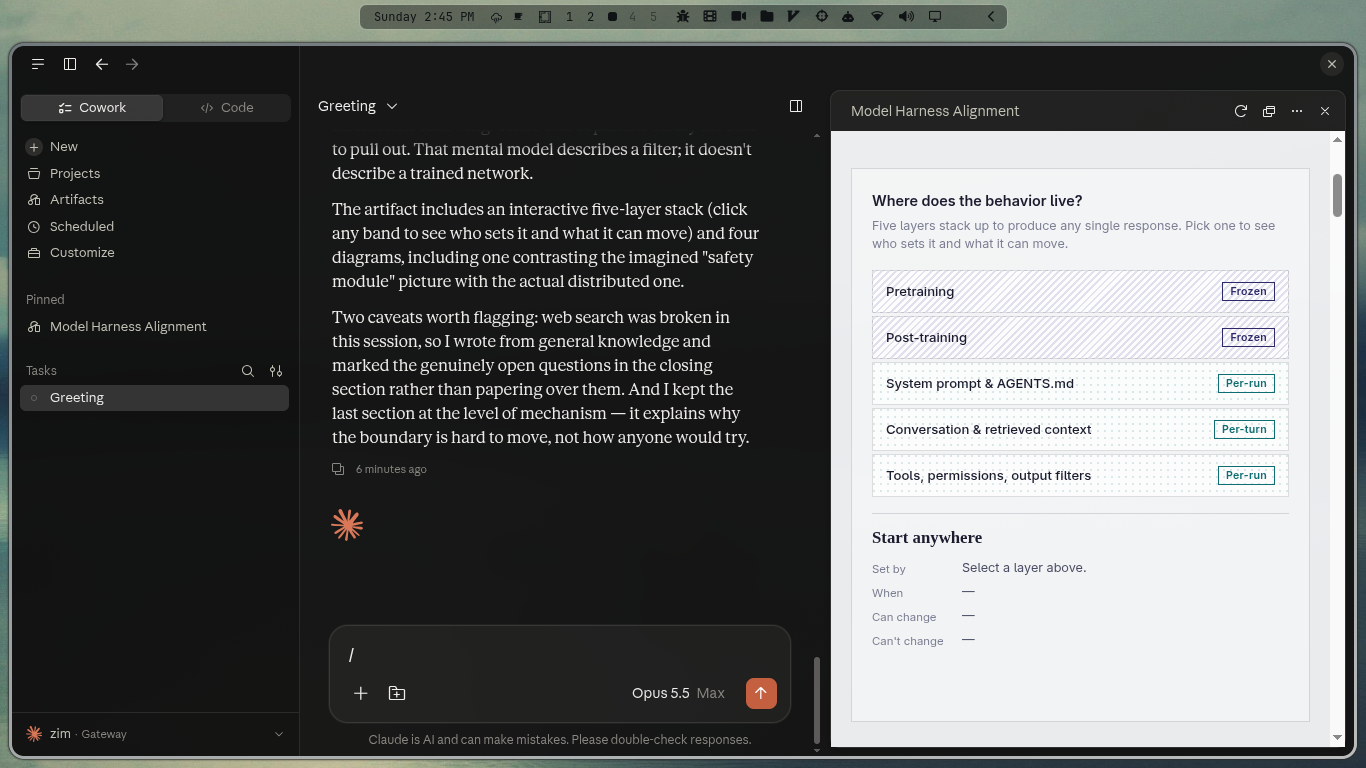 The model picker reads Opus 5.5 Max; the status bar reads zim · Gateway.
|
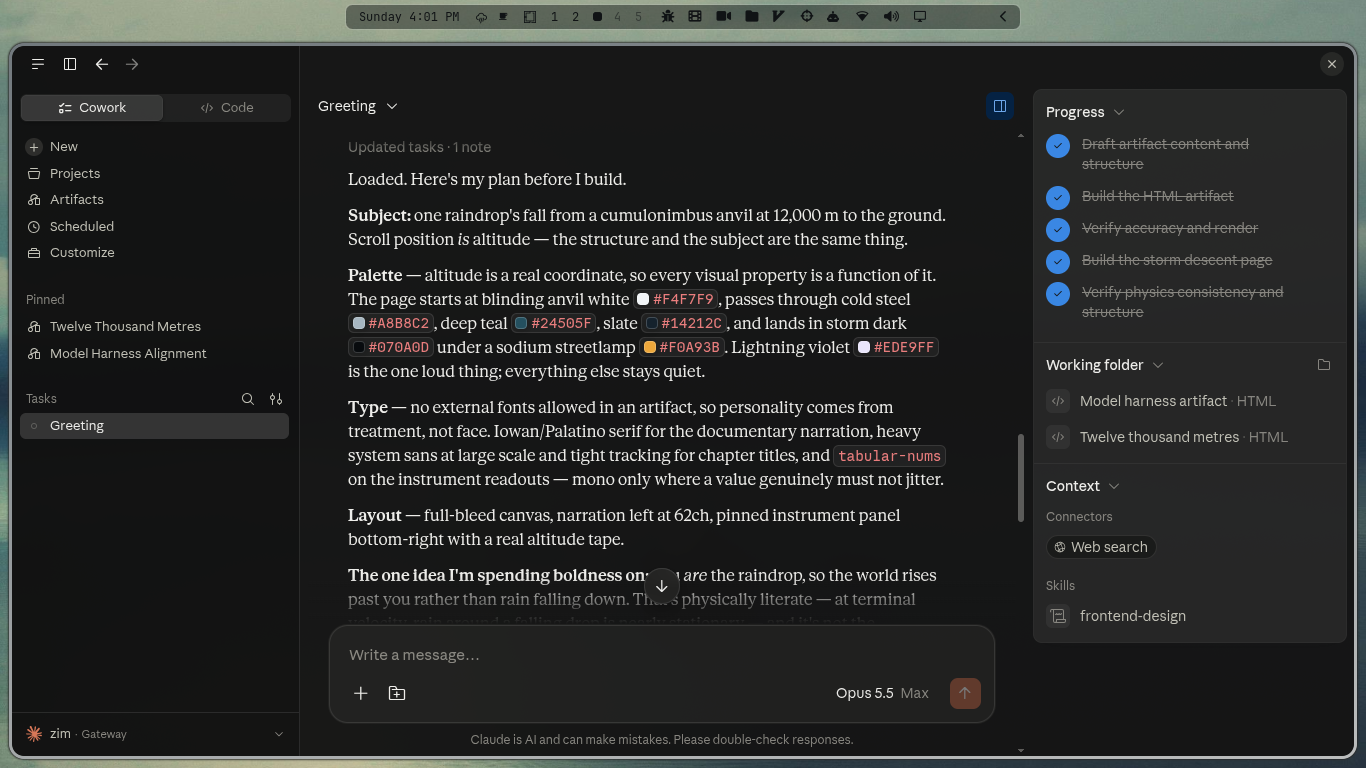 Cowork sessions, progress tracking and the working-folder panel all work normally. |
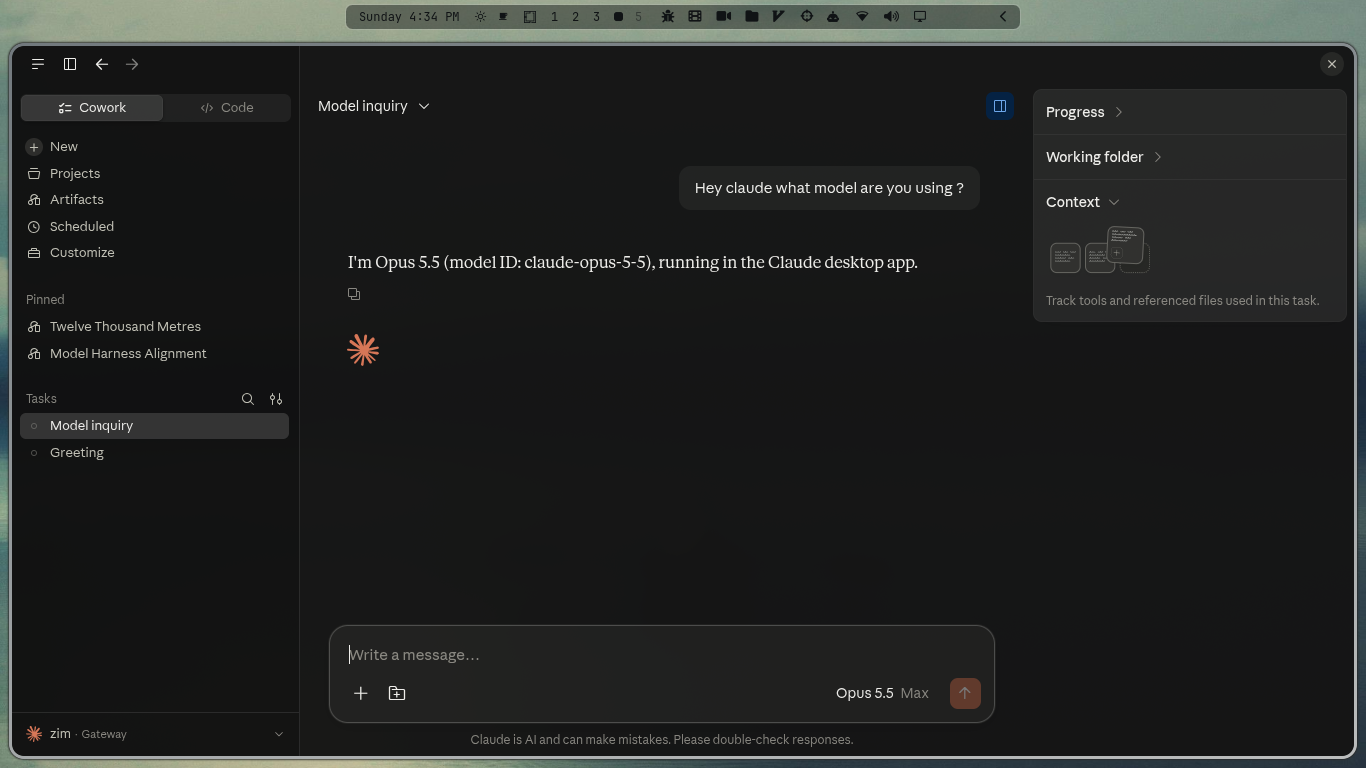
Asked which model it is, the session answers with the name the gateway exposes it
under — claude-opus-5-5.
Set it up
Windows — the installer sets up the proxy; you still paste the values into the app
once (Windows has no managed-config file, so there is nothing the installer can write
for you):
cd windows
win-install.bat
Use -SkipCli if you want only the :4002 gateway. The desktop config lands at%USERPROFILE%\.local\share\zim-claude\desktop\litellm-config.desktop.yaml, its log at...\logs\desktop.log. start-proxies.ps1 gateway prints the exact values for the
dialog, and windows\verify.ps1 proves the gateway answers.
Use the key
start-proxies.ps1 gatewayprints, not the one in this README. IfCLAUDE_DESKTOP_LITELLM_KEYis set, the proxy enforces that key. A mismatch comes
back as{"error":{"message":"No connected db.","type":"no_db_connection"}}— LiteLLM
treats an unmatched key as a DB-backed virtual key and there is no DB.
Linux · macOS — run the desktop installer:
cd claude-desktop-integration
./install.sh
It starts the proxy and prints the exact values to paste into the app. It does not
touch :4000 or your shell config.
Then, in Claude Desktop:
Help → Troubleshooting → Enable Developer Mode
Claude menu → Developer → Configure Third-Party Inference…
Connection section:
Field Value Inference provider GatewayGateway base URL http://127.0.0.1:4002Gateway API key sk-claude-desktop-localGateway auth scheme bearerApply Changes (older builds: Apply locally), then restart Claude Desktop.
The picker now lists claude-opus-5-5, and every Cowork, Chat and Code model call goes
through LiteLLM.
./install.sh --managed          # needs sudo -> /etc/claude-desktop/managed-settings.json
./install.sh --uninstall-managed
This is the same content as managed-settings.json. A managed profile may make the app
show a managed configuration notice — that is expected.
--managed has no Windows equivalent here — it writes to /etc/ with sudo. On
Windows, use the in-app dialog above.
Desktop gateway configuration
| Variable | Default | Meaning |
|---|---|---|
CLAUDE_DESKTOP_PORT |
4002 |
proxy port |
CLAUDE_DESKTOP_LITELLM_KEY |
sk-claude-desktop-local |
gateway key (bearer) |
CLAUDE_DESKTOP_CONFIG |
./litellm-config.desktop.yaml |
proxy config |
CLAUDE_DESKTOP_LOG |
/tmp/litellm-desktop.log |
log file |
LITELLM_ENV_FILE |
~/claude-source/deepseek-claude |
profile with the upstream token |
The proxy
start-litellm.sh manages it:
start-litellm.sh status     # is it running?
start-litellm.sh logs       # tail the log
start-litellm.sh restart    # after editing the config
start-litellm.sh stop
You normally never need these — zim-claude health-checks localhost:4000 and starts
the proxy if it's down. The check costs ~8 ms when the proxy is already up.
Configuration
zim-claude takes no flags of its own — every argument goes to claude. Configure it
through environment variables:
| Variable | Default | Meaning |
|---|---|---|
LITELLM_ENV_FILE |
~/claude-source/deepseek-claude |
profile to source |
LITELLM_PORT |
4000 |
proxy port |
LITELLM_LOG |
/tmp/litellm-proxy.log |
proxy log |
LITELLM_SERVICE |
<install dir>/start-litellm.sh |
proxy manager |
ZIM_CLAUDE_BIN |
claude on PATH |
which claude to run |
ZIM_CLAUDE_NO_PROXY |
0 |
set to 1 to never touch the proxy |
ZIM_CLAUDE_REQUIRE_PROXY |
0 |
set to 1 to hard-fail if the proxy is down |
Using a different profile:
LITELLM_ENV_FILE=~/claude-source/some-other-model zim-claude
Troubleshooting
zim-claude refuses to start, complaining about the env file.
This is deliberate. Without the profile, Claude Code would silently use whateverANTHROPIC_* variables your shell already exports — a session against a different
provider, with a different model, and nothing telling you. Re-run install.sh, or pointLITELLM_ENV_FILE at a real profile.
It warns overriding inherited ANTHROPIC_BASE_URL=....
Your shell exports an ANTHROPIC_BASE_URL from somewhere else. zim-claude overrides it
for its own process only, so plain claude is unaffected. The warning is informational.
The proxy won't start.
start-litellm.sh logs
The usual causes are the port already being held by a stray process, or a required
environment variable being unset. start-litellm.sh verifies that everyos.environ/<VAR> referenced by the config is actually set before launching.
zim-claude -p "x" output won't pipe into jq.
All of zim-claude's own diagnostics go to stderr, so stdout stays clean:
zim-claude -p "hi" --output-format json 2>/dev/null | jq .
Desktop picker is empty / model missing.
Confirm verify.sh shows a claude* id from /v1/models. A non-claude name is silently
dropped by the app.
Desktop requests fail with 400.
The upstream rejected Anthropic-only fields — ensure drop_params: true is on the model
entry (it is by default here).
{"error":{"message":"No connected db.","type":"no_db_connection"}}.
The gateway key did not match master_key. Make sure the app's Gateway API key is
exactly sk-claude-desktop-local (or whatever CLAUDE_DESKTOP_LITELLM_KEY you set). With
no matching key LiteLLM treats it as a DB-backed virtual key and there is no DB, hence the
odd message.
Notes for maintainers
ANTHROPIC_API_KEY="" in the profile is load-bearing. Claude Code prefersANTHROPIC_AUTH_TOKEN (sent as Authorization: Bearer) and falls back toANTHROPIC_API_KEY (x-api-key). The fallback check is a truthiness test, so an empty
string means the auth token wins — and it also clears any real ANTHROPIC_API_KEY
inherited from the shell. Deleting that line breaks authentication.
scripts/start-litellm.sh and config/litellm-config.yaml ship byte-for-byte
unmodified, which is why their $HOME-relative defaults line up with where the
installer places things. If you edit them, keep them identical to the working originals;tests/run-tests.sh diffs them and fails if they drift. Note that start-litellm.sh'shelp reads its own header with sed -n '2,9p', so its comment block must stay on
lines 2–9.
The token ships in plaintext at config/token. This is deliberate. An earlier
revision kept it base64-encoded in config/.token.b64, which failed in practice for a
reason that had nothing to do with base64: GitHub's web uploader skips dotfiles, so the
file was never committed, and every fresh clone installed a wrapper with no credential.
Base64 was never protection anyway — install.sh had to reverse it, so anyone with the
repo could too.
Treat the repo as containing the credential. If it is ever pushed somewhere public,
rotate the token at Token Juice rather than trying to scrub the history.
install.sh still reads config/.token.b64 if config/token is absent, so an older
checkout keeps working.
Line endings are pinned in .gitattributes. Git for Windows defaults tocore.autocrlf=true, which would rewrite the bash scripts on checkout and make their
shebangs unrunnable. The repo is pinned to LF, .bat/.cmd are handed CRLF for
cmd.exe's parser, and config/token is marked -text so no CR can ever land inside the
credential.
Tests:
./tests/run-tests.sh
Runs everything against a throwaway sandbox $HOME; your real config is never touched.
Covers the installer round-trip, idempotency, secret preservation, the argument
pass-through matrix (spaces, --, empty args, newlines), environment handling, and
fail-closed behaviour.
Yorumlar (0)
Yorum birakmak icin giris yap.
Yorum birakSonuc bulunamadi