berth
Health Uyari
- License — License: MIT
- Description — Repository has a description
- Active repo — Last push 0 days ago
- Low visibility — Only 5 GitHub stars
Code Basarisiz
- rm -rf — Recursive force deletion command in .cursor/install.sh
- rm -rf — Recursive force deletion command in .github/workflows/release.yml
Permissions Gecti
- Permissions — No dangerous permissions requested
Bu listing icin henuz AI raporu yok.
Fast, daemonless local workspaces for parallel coding agents: one Git worktree per agent, isolated ports and private data directories, supervised processes. Zero VM overhead, plus an optional reusable Linux container backend. Single Go binary for Linux, macOS and Windows.

Fast, low-cost management of parallel development environments


English | 简体中文
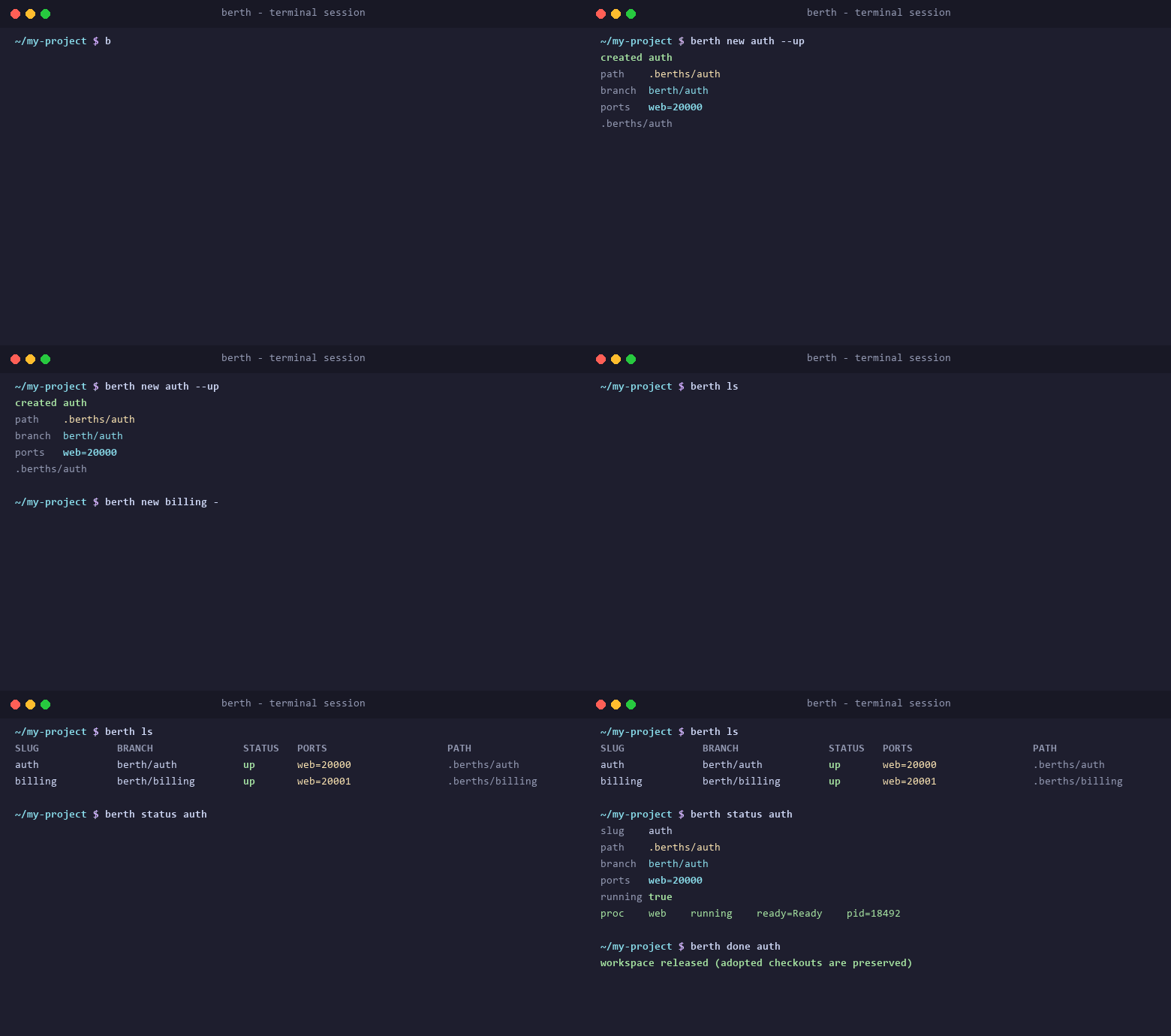
berth provisions lightweight, isolated local workspaces for parallel coding agents, combining Git worktrees, private data directories, dynamic port assignment, and supervised processes without virtual machine overhead. Every workspace is a self-contained development environment — its own branch, its own data, its own ports, its own supervised processes — created in milliseconds, with no background daemon.
Install
Choose any of the following installation methods.
Homebrew (macOS and Linux)
brew install Mrjwj34/tap/berth
Scoop (Windows)
scoop bucket add berth https://github.com/Mrjwj34/scoop-bucket
scoop install berth
Download prebuilt binaries
Prebuilt binaries for Linux, macOS, and Windows are available on the GitHub Releases page. Extract the archive and place the executable in your PATH.
Install with Go
Requires Go 1.25 or newer:
go install github.com/Mrjwj34/berth/cmd/berth@latest
Build from source
git clone https://github.com/Mrjwj34/berth.git
cd berth
go build -o bin/berth ./cmd/berth
Install only the agent skill
If you want the agent instructions without the binary, the skills CLI can install just the skill:
npx skills add Mrjwj34/berth
The skill checks for the binary first and tells your agent how to install it when it is missing.
30-Second Quick Start
1. Initialize berth in your repository
Run initialization in your repository root:
berth init
This writes a berth.yaml template and installs the agent skill. Harness hooks are optional and only matter when you want worktrees created by your agent to be adopted automatically — see Supported agents.
2. Let your Agent configure berth.yaml
Prompt your coding agent:
Inspect this repository and configure berth.yaml based on existing startup scripts, toolchains, and listen ports.
The agent reads the installed skill, inspects project dependencies, and declares required ports and services automatically.
If you prefer to configure manually, see the complete configuration guide and examples in docs/features.md, which also documents the rest of the workflow: creating a workspace (berth new), running commands inside it, and releasing it again.
Why parallel coding agents collide
When multiple software agents work on the same repository in parallel, simple branches are not enough. Running concurrent test suites or background servers immediately causes TCP port collisions, database state corruption, and leaked processes.
Developers often face an awkward trade-off. Raw Git worktrees manage file trees but leave ports, databases, and background processes entirely unhandled. Manual port assignment leads to accidental commits of local port overrides. Full container stacks consume excessive memory, introduce filesystem performance penalties on macOS and Windows, and slow down agent feedback loops.
berth solves this by providing a unified workspace abstraction. Each workspace receives its own linked Git checkout, private data directory, atomic port reservations, and process supervision. Operations complete in milliseconds without requiring a persistent background daemon.
How berth compares
raw git worktree |
devcontainer / Docker | berth | |
|---|---|---|---|
| Isolation boundary | files and branches | the whole machine or VM | the workspace: worktree, private data, ports |
| Create a new environment | instant, source files only | image build and container start | milliseconds, no daemon |
| Port allocation | manual, leaks into commits | container network | atomic reservation, BERTH_PORT_* |
| Data isolation | none | volumes and bind mounts | .berth/data per workspace |
| Process supervision | none | inside the container | process-compose or the container runtime |
| Host filesystem speed | native | bind-mount penalty on macOS and Windows | native, Copy on Write where available |
Git worktree alone
Git worktree provides isolated branches and checkouts, but offers no assistance with port allocation, database persistence, process supervision, or environment variables. Everything beyond source files must be managed manually.
Docker and devcontainer
Docker and devcontainer provide complete operating system isolation. However, they come with substantial startup latency, heavy memory footprints, bind mount filesystem slowdowns on non-Linux hosts, and repetitive image rebuild overhead. They treat the entire machine environment as the boundary of isolation. Reach for them when you genuinely need a different kernel or a toolchain your host cannot provide.
berth
berth chooses a pragmatic middle path. In native mode, it runs host processes directly with zero virtualization overhead while isolating ports, data directories, and environment variables. In container mode, it reuses a single Linux container per workspace without per-command rebuilds, forwarding host traffic through loopback gateways. berth treats the workspace rather than the entire operating system as the primary unit of isolation.
Supported agents
berth is a plain CLI, so any agent that can run shell commands can drive it. On top of that, berth init installs one skill into the shared .agents/skills convention, which these harnesses read directly:
Codex · Cursor · GitHub Copilot · Gemini CLI · opencode · Windsurf · Kilo Code · Zed · JetBrains Junie · Google Antigravity · pi
Claude Code and Cline read only their own skill directory, so berth can install a copy for them too. Skill installation is configurable by scope and by agent:
berth skill install                        # shared location, in this repository
berth skill install --scope user           # shared location, in your home directory
berth skill install --agent claude,cline   # plus the harnesses that need their own copy
berth agents                               # what is supported, and what is installed
The skill can also be installed by the skills CLI, which needs no berth binary first:
npx skills add Mrjwj34/berth
Worktree hooks are optional and project-scoped: berth hook install wires the Cursor worktree adapter into .cursor/worktrees.json, and berth hook install --agent windsurf does the equivalent for Windsurf's post_setup_worktree, so berth adopt --setup runs inside every worktree those harnesses create. Existing entries are appended to, never replaced.
Session-end hooks are deliberately not installed anywhere. Stop work explicitly with berth down (keep data) or berth done (release the workspace), and let berth gc reclaim what was abandoned.
FAQ
Can two agents work on the same repository at the same time?
Yes. Each workspace is its own linked Git worktree on branch berth/<slug>, created beside the repository at <repo>.berths/<slug>, with its own private data directory and its own dynamically allocated ports. The primary checkout is never a workspace, so it stays usable while agents work in parallel.
How does each agent get its own port?
Declare the named ports your project needs in berth.yaml, for example ports: [web, pg]. berth reserves a unique host port for every workspace in one atomic, cross-process transaction, and the assignment stays stable for the lifetime of that workspace. Programs read BERTH_PORT_WEB for the internal port and BERTH_HOST_PORT_WEB to reach the service from a host browser.
Why not just use devcontainers or Docker?
Use them when you need a different kernel, full OS isolation, or a toolchain your host cannot provide. The trade-off is startup latency, memory footprint, bind-mount filesystem penalties on macOS and Windows, and rebuild overhead. berth's native mode runs ordinary host processes with zero virtualization overhead, while its container mode covers projects that hardcode loopback ports by reusing one Linux container per workspace with no per-command image builds.
Does berth run a daemon?
No. berth relies on file locks and a single machine-level registry file. Long operations hold an individual workspace lock rather than a global machine lock, and process supervision is delegated to process-compose or the container runtime.
What happens to my work when a workspace goes away?
berth down <slug> gracefully stops the processes and keeps all data. berth done <slug> verifies the work is preserved before removing the workspace and its worktree. berth reset <slug> wipes only the private data directory and reruns the setup hooks. berth gc reclaims abandoned workspaces and never uses force.
Does it work on Windows and macOS?
Yes. Native binaries are published for Linux, macOS and Windows on both amd64 and arm64. Container mode requires an existing local Docker or Podman installation. Writable dependency copies use Copy on Write where the filesystem supports it — reflink on Linux btrfs and xfs, clonefile on APFS — and never silently fall back to hardlinks.
One Windows caveat: the supervisor starts a native process by splitting its command string on whitespace and does not strip quotes, so a quoted argument arrives with the quotes in it and an argument containing a space arrives split. Pass paths relative to the workspace root, or read BERTH_DATA_DIR from inside your program; berth warns on up when a command cannot work that way. Container workspaces are unaffected.
Architecture
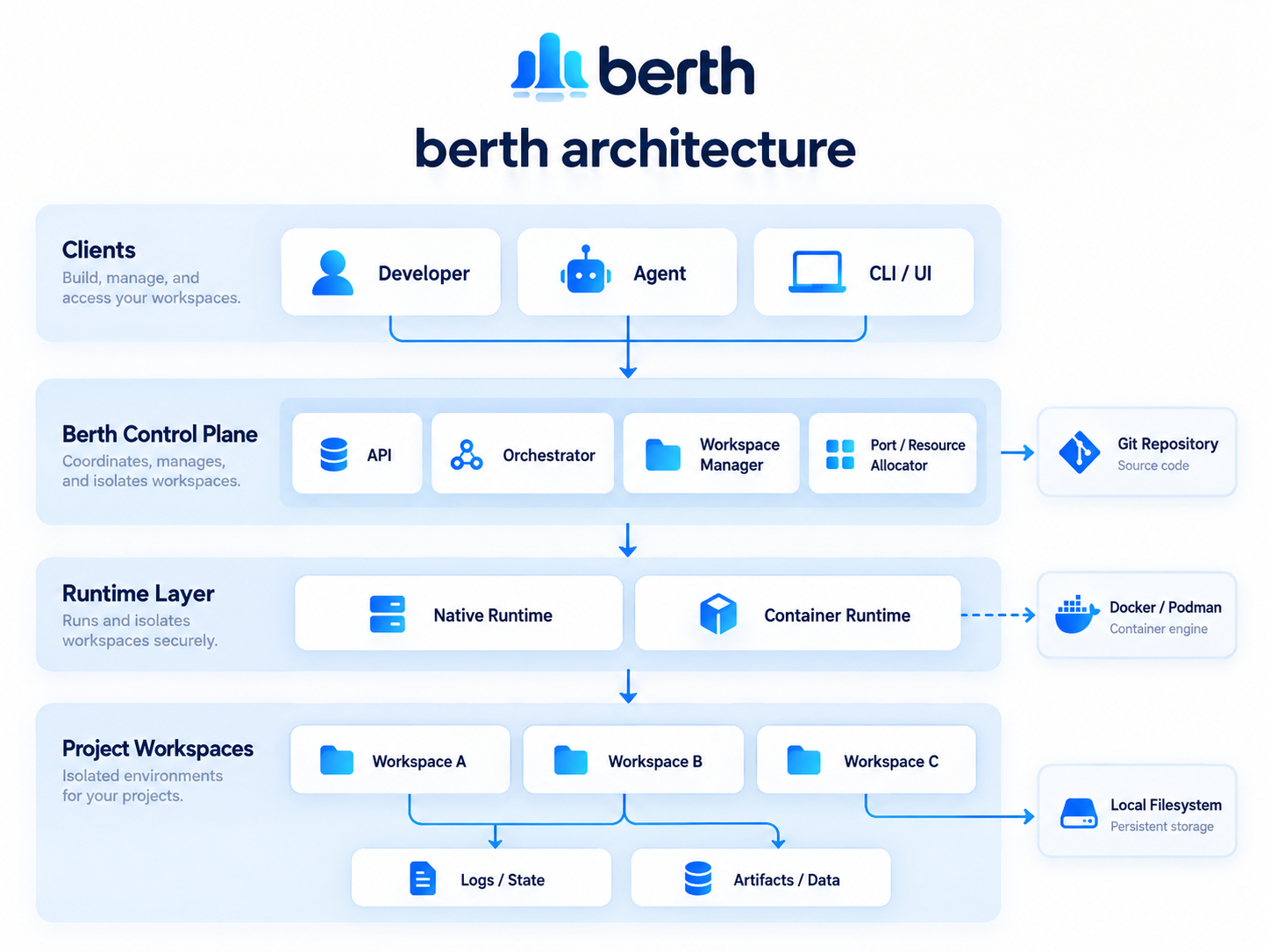
berth separates workspace management from the execution context. Each workspace has its own branch configuration, runtime plan, and operation lock.
Detailed documentation:
- Website: mrjwj34.github.io/berth is the rendered guide, including the comparison pages.
- User Guide: docs/features.md covers complete configuration references, practical workflows, and agent integrations.
- Runtime contract: docs/runtime.md explains networking, port mapping, and container execution rules.
- Architecture decisions: docs/architecture.md details the daemonless lock model, state recovery, and safety invariants.
Yorumlar (0)
Yorum birakmak icin giris yap.
Yorum birakSonuc bulunamadi