cosmos-mcp
Health Pass
- License — License: MIT
- Description — Repository has a description
- Active repo — Last push 0 days ago
- Community trust — 17 GitHub stars
Code Warn
- process.env — Environment variable access in scripts/probe-schema.ts
- network request — Outbound network request in scripts/probe-schema.ts
Permissions Pass
- Permissions — No dangerous permissions requested
No AI report is available for this listing yet.
Unofficial MCP server for cosmos.so. Search, browse and build visual moodboards with Claude, Cursor or any MCP client.
cosmos-mcp



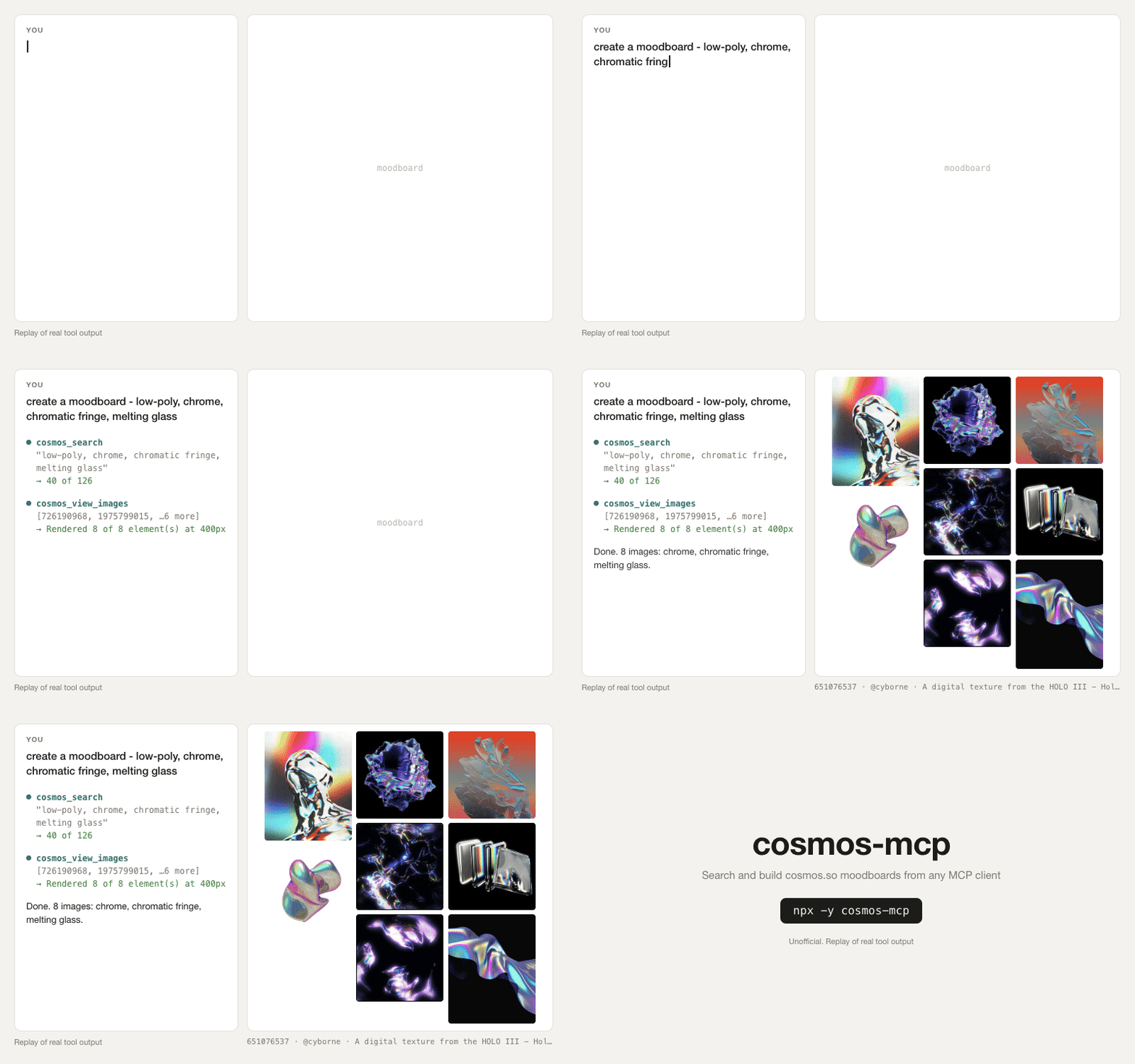
cosmos-mcp lets an AI agent search cosmos.so and build moodboards there. Cosmos is a site where people collect images. This is an unofficial Model Context Protocol (MCP) server. MCP is the standard that lets apps such as Claude and Cursor use outside tools.
Search and browsing work without an account. You sign in only to save.
Before you install
- Cosmos publishes no API. This server uses the private API of the cosmos.so web app. If Cosmos changes that API, the server stops working until a new release fixes it.
- To save, the server uses your own browser session token. The token can do everything that your account can do.
- You must follow the cosmos.so Terms of Service. Use your own account at a normal pace, and do not scrape.
- You use this server at your own risk, including the risk that Cosmos restricts your account. This project is not affiliated with Cosmos.
Install

For Claude Code, run this command. The -s user flag adds the server to all of your projects.
claude mcp add cosmos -s user -- npx -y cosmos-mcp
For Claude Desktop, download cosmos-mcp-<version>.mcpb from the latest GitHub release and open it. You do not need Node.
Other MCP clients use this configuration:
{
  "mcpServers": {
    "cosmos": {
      "command": "npx",
      "args": ["-y", "cosmos-mcp"]
    }
  }
}
Put it in the configuration file of your client:
- Claude Desktop without the extension:
~/Library/Application Support/Claude/claude_desktop_config.jsonon macOS, or%APPDATA%\Claude\claude_desktop_config.jsonon Windows. Restart the app after you edit the file. - Cursor:
~/.cursor/mcp.jsonfor all projects, or.cursor/mcp.jsonfor one project. - Claude Code:
.mcp.jsonat the project root. People often commit this file, so do not put a token in it.
Try it
Ask your agent for something like this:
- "Show me 8 images of warm brutalist interiors from Cosmos."
- "Search Cosmos for 90s Japanese book covers and show me the twelve best."
- "Find images like this one on Cosmos and tell me what they have in common."
- "Build a moodboard about warm brutalist interiors and save it to a new private collection."
- "Take everything I saved this week and file it into the right collection."
The last two need sign-in.
The server also has a moodboard prompt. Claude Code shows it as /mcp__cosmos__moodboard. Give it a brief. If you also set save to yes and you are signed in, the agent saves the board to a new private collection.
Sign in to save
You need to sign in only to save, or to read your own private collections. Cosmos has no API keys. The web app sends a bearer token (a secret string that proves who you are) in the Authorization header. This server uses your token in the same way.
To get the token and save it:
- Sign in at cosmos.so in your browser.
- Open DevTools. Press
Cmd+Option+Ion macOS orF12on Windows and Linux. - Open the Network tab and reload the page.
- Click a request to
api.cosmos.so. - Under Request Headers, right-click
authorizationand choose Copy value. The value starts withBearer. - In a terminal, run
pbpaste | npx cosmos-mcp login. On Windows or Linux, runnpx cosmos-mcp loginand paste the token when it asks.
login makes sure that the token works, then saves it in ~/.config/cosmos-mcp/config.json. Only your user account can read that file. A server that is already running uses the new token on its next tool call. You do not have to restart your client.
npx cosmos-mcp status   # show which credential is in use, and test it
npx cosmos-mcp logout   # remove the saved credential
If sign-in does not work:
- If
loginasks for theCookieheader, npx ran an old copy. Runnpx -y cosmos-mcp@latest login. - Do not copy the
Cookieheader. ItsAWSALBvalues do not sign you in. - Do not use a HAR file that you exported from DevTools. Chrome removes the token from it.
- If the tools say "not signed in" after some time, the token expired. Run
loginagain.
Keep the token safe
The token works like a password. Anyone who has it can act as you on Cosmos.
- Do not paste the token into a chat with the agent. The chat transcript keeps it.
- Do not commit the token to
.mcp.jsonor to a dotfiles repository. - To cancel the token, sign out of that browser session on cosmos.so.
The server sends the token only to api.cosmos.so. It has no telemetry.
Other ways to give the token
The server takes the credential from the first of these places that has one:
- The
COSMOS_AUTHORIZATIONenvironment variable, for example in theenvblock of the client configuration. - A
.envfile next to the package. This applies only to a local clone. ~/.config/cosmos-mcp/config.json, whichloginwrites.
If you set COSMOS_AUTHORIZATION, a later login has no effect until you remove the variable. login warns you when this happens.
To set the variable in Claude Code, put the -e flag before the --:
claude mcp add cosmos -s user -e COSMOS_AUTHORIZATION="Bearer <your token>" -- npx -y cosmos-mcp
The Claude Desktop extension has a token field in its settings.
Tools
18 of the 36 tools work signed out. The tools with "Yes" in the Sign-in column need a credential. If you call one of them signed out, it returns an error that tells you how to sign in.
The Cosmos API calls a collection a "cluster", so the tool names use that word. An element is one saved image, video or product.
Find things
| Tool | What it does | Sign-in |
|---|---|---|
cosmos_search |
Searches public elements by keyword. Filters by content type and color. | |
cosmos_search_clusters |
Searches public collections. | |
cosmos_search_users |
Finds people by name or handle. | |
cosmos_search_all |
Searches collections, people and elements in one call. | |
cosmos_similar_elements |
Returns images that look like the images that you give it. | |
cosmos_element_saved_by |
Shows which public collections hold an image, and who saved it. | |
cosmos_browse_boards |
Browses about 800 curated collections, by category. | |
cosmos_conversational_search |
Takes a one-sentence brief and returns images in named groups. Experimental. | Yes |
cosmos_explore |
Returns the featured feed, by category. | |
cosmos_spotlights |
Returns the collections that Cosmos features now, for example "Rooms Lit Only by Lamps". | |
cosmos_categories |
Lists the 17 subject areas, for example Fashion and Interiors. | |
cosmos_suggested_searches |
Lists search phrases that Cosmos promotes. Returns few results signed out. | |
cosmos_cluster_recommendations |
Suggests elements for a collection. | Yes |
Read things
| Tool | What it does | Sign-in |
|---|---|---|
cosmos_get_element |
Returns one element: media, caption, source and author. Takes an id or a cosmos.so link. | |
cosmos_get_cluster |
Returns one collection: name, owner, size and cover. Takes an id or a cosmos.so link. | |
cosmos_list_cluster_elements |
Lists the elements in a collection. Private collections need sign-in. | |
cosmos_get_user |
Returns a public profile. | |
cosmos_list_user_clusters |
Lists the public collections on a profile. Returns only three when signed out. | |
cosmos_view_images |
Shows elements to the model as images. Images use many tokens, so the agent passes few at a time. |
Build collections
| Tool | What it does | Sign-in |
|---|---|---|
cosmos_create_cluster |
Creates an empty collection. Private by default. | Yes |
cosmos_save_elements |
Adds elements to a collection. | Yes |
cosmos_save_url |
Saves an image or page from any website. | Yes |
cosmos_organize_elements |
Adds elements to collections and removes them, in one call. | Yes |
cosmos_update_cluster |
Changes the name, description, privacy or cover of a collection. | Yes |
cosmos_nest_cluster |
Puts a collection inside another collection, or takes it out. | Yes |
cosmos_delete_cluster |
Deletes a collection permanently. The agent must pass confirm: true. |
Yes |
cosmos_find_clusters_for_element |
Shows which of your collections already hold an element. | Yes |
cosmos_quick_connect_suggestion |
Asks Cosmos which collection an element belongs in. | Yes |
Your account
| Tool | What it does | Sign-in |
|---|---|---|
cosmos_whoami |
Tells the agent whether it is signed in. | |
cosmos_my_library |
Returns everything that you saved. | Yes |
cosmos_list_my_clusters |
Lists your collections, including private ones. | Yes |
cosmos_following_feed |
Returns recent saves by the people that you follow. | Yes |
cosmos_activity |
Returns your notifications. | Yes |
cosmos_follow_user |
Follows or unfollows a person. | Yes |
cosmos_follow_cluster |
Follows or unfollows a collection. | Yes |
cosmos_pin_cluster |
Pins one of your collections to your profile, or unpins it. | Yes |
Configuration
You do not need any environment variables. These are optional:
| Variable | Default | What it does |
|---|---|---|
COSMOS_AUTHORIZATION |
unset | Your token. The server adds Bearer if it is missing. |
COSMOS_COOKIE |
unset | A full Cookie header that holds a session. You almost never need it. |
COSMOS_USER_ID |
unset | Your numeric user id. It saves one lookup request. The server uses it only when it is set in the same place as the token. |
COSMOS_TIMEOUT_MS |
30000 |
The time limit for each request, in milliseconds. |
.env.example lists all variables, including the ones for testing.
Questions
- Does Cosmos have an API? No. Cosmos publishes no API and gives out no API keys. This server uses the same private API as the website.
- Does it work without signing in? Yes. Search, browsing, public profiles and image views work signed out. See Tools.
- Which clients does it support? Any MCP client that starts servers as a local command.
- Will it break? Yes, when Cosmos changes its private API. Run
npx -y cosmos-mcp@latestto get the newest release, or open an issue.
Contributing
Bug reports and pull requests are welcome. CONTRIBUTING.md explains how to run the server from source and how to test a change against the live API.
License
MIT. See LICENSE. Not affiliated with or endorsed by Cosmos.
Reviews (0)
Sign in to leave a review.
Leave a reviewNo results found