muxboard
Health Uyari
- License — License: MIT
- Description — Repository has a description
- Active repo — Last push 0 days ago
- Low visibility — Only 6 GitHub stars
Code Gecti
- Code scan — Scanned 12 files during light audit, no dangerous patterns found
Permissions Gecti
- Permissions — No dangerous permissions requested
Bu listing icin henuz AI raporu yok.
Stream Deck+ plugin that surfaces cmux panes and Orca worktrees needing attention (Claude Code, Codex, Pi) on the 8 keys, with CodexBar quota/limits on the LCD strip.
Muxboard: a Stream Deck+ dashboard for cmux AI coding agents
Monitor your cmux and Orca AI coding
agents (Claude Code, Codex, Pi, OMP) from an Elgato Stream Deck+: which agents
need attention show on the keys, and your CodexBar usage limits show on the LCD.




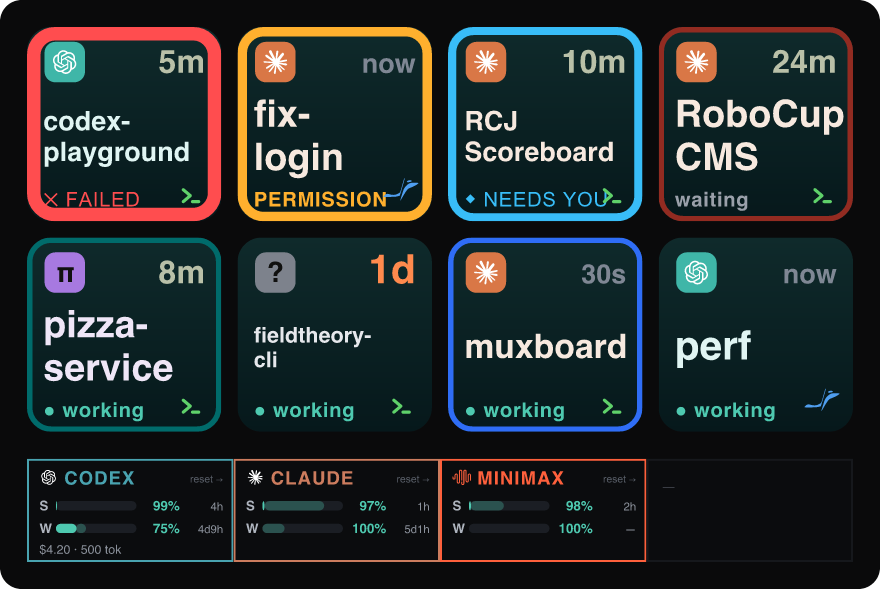
Muxboard turns the 8 keys of an Elgato Stream Deck+ into a queue of
cmux panes whose coding agents (Claude Code, Codex, Pi,
OMP, or any other) have finished, failed,
gotten blocked, or are waiting for your input. Orca
worktrees appear on the same keys when Orca is running (auto-detected; see
Orca support). For cmux to see OMP sessions at all, install its
hook bridge once with cmux hooks omp install (cmux ≥ 0.64.17). The LCD touch
strip shows CodexBar usage: session and weekly quota with pace, plus spend and
tokens per provider.
The newest attention item is key 1 (top-left); the queue fills left-to-right,
top-to-bottom:
1 2 3 4      key 1 = newest attention item
5 6 7 8      key 8 = 8th newest
Press a key to bring cmux to the foreground and jump straight to that
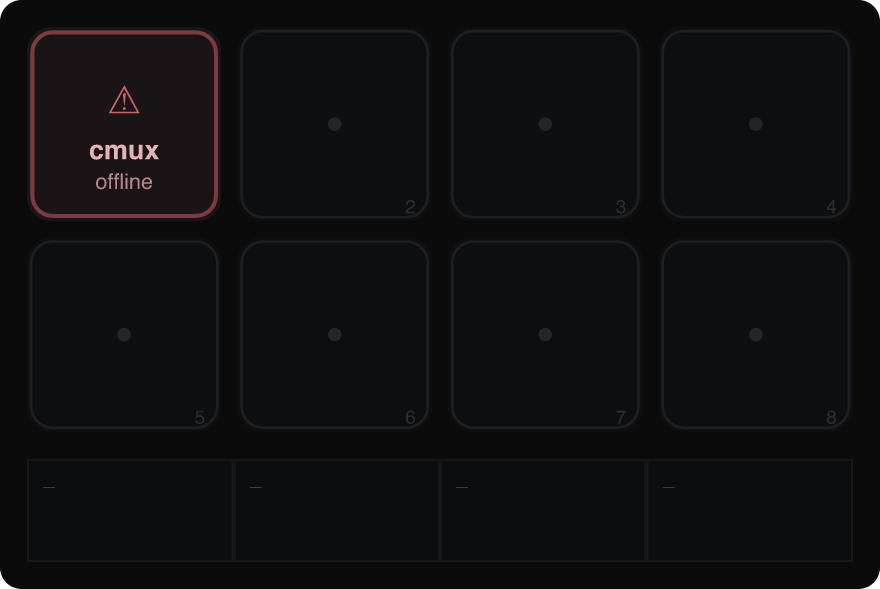
workspace/surface. Empty slots render muted. When cmux or CodexBar is
unreachable, the display degrades gracefully and the rest keeps working:
Install
macOS, with Node.js, the Elgato Stream Deck app,
and cmux installed:
curl -fsSL https://raw.githubusercontent.com/mrshu/muxboard/main/scripts/setup.sh | bash
It downloads the latest packaged plugin from
Releases, installs it and the
8-key + 4-dial profile, and checks that cmux automation mode is enabled (see
Requirements). Then open the Stream Deck app and pick the Muxboard
profile. To build from source instead, see Quick start.
How it works
| Surface | Shows | Source |
|---|---|---|
| 8 keys | Attention queue: agent glyph, status, repo, age | cmux list-notifications --json + orca worktree ps --json (Orca, auto-detected) |
| LCD strip (4×200×100) | One CodexBar provider per segment: session + weekly quota with pace, spend + tokens | codexbar serve HTTP |
| 4 dials | Scroll, filter, quota view, refresh | local state |
Required cmux setting. cmux's control socket rejects processes outside a
cmux session by default (socketControlMode: cmuxOnly), and the Stream Deck
app launches plugins outside any session. Set cmux Settings → Automation →
Socket Control Mode → Automation (then fully quit and relaunch cmux) so the
plugin is accepted. Without it, the keys stay on the muted "cmux offline"
state. See Requirements.
- Keys are assigned to physical slots newest-first, with the panes that need you
pinned ahead of those actively working. Agent, status, and age are fused from
several cmux signals (no terminal scraping); see
How a pane's state is derived. - Tapping a key runs
cmux open-notification --id <uuid>, which focuses the
workspace + surface and marks the row read (it does not dismiss it). - Long-pressing a key (hold ~0.6s) runs
cmux dismiss-notification --id <uuid>,
removing it from the queue ("seen it, nothing further") without switching to
cmux. It fires while you're still holding (you get a ✓); releasing does nothing
more. The key clears on the next poll. - The LCD shows one segment per CodexBar provider, auto-discovered from CodexBar
rather than a hardcoded list. Each segment carries the provider name in
CodexBar's brand color, the session and weekly gauges with their reset times,
and a footer with today's spend and tokens, so all your providers are visible
at once. - Each gauge also carries a calm pace marker, comparing how much quota you've
used against how far through the window the clock is: a faded same-hue
extension toward where you "should" be when you're under the clock (in reserve,
banking headroom), or a coral cap past it when you're over (in deficit). By
default the row number is percent remaining; rotating dial 3 flips it to the
signed pace delta (+12%green = reserve,−8%coral = deficit).
Dials (Stream Deck+)
| Dial | Rotate | Press |
|---|---|---|
| 1 | Scroll the queue (when > 8 items) | Jump to newest item |
| 2 | Cycle filter: all → claude → codex → omp → pi | Reset filter to all |
| 3 | Toggle the quota number: remaining% ↔ pace (reserve/deficit) | Open CodexBar /usage |
| 4 | Rotate the LCD provider window (when > 4 providers) | Force refresh both polls |
Requirements
- Node.js ≥ 20 (developed on v26).
- cmux on your
PATH(or setcmuxBin). Verified against cmux 0.64.16. To
enable automation: cmux Settings → Automation → Socket Control Mode →
Automation (or add"automation": { "socketControlMode": "automation" }to~/.config/cmux/cmux.json), then fully quit and relaunch cmux. This is
required for the keys to work; without it cmux rejects the plugin. Verify withcmux capabilities | grep access_mode(should read"automation"). - cmux agent hooks, for accurate live working/waiting state. The state and age
on each key come from cmux's agent event stream, which cmux emits from agent
hooks (injected automatically by cmux's Claude wrapper, for other agents runcmux hooks setup). They are not required to launch, but without them the keys
fall back to the notification feed plus process CPU and can read stale (a wrong
"waiting" or a frozen age) until the agent session restarts. If a long-running
session stops emitting them, restart it (orcmux hooks setup) to resume.
Check the feed is live:cmux events --limit 5should show recentagent.hook.*rows while an agent works. See
How a pane's state is derived. - CodexBar for the LCD: Muxboard reads usage from
codexbar serveover HTTP,
defaulting to port 17777 (keeping CodexBar's own default 8080 free). Optional —
the keys work without it. Don't run a barecodexbar serve, though: it can exit
unexpectedly (on some builds it crashes when Codex's remote-control status
changes), and a dead server leaves the LCD on the muted "stale"/offline state
until you restart it. Install the keep-alive agent so launchd respawns it within
seconds of any crash and at login:
The one-command installer offers this step for you. Remove it later withbash scripts/install-codexbar-agent.sh # CODEXBAR_PORT=8099 to overridebash scripts/install-codexbar-agent.sh --uninstall. - Stream Deck+ hardware and the free
Elgato Stream Deck desktop app to run the
plugin on the device. The app is what launches the plugin process.
You can review the full visuals and verify all transforms without the
hardware or the desktop app. See Headless preview below.
Quick start
npm install
npm test          # unit tests over the core transforms
npm run validate  # prints the 8-key layout + LCD summary, asserts acceptance
npm run preview   # renders out/dashboard.png (+ dashboard-offline.png)
Headless preview
npm run preview rasterizes the exact key + LCD SVGs from the test fixtures toout/*.png via @resvg/resvg-js, so you can see precisely what the device will
show with no Stream Deck+ and no desktop app.
Run on the device
- Enable cmux automation mode (see Requirements) and relaunch
cmux. - Install the Elgato Stream Deck desktop app.
- Build + link the plugin and start CodexBar:
npm run dev - Install the device profile (places all 8 keys + 4 dials, no dragging):
Keys read cmux directly; the LCD reads CodexBar.# quit the Stream Deck app first npm run install-profile # reopen the Stream Deck app, then pick the "Muxboard" profile from the # profile dropdown at the top of the window
Why a separate install step? Elgato's profile importer rejects
programmatically-built.streamDeckProfilefiles ("content corrupted") on
recent macOS builds, so the plugin can't auto-apply a bundled profile.install-profilesidesteps the importer by writing the profile straight into
the app's profile store (ProfilesV3) in its native format, keyed to your
connected Stream Deck+. See Architecture.
The cmux notification contract
Muxboard is driven entirely by cmux notifications: agents make a pane "need
attention" by emitting one. cmux already does this for built-in agents; for
custom agents, emit a notification (e.g. from an agent hook) shaped like the
rows returned by cmux list-notifications --json:
{
  "id": "015D0B50-...",           // uuid; used as the focus/open key
  "title": "Claude Code",         // agent → claude | codex | omp | pi | unknown
  "subtitle": "",
  "body": "Claude is waiting for your input",   // status (see mapping)
  "is_read": true,
  "workspace_id": "6ECA42AE-...", // required
  "surface_id": "4F5A8945-...",   // focused on press
  "tab_title": "RCJ Scoreboard",  // shown as the repo/short name
  "created_at": "2026-06-20T11:59:46Z"  // sort key, newest-first
}
Agent is detected from the running process: Muxboard reads cmux'stop --processes coding_agents (matched to the workspace by PID), so a codex
CLI in a pane named fieldtheory-cli is still identified as codex. If the
process can't be resolved, it falls back to matching the title/tab name
(claude/codex/omp/pi), then the optional agentAliases override, elseunknown.
Status is mapped from body, strongest signal first:
| Status | Body contains (any) | Treatment |
|---|---|---|
failed |
fail, failed, error, crashed, exception | strongest (red border) |
blocked |
permission, approve, blocked, denied, confirm | strong (amber) |
waiting |
waiting, awaiting, input, ready for, your turn | strong (yellow) |
finished |
done, finished, complete, completed | normal (teal) |
waiting |
waiting, input, and anything else (a notification means the pane wants you) | strong (yellow) |
Notes:
- Rows missing
idorworkspace_idare dropped (never fatal). - Read notifications stay on the board, demoted. cmux flips
is_readwhen you
merely see a notification — not when you resolve it — and muxboard's ownopen-notificationmarks it read too, so a read row can still need you.
Dropping read rows would hide genuine attention, so instead a readfailed/blockedis demoted towaiting: the key stays but loses the urgent
badge and the front-pin. LiveNeedsstatus re-flags genuine attention.
Notifications are collapsed to one per workspace (newest wins), so each repo
occupies a single key showing its current state. - An explicit "clear notifications" in cmux is honored live: the
cmux events
stream emitsnotification.clear_requested(carrying--tab=<workspace>), and
any key that fired at or before that clear is dropped immediately, ahead of the
next poll — even one that was still unread. A later prompt (a re-ask) survives,
since its timestamp is past the clear. - To emit one yourself:
cmux notify --title "Codex CLI" --body "Task failed: ..."
(run inside the target workspace, or pass--workspace).
Orca support
Muxboard also surfaces Orca worktrees alongside cmux
panes on the same keys. It polls orca worktree ps --json and derives the key
from the worktree's primary agent state, not the worktree status — the
latter is just a terminal-liveness flag (PTY alive → active) that does not
roll up the agent lifecycle, so a finished or question-blocked agent still
leaves the worktree active. By agent state: waiting/blocked (a permission
prompt or an AskUserQuestion) shows as a needs-input key; working as a working
key that sinks to the end; done as finished (or failed when interrupted), but
only while the worktree is unread so an already-seen result doesn't linger.
Each key carries a small badge — the Orca mark or a cmux monogram — so you can
tell the two apart.
Orca is auto-detected: the poller starts only when an Orca runtime is
reachable (orca status), so cmux-only users see no change. SetenableOrca: true|false in the plugin's global settings to force it on or off,
and orcaBin/orcaPollMs to tune the binary path and cadence.
Pressing an Orca key brings Orca forward and jumps to the worktree's most
recent terminal (orca terminal focus). Orca has no dismiss primitive, so a
long-press focuses the worktree too (which clears its unread in Orca).
How a pane's state is derived
A key shows a status (working, waiting, permission, or failed) and an age.
Neither comes from a single cmux field; cmux's notifications, title spinner, and
agent state each tell a partial, often-stale story. Muxboard fuses several
signals so a key reflects what is actually true, which in practice is frequently
more accurate than any one cmux surface on its own. Each signal is best-effort
and degrades to the next when unavailable.
Queue membership and the reason come from
cmux list-notifications. A
notification puts a pane on a key; the reason (failed,blocked,waiting,finished) is mapped from structured fields, never by scraping the free-form
body (see the table above). cmux flipsis_readwhen you see a notification,
not when you resolve it, so a read (is_read: true) permission/failure is
demoted towaiting— the key stays visible but loses its urgent badge —
rather than dropped, which would hide things that still need you. An explicit
"clear notifications" in cmux is honored live via the event stream
(notification.clear_requested), removing the key at once.Activity (working vs waiting) comes from the
cmux eventsstream. Muxboard
prefers cmux's own computed verdict (set_status:Running,Idle,Needs),
the same state that drives cmux's UI. For workspaces cmux doesn't publish a
status for, it derives state from raw agent hooks (UserPromptSubmitandPreToolUse→ working;StopandSessionEnd→ idle;NotificationandAskUserQuestion→ needs). A working pane shows● workingand sinks below
the panes still waiting on you, since it no longer needs you. The title spinner
glyph is the fallback when the stream is unavailable.Age is the time since the current state began (the transition
occurred_at),
so a key reads "working for 2m" or "waiting since 09:31" rather than the age of
a stale, lingering notification. It falls back to the notificationcreated_at.A busy command counts as working, from
cmux top. An agent can finish its turn
and return to waiting while a command it launched keeps running, so a workspace
whose process CPU is at or abovebusyCpuPercentis treated as working even
after the agent yields, with a short hysteresis window so a bursty command
doesn't flicker. An explicit "needs you" still wins over busy, so permission
prompts stay visible.
Grid priority, front to back: failed, then permission, then needs-input (cmux's
"Needs" status, shown as a prominent ◆ NEEDS YOU badge), then plain waiting,
then actively-working last. The newest item is key 1. Actively-working panes are
listed even without a notification; they land at the very end, so the panes that
need you always stay up front, and pressing one focuses its workspace.
Known limitation: a Claude agent waiting on its own background subagent does that
work in-process, where cmux reports no spinner, no set_status, and low CPU, so
the pane reads waiting. The only ground truth is the agent's own terminal
screen, which Muxboard deliberately does not scrape. That narrow case (an agent
blocked on its own background task) is the one state no cmux signal exposes.
CodexBar contract
Muxboard polls codexbar serve (default http://127.0.0.1:17777). It queries
each provider individually (/usage?provider=all returns nothing) and handles
both payload shapes CodexBar emits:
- Codex exposes
primary/secondarywindows at the top level. - Claude and others nest them under
usage.
Each window provides usedPercent, resetsAt, windowMinutes, and aresetDescription; primary is the session (5h) and secondary the weekly (7d)
window. The pace marker/number is derived locally from resetsAt + windowMinutes
(elapsed-vs-used); windows with no time bounds (e.g. an "Unlimited" weekly) show
no pace. Today's spend and token count come from /cost?provider=<p> (a daily
series; amounts are treated as USD since CodexBar emits no currency code). A
provider that returns an { error } object (e.g. an expired token) is shown as
unavailable. Data older than 2× the poll interval is flagged STALE.
Configuration
Stored in the plugin's global settings; all fields have safe defaults
(src/config.ts):
| Field | Default | Notes |
|---|---|---|
cmuxBin |
"cmux" |
Binary path or name (spawned directly) |
codexbarBaseUrl |
"http://127.0.0.1:17777" |
codexbar serve --port 17777 base URL |
codexbarProviders |
[] |
Optional allow-list/order; empty = auto-discover all |
cmuxPollMs |
1500 |
cmux poll interval |
codexbarPollMs |
45000 |
CodexBar poll interval |
agentAliases |
{} |
Manual override (name substring → agent); process detection is primary |
busyCpuPercent |
40 |
Workspace CPU% (from cmux top) at/above which a running command counts as "working" |
Architecture
  Stream Deck+ plugin ── spawns ──► cmux CLI ──► cmux socket (automation mode)
        └── TCP ──► codexbar serve (LCD usage)

src/
  plugin.ts          entry: connect, load config, start services
  runtime.ts         shared store/clients/services + macOS foregrounding
  config.ts          defaults + defensive resolveConfig()
  core/              dependency-free, unit-tested, no SDK import
    types.ts
    cmux/            client (CLI wrapper), normalize (agent/reason), sort,
                     eventStatus (live state from the event stream + CPU)
    codexbar/        client (HTTP), normalize (dual-shape + error + cost)
    render/          palette, format, keyRender (SVG), lcdRender (SVG)
    services/        store, cmux/codexbar poll loops, cmuxEvents (event stream)
  actions/           attentionKey (8 keys), dialStrip (4 dials): thin SDK glue
scripts/             preview / validate / gen-icons / install-profile / dev.sh
test/                fixtures + node:test suite
com.mrshu.muxboard.sdPlugin/   manifest, layouts, imgs, built bin
Why automation mode is required
cmux's control socket does an ancestry check: under the defaultsocketControlMode: cmuxOnly it only accepts processes spawned inside a cmux
session. The Stream Deck app launches plugins via launchd, outside any session,
so a direct cmux call is rejected with "broken pipe". SettingsocketControlMode: automation removes the ancestry check for local processes of
the same user, which is what lets the plugin spawn cmux directly. This is the
approach the gonzaloserrano/streamdeck-cmux
plugin also uses. (Note: on some builds and macOS versions the mode reportedly
doesn't take effect; see upstream issues
#1864 /
#3282, and verify withcmux capabilities | grep access_mode.)
The device profile
scripts/install-profile.mjs writes a Muxboard profile straight into the Stream
Deck app's ProfilesV3 store (the app's own V3 format, keyed to the connected
Stream Deck+'s device id), placing the Attention Slot action on all 8 keys and
the Muxboard Dial on all 4 dials. Run it with the app closed
(npm run install-profile); the app picks it up on next launch and you select it
from the profile dropdown.
This deliberately bypasses the app's profile importer, which rejects
programmatically-built .streamDeckProfile archives as "content corrupted" on
recent macOS builds (confirmed across clean/stored zips and deterministic UUIDs).
Elgato's only supported way to produce an importable profile is to build it in the
app UI and Export it, so we skip import entirely and write the store format the
app itself uses.
Rendering is SVG-first: Stream Deck's setImage accepts SVG data-URIs, so keys
and LCD segments are plain strings, with no native canvas dependency and fully
testable. Each action caches the last SVG per instance to debounce redundant
draws (anti-flicker). Polls never overlap, and last-good data is retained on
failure so a transient outage never blanks the display.
Testing
npm test        # 30 unit tests: normalization, slotting, dual-shape codexbar,
                # SVG structure, store dial machines, service offline retention
npm run validate
npm run typecheck
Troubleshooting
- Plugin won't start or crash-loops on first install. The Stream Deck app runs
Node plugins with its own managed Node.js runtime, downloaded on demand. If
it's missing (NodeJS/manifest.json not foundin~/Library/Logs/ElgatoStreamDeck/StreamDeck.log), fully quit and relaunch the
Stream Deck app so it fetches the runtime, then restart the plugin. require is not defined/ exit code 1. The bundle must be CommonJS with a.cjsextension (this repo'spackage.jsonis"type":"module").npm run buildalready emitsbin/plugin.cjs; the manifest'sCodePathpoints at it.- Changed the manifest? Re-link. A plugin restart does not re-read the manifest.
Runnpx streamdeck link com.mrshu.muxboard.sdPluginagain (or restart the
Stream Deck app) after editing it. - LCD shows "CodexBar off", or every segment reads "stale".
codexbar serve
isn't answering: it's not running, has crashed, orcodexbarBaseUrldoesn't
match its port. "stale" specifically means the last good data is older than 2×
the poll interval — the server stopped responding. Check withcurl -s http://127.0.0.1:17777/health; if it's dead, install the keep-alive so
it can't stay down:bash scripts/install-codexbar-agent.sh
(status:launchctl list | grep codexbar-serve, logs:/tmp/codexbar-serve.log). - Keys are blank or show "cmux offline". cmux is rejecting the plugin. Confirm
cmux capabilities | grep access_modereads"automation"(notcmuxOnly).
If it still sayscmuxOnly, the setting hasn't taken; set Socket Control Mode
to Automation and fully quit and relaunch cmux (a reload is not enough). The
plugin log (com.mrshu.muxboard.sdPlugin/logs/) will showbroken pipewhen
rejected. - No Muxboard keys, or the profile is missing. Run
npm run install-profilewith
the Stream Deck app closed, reopen it, and select the Muxboard profile from the
dropdown. (The app's profile importer rejects bundled profiles as "content
corrupted" on recent macOS builds, so the profile is written directly into the
app's store instead.) - A key is stuck on a stale state (wrong "waiting", or an age that won't move
even though the agent is active). cmux's agent hook feed has gone quiet for
that session, so Muxboard has no live signal and falls back to the last
notification. Confirm it:cmux events --limit 5shows recent UI rows but noagent.hook.*while an agent works. See the FAQ entry below; the usual cause
is a PATH issue where cmux'sclaudewrapper is shadowed.
FAQ
Claude panes show stale/wrong state (or don't appear), but codex works
This is almost always a PATH problem, and it's upstream of Muxboard: cmux's
#5796. cmux injects Claude's
hooks through a claude wrapper shim on PATH. If Claude Code's own~/.local/bin/claude (created/updated by its auto-installer) sits earlier on
PATH, it shadows the shim, so claude runs the real binary and no hooks fire.
Codex is unaffected because its hooks are a file (~/.codex/hooks.json), not a
PATH shim. Diagnose:
which claude        # if it's ~/.local/bin/claude (not a .../cmux-cli-shims/... path), the shim is shadowed
cmux events --limit 5   # codex emits agent.hook.* while working; Claude emits none
Fix: make cmux's shim win on PATH by re-prepending its shim dir after your PATH
setup runs, then start your Claude sessions in a fresh cmux terminal (pre-existing
sessions won't recover). Add to the end of your shell config:
# ~/.config/fish/config.fish
for d in $PATH
    if string match -q '*cmux-cli-shims*' -- $d
        set -gx PATH $d $PATH
        break
    end
end
# ~/.zshrc (or ~/.bashrc with the loop adapted)
for __d in ${(s/:/)PATH}; do
  if [[ "$__d" == *cmux-cli-shims* ]]; then export PATH="$__d:$PATH"; break; fi
done
unset __d
After a fresh session, which claude should resolve to a .../cmux-cli-shims/...
path. Verify hooks with cmux events --limit 5: you should now seeagent.hook.PreToolUse while the agent works.
A pane shows "working" but with a stale-looking age
Without the agent-hook stream, Muxboard can't know exactly when work started, so
the age falls back to the last notification time. Once hooks fire (see above),
the age reflects the live activity. A CPU-bound command (build/test) is also
detected as working via cmux top; an agent merely waiting on remote inference
has no local signal.
Why is an active agent not on a key?
Muxboard lists actively-working panes at the end of the queue, but only once cmux
reports them as working (a live spinner / hook activity). A brand-new agent with
no notification and no live "working" signal yet won't appear until it either
needs you or cmux marks it working.
Privacy & non-goals
- Localhost only. The sole network call is to CodexBar on
127.0.0.1. - No terminal scraping; only cmux's structured notification fields.
- No destructive actions. Muxboard never dismisses cmux notifications, runs
commands inside agents, or sends approve/deny input. It reads and focuses. - No cloud and no database beyond plugin settings and an in-memory cache.
MVP intentionally excludes: command execution, approve/deny buttons, non-Stream
Deck+ devices.
License
MIT
Yorumlar (0)
Yorum birakmak icin giris yap.
Yorum birakSonuc bulunamadi