pm-pilot
Health Warn
- License — License: MIT
- Description — Repository has a description
- Active repo — Last push 0 days ago
- Low visibility — Only 7 GitHub stars
Code Pass
- Code scan — Scanned 3 files during light audit, no dangerous patterns found
Permissions Pass
- Permissions — No dangerous permissions requested
No AI report is available for this listing yet.
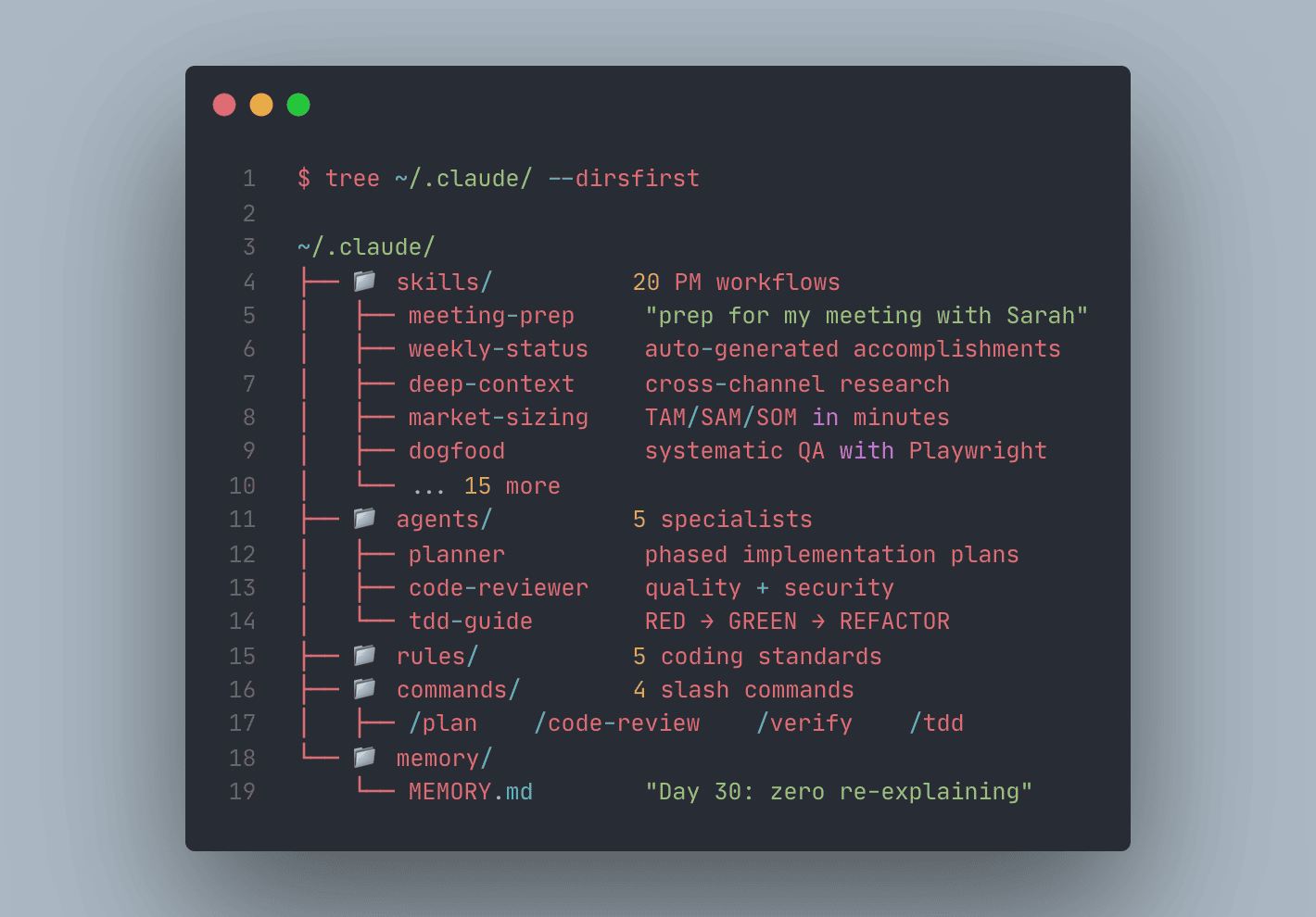
The PM toolkit for Claude Code. 20 skills, 5 rules, 5 agents for product managers who code.



24 skills, 5 rules, 5 agents, 4 slash commands.
Everything a technical PM needs to ship faster with AI.
Install
# As a Claude Code plugin (recommended)
claude plugin install pm-pilot

# Or clone and configure manually
git clone https://github.com/mshadmanrahman/pm-pilot.git
cd pm-pilot
# Copy skills/rules/agents to your ~/.claude/ directory
Prerequisites
- Claude Code installed and working (get it here)
- A terminal (macOS Terminal, iTerm2, Warp, VS Code terminal, etc.)
- An Anthropic API key or Claude Max subscription (you need this for Claude Code itself)
That's it. No Node.js, no Python, no build step. PM Pilot is pure markdown.
Quick Start (5 minutes)
Step 1: Install
# Option A: As a Claude Code plugin (recommended)
claude plugin install pm-pilot

# Option B: Clone and install manually
git clone https://github.com/mshadmanrahman/pm-pilot.git
If you used Option B, copy the pieces to your Claude Code directory:
# Copy skills, rules, agents, and commands to user-level
cp -r pm-pilot/skills/* ~/.claude/skills/
cp -r pm-pilot/rules/* ~/.claude/rules/
cp -r pm-pilot/agents/* ~/.claude/agents/
cp -r pm-pilot/commands/* ~/.claude/commands/

# Create your memory directory
mkdir -p ~/.claude/memory
cp pm-pilot/memory/MEMORY-TEMPLATE.md ~/.claude/memory/MEMORY.md
Step 2: Connect Your Tools (optional but recommended)
PM Pilot works best when Claude Code has MCP servers connected. These are the most impactful:
| Priority | MCP Server | What it unlocks |
|---|---|---|
| High | Atlassian (Jira + Confluence) | meeting-prep, weekly-status, deep-context, ask-company |
| High | Slack | meeting-prep, weekly-status, deep-context |
| High | GitHub | weekly-status, search-first, code-review |
| Medium | Gmail/Calendar | meeting-prep |
| Medium | Playwright | dogfood (browser-based QA) |
You can add MCP servers in Claude Code settings or via claude mcp add.
No MCP servers? PM Pilot still works. Skills like market-sizing, writing-style, tdd-workflow, and security-review work with zero external connections.
Step 3: Configure for Your Org
Run the interactive setup wizard:
/configure-pm-pilot
Or configure manually:
- Set your company name: Edit
skills/pm-core/ask-company/SKILL.mdand replace[YOUR_COMPANY]in the Configuration section - Seed your memory: Open
~/.claude/memory/MEMORY.mdand add your current projects and key stakeholders (seeexamples/memory-example.mdfor format) - Set your writing voice (optional): Run the
writing-styleskill with 2-3 sample posts
Step 4: Try It
Open Claude Code in any project and try these:
"prep for my meeting with Sarah"          → meeting briefing from Jira/Slack/Calendar
"weekly status"                           → auto-generated accomplishment report
"size the market for AI code assistants"  → TAM/SAM/SOM analysis
"dogfood https://myapp.com"               → systematic QA with bug reports
"/plan"                                   → implementation plan for any feature
"tell me everything about Project X"      → cross-channel research synthesis
Step 5: Build the Habit
The more you use PM Pilot, the smarter it gets:
Day 1:   Memory is empty. You explain your projects.
Day 5:   Memory has your projects, people, preferences. Less explaining.
Day 15:  Memory has your process, lessons, patterns. Almost zero re-explaining.
Day 30:  New sessions start with full context. You just say what to do.
The key is corrections compound. When you correct Claude, it saves a feedback memory. That correction persists forever. You never repeat yourself.
What's Inside
PM Core Skills
| Skill | Trigger | What it does |
|---|---|---|
meeting-prep |
"prep for my meeting with X" | Pulls context from Jira, Slack, Confluence, Calendar into a briefing |
weekly-status |
"weekly status" | Generates accomplishment report from connected systems |
deep-context |
"tell me everything about X" | Cross-channel research across all MCP tools |
market-sizing |
"size the market for X" | TAM/SAM/SOM analysis with data sources and assumptions |
ask-company |
"who owns X" | Enterprise knowledge assistant (configure for your org) |
dogfood |
"dogfood this app" | Systematic QA with Playwright: finds bugs, produces repro steps |
lenny-podcast |
"what does Lenny say about X" | Search 269+ PM podcast episodes for advice |
prd |
"write a PRD for X" | Generate one-pagers, briefs, full PRDs, or RFCs at the right depth |
prioritize |
"rank these features" | Score and rank with RICE, ICE, WSJF, MoSCoW, Kano, Value/Effort, Weighted |
synthesize-interviews |
"synthesize these interviews" | Turn raw interviews into themes, pain points, and recommendations |
critique |
"critique this doc" | Pressure-test any document for logic, assumptions, and completeness |
Productivity Skills
| Skill | Trigger | What it does |
|---|---|---|
session-init |
"resume" | Reads memory + handoffs to restore context |
handoff-doc |
"handoff" | Captures decisions, blockers, next steps for session continuity |
strategic-compact |
(proactive) | Suggests context compaction at logical milestones |
orchestrator |
"orchestrate" | Decomposes work into parallel waves of sub-agents |
manifest-reader |
"what did agents find" | Summarizes sub-agent results |
meta-observer |
"observe skills" | Tracks skill performance and emerging patterns |
Dev Skills (for PMs who code)
| Skill | Trigger | What it does |
|---|---|---|
tdd-workflow |
writing new code | Enforces test-first development, 80%+ coverage |
verification-loop |
"verify" or before commits | Lint, type-check, test, security scan |
search-first |
before implementing | Research existing solutions before writing code |
security-review |
after writing auth/API code | OWASP checklist with severity ratings |
Content Skills
| Skill | Trigger | What it does |
|---|---|---|
market-research |
"competitive analysis of X" | Source-attributed market and competitor research |
writing-style |
writing long-form content | Applies your configured voice profile to drafts |
writing-substack |
"write a Substack Note" | Platform-optimized short-form content |
Slash Commands
| Command | What it does |
|---|---|
/plan |
Create implementation plan, wait for approval before coding |
/code-review |
Review staged changes for quality, security, maintainability |
/verify |
Run full verification loop (lint + test + security) |
/tdd |
Enforce test-driven development for a feature |
Agents
| Agent | Dispatched by | Purpose |
|---|---|---|
| planner | /plan |
Phased implementation planning with risk analysis |
| code-reviewer | /code-review |
Code quality and security review |
| build-error-resolver | build failures | Fix build errors with minimal diffs |
| tdd-guide | /tdd |
Enforce RED-GREEN-REFACTOR cycle |
| file-analyzer | large file analysis | Summarize logs and verbose outputs |
Setup
After installing, run the configuration wizard:
/configure-pm-pilot
This will:
- Detect your available MCP tools (Jira, Slack, Confluence, etc.)
- Set your company name for the
ask-companyskill - Create your initial
MEMORY.mdfrom the template - Validate that everything is connected
Memory System
PM Pilot uses a file-based memory system that compounds learning across sessions:
memory/
  MEMORY.md          # Index file (always loaded, under 200 lines)
  project_*.md       # Project context
  user_*.md          # People context
  feedback_*.md      # Corrections and preferences
  reference_*.md     # Pointers to external systems
The key insight: MEMORY.md is always in context. Every session starts with full knowledge of your projects, people, and preferences. No re-explaining needed.
See examples/ for populated examples.
Session Workflow
MORNING
  Open Claude Code → MEMORY.md auto-loaded
  "Continue the matchmaker redesign" → full context from memory
  (or "read the latest handoff" → exact pickup from yesterday)

DURING SESSION
  Work normally
  Corrections saved as feedback memories
  New project info updates memory entries

END OF DAY
  "Create a handoff" → saves decisions + next steps
  Learnings saved to memory → next session starts smarter
Recommended Companion: RTK
PM Pilot optimizes the input side (compressed rules, lazy-loaded skills, structured memory). For the output side, pair it with RTK (Rust Token Killer), which strips noise from tool outputs before they hit context.
brew install rtk
rtk init -g --hook-only
Together: ~50% fewer input tokens + ~70% fewer output tokens. Significantly longer sessions before hitting limits or compaction.
Rules (Token-Optimized)
Five compressed rules that load with every message (~600 tokens total):
coding-style.md- Immutability, file organization, error handlinggit-workflow.md- Conventional commits, PR processtesting.md- TDD, 80% coverage minimumsecurity.md- Pre-commit security checklistsession-workflow.md- Memory and learning protocol
Customization
Adding Your Company Knowledge
Edit skills/pm-core/ask-company/SKILL.md and configure:
- Your company name
- Available MCP tools (Confluence, Jira, Slack, etc.)
- Team structure and ownership areas
Adding Your Writing Voice
Run the writing-style skill with 2-3 sample posts to extract your voice profile. The skill stores it and applies it to all future drafts.
Adding Project-Specific Skills
Create a new skill directory:
skills/your-skill/SKILL.md
Follow the SKILL.md format from any existing skill as a template.
Philosophy
- Memory over transcripts. A 200-line MEMORY.md beats a 50K-token session replay.
- Skills load on demand. 24 skills, zero startup cost.
- Rules are compressed. 600 tokens, not 6,000.
- Research before coding. Search first, build second.
- Every session compounds. Corrections become rules. Patterns become skills.
Contributing
PRs welcome. To add a skill:
- Create
skills/category/your-skill/SKILL.md - Follow the frontmatter format (name, description, origin, version)
- Include clear triggers, step-by-step procedure, and output format
- Keep under 200 lines
Troubleshooting
"Skills not showing up"
Skills need a SKILL.md file in their directory. Verify the path:
ls ~/.claude/skills/meeting-prep/SKILL.md
If missing, re-copy from the pm-pilot repo. Restart Claude Code after adding skills.
"meeting-prep / weekly-status returns nothing"
These skills need MCP servers (Jira, Slack, etc.) to pull data. Check your connected tools:
claude mcp list
If no MCP servers are connected, these skills will tell you what's missing.
"Memory not loading"
MEMORY.md must be in the right location for your project:
- User-level (all projects):
~/.claude/memory/MEMORY.md - Project-level (one project):
.claude/memory/MEMORY.mdin your project root
Claude Code automatically loads MEMORY.md from these locations.
"Too many tokens / context filling up"
PM Pilot's rules use only ~950 tokens. If context is filling up:
- Use
strategic-compactto compact at logical milestones - Use
handoff-docto save state, then/clearand resume - Offload research to sub-agents with
orchestrator
"How do I add my own skills?"
Create a directory under skills/ with a SKILL.md inside:
skills/my-category/my-skill/SKILL.md
Use any existing skill as a template. The frontmatter (name, description, triggers) is what Claude Code uses to match your requests to the right skill.
Part of the PM Toolkit Family
Open-source tools for PMs who ship with AI:
| Tool | What it does |
|---|---|
| PM Pilot | You are here |
| Bug Shepherd | Zero-code bug triage with parallel AI agents |
| Tech-to-PM Translator | Convert developer docs into PM-friendly knowledge bases |
| Morning Digest | AI-powered daily briefing from calendar, email, and Slack |
License
MIT
Built by a PM, for PMs. Pure markdown, no build step, no dependencies.
Reviews (0)
Sign in to leave a review.
Leave a reviewNo results found