jattends
Health Warn
- License — License: MIT
- Description — Repository has a description
- Active repo — Last push 0 days ago
- Low visibility — Only 5 GitHub stars
Code Fail
- rm -rf — Recursive force deletion command in Tests/test_hook.py
- rm -rf — Recursive force deletion command in scripts/build.sh
- rm -rf — Recursive force deletion command in scripts/install.sh
- rm -rf — Recursive force deletion command in scripts/uninstall.sh
Permissions Pass
- Permissions — No dangerous permissions requested
No AI report is available for this listing yet.
macOS menubar app that monitors Claude Code sessions and tells you when they need attention

Jattends is a menubar app that tells you when your Claude Code sessions need attention.
From French "j'attends" — "I'm waiting."
Install
git clone https://github.com/msllrs/jattends.git
cd jattends
bash scripts/install.sh
Grant Accessibility permission when prompted — this lets Jattends raise the correct terminal window when you click a session.
How it works
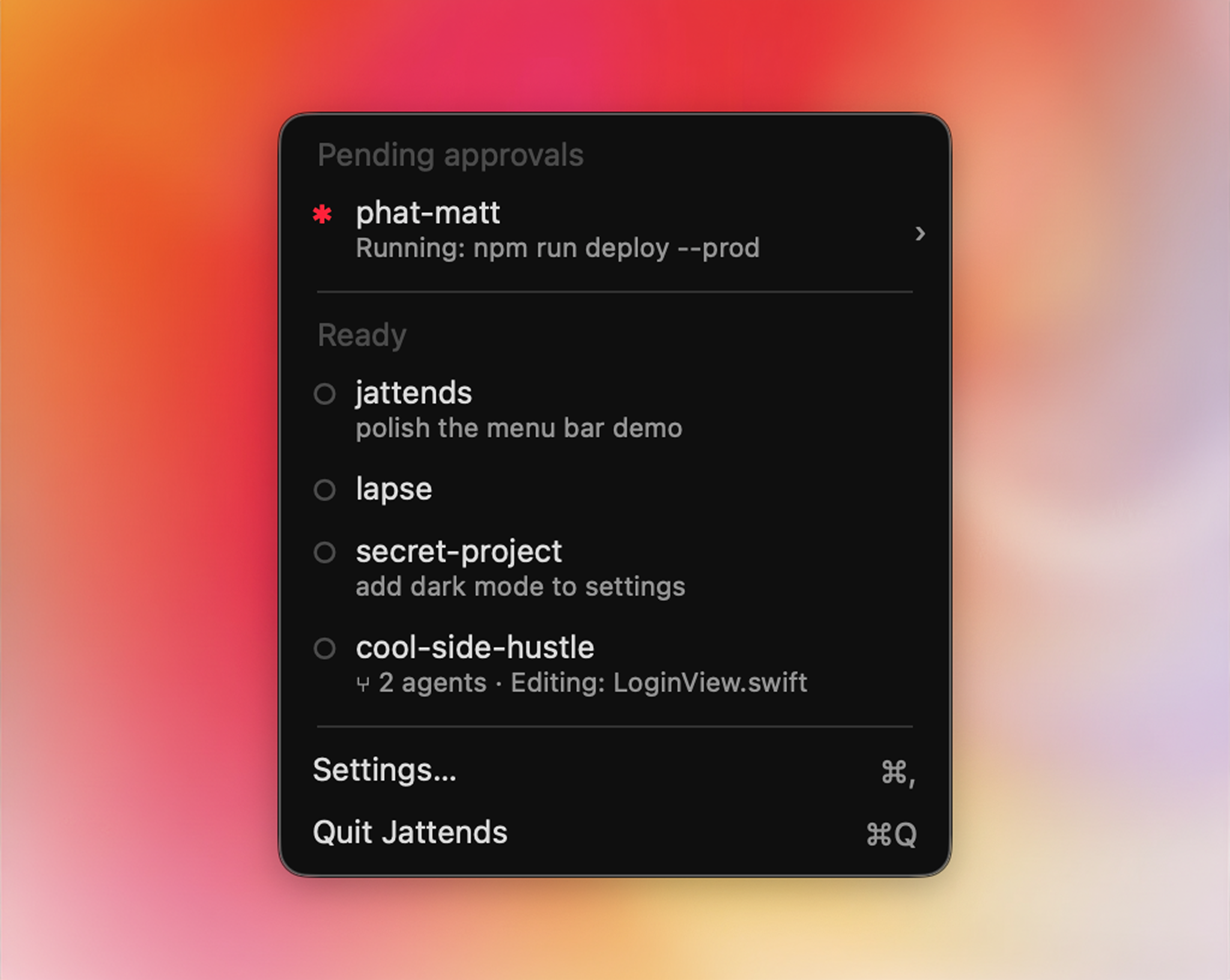
Jattends uses Claude Code hooks to track session state. When something needs your attention — a tool approval, a question, an error — a badge appears in your menubar. Click a session to jump straight to the right terminal window, or approve permission requests without leaving what you're doing.
Features
- Approve from the menu bar — when Claude asks for permission, answer Approve/Deny from a notification or the menu; no window switching. If you don't answer in time, the prompt appears in the terminal as usual
- Live session states — needs approval, waiting, error, working (with what it's doing: "Running: npm test", "Editing: Store.swift"), compacting, ready
- Menubar badge — see at a glance when any session needs you
- Terminal focus — click a session to raise the exact window/tab (OSC 2 title tagging, so two sessions in the same project resolve correctly)
- Dismiss — Option+click a session to dismiss it, or Option+click the header to clear all
- Notifications — native macOS notifications with the session's status and detail
- Sound alerts — play a system sound, with an option to repeat until dismissed
- Global shortcut — jump to the most recent waiting session from any app
- Auto-clear — automatically dismiss attention-needing sessions after a configurable timeout
- Multi-terminal — Ghostty, Terminal.app, iTerm2, kitty, Warp, Alacritty, WezTerm, Hyper, VS Code
In-app approvals are on by default. Notifications, sound, shortcut, and auto-clear are off by default. Configure in Settings (menubar icon → Settings).
Raycast Extension
A companion Raycast extension for fast fuzzy-search session switching. See raycast-extension/ for setup.
Requirements
- macOS 14+
- Claude Code
- Swift 5.10+ (Xcode 15.3+)
Uninstall
bash scripts/uninstall.sh
License
Reviews (0)
Sign in to leave a review.
Leave a reviewNo results found