ocarina
Health Warn
- License — License: MIT
- Description — Repository has a description
- Active repo — Last push 0 days ago
- Low visibility — Only 5 GitHub stars
Code Pass
- Code scan — Scanned 12 files during light audit, no dangerous patterns found
Permissions Pass
- Permissions — No dangerous permissions requested
No AI report is available for this listing yet.
Automation framework for MCP servers. Write a YAML playbook, replay it deterministically against real servers, no LLM in the loop.

Ocarina
An automation framework for MCP servers. Write a YAML playbook, replay it deterministically, no LLM in the loop.
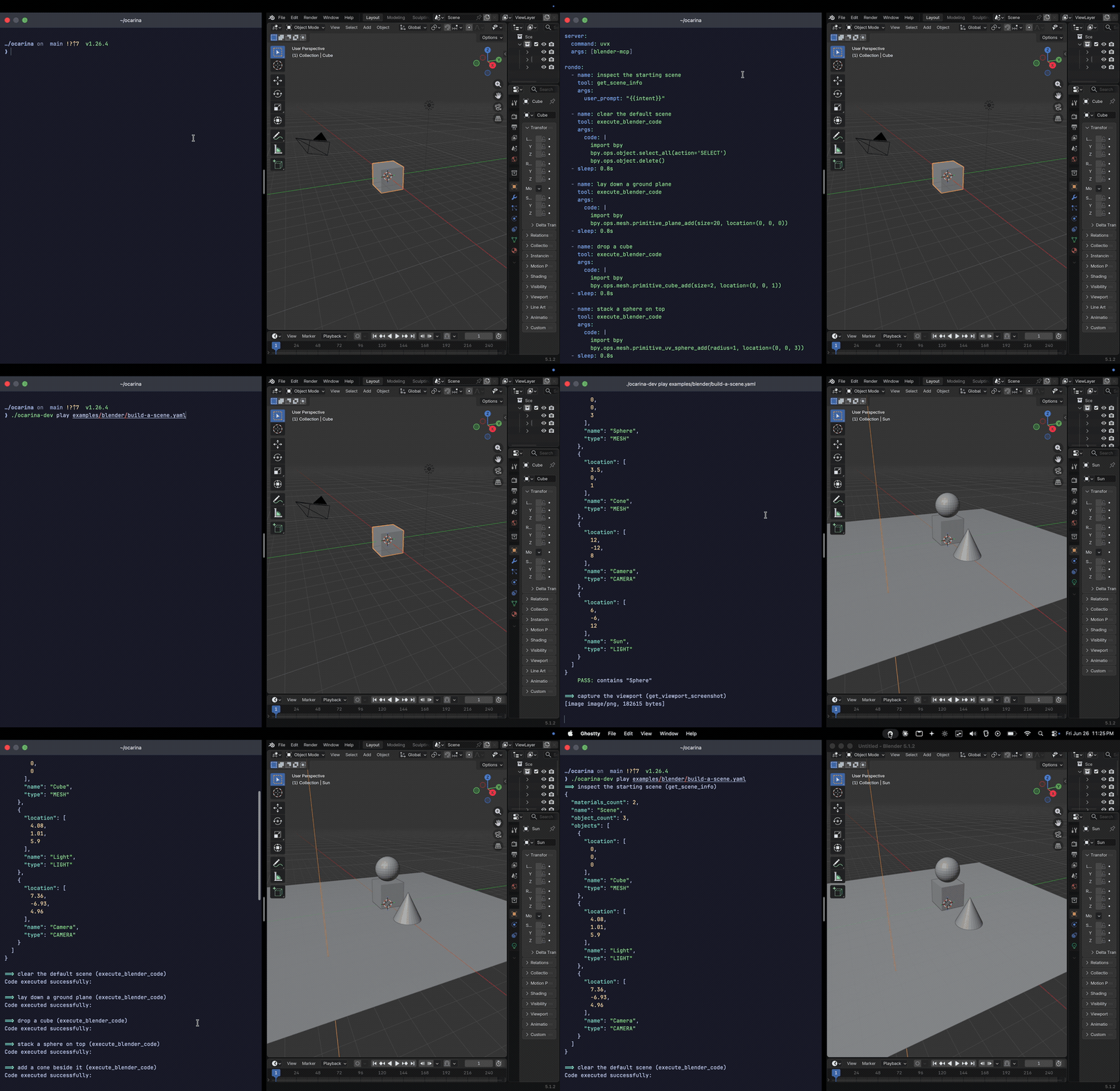
A rondo driving blender-mcp: lay down a plane, drop a cube, stack a sphere, add a cone, then verify the scene. Same YAML, same result, every run. No model involved. Clone blender-mcp-ocarina to run it yourself.
Ocarina runs MCP servers from YAML files called rondos. A rondo is a playbook: it drives tools across one or more servers, pipes values between steps, branches, loops, retries, and asserts on results. It reads like an Ansible playbook and runs the same way every time, because there is no language model between the file and the result. Write a rondo by hand or have an agent generate it once. After that, every run is reproducible and costs no tokens.
The MCP ecosystem is large and growing: thousands of servers exposing real services through typed tools and readable resources, ready to call. These tools were built to be read by language models, so they read cleanly to people too. A server exposes named contracts like get_issues or query_database, not endpoints you wire up in code. Ocarina is an automation framework for all of it.
Install
go install github.com/msradam/ocarina@latest
Binaries are on the releases page. Building from source needs Go 1.26+.
Quickstart
Write a rondo:
# clock.yaml
server:
  command: uvx
  args: [mcp-server-time]

rondo:
  - name: what time is it in Tokyo
    tool: get_current_time
    args:
      timezone: Asia/Tokyo
    expect:
      contains: datetime
Run it:
ocarina play clock.yaml          # execute against the live server
ocarina validate clock.yaml      # check tools, args, and data flow, no calls
play exits non-zero if any expect: fails, so a rondo is a CI check as written.
Commands
| Command | What it does |
|---|---|
play <rondo.yaml> |
Execute each step against the live server |
serve <rondo.yaml>... |
Expose rondos as composite MCP tools (stdio or HTTP) |
validate <rondo.yaml> |
Check tool names, required args, types, and {{key}} flow without calling anything |
diff <rondo.yaml> |
Compare the rondo's tools against the server's current schemas |
lock <rondo.yaml> |
Snapshot the full tool schema; --check fails on drift |
load <rondo.yaml> |
Run the rondo as a concurrent load test with latency percentiles |
record <out.yaml> <server...> |
Proxy a live client session and record its tool calls into a rondo |
docs <server...> |
Generate markdown docs for every tool, resource, and template a server exposes |
hum <server...> -- <tool> [k=v] |
Call a single tool and print the result |
Run ocarina <command> --help for flags.
Rondo format
A rondo has up to three sections: keys (variables), server or servers (where to connect), and rondo (the steps).
keys:
  owner: acme
  repo: api

server:
  command: npx
  args: [-y, "@modelcontextprotocol/server-github"]

rondo:
  - name: recent commits
    tool: list_commits
    args:
      owner: "{{owner}}"
      repo: "{{repo}}"
    grab: ".0.sha"      # gjson path into the JSON output
    echo: latest_sha    # capture it for later steps

  - name: commit detail
    tool: get_commit
    args:
      sha: "{{latest_sha}}"
    expect:
      contains: "feat"
Step fields
| Field | Description |
|---|---|
tool |
Tool to call (tools/call) |
resource |
Resource URI to read (resources/read) |
list_resources |
List a server's resources; output is a JSON URI array |
sleep |
Pause (e.g. 2s); paces a run, makes no call |
args |
Tool arguments. {{key}} interpolates from keys, prior echo, or {{env.NAME}} |
grab |
gjson path into the output before capture: .0.sha, .items.0.id |
echo |
Store the output (or grabbed value) under a key |
expect.contains / matches / equals |
Assert on the output (substring, regex, exact) |
expect.is_error |
Assert whether the tool returned isError: true |
expect.rule / message |
Assert a CEL expression over output and vars, with a custom failure message |
when |
Run the step only if a CEL expression is true (bare variable names, not {{...}}) |
loop |
Expand a JSON array into repeated iterations, setting {{item}} |
retry |
retries, delay, and until (a CEL expression); retry until it holds |
timeout |
Per-step deadline (e.g. 10s) |
tags |
Tag for --tags / --skip-tags filtering |
ignore_errors |
Continue past a failure instead of recording it |
allow_destructive |
Run this step even under --safe |
server |
Which server (a key in servers:); defaults to the first |
When a tool returns structuredContent, grab and expect run against that typed JSON instead of the text block. Coming from Ansible? tasks: is accepted for rondo:, and register: for echo:.
Full reference: docs/architecture.md.
Motifs: reusable fragments
A motif is a rondo fragment you include and parameterize, the equivalent of an Ansible role or a pytest fixture. The motif declares its own keys: as defaults; the caller overrides them with with:. A motif is isolated: it sees only its own keys plus the with: values, so it stays a clean building block.
# motifs/time-probe.yaml
keys:
  zone: UTC
rondo:
  - tool: get_current_time
    args: {timezone: "{{zone}}"}
    expect: {contains: datetime}
rondo:
  - name: default zone
    motif: motifs/time-probe.yaml
  - name: tokyo
    motif: motifs/time-probe.yaml
    with:
      zone: Asia/Tokyo
See examples/motif/.
Error handling: block, rescue, always
Ocarina mirrors Ansible's block / rescue / always. The block runs until a step fails. On failure the block stops and rescue runs; a clean rescue recovers, so the run continues and exits 0. always runs regardless, which is where teardown of anything the block created belongs.
rondo:
  - name: provision with rollback
    block:
      - tool: create_directory
        args: {path: "{{dir}}"}
      - tool: read_text_file
        args: {path: "{{dir}}/missing"}   # fails here
    rescue:
      - tool: write_file
        args: {path: "{{dir}}/ROLLBACK", content: "recovered"}
    always:
      - tool: list_directory
        args: {path: "{{dir}}"}
examples/block-rescue/ mirrors the canonical Ansible playbook 1:1 against a real MCP server.
Serve: rondos as composite MCP tools
ocarina serve exposes a rondo as a single MCP tool. The rondo's params: become the tool's input schema, return: names the result, and the rondo's own server: block is the downstream it drives. This mints a custom, deterministic, higher-level tool for any MCP server without touching that server's code, the way a stored procedure wraps several queries behind one call. An agent calls it once instead of orchestrating the underlying steps itself.
name: provision_workspace
description: Create a workspace and seed it with config files. One call instead of five.
params:
  - name: dir
    type: string
    required: true
return: listing
server:
  command: npx
  args: [-y, "@modelcontextprotocol/server-filesystem", /private/tmp]
rondo:
  - tool: create_directory
    args: {path: "{{dir}}"}
  - tool: write_file
    loop: '["alpha.conf", "beta.conf", "gamma.conf"]'
    args: {path: "{{dir}}/{{item}}", content: "managed by ocarina"}
  - tool: list_directory
    args: {path: "{{dir}}"}
    echo: listing
ocarina serve provision.yaml                  # stdio (default)
ocarina serve provision.yaml --http :8080     # Streamable HTTP
Over HTTP, set a bearer token with --token (or OCARINA_TOKEN) and enable TLS with --tls-cert / --tls-key. Each call runs under --timeout and a --max-concurrent limit, with a panic guard so one bad call cannot take the server down. See examples/serve/.
Safe mode
play --safe and serve --safe refuse any tool not marked read-only in its MCP annotations (readOnlyHint). A step opts back in with allow_destructive: true. This keeps a read-only rondo from making a write when you point it at a server you do not fully control.
ocarina play audit.yaml --safe
This is a guardrail, not a security boundary: MCP annotations are advisory, and a server is free to misreport them, so treat --safe as protection against mistakes, not against a hostile server.
Output
play prints a per-step run and a final tally. Two open output surfaces let other tools consume a run without Ocarina shipping format-specific reporters:
--output jsonemits a structured result: per-step status, message, and duration, plus the run total. Transform it into JUnit, a dashboard, or anything else.- Set
OTEL_EXPORTER_OTLP_ENDPOINTandplayexports the run as OpenTelemetry traces (a span per step) over OTLP. Any OTLP backend (Jaeger, Tempo, Honeycomb, Datadog) ingests it. This uses the standard library only, so it adds no dependencies.
--trace logs every JSON-RPC frame to stderr for debugging.
Multiple servers
A rondo can drive more than one server. Declare them under servers: and set server: per step. Steps that omit server: use the first entry. Output and diff namespace tool names by server (time.get_current_time).
servers:
  time: {command: uvx, args: [mcp-server-time]}
  fetch: {command: uvx, args: [-y, "@modelcontextprotocol/server-fetch"]}

rondo:
  - server: time
    tool: get_current_time
    args: {timezone: UTC}
  - server: fetch
    tool: fetch
    args: {url: "https://example.com"}
Remote servers
Give a server a url: instead of a command: to use the Streamable HTTP transport. Headers are sent on every request, so a bearer token works through {{env.X}}.
server:
  url: https://api.githubcopilot.com/mcp/
  headers:
    Authorization: "Bearer {{env.GITHUB_TOKEN}}"
rondo:
  - tool: get_me
    expect: {contains: login}
Server names
Create a .mcp.json (or ~/.mcp.json for credentials) and reference servers by name in rondos and on the command line. Ocarina also discovers servers from the Claude Desktop config.
{
  "mcpServers": {
    "github": {
      "command": "npx",
      "args": ["-y", "@modelcontextprotocol/server-github"],
      "env": { "GITHUB_PERSONAL_ACCESS_TOKEN": "ghp_..." }
    }
  }
}
ocarina hum github -- list_commits owner=pytorch repo=pytorch per_page=1
See mcp.json.example for a starter template.
Use in CI
play exits 0 if all assertions pass, non-zero otherwise. Drop a rondo into any pipeline:
- name: MCP smoke test
  run: ocarina play tests/mcp-smoke.yaml
A composite GitHub Action installs Ocarina and replays a rondo:
- uses: msradam/ocarina@v1
  with:
    rondo: tests/mcp-smoke.yaml
See action.yml.
Examples
Working rondos for 50+ MCP servers are in examples/. A selection:
| Rondo | Server | What it does |
|---|---|---|
motif/check-zones.yaml |
mcp-server-time |
Reusable fragments via motif: and with: |
block-rescue/provision.yaml |
filesystem | block/rescue/always, 1:1 with an Ansible playbook |
serve/provision.yaml |
filesystem | A composite tool served via ocarina serve |
sqlite/data-quality-audit.yaml |
mcp-server-sqlite |
Schema check, row counts, referential integrity |
github-investigation/repo-health.yaml |
github-mcp-server |
Commit history, open issues, contributor activity |
docker/docker.yaml |
mcp-server-docker |
Container list, image audit, resource usage |
See docs/tested-servers.md for the full list.
Showcases
Standalone repositories you can clone and run, each a working environment for a different MCP server:
- duckdb-mcp-ocarina: data integrity, migration, and regression tests against a DuckDB database. No credentials.
- chrome-devtools-mcp-ocarina: synthetic web health checks through Chrome DevTools MCP.
- github-mcp-ocarina: repo governance as tests through the GitHub MCP server.
- blender-mcp-ocarina: automate and snapshot-test a 3D scene in Blender, an app with no external API at all.
License
MIT. Whistle icon by Alessio Capponi from Noun Project (CC BY 3.0).
Reviews (0)
Sign in to leave a review.
Leave a reviewNo results found