anna-dog-grooming-workshop
Health Uyari
- No license — Repository has no license file
- Description — Repository has a description
- Active repo — Last push 0 days ago
- Low visibility — Only 7 GitHub stars
Code Uyari
- process.env — Environment variable access in lib/auth0.ts
- process.env — Environment variable access in lib/config.ts
Permissions Gecti
- Permissions — No dangerous permissions requested
Bu listing icin henuz AI raporu yok.
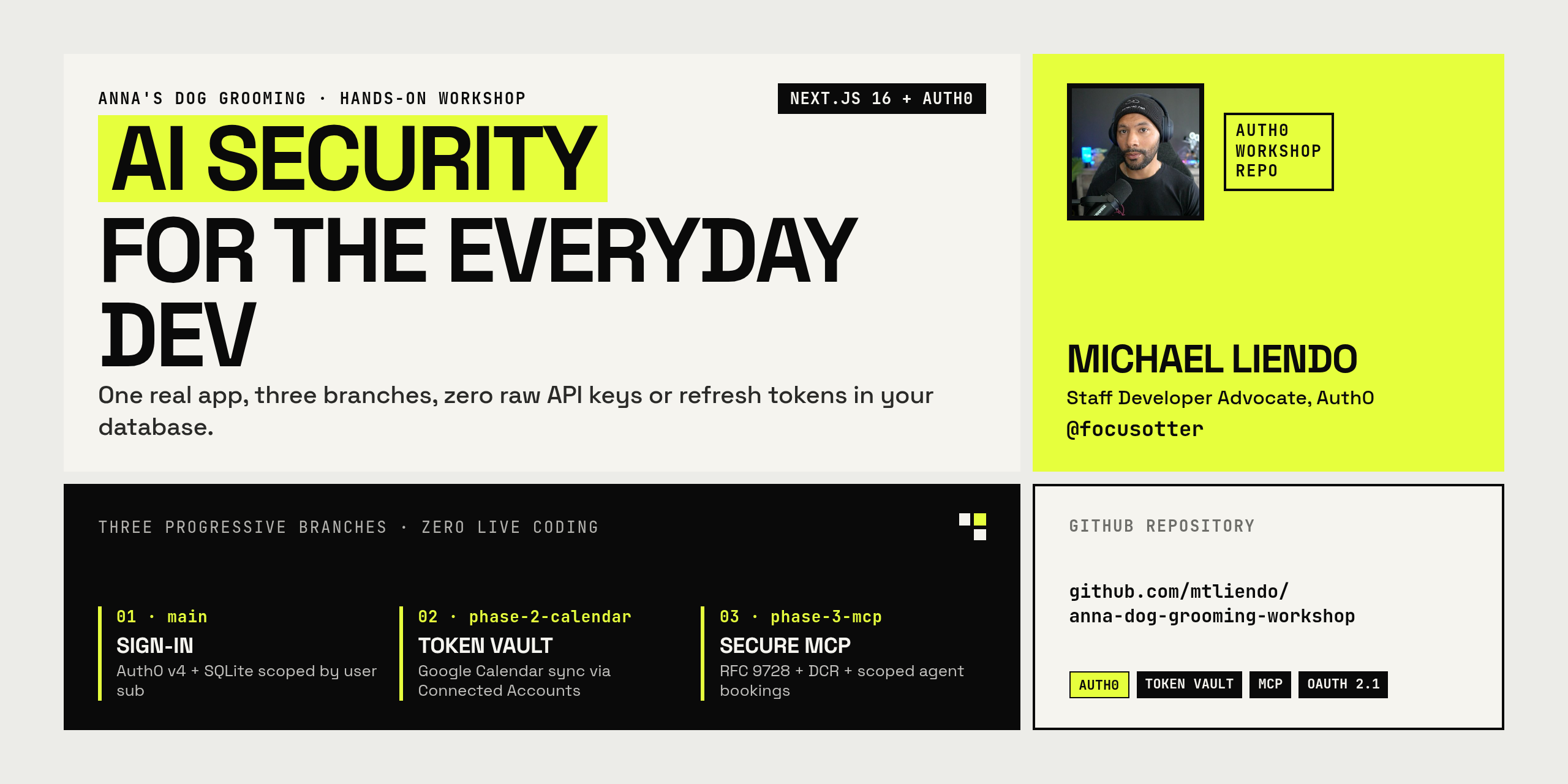
AI Security for the Everyday Dev — Anna's Dog Grooming Workshop (Auth0 Sign-in, Token Vault + Google Calendar, and Secure MCP Server)
Anna's Dog Grooming — Phase 1
AI Security for the everyday dev · a 1-hour hands-on workshop by Michael Liendo (@focusotter), Staff Developer Advocate at Auth0.
You're hired! Anna just opened a boutique grooming salon and needs software before the first doodle walks in. In this phase you will:
- Sign customers in with Auth0 (email + password or the default Google social connection).
- Let each customer register their dogs and book a grooming appointment.
- Store everything in a local SQLite file — scoped to
session.user.subso one customer never sees another customer's roster.
No extra databases. No Auth0 CLI. No native C++ addons. Attendees only need Node.js 20.9 or newer (24 LTS recommended) and Git.
git clone https://github.com/mtliendo/anna-dog-grooming-workshop.git
cd anna-dog-grooming-workshop
npm install
cp .env.example .env.local
# fill in the Auth0 values (see below), then:
npm run dev
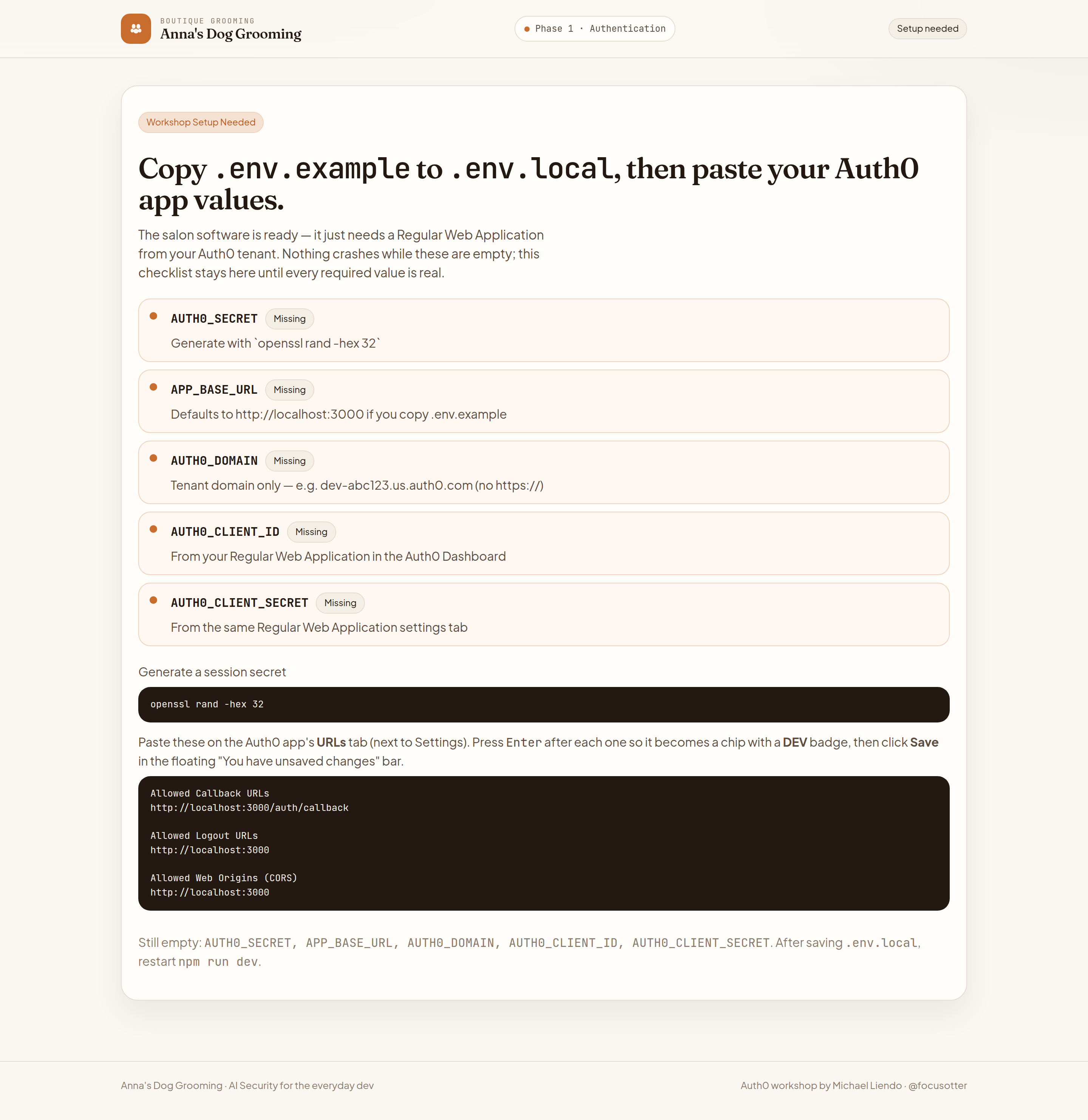
Open http://localhost:3000. Until .env.local is real, the app renders a Workshop Setup Needed card instead of crashing:
What you're building
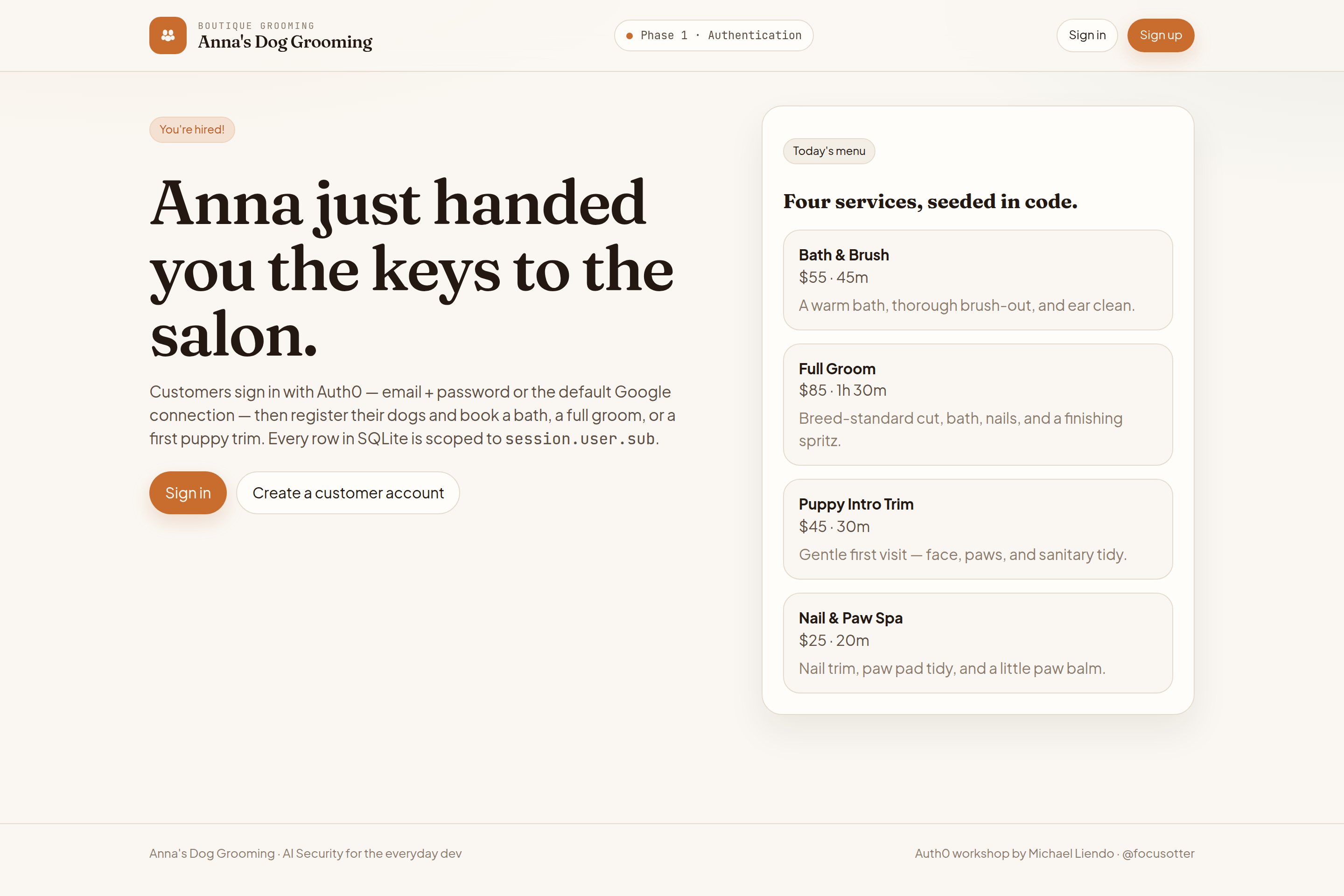
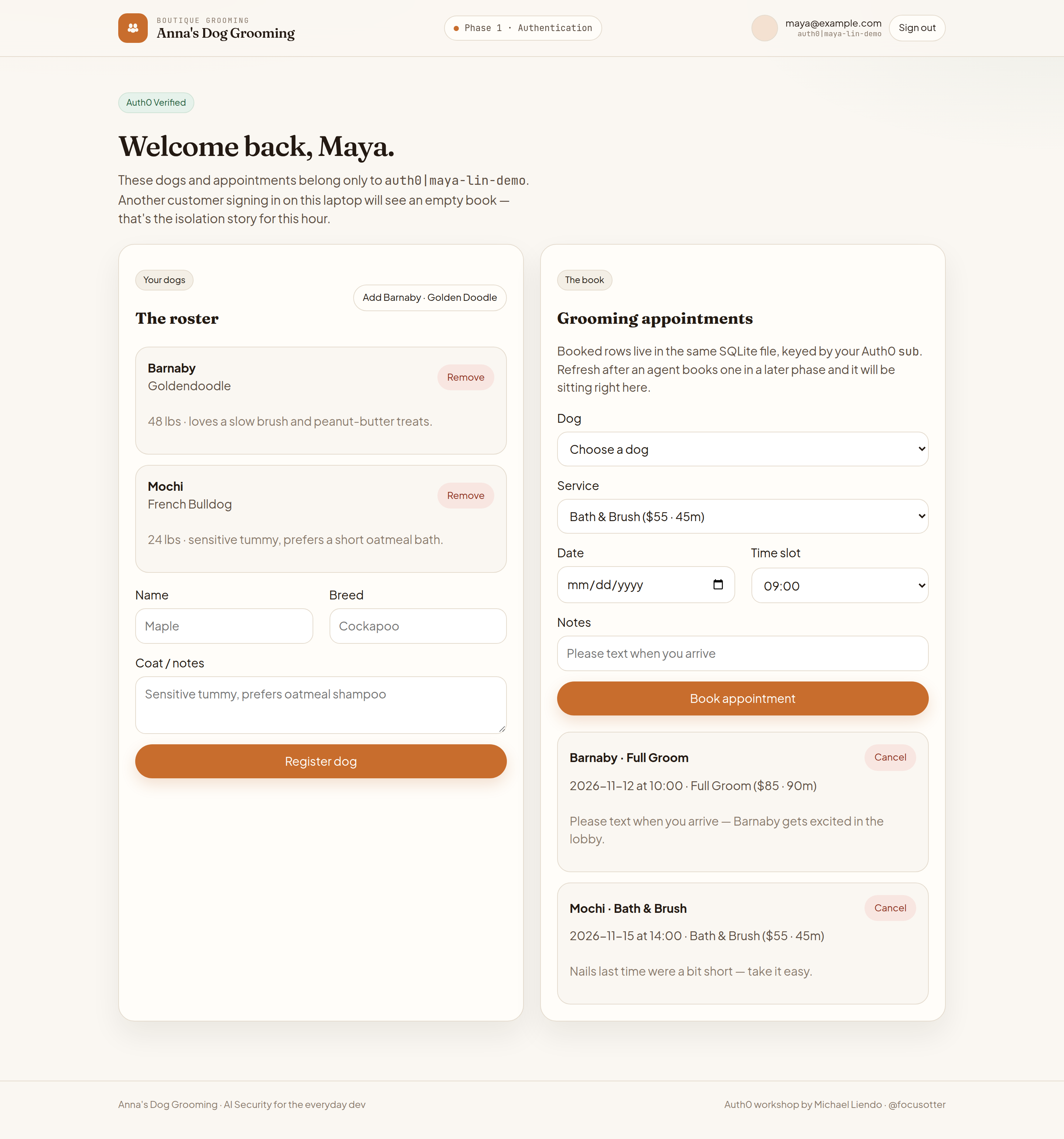
The logged-out boutique landing — Sign in / Sign up and today's grooming menu — and the signed-in customer book for Maya Lin ([email protected]), with Barnaby the Goldendoodle, Mochi the French Bulldog, and two upcoming visits.
Architecture
flowchart LR
  Browser["Customer browser"] -->|"/auth/login"| Auth0["Auth0 Universal Login"]
  Auth0 -->|"/auth/callback"| Next["Next.js App Router"]
  Next -->|"session.user.sub"| SQLite["libsql SQLite\nfile:./data/anna-grooming.db"]
  Next -->|"dogs + appointments"| Browser
| Piece | Why it's here |
|---|---|
@auth0/nextjs-auth0 v4 |
Cookie session, /auth/login, /auth/logout, /auth/callback |
@libsql/client |
Pure JS/WASM SQLite — not better-sqlite3, so macOS/Windows/Linux work without Xcode CLT or Python |
user_sub on every row |
The isolation story: identity from Auth0 is the row key |
Prerequisites
- Node.js 20.9 or newer and npm — Next.js 16 refuses to start on 20.0–20.8. Use Node.js 24 LTS (
nvm usereads the repo's.nvmrc); Phase 3's MCP Inspector needs 24.22.1+ anyway. Check withnode -v;npm run devstops with a fix-it message if your version is too old. (This repo shipspackage-lock.json— please don't switch to pnpm/yarn mid-workshop) - Git
- A free Auth0 account
That's it. No Postgres, no Redis, no Auth0 CLI, no Google Cloud project yet.
Auth0 Dashboard setup (November 2026 UI)
All tenant work happens in the Auth0 Dashboard. Do not run the Auth0 CLI or call the Management API. The screenshots below are from a real workshop tenant — your tenant slug will differ.
0. Dismiss the new-tenant popups
If "Meet your new navigation" pops up, click "Maybe later" and then click the X to close. The 22-day trial banner at the top is normal on new Free accounts.
1. Create a Regular Web Application
Applications → Applications → + Create Application
- Leave Create Manually selected (not "Import from URL").
- Name it
Anna's Dog Grooming. - Explicitly select Regular Web Application.
- Click Create.
Don't rush Create. Native is preselected by default. Next.js keeps a client secret on the server — if you leave Native selected, login will fail.
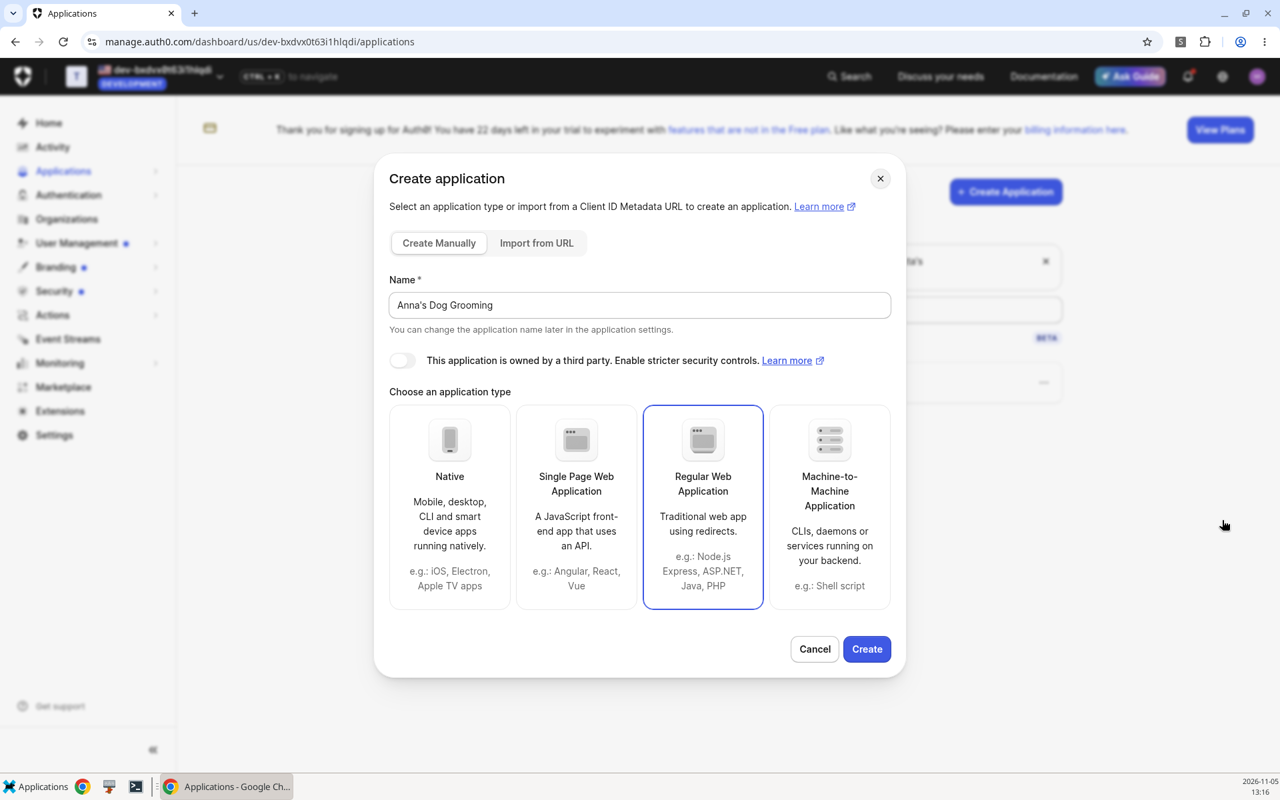
2. Copy Domain, Client ID, and Client Secret
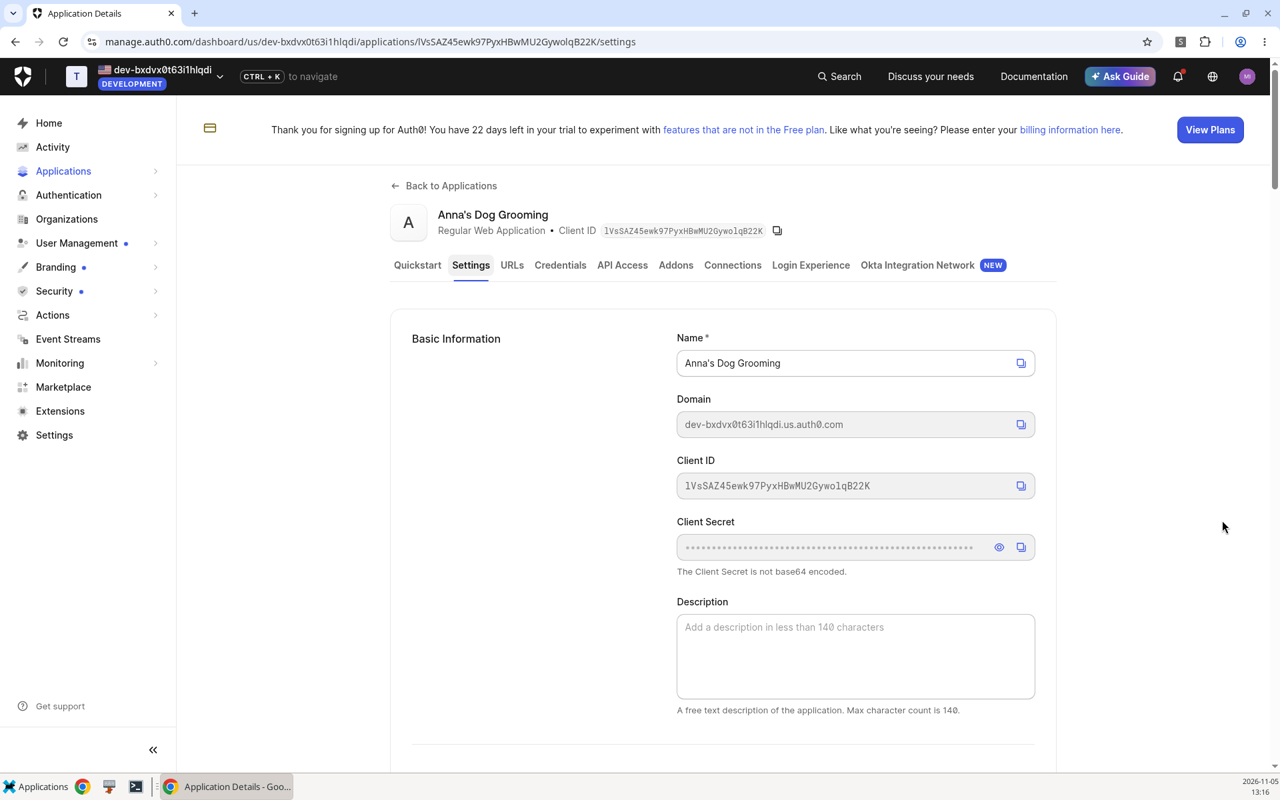
The app opens on Quickstart. Click the Settings tab.
Copy these into .env.local (create it with cp .env.example .env.local):
.env.local |
Where it lives |
|---|---|
AUTH0_DOMAIN |
Domain — the full <your-tenant>.us.auth0.com (or .auth0.com) hostname. It appears here on Settings, not in the top bar. No https://. |
AUTH0_CLIENT_ID |
Client ID |
AUTH0_CLIENT_SECRET |
Client Secret (click the eye to reveal; never commit it) |
AUTH0_SECRET |
Generate locally: openssl rand -hex 32 |
APP_BASE_URL |
http://localhost:3000 |
AUTH0_SECRET=          # openssl rand -hex 32
APP_BASE_URL=http://localhost:3000
AUTH0_DOMAIN=          # e.g. your-tenant.us.auth0.com  (no https://)
AUTH0_CLIENT_ID=       # from the Settings tab
AUTH0_CLIENT_SECRET=   # from the same Settings tab
AUTH0_DOMAIN is the hostname only. APP_BASE_URL is how the SDK builds /auth/callback. Restart npm run dev after saving.
3. Allowed URLs live on the URLs tab
Callback, Logout, and Web Origins are no longer on Settings. Click the URLs tab (right next to Settings).
| Field | Value |
|---|---|
| Allowed Callback URLs | http://localhost:3000/auth/callback |
| Allowed Logout URLs | http://localhost:3000 |
| Allowed Web Origins (CORS) | http://localhost:3000 |
After each URL, press Enter so it turns into a chip with a DEV badge. Then click Save in the floating "You have unsaved changes" bar at the bottom.
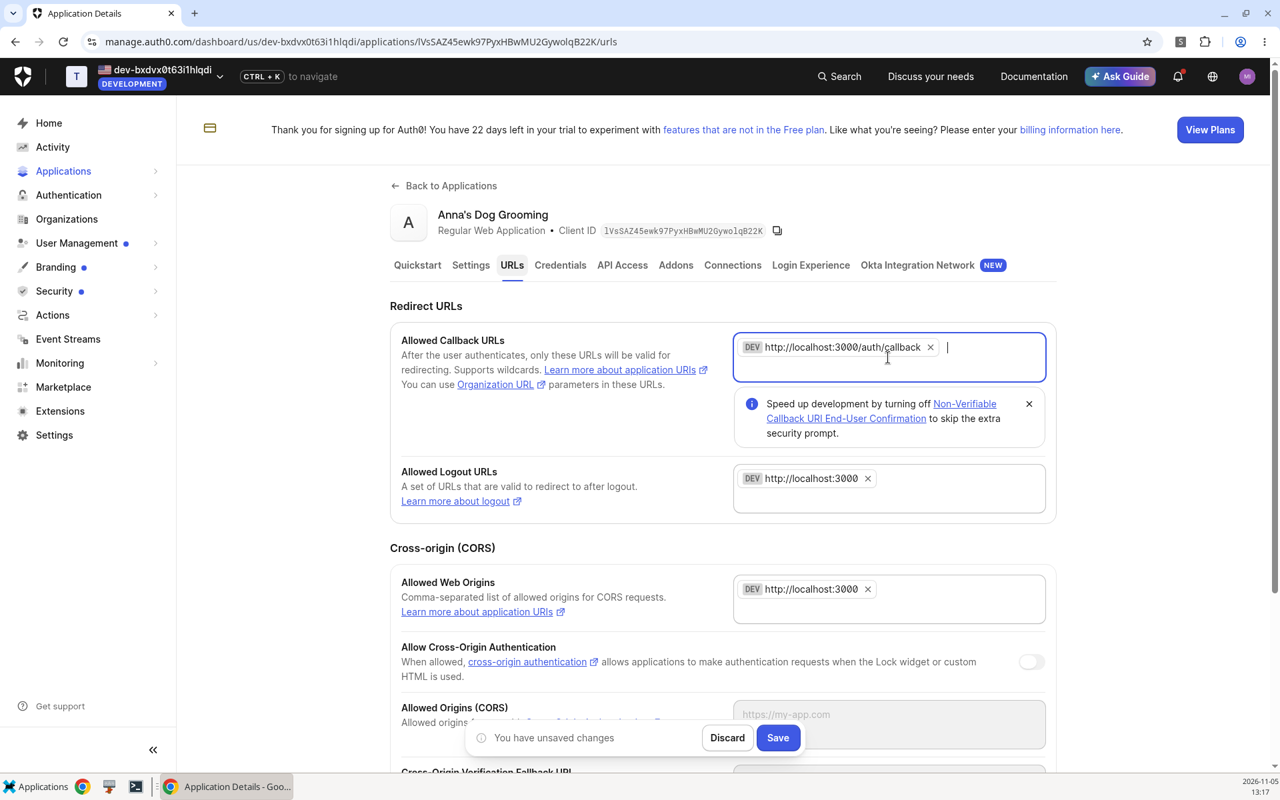
The in-app Workshop Setup Needed card lists these same three values and points you at the URLs tab.
4. Connections are already on — and the 15-character password
Open the Connections tab on the same application. Both Username-Password-Authentication and google-oauth2 are toggled ON by default. You do not need to enable anything extra for Phase 1 login.
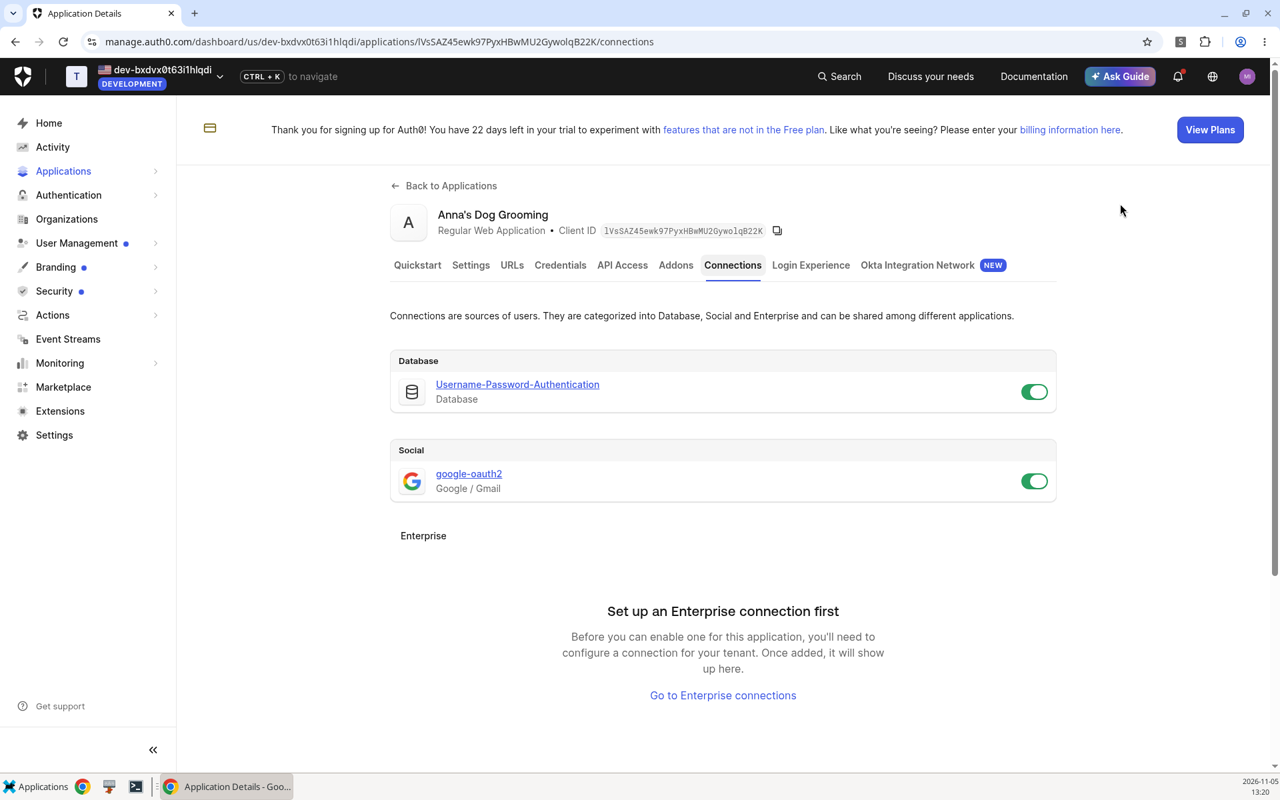
Email + password
Click Sign up in the app and create a customer.
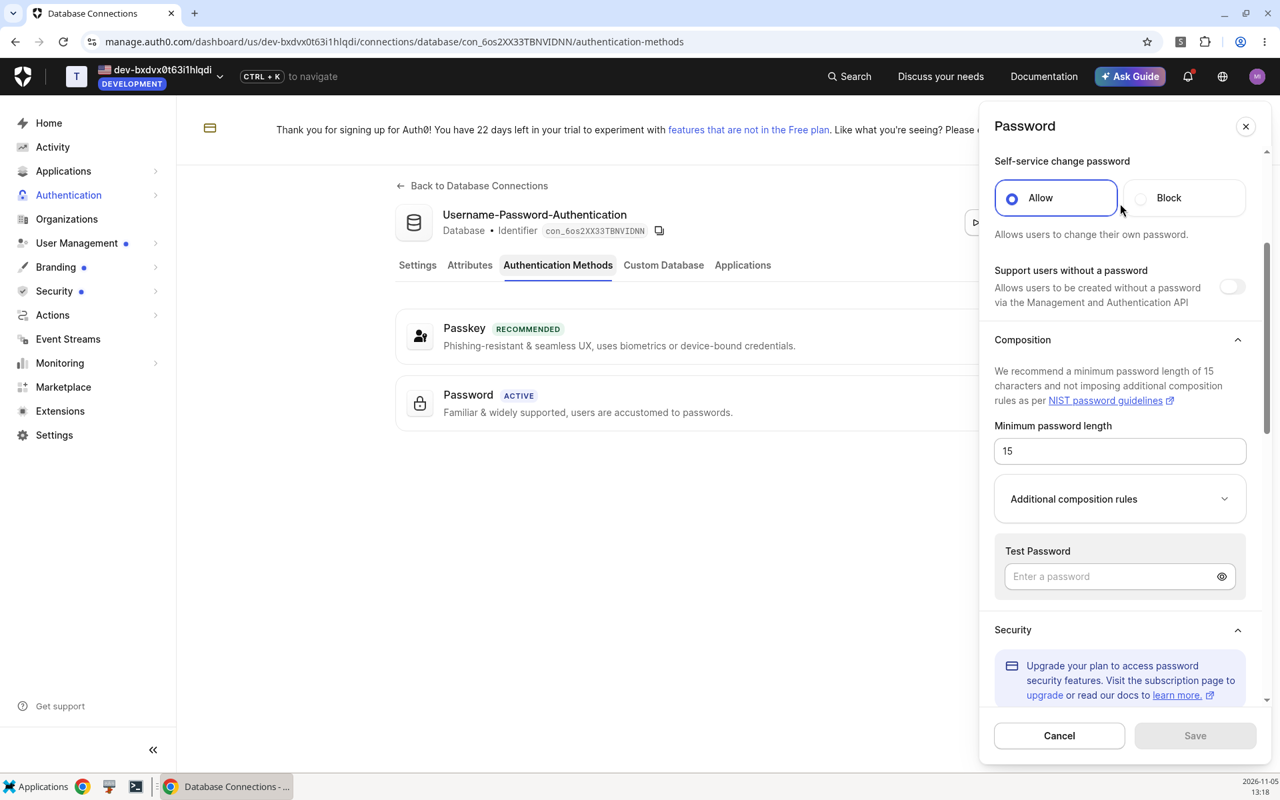
Pro tip — 15-character minimum, zero composition rules. New Auth0 tenants follow NIST: Authentication → Database → Username-Password-Authentication → Authentication Methods → Password → Configure. There is no "must include a number / symbol" rule — just 15+ characters. A passphrase like
sunny-poodle-bath-2026works.
The default Google connection uses Auth0's built-in developer keys. That's perfect for "can I sign in?" in Phase 1.
The yellow banner "This connection is using Auth0 development keys" on Authentication → Social → google-oauth2 is completely expected. Leave Client ID / Client Secret blank for now.
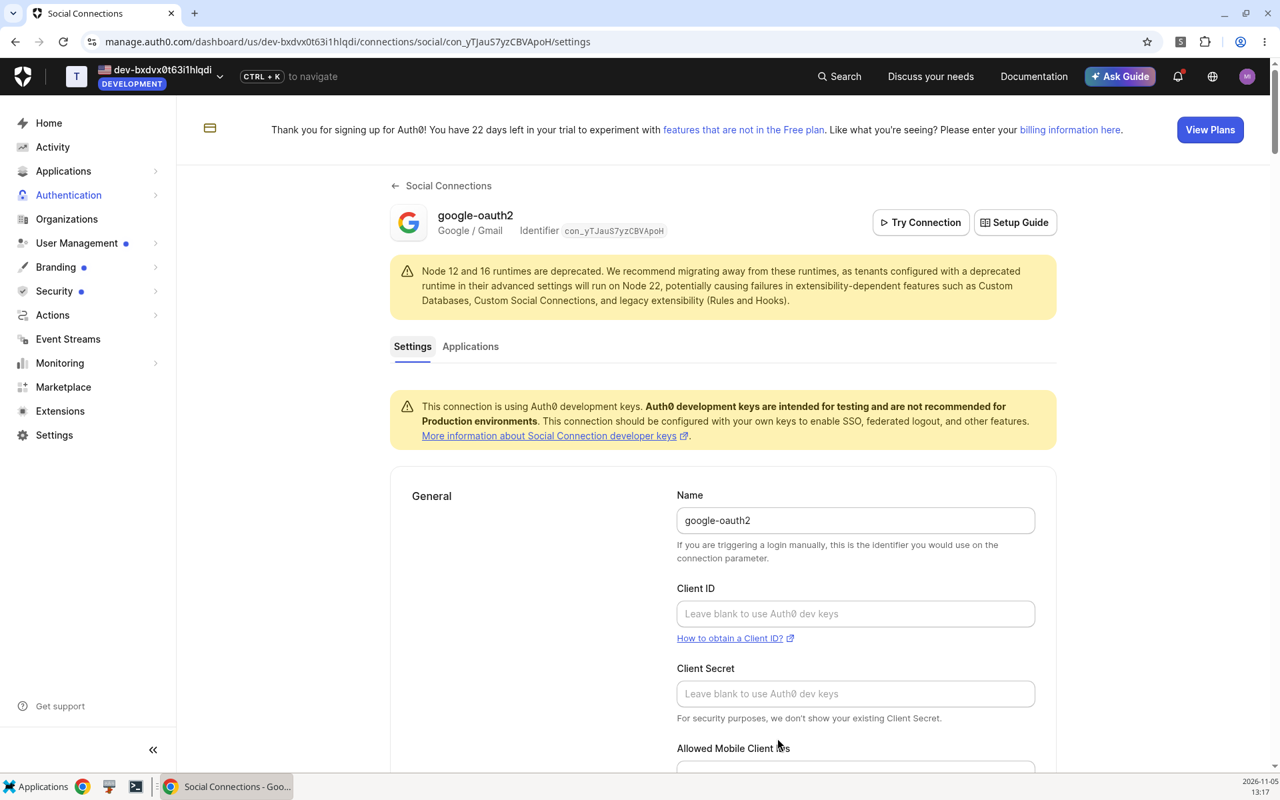
Why we'll bring our own Google OAuth keys in Phase 2: Auth0's shared Google dev keys are fine for login. They do not issue refresh tokens, and they cannot be used with Token Vault / Connected Accounts. Phase 2 swaps in a Google Cloud OAuth client so Anna can drop a reminder on the customer's real calendar without this app ever storing a Google refresh token.
Code tour
lib/auth0.ts
v4's Auth0Client reads AUTH0_DOMAIN, AUTH0_CLIENT_ID, AUTH0_CLIENT_SECRET, AUTH0_SECRET, and APP_BASE_URL. We construct it lazily so a missing .env.local never throws during next build or first paint.
proxy.ts (Next.js 16; this used to be middleware.ts)
export async function proxy(request: NextRequest) {
  if (!isAuth0Configured()) return NextResponse.next();
  return getAuth0().middleware(request);
}
That one call mounts:
/auth/login/auth/logout/auth/callback/auth/profile
There is no /api/auth/* prefix in v4.
lib/db.ts
@libsql/client opens file:./data/anna-grooming.db and creates ./data/ plus the dogs / appointments tables on first use. Every query includes WHERE user_sub = ?. The sample dog button inserts Barnaby · Golden Doodle so the projector demo is one click.
The service catalog (Bath & Brush, Full Groom, Puppy Intro Trim, Nail & Paw Spa) is seeded in lib/services.ts — not in SQLite — so attendees can change prices without a migration.
After the workshop / keep building
Phase 1 is the salon: identity + your own data. Next, Anna wants appointment reminders on Google Calendar — without a google_refresh_token column in SQLite.
git checkout phase-2-calendar
npm install   # only if lockfile changed
npm run dev
Phase 2 adds Auth0 Token Vault / Connected Accounts. Phase 3 (git checkout phase-3-mcp) turns the same SQLite book into a secure MCP server so Grok, Cursor, or Claude can book as the signed-in customer.
Scripts
npm run dev     # http://localhost:3000
npm run build   # production build — must pass without .env.local
npm run lint    # eslint
Yorumlar (0)
Yorum birakmak icin giris yap.
Yorum birakSonuc bulunamadi