praktor
Health Gecti
- License — License: MIT
- Description — Repository has a description
- Active repo — Last push 0 days ago
- Community trust — 22 GitHub stars
Code Basarisiz
- execSync — Synchronous shell command execution in agent-runner/src/extensions.ts
- process.env — Environment variable access in agent-runner/src/extensions.ts
- execSync — Synchronous shell command execution in agent-runner/src/index.ts
- process.env — Environment variable access in agent-runner/src/index.ts
- process.env — Environment variable access in agent-runner/src/ipc.ts
Permissions Gecti
- Permissions — No dangerous permissions requested
Bu listing icin henuz AI raporu yok.
Multi-agent Claude Code orchestrator with Telegram I/O, Docker isolation, swarm patterns, and Mission Control UI

Praktor
Personal AI agent assistant. A single Go binary that receives messages from Telegram, routes them to named agents running Claude Code in isolated Docker containers, and serves a real-time Mission Control web UI. Self-hosted, single-binary deployment via Docker Compose.
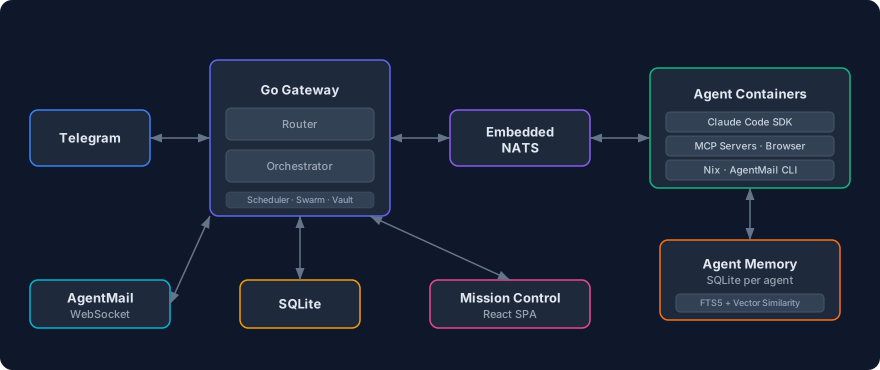
Features
- Mission Control — Real-time dashboard with WebSocket updates
- Telegram I/O — Chat with your agents from your phone
- Telegram commands —
/start,/stop,/reset,/nix,/agents,/commands - Named agents — Multiple agents with distinct roles, models, and configurations
- Smart routing —
@agent_nameprefix or AI-powered classification via the default agent - Per-agent isolation — Each agent runs in its own Docker container with its own filesystem
- Persistent memory — Per-agent SQLite memory database with hybrid search (FTS5 keyword + vector semantic similarity via all-MiniLM-L6-v2) for storing and recalling facts across sessions
- Agent identity — Each agent has an
AGENT.mdfor personality and expertise, editable from Mission Control or by agents themselves - User profile — Agents know who you are via
USER.md, editable from Mission Control or by agents themselves - Scheduled tasks — Cron, interval, or one-shot jobs that run agents and deliver results via Telegram. Multiple tasks execute in parallel (up to 3 concurrent) with independent sessions
- Secure vault — AES-256-GCM encrypted secrets injected as env vars or files at container start, never exposed to the LLM
- Web & browser access — Agents can search the web and automate browsers via agent-browser
- Voice messages — Send voice messages in any language; they're transcribed via OpenAI Whisper and delivered as text. Optional TTS replies voice messages back using OpenAI TTS
- Email via AgentMail — Agents can send and receive email via AgentMail. Configure an inbox per agent and the gateway handles real-time email routing
- Hot config reload — Edit
praktor.yamland changes apply automatically, no restart needed - Nix package manager — Agents can install packages on demand (Python, ffmpeg, LaTeX, etc.) via MCP tools or the
/nixTelegram command - Agent extensions — Per-agent MCP servers, plugins, and skills, managed via Mission Control
- Agent swarms — Graph-based multi-agent orchestration with fan-out, pipeline, and collaborative patterns
- Backup & restore — Back up and restore all Docker volumes as zstd-compressed tarballs via CLI
Prerequisites
- Docker and Docker Compose
- A Telegram bot token (create one with @BotFather)
- A Claude authentication method: Anthropic API key or Claude Code OAuth token (
claude setup-token) - (Optional) An OpenAI API key for voice message transcription and text-to-speech
Note on OAuth tokens: Using Claude Code OAuth tokens with third-party applications must comply with Anthropic's authentication and credential use policy. Review the policy before using this method. OAuth token support is deprecated and will be removed in a future version.
Getting Started
1. Clone and Configure
git clone https://github.com/mtzanidakis/praktor.git
cd praktor
cp config/praktor.example.yaml config/praktor.yaml
cp .env.example .env && chmod 0600 .env
Edit .env and fill in your credentials (see comments in the file for details). Set DOCKER_GID to the group ID of the docker group on your host so the non-root container user can access the Docker socket:
grep docker /etc/group # look for the docker group GID
Edit config/praktor.yaml to define your agents:
telegram:
  allow_from: []            # Telegram user IDs (empty = allow all)
  main_chat_id: 0           # Chat ID for scheduled task / swarm results

defaults:
  model: "claude-sonnet-4-6"
  max_running: 5
  idle_timeout: 10m

agents:
  general:
    description: "General-purpose assistant for everyday tasks"
    nix_enabled: true
  coder:
    description: "Software engineering specialist"
    model: "claude-opus-4-6"
    nix_enabled: true
    env:
      GITHUB_TOKEN: "secret:github-token"    # Resolved from vault
  researcher:
    description: "Web research and analysis"
    allowed_tools: [WebSearch, WebFetch, Read, Write]

router:
  default_agent: general
2. Build and Run
docker compose build agent    # Build the agent image locally
docker compose up -d          # Start the stack (pulls gateway from GHCR)
docker compose logs -f        # Watch logs
The agent image must be built locally because it bundles proprietary third-party software that cannot be redistributed. See Third-Party Notice for details.
Mission Control is available at http://localhost:8080.
3. Start Chatting
Open Telegram and send a message to your bot. Praktor routes it to the right agent, spins up a container, and responds. Use @agent_name to target a specific agent, or let smart routing classify the message automatically:
Hello!                              → smart routing picks best agent
@coder fix the login bug            → explicit routing to coder
@researcher find papers on RAG      → explicit routing to researcher
Routing works in 3 tiers: @agent_name prefix → AI-powered classification via default agent → default agent fallback.
For a secure setup without exposed ports, see Production Deployment.
Upgrading
Pull the latest code, images, and rebuild the agent:
./scripts/upgrade.sh
Then restart the stack:
docker compose up -d
Documentation
See the Wiki for detailed documentation on all features:
Hot Config Reload · Vault · Voice Messages · Browser Automation · AgentMail · Agent Extensions · Agent Swarms · Nix Package Manager · Backup & Restore · Production Deployment
Getting Help
After cloning the repo, you can use Claude Code to get help with any aspect of Praktor. The project includes a detailed CLAUDE.md that gives Claude full context about the architecture, configuration, and available APIs.
git clone https://github.com/mtzanidakis/praktor.git
cd praktor
claude
For example, you can ask Claude Code things like:
- "How do I install an MCP server on a Praktor agent?"
- "How do I add a new agent to my configuration?"
- "How do I set up secrets for an agent?"
Development
go mod download              # Install Go dependencies
make dev                     # Run the gateway locally
make test                    # Run tests
Mission Control with hot reload:
cd ui && npm install && npm run dev # Vite dev server on :5173, proxies /api to :8080
License
See LICENSE.
Third-Party Notice
This project integrates with third-party tools that have their own licenses and terms of service. In particular, Claude Code and the Claude Agent SDK are proprietary software by Anthropic and subject to Anthropic's Commercial Terms of Service. They are not included in this repository — users must install them at build time and are responsible for complying with Anthropic's terms. Pre-built Docker images containing these components should not be redistributed without Anthropic's permission.
Yorumlar (0)
Yorum birakmak icin giris yap.
Yorum birakSonuc bulunamadi