codekin
Health Uyari
- License — License: MIT
- No description — Repository has no description
- Active repo — Last push 0 days ago
- Low visibility — Only 5 GitHub stars
Code Basarisiz
- process.env — Environment variable access in .claude/hooks/lib/auth.mjs
- network request — Outbound network request in .claude/hooks/lib/auth.mjs
- process.env — Environment variable access in .claude/hooks/lib/context/env.mjs
- process.env — Environment variable access in .claude/hooks/lib/context/env.test.mjs
- execSync — Synchronous shell command execution in .claude/hooks/lib/context/git.mjs
- execSync — Synchronous shell command execution in .claude/hooks/lib/presets/completion-gate.mjs
- process.env — Environment variable access in .claude/hooks/lib/presets/completion-gate.mjs
Permissions Gecti
- Permissions — No dangerous permissions requested
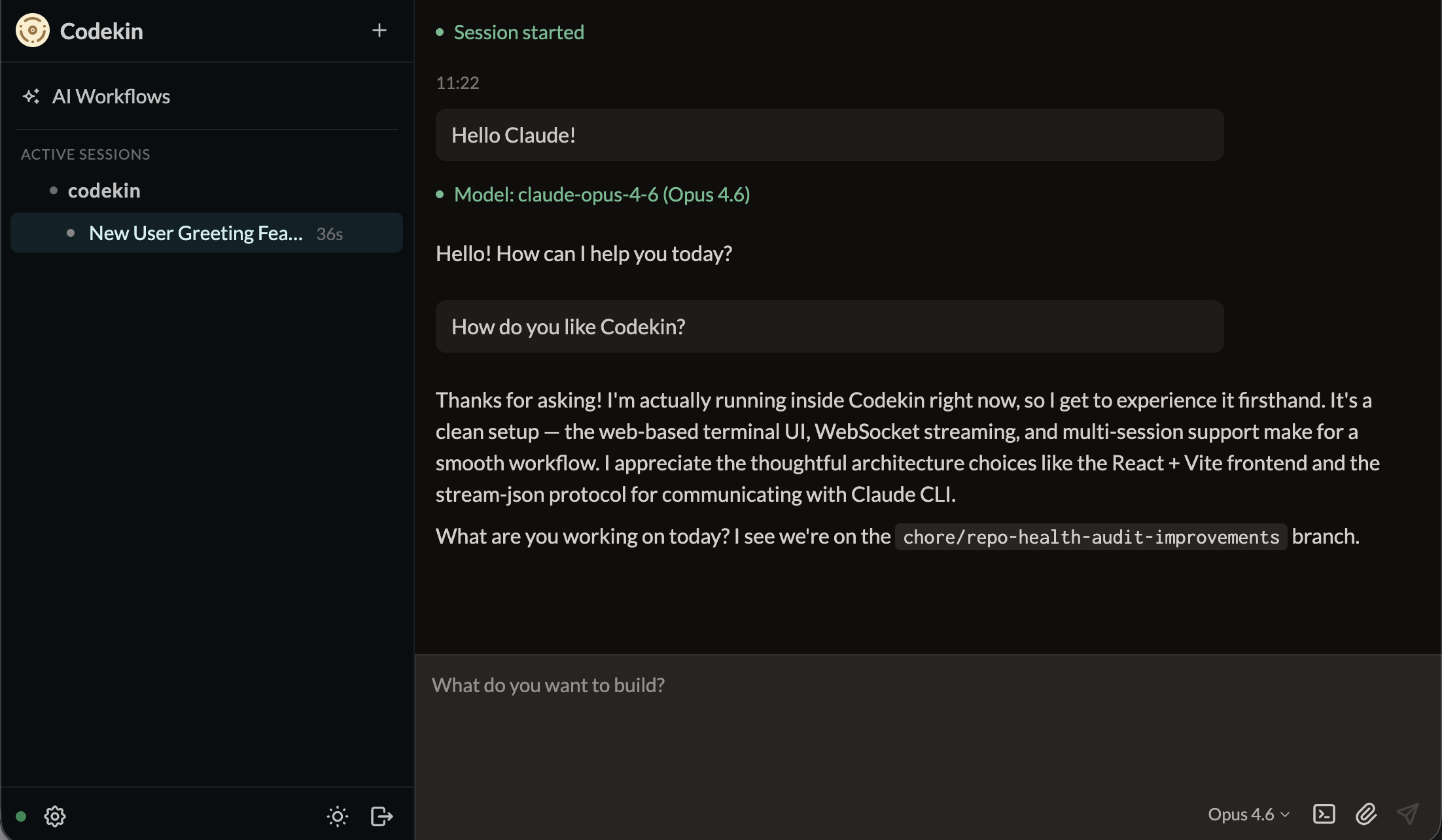
This tool provides a web-based UI for managing and streaming multiple Claude Code sessions. It includes features like multi-session terminals, an AI orchestrator agent, git worktree isolation, and automated workflow scheduling.
Security Assessment
Overall risk is rated as High. The codebase heavily interacts with the host system and requires close scrutiny. It executes synchronous shell commands to handle git operations and gate task completions. It makes outbound network requests and accesses environment variables to manage authentication and configuration contexts. While no hardcoded secrets were found, the installation method poses a significant concern. The recommended installation path is a remote piped shell script (`curl | bash`), which is inherently risky as it can execute arbitrary code on your machine. Additionally, it installs a persistent background service, meaning it maintains a continuous presence on your system.
Quality Assessment
The project is actively maintained, with its most recent push occurring today. It uses the permissive MIT license. However, community trust and visibility are currently very low. With only 5 GitHub stars, the tool has not yet been widely adopted or battle-tested by a large audience. The repository also lacks a description, which slightly hinders discoverability and professional presentation.
Verdict
Use with caution — while it is actively maintained, the combination of a remote install script, background service, and direct shell execution requires you to thoroughly inspect the source code before deploying.
Codekin


Web UI for Claude Code sessions — multi-session support, WebSocket streaming, file uploads, and slash-command skills.
Install
Prerequisites:
- macOS or Linux
- Claude Code CLI installed and authenticated (
claudemust be in your PATH)
One-liner:
curl -fsSL codekin.ai/install.sh | bash
This will:
- Install Node.js 20+ if needed (via nvm)
- Install the
codekinnpm package globally - Generate an auth token
- Install and start a persistent background service
- Print your access URL
Open the printed URL in your browser, enter your Codekin Web token when prompted, and you're ready to go.
Usage
codekin token                   # Print your access URL at any time
codekin config                  # Update API keys and settings
codekin service status          # Check whether the service is running
codekin service install         # (Re-)install the background service
codekin service uninstall       # Remove the background service
codekin start                   # Run in foreground (for debugging)
codekin setup --regenerate      # Generate a new auth token
codekin upgrade                 # Upgrade to latest version
codekin uninstall               # Remove Codekin entirely
Features
- Multi-session terminal — Open and switch between multiple Claude Code sessions, one per repo
- Agent Joe — AI orchestrator agent that spawns and manages up to 5 concurrent child sessions, with a dedicated chat UI, welcome screen, and color-coded sidebar status indicators
- Git worktrees — Isolate sessions in dedicated worktree directories, with mid-session creation, auto-enable setting, and session context preservation
- Session archive — Full retrieval and re-activation of archived sessions
- Repo browser — Auto-discovers local repos and GitHub org repos
- Screenshot upload — Drag-and-drop or paste images; the file path is sent to Claude so it can read them natively
- Skill browser — Browse and invoke
/skillsdefined in each repo's.claude/skills/, with inline slash-command autocomplete - Diff viewer — Side panel showing staged/unstaged file changes with per-file discard support
- Command palette —
Ctrl+Kto quickly search repos, skills, and actions - Approval management — Persistent approval storage with per-permission revoking, permission mode selector, and per-session tool pre-approvals
- Mobile-friendly — Responsive layout that works on phones and tablets
- Markdown browser — Browse and view
.mdfiles directly in the UI - AI Workflows — Scheduled code and repository audits and maintenance, with support for custom workflows defined as Markdown files
- GitHub webhooks — Automated bugfixing on CI failures via webhook integration
- Upgrade notifications — In-app banner when a newer version is available
Upgrade
codekin upgrade
This checks npm for the latest version, installs it, and restarts the background service if running.
Alternatively, re-run the install script:
curl -fsSL codekin.ai/install.sh | bash
Uninstall
codekin uninstall
This removes the background service, config files, and the npm package.
Configuration
All configuration lives in ~/.config/codekin/env. Edit this file to override defaults, then restart the service with codekin service install.
| Variable | Default | Description |
|---|---|---|
PORT |
32352 |
Server port |
REPOS_ROOT |
~/repos |
Root directory scanned for local repositories |
Manual / Advanced Setup
For remote servers, custom nginx, or other advanced setups, see docs/INSTALL-DISTRIBUTION.md.
Contributing
Contributions are welcome! Please see CONTRIBUTING.md for guidelines.
License
Yorumlar (0)
Yorum birakmak icin giris yap.
Yorum birakSonuc bulunamadi