selfsemester
Health Pass
- License — License: MIT
- Description — Repository has a description
- Active repo — Last push 0 days ago
- Community trust — 23 GitHub stars
Code Pass
- Code scan — Scanned 12 files during light audit, no dangerous patterns found
Permissions Pass
- Permissions — No dangerous permissions requested
No AI report is available for this listing yet.
Windows app that turns any subject into a full, scheduled, graded course, built and marked by your own Claude Code

SelfSemester
A Windows desktop app that turns any subject into a full university-style course: lessons, homework, quizzes,
assignments and exams, released on a schedule with hard deadlines and real marks.
You name a subject. Claude asks a few questions about your goals and level, plans a syllabus, and tells you how well
it can teach and mark that subject before you commit. Once you approve, it writes the whole course up front. After
that the app runs the course on its own: it releases material day by day, enforces deadlines, auto-marks quizzes,
and sends written work and photos of handwritten working back to Claude for marking against a rubric. Final marks
go on a transcript, and finished courses are archived to your Documents folder.
You can also write a course yourself in the course builder, with no Claude at all, and run it on the same
schedule. What changed in each version is in CHANGELOG.md.
Status: early (0.4.0). It works end to end but has had little real-world use. Expect rough edges.
Latest update (November 2026)
Version 0.4.1 is a security update: I updated the framework the app is built on after GitHub flagged a few
issues in it. Nothing changes in how the app works, and your courses carry over like always.
Version 0.4.0 is out, and you can now download a ready-made installer. Updating keeps all your courses and
progress, and SelfSemester backs up your data before every update just in case.
In 0.3.0, courses started to feel a lot more like actual school: every course has its own classroom with a
home page, weekly modules, a syllabus, a gradebook and a materials tab, plus next and previous buttons on lessons.
The course builder got the details a real course has too: course code, term, instructor, colour, a welcome
message, learning outcomes and weekly objectives.
What came in 0.2.0:
- Add your own stuff to a course: notes, PDFs, images. Claude uses them when it builds and marks the course.
- Sandbox mode: retry as many times as you want, no late penalties. Structured mode is still there if you
want it to feel like a real course. - Instant feedback on multiple choice and number questions the moment you submit.
- Review with Claude: ask about your mark and the feedback on anything you've handed in.
- Course builder: write your own course without Claude and run it the same way.
The full list is in the changelog.
Screenshots
Your courses, laid out like school
Shown with made-up demo courses written in the course builder (the names in them are invented).
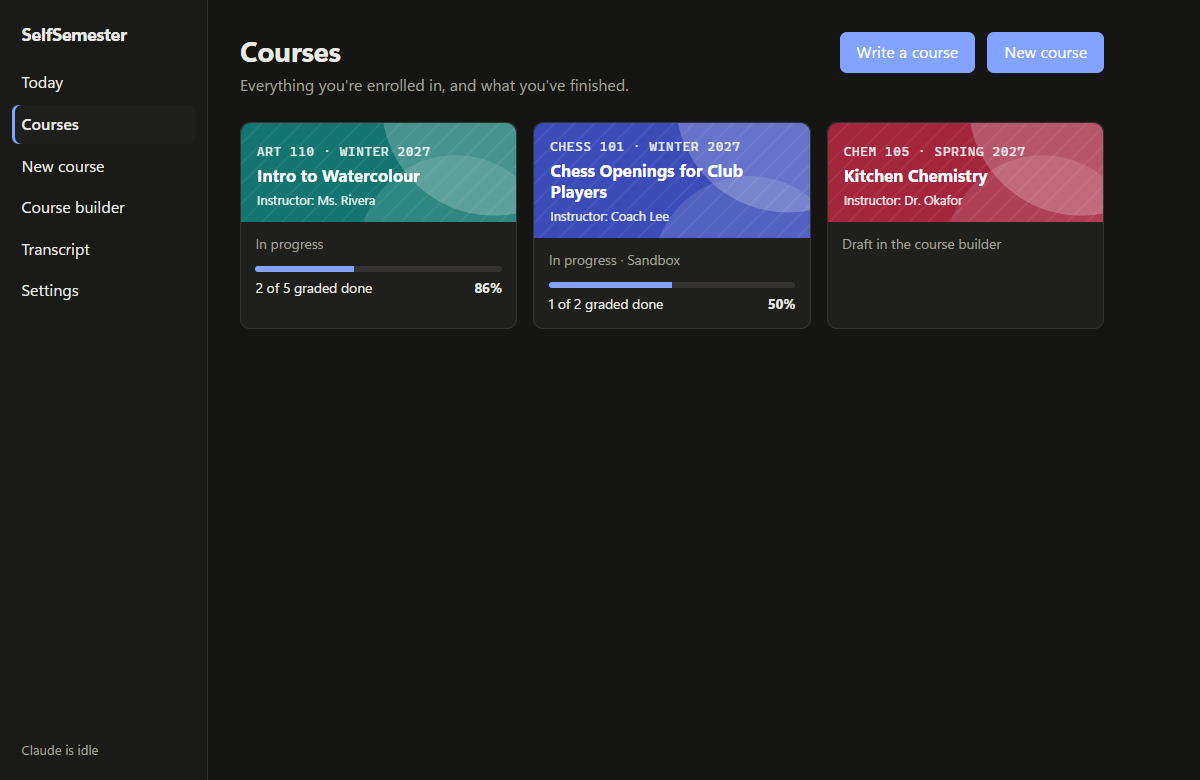 |
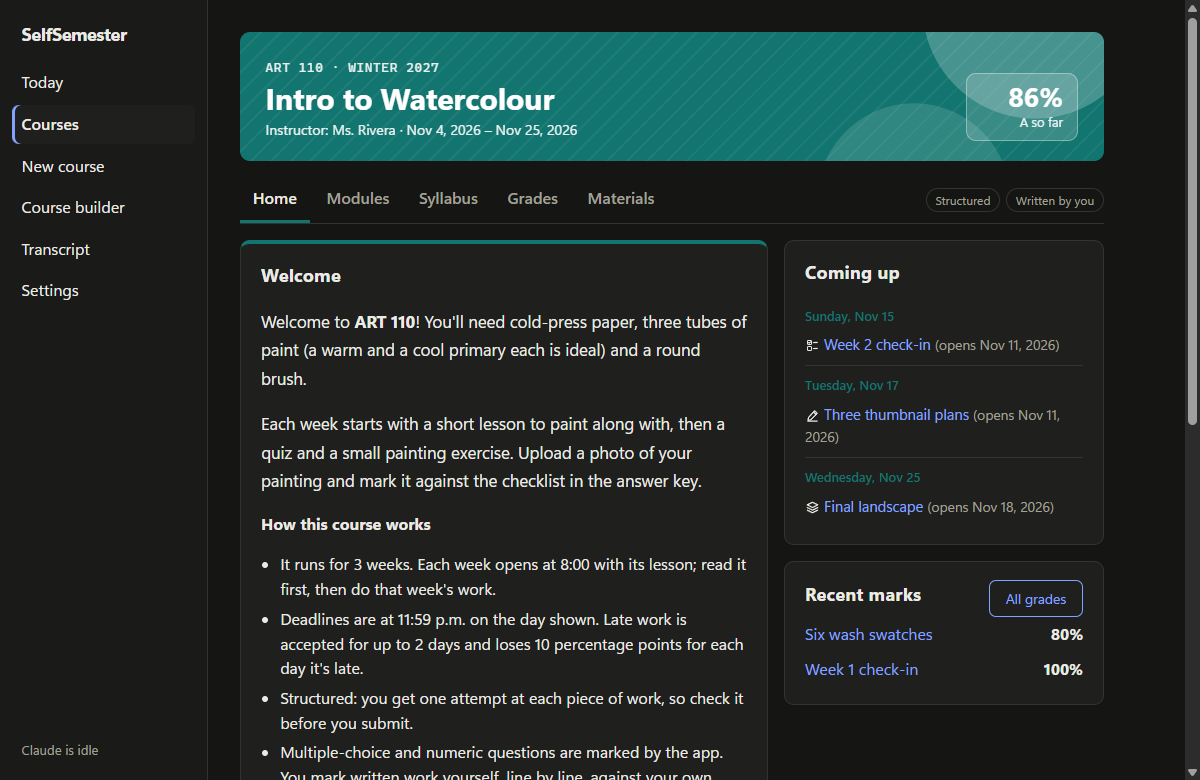 |
| Courses: a card for each course with its code, instructor, progress and mark | Course home: a welcome, how the course works, what's coming up and recent marks |
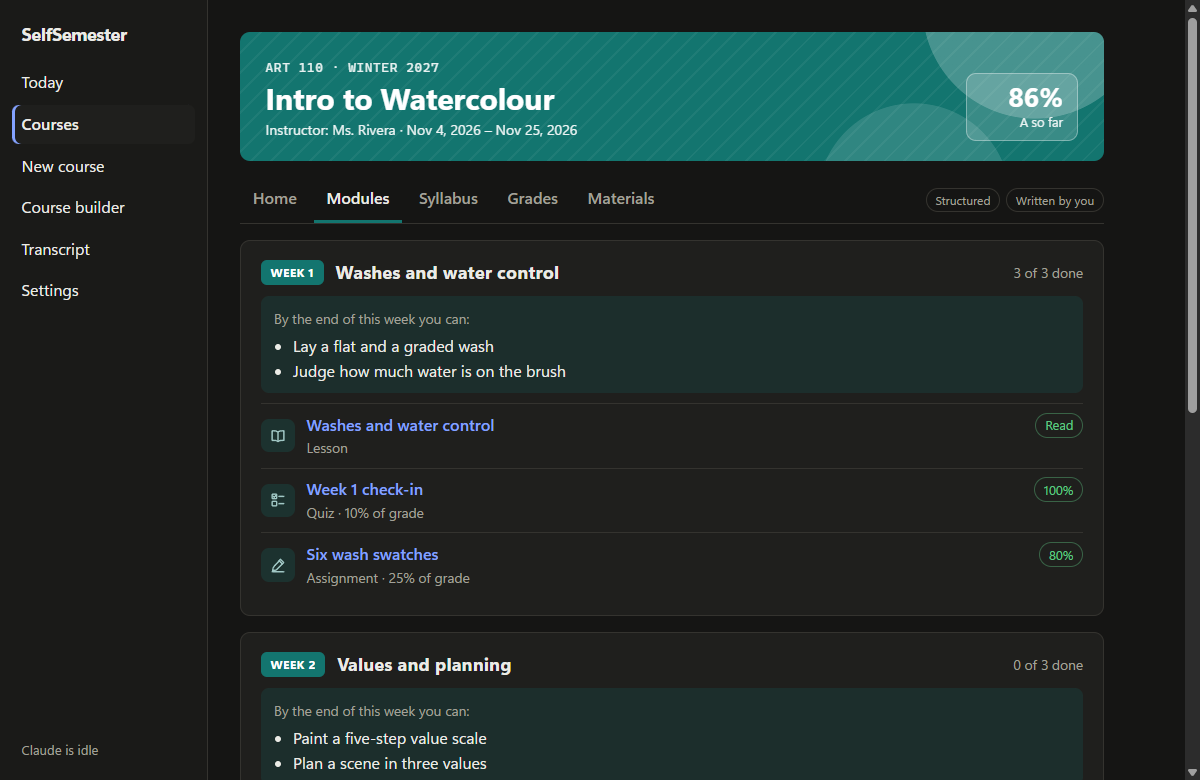 |
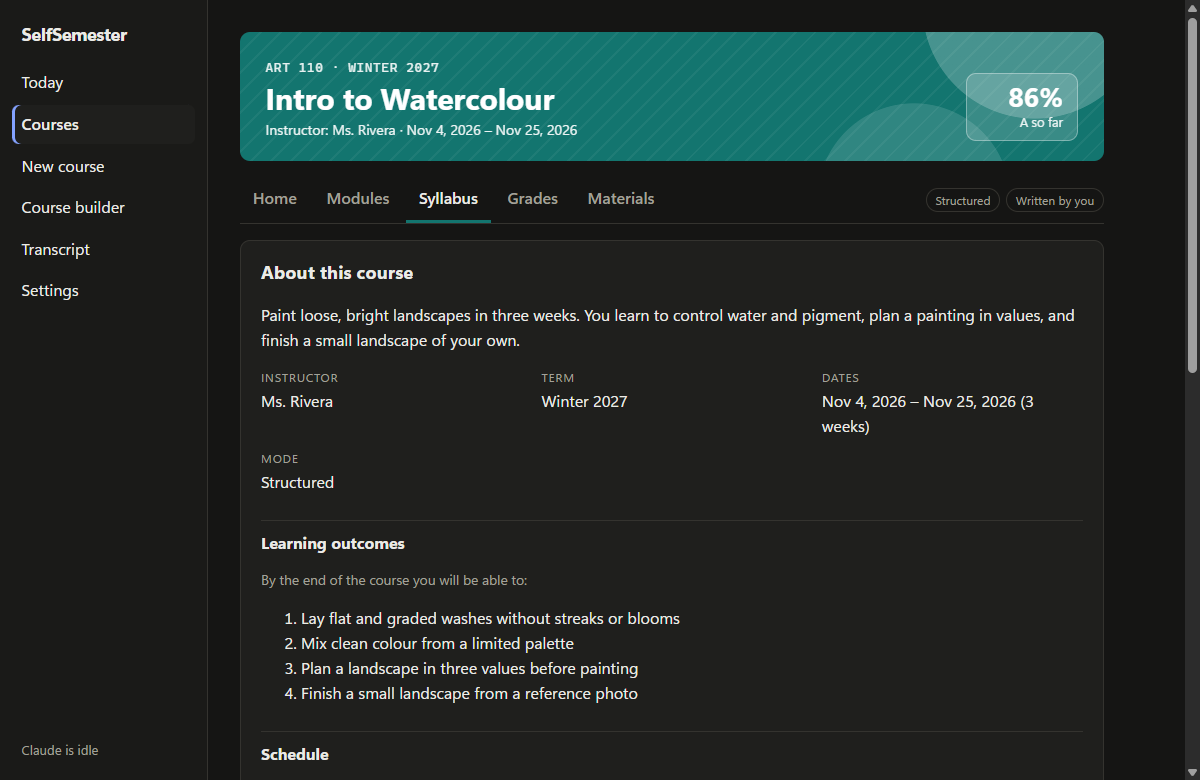 |
| Modules: every week has the same shape: objectives, a lesson, then the work | Syllabus: description, learning outcomes, schedule, grading and policies |
 |
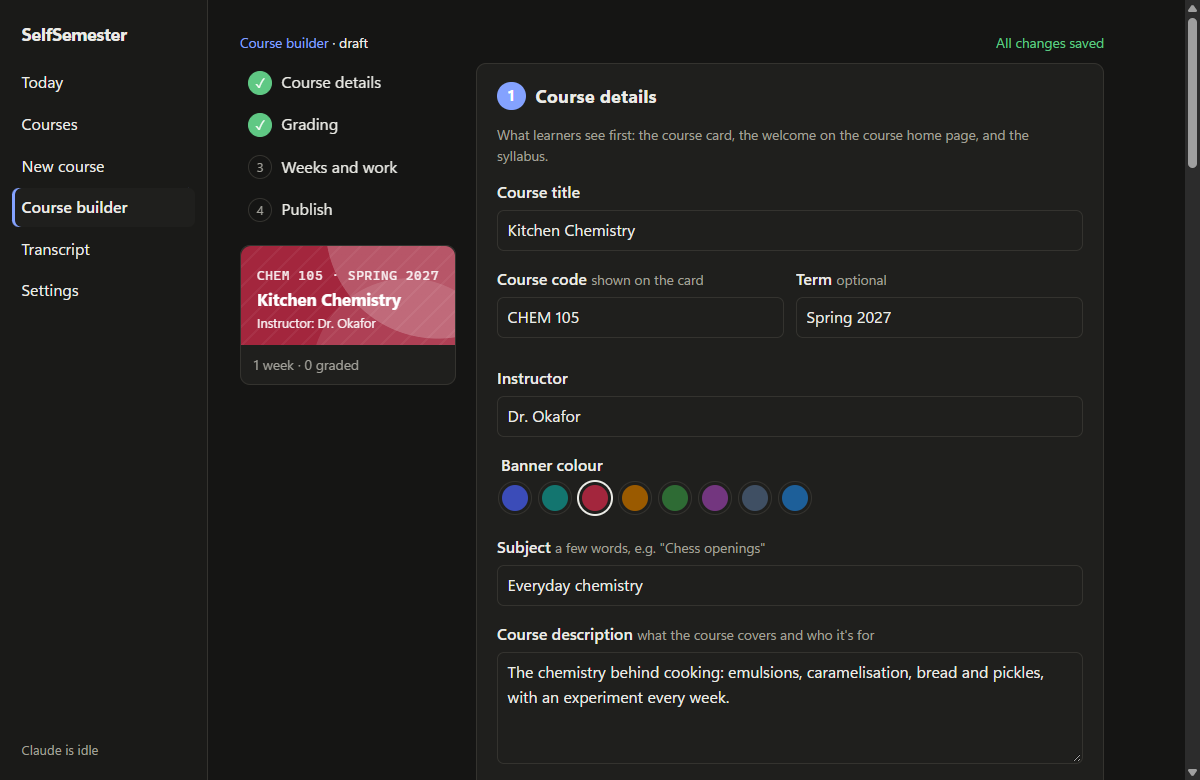 |
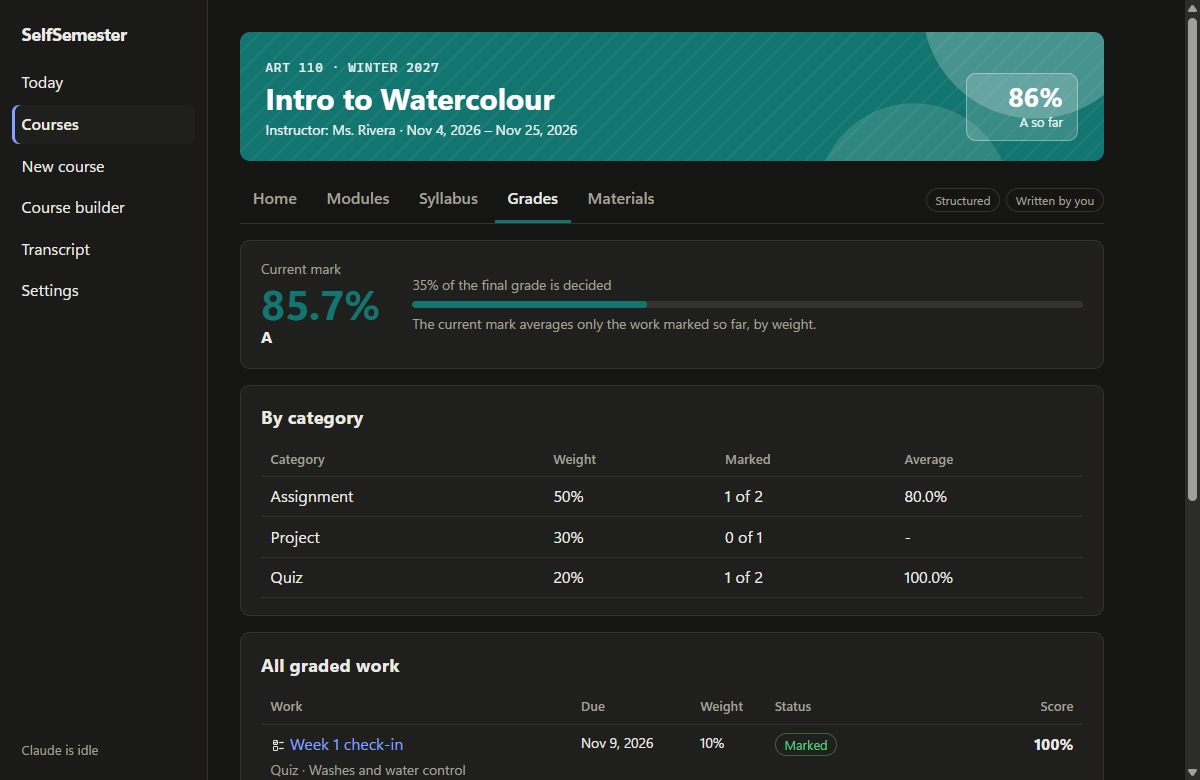
| Grades: current mark, how much is decided, averages by category | Course builder: write your own course in four steps, with a live preview |
 |
|
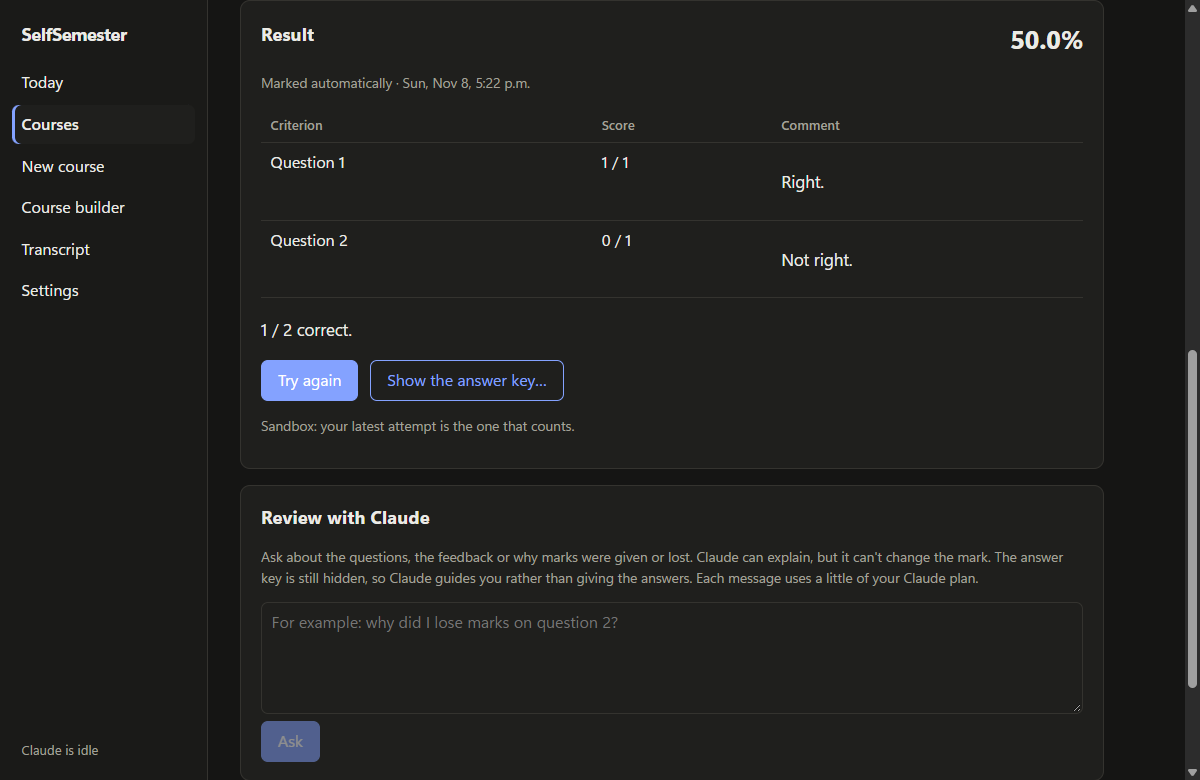
| Sandbox: try again as often as you like; the answer key stays hidden until you ask for it |
Courses Claude writes
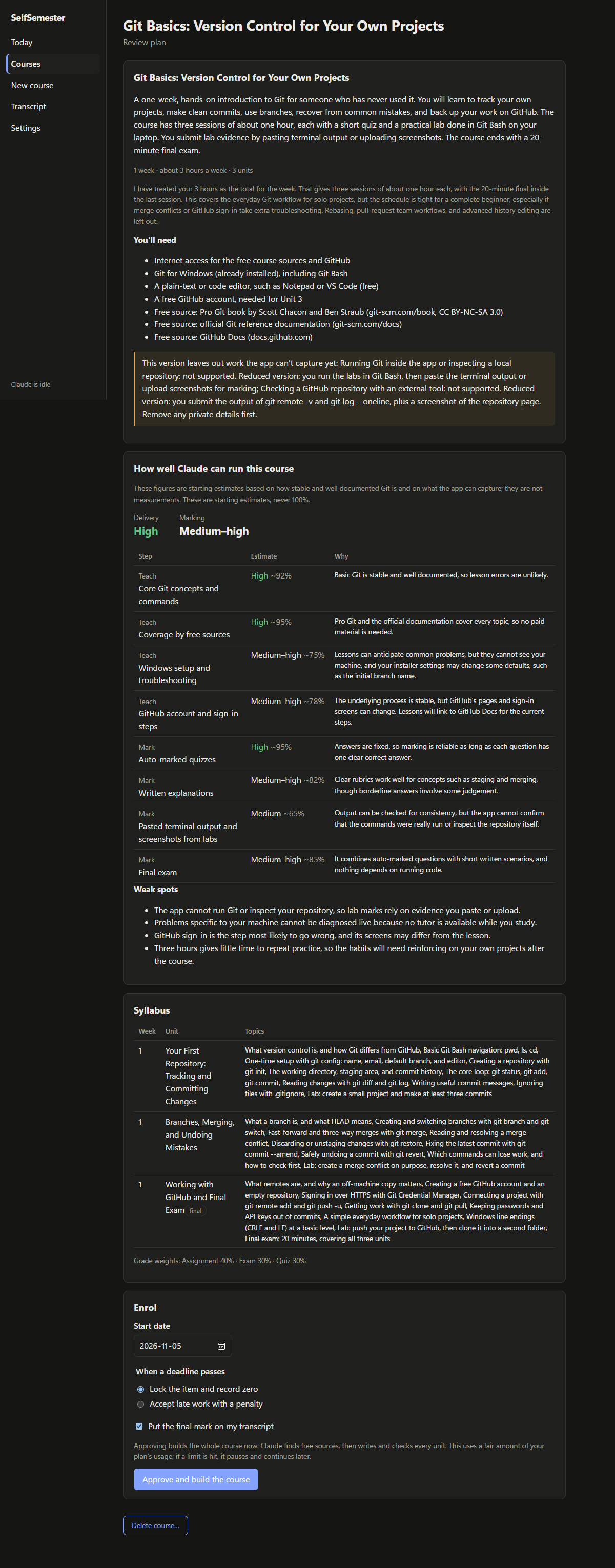
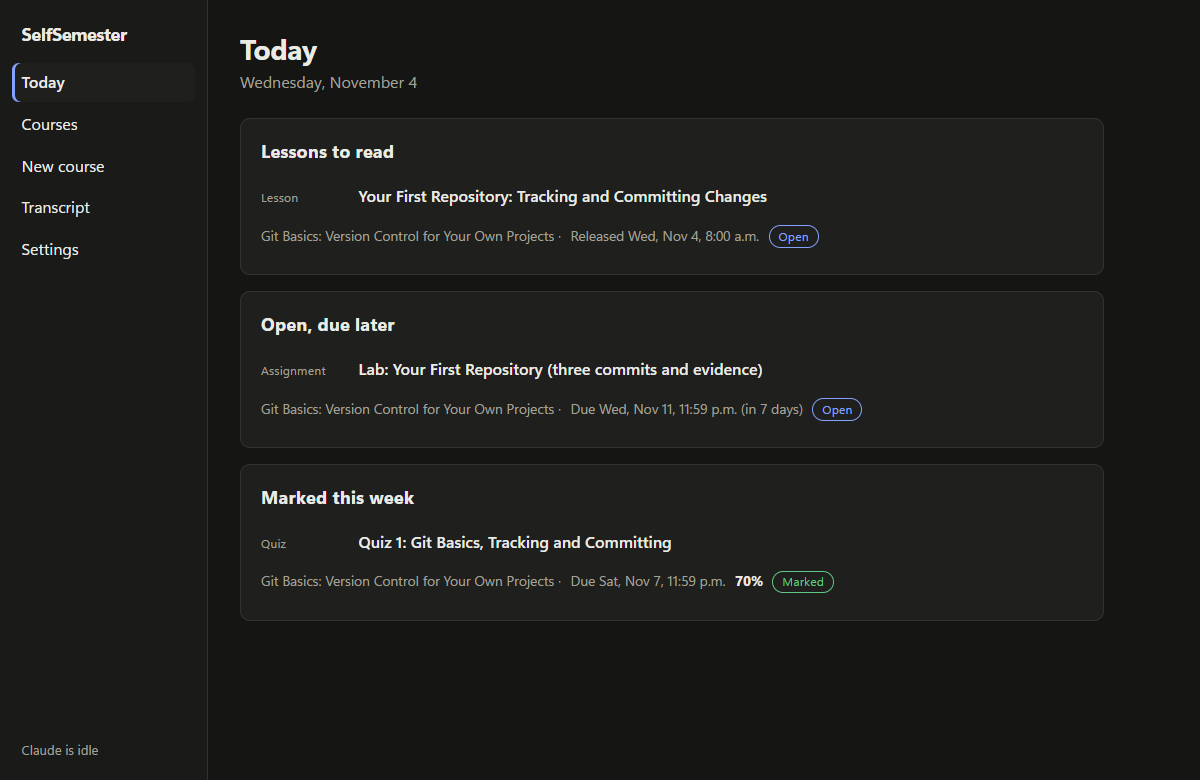
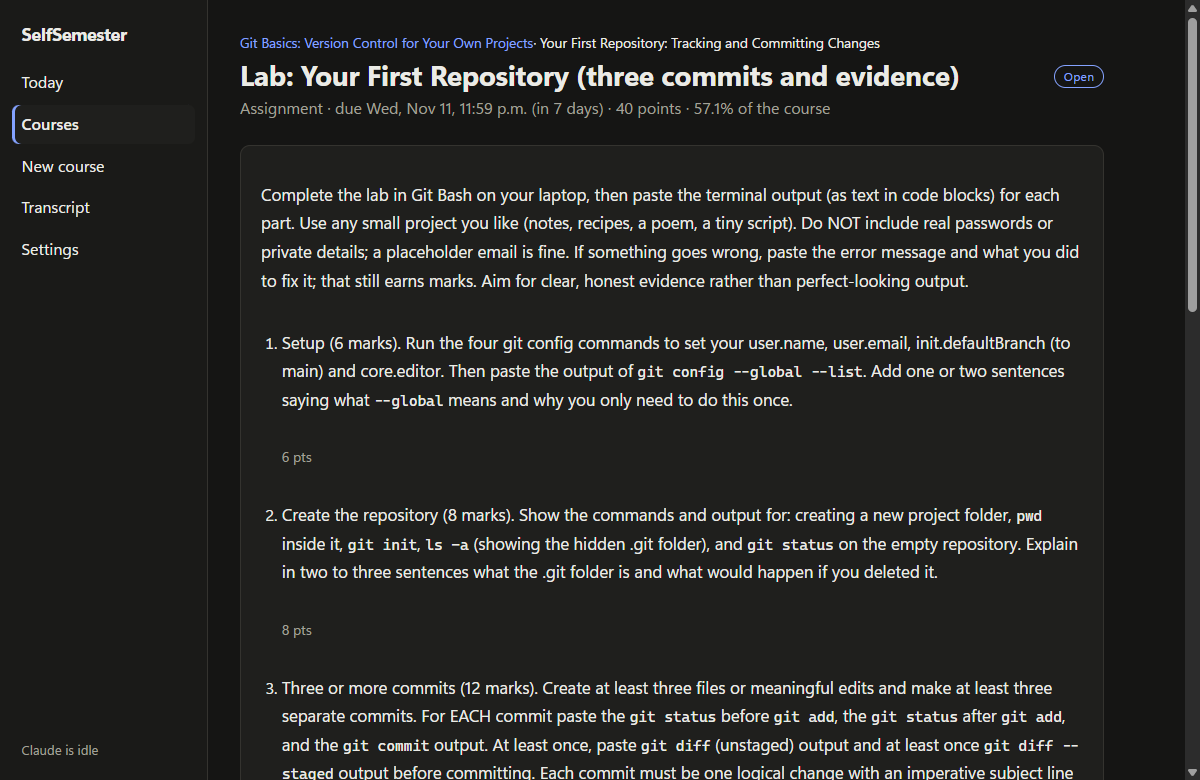
Shown with a one-week "Git basics" course that Claude generated for a test run (example names in it are made up).
 |
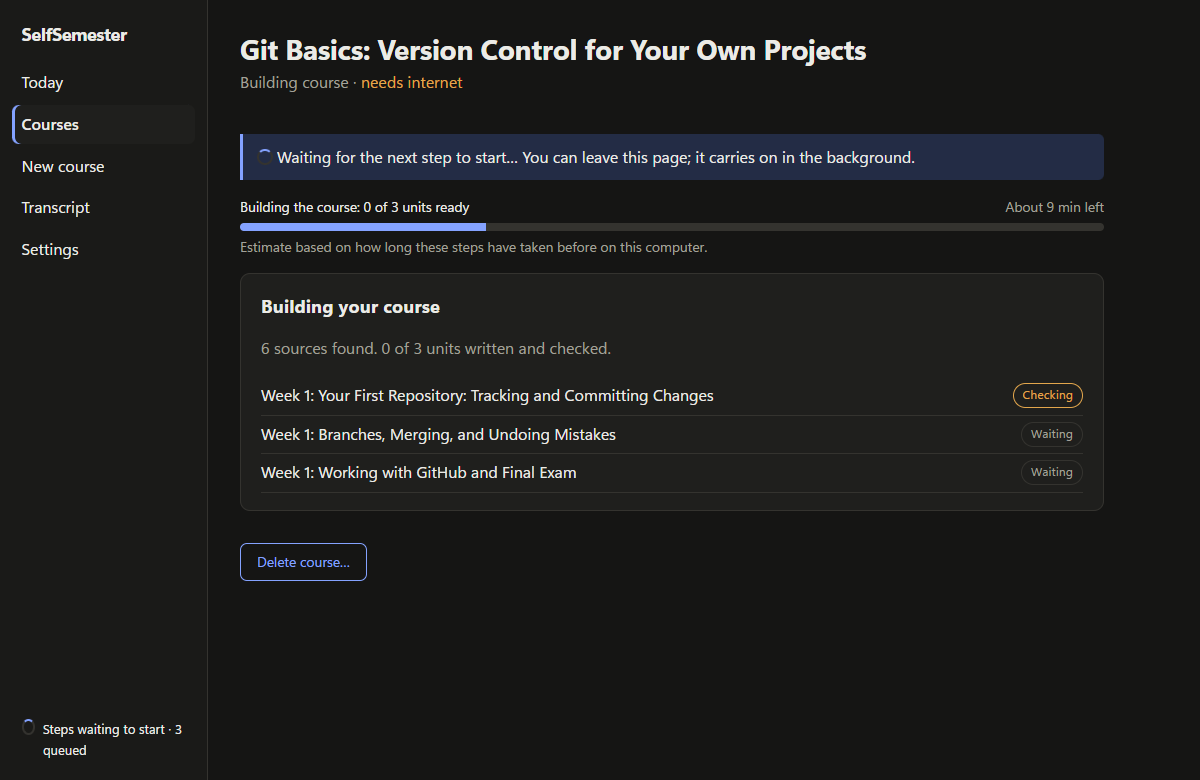 |
| Plan review: syllabus, pacing and honest accuracy estimates before anything is built | Building: each unit is written, then checked by a second model |
 |
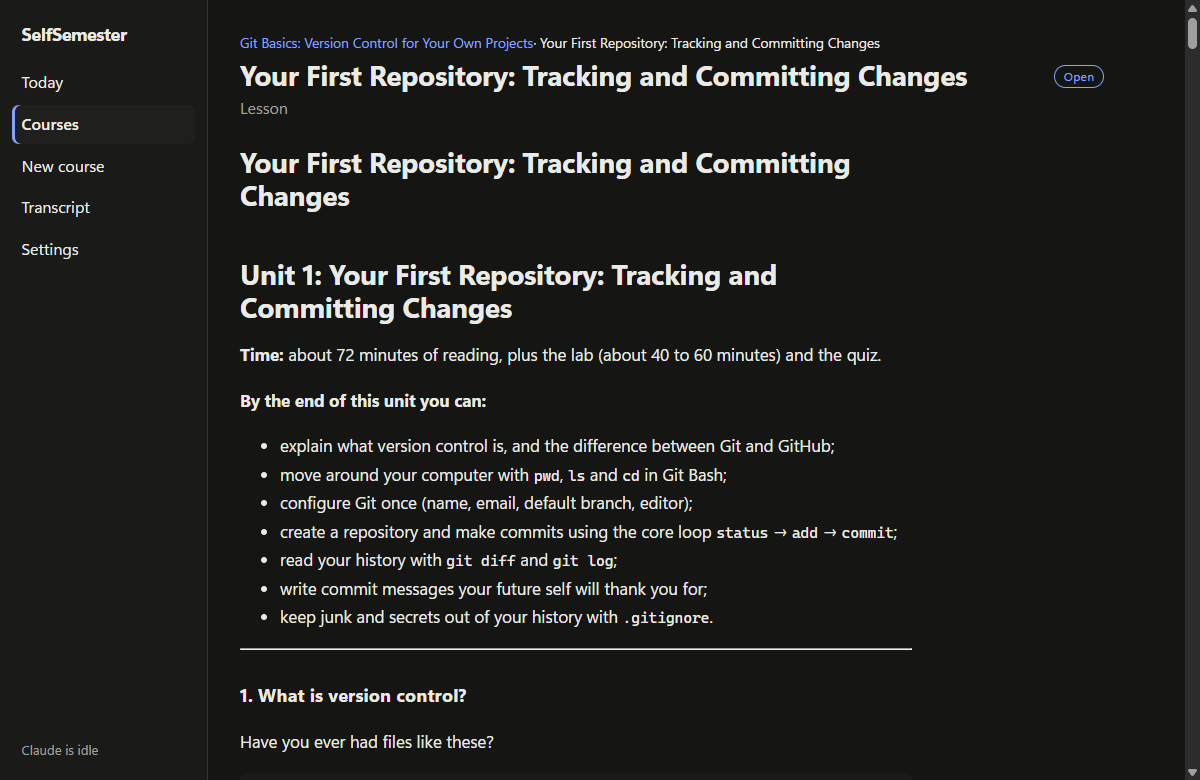 |
| Today: what's due, what's new, what's been marked | Lesson: full self-study lessons, with a distraction-free reading mode |
 |
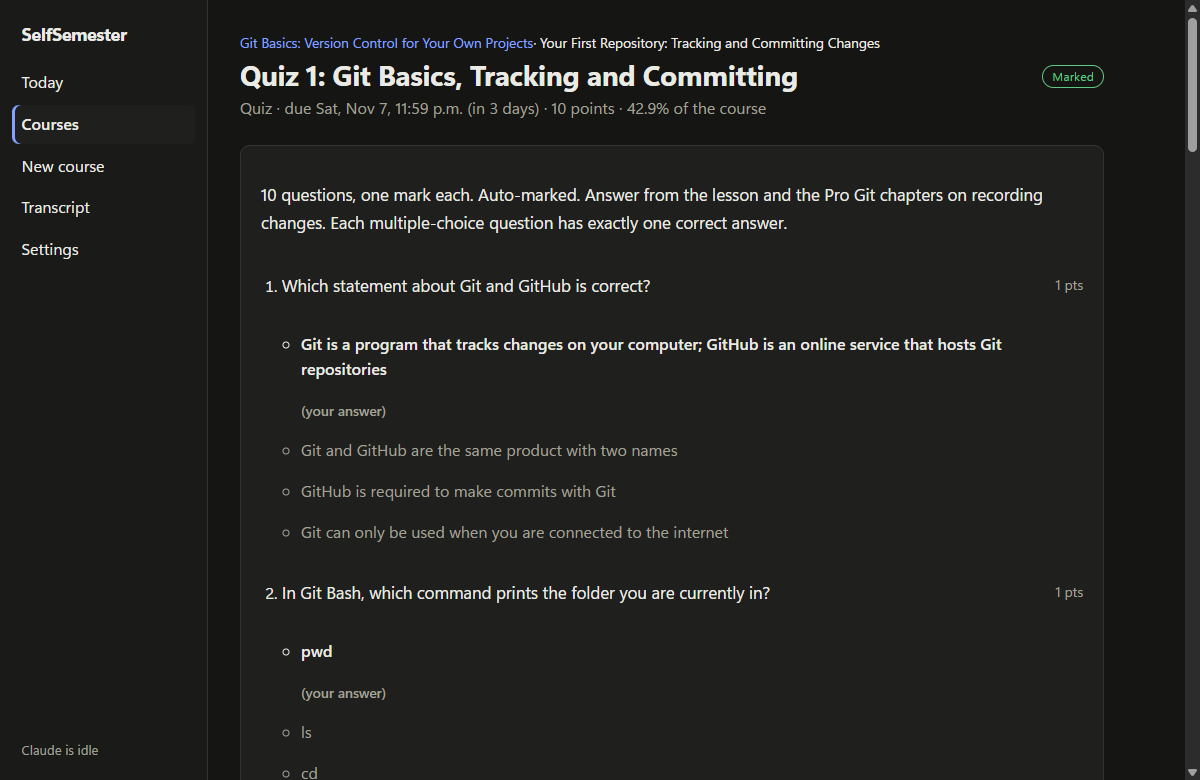 |
| Assignment: deadline, points and share of the final grade | Quiz: marked instantly, with the right answer explained for each miss |
 |
|
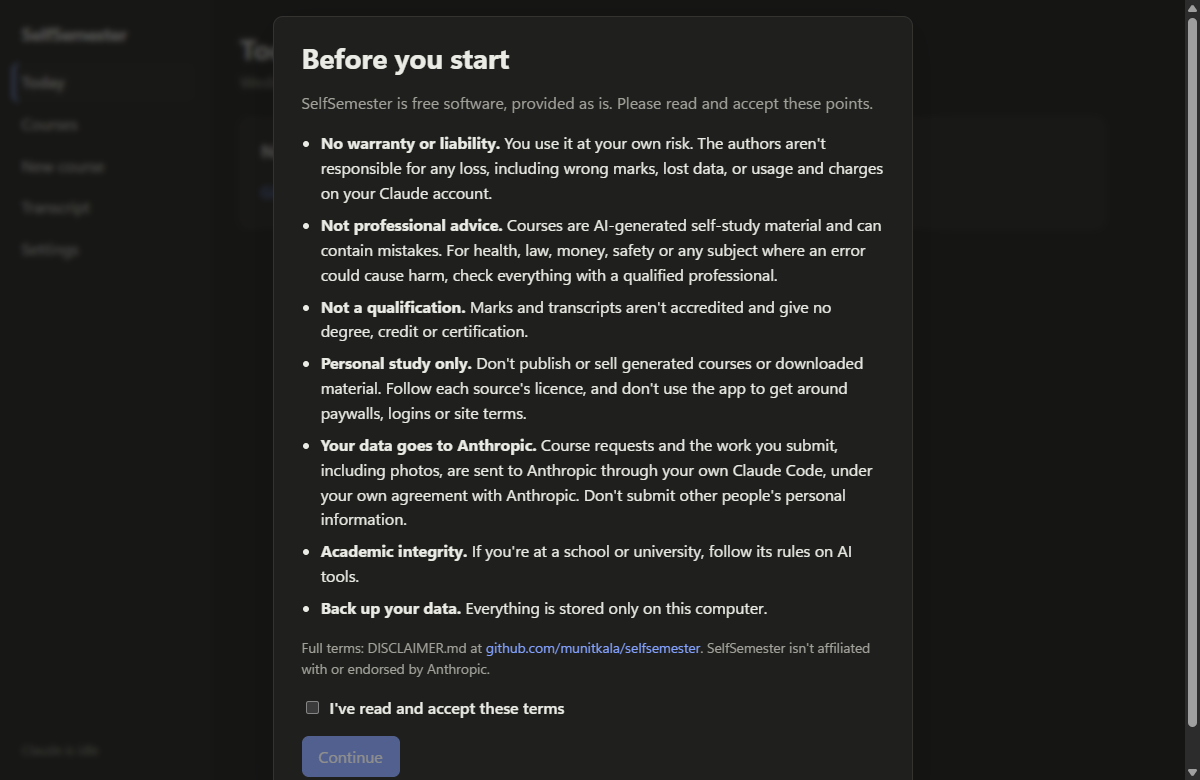
| First launch: the terms every user accepts |
Requirements
| What | Details |
|---|---|
| Windows 10 or 11, 64-bit | Uses Microsoft Edge WebView2, which Windows 11 already has (the installer adds it on Windows 10 if needed). |
| Claude Code | Installed and signed in with a Claude subscription (Pro or Max). SelfSemester runs your own copy of Claude Code; there's no API key to enter. |
| Internet | Needed while a course is being built and whenever work is marked. Reading lessons and doing work happen offline. |
To build from source instead of downloading the installer, you also need Node.js 22.17+, Rust 1.85+ and the Visual
Studio C++ build tools (see Install).
Before you use it
- Cost. SelfSemester itself is free. Signed in with a Claude subscription, Claude Code adds no extra charges. If
Claude Code is signed in with an API key instead, every call is billed to that key; the Settings page tells you
which one you're using. - Usage limits. Building a course is heavy work: roughly one call per stage plus two per unit, with each unit
taking a few minutes. A long course can use a large share of your plan's limits. When a limit is reached, the
app pauses and tries again at the reset time Claude Code reports (or at least every hour). If your limit has
reset sooner, press Resume now. A progress bar shows roughly how long building or marking has left, based on
how long each step has taken before on your computer. - Keep the app open while a course is building. Building, releases, deadline checks and reminders only run while
the window is open. Anything that fell due while it was closed is settled the next time you open it. - AI teaching and marking can be wrong. Before you enrol, each course shows a readiness report with honest
estimates for every step; none is ever 100%. A second model checks each unit, but mistakes can still get through.
Every mark shows its reasoning and the answer key, so you can check it. - Not a qualification. Transcripts record your own study. They aren't accredited and shouldn't be presented as
if they were. - Sealed files keep honest people honest. Answer keys and unreleased exams are encrypted on disk, but the key is
on the same computer. It stops accidental peeking, not someone set on cheating on their own course. - Sources. Claude prefers free and openly licensed material (OpenStax, MIT OpenCourseWare, LibreTexts, official
docs) and marks anything paid as "get this yourself". The app never bypasses paywalls. Lessons are written in
Claude's own words and link to their sources; keep generated courses for your own study. - Supported work types today: typed answers (Markdown and LaTeX), photo or PDF uploads, and auto-marked quizzes.
Courses that would need audio, camera or code-running checks are planned without those parts for now. - Your own materials: each course page has a "Your materials" section where you can add reference files (PDFs,
text, notes, code), images and typed notes. Claude reads them when it plans the course, writes each unit and marks
your work, so add them before you approve a course if you want every unit to use them. - Structured or Sandbox: chosen when you enrol. Structured gives one attempt per assessment and applies the late
policy. Sandbox lets you resubmit as often as you like with no late penalties, and keeps the answer key hidden
until you choose to see it (which closes that item). Sandbox courses are marked as such on the transcript. - Instant feedback and review: multiple-choice and numeric answers are checked the moment you submit, while
Claude marks the rest. Every marked item has a Review with Claude thread to go over the questions, feedback
and mark in depth; Claude can explain a mark but not change it. - A classroom for every course: a home page with what's next and what's due, weekly modules with objectives, a
syllabus, a gradebook and your materials, the same layout for every course. - Course builder: write the syllabus, lessons, questions, answer keys and rubrics yourself. Multiple-choice and
numeric questions are marked by the app and you mark written answers against your own key, so these courses
never call Claude. A draft can be exported to a plain folder, edited in any text editor and imported back.
Privacy
Everything stays on your computer. The app has no server and no account system. The only thing that talks to the
internet is your Claude Code, which sends course prompts, your course materials, your submitted work and review questions to Anthropic
to generate and mark courses, under your agreement with Anthropic. SelfSemester never reads, stores or sends your Claude sign-in.
Courses you write in the course builder never leave your computer, unless you ask Claude about one in review mode.
| Folder | Contents |
|---|---|
%LOCALAPPDATA%\SelfSemester |
Database, course files, sealed answer keys, submissions, your course materials |
Documents\SelfSemester\Course builder |
Courses you export from the course builder, to edit in a text editor |
Documents\SelfSemester\Completed |
Archives of finished courses: summary, lesson notes, your work, feedback, reference list |
Documents\SelfSemester\Backups |
Safety copies of your data, made before each update (the last 5 are kept) |
Legal and responsible use
Read DISCLAIMER.md before using SelfSemester; the app also asks you to accept its key points the
first time it opens. In short:
- No warranty. It's free software provided as is. The authors aren't liable for any loss, including wrong marks,
lost data or usage on your Claude account. You use it at your own risk. - Not professional advice. Courses Claude writes are AI-generated self-study material, and courses you write
yourself are your own content. For medicine, law, finance, safety or any subject where a mistake could hurt someone,
check everything with a qualified professional. - Personal study only. Don't publish or sell generated courses or downloaded sources. Follow each source's
licence, and never use or change the app to get around paywalls, logins or site terms. - Your Claude account, your agreement. Claude Code runs under your own agreement with Anthropic, and your
requests and submitted work are sent to Anthropic. - Academic integrity. If you're at a school or university, follow its rules on AI tools.
- Back up your data. Everything lives on your computer, and nobody else can recover it. SelfSemester copies it
toDocuments\SelfSemester\Backupsbefore each update, but keep your own copy somewhere else too.
Install
Download the installer (easiest)
- Go to the latest release and download
SelfSemester_<version>_x64-setup.exeunder Assets. - Run it. It installs for your Windows account only, so it doesn't need administrator rights.
- The installer isn't code-signed, so Windows SmartScreen warns about an unknown publisher. Choose
More info → Run anyway. To check the download first, runGet-FileHash .\SelfSemester_<version>_x64-setup.exe
in PowerShell and compare it with the.sha256file next to the installer on the release page. - Open SelfSemester from the Start menu.
The installers are built by GitHub Actions straight from the tagged source code (see.github/workflows/release.yml), not on anyone's own computer.
Updating: download the newer installer and run it. It replaces only the program: your courses, materials,
marks, transcript and course-builder drafts are kept, and the new version backs them up toDocuments\SelfSemester\Backups before it first opens them. If your data ever goes missing, SelfSemester restores
the newest backup by itself when it starts. Settings → Your data and backups shows the backups and has a
Back up now button.
Uninstalling: use Settings → Apps → Installed apps in Windows. Your data in %LOCALAPPDATA%\SelfSemester
and Documents\SelfSemester stays until you delete it yourself.
Or build it yourself
You need Node.js 22.17+, Rust 1.85+ and the Visual Studio C++ build tools.
git clone https://github.com/munitkala/selfsemester.git
cd selfsemester
npm install
npm run tauri build -- --bundles nsis
The installer is written to src-tauri\target\release\bundle\nsis\. Run it the same way as above.
Then connect Claude Code
Courses you write yourself in the course builder work without this. For courses Claude writes and marks, install
Claude Code, open a terminal, run claude and sign in with your Claude account.
Then in SelfSemester open Settings and press Run test.
Development
npm install
npm run tauri dev          # run the app with hot reload
npm run check              # type-check the interface
cd src-tauri
cargo test                 # unit tests, including a simulated course from intake to transcript
Two tests call the real Claude Code and use plan usage, so they're skipped unless asked for:cargo test -- --ignored live_haiku (one tiny call) andcargo test --lib -- --ignored live_compile --nocapture (every build stage on a one-week course, about five minutes).
Two environment variables help when testing without touching real courses:
| Variable | Effect |
|---|---|
SELFSEMESTER_HOME=<folder> |
Keep all data (database, courses, archives) under that folder instead of AppData and Documents |
SELFSEMESTER_NO_CLAUDE=1 |
Never start Claude jobs; queued work just waits (useful for demos and UI work) |
The screenshots come from demo data made by the seed_demo test (see its comment in course/pipeline.rs).
How it fits together
src/                      SvelteKit interface (Today, Courses, New course, Course builder, course and item pages, Transcript, Settings)
src-tauri/src/
  claude/                 runs `claude -p` with a JSON schema, reads the result, spots usage limits
  course/
    prompts.rs            the prompt and JSON schema for each stage
    pipeline.rs           intake -> plan -> sources -> units -> check -> schedule
    schedule.rs           release dates, deadlines, late policy, Structured and Sandbox rules
    marking.rs            submissions, auto-marking, instant feedback, self-marking, grades, transcript, archive
    materials.rs          your own reference files, images and notes for a course
    review.rs             review mode: talking a marked item through with Claude
    builder.rs            the course builder: drafts, publishing, folder export and import
    seal.rs               encrypted answer keys and exams
  db/                     SQLite schema, migrations, job queue
  worker.rs               background thread: runs one Claude job at a time and ticks the clock
  backup.rs               backups before each update, and restoring if the data goes missing
Every call to Claude is a row in a job queue, so work survives crashes and usage limits. Each call runs in an empty
folder with no tools (unless the stage needs web search or must read an upload or your course materials), no MCP servers and none of the
user's Claude Code settings, which keeps calls small and predictable.
Not built yet
- Downloading and indexing sources locally (lessons currently cite their sources rather than quoting from them)
- Tray icon and start with Windows, so reminders arrive with the window closed
- Code-running checks (e.g. Godot), audio marking (e.g. piano) and camera capture
- Re-mark requests, a spaced-repetition review deck, and PDF archives (archives are Markdown for now)
Licence
MIT. See LICENSE, DISCLAIMER.md for the terms of use, and THIRD_PARTY.md for the libraries the app uses.
SelfSemester is an independent project. It isn't made by, affiliated with or endorsed by Anthropic. Claude and
Claude Code are trademarks of Anthropic.
About this project
Written by the SelfSemester authors with help from Claude.
Reviews (0)
Sign in to leave a review.
Leave a reviewNo results found