Super-ai-agent
Health Uyari
- License — License: Apache-2.0
- Description — Repository has a description
- Active repo — Last push 0 days ago
- Low visibility — Only 7 GitHub stars
Code Uyari
- network request — Outbound network request in super-ai-agent-web/package-lock.json
- network request — Outbound network request in super-ai-agent-web/package.json
- network request — Outbound network request in super-ai-agent-web/src/api/chat-v2.js
Permissions Gecti
- Permissions — No dangerous permissions requested
Bu listing icin henuz AI raporu yok.
基于 Spring Boot 3.5 + Java 21 + Spring AI + Vue 3,实现 AI 情感咨询、深度思考智能体、RAG 知识库检索、多工具调用等核心功能。支持恋爱报告生成、地图服务集成、PDF文档处理等实用场景。架构清晰、文档完善,非常适合作为 AI 应用学习和简历项目,学习门槛低
Super AI Agent - Intelligent Conversational Assistant Platform
中文 | English





Built with Spring Boot 3.5 + Java 21 + Spring AI + Vue 3, featuring AI relationship counseling, deep-thinking agent, RAG knowledge retrieval, and multi-tool invocation. Supports love report generation, map service integration, PDF document processing, and more. Clean architecture, comprehensive documentation — ideal for learning AI applications and boosting your resume.
📸 Screenshots
Home Page
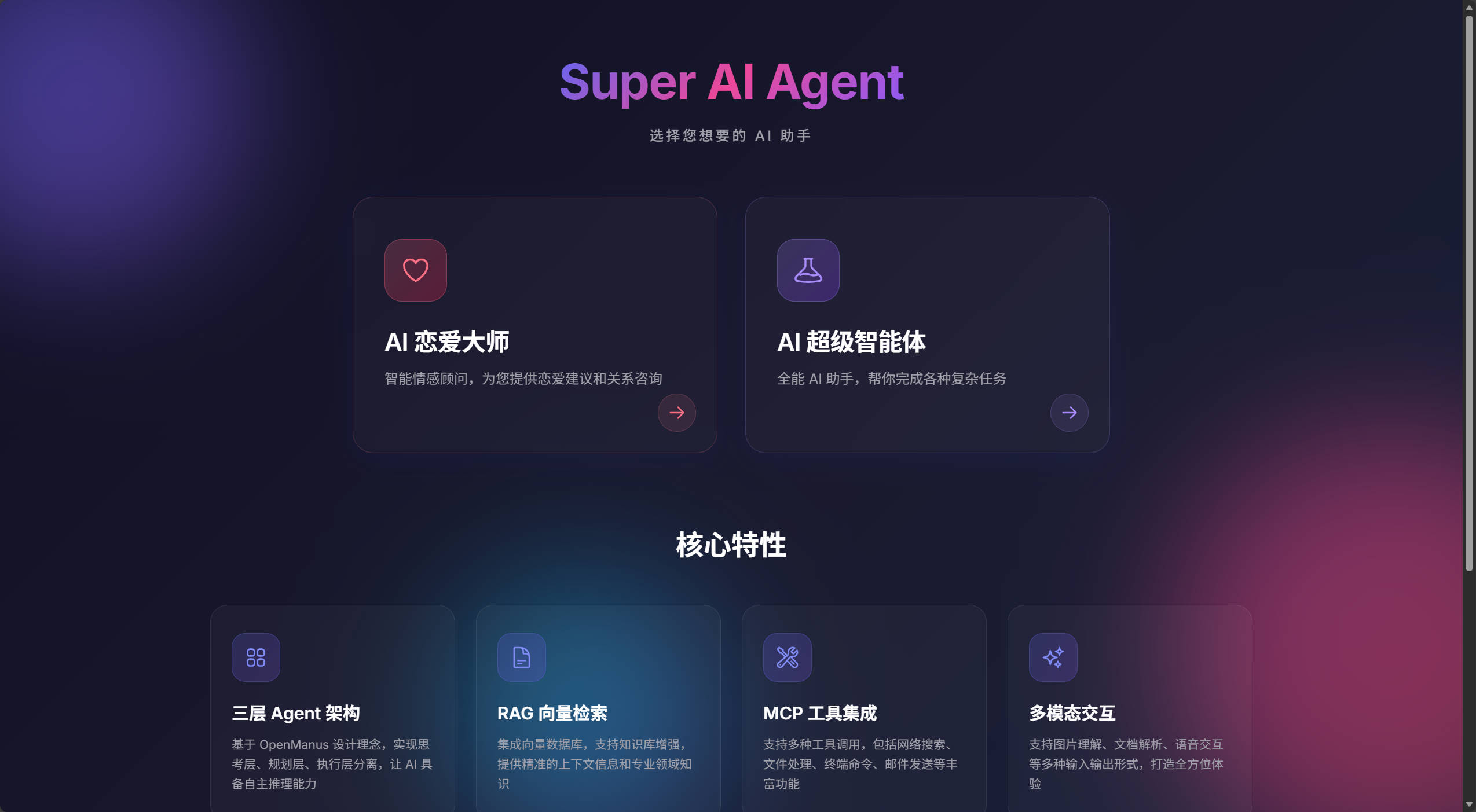
Home Page - Choose Your AI Assistant
Highlights:
- ✅ Clean and modern UI design
- ✅ Two AI applications to choose from
- ✅ Quick access to Love Master and Super Agent
- ✅ Responsive layout for all devices
AI Love Master
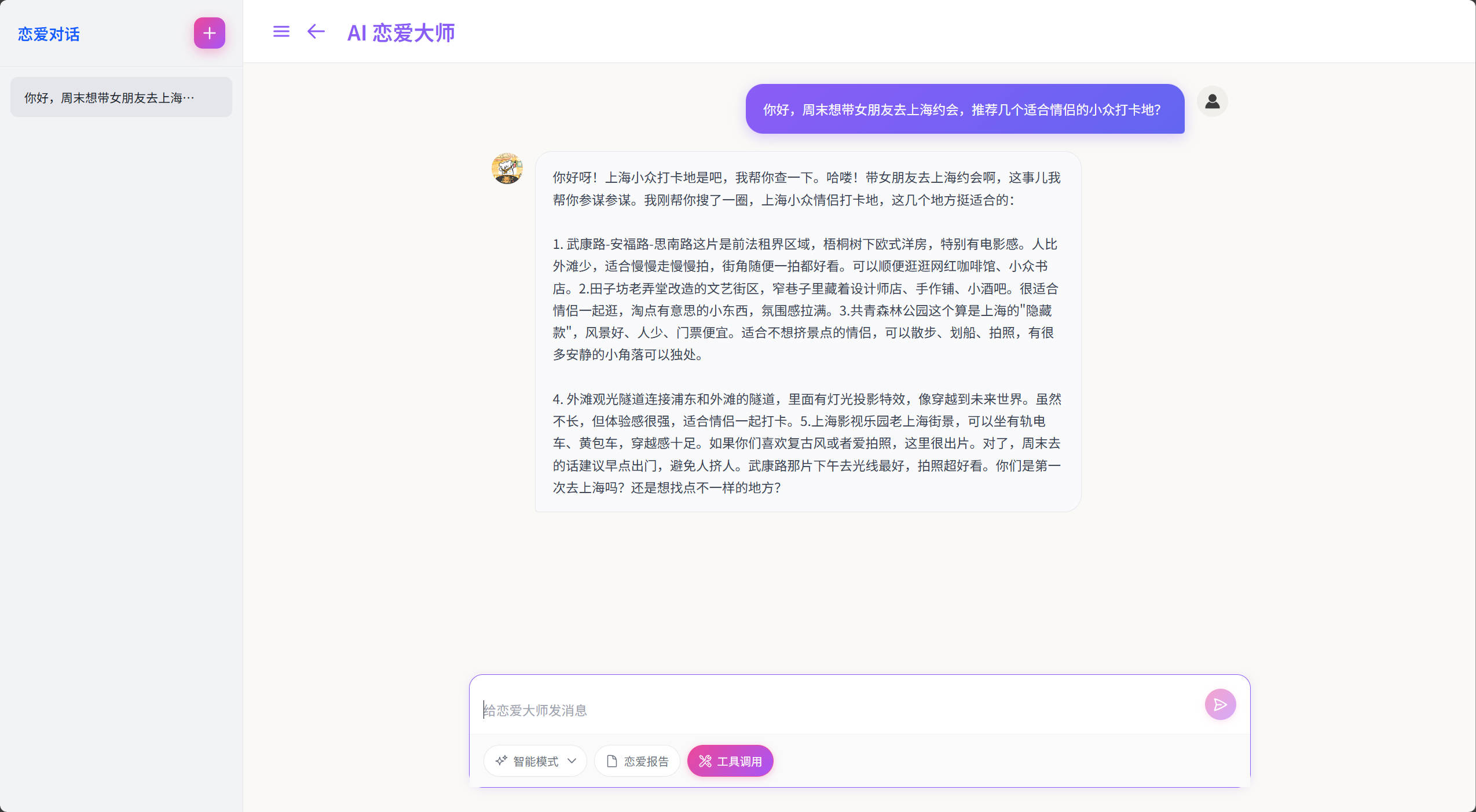
AI Love Master - Relationship Counseling & Plain Text Chat
Highlights:
- ✅ Natural plain text chat without Markdown formatting
- ✅ Three conversation modes: Basic, Smart (recommended), RAG Q&A
- ✅ Feature enhancements: Love report generation, tool invocation
- ✅ Session management: Create, rename, delete conversations
- ✅ Real-time streaming output with typewriter effect
AI Super Agent (Manus)
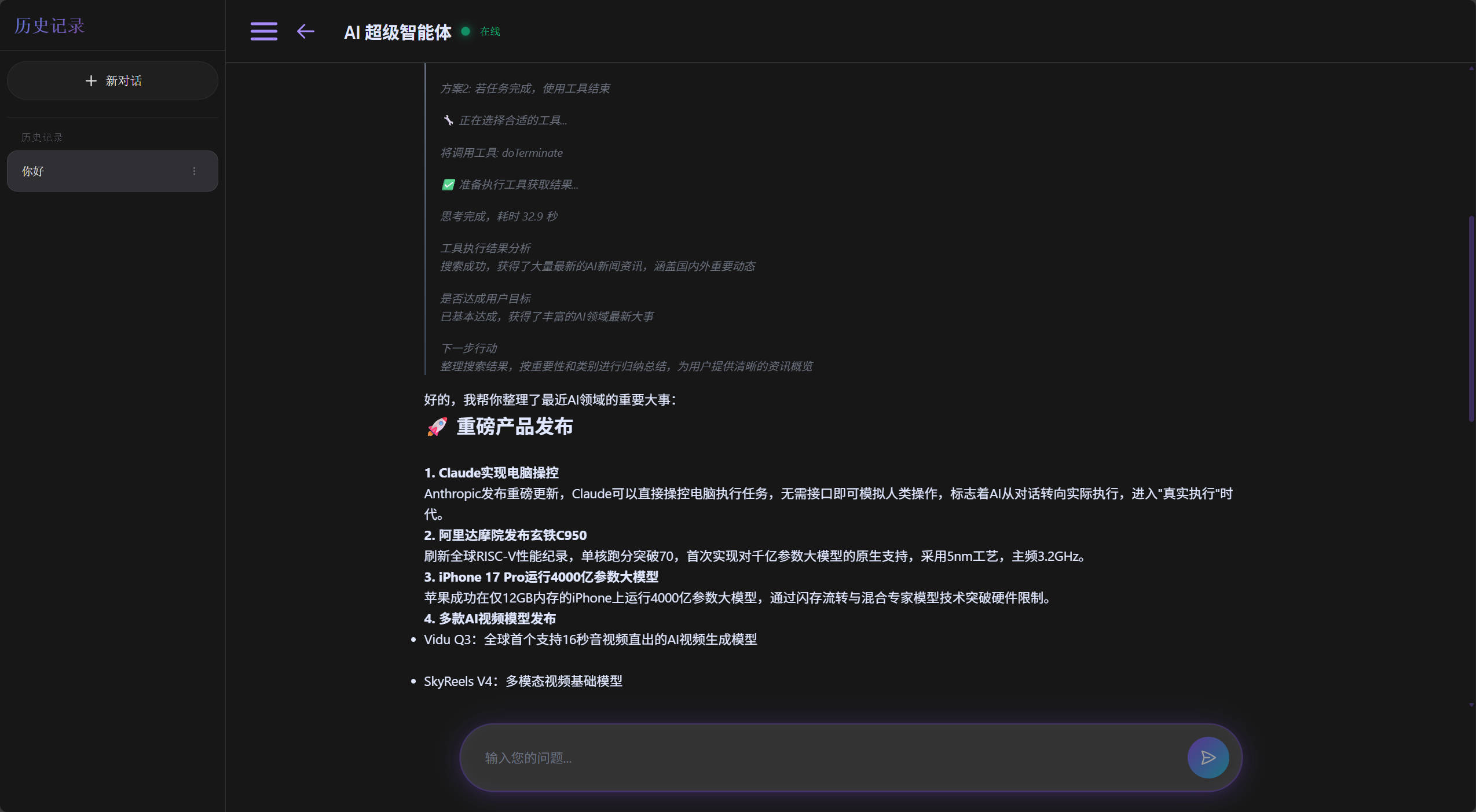
Manus Super Agent - Deep Thinking & Tool Invocation
Highlights:
- ✅ Gemini-style thinking process display (collapsible)
- ✅ Real-time thinking steps and duration
- ✅ 14+ automatic tool calls (search, files, email, PDF, etc.)
- ✅ MCP protocol integration (Amap 15 tools)
- ✅ Smart question classification (simple → direct answer, complex → deep thinking)
📖 About
Super AI Agent is a production-grade AI conversational platform that demonstrates how to build a complete intelligent agent application using Spring AI.
🎭 Two Core Applications
💕 AI Love MasterProfessional relationship counseling assistant
|
🤖 AI Super Agent (Manus)All-purpose assistant with deep thinking
|
🌟 Why This Project?
| Feature | Description |
|---|---|
| 📚 Beginner Friendly | Detailed code comments, clean architecture, great for Spring AI beginners |
| 🏗️ Complete Architecture | Layered architecture + Agent pattern + RAG + Tool invocation |
| 🎯 Production Grade | Exception handling, logging, monitoring, and protection mechanisms |
| 📝 Well Documented | README, code comments, architecture diagrams included |
| 💼 Resume Builder | Modern tech stack, complete features, interview bonus |
| 🚀 Quick Deploy | One-click startup with Docker Compose |
✨ Features
AI Love Master
- 💬 Smart Chat: Three conversation modes (Basic/Smart/RAG)
- 📊 Love Reports: Auto-generate structured relationship analysis reports
- 📥 Report Download: Download and copy report content
- 🎯 RAG Knowledge: Professional answers based on relationship knowledge base
- 🔄 Smart Fallback: Auto-switch to regular chat when RAG fails
AI Super Agent (Manus)
- 🧠 Deep Thinking: Display complete thinking process (collapsible)
- 🔧 Tool Invocation: 14+ tools (search, files, email, PDF generation, etc.)
- 🌐 MCP Integration: Amap 15 tools (POI search, route planning, etc.)
- 💭 Thinking Visualization: Gemini-style thinking process display
- ⚡ Streaming Output: Real-time AI response and thinking steps
- 🎨 Smart Classification: Auto-detect simple/complex questions for selective thinking
Core Capabilities
| Feature | Description |
|---|---|
| Question Classification | Keyword-based quick type detection (simple/complex) |
| Selective Thinking | Simple questions answered directly, complex ones get deep thinking |
| Tool Invocation | Automatically select and call appropriate tools |
| Infinite Loop Prevention | Semantic repetition, tool repetition, consecutive failure detection |
| Execution Monitoring | Timeout control, execution state tracking |
| Conversation Memory | Multiple storage options (memory/file/database) |
| RAG Retrieval | Vector storage, query transformation, multi-query expansion |
🏗️ Tech Architecture
Backend Stack
| Technology | Version | Description |
|---|---|---|
| Java | 21 | Programming language |
| Spring Boot | 3.5.9 | Application framework |
| Spring AI | 1.0.0 | AI integration framework |
| Spring AI Alibaba | 1.0.0.2 | Alibaba Cloud AI integration |
| MyBatis-Plus | 3.5.12 | ORM framework |
| MySQL | 8.0+ | Conversation history storage |
| PostgreSQL | 14+ | Vector database (PGVector) |
| LangChain4j | 1.0.0-beta2 | AI orchestration framework |
Frontend Stack
| Technology | Version | Description |
|---|---|---|
| Vue | 3.4.0 | Frontend framework |
| Vue Router | 4.2.0 | Routing |
| Axios | 1.6.0 | HTTP client |
| Vite | 5.0.0 | Build tool |
AI Capabilities
| Capability | Provider | Description |
|---|---|---|
| Chat Model | Alibaba Cloud Tongyi Qianwen | qwen-max, qwen-plus |
| Embedding Model | Alibaba Cloud DashScope | text-embedding-v2 |
| Local Model | Ollama | Optional local deployment |
| Vector Store | PGVector | PostgreSQL vector extension |
| MCP Tools | Amap | 15 map-related tools |
Architecture Design
┌─────────────────────────────────────────────────────────┐
│                    Frontend Layer (Vue 3)                 │
│  ┌──────────────┐  ┌──────────────┐  ┌──────────────┐  │
│  │  Love Master  │  │  Super Agent  │  │   Home Page   │  │
│  └──────────────┘  └──────────────┘  └──────────────┘  │
└─────────────────────────────────────────────────────────┘
                            │
                            │ HTTP/SSE
                            ▼
┌─────────────────────────────────────────────────────────┐
│                  Controller Layer (Spring MVC)            │
│  ┌──────────────┐  ┌──────────────┐  ┌──────────────┐  │
│  │ LoveApp      │  │ Manus        │  │ ChatHistory  │  │
│  │ Controller   │  │ Controller   │  │ Controller   │  │
│  └──────────────┘  └──────────────┘  └──────────────┘  │
└─────────────────────────────────────────────────────────┘
                            │
                            ▼
┌─────────────────────────────────────────────────────────┐
│                     Agent Layer                           │
│  ┌──────────────────────────────────────────────────┐  │
│  │              MonuoManus (Super Agent)              │  │
│  │  ┌────────────┐  ┌────────────┐  ┌────────────┐ │  │
│  │  │ Thinking   │  │ ToolCall   │  │ Database   │ │  │
│  │  │ Agent      │  │ Agent      │  │ Memory     │ │  │
│  │  └────────────┘  └────────────┘  └────────────┘ │  │
│  └──────────────────────────────────────────────────┘  │
│  ┌──────────────────────────────────────────────────┐  │
│  │                LoveApp (Love Master)               │  │
│  │  ┌────────────┐  ┌────────────┐  ┌────────────┐ │  │
│  │  │ RAG        │  │ Fallback   │  │ Report     │ │  │
│  │  │ Advisor    │  │ Strategy   │  │ Generator  │ │  │
│  │  └────────────┘  └────────────┘  └────────────┘ │  │
│  └──────────────────────────────────────────────────┘  │
└─────────────────────────────────────────────────────────┘
                            │
                            ▼
┌─────────────────────────────────────────────────────────┐
│                    Tools Layer                            │
│  ┌──────────┐ ┌──────────┐ ┌──────────┐ ┌──────────┐  │
│  │ Web      │ │ File     │ │ Mail     │ │ PDF      │  │
│  │ Search   │ │ Operation│ │ Send     │ │ Generate │  │
│  └──────────┘ └──────────┘ └──────────┘ └──────────┘  │
│  ┌──────────┐ ┌──────────┐ ┌──────────┐ ┌──────────┐  │
│  │ Terminal │ │ Download │ │ Scraping │ │ Document │  │
│  │ Operation│ │ Resource │ │ Web      │ │ Reader   │  │
│  └──────────┘ └──────────┘ └──────────┘ └──────────┘  │
│  ┌──────────────────────────────────────────────────┐  │
│  │         MCP Tools (Amap 15 tools)                 │  │
│  └──────────────────────────────────────────────────┘  │
└─────────────────────────────────────────────────────────┘
                            │
                            ▼
┌─────────────────────────────────────────────────────────┐
│                    Data Layer                             │
│  ┌──────────────┐  ┌──────────────┐  ┌──────────────┐  │
│  │ MySQL        │  │ PostgreSQL   │  │ File System  │  │
│  │ (Chat History)│  │ (Vector Store)│ │ (Docs/Cache) │  │
│  └──────────────┘  └──────────────┘  └──────────────┘  │
└─────────────────────────────────────────────────────────┘
🚀 Quick Start
Option 1: Docker Compose (Recommended)
If you have Docker installed, this is the easiest way:
# 1. Set environment variables
export DASHSCOPE_API_KEY=your_api_key
export MYSQL_PASSWORD=your_password
export POSTGRESQL_PASSWORD=your_password

# 2. Start all services (App + MySQL + PostgreSQL)
docker-compose -f docker-compose.local.yml up --build

# 3. Wait for startup, then access:
# Backend Swagger UI: http://localhost:8123/api/swagger-ui.html
# Frontend: http://localhost:5173
Option 2: Local Manual Setup
1. Prerequisites
- ✅ Java 21+
- ✅ Node.js 18+
- ✅ Maven 3.8+
- ✅ MySQL 8.0+
- ✅ PostgreSQL 14+ (with PGVector extension)
- ✅ Alibaba Cloud DashScope API Key
2. Clone the Repository
git clone https://github.com/muonuo/Super-ai-agent.git
cd Super-ai-agent
3. Configure Databases
MySQL Setup:
-- Create database
CREATE DATABASE super_ai_agent CHARACTER SET utf8mb4 COLLATE utf8mb4_unicode_ci;

-- Tables are auto-created, no manual SQL needed
PostgreSQL + PGVector Setup:
-- Create database
CREATE DATABASE super_ai_agent;

-- Install PGVector extension (Spring AI will auto-initialize vector tables)
CREATE EXTENSION IF NOT EXISTS vector;
4. Configure Environment Variables
Edit src/main/resources/application.yml:
# MySQL config
spring:
  datasource:
    url: jdbc:mysql://localhost:3306/super_ai_agent?useUnicode=true&characterEncoding=utf-8&useSSL=false&serverTimezone=Asia/Shanghai
    username: root
    password: your_mysql_password

  # AI config (required)
  ai:
    dashscope:
      api-key: your_dashscope_api_key  # Get it at https://dashscope.console.aliyun.com/

# PostgreSQL config
pgvector:
  datasource:
    url: jdbc:postgresql://localhost:5432/super_ai_agent
    username: postgres
    password: your_postgresql_password

# Optional config
search-api:
  tavily-api-key: your_tavily_api_key  # For web search
qq-email:
  from: your_qq_email
  auth-code: your_qq_email_auth_code   # For sending love reports
💡 Getting a DashScope API Key:
- Visit https://dashscope.console.aliyun.com/
- Register/login to Alibaba Cloud
- Enable DashScope service
- Create an API Key
- New users get free credits
5. Start Backend
# Option A: Using Maven (recommended)
cd Super-ai-agent
mvn clean package -DskipTests
java -jar target/Super-ai-agent-0.0.1-SNAPSHOT.jar

# Option B: Using IDE
# Run src/main/java/com/monuo/superaiagent/SuperAiAgentApplication.java directly
Backend will start at http://localhost:8123/api
6. Start Frontend
cd super-ai-agent-web
npm install
npm run dev
Frontend will start at http://localhost:5173
7. Access the Application
Open your browser and visit:
- Frontend: http://localhost:5173
- Backend Swagger UI: http://localhost:8123/api/swagger-ui.html
- Backend API Docs: http://localhost:8123/api/v3/api-docs
❓ FAQ
Q1: Port Already in Use
Change the port in src/main/resources/application.yml:
server:
  port: 8123  # Change to another port, e.g. 8124
Q2: Database Connection Failed
Make sure MySQL and PostgreSQL services are running:
# Windows
net start MySQL80
net start postgresql-x64-14

# Linux/Mac
sudo systemctl start mysql
sudo systemctl start postgresql
Q3: PGVector Extension Not Installed
PostgreSQL requires the PGVector extension:
# Ubuntu/Debian
sudo apt install postgresql-14-pgvector

# macOS (Homebrew)
brew install pgvector

# Windows
# Download from https://github.com/pgvector/pgvector-windows/releases
Q4: Maven Build Failed
Make sure you're using Java 21 and Maven 3.8+:
java -version
mvn -version
Q5: DashScope API Key Not Found
- Visit https://dashscope.console.aliyun.com/
- Register/login to Alibaba Cloud
- Enable DashScope service
- Create an API Key
- New users get free credits
🛠️ Development Guide
Project Structure
Super-ai-agent/
├── src/main/java/com/monuo/superaiagent/
│   ├── agent/              # Agent core
│   │   ├── BaseAgent.java
│   │   ├── ThinkingAgent.java
│   │   ├── ToolCallAgent.java
│   │   └── MonuoManus.java
│   ├── app/                # Application layer
│   │   └── LoveApp.java
│   ├── tools/              # Tools
│   ├── rag/                # RAG related
│   ├── controller/         # Controllers
│   ├── service/            # Services
│   └── config/             # Configuration
├── super-ai-agent-web/     # Frontend project
│   ├── src/
│   │   ├── views/          # Pages
│   │   ├── components/     # Components
│   │   ├── api/            # API interfaces
│   │   └── router/         # Routes
│   └── package.json
├── docs/                   # Documentation
└── docker-compose.yaml     # Docker config
Adding New Tools
- Create a tool class:
@Component
public class MyTool {

    @Tool(description = "Tool description")
    public String myFunction(
        @ToolParam(description = "Parameter description") String param) {
        // Tool logic
        return "result";
    }
}
- Register the tool:
@Configuration
public class ToolRegistration {

    @Bean
    public List<ToolCallback> myTools(MyTool myTool) {
        return ToolCallback.from(myTool);
    }
}
Adding New RAG Documents
Place Markdown documents in the src/main/resources/ directory. The system will auto-load them.
🎯 Usage Examples
AI Love Master
User: My girlfriend and I have been together for 3 years. She seems a bit cold lately. What should I do?

AI: [Smart Mode + Love Report]
1. Analyze the conversation in detail
2. Auto-generate a relationship analysis report
3. Provide 3-5 specific, actionable suggestions
4. Support downloading and copying the report
AI Super Agent
User: Search for today's AI news

AI: [Showing thinking process]
💭 Thinking...
├─ Question type: Complex
├─ User wants today's AI news
├─ Need to use webSearch tool
└─ Thinking time: 1.2s

[Calling tool: webSearch]
[Returning search results...]
🤝 Contributing
Issues and Pull Requests are welcome!
- Fork this repository
- Create a feature branch (
git checkout -b feature/AmazingFeature) - Commit your changes (
git commit -m 'Add some AmazingFeature') - Push to the branch (
git push origin feature/AmazingFeature) - Submit a Pull Request
📄 License
This project is licensed under the MIT License - see the LICENSE file for details.
🙏 Acknowledgments
- Spring AI - AI integration framework
- Alibaba Cloud Bailian - AI model service
- LangChain4j - AI orchestration framework
- PGVector - PostgreSQL vector extension
📞 Contact
- GitHub: @muonuo
- Repository: Super-ai-agent
- Issues: Report a bug
If this project helps you, please give it a ⭐ Star!
Made with ❤️ by Monuo
Yorumlar (0)
Yorum birakmak icin giris yap.
Yorum birakSonuc bulunamadi