BarkOS
Health Warn
- License — License: MIT
- Description — Repository has a description
- Active repo — Last push 0 days ago
- Low visibility — Only 5 GitHub stars
Code Fail
- rm -rf — Recursive force deletion command in .github/actions/install-node-dependencies/action.yml
- process.env — Environment variable access in .github/scripts/pr-test-loc-summary.mjs
- process.env — Environment variable access in .github/scripts/render-readme-downloads-badge.mjs
- network request — Outbound network request in .github/scripts/render-readme-downloads-badge.mjs
Permissions Pass
- Permissions — No dangerous permissions requested
No AI report is available for this listing yet.
Local-first AI company operating system with a Codex lead, Claude and OpenCode workers, and a live pixel office.
BarkOS
Your local-first AI software company.
Describe the outcome. BarkOS reads the project, builds the team, divides the work, and keeps every agent visible.
Product website · Download the macOS preview · Star BarkOS



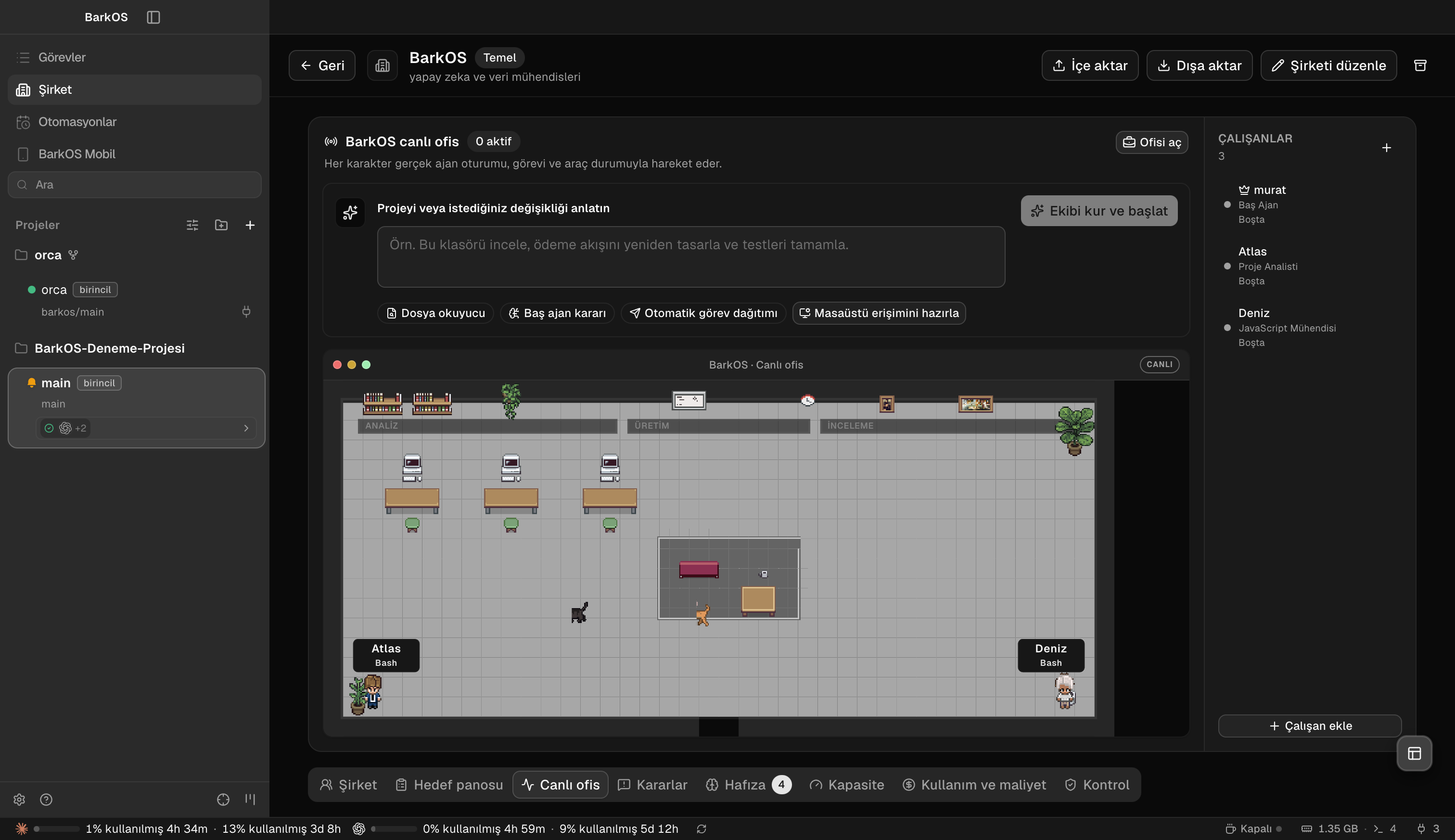
Real BarkOS MVP: agent sessions, assignments and status represented inside the live pixel office.
[!IMPORTANT]
BarkOS is an early preview. It can run tools and modify files with the permissions you grant. Use Git, review high-risk actions, and keep important work backed up.
Why BarkOS
Most agent tools give you another chat window. BarkOS gives you an operating company:
- Codex lead agent interprets the objective, makes staffing decisions, and owns the final result.
- Project reader maps the repository before work begins and turns findings into an executable plan.
- Claude and OpenCode specialists are assigned per task for deep review, refactors, parallel implementation, or provider fallback.
- Live pixel office represents real agent sessions and their current state instead of decorative animation.
- Isolated workspaces let agents work in parallel without trampling the same files.
- Audited decisions and permission gates keep provider choice below user authority.
- Turkish-first desktop experience makes the full workflow understandable without terminal knowledge.
How it works
Your objective or existing project
              │
              ▼
        Project reader
              │ repository map + constraints
              ▼
        Codex lead agent
              │ staffing plan
       ┌──────┼─────────┐
       ▼      ▼         ▼
    Codex   Claude   OpenCode
       └──────┼─────────┘
              ▼
    Review, evidence, delivery
The lead selects the provider for each worker, but never gains more filesystem, shell, browser, or network authority than the user granted.
Current provider policy
| Provider | Default role |
|---|---|
| Codex | Lead agent, general implementation, coordination, final decision |
| Claude Code | Deep review, large refactors, architecture, documentation |
| OpenCode | Independent parallel implementation and provider fallback |
Provider assignments are recorded in the staffing plan. Users can still add or remove workers, and risk controls remain authoritative.
Install the preview
Download the Apple Silicon macOS preview, open the DMG, and drag BarkOS into Applications. Release notes and previous builds are available under GitHub Releases.
The current preview is not notarized. On macOS, right-click BarkOS and choose Open on first launch if Gatekeeper asks for confirmation.
Agent CLIs
BarkOS discovers supported agents from your PATH. Sign in to the providers you want to use:
# Codex
curl -fsSL https://chatgpt.com/codex/install.sh | sh
codex

# Claude Code
npm install -g @anthropic-ai/claude-code
claude

# OpenCode
opencode
Provider subscriptions, API usage, and rate limits belong to their respective providers; BarkOS does not bundle paid model access.
Build from source
Requirements: Node.js 24, pnpm, Git, and macOS for a macOS package.
git clone https://github.com/MuratKomurcu1/BarkOS.git
cd BarkOS
corepack enable
pnpm install
pnpm dev
Build a local macOS DMG:
pnpm build:mac
Roadmap
- Stabilize autonomous project intake and evidence-based completion
- Expand the pixel office with richer real-session movement and collaboration
- Finish the BarkOS mobile companion and independent pairing service
- Add signed and notarized macOS releases
- Harden Windows and Linux installers
- Add configurable provider routing, budgets, and local-model adapters
Contributing
Issues, ideas, and pull requests are welcome. Start with the contribution guide and read the security policy before reporting a vulnerability.
Open source
BarkOS is free and open source under the MIT License. Use it, modify it, build with it, and contribute back.
Built by Murat Kömürcü and the BarkOS contributors.
Website · Releases · Issues
Reviews (0)
Sign in to leave a review.
Leave a reviewNo results found