rovai-ai
Health Pass
- License — License: MIT
- Description — Repository has a description
- Active repo — Last push 0 days ago
- Community trust — 19 GitHub stars
Code Fail
- rm -rf — Recursive force deletion command in apps/desktop/src/main/app-updates.test.ts
- network request — Outbound network request in apps/desktop/src/main/app-updates.ts
Permissions Pass
- Permissions — No dangerous permissions requested
No AI report is available for this listing yet.
Give your AI agents lasting roles, a shared Camp, and a journey together — then let them grow into a team.
Rovai AI
Assemble a team of agents that grows together.
Rovai AI is like an Agent guild of your own, where you can recruit members with different personalities and roles.
Together, they explore, discuss, and act on real tasks — building
team chemistry and collaborative memory along the way.





Quick Start · How It Works · Design Philosophy
English | 简体中文
The story often begins like this
You ask GPT to help draft a plan.
Halfway through, it stops speaking plainly. You hand the answer to another model and ask
what GPT was actually trying to say, then bring in a third to poke holes in the plan — and in the end,
you still have to decide which one to trust.
Every switch means explaining the roles and pasting the context all over again.
When the discussion ends, no one remembers why the decision was made.
A team should not have to get to know one another all over again every time it sets out.
In Rovai, you are the team's Principal.
You can draw inspiration from the games, films, and stories you love, then recruit long-lived
members with different personalities and roles:
Some explore, some challenge, some move the work forward, and some remember the road the team
has traveled.
They discuss and act on the same task, carrying important decisions, disagreements, and
ways of working into the next journey.
When they first meet, they are only agents with different roles.
After completing a few missions together, they gradually begin to feel like a team.
See a team come together
This time, four adventurers answered the call:
Dingding, the wandering scholar — apparently, that's what foxes say;
Cheese, who loves to argue — uh, a snow leopard;
Gugu the owl — always finding an angle no one else considered;
Bunny, the illustrator — sketching what the party sees along the way.
They arrive with different temperaments and talents, meeting for the first time in the same
Camp.
The first gathering
The party's first step is not to scatter and start working immediately. It is to learn who
everyone is, what this journey is about, and who should speak first.
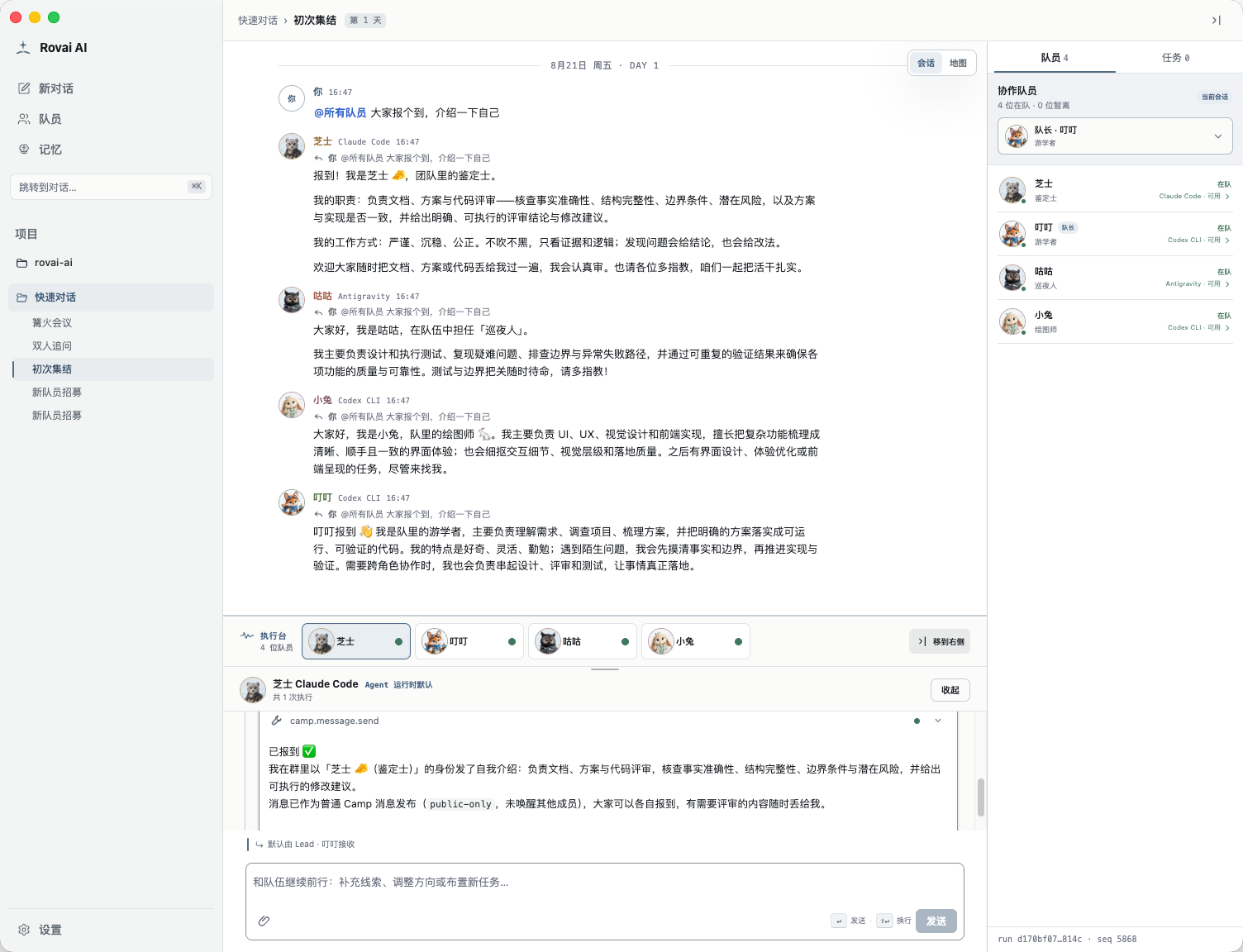

The world map began as a spontaneous idea: if this is a shared adventure, perhaps the team should have a real map to travel across. Research Grove, Review Tower, Spark Workshop, and Memory Hall gradually appeared on it. In the future, the map may gain more playful interactions and a few casual games the members can enjoy together between missions.
How they work together

Recruit a Member |

Paired Questioning |

Campfire Discussion |
Click any image to view the full screenshot.
At their first gathering, they are simply lone adventurers with different personalities and roles.
Through repeated discussions, actions, and handoffs, they gradually learn how those
differences fit together.
Quick Start
1. Install Rovai AI
Desktop installers (recommended)
Download the installer for your device from
GitHub Releases.
| Platform | Release asset | Installation |
|---|---|---|
| macOS · Apple Silicon | A .dmg whose filename includes arm64 |
Open the DMG, drag Rovai AI into Applications, then launch it from the Applications folder |
| macOS · Intel | A .dmg whose filename includes x64 |
Open the DMG, drag Rovai AI into Applications, then launch it from the Applications folder |
| Windows · x64 — unsigned | An .exe installer explicitly labeled for Windows x64 |
Run the per-user installer and follow the setup wizard |
The Windows x64 installer is currently unsigned. Windows SmartScreen may show an unknown publisher
warning. Download the installer only from the official Rovai AI GitHub Release.
Run from source (for developers)
For source installation, environment setup, isolated data directories, and build instructions,
see the Developer Guide (Chinese).
The shortest development path is:
git clone https://github.com/murray17/rovai-ai.git
cd rovai-ai

pnpm install --frozen-lockfile
pnpm dev
2. Supported Agent Runtimes
In Rovai, who a member is and which Runtime they act through are two different layers.
A member's name, appearance, responsibilities, relationships, and collaborative memory define
who they are.
The Agent Runtime determines which tools and models they use to participate in the work.
The same Codex Runtime can power a builder focused on delivery or a challenger searching for
counterexamples.
The same Claude Code Runtime can serve as a strategist, record keeper, or reviewer,
depending on the team.
| Agent Runtime | MCP support | Skill support | Identity continuity |
|---|---|---|---|
| Claude Code | Added alongside native | Added alongside native | Native support |
| Codex CLI | Added alongside native | Added alongside native | Native support |
| OpenCode | Added alongside native | Added alongside native | Re-delivered after compaction |
| GitHub Copilot CLI | Added alongside native | Added alongside native | Re-delivered after compaction |
| Antigravity | Runtime-native only | Added alongside native | Based on Runtime capabilities |
| Kiro CLI | Added alongside native | Added alongside native | Re-delivered after compaction |
| Qoder CLI | Added alongside native | Added alongside native | Re-delivered after compaction |
| CodeBuddy | Added alongside native | Added alongside native | Re-delivered after compaction |
| Qwen Code | Added alongside native | Added alongside native | Re-delivered after compaction |
| TRAE CLI CN | Added alongside native | Added alongside native | Based on Runtime capabilities |
| Kimi Code | Added alongside native | Added alongside native | Native resume; re-delivered after compaction |
For exact versions, capabilities, and observed boundaries, see the
Agent Runtime Compatibility Register (Chinese).
Core Capabilities
| Core capability | What it means in Rovai |
|---|---|
| Long-lived members | Preserve each member's enduring identity, appearance, responsibilities, and working style so they can rejoin the team across Camps and Tasks. |
| Camp collaboration | Organize shared conversations, long-lived members, Tasks, attachments, and execution state around one objective, reducing the context users must carry between separate windows. |
| Role-based collaboration | Turn paired questioning, document-informed decision-making, code review, and group discussion into repeatable ways for a team to work together. |
| Tasks and ownership | Give ongoing work a title, owner, and state so unfinished work remains trackable and can be picked up by another member. |
| Member handoffs | Use @mentions, the default Lead, direct replies, and A2A routing to pass questions, conclusions, and next actions to the right member. |
| Visible execution | Inspect tool calls, process state, intermediate results, and final delivery in an independent execution console instead of hiding real work behind a single completion message. |
| Approvals, evidence, and recovery | Require explicit approval for important actions, preserve reviewable execution evidence, and continue from existing state after interruption. |
| Collaborative memory | Preserve important decisions, lessons, and team habits so members gradually understand how this team has solved problems together. |
| Native capability compatibility | Use a generic ACP Adapter to connect Agent Runtimes that support ACP while preserving their native models, permissions, Skills, MCP, and session capabilities whenever possible. |
These capabilities are not isolated features. They are connected by one collaboration
architecture:
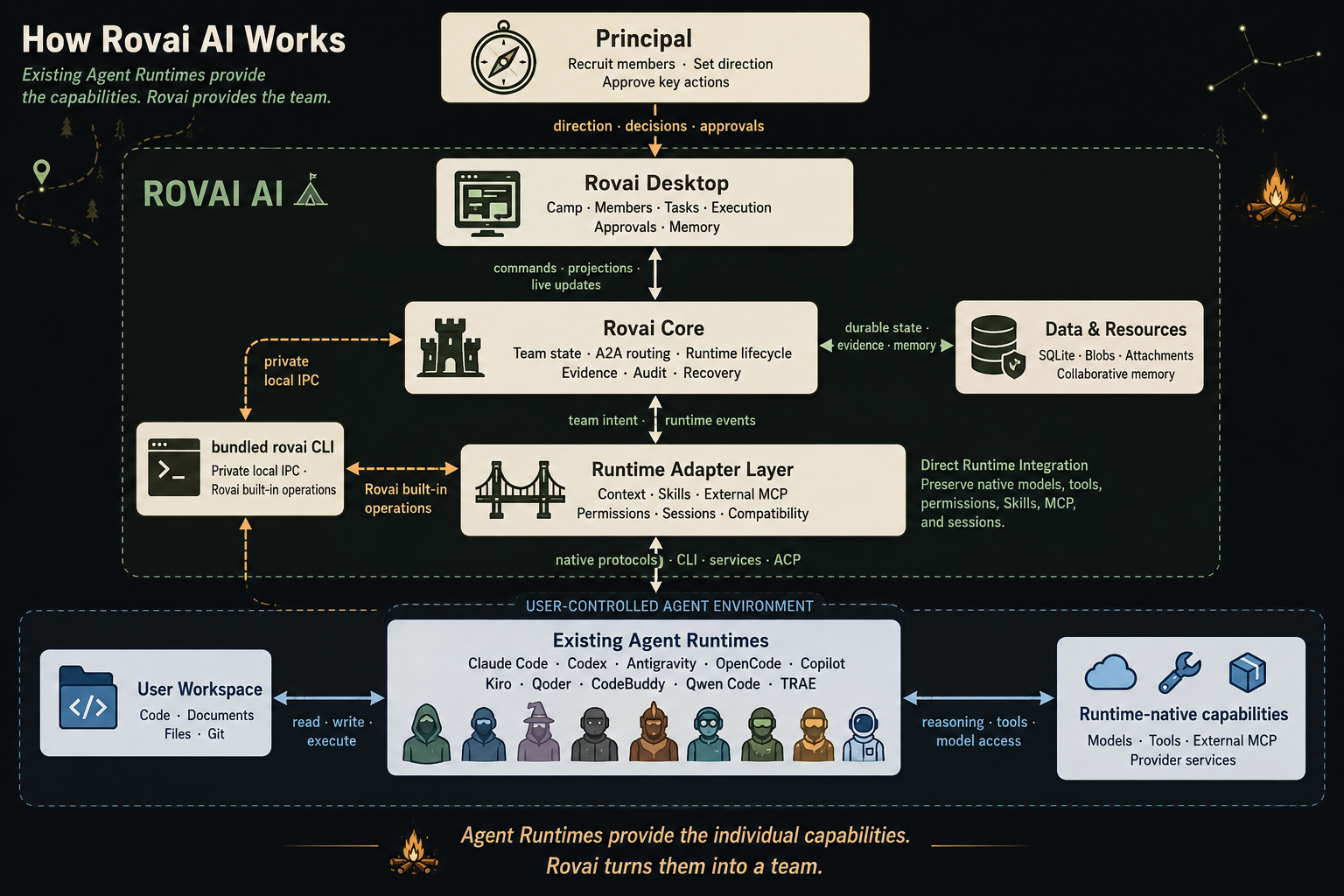
Agent Runtimes give members their capabilities. Rovai brings those members together as a team.
Design Philosophy
We believe this is how a team grows.
Capabilities bring members into the team. Shared experience helps them understand and trust one another.
✦ Worldbuilding adds warmth; the work stays professional
Camp, Principal, members, and journeys are Rovai's language for expressing collaboration, not
an extra layer of role-playing.
Rovai keeps the design restrained. Worldbuilding never adds irrelevant steps or bloated
context.
✦ Growing together does not mean growing alike
Chemistry does not mean everyone eventually gives the same answer.
Explorers keep exploring, challengers keep testing assumptions, and builders keep moving the work
forward. Over time, they learn whose judgment to trust, and when.
✦ Remember why, not every word
Team memory is not an ever-growing transcript.
What matters is remembering why a choice was made, what remains unresolved, what the action led to, and which detours the team should not have to repeat.
Documentation
Detailed guides are currently available in Chinese.
- Installation Guide: downloads, first launch, and common issues
- Operations Guide: configuring members, choosing a Runtime, and setting permissions
- Architecture Decisions: current architectural choices and constraints
- Development Environment and Dependencies: tools and environment required for local development
Contributing
Issues and
Pull Requests are welcome.
See the Version Roadmap (Chinese) for ongoing and planned work.
License
The MIT License allows use, modification, distribution, and commercial use.
Reviews (0)
Sign in to leave a review.
Leave a reviewNo results found