vibe-usage
Health Gecti
- License — License: MIT
- Description — Repository has a description
- Active repo — Last push 0 days ago
- Community trust — 19 GitHub stars
Code Basarisiz
- fs.rmSync — Destructive file system operation in scripts/build.ts
- fs.rmSync — Destructive file system operation in scripts/media/main.ts
- process.env — Environment variable access in scripts/media/main.ts
- process.env — Environment variable access in scripts/package.ts
Permissions Gecti
- Permissions — No dangerous permissions requested
Bu listing icin henuz AI raporu yok.
See the quota left on Claude Code, Codex, Cursor and Antigravity, launch the tool that has room and hand a task over. Windows tray, macOS menu bar and CLI.
English · Türkçe · Deutsch · Español · Français · Italiano · Português · Nederlands · Polski · 日本語 · 한국어 · 简体中文 · Русский
Vibe Usage
Every AI coding subscription you pay for, in one menu-bar window.
See how much quota Claude Code, Codex, Cursor and Antigravity have left, and keep working when a limit runs out:
your session continues on another account or tool, without re-explaining the task.
Windows tray · macOS menu bar · 13 languages · no passwords, no tokens stored
Download for Windows and macOS · Terminal: npm install -g vibe-usage-cli
Why
If you code with several AI tools, you hit the same wall over and over: the 5-hour limit runs out mid-task, you open
another tool, and you start explaining the task from scratch. Each provider shows its usage somewhere different, if at
all.
Vibe Usage reads the sessions already signed in on your machine and shows every limit side by side: how much is left
and when it resets. When one tool is running low, it starts the next one with verified quota in your project folder,
and writes a briefing of the current session so the new tool can continue where the old one stopped.
Features
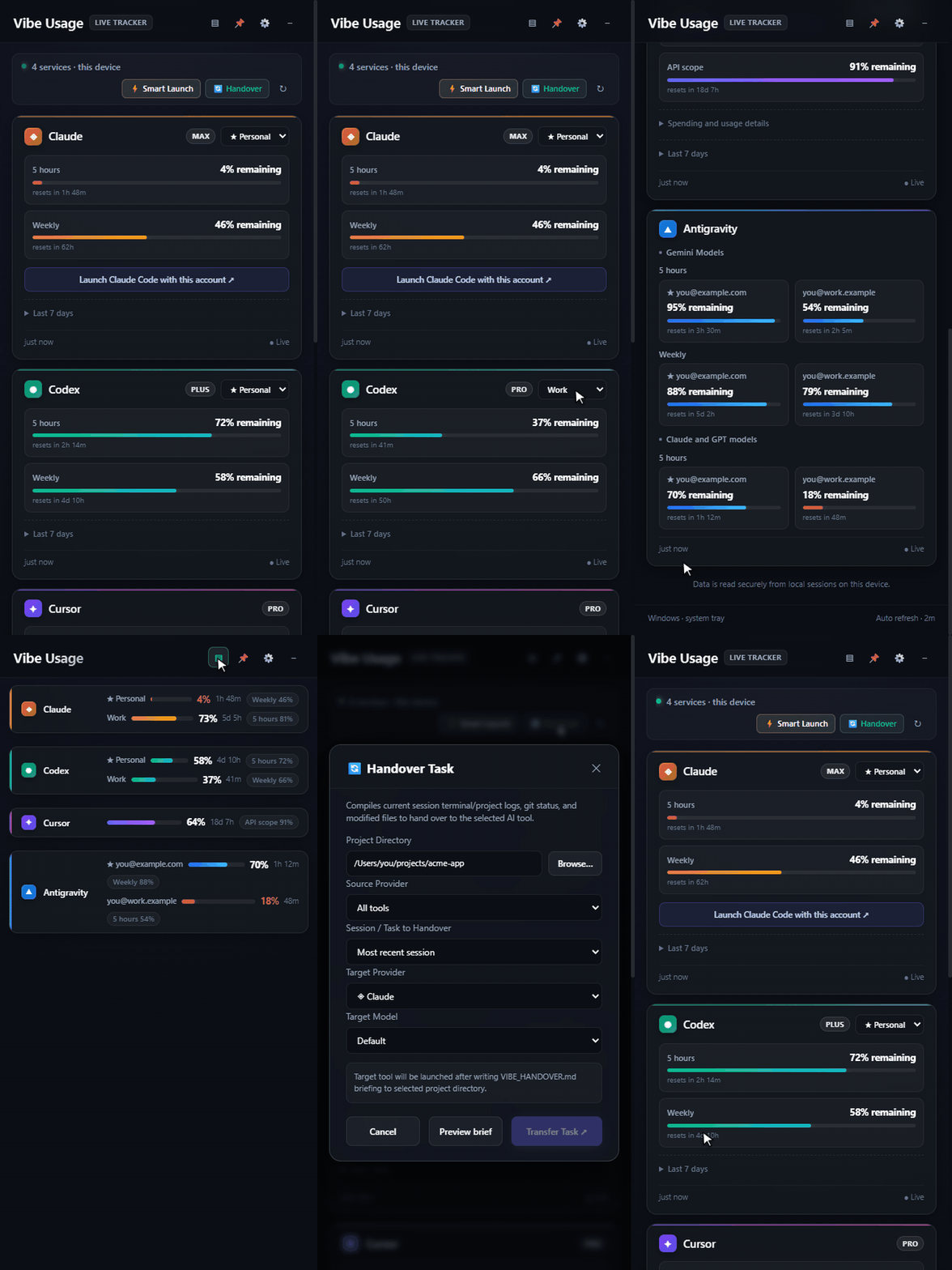
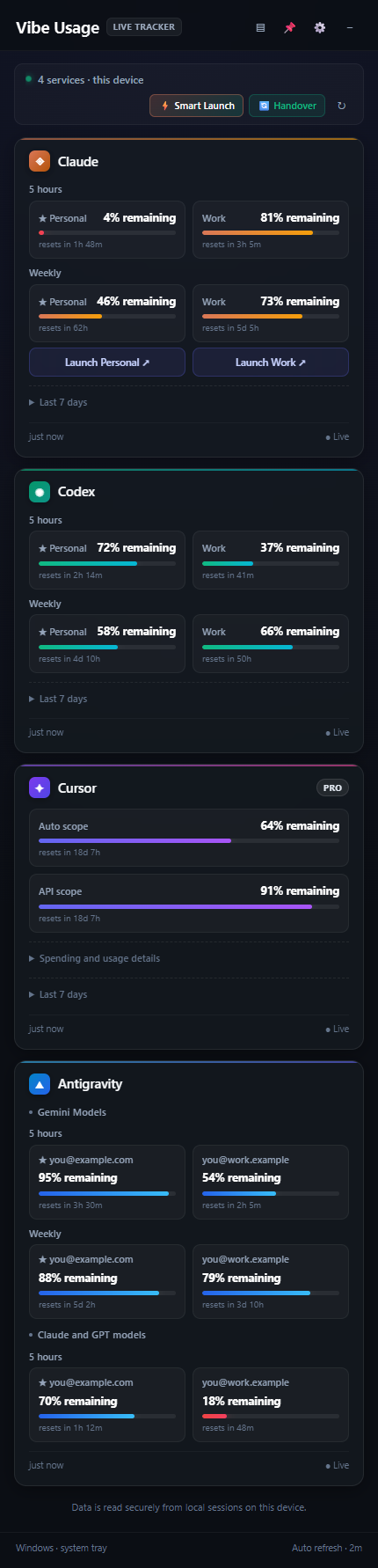
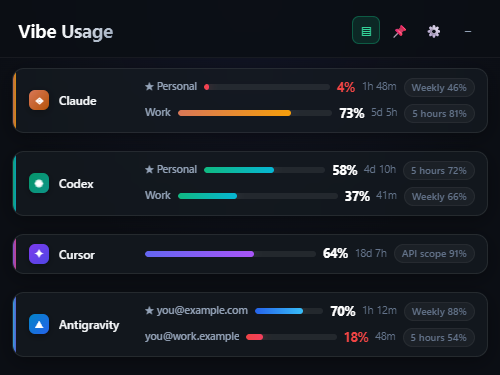
Quota at a glanceEvery limit of every account: 5-hour and weekly windows, per-model scopes, spend pools. Countdowns show when each one |
|
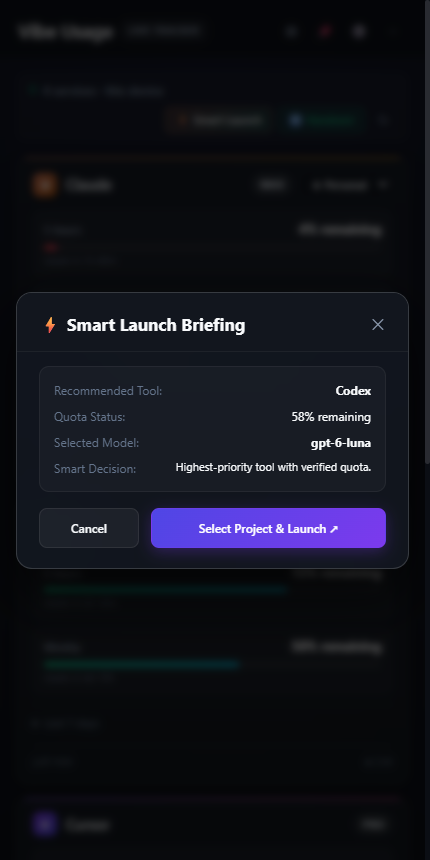
Keep working when a limit runs outWhen Claude Code or Codex stops because its account hit the usage limit, the session continues where there is room: If the computer goes down (a restart, a crash, a power cut) while Claude Code sessions are open, they open again where Smart LaunchPicks the first tool in your priority order whose quota is verified to have room, then opens it in a new terminal |
|
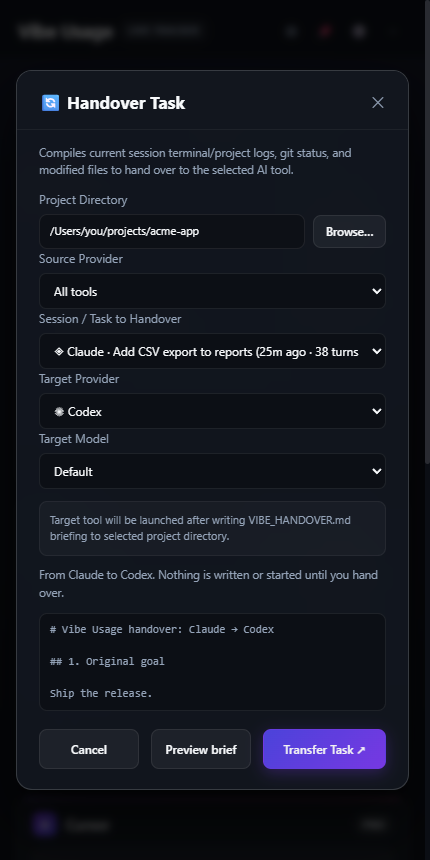
HandoverChoose a session from Claude Code, Codex, Cursor Agent or Antigravity. Vibe Usage summarizes it into |
|
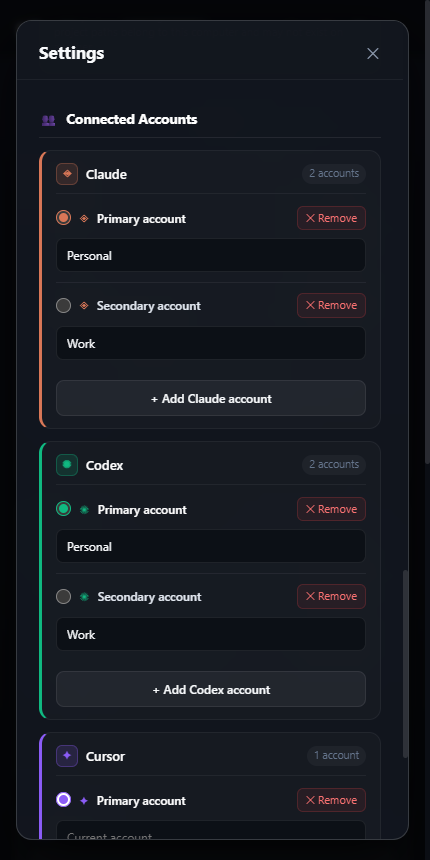
Multiple accountsClaude and Codex keep one sign-in per profile folder. Add account creates a new folder and opens the tool's sign-in |
|
Per-project choices, history and diagnostics
- Project preferences (Settings): give a folder its own tool, model, account and automatic continuation. They narrow
what Smart Launch and continuation pick, never replace the verified-quota check, and a project set to off stays off
even when continuation is on globally. - Notifications: choose the low-quota line and quiet hours (they may cross midnight). Quiet hours skip notifications
(they are not sent later); quota is still read, work still continues and suggestions wait in the window. - Handover history lists each continuation with its project, route and outcome. A failed one can be tried again,
checked against current quota first. - Diagnostics shows, per tool, whether it is installed, each account's state and freshness, and the next step.
Copy report gives a version without names, e-mail addresses or folders, ready for an issue. - Backup and restore: export, import or reset the settings. Every save keeps the previous good copy; a damaged
settings file is restored from it (and kept aside), and a file written by a newer version is never overwritten.
Supported tools
| Tool | Where the quota comes from | Sessions for handover | Launch |
|---|---|---|---|
| Claude Code | The profile's OAuth usage endpoint (Keychain on macOS) | ~/.claude/projects |
claude CLI with the chosen profile |
| Codex | The installed CLI's app-server rate-limit methods | ~/.codex/sessions |
codex CLI |
| Cursor | The signed-in session's usage summary | Cursor Agent CLI chats (~/.cursor/chats) |
cursor-agent, otherwise the app |
| Antigravity | The running app's local service (process and port ownership verified) | ~/.gemini/antigravity-ide |
Antigravity app |
Model lists come from each tool's own data: Claude Code aliases and the models you used, the Codex model cache, andcursor-agent --list-models (cached for 24 hours).
Privacy and safety
- Your sign-ins stay as they are. It uses the sessions that already exist. It never asks for a password, never
reads or stores a refresh token, never signs you out, and never touches running work. When work may move between
accounts on its own, an expired Claude Code sign-in is renewed by Claude Code itself: one minimal Haiku request (one
word, no tools, nothing saved), at most every 30 minutes per account. Continuing a Claude Code session on
another account copies its transcript into that account's profile folder; the original is left as it is. - Few endpoints. Quota requests go only to the Anthropic and Cursor usage endpoints, with TLS verification on
(and the renewal above goes through Claude Code).
Codex and Antigravity are read locally. Once a day the app asks GitHub for its latest release (Settings → General
turns this off). An installed Windows copy then downloads a new version itself, only from this repository's
releases, checks it against the release's SHA-512 checksums (and, for a signed release, its publisher), and installs
it only when you click Restart to update. - Nothing secret on disk. Settings live in
%APPDATA%\Vibe Usage\settings.json(Windows) or~/Library/Application Support/Vibe Usage/settings.json(macOS), withsettings.json.bak(the previous good copy)
and, if the file was ever damaged,settings.json.damaged-<time>. Next to them,history.jsonkeeps a week of quota
percentages for the chart and the forecast (numbers only),measurements.jsoneach account's last good reading (its
limits, percentages, reset times and plan, shown as stale after a restart until a fresh read), andcontinuity.json
the handover history: project folders, tool and account ids, session ids and outcomes, never conversation text,
tokens or e-mails. - A locked-down app. The window is sandboxed with a strict CSP, cannot navigate or open other windows, and only
answers its own page. Electron fuses disablerunAsNode,NODE_OPTIONSand the inspector, and enforce ASAR
integrity.
Found a security issue? Please report it privately as described in SECURITY.md.
Install
Windows
Download Vibe-Usage-<version>-win-setup.exe from the latest release and
run it: it installs for your user only (no administrator rights) and keeps itself up to date. A new version downloads
in the background, and the app tells you when Restart to update installs it. Or take the portableVibe-Usage-<version>-win-x64.zip (or -arm64), unzip it and run Vibe Usage.exe; a portable copy links to the
release page when there is a new version. Either way it lives in the system tray.
Unless a release says it is signed, the app is not code-signed, so on first launch Windows SmartScreen may say Windows protected your PC. Click More info, then Run anyway.
macOS
Download Vibe-Usage-<version>-mac-arm64.dmg (Apple silicon) or -mac-x64.dmg (Intel) from the
latest release, open it and drag Vibe Usage to
Applications. The app is not signed with an Apple Developer ID yet, so Gatekeeper blocks the first launch: open
System Settings › Privacy & Security and click Open Anyway, or run:
xattr -dr com.apple.quarantine "/Applications/Vibe Usage.app"
To skip that step, build it yourself. You only need Node.js 24:
git clone https://github.com/mustafacagri/vibe-usage.git && cd vibe-usage
npm ci
npm run build:mac
cp -R "release/mac-arm64/Vibe Usage.app" /Applications/
On an Intel Mac the folder is release/mac. An app you build yourself is not quarantined and opens directly.
macOS lets only a signed app replace itself, so until releases are signed a new version is installed the same way:
when one is out, the app's Download button fetches the disk image for your Mac.
Command line
The same data is available in the terminal on Windows and macOS, with or without the desktop app. It needs Node.js 24
or later and reads the same signed-in sessions as the app; when both are installed they share settings and language.
npm install -g vibe-usage-cli
vibe-usage status
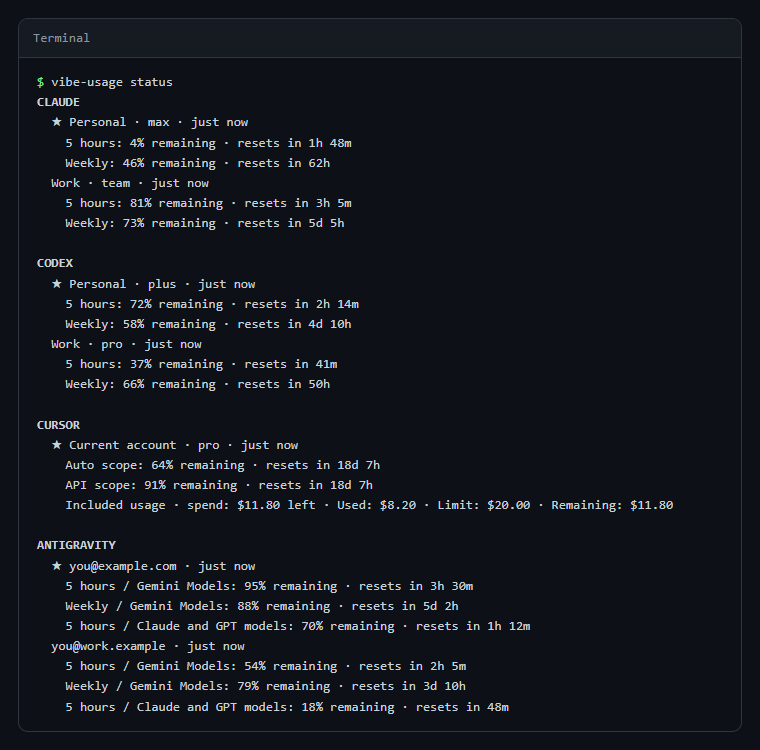
vibe-usage status [--json]   # every account's quota once; --json for scripts
vibe-usage watch             # the same, refreshed until Ctrl+C
vibe-usage run <claude|codex|cursor> [--account ID] [--cwd PATH] [--model MODEL] [--dry-run]
vibe-usage handover [--from TOOL] [--to TOOL] [--session ID] [--cwd PATH]
vibe-usage help
To try it without installing, run npx vibe-usage-cli status.
run starts the tool in this terminal with an account whose quota is verified; otherwise name one with --account
(the IDs are in status --json). --dry-run prints the account and the command without starting anything.handover writes VIBE_HANDOVER.md for the folder's latest session (or --session) and opens the target tool with
it.
Development
TypeScript in strict mode on Node.js 24 (the version Electron 44 embeds). Tests, the CLI and scripts run straight from
the .ts sources; the app is compiled to build/.
npm ci
npm start              # build and run the app
npm test               # unit and integration tests
npm run test:coverage  # the same, with the coverage gates CI enforces
npm run lint           # ESLint with type information
npm run format         # Prettier
npm run ui-check       # renders the built UI in all 13 languages and checks that every text fits
npm run media          # regenerates the screenshots and the walkthrough in docs/media (needs ffmpeg)
npm run build:win      # or build:mac
| Folder | Runs in | Contains |
|---|---|---|
src/shared |
anywhere | provider catalog, data types, IPC contract, i18n |
src/ui |
the window | the interface |
src/core, src/providers, src/main, src/cli.ts |
Node/Electron | service, provider adapters, main process, CLI |
test, scripts |
Node | type-checked only, never compiled |
VIBE_DATA_DIR moves the settings folder. VIBE_CLAUDE_BINARY, VIBE_CODEX_BINARY and VIBE_CURSOR_AGENT_BINARY
point at specific CLI binaries. Tests never start a real tool or read real accounts.
Limitations
- The macOS build is not notarized (see macOS).
- Antigravity's session model comes from an undocumented local record; if it cannot be read, the model is left blank.
- Cursor IDE (Composer) chats cannot be handed over; only Cursor Agent CLI sessions are read.
License
Yorumlar (0)
Yorum birakmak icin giris yap.
Yorum birakSonuc bulunamadi