openrig
Health Gecti
- License — License: Apache-2.0
- Description — Repository has a description
- Active repo — Last push 0 days ago
- Community trust — 27 GitHub stars
Code Gecti
- Code scan — Scanned 12 files during light audit, no dangerous patterns found
Permissions Gecti
- Permissions — No dangerous permissions requested
OpenRig is a multi-agent orchestration tool that coordinates coding agents (like Claude Code and Codex) into a unified team. It allows developers to define agent topologies in YAML, boot them together via tmux sessions, and manage them through a live visual UI.
Security Assessment
The tool inherently executes shell commands and interacts heavily with your local terminal environment via tmux to manage agent sessions. However, the light code audit scanned 12 files and found no dangerous patterns, no hardcoded secrets, and no requests for overly broad or dangerous permissions. Because it wraps third-party AI coding agents, it handles whatever sensitive data you feed into those agents, but the harness itself does not appear to exfiltrate data or operate covertly. Overall risk is rated as Low within its expected context (local developer tooling).
Quality Assessment
The project is highly active, with its last push occurring today. It uses the permissive Apache-2.0 license and has a clear, well-documented README with step-by-step walkthroughs. Community trust is moderate but growing, currently sitting at 27 GitHub stars. The project structure appears professional and focused on developer experience.
Verdict
Safe to use. The code is clean, actively maintained, properly licensed, and transparent in its operations, making it a reliable utility for developers comfortable running local terminal-based agents.
Multi-agent harness that runs Claude Code and Codex together as one system
OpenRig
Open source multi-agent harness for coding teams.
A harness wraps a model. A rig wraps your harnesses. Define your agent team in YAML, boot it with one command. Claude Code and Codex in the same rig, managed as one system.
Quick Start
# Install
npm install -g @openrig/cli

# Prepare the machine (attempts tmux, cmux, Claude Code, Codex, tmux defaults — reports what worked)
rig setup

# Boot the demo rig (3 pods, 8 nodes, mixed runtimes)
rig up demo

# Open the UI
rig ui open
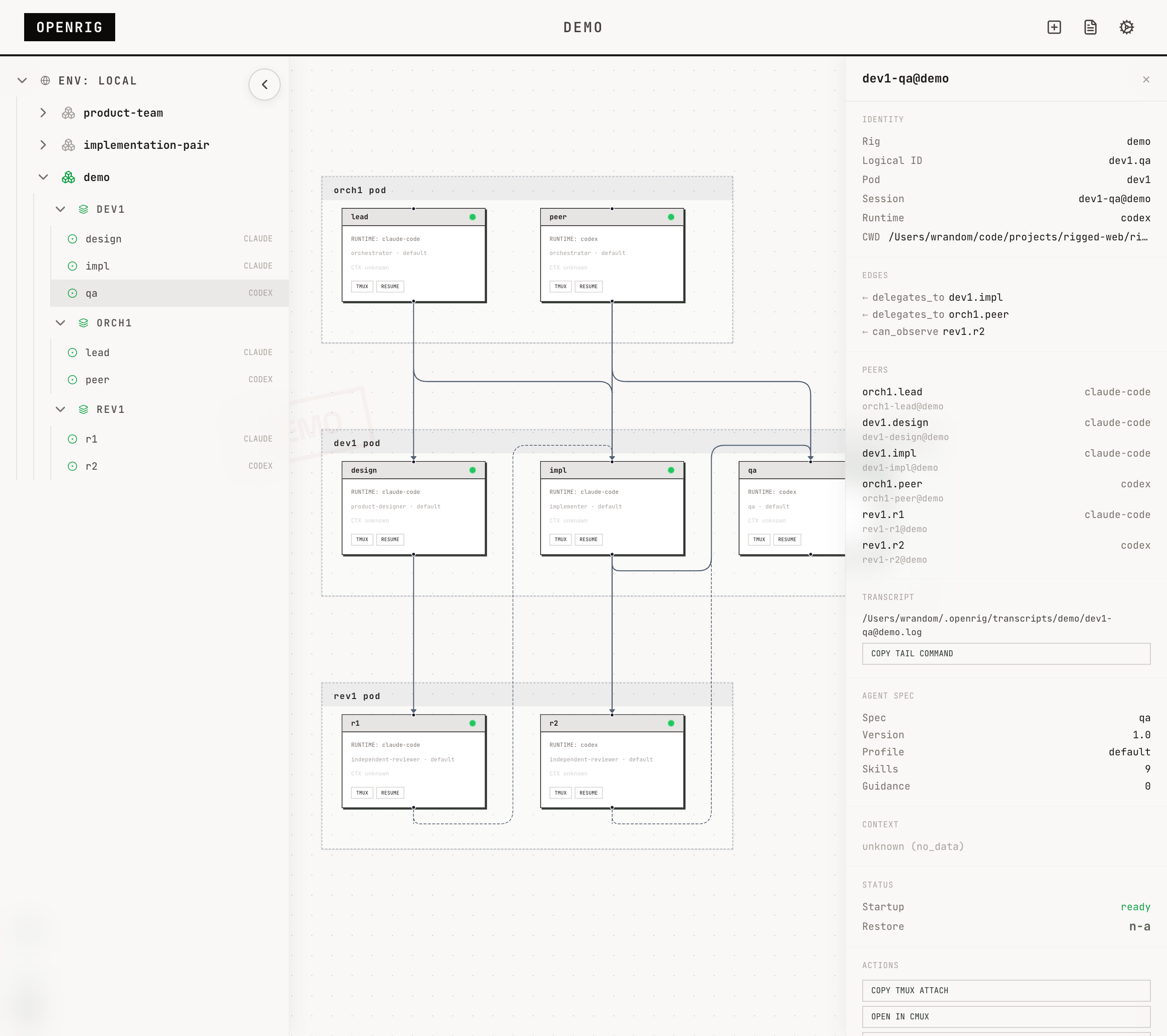
After the demo boots, open the UI and click orch1.lead in the topology graph. Use Open CMUX to jump into a terminal for that node. If cmux is not available, use the tmux attach command shown in the node detail panel instead.
Launch Walkthrough
The launch path above has been walked end-to-end on fresh macOS VMs. The only thing your agent can't do would be the oauth logins for claude and openai and dealing with permission prompts.
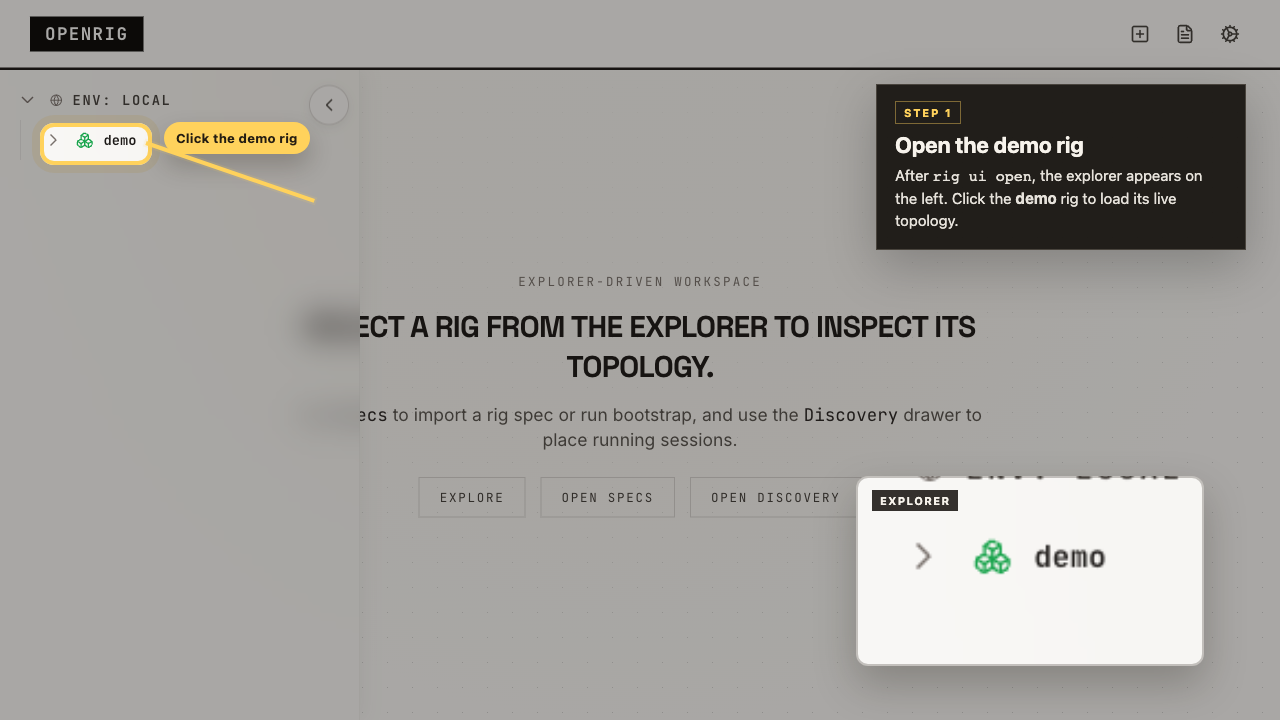
1. Open the demo rig
When the UI opens, the explorer is already visible on the left. Click the demo rig to load its live topology.
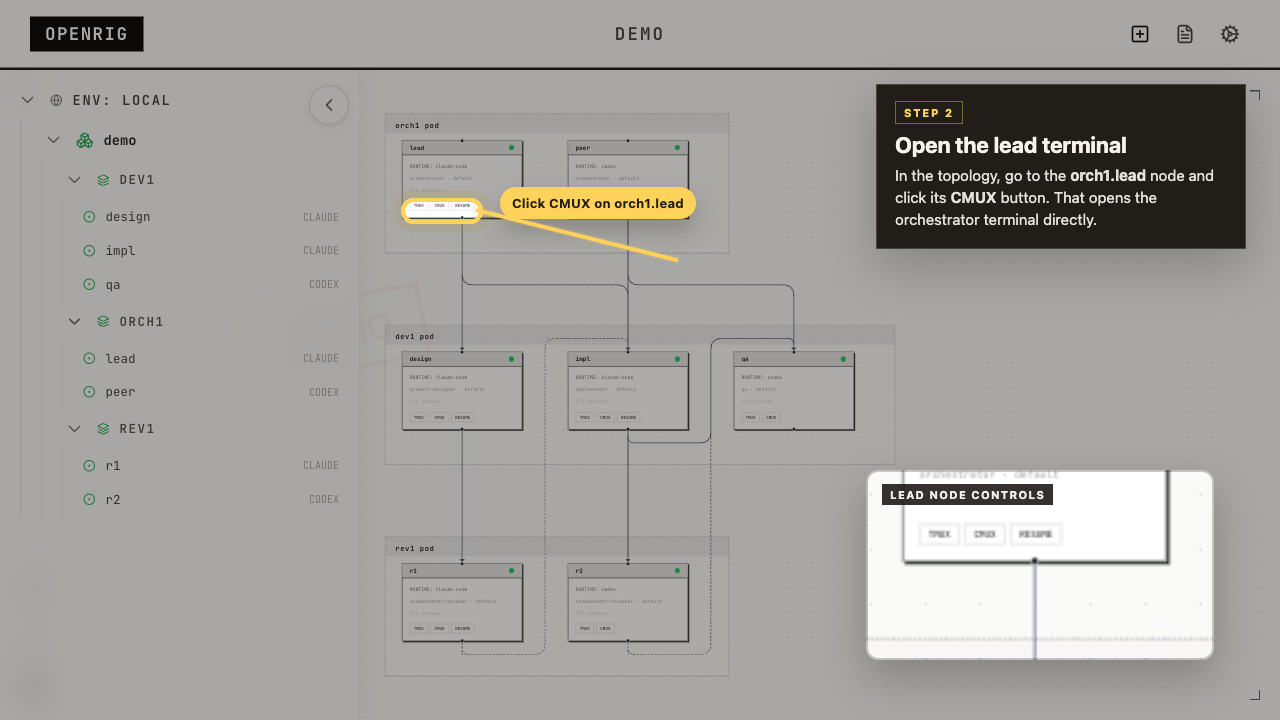
2. Click CMUX on orch1.lead
Once the topology loads, go to the orch1.lead node and click its CMUX button. That opens the orchestrator terminal directly.
From here just talk to the orchestrator and tell it what you want it to build...
What It Does
OpenRig is a multi-agent harness — it manages the system that coding agents form when you run them together. Not the agents themselves, but the team they create: which sessions are running, how they relate, how to recover after a reboot, and how to stop it from becoming terminal sprawl.
- Define topologies in YAML (RigSpec) with pods, edges, and continuity policies
- Boot everything with
rig up— tmux sessions, harnesses, startup files, readiness checks - See the topology in a live graph with explorer, node detail, and system log
- Discover existing Claude Code and Codex sessions in tmux and adopt them into a managed rig
- Snapshot the full topology on
rig down, restore by name withrig up <name> - Communicate across agents with
rig send,rig broadcast, andrig chatroom - Evolve running topologies with
rig expand,rig shrink,rig launch,rig remove
Every agent runs in a tmux session you can attach to, inspect, and work with directly.
Demo Rig
OpenRig ships with a demo rig you can boot in seconds:
rig specs preview demo
demo (rig, pod_aware)
  Launch-grade starter: a stable full product squad with two
  orchestrators, implementation, QA, design, and two independent
  reviewers.

  Pod: orch1 (2 members)
    lead — claude-code
    peer — codex
  Pod: dev1 (3 members)
    impl — claude-code
    qa — codex
    design — claude-code
  Pod: rev1 (2 members)
    r1 — claude-code
    r2 — codex
Also ships: implementation-pair, adversarial-review, research-team, product-team, and secrets-manager (HashiCorp Vault managed by a specialist agent).
Browse the library: rig specs ls
How It Works
OpenRig is a local daemon + CLI + MCP server + React UI, built on tmux.
CLI / UI / MCP
      |
Hono HTTP daemon
      |
  Domain services (52)
      |
  SQLite + tmux + runtime adapters
- CLI: 40+ commands designed for both humans and agents. Every mutating command ends with what happened, current state, and next action.
- UI: Explorer sidebar, topology graph with pod grouping, node detail panel, system log, chatroom.
- MCP: 17 tools so agents can manage their own topology (
rig_up,rig_ps,rig_send,rig_chatroom_send, etc.) - Runtimes: Claude Code, Codex, and terminal nodes. Adapters for Pi and OpenHands in development.
Key Concepts
- RigSpec: Declarative multi-agent harness definition in YAML. Pods, members, edges, continuity policies, culture file.
- AgentSpec: Reusable agent blueprint with skills, guidance, hooks, profiles, and startup contracts.
- Pod: Bounded context group. Agents in a pod share memory and can maintain each other's context.
- Discovery:
rig discoverfingerprints existing tmux sessions.rig adoptbrings them under management. - Snapshot/Restore:
rig down --snapshotcaptures full state.rig up <name>restores from latest snapshot. Restore reports per-node outcomes (resumed, fresh, or failed). - RigBundle: Portable archive with vendored AgentSpecs and SHA-256 integrity. Share topologies across machines.
- Culture: CULTURE.md sets coordination norms for the group. Research rigs get exploratory culture. Implementation rigs get conservative, trust-but-verify culture.
Agent-Managed Software
A rig can package actual software alongside the agents that manage it. The shipped example is secrets-manager: a HashiCorp Vault instance operated by a specialist agent.
rig up secrets-manager
rig env status secrets-manager
rig send vault-specialist@secrets-manager "Check Vault health and report status." --verify
Requires Docker for service-backed rigs.
Requirements
- Node.js 20+
- tmux
Optional:
- cmux for
Open CMUXnode surface controls - Docker for service-backed rigs and managed apps
Setup and Troubleshooting
rig setupattempts core machine preparation: tmux, cmux, Claude Code, Codex, and tmux defaults. It reports what it tried and what actually succeeded. If something fails, it gives the local agent enough context to finish the job.rig setup --fullattempts a broader operator workstation setup (jq, gh) on top of core.rig doctorinspects current system health and helps diagnose problems after setup. Use it when something stops working or after machine changes.
Both commands support --json for agent-driven workflows.
Managed runtime boot (during rig up) may modify runtime config to reduce permission and MCP friction. rig setup discloses these paths so agents know what was changed:
- global Claude:
~/.claude/settings.jsonfor OpenRig command allowlisting - global Claude state:
~/.claude.jsonfor managed workspace trust and onboarding completion - project Claude:
.claude/settings.local.jsonfor managed-session permissions - project Claude MCP:
.mcp.jsonfor OpenRig-managed MCP servers - global Codex:
~/.codex/config.tomlfor workspace trust and MCP servers
Already-running adopted sessions may need restart before they pick up newly written runtime config.
For agents: Ask the user whether they want core setup (rig setup) or the fuller workstation path (rig setup --full) before choosing the invocation. Inspect the result with --json and use rig doctor to finish any remaining machine-specific issues.
Comparison with Claude Managed Agents
Anthropic shipped Claude Managed Agents — a cloud-hosted, Claude-only runtime at $0.08/session-hour. OpenRig is the local side: open source, cross-harness, runs on your machine, costs nothing.
Links
- Website: openrig.dev
- Blog: Why I Built OpenRig
- Docs: openrig.dev/docs
- Open Specification: openrig.dev/specs
- Twitter: @_feralmachine
License
Apache 2.0
Yorumlar (0)
Yorum birakmak icin giris yap.
Yorum birakSonuc bulunamadi