AgentSUMO
Health Uyari
- License — License: MIT
- Description — Repository has a description
- Active repo — Last push 0 days ago
- Low visibility — Only 5 GitHub stars
Code Gecti
- Code scan — Scanned 12 files during light audit, no dangerous patterns found
Permissions Gecti
- Permissions — No dangerous permissions requested
Bu listing icin henuz AI raporu yok.
AgentSUMO: An Agentic Framework for Interactive Simulation Scenario Generation in SUMO via Large Language Models
AgentSUMO
An Agentic Framework for Interactive Simulation Scenario Generation in SUMO via Large Language Models






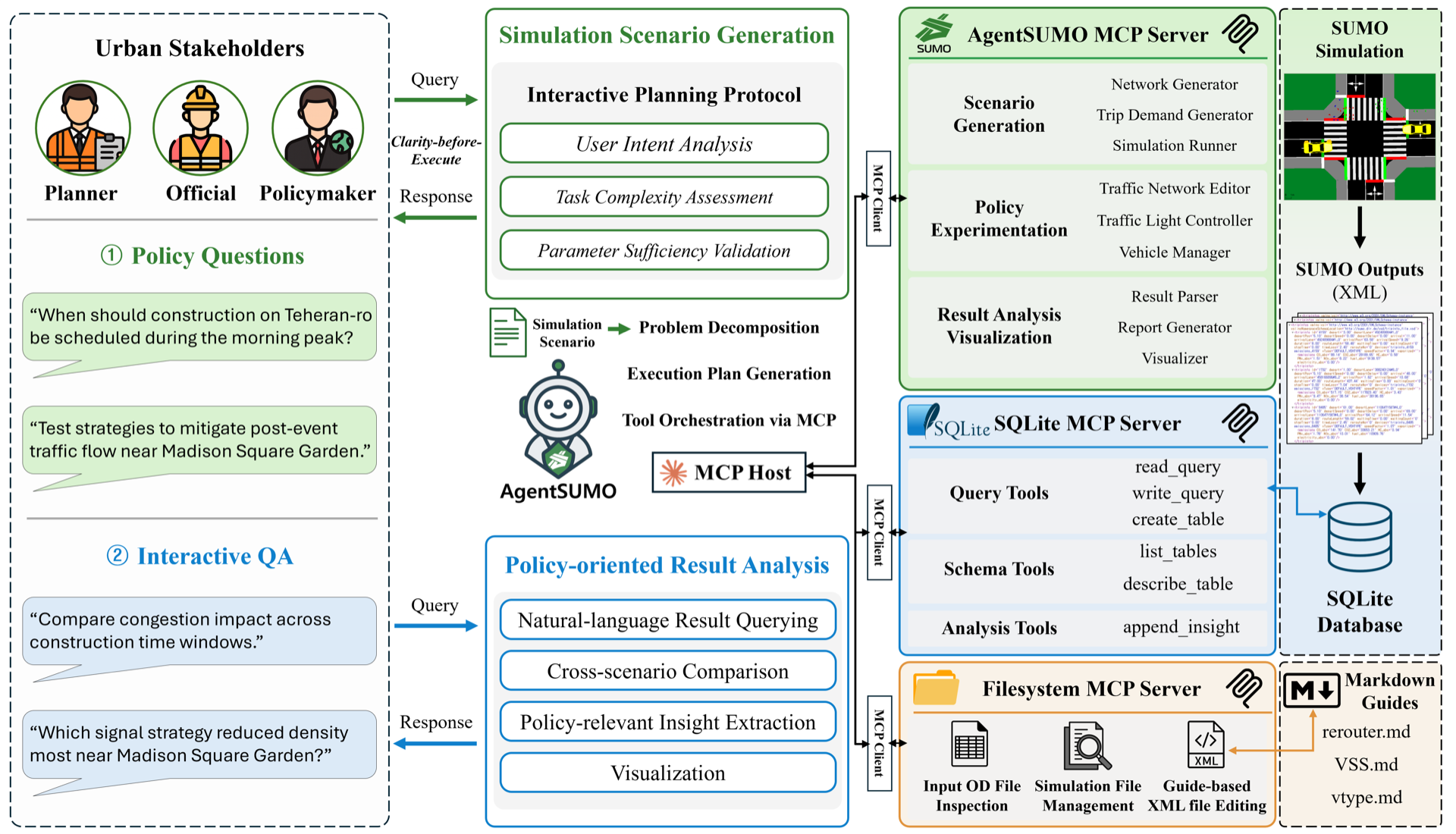
Overview
AgentSUMO lets non-expert stakeholders design, execute, and analyze SUMO traffic simulations through natural-language interaction. The Planner Agent translates abstract policy questions into executable simulation plans, drives them via the Model Context Protocol (MCP), and surfaces results through a web dashboard.
- Conversational scenario design — describe a policy question, get a runnable simulation
- Policy experiments — road closures, lane reductions, signal optimization, demand changes
- Cross-scenario analysis — SQL-based comparison across runs, with auto-generated HTML reports
- Web dashboard — geospatial visualization, time-series charts, and trip replay
Demo
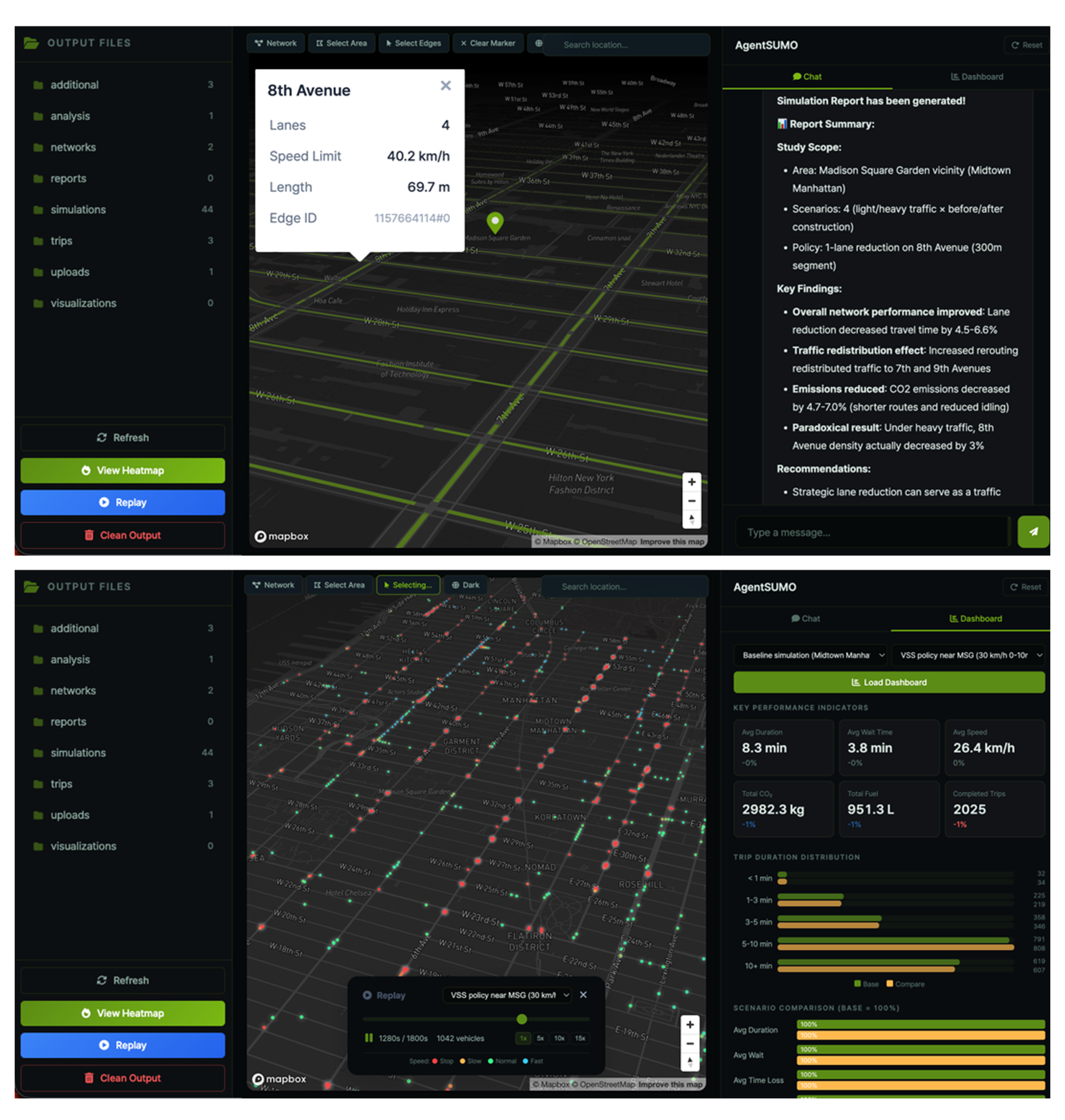
Web interface: conversational planning panel, scenario list, and live simulation status.
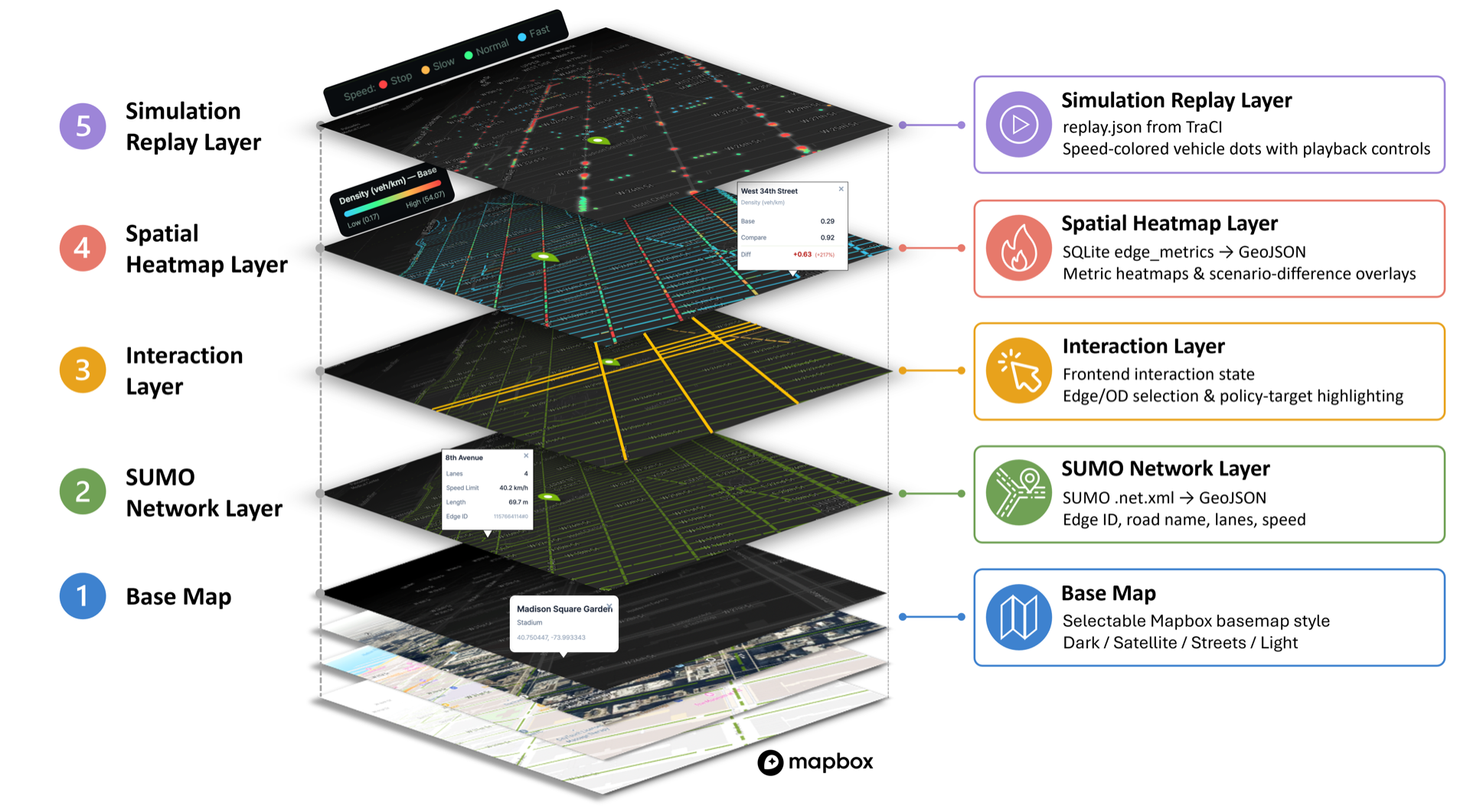
Geospatial visualization: per-edge metrics, congestion overlays, and trip replay on the 2.5D basemap.
Architecture
User (natural language)
    |
    v
Planner Agent (Claude LLM, Interactive Planning Protocol)
    |
    +--> AgentSUMO MCP Client --> AgentSUMO MCP Server (PyPI: agentsumo-mcp) --> SUMO
    |
    +--> SQLite MCP Client    --> SQLite MCP Server (Anthropic, open source)  --> simulations.db
    |
    +--> Filesystem MCP Client --> Filesystem MCP Server (Anthropic, open source) --> additional XML files
The reasoning layer (Planner Agent) lives in this repository. The execution layer (agentsumo-mcp) is published to PyPI and installed automatically as a dependency.
Tool Layer
The AgentSUMO MCP Server exposes 26 tools grouped into five capability categories that follow the simulation workflow. Full reference at agentsumo.readthedocs.io/.../tools.
| Category | Purpose | Representative tools |
|---|---|---|
| Scenario Generation | Build a baseline SUMO simulation: OSM → network → trips → routes → run | osm_extract, net_convert, trip_generate, route_generate, sumo_runner |
| Policy Experimentation | Apply infrastructure, demand, and signal-control interventions | edge_edit_tool, reduce_lanes_tool, vehicle_generation_tool, flow_generation_tool, tls_offset_tool, tls_adaptation_tool |
| Result Analysis | Convert SUMO XML output to SQLite and render HTML reports | xml_to_sqlite_tool, simulation_report_tool |
| Visualization | Render networks, highlighted edges, and per-edge metric heatmaps | visualize_net_tool, visualize_edge_tool, visualize_policy_target_tool, visualize_edgedata_tool |
| Utility Functions | Network statistics, routing, road-name ↔ edge-id resolution, OD-coordinate validation, web-search grounding | network_summary_tool, route_analysis_tool, validate_od_coordinates_tool, web_search_tool |
Installation
Requirements
- Python 3.10 or later
- SUMO 1.24 or later (locally installed, with
SUMO_HOMEset) - Anthropic Claude API key (bring-your-own-key)
- Mapbox access token (used by the web map renderer)
1. Install SUMO
macOS
brew install sumo
Or download the installer from the Eclipse SUMO downloads page.
Windows — Download the installer from the Eclipse SUMO downloads page.
Linux (Ubuntu/Debian)
sudo add-apt-repository ppa:sumo/stable
sudo apt-get update
sudo apt-get install sumo sumo-tools sumo-doc
2. Set up the Python environment
Install uv:
# macOS / Linux
curl -LsSf https://astral.sh/uv/install.sh | sh

# Windows (PowerShell)
powershell -c "irm https://astral.sh/uv/install.ps1 | iex"
Clone the repository, create a virtual environment, and install AgentSUMO:
git clone https://github.com/mw-jeong/AgentSUMO
cd AgentSUMO

# Create a Python 3.12 venv
uv venv --python 3.12

# Activate the venv
source .venv/bin/activate              # macOS / Linux
# .venv\Scripts\activate               # Windows

# Install AgentSUMO and all dependencies
# (this also pulls agentsumo-mcp from PyPI as a dependency)
uv pip install -e .
3. Configure environment variables
AgentSUMO reads API keys and the SUMO path from environment variables. The easiest way is a .env file at the project root:
cp .env.example .env
Open .env in your editor and fill in:
ANTHROPIC_API_KEY (required) — Claude API key that drives the Planner Agent. Get one at the Anthropic Console.
ANTHROPIC_API_KEY=sk-ant-api03-xxxxxxxxxxxxxxxxxxxxxxxxxxxxxxxx
MAPBOX_TOKEN (required for the web UI) — used to render the basemap. Get one at the Mapbox access tokens page.
MAPBOX_TOKEN=pk.eyJ1Ijoixxxxxxxxxxxxxxxxxx
SUMO_HOME (required) — absolute path to your local SUMO installation. The directory must contain bin/sumo (or bin/sumo.exe on Windows).
# macOS (Homebrew)
SUMO_HOME=/opt/homebrew/share/sumo

# macOS (Eclipse SUMO installer)
SUMO_HOME=/Library/Frameworks/EclipseSUMO.framework/Versions/<version>/EclipseSUMO  # e.g. 1.24.0; use the directory name installed under Versions/

# Windows
SUMO_HOME=C:\Program Files (x86)\Eclipse\Sumo

# Linux
SUMO_HOME=/usr/share/sumo
AGENTSUMO_MCP_OUTPUT_BASE (optional) — override the base directory where the MCP server writes simulation outputs (networks, trips, results). Defaults to the current working directory.
AGENTSUMO_MCP_OUTPUT_BASE=/path/to/your/output/dir
4. Run
# Web interface (opens at http://localhost:8000)
python web.py

# CLI mode
python chat.py

# Clean up simulation outputs
python clean.py
Project Structure
AgentSUMO/
├── agentsumo/
│   ├── agent/        # Planner Agent (Claude orchestrator + prompts)
│   ├── client/       # MCP clients (AgentSUMO, SQLite, Filesystem)
│   └── core/         # Configuration
├── agentsumo_mcp/    # AgentSUMO MCP Server source (also published to PyPI)
│   └── defaults/     # Packaged fixtures (e.g., vehicle_types.add.xml)
├── packaging/mcp/    # PyPI build configuration for agentsumo-mcp
├── web/              # Web interface (FastAPI + Jinja2 templates)
├── docs/             # Sphinx documentation source
├── tests/            # Unit tests
├── assets/           # README images
├── output/           # Runtime artifacts (auto-populated; 8 categories tracked
│                     #   via .gitkeep — simulations/, networks/, trips/,
│                     #   analysis/, reports/, uploads/, visualizations/, additional/)
├── chat.py           # CLI entry point
├── web.py            # Web server entry point
└── .env.example      # Environment variable template
Use the MCP Server Standalone
The AgentSUMO MCP Server can be used independently from this framework with any MCP-compatible LLM client (Claude Desktop, OpenAI tool clients, Gemini, local LLMs):
pip install agentsumo-mcp
Or via uvx without installing:
uvx agentsumo-mcp
The server is registered in the official MCP Registry under io.github.mw-jeong/agentsumo-mcp.
Troubleshooting
SUMO path error — Verify SUMO_HOME in your .env. The directory must contain bin/sumo (or bin/sumo.exe on Windows).
API key error — Verify ANTHROPIC_API_KEY in your .env is set to a valid Claude API key. The Planner Agent will refuse to start without it.
Dependency error — Re-resolve dependencies:
uv pip install -e . --upgrade
Legacy token files (deprecated, scheduled for removal in 0.2.0) — AgentSUMO still falls back to claude_api.txt and mapbox_token.txt at the project root when the corresponding environment variables are missing, but those code paths now emit a DeprecationWarning at import time. Use the .env workflow for new installations.
Documentation
Full documentation lives at agentsumo.readthedocs.io.
- Installation — SUMO, Python 3.10+, environment setup
- Tools — reference for all MCP tools
- Schema —
simulations.dbER diagram and column reference - Tutorials — walkthroughs of the paper case studies
Citation
If you use AgentSUMO in academic work, please cite:
@article{jeong2025agentsumo,
  title         = {AgentSUMO: An Agentic Framework for Interactive Simulation Scenario Generation in SUMO via Large Language Models},
  author        = {Jeong, Minwoo and Chang, Jeeyun and Yoon, Yoonjin},
  journal       = {arXiv preprint arXiv:2511.06804},
  year          = {2025},
  url           = {https://arxiv.org/abs/2511.06804}
}
License
MIT. See LICENSE.
Developed at



Yorumlar (0)
Yorum birakmak icin giris yap.
Yorum birakSonuc bulunamadi