volant
Health Uyari
- License — License: MIT
- Description — Repository has a description
- Active repo — Last push 0 days ago
- Low visibility — Only 9 GitHub stars
Code Basarisiz
- rm -rf — Recursive force deletion command in Scripts/install.sh
- rm -rf — Recursive force deletion command in Scripts/ship.sh
Permissions Gecti
- Permissions — No dangerous permissions requested
Bu listing icin henuz AI raporu yok.
A native macOS launcher for apps, notes, and agent workflows. MIT licensed.
Volant
A private, open-source launcher for macOS. Find apps and files, do math and conversions, keep notes and clipboard history, and keep your coding agents moving, all from one shortcut. A free, MIT-licensed alternative to Raycast, Alfred and Spotlight.
Download Volant · macOS 15 or later on Apple silicon · 9.3 MB · signed and notarized, updates through Sparkle
Highlights
- Launcher: fuzzy app search that learns from your picks, file search, contacts, today's calendar, per-app hotkeys and aliases.
- Answers inline: calculator, unit and currency conversion, time zones, emoji, snippets and quicklinks.
- Notes and clipboard: plain Markdown notes with a live editor, and clipboard history encrypted at rest.
- Agents: see Claude Code and Codex sessions waiting on you through Herdr, answer supported questions, and run ACP conversations from the launcher.
- Mac controls: audio devices, volume, Wi-Fi, Bluetooth, and the local dev servers you're running.
- Extensions: WebAssembly extensions from a signed catalog, run in a separate sandboxed helper with only the hosts and permissions you approve.
- Coming from Raycast? Import snippets, quicklinks, aliases, hotkeys and notes from a Raycast export.
Why it's different
The main app runs in the App Sandbox with no network access. Work that needs more happens in separate signed XPC helpers with narrow APIs: exchange rates, extension fetches, AI providers and extensions run in sandboxed helpers, while the agent helper (Herdr, Rex, ACP agents, Shortcuts, listening servers) and the typing-at-the-cursor helper run unsandboxed and start only when one of those features is used. No account, no telemetry. Translations are betas.
Details
Formerly Slingshot (renamed 2026-09-13). A small, sandboxed macOS launcher. Apps, per-app hotkeys, calculator, unit conversion, file search, contacts, today's calendar, encrypted clipboard history, and quick Markdown notes. The main app has no network access. Opt-in WebAssembly commands use ABI 1, with a bundled Hello World example and Settings controls; see extensions.
Security posture
- App Sandbox on. No network entitlement. The main binary has no network entitlement or telemetry. Sparkle checks and downloads updates through its dedicated helper. Opening links hands them to other apps. Shortcuts quicklinks hand execution to Shortcuts; those workflows may access the network or change data using their own permissions.
- Optional local agent bridge. Type
agentsorherdrin the launcher, or choose Agents from the menu, then Connect Herdr. The signed helper runs outside App Sandbox for Herdr discovery/focus and typed ACP conversations. Typeacp, choose a project, and start OpenCode, Claude Code, or Codex; replies, tool status, cancellation and explicit permission choices appear in the main launcher. Providers use their own credentials, network access and tool permissions. No notes or clipboard history are sent automatically. Cursor’s ACP launch path is included but not verified on this machine; Claude Code and Codex use pinned adapters from the Agent Client Protocol project. - Listening servers. Type
serversorportsto list the local dev servers you're running, by port, runtime and folder; Return openshttp://localhost:<port>. The sandboxed app can't see other processes' sockets, so the agent helper reads them through one read-only call that returns only the owner's own processes, never their arguments or environment, and acts on nothing. - No shell API; WASM extensions stay in a cage. Extension code runs as a WebAssembly module inside a separate sandboxed XPC process, with only explicitly enabled, declared capabilities (see
docs/extensions.md). Extension code stays outside the app; the app handles and rechecks granted capability calls. - Two permissions, asked on first use: Contacts and Calendar, each scoped by its own sandbox entitlement. Volant only reads, but note that Apple's Calendar grant is a full-access grant; the read-only behavior is the app's, not the OS's. Deny either and that feature simply returns nothing.
- No Input Monitoring grant, and no Accessibility grant unless you choose Type at the cursor. Global hotkeys use Carbon
RegisterEventHotKey, which needs no permission, and results are copied to the clipboard instead of pasted. Merged after 0.2.4: dictation can instead be typed at the cursor. Only then does Volant startVolantInputHost, a separate unsandboxed helper with a four-call API that asks once for Accessibility (listed as Volant), types only the phrases just dictated into the app that was in front, never reads that app's text, and refuses password fields and secure input. The main app stays sandboxed and never uses Accessibility;tools/check-input-confinement.pykeeps those APIs inside the helper. - Clipboard history is AES-GCM encrypted at rest with a 256-bit key held in the Keychain (
WhenUnlockedThisDeviceOnly), stored in SQLite withsecure_deleteon, and excluded from Time Machine. Password-manager pasteboard markers (ConcealedType,TransientType,is-sensitive) are honored unconditionally. Supports text and images; PNG and TIFF copies are stored as PNG, capped at 8 MB per image. - Release builds are meant to be Developer ID signed, hardened, notarized and stapled by
Scripts/release.sh, which now refuses to package an archive that carries debugger access or a network entitlement or lacks a Developer ID signature. Local builds frominstall.share development-signed and not notarized; Volant 0.1.2 (build 4) has passed Apple notarization. Sparkle and Check for Updates are integrated; a two-version installed upgrade test remains pending. See release quality and setup. - One dependency: Sparkle, for updates. Otherwise AppKit, SwiftUI, Carbon, CryptoKit, SQLite3 and Security. Project generated by xcodegen.
Use
- Summon with the
summonHotKeyin your config: the bundled example usescmd+space; the fallback when the setting is absent isoption+space. Type to fuzzy-search apps; return launches. - Type an expression (
2^10 / 3,sqrt(2)*pi) to see the result; return copies it. - Type a conversion (
5 km in mi,72f to c,1 gib in mb) to see the result; return copies the number. Offline, via Foundation's Measurement units. Currency conversion fetches rates through a separate helper only when you type a currency query. - Results merge: math and units first, then apps, then up to three contacts and five files once the query is long enough. Prefixes force one source:
/files,@contacts,calortodayfor the agenda (return joins the meeting or opens Calendar),clipfor clipboard history. - The launcher opens ready to type when the app starts (
showOnLaunchin config). Launch at Login is a menu bar toggle, on by default afterScripts/install.sh. - The panel dismisses when it loses focus, except while a system permission prompt is up.
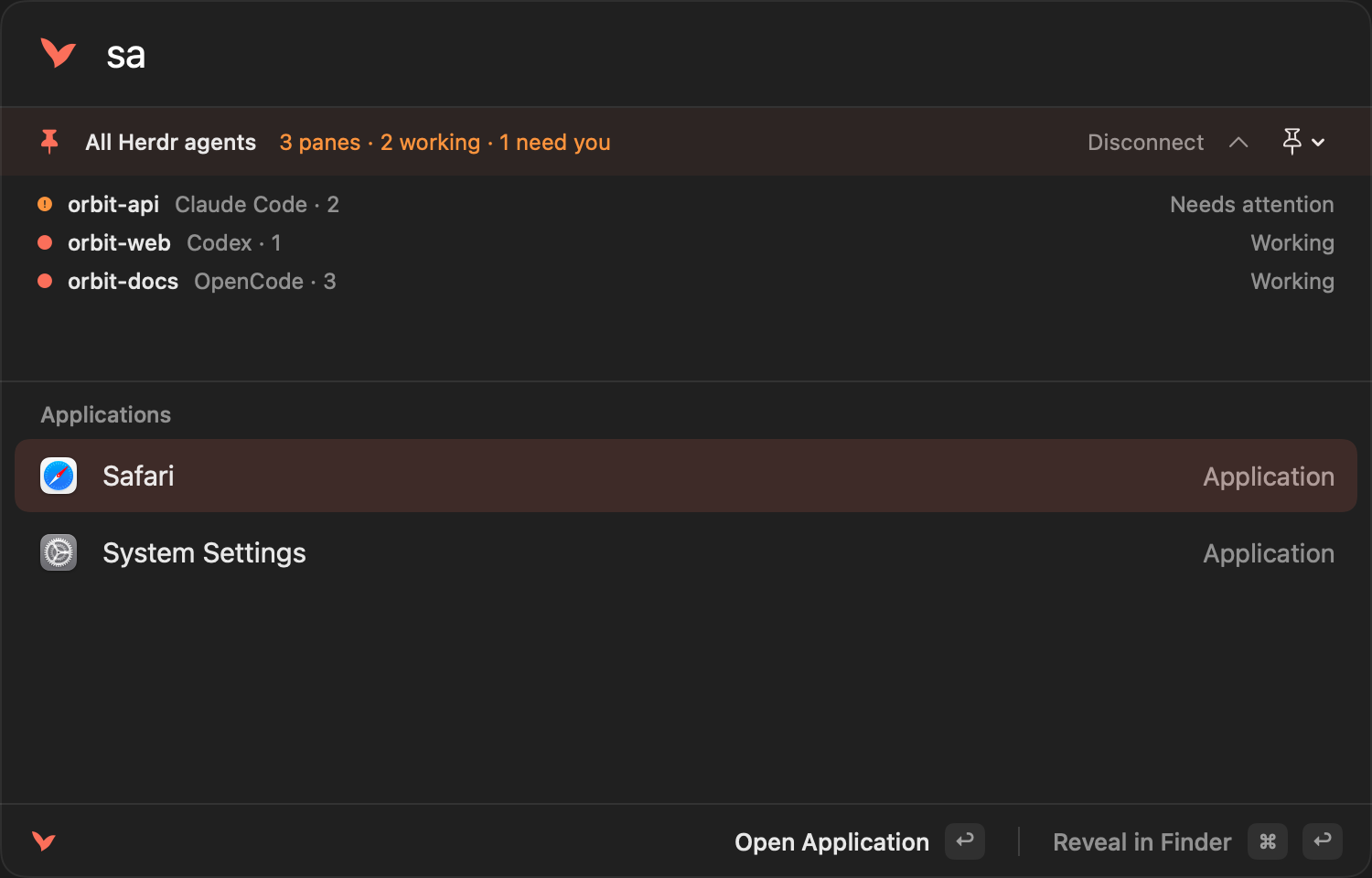
- Learned ranking. Every choice is recorded with the exact query that led to it, in a local SQLite file. A use adds one point to a score with a seven-day half-life, so daily picks outrank an old binge. Among matched apps the score is a bonus, and the app last chosen for the exact query you typed is pinned first, so
salearns Safari after one pick. Suggestions on an empty query are your most-chosen apps, filled out with Spotlight's last-used dates. Nothing about this leaves the machine. calshows Today and Tomorrow; merged contact results only appear once Contacts access has been granted via@.- Contact rows show the contact's photo when there is one, from the pre-scaled thumbnail rather than the full-size image, and fall back to a person glyph. Photos are held only for the rows on screen and never written to disk.
- Footer names the return action for the selected row; command-return runs the secondary one (reveal in Finder, copy phone). Contact labels come from the Contacts app, so the footer reads Copy Work Email or Copy iPhone Phone rather than a generic label.
- Audio devices:
audiolists inputs and outputs;output airpodsorinputnarrows the list. Return changes only the chosen direction. - Connectivity:
bluetooth/btlists connected paired devices.wifilists nearby networks, marks the current network, and joins open or personal-password networks with native secure entry or a saved Keychain password. Bluetooth and Location permission requests occur on first use of the respective command. Network/device lists remain in memory; no coordinates are requested. Hidden and enterprise networks use System Settings. - Volume:
volume(orvol) shows the current output,volume up/volume downadjust by five percentage points,volume 40%sets a level, andmute/unmutecontrol output mute. Uses CoreAudio inside the sandbox; unsupported hardware is reported. Behavior and validation. - Snippets:
snippetsin config, each with a keyword;sniplists them, or type the keyword. Return copies the body with{date},{isodate},{time},{datetime},{clipboard}and{uuid}expanded. Never pastes. - Emoji:
:rocketsearches 1,765 names from the Unicode database bundled with the app. Return copies. - Aliases:
aliasesmaps a word to an app name; the alias ranks first. - Quicklinks:
quicklinkswith a{query}slot;google volant launcheropens the search. Supports http, https, mailto, and validatedshortcuts://run-shortcutURLs. Run saved shortcuts, including workflows that use other apps' App Intents, with optional typed text or explicitly configured clipboard input. - Clipboard images: PNG and TIFF copies are stored encrypted like text, shown as thumbnails under
clip, and put back on the pasteboard with return. 8 MB cap. - Appearance:
appearance.scale(0.8 to 1.4) andappearance.opacity(0.5 to 1.0). - Raycast import: Settings → Import from Raycast unlocks schema-3 exports locally and previews snippets, basic quicklinks, app aliases/hotkeys, and plain-text/Markdown notes. Existing data wins conflicts; hotkeys are opt-in and recovery backups precede writes. Unsupported rich notes, clipboard history, extensions, and AI sessions are reported but not migrated. See format, limits, and validation.
- Backup: Export Backup and Import Backup in the menu bar copy config and notes to and from a folder you choose. Import shows every hotkey and quicklink it would install before applying. Clipboard history is excluded by design, since it is encrypted under this Mac's Keychain key.
- Hotkeys accept
meh(control+option+shift) andhyper(all four) as modifier names, for Karabiner users. - Notes on
option+n(configurable asnotesHotKey): a floating single-note window that remembers your last note. ⌘P browses/searches notes (pinned first), ⌘K searches actions, ⌘D duplicates, and ⇧⌘P toggles pinning. Each note is a plain.mdfile in the container. Pinning and the last selection are local UI preferences, excluded from backup. Save failures stay visible with Retry Save; closing waits for unsaved text to reach disk. Live mode styles Markdown as you type and recognizes code fences immediately. Move the cursor into a code block to choose its language or Auto (local heuristic detection), or copy its code. The footer switches between Live, Markdown Source and Preview. Markdown markers remain visible in Live mode. Preview renders Markdown; code blocks and bare URLs copy their contents, never the fences, by double-click or the Copy button. ⇧⌘C copies the raw Markdown when you want it. ⌘N new, ⌘E toggles edit and preview, ⌘⌫ trashes. From the launcher,notelists recent notes,note termsearches contents and offers to create one. - Development:
Volant --show --query "5 km in mi"opens the launcher with a query;--notesopens the notes window. - Per-app hotkeys: edit
config.json(menu bar, Reveal Config Folder), add{ "bundleIdentifier": "...", "hotKey": "cmd+ctrl+t" }, then Reload Config. Press once to activate or launch, again to hide.
Build
Scripts/install.sh   # Release build → /Applications/Volant.app, login item, launch
Scripts/build.sh     # debug build to build/Build/Products/Debug/Volant.app
Scripts/test.sh      # unit tests: matcher, calculator, pasteboard filter
Scripts/release.sh   # Developer ID archive/export, notarized DMG + signed update feed (VOLANT_NOTARY_PROFILE defaults to "volant"; API-key authentication also supported)
Requires Xcode 26 and xcodegen (brew install xcodegen). Deployment target macOS 15.
Not included, by choice
Window management and window or menu-bar search, which need Accessibility in the main app; that stays ruled out. Add deliberately.
Volant name and compatibility
Volant was previously named Vey. Build with the Volant scheme in Volant.xcodeproj (generated from project.yml). App, source folders, tests, and release artifacts use Volant. Repository: https://github.com/mysticcoders/volant (MIT licensed, public source).
Storage, the clipboard Keychain item and the WASM import namespace use Volant too; releases up to 0.3.14 used Vey, and the app moves that data once on launch. Old Vey backups remain importable. See rename decisions.
Agent status in the launcher
Type agents or herdr and connect to see local Herdr panes directly in the launcher. Search by provider or project, then press Return to focus a pane in Herdr. Use the pin menu or Settings → Pinned harness to keep one harness's status below the search field while using other launcher features. Pinned status connects while the launcher is open and stops polling when it closes. Type acp for a separate Volant-owned conversation through an installed provider CLI. Existing terminal panes are not attached as ACP conversations.
Native ACP conversations (development)
Choose New ACP conversation from the agent results or type acp. Select a provider and a project folder, then Start. Write a prompt and use Send or ⌘Return. Tool permission requests show their operation details and the provider’s choices; none are automatically approved. Cancel stops the current turn. End closes the agent connection; the transcript remains visible until the next Start. Hiding the launcher keeps the conversation alive, with an activity row when you return. Volant’s transcript is in memory; the provider may keep its own history.
This slice runs up to six ACP v1 sessions at once: New in the chat header starts another conversation while the shown one keeps running, and the buttons under the header switch between them. It can resume the last conversation by its recorded session ID when the agent advertises loadSession (see agent integrations). It uses the provider’s default model/mode and existing CLI login; for Claude Code and Codex, Account in AI Settings can start new conversations with another configuration folder instead (CLAUDE_CONFIG_DIR or CODEX_HOME, signed in through that CLI), and each conversation shows its account’s label. It does not yet select models, send attachments/notes, or implement client filesystem/terminal callbacks and provider-specific extensions. Cursor requires a separately installed, signed-in agent CLI and remains unverified here. Run ./tools/check-acp.sh for isolated protocol regressions.
Claude Code and Codex ACP setup: install Node.js 22+, keep the native claude and codex CLIs signed in, and run ./Scripts/install-acp-adapters.sh. This installs locked adapter dependencies under ~/.local/share/volant/acp; startup never downloads a package. Volant explicitly points the adapters at the installed CLIs. The helper joins the app’s macOS security session so Claude can use the existing Keychain login.
Settings and app shortcuts
Open Settings from Volant’s menu or type settings in the launcher. General contains Dock/startup and Herdr preferences plus editable Show Volant and Open Notes shortcuts; Data & Configuration contains reload, backups and Raycast import. Type reload config to apply file edits.
Select an application and press ⌘K, then Return, to edit its global shortcut and launcher alias. App Shortcuts in Settings offers the same editor. Shortcuts save immediately after recording, with a Saved confirmation; hover over a binding to remove it with ×. Global shortcuts require Command, Control or Option; aliases such as c are typed into Volant. Conflicts and save failures are reported. See Settings validation and remaining checks.
Yorumlar (0)
Yorum birakmak icin giris yap.
Yorum birakSonuc bulunamadi