a-stack
Health Warn
- License — License: MIT
- Description — Repository has a description
- Active repo — Last push 0 days ago
- Low visibility — Only 6 GitHub stars
Code Fail
- rm -rf — Recursive force deletion command in install.sh
- network request — Outbound network request in internal/stack/browser/app.js
- network request — Outbound network request in scripts/bench.py
- rm -rf — Recursive force deletion command in scripts/build-release.sh
Permissions Pass
- Permissions — No dangerous permissions requested
No AI report is available for this listing yet.
Local Task graph, Task mail and questions for teams of AI coding agents (Claude Code, Codex, any CLI), with a read-only browser view. One Go binary.
a-stack
Keep an eye on your AI coding agents.




When several Agents work on one project, you soon lose track of who is doing what, what is blocked and who is waiting for you. a-stack gives your Agents a shared Task graph and a message thread for each Task. You watch it all live in your browser, and an Agent that needs a decision asks you there.
- Any agent, one picture. Claude Code, Codex and any agent that can run a command share the same Tasks, dependencies and mail. You see the whole team in one browser tab.
- Your data stays here. One binary and one SQLite file, reachable only from
127.0.0.1. No account, no cloud, no telemetry. View links work once, and releases are signed. - Nothing is lost when a session ends. Reports, Task mail and answered questions stay after an Agent compacts, crashes or hits its limit, so a new Agent can pick up where the last one stopped.
Works with Claude Code and Codex (with hooks), Herdr (optional) and any agent with a shell. Runs on Linux; macOS and Windows are coming.
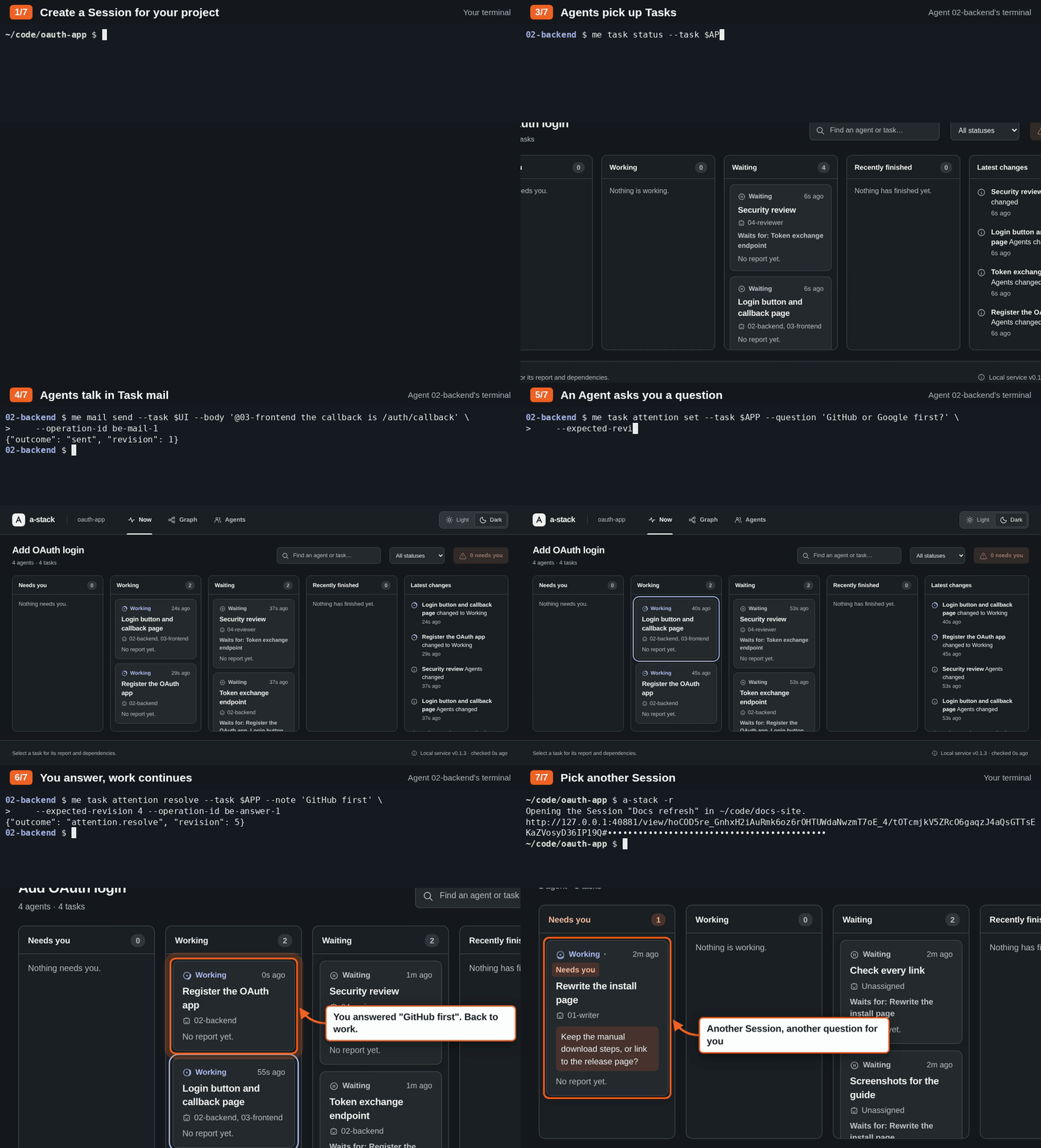
How it works
- You start the a-stack service and create a Session for the team.
- The Agents register themselves in the Session. One of them becomes the Orchestrator.
- The Orchestrator divides the work into Tasks, assigns Agents to them and sets which Tasks depend on other Tasks.
- The Agents update their Tasks, write reports and send Task mail to the other Agents on the same Task.
- When an Agent needs your input, it marks its Task as Needs you, with a question.
- You follow the work in a read-only browser view.
The Agents use the a-stack command line for all of this. a-stack is one binary with one SQLite database. It runs on Linux, keeps all data on your computer and accepts connections only on 127.0.0.1.
If your Agents run in Herdr, a-stack can also tell an Agent to check its mail when another Agent mentions it. This is optional.
The browser view
The view has three tabs:
- Now opens first. Its columns show the Tasks that need you, the Tasks in progress, the Tasks waiting for other Tasks and the Tasks that finished recently. A list beside them shows the latest changes.
- Graph shows which Task waits for which. Finished Tasks shrink to one line, so the open work stands out.
- Agents shows each Agent's Tasks in one row.
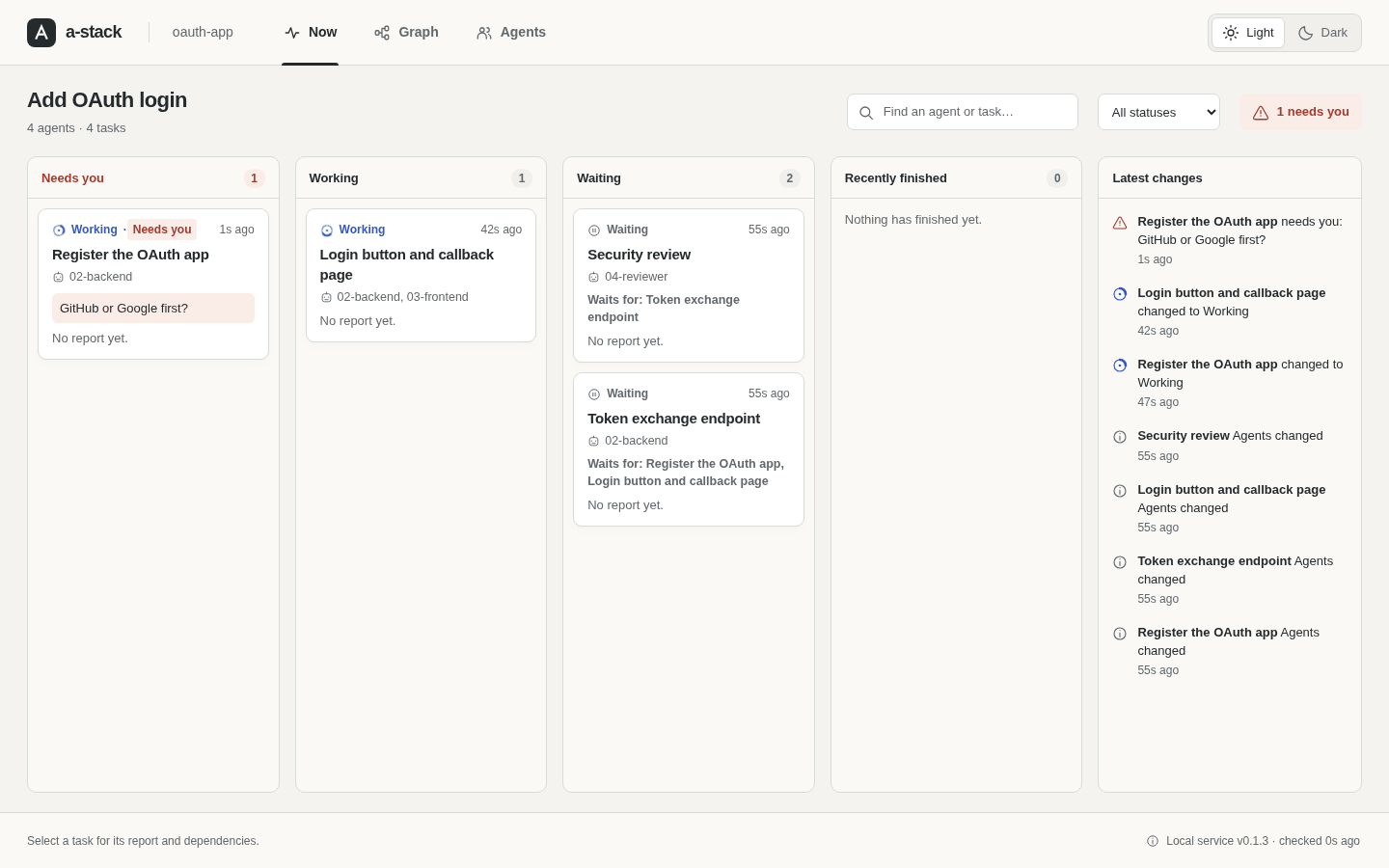
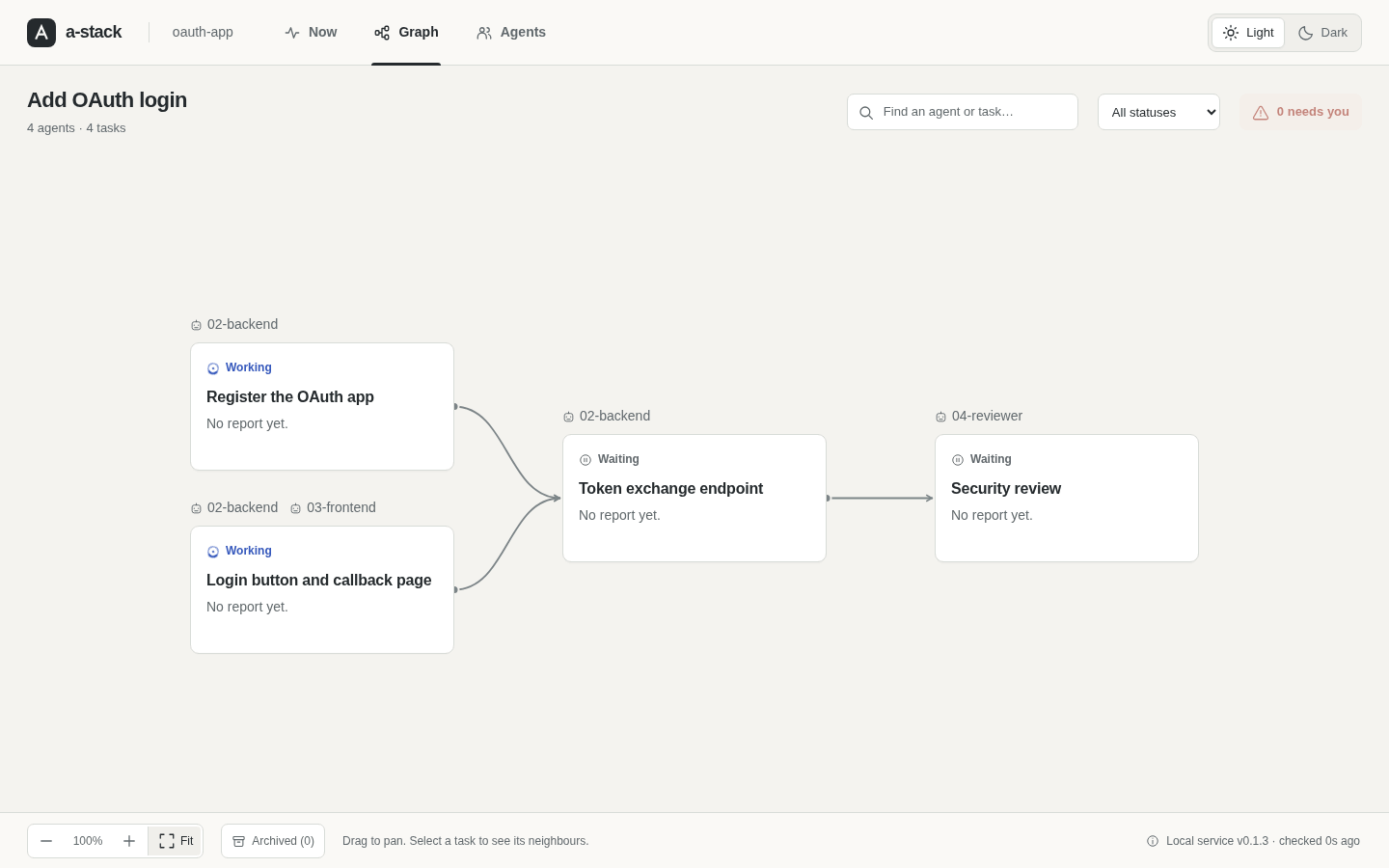
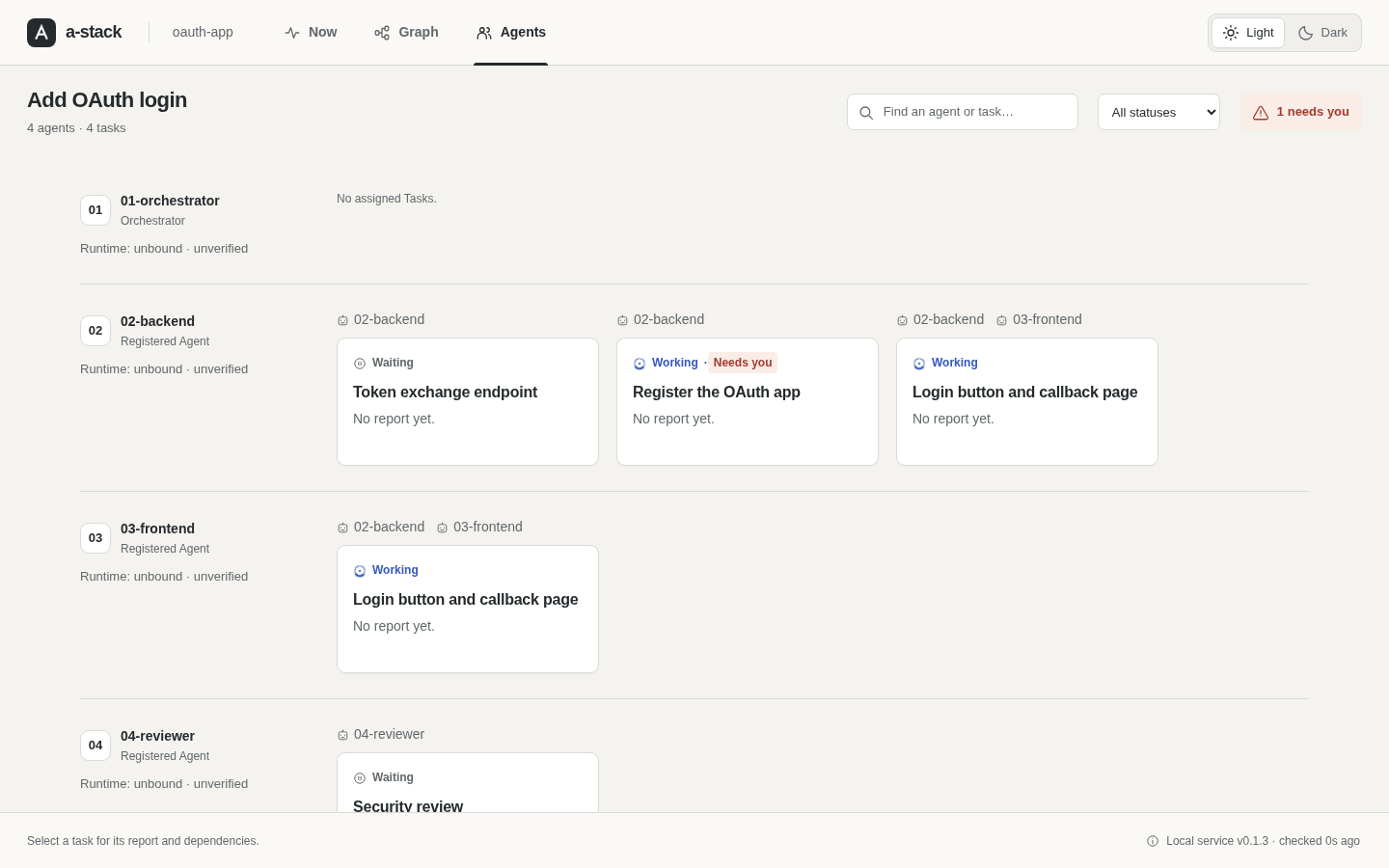
Select a Task to see its report, its dependencies and its Task mail. The view reads the mail but cannot send it or change anything.
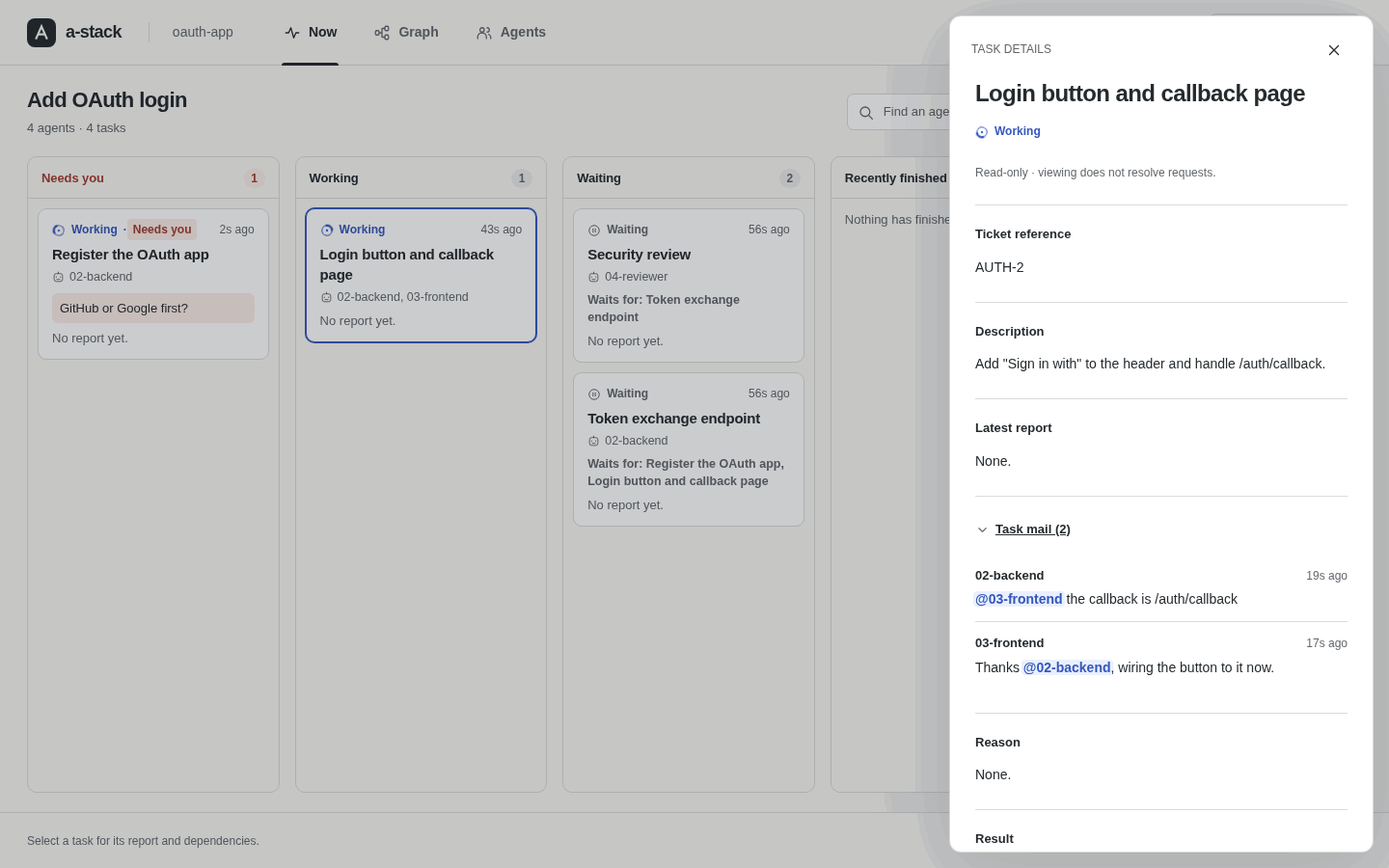
Short clips in the browser view guide show the graph, the archive and the Agents tab.
Old work is archived so that it does not clutter the graph. a-stack archives a finished Task when all the Tasks that depend on it are finished too, or one day after it finished. You or the Orchestrator can also archive a Task with a-stack task archive. The Archived button shows archived Tasks again.
Install
curl -fsSL https://github.com/mzmzeee/a-stack/releases/latest/download/install.sh | sh
The script installs the a-stack binary in ~/.local/bin. It checks the download against the release checksums before it installs. For other versions, other folders, a manual download, go install (it needs a C compiler) or a build from source, see Install.
To update, run a-stack update and restart the service. See Update.
To start a-stack at boot and restart it after a crash, run a-stack service install. See Start a-stack automatically.
Quick start
cd ~/code/my-project
a-stack new          # first time: creates a Workspace and a Session and opens the view
a-stack              # later: opens your last Session
a-stack -r           # pick another Session
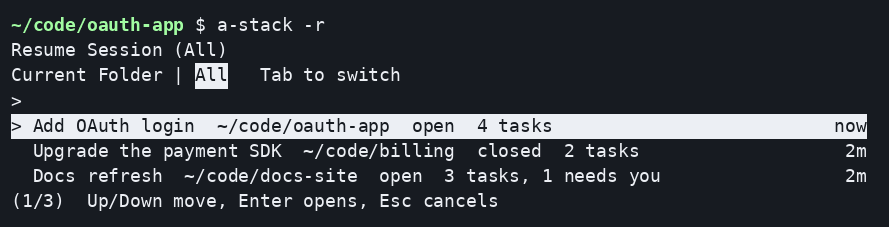
If no a-stack service runs yet, these commands start it in the terminal and keep it running until you press Ctrl-C or close the terminal. To keep it running, run a-stack service install. If the service already runs, for example as a systemd service, they use it and return.
The Task graph is empty at first. a-stack new --orchestrator 01-orchestrator also registers and appoints an Orchestrator and prints a brief to give your coding agent. To hand the Session to an Orchestrator agent that registers the other Agents and plans the Tasks, see Hand your Session to an Orchestrator. To try a whole team on throwaway state first, follow Getting started.
Documentation
- Getting started: set up a team of three Agents and take one Task from start to finish.
- Workspaces, Sessions and Agents: register Agents, recover credentials, close and reopen Sessions.
- Tasks and the Task graph: create and assign Tasks, report progress, ask questions, add dependencies.
- Task mail: send and read messages, and mention Agents.
- Browser view: open the view and read what it shows.
- Watch from the terminal:
a-stack status,a-stack watchanda-stack statuslineshow what needs you, with a bell, opt-in desktop notices and a Claude Code status line. - Agent hooks:
a-stack hook installreminds Claude Code and Codex agents of their Tasks after a compaction and reports their runtime state. - Mention notices: set up Herdr notices and fix delivery problems.
- Local service: the state directory, credentials, command output, the HTTP API, backup and restore.
- Agent skill: run
a-stack skill installto teach your coding agents to work in an a-stack Session. - Performance: stress test results with many Agents, and how to run the test.
To see all commands, run a-stack --help. To see the flags of one command, run a-stack help COMMAND, for example a-stack help task create.
Contributing
Read CONTRIBUTING.md for the development setup and the checks.
License
a-stack is released under the MIT License.
Reviews (0)
Sign in to leave a review.
Leave a reviewNo results found