ochakai
Health Warn
- License — License: MIT
- Description — Repository has a description
- Active repo — Last push 0 days ago
- Low visibility — Only 6 GitHub stars
Code Pass
- Code scan — Scanned 12 files during light audit, no dangerous patterns found
Permissions Pass
- Permissions — No dangerous permissions requested
No AI report is available for this listing yet.
Context provider for data agents (MCP + REST + CLI): metrics, golden queries, and interpretation knowledge. Google Cloud native (Cloud Run + Cloud SQL), secret-zero.
ochakai




ochakai is a context provider for data agents. Semantic layers tell
you that revenue = SUM(price) — they don't tell you whether 100 is good
or bad. ochakai keeps that missing half in one knowledge base: metric
definitions, verified golden queries, interpretation knowledge (how to
read a metric), glossary terms, and table catalog entries — curated by
humans and agents together, and served to Claude Code and every other
data agent over MCP, REST, a CLI, and
a bundled web UI. More at ochak.ai.
One Go binary and Postgres — Docker and nothing else locally, Cloud Run
and Cloud SQL when it is real.
Quick start · Why ochakai ·
Requirements · All docs (Japanese;
one page in English) ·
REST API · Changelog
Quick start
Three steps, in order, and nothing to choose between: read somebody
else's knowledge, then hold your own, then run it for a team.
Sixty seconds: the public demo
A public demo already holds the knowledge base below. It reads no
identity (design doc
0066 §3), so there is no
account and nothing to configure:
go install github.com/na0fu3y/ochakai/cmd/ochakai@latest
ochakai use https://demo.ochak.ai
ochakai search "なぜ売上が落ちているのか"
ochakai get insights/reading-revenue
The demo knowledge base is written in Japanese, because that is what
a knowledge base a Japanese team keeps looks like and this demo is one
(the eight conditions in docs/surface.md, C8). What
stays English is what comes from the warehouse — total_price,status = 'completed', the SQL in the # Computation fence — soochakai search channel_code still lands on the concept that lists the
codes.
It is also the one deployment where plain curl works — nothing to sign:curl 'https://demo.ochak.ai/api/v1/search?q=売上'.
It is a sandbox, and it takes writes. That is what makes the loop
below — an agent drafts, a human rules — something you can try without
standing anything up first. The price is that the base is restored on a
schedule and everything written to it goes: a sandbox that did not say so
would be taking your work (design doc
0087 §3). ochakai whoami
says it on the posture: line, and ochakai stats on its first.
What those two calls are worth
Search ranks what bears on the question; get hands one concept over in
full, and its linked_from rows name what points back at it — which is
how the caveat that says how to read a metric reaches whoever reads the
metric (design doc
0106). Here is
part of what the insight above holds, condensed — the quoted sentences
are verbatim, and the English beside them is this page's rendering of
what the demo actually says:
季節性 (seasonality). The shape repeats every year and is larger
than almost anything you will be asked to investigate. December, +30 to
+40%; March, +10 to +15%; August, -15% — お盆 (Obon), the whole
country stops buying for a week. 「8月が 15% 落ちることは、ここで知って
おく価値がいちばん高い一つの事実である。毎年戻ってくるし、一度も何かを
意味したことがないし、それでも毎年調査が立つ」 — it comes back every
year, it has never meant anything, and a review is opened over it every
year anyway.しきい値 (threshold). 「前年同月を 8% 以上下回る月が2か月続いた
ときに上へ上げる […] 1か月だけなら、どれだけ下でも問題だったことは
ない」 — one month below has never been a problem, however far below,
including the month a payment provider outage cost a full day.
An agent with warehouse access alone can see that August fell. Nothing in
the schema says the fall arrives every year, that a month-over-month move
inside ±6% is this series' own noise, or that a late 06:00 JST partition
reads exactly like a bad day and has caused more false alarms than any
real decline. Those are somebody's conclusions about their own data, and
they are the difference between revenue is down 15% and it is August.
The same search hands back what is not settled, which is the half a
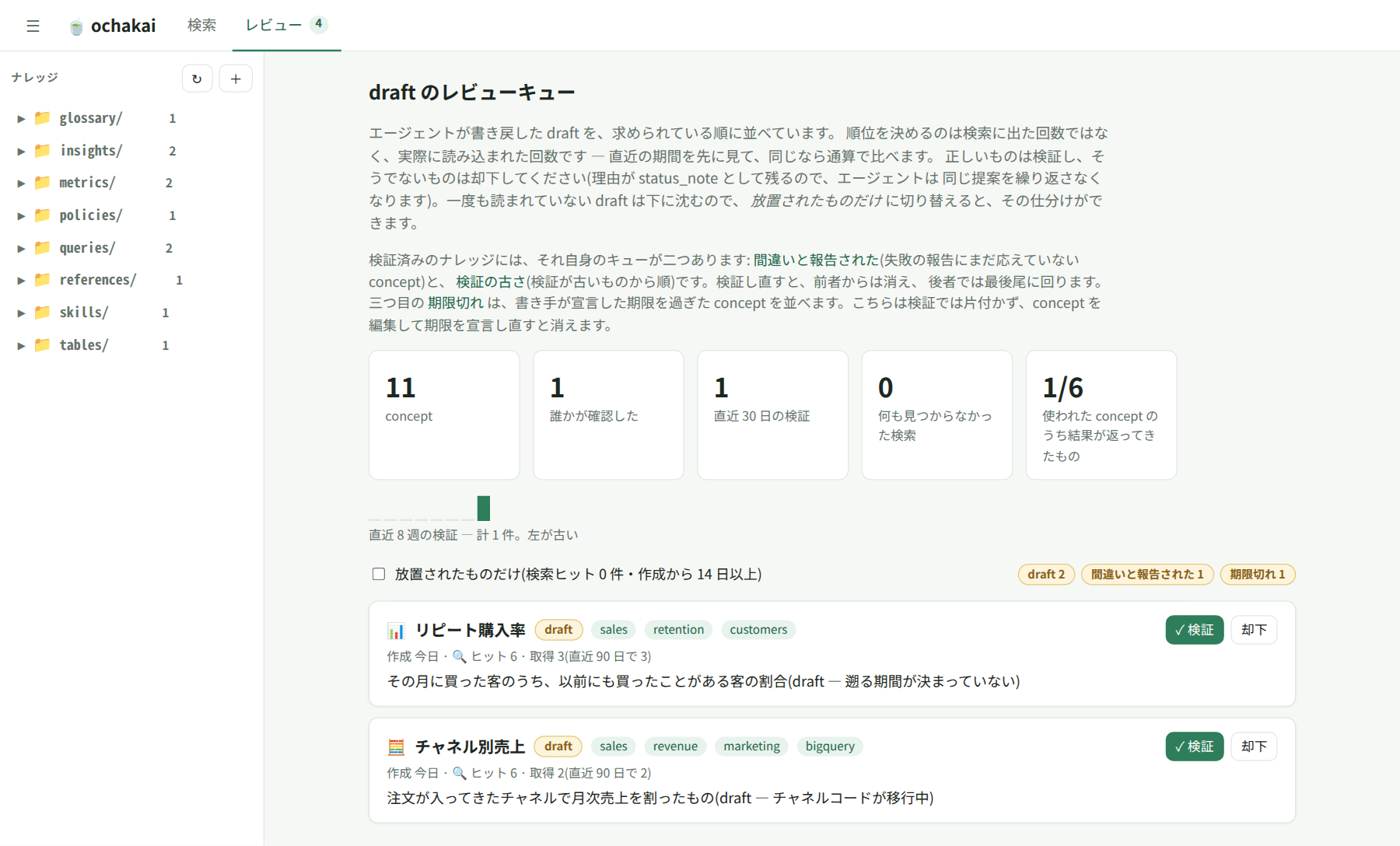
retrieval system usually drops. The repeat-purchase-rate metric comes back
marked draft, carrying the three questions nobody has answered yet — the
lookback window, guest checkout, the denominator — and its frontmatter says
who wrote it: by: analysis_agent/gemini-2.5-pro. An agent drafted it
while looking into this very question, a human has not ruled on it, and
ochakai says so instead of quietly ranking it beside the verified ones. The
deprecated channel-code reference comes back too, by name, for the same
reason.
No LLM ran inside ochakai to produce any of that. It returned what
people wrote and verified, with the provenance still attached; the reading
is your agent's job (design doc
0081 §6).
Ten minutes: a base of your own
The demo above is somebody else's knowledge, and nothing written to it
outlives the next restore. A server of your own is one command, and
everything after it keeps:
git clone https://github.com/na0fu3y/ochakai && cd ochakai
docker compose -f deploy/compose.yaml up -d
This runs with OCHAKAI_MODE=dev: authentication is off and every
request acts as human:anonymous — never do this on a deployment
(every mode (Japanese)).
Point the same CLI at it and load the demo knowledge base — eleven
concepts about one invented retail domain, linked to each
other, some of them drafts. Everything goes through the API, so plain
curl reaches it too:
ochakai use http://localhost:8080
ochakai import examples/demo
curl 'http://localhost:8080/api/v1/search?q=shop.orders'
ochakai search "なぜ売上が落ちている?"   # the judgment, asked in Japanese
The two searches are not translations of each other. The base is written
the way a Japanese team writes its own — Japanese where the judgment is,
English where the warehouse columns are — so the first reaches the table
and the second reaches the insight that says how to read it. 売上 is a
two-character term, which is the shape a Japanese knowledge base is
mostly made of and the shape a trigram index cannot look up; here it is
an index lookup with nothing installed and nothing configured.
An import writes documents; it does not rule on them. The bundle's ownverified: keys arrive as what the document claims, so a base that was
just loaded holds no verification of its own. ochakai verify metrics/revenue — or the web UI's ✓ — is the first one, and until it
lands, --trust human-reviewed answers with nothing and the review
page's counters read zero, by design.
That shop is invented. Your own tables go in the same way, and ochakai
never touches the warehouse to get them — you run the schema query with
your own client and your own identity, and pipe the rows in. Raise your
client's row limit while you do: bq query prints the first 100 rows and
says nothing about the rest, so a dataset with more columns than that
seeds only the tables the first 100 rows reached.
bq query --max_rows=100000 --format=json --nouse_legacy_sql \
  'SELECT table_schema, table_name, column_name, data_type, is_nullable, description
     FROM `your-project.your_dataset.INFORMATION_SCHEMA.COLUMNS`
    ORDER BY ordinal_position' \
  | ochakai seed - | ochakai import -
Every concept lands as a draft, because a projected schema is a
skeleton somebody still has to say something about — which is what the
review queue is for. The first month
(Japanese) is the road from there: how small to scope it, what to write
in what order, how to check that an agent's search finds it, and
which drafts to read first — not all of them.
The warehouse also knows what people keep asking, which a schema does
not: examples/bigquery-catalog (Japanese)
turns repeated queries from your job history into drafts, and carries the
day-one procedure, the job that reruns it, and the attester that says
whether a run counted.
For real: Cloud Run and Cloud SQL
The same binary, about $10/month, and no secret anywhere — Cloud Run IAM
decides who reaches it, Cloud SQL IAM authenticates the service, and
there is nothing to issue or rotate. Terraform stands the whole thing
up (Japanese), or
the gcloud commands it runs (Japanese) if
you would rather see them one at a time. Your knowledge keeps going the
other way too: ochakai export hands back the whole base as an OKF
bundle, which is markdown you can commit.
Connect an agent
For Claude Code — and anything else with a shell (headless agents, CI) —
the recommended interface is the bundled CLI, a thin client of the same
REST API: tool schemas don't occupy the agent's context, output composes
with pipes, and it resolves Google ID tokens itself, so no proxy process
is needed against Cloud Run. The quick start already installed it (a
release archive is the
other way), and it is pointed at your own server; the rest of what it
does:
ochakai use https://your-service.run.app   # or back to http://localhost:8080
ochakai whoami                      # which server, as whom, reachable?
ochakai search "なぜ売上が落ちているのか"  # the read an agent starts a data question with
ochakai verify metrics/revenue      # a human confirmed it; status and ETag stay put
ochakai search "revenue" --type Metric --trust human-reviewed   # what that verify put there
ochakai ui                          # web UI at http://127.0.0.1:8098, acting as you
Auth is gcloud auth login — there are no tokens to configure. (A
service account's ADC works too; your own gcloud auth application-default login does not, because Cloud Run needs an
audience-bound ID token that only those two can mint — why, and what to
run instead (Japanese).)
Every command carries its flags and worked examples in ochakai <command> -h;
docs/cli.md is that same text rendered, for reading before
you install anything.
MCP is for the clients that cannot shell out: Claude Desktop, and your
own services calling ochakai under their own identity. Both take one of
two forms — a URL, or the ochakai mcp-stdio bridge against Cloud Run —
and see the same seven tools. An assistant hosted by a vendor opens the
connection from that vendor's infrastructure rather than from your
machine, so an IAM-restricted deployment is out of its reach by design:
connecting an MCP client (Japanese).
Claude Desktop has a third form: ochakai_<version>.mcpb on the
releases page. It is the
bridge above with the JSON already written — open the file, and the app
asks for one thing, the server URL, with the public demo filled in. macOS
and Windows, which are the platforms that install a bundle.
Then copy examples/claude-code/CLAUDE.md
(Japanese) into your project's CLAUDE.md, or install the
hooks (Japanese) to make recall and write-back automatic
instead of habitual — both without an LLM.
Walk the whole loop in four prompts → (Japanese)
Why ochakai
In 2026, serving metric definitions to agents over MCP is table stakes —
semantic layers, warehouses, and data catalogs all do it. ochakai exists
for what they still don't do:
- Interpretation knowledge is a first-class type. An
Insightconcept
records the baseline, the seasonality, the caveat, the threshold — the
tribal knowledge that never fits in a semantic-model YAML and today
travels by Slack. Your agent gets it in the same search that returns
the metric definition. - Japanese search works with nothing installed and nothing tuned.
PostgreSQL does not tokenize Japanese, so a knowledge base written in
it usually means installing a tokenizer extension and configuring it —
which managed Postgres, Cloud SQL included, will not let you do.
ochakai cuts Japanese runs into the two-character windows the language
actually spells its terms in, stores them as lexemes, and looks a query
up in the same index: 売上 is an index lookup, not a scan of the
corpus. Latin words stem on the way, sorevenuesfindsrevenue.
There is no setting for any of this, and semantic search sits beside it
by default on Google Cloud (design doc
0080). - A write-back loop with a memory. Agents write learnings back as
drafts and a human promotes them, with provenance on every concept and
every change kept as a revision. Proposals that don't make it are kept
asrejectedwith the reason, so agents stop re-proposing them — a
memory of no. And the loop is measured: usage counts, a
verification-age feed, and outcome reports from agents that acted on a
concept and found it wrong (the loop). - No forward-deployed engineers, by design. Encoding what your data
means is labor, and it doesn't vanish — the only question is who does
it. Palantir's answer is engineers on-site; the warehouse-native answer
folds it into the data team's workflow. ochakai's bet is a third path:
the agent is the forward-deployed labor, drafting breadth every time
it learns something, while a human verifies the judgment-heavy core.
The smallest team that sustains a living knowledge base is one reviewer
already in the loop. In ontology terms, this is the smallest ontology
that still works: concepts and their links carry the semantic half —
verified definitions, readings, policies — and the definitions of the
kinetic half — sanctioned computations, skills, the contract an
executor honors — while execution itself stays deliberately absent,
because your agent already owns it
(positioning, Japanese). - Not a memory layer — the other half of one. Memory layers (mem0,
Zep, Letta) auto-extract per-user memories with an LLM and inject them
back unaudited. ochakai is the opposite trade: team-shared knowledge
that passes through human review. Memory layers remember what
happened; ochakai curates what's true. They compose — preferences
there, verified data knowledge here. - Verified answers for any client, and an exit. Verified-query stores
exist inside Snowflake Cortex Analyst, inside Databricks Genie, inside
each AI-analyst SaaS — each feeding only its own chat. The same
knowledge here serves Claude Code, hosted MCP agents and CI jobs alike,
and the whole base round-trips through
OKF v0.2
bundles — plain markdown + YAML frontmatter that lives happily in git,
with trust in the spec's own keys. MIT-licensed and self-hosted per
tenant: your knowledge is never a hostage.
Each of those has an alternative you may already run — a catalog, a
memory layer, a markdown vault with an MCP server.
Positioning (Japanese) takes them one at a time, says where
ochakai loses, and says who should pick something else.
What it refuses
| ochakai has no… | because |
|---|---|
| LLM | it returns human-verified golden queries verbatim, and the definitions and caveats around them. Interpretation is the client agent's job. Embeddings are the exception in spirit and not in fact — an encoder is deterministic and produces no text |
| SQL execution | it holds no warehouse credentials. Your agent executes |
| connector ingestion | knowledge is curated, not harvested. Trust density over volume — and a harvester would need warehouse credentials the server does not hold, so a catalog projection runs as an ordinary client under your own service account (example (Japanese)) |
| chat UI or dashboards | it feeds your agents; it doesn't compete with them. The bundled web UI is a curation surface, not a BI tool |
| secrets | Cloud Run IAM decides who reaches it and Cloud SQL authenticates the service account — nothing to issue or rotate |
| roles, a user database, per-concept permissions | reachability is the access model, and the one boundary ochakai does hold is grants of read and write under a directory, off unless you write one (0109, Japanese) — see requirements and configuration (Japanese) |
| telemetry | nothing is reported anywhere. The only hosts ochakai contacts are Google Cloud APIs in your own project |
Requirements
- Google Cloud, recommended: Cloud Run IAM and Cloud SQL IAM are how
ochakai holds no secret of its own without any configuration. Off
Google Cloud, naming your own OpenID Connect (OIDC) issuer
(0086) is a
second, supported authentication path — ochakai verifies the bearer
token itself against the issuer's published keys, which introduces no
secret either, so it costs secret-zero nothing. Embeddings stay Vertex
AI or nothing there, so search off Google Cloud is lexical-only. What
is portable is the knowledge; a particular runtime is not required. - PostgreSQL 17, able to install
pg_trgm. Nothing queries it — the
lexical index has been atsvectorcolumn since the two-character
windows above replaced trigrams — but the schema replays from its first
migration, and two of those build a trigram index that a later one
drops. It stays a requirement for that, and for nothing else.vector
(pgvector) as well where semantic search is on, which on Google Cloud
is the default. - No authorization by default, as above: deciding who may reach a
deployment is Cloud Run IAM's job. A deployment that needs a boundary
inside one bundle can grant read and write under a directory prefix
(0109,
Japanese), which is off until the first grant is written.
Details, and every environment variable:
requirements and configuration (Japanese).
Documentation
This README describes main; the changelog says what is
in the version you are running.
- Evaluating — FAQ (Japanese) ·
Positioning (Japanese) ·
Architecture (Japanese) ·
Compatibility and support ·
Roadmap - Using — The improvement loop (Japanese) ·
Fill it with your own tables (Japanese) ·
CLI reference ·
MCP clients (Japanese) ·
Troubleshooting (Japanese) - Running — Deploy with Terraform
(Japanese) ·
the gcloud reference it runs
(Japanese) ·
Configuration (Japanese) ·
Operating (Japanese) ·
Golden query canary (Japanese) - Building on it — REST API ·
Examples (Japanese) · All docs (Japanese) - Reading it in English — docs/en.md: what each Japanese
page holds, in what order to read them, and the names you would
otherwise have to hunt for inside a page you cannot skim. The manual is
Japanese by decision (condition C8), and this is the way in rather than
a translation of it - Deciding — The surface, the eight conditions
ochakai exists to satisfy and everything counted against them, and
docs/design, the numbered decision records
behind it (mostly Japanese, summarized in
English).
Contributing
Issues and PRs welcome — see CONTRIBUTING.md for the
local setup and the checks CI runs. A design doc in Japanese is the
project's own habit, not a requirement: propose in whichever language you
think in, and say so in the PR. SUPPORT.md is where to ask
a question, SECURITY.md where to report a vulnerability.
License
Reviews (0)
Sign in to leave a review.
Leave a reviewNo results found