drex-browser-harness-pub
Health Uyari
- License — License: MIT
- Description — Repository has a description
- Active repo — Last push 0 days ago
- Low visibility — Only 7 GitHub stars
Code Basarisiz
- execSync — Synchronous shell command execution in build.mjs
- fs.rmSync — Destructive file system operation in build.mjs
- process.env — Environment variable access in build.mjs
- process.env — Environment variable access in e2e/impostor.mjs
Permissions Gecti
- Permissions — No dangerous permissions requested
Bu listing icin henuz AI raporu yok.
Drex Browser Use: an AI browser agent. Describe a task in plain words and Drex Max clicks and types in a real browser for a fraction of a cent a move. MCP server, CLI and Chrome side panel.
Drex Browser Use: AI browser agent and MCP browser server
Quick start · Chrome extension · Benchmarks ·
How it works · Models · Safety · Docs
Describe a browser task in plain words. Drex Browser Use does it in a real browser and tells you what it found.
Drex Max takes the actions. It picks each click and keystroke from the page's
controls and screenshots, for a fraction of a cent a move. An LLM helps: it plans the task, reads pages and checks
the result. The LLM is your choice: Claude Haiku 5.5 by default, or another model. Coding agents call it as
an MCP server or a CLI; people use it from a Chrome side panel.
Part of Drex, Nace.AI's open decision models. Drex Max, the model that takes the actions here, is one of them: weights, model page and runners.

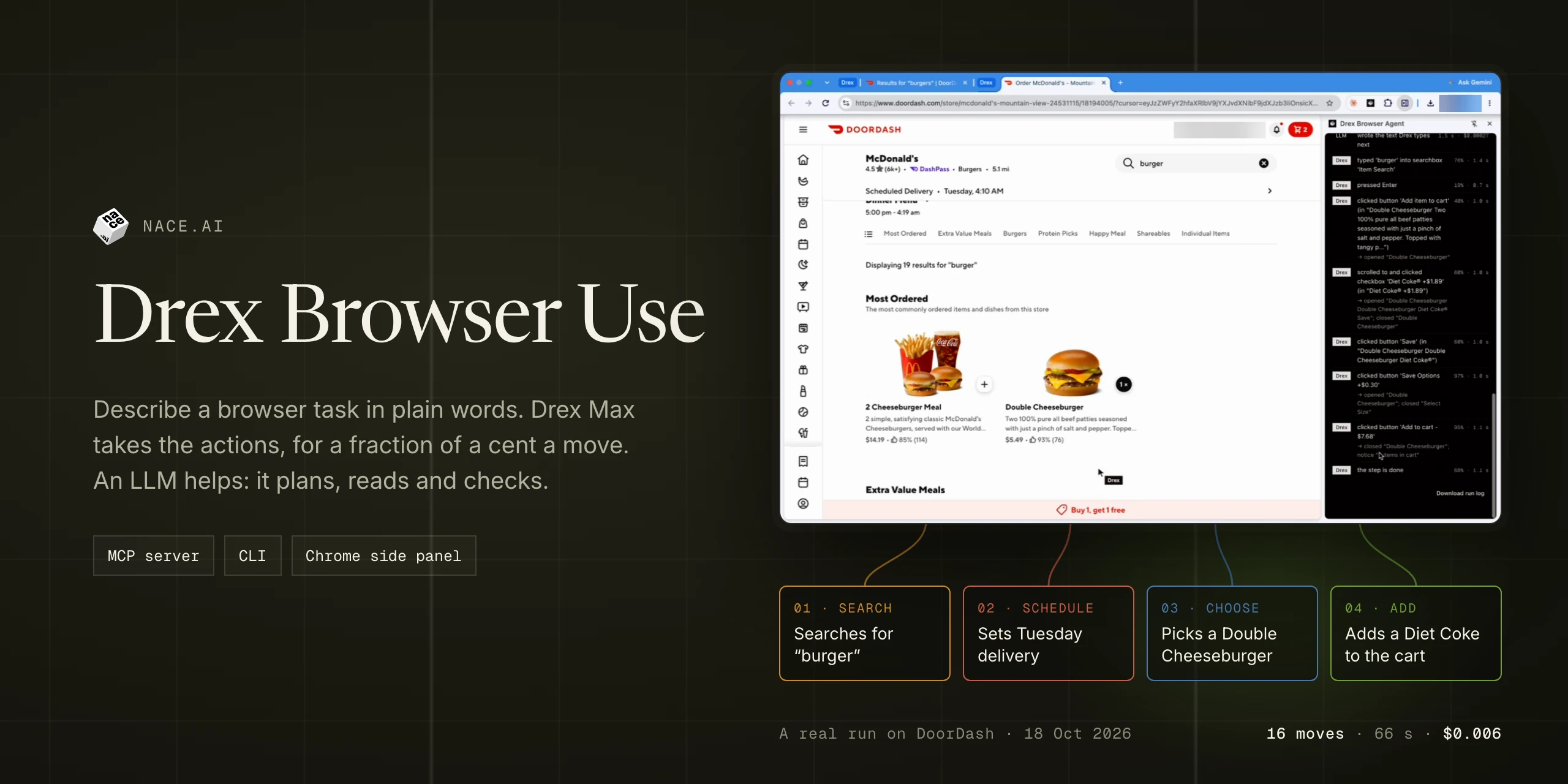
A real run, sped up 5×: Drex Browser Use fills a DoorDash cart from one sentence and stops before checkout. All 16
moves were Drex Max's; 66 s, $0.006 of model cost.
What it is good at: tasks on web pages that need clicking, typing, filling forms or reading behind navigation, such as
"find the cheapest 1 TB SSD on this shop and return its name and price" or "fill in this registration form with these
details and tell me the confirmation".
What it will not do: type passwords or payment details, or solve CAPTCHAs. It stops before a click it recognizes as
risky (pay, send, delete, publish, place an order) unless a person approves it. See Safety.
Ways to use Drex Browser Use
| Who it's for | How you run it | |
|---|---|---|
Local runner (nace-browser) |
Coding agents on your machine: Claude Code, Codex, Cursor, Hermes, Pi and any agent with a shell | An MCP server (nace-browser mcp) or a CLI (nace-browser run --json) that drives its own Chromium. Build it from this repository. |
| Chrome extension | People, in their everyday Chrome, with approval cards for risky clicks | A side panel. Build it from this repository and load it unpacked. |
| Cloud runs | Apps and servers | Not available yet. |
Nothing is published to npm or the Chrome Web Store: both the runner and the extension are built from a checkout of
this repository, as below.
Quick start: the MCP browser server and CLI
You need Node 22.18 or later, npm and git.
1. Get your keys
- A Drex API key for Drex Max: sign in at console.nace.ai and create a key under
API Keys. New accounts get free credit. - An Anthropic API key for Claude Haiku 5.5, from the Claude Console.
Set both in your shell profile (~/.zshrc, ~/.bashrc or similar), so every agent you start from a shell has them:
export DREX_API_KEY=nace_sk_...
export ANTHROPIC_API_KEY=sk-ant-...
Never put keys in an agent's MCP config file, a project file or a command line you might commit or share. To keep them
out of plain-text dotfiles, read them from your OS keychain instead; see docs/auth.md.
2. Build the runner
git clone https://github.com/nace-ai/drex-browser-harness-pub.git drex-browser
cd drex-browser
npm ci
npm run build:release                      # the extension build the runner loads, into runner/extension/
node runner/bin/nace-browser.mjs install   # Playwright's Chromium, once (about 170 MB)
npm link -w runner                         # optional: puts `nace-browser` on your PATH
Check it: nace-browser --help (or node runner/bin/nace-browser.mjs --help) prints the commands.
3. Add it to your agent
The MCP server is node <checkout>/runner/bin/nace-browser.mjs mcp, with the absolute path of your checkout. Its three
tools are browser_task, browser_login and browser_profiles (docs/mcp-tools.md). A run takes
from a few seconds to a few minutes, so give the tool a long timeout. Snippets for Claude Code, Codex, Cursor, Hermes
and Pi are in docs/runner.md. For Claude Code, from the checkout:
claude mcp add --scope user nace-browser -- node "$PWD/runner/bin/nace-browser.mjs" mcp
4. Run a first task
Ask your agent, for example: "Use the browser to find the top story on news.ycombinator.com". Or from a shell:
nace-browser run "What is the top story? Give its title and points." --url https://news.ycombinator.com --json
--json prints only the result on standard output: read status, answer_text and outcome. The run log and a final
screenshot are saved under ~/.nace/browser/runs/. The result shape is in docs/runner.md.
The Chrome extension
npm ci
npm run build        # lint, types and formatting, then the extension into dist/
Open chrome://extensions, turn on Developer mode, choose Load unpacked and pick the dist/ folder. Open the
side panel with Alt+Shift+D or the toolbar icon, then enter your Drex API key and an LLM key in its settings (the
gear icon). Each setting is described in docs/extension-settings.md.
Chrome shows a "started debugging this browser" bar while the extension works: it drives tabs through Chrome's
debugger. Close the bar, or press Stop, to end a run.
Loop mode (the runner's default)
npm run build                  # the default agent, into dist/
DREX_MODE=loop npm run build   # the extension in Loop mode, into dist/
npm run build:release          # both, for the runner: runner/extension/ (default) and runner/extension-loop/ (Loop)
In Loop mode one LLM conversation holds the whole task. Each turn it reads the page (its text and controls, a
screenshot, or data it pulls out with JavaScript that only reads), then hands Drex Max one concrete step to carry out,
or clicks a point or drags itself on a canvas or a shape, or answers. Drex Max makes the moves on the page's controls
and hands a step back when it is unsure. It passes more tasks than the default mode on both benchmarks,
clearly so on MiniWoB++, and on 43 further WebArena-Verified tasks nobody had tuned on (below).
Since 0.1.7 the local runner and the MCP server run Loop mode unless you ask for the older agent: --mode default onnace-browser run and nace-browser mcp, or NACE_BROWSER_MODE=default. The result's agent_mode says which one ran.
The Chrome extension you build with npm run build is still the default agent; build Loop with DREX_MODE=loop.
A read runs sealed. Its JavaScript runs in an isolated world of its own, with the network, timers, storage and page
changes taken away, every request the tab makes meanwhile failed, and a read that moved the page taken back to where it
was. After the first read, a navigation to another site fails unless a step or the person's turn is under way. This is
a restriction and a backstop, not a proof. Three residuals are accepted: a javascript: address that code outliving a
read schedules later is logged, not stopped; deferred non-document requests need such code too; and a read can still
remove or reorder a select's existing options (see docs/runner.md). Page text reaches the LLM inside per-run markers it is told
not to take instructions from. Use accounts you can afford to expose until you have judged that risk for yourself.
Benchmarks
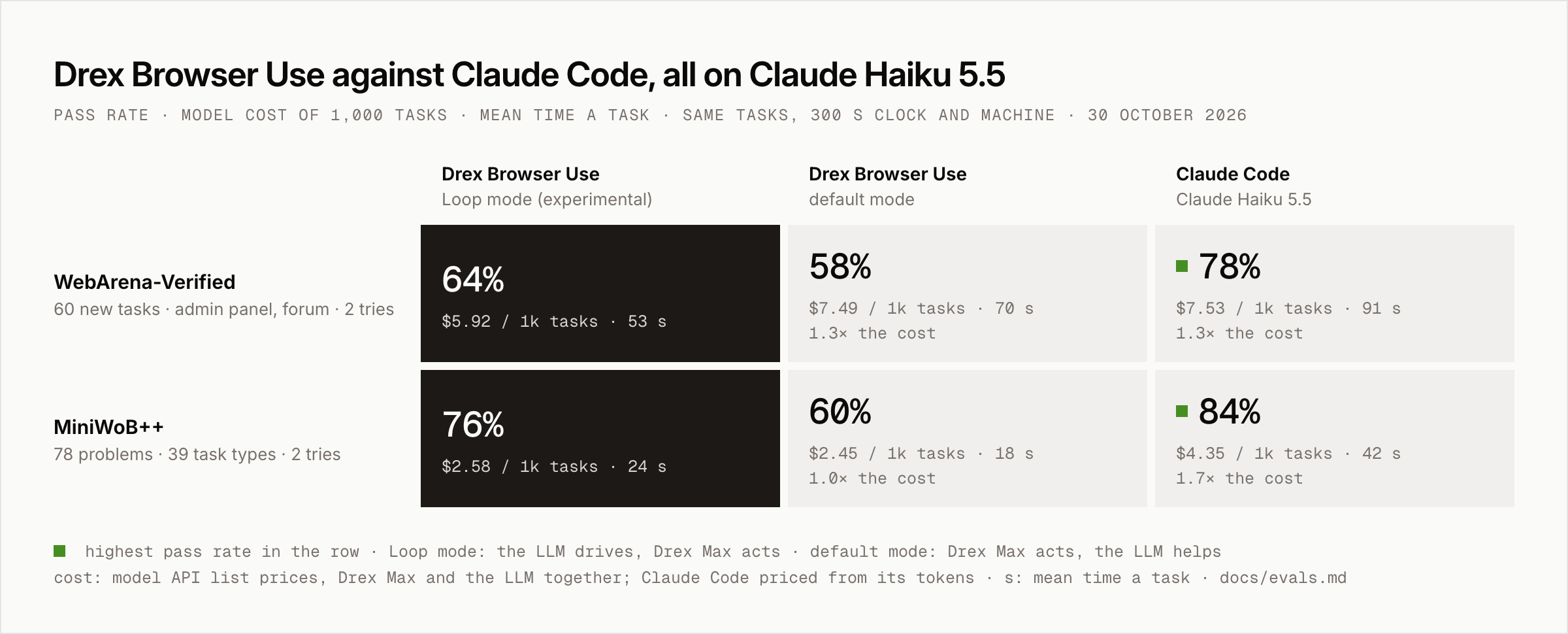
Pass rate, with the model cost of 1,000 tasks at API list prices, how many times Loop mode's cost it is, and the
mean time a task · 🟩 highest pass rate in the row · methodology
| Benchmark | Drex Browser Use Loop mode |
Drex Browser Use default mode |
Claude Code Claude Haiku 5.5 |
|---|---|---|---|
| WebArena-Verified 60 new tasks · admin panel, forum · 2 tries |
64% $5.92 per 1,000 tasks · 53 s |
58% $7.49 · 1.3× · 70 s |
🟩 78% $7.53 · 1.3× · 91 s |
| MiniWoB++ 78 problems · 39 task types · 2 tries |
76% $2.58 per 1,000 tasks · 24 s |
60% $2.45 · 1.0× · 18 s |
🟩 84% $4.35 · 1.7× · 42 s |
All three agents use the same LLM, Claude Haiku 5.5, on the same tasks, pass rule, 300-second clock and machine.
- Loop mode passes more tasks than the default mode: 76% against 60% on MiniWoB++, a clear gap, and 64% against
58% of the WebArena-Verified tasks, a gap within this sample's noise. In Loop mode the LLM holds the whole task and
decides each step, and Drex Max carries the steps out. - Claude Code is more accurate: 78% against Loop mode's 64% on WebArena-Verified, and 84% against 76% on MiniWoB++
(a gap within this sample's noise). - Loop mode costs less and is faster: on WebArena-Verified a task costs 21% less than with Claude Code and takes 53
seconds against 91; on MiniWoB++ it costs 41% less and takes 24 seconds against 42.
These numbers are from 0.1.6 and from the task sets its code was developed on. On 43 WebArena-Verified tasks fixed
before any 0.1.7 work and not tuned on (19 admin panel, 24 forum, 3 tries each, list prices), Loop mode passed 70%
(90 of 129) at $4.9 per 1,000 tasks, the default mode 58% (75 of 129) at $6.5, and Claude Code with Haiku 5.5 80%
(103 of 129) at $6.3. Loop mode is more accurate and cheaper than the default mode and still less accurate than Claude
Code; 43 tasks is a small sample. Loop mode costs about 77% of Claude Code's price there, less than on the older task set.
Drex Browser Use 0.1.6 and Claude Code 2.1.289, measured on 30 October 2026. The 60 WebArena-Verified tasks had
not been used by us before and were picked by a fixed seed before any attempt ran; they come from the admin panel and
the forum, and 59 of them change something on the site. A MiniWoB++ problem passes when the page's own reward is
exactly 1. Claude Code was given 600 seconds: its passes after 300 seconds count as failures and its cost and time are
counted up to 300 seconds. Cost is the model cost at API list prices, Drex Max and the LLM together for Drex Browser
Use. Intervals, per-site results, what was left out and earlier results: docs/evals.md.
How it works
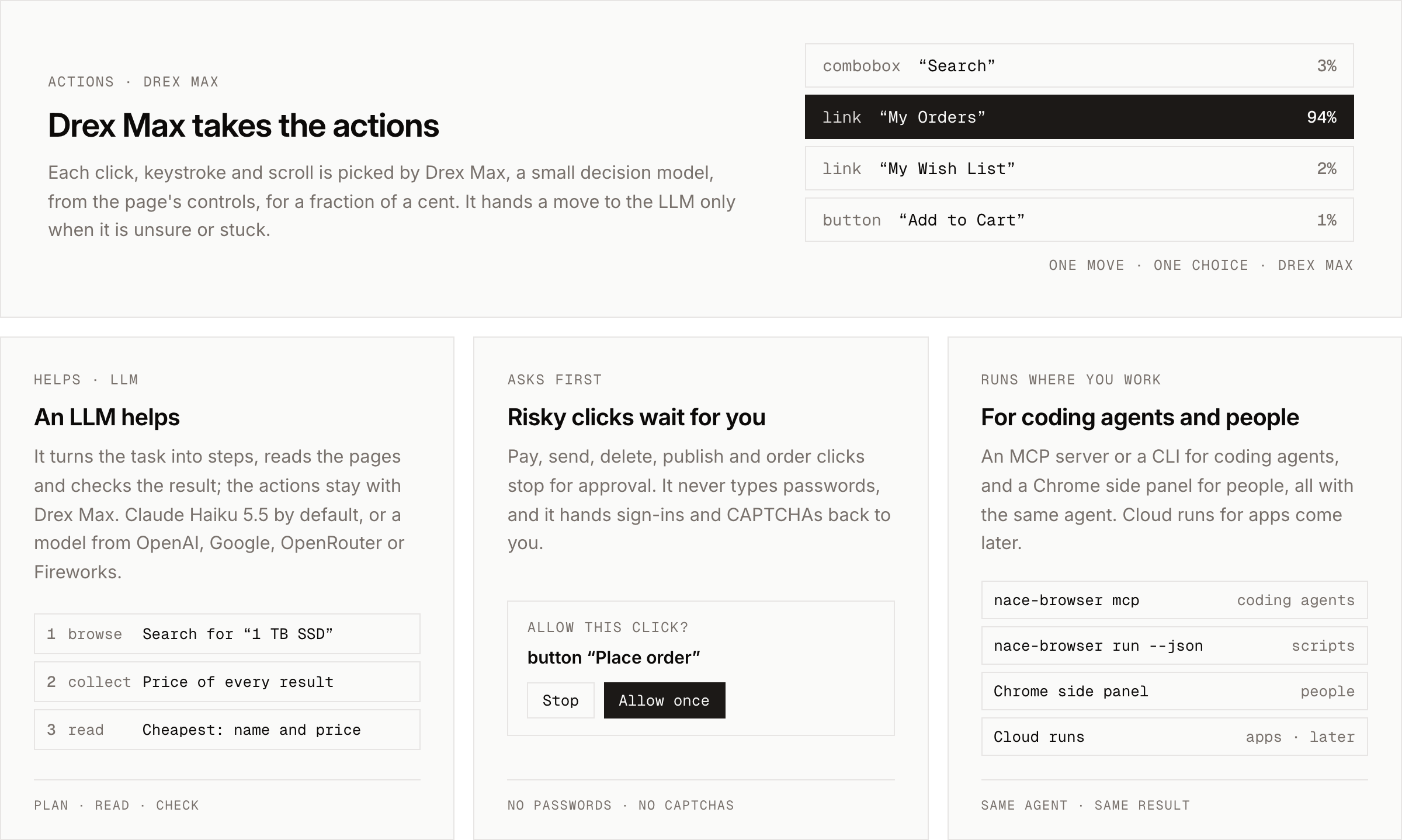
- Drex Max takes the actions. Every move, whether a click, typing into a field, a key press, a choice in a list or
a scroll, is picked by Drex Max from the page's controls and a screenshot. In the DoorDash run above, all 16 moves
were Drex Max's. - The LLM helps. It turns the task into steps, reads pages for the answer and checks the result. It takes a move
only when Drex Max hands one over because it is unsure or stuck.
Models
Drex Max always takes the actions; the LLM that helps is your choice: --model on the CLI, or the extension's
settings. Only models that read screenshots and have known prices are offered, because every run is metered and capped
in dollars; any other model id is refused.
| Provider | Model | --model |
Key |
|---|---|---|---|
| Anthropic | Claude Haiku 5.5 (default) | claude-haiku-5-5 |
ANTHROPIC_API_KEY |
| Anthropic | Claude Sonnet 5.5 | claude-sonnet-5-5 |
ANTHROPIC_API_KEY |
| Anthropic | Claude Opus 5.5 | claude-opus-5-5 |
ANTHROPIC_API_KEY |
| OpenAI | GPT-6 Luna | gpt-6-luna |
OPENAI_API_KEY |
| Gemini 3.8 Flash | gemini-3.8-flash |
GOOGLE_API_KEY or GEMINI_API_KEY |
|
| Fireworks | GLM-5.3 Flash | accounts/fireworks/models/glm-5p3-flash |
FIREWORKS_API_KEY |
| OpenRouter | Claude Haiku 5.5 | anthropic/claude-haiku-5.5 |
OPENROUTER_API_KEY |
| OpenRouter | GPT-6 Luna | openai/gpt-6-luna |
OPENROUTER_API_KEY |
MCP runs always use the default model, so they need ANTHROPIC_API_KEY. A pricier model raises a run's default cost limit in proportion to its price
(docs/runner.md).
Safety
- Risky actions are denied by default in the runner and the MCP server. When the next move is a click recognized
as pay, send, delete, publish or place an order, a click at a screen point whose target is risky or unknown, a drag or
other gesture, or a bulk action over list items, the run stops before it with the outcomerisky_action_denied. A
person can turn this off for one CLI run with--allow-risky; the MCP tools have no such option. - The extension asks instead. With Ask before risky actions on (the default), the side panel shows an approval
card: Stop, Allow once, or Allow for this task. Turned off, the extension makes those clicks without asking. - The guard is best-effort, not a security boundary. It recognizes risky controls by their names, with a list of
English words. Labels in other languages, and words such as "Submit", "Confirm", "Save" or "Approve", are not
recognized, and a form submitted with Enter is not gated. Use it only on tasks and signed-in accounts where you accept
that it may send, pay or delete. - No credentials are typed. A sign-in screen or a CAPTCHA ends the run (
blocked_login,blocked_captcha). You
sign in once yourself, in a visible window (nace-browser login <url>), and later runs on that profile are signed in. - Pages are data, not instructions. Text on a page is treated as content to read, not as commands. This lowers the
risk of prompt injection from a hostile page; it does not remove it. - Limits. Each run stops at a cost, time and LLM-call limit ($0.04, 600 s and 20 calls by default). An agent on MCP
can lower the limits, never raise them. - Profiles are separate. The runner uses browser profiles of its own, never your everyday Chrome profile, one run
per profile at a time. A profile signed in to a site gives every run on it that session, so keep separate profiles
for separate trust. - Pairing a coding agent with the extension (the setting Let coding agents use Drex, off by default) gives that
agent runs in your everyday Chrome. Itsdrex_tabs,drex_read_pageanddrex_screenshottools see only the tabs
its own runs opened or worked in, never your other tabs. A risky step in a run it starts always ends the run and hands
control back, whatever your Ask before risky actions setting. Turn pairing on only for agents you trust, and
prefer the local runner, which has its own profiles.
Privacy
Nothing is sent anywhere until you, or an agent you set up, start a task. There is no telemetry and no analytics in the
extension or the runner. During a task:
- Drex (
console.nace.ai, run by Nace AI) receives, for each move, screenshots of the page, the page's controls
with their labels and nearby text, the task or current step, and the moves so far. - Your LLM provider (Anthropic by default) receives the task, today's date, page text, screenshots and controls.
In the extension it also receives the titles and URLs of your open tabs. - On your machine: settings, browser profiles, run logs and screenshots.
Pages can hold whatever the task touches, including personal data. How Drex and your LLM provider keep and use it is
governed by their own terms. Details and links are in docs/privacy.md.
Limitations and known issues
- Accuracy: Loop mode, the runner's default, passes 70% of 43 untuned WebArena-Verified tasks and the default mode
58%, where Claude Code with Haiku 5.5 passes 80%; see Benchmarks. Check the answer of a run that
matters. - Loop mode's page reads are sealed, not proven safe: read the residuals under Loop mode
before using it on an account you care about. - Risk detection is English-only and name-based, as described under Safety.
- No npm package or Chrome Web Store listing yet: build from source.
- Cloud runs are not available yet.
- The runner uses Playwright's Chromium, not branded Google Chrome, which no longer loads an unpacked extension from
the command line. - Content inside iframes is only partly supported, and heavy pages take about 2 to 3 seconds a move.
Troubleshooting
| Problem | What to do |
|---|---|
missing_keys |
The process that started the runner has no DREX_API_KEY or ANTHROPIC_API_KEY. Set them in your shell profile, start the agent from a new shell, and check that the agent passes them to MCP servers (docs/runner.md). |
internal_error with invalid x-api-key or a 401 |
A key is wrong or revoked. Check it in console.nace.ai or the Claude Console. |
browser_missing |
Run node runner/bin/nace-browser.mjs install. On a bare Linux machine, add --with-deps for Chromium's system packages. |
extension_missing |
Run npm run build:release in the checkout. |
profile_busy |
Another run, or another Chromium, has the profile. Wait, use --profile <other> or --temp-profile. If no run is going, delete the lock file the message names (~/.nace/browser/profiles/<name>.lock). |
| The agent's tool call times out | Raise the agent's MCP tool timeout to 900 seconds (Codex's default is 60 s). |
blocked_login |
Run nace-browser login <url>, sign in in the window that opens, close it, and run the task again. |
Repository layout
| Path | What's in it |
|---|---|
src/ |
The Chrome extension: the agent, the side panel, the providers and the site tips |
runner/ |
The nace-browser CLI and MCP server, and the cloud worker entry |
mcp/ |
The local MCP server a paired coding agent uses to give the extension tasks |
sandbox/ |
Builds the cloud worker's sandbox image (for maintainers) |
plugins/, .claude-plugin/ |
The Claude Code plugin and its marketplace entry |
test/ |
Unit and browser tests |
e2e/ |
Synthetic test pages (a mailbox, forms, menus, a checkout) and the scripts that drive the extension on them |
scripts/ |
Build helpers, and readme-assets.mjs, which renders the README's images |
docs/ |
The guides listed under Documentation; docs/assets/ holds the README's images and docs/assets/src/benchmarks.json their numbers |
third_party/ |
The license and upstream commit of browser-use/browser-harness |
Documentation
| Page | What's in it |
|---|---|
| docs/runner.md | The local runner: setup for each coding agent, the CLI, profiles and the result |
| docs/mcp-tools.md | browser_task, browser_login and browser_profiles: arguments, results and errors |
| docs/auth.md | Keys: where to get them and how to keep them safe |
| docs/extension-settings.md | Every setting in the Chrome extension |
| docs/privacy.md | What data goes where |
| docs/evals.md | How we measure accuracy and cost, and the latest numbers |
| docs/worker.md | Maintainer notes on the cloud worker entry |
Contributing and security
See CONTRIBUTING.md. Report vulnerabilities privately, as described in SECURITY.md, not in a public
issue. Changes are recorded in CHANGELOG.md.
Credits
Drex Browser Use is partly built on browser-use/browser-harness (MIT),
including its site tips, key-by-key typing and background-tab approach. Its license and the upstream commit are kept inthird_party/; see NOTICE. The extension uses the Inter and Geist Mono fonts (SIL Open Font License).
License
MIT. The Nace and Drex names and the Nace logo are not covered by the license.
Docs · Contributing · Security · Changelog ·
MIT, © 2026 Nace AI · Notices
Yorumlar (0)
Yorum birakmak icin giris yap.
Yorum birakSonuc bulunamadi