agent-lens
Health Uyari
- No license — Repository has no license file
- Description — Repository has a description
- Active repo — Last push 0 days ago
- Community trust — 10 GitHub stars
Code Basarisiz
- os.homedir — User home directory access in adapters/antigravity.js
- process.env — Environment variable access in adapters/antigravity.js
- fs module — File system access in adapters/antigravity.js
- os.homedir — User home directory access in adapters/claude.js
- process.env — Environment variable access in adapters/claude.js
- fs module — File system access in adapters/claude.js
- os.homedir — User home directory access in adapters/codex.js
- process.env — Environment variable access in adapters/codex.js
- fs module — File system access in adapters/codex.js
- os.homedir — User home directory access in adapters/copilot.js
- process.env — Environment variable access in adapters/copilot.js
- fs module — File system access in adapters/copilot.js
- os.homedir — User home directory access in adapters/cursor.js
- process.env — Environment variable access in adapters/cursor.js
- fs module — File system access in adapters/cursor.js
- os.homedir — User home directory access in adapters/gemini.js
- process.env — Environment variable access in adapters/gemini.js
- fs module — File system access in adapters/gemini.js
- os.homedir — User home directory access in adapters/kimi.js
- process.env — Environment variable access in adapters/kimi.js
- fs module — File system access in adapters/kimi.js
- os.homedir — User home directory access in adapters/opencode.js
- process.env — Environment variable access in adapters/opencode.js
- fs module — File system access in adapters/opencode.js
- fs module — File system access in adapters/util.js
Permissions Gecti
- Permissions — No dangerous permissions requested
Bu listing icin henuz AI raporu yok.
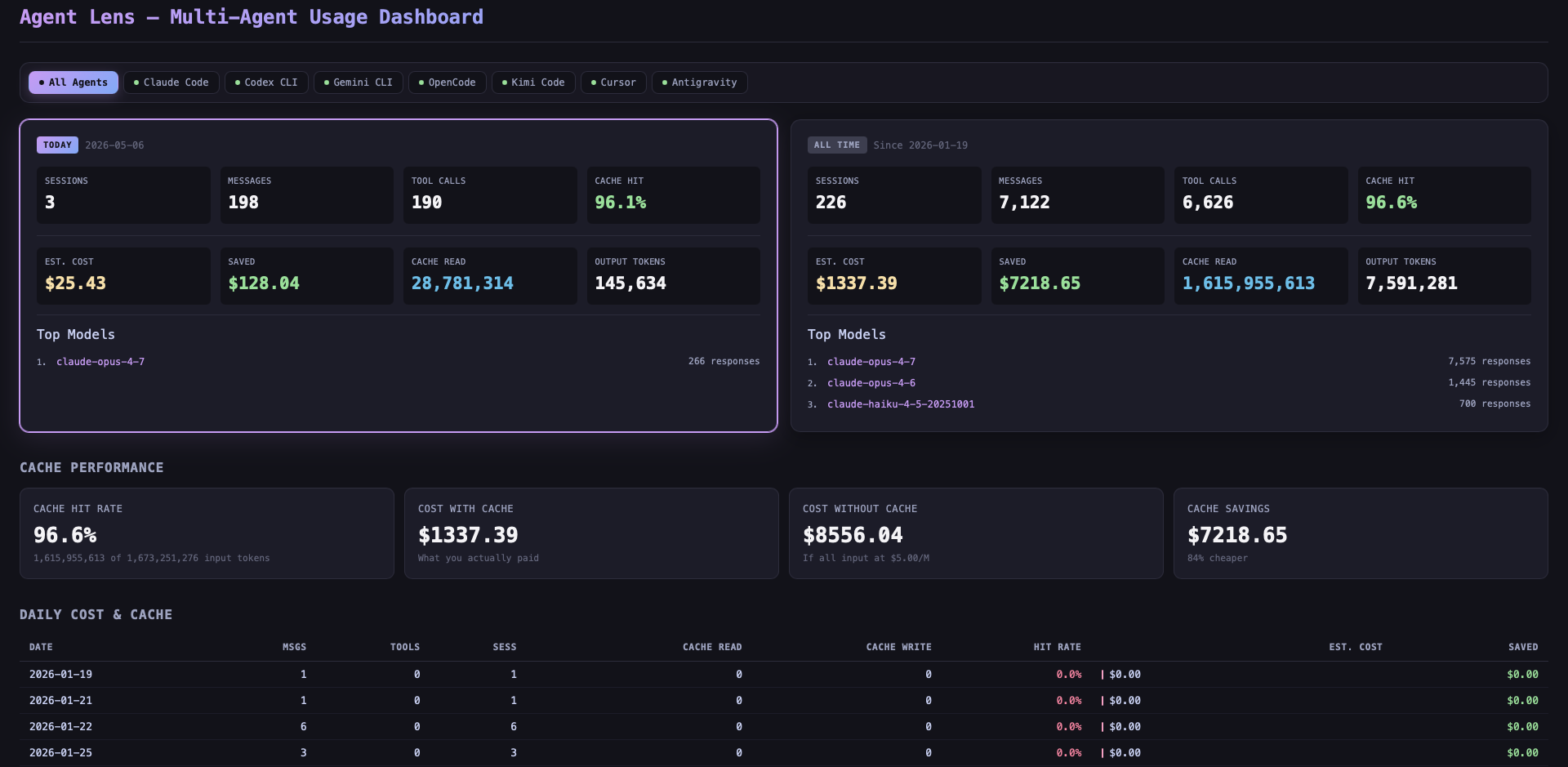
Local dashboard for visualizing usage across seven AI coding agents - sessions, token costs, cache performance, tool calls, and daily breakdowns
agent-lens
Local dashboard for visualizing usage across eight AI coding agents — sessions, token costs, cache performance, tool calls, and daily breakdowns. Filter by agent or view everything in one place.
Inspired by foyzulkarim/claude-lens.
Supported agents
| Agent | Default data path | Token data | Tool calls | Models |
|---|---|---|---|---|
| Claude Code | ~/.claude |
full | full | yes |
| Codex CLI | ~/.codex |
full | full | yes |
| Gemini CLI | ~/.gemini |
full | full | yes |
| OpenCode | ~/.local/share/opencode |
full (SQLite) | full | yes |
| Kimi Code | ~/.kimi |
partial (TurnBegin events) | partial | partial |
| Cursor | ~/Library/Application Support/Cursor/... (auto-detected per OS) |
full (SQLite cursorDiskKV) |
full | partial |
| Antigravity | ~/.gemini/antigravity |
session metadata only (protobuf) | — | — |
| GitHub Copilot | VS Code User/workspaceStorage/<hash>/chatSessions/*.{json,jsonl} (auto-detected per OS) |
session metadata + prompts (no token counts in chat JSON) | full | yes |
OpenCode and Cursor read SQLite via the optional better-sqlite3 dependency. If the prebuild fails on your platform the dashboard still works for the JSONL/JSON-based agents (Claude, Codex, Gemini, Kimi, Antigravity).
Features
- Agent selector — filter the entire dashboard by agent or aggregate across all
- Today vs All-Time stats — sessions, messages, tool calls, estimated cost
- Cache performance — hit rate, savings vs no-cache baseline (uses the active agent's pricing)
- Daily cost & cache table — per-day token breakdown with estimated spend
- Tool call analytics — which tools each agent used most
- Per-agent pricing — independent rate config per provider via
.env
Requirements
- Node.js 18+
- One or more of the supported agents installed locally
- Works on macOS, Linux, and Windows. Default data directories are auto-detected per OS.
Platform support
The dashboard runs on macOS, Linux, and Windows. Path resolution per agent:
- Verified: macOS — actively tested against real installs.
- By convention: Linux/Windows — adapters use
os.homedir()+ the agent's documented dotfile, or the standard Electronapp.getPath('userData')location for IDE-style agents (Cursor, Copilot via VS Code, Antigravity). These match each agent's published behavior; report mismatches via issue with the actual path your install uses. - Always overridable: every adapter accepts an env var to point at any path you want.
Platform-specific defaults
| Agent | macOS | Linux | Windows |
|---|---|---|---|
| Claude | ~/.claude |
~/.claude |
%USERPROFILE%\.claude |
| Codex | ~/.codex |
~/.codex |
%USERPROFILE%\.codex |
| Gemini | ~/.gemini |
~/.gemini |
%USERPROFILE%\.gemini |
| OpenCode | ~/.local/share/opencode |
$XDG_DATA_HOME/opencode or ~/.local/share/opencode |
%LOCALAPPDATA%\opencode → %APPDATA%\opencode → ~/.local/share/opencode (first existing) |
| Kimi | ~/.kimi |
~/.kimi |
%USERPROFILE%\.kimi |
| Cursor | ~/Library/Application Support/Cursor/User/globalStorage/state.vscdb |
~/.config/Cursor/User/globalStorage/state.vscdb |
%APPDATA%\Cursor\User\globalStorage\state.vscdb |
| Antigravity | ~/.gemini/antigravity |
~/.gemini/antigravity |
%USERPROFILE%\.gemini\antigravity |
| Copilot | ~/Library/Application Support/{Code,Code - Insiders,VSCodium,Cursor}/User |
~/.config/{Code,Code - Insiders,VSCodium,Cursor}/User |
%APPDATA%\{Code,Code - Insiders,VSCodium,Cursor}\User |
Override any of these with CLAUDE_DIR, CODEX_DIR, GEMINI_DIR, OPENCODE_DIR, KIMI_DIR, CURSOR_DIR (or CURSOR_DB for a specific .vscdb file), ANTIGRAVITY_DIR, COPILOT_DIR / COPILOT_VSCODE_ROOT.
Quick start
No install needed — run directly from GitHub:
npx github:naimjeem/agent-lens
Then open http://localhost:3456. The dashboard auto-detects which agents have data on your machine and disables tabs for the rest.
Local setup
git clone https://github.com/naimjeem/agent-lens.git
cd agent-lens
npm install
cp .env.example .env
Edit .env to override data directories or pricing. All paths default to standard locations — usually no edits needed.
node server.js
Open http://localhost:3456.
Configuration
Data directories
| Variable | Default |
|---|---|
CLAUDE_DIR |
~/.claude |
CODEX_DIR |
~/.codex |
GEMINI_DIR |
~/.gemini |
OPENCODE_DIR |
~/.local/share/opencode |
KIMI_DIR |
~/.kimi |
CURSOR_DB / CURSOR_DIR |
macOS: ~/Library/Application Support/Cursor/User/globalStorage/state.vscdb · Linux: ~/.config/Cursor/User/globalStorage/state.vscdb · Windows: %APPDATA%/Cursor/User/globalStorage/state.vscdb |
ANTIGRAVITY_DIR |
~/.gemini/antigravity |
Pricing (USD per 1M tokens)
Each agent has its own rate set. Defaults are sensible approximations; override per-agent:
| Variable prefix | Default input | Default output | Default cache read | Default cache write |
|---|---|---|---|---|
RATE_* (Claude) |
5.0 | 25.0 | 0.5 | 6.25 |
RATE_CODEX_* |
1.25 | 10.0 | 0.125 | 0 |
RATE_GEMINI_* |
1.25 | 10.0 | 0.31 | 0 |
RATE_OPENCODE_* |
3.0 | 15.0 | 0.3 | 3.75 |
RATE_KIMI_* |
0.55 | 2.20 | 0.15 | 0 |
RATE_CURSOR_* |
0 | 0 | 0 | 0 |
RATE_ANTIGRAVITY_* |
0 | 0 | 0 | 0 |
RATE_COPILOT_* |
0 | 0 | 0 | 0 |
Each prefix has four suffixes: _INPUT, _OUTPUT, _CACHE_READ, _CACHE_CREATE.
Default Claude rates match Bedrock cross-region inference (ap-southeast-2). For Anthropic API rates use RATE_INPUT=15, RATE_OUTPUT=75, RATE_CACHE_READ=1.5, RATE_CACHE_CREATE=18.75.
OpenCode also reports actual cost per assistant message in its DB; that value is preferred over the rate calculation when present.
Notes per agent
- Cursor stores chat history in
state.vscdbunderApplication Support/Cursor/User/globalStorage(macOS),~/.config/Cursor/...(Linux), or%APPDATA%/Cursor/...(Windows). The dashboard reads thecursorDiskKVtable directly: prompts, per-bubble token counts, tool calls (toolFormerData), and per-session model name fromcomposerData. Override viaCURSOR_DB(full path tostate.vscdb) orCURSOR_DIR(directory containing it). Default rates are 0 because most Cursor users pay a flat subscription rather than per token; setRATE_CURSOR_*to estimate spend. - Antigravity writes conversations as binary protobuf (
*.pb) in~/.gemini/antigravity/conversations. Without the.protoschema the dashboard reports session count and timestamps only. - Kimi logs are sparse in the local
wire.jsonl— turn boundaries and user inputs are reliable; token counts depend on whether your Kimi version emitsTokenUsage/Usageevents. - GitHub Copilot chat sessions live under VS Code's
User/workspaceStorage/<hash>/chatSessions/*.{json,jsonl}. The dashboard reads request prompts, response tool invocations, and the per-session model frominputState.selectedModel.metadata.name. Token counts are not stored in these files (Copilot bills via subscription server-side), so per-message tokens display as 0; messages, sessions, and tool calls are accurate. Adapter scansCode,Code - Insiders,VSCodium, andCursorflavors. Override withCOPILOT_DIR(a singleUser/dir) orCOPILOT_VSCODE_ROOT.
Author
Maintained by naimjeem — <naimjeem.me>.
Yorumlar (0)
Yorum birakmak icin giris yap.
Yorum birakSonuc bulunamadi