run-skills
Health Warn
- License — License: MIT
- Description — Repository has a description
- Active repo — Last push 0 days ago
- Low visibility — Only 5 GitHub stars
Code Fail
- rm -rf — Recursive force deletion command in install.sh
- exec() — Shell command execution in remote/launch.sh
- rm -rf — Recursive force deletion command in remote/status.sh
- rm -rf — Recursive force deletion command in selftest.sh
Permissions Pass
- Permissions — No dangerous permissions requested
No AI report is available for this listing yet.
Agent skills (Claude Code, Codex, pi) to run experiments on Slurm clusters and GPU workstations — contained, confirmed, monitored
run-skills
Let your coding agent run experiments on Slurm clusters and GPU workstations — contained, authorised, and watched.
run-skills is one agent skill, remote-run, plus a small bash harness and its rsk command. You say "run this on mycluster
with 2 GPUs for a day"; the agent syncs your project, builds its environment on the remote side, shows you the plan
the cluster resolved, and — once you approve it, or when a permission you already gave covers it — submits a
correctly sized job and keeps an eye on it. Works with Claude Code, OpenAI Codex and pi from one installed copy.
you    › train configs/base.yaml on mycluster, 2 GPUs, 1 day
agent  › [mycluster] remote: mycluster:/project/lab/me/myproj  tag: MYCLUSTER  deploy: .mycluster
         bootstrap done (mycluster).
         plan p-… — launch on mycluster (slurm): partition gpu · gres gpu:a100:2 · time 1-00:00:00 · warnings 0
         name mytask-v1--train--base--scratch--s0--a01 · checkpoints + auto-resume ✓ — go?
you    › go
agent  › approval ap-… ("go") · submitted: job 4815162 · log: logs/mytask-v1--train--base--scratch--s0--a01_4815162.out
         I'll review it with status.sh soon after it starts, then less often while it stays healthy.
Why
Agents are good at writing training code and bad at the last mile of running it somewhere else. Left alone they
hand-write sbatch scripts with the wrong memory flags, fill a 50 GB $HOME with HuggingFace and pip caches,pip install into a shared base env, launch onto a GPU a colleague is using, tail -f a 2 GB log into their
context, or "fix" a stuck job with scancel. run-skills turns all of that into a small set of commands with the
guard rails built in, and gives the agent a short, per-site reference instead of letting it guess.
What you get
- Containment. Every cache and output — HF, torch, triton/inductor, pip, uv, wandb, tmp, logs, checkpoints — is
pinned under the project directory (or wherever the target's storage policy says), never in$HOME. Targets that
share a filesystem get suffixed venvs and compile caches so their binaries never clash. - Reproducible environments.
uvby default: one venv per target, built from yourpyproject.toml. Or a named
conda env, which the harness only verifies — it never creates or modifies conda envs. - Fail-closed. A broken conf, a missing venv or a half-applied environment aborts the job instead of running it
misconfigured. Walltimes above a partition's cap are rejected (they would pend forever), and so is a limit of none;
a busy cluster is a warning that needs an explicit-y; site policies can refuse a submission outright. - Your authorisation, checked first — asked only when it is missing. Every submit, launch and cancel is checked
against what you already allowed: a plan you approved, a sweep (one approval for the set), or a standing permission
("smoke runs on mybox are fine" — a run it covers may also be re-run after a fix, never while an earlier copy may
still run; "auto-resume preemptions up to 3 times" — a resume only after an infrastructure end: a preemption, a node
failure, a reboot) with the limits you set. The agent asks only outside that — a charged partition, more resources, a
wider scope. rsk records what you allowed (rsk grant: scope and limits, not your words), and a "never" of yours
also stopsrsk watch --act("never relaunch a" stops every launch of a in its scope: rsk cannot see every earlier
attempt). The agent may stop the runs it launched for this project without asking; anything else it stops — "cancel
job 123" — only with your OK for that command; a cancel checks the job is this project's and yours; another user's is
never touched. The record keeps you from being asked twice; it is bookkeeping, not proof that you agreed, and it cannot
make an agent comply (onlyrskis bound). - Cheap, honest monitoring. One deployed script,
status.sh, returns a ~2 KB digest of a run: scheduler or PID
state, restarts, exit footer, error/OOM/NaN hint counts, the wandb URL and the last lines — all from byte-bounded
reads. The agent reviews often while a run is young or odd and backs off while it is healthy. - Experiment conventions. Smoke / pilot / train / eval / ablate run classes, structured run names, a fixed
wandb project/group/name mapping, and a checkpoint + auto-resume contract (Slurm jobs go out with--requeue;
runs longer than the walltime cap become--dependency=singletonsegment chains).rsk launchpoints out a new run
named outside the shape, refuses a smoke it can see reaching wandb and warns where it cannot tell. - Sites are data, not code. A cluster or workstation is one directory:
profile.sh(facts),policy.sh(Slurm
partitions and limits),reference.md(what the agent reads),tests.sh. Keep yours private, or share a whole
lab's worth as a target pack. - Tested offline.
bash selftest.shexercises the harness against stubbedsbatch/sinfo/squeue/ssh/uv/rsync— nothing leaves your machine.
Requirements
| where | needs |
|---|---|
| your machine | Linux or macOS (bash 3.2 is fine), git, rsync, ssh, uv; Claude Code, Codex (0.149+) or pi |
| every target | Linux with bash, key-based ssh through an alias in ~/.ssh/config, NVIDIA GPUs |
| Slurm targets | sbatch/squeue/sinfo/sacct on the login node |
| your project | a Python repo with a pyproject.toml (uv), or an existing conda env on the target |
uv does not need to be installed remotely — if the target has none, the bootstrap installs a private copy from
astral.sh into the project's env root (so the target needs outbound internet for that one step).
Quick start
Let your agent do it (recommended)
Paste this into Claude Code, Codex or pi:
Install run-skills for me: clone https://github.com/NAIVlab/run-skills to
~/.local/share/run-skillsand follow
itsINSTALL.md.
INSTALL.md is a runbook written for the agent. It installs the skill, lists the hosts in your~/.ssh/config and asks which are GPU machines, probes the ones you pick with read-only commands (GPUs, Slurm
partitions and accounts, filesystems), asks what a probe cannot know (default partition, where projects live, queues
you must never hit), writes the target files, connects your wandb key without ever printing it, and verifies the
result. It asks before connecting anywhere, shows any ~/.ssh/config change before making it, and submits nothing.
In a lab with a target pack, give it the pack's URL when it asks.
Or by hand
1. Install (later, rsk update updates everything):
uv tool install git+https://github.com/NAIVlab/run-skills    # the `rsk` command, in its own uv-managed env
rsk setup
rsk setup copies the harness to ~/.agents/run-skills/, installs one copy of the remote-run skill into~/.agents/skills/ (read directly by Codex and pi; ~/.claude/skills/ gets a symlink for Claude Code), uninstalls thehpc-run / ws-run skills it replaced (from Claude Code, Codex and pi), scaffolds ~/.config/run-skills/, checks your
ssh aliases and runs the offline selftest. It never edits ~/.ssh/config and never overwrites an existing wandb key.
In a lab that already has a target pack? Install the pack instead — it installs the engine for you
(see Target packs).
2. Register a target. Copy a template into your private overlay and fill it in:
cp -R ~/.agents/run-skills/targets/_template-nohup ~/.config/run-skills/targets/mybox      # a GPU workstation
cp -R ~/.agents/run-skills/targets/_template-slurm ~/.config/run-skills/targets/mycluster  # a Slurm cluster
The directory name is the target name. bash ~/.agents/run-skills/bin/run-probe <alias> prints the facts you
need (GPUs, partitions, time limits, accounts, filesystems — read-only). Edit profile.sh (ssh alias, GPUs, storage
policy — every key is commented), for Slurm also policy.sh (partitions, GPU ranges, per-GPU cpu/mem, walltime caps), andreference.md — the one page the agent reads before using the target, so write down what a newcomer would need
(partitions, quotas, quirks). Add a matching Host block to ~/.ssh/config (seetemplates/ssh_config), then re-run rsk setup so the target shows up in the skill.
3. Optional: your wandb key. Put your own key (wandb.ai/authorize) in~/.config/run-skills/wandb_env. Every sync pushes it next to the project (mode 600). With no key, runs simply go
wandb-offline — the harness never falls back to credentials stored on the remote machine.
4. Ask your agent, from your project's root:
run this on mybox with 1 GPU —
python train.py --config configs/base.yaml
The first time, the agent scaffolds the project's .ws.conf (workstations) or .hpc.conf (clusters) and asks you
for the remote directory — it never guesses it. Annotated examples:templates/ws.conf.example, templates/hpc.conf.example.
Bringing an existing project
Open your agent in the project and say "set up this project for mycluster" (or just ask for a run). The skill'sproject-setup.md has it read how the project runs today —pyproject.toml or requirements.txt, a conda env, your existing sbatch / nohup scripts, wandb, checkpointing —
and translate that into .hpc.conf / .ws.conf: #SBATCH lines become DEFAULT_*, ACCOUNT and SBATCH_EXTRA,module load and exports become an ENV_HOOK, a conda env stays a conda env. If the project already lives on the
server, it checks that copy first (edits made only there, a hand-built .venv the harness would otherwise adopt),
then shows a dry-run sync and bootstraps the env. Your old scripts stay untouched, and it reports gaps such as a
trainer that cannot resume from a checkpoint. Nothing runs until you say go.
How a run happens
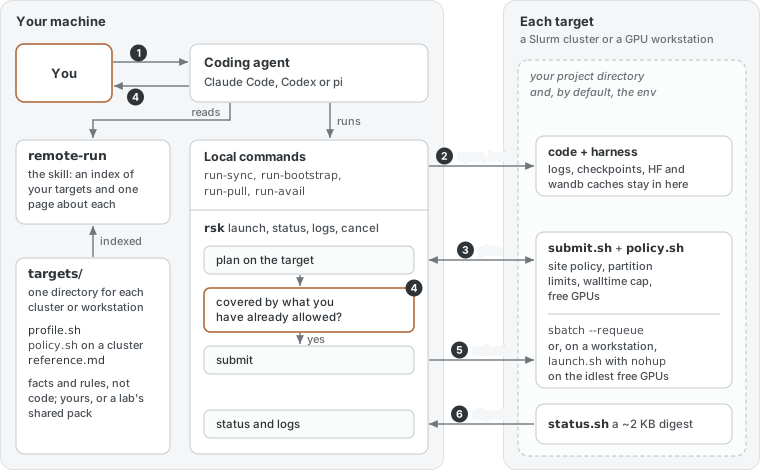
 agent reads references/INDEX.md ──► picks the target (run-avail first when you left it open) ──► reads its reference.md
   │
   ├─ run-sync        rsync the code (caches, venvs, data, logs, checkpoints excluded and protected)
   │                  + deploy the harness into <remote dir>/.<target>/ (Slurm) or .ws/ (workstation)
   │                  + stamp the commit it pushed; refuse a dir another checkout of the project owns
   ├─ run-bootstrap   uv sync into the target's venv (--job: on a compute node) — or verify the conda env exists
   ├─ rsk launch      plan on the target (every check below, nothing submitted) → the card → covered by a
   │                  recorded permission? submit : wait for your OK (rsk launch --plan <id> --approve)
   ├─ submit          Slurm: submit.sh → site policy → partition limits → MaxTime → availability → sbatch
   │                  workstation: run-launch → nohup on the idlest free GPUs (never one another job uses unasked)
   ├─ monitor         rsk status / rsk logs (the status.sh digest), byte-bounded; stopping a run: the agent's own, or your call
   └─ run-pull        copy results back (the same transfer path as run-sync; never deletes local files)
Each job sources the deployed env.sh, which pins every path, then exports a readiness sentinel; the job refuses to
start without it. Logs land in logs/ with a header per (re)start and an EXIT rc=… footer, so "did it resume?"
and "how did it end?" have answers in the log itself.
Targets, packs and your overlay
The harness finds targets in three places, highest precedence first:
| layer | location | for |
|---|---|---|
| your overlay | ~/.config/run-skills/targets/<name>/ |
private machines; personal tweaks to a shared target |
| target packs | ~/.config/run-skills/packs/<pack>/targets/<name>/ |
a lab's or site's shared targets |
| templates | ~/.agents/run-skills/targets/_template-*/ |
starting points (never listed as targets) |
A directory with profile.sh defines a target. An overlay directory without one extends the target of the
same name from a pack: policy.local.sh can wrap the pack's t_policy (say, a personal queue you must never submit
to by accident), reference.local.md is shown next to the pack's reference, tests.local.sh joins the selftest.
Target packs
A pack is a git repo — usually a private one, because cluster details are nobody else's business — holdingtargets/<name>/ directories, optional routing hints for the agent (routing/remote-run.md) and an installer.
Lab members then need one line (rsk update keeps the engine and the pack clone current):
uv tool install git+https://github.com/NAIVlab/run-skills && rsk pack add [email protected]:<your-org>/<your-pack>.git && rsk setup
A pack's own install.sh still works (it clones this engine and runs its install.sh). Start fromtemplates/pack/; the full guide is docs/packs.md.
Configuration in one paragraph
The project conf (.hpc.conf / .ws.conf, in the repo root) is sourced as shell. Resolution is
CLI flag → <TAG>_KEY → KEY → default, where <TAG> is the target name uppercased without punctuation
(my-hpc → MYHPC_), so one conf can serve several targets: REMOTE_DIR=/project/me/x plusOTHERHPC_REMOTE_DIR=/scratch/me/x. Every key, and which ones accept a tag:
conf keys (both confs).
Hooks cover the unusual cases: ENV_HOOK (sourced at the end of the environment), BOOTSTRAP_HOOK (replacesuv sync), UV_SYNC_ARGS, SYNC_ALSO, EXTRA_EXCLUDES; ENV_KIND=none for container-only payloads.
Safety rails
These are part of the skill's instructions and are enforced by the harness where code can enforce them:
- Check your existing authorisation before every submit, launch or cancel; ask only outside it. Cancel only after
an identity check; never someone else's job or process. - On a workstation the harness picks the GPUs (
-d/-n, never one another job uses unasked): a run command whose
text sets or clearsCUDA_VISIBLE_DEVICES(or a sibling variable) anywhere is refused, as is one that empties the
environment (env -i,exec -c); a launcher given its own GPU flags (deepspeed --num_gpus,accelerate launch --gpu_ids) is a warning on the plan you approve, and so are a launcher config's GPU ids (or a config it cannot
locate), a container started with GPUs of its own (docker run --gpus,apptainer --cleanenv) and a tool that starts
the command elsewhere or without the launch's environment (docker exec,tmux new,sudowithout-E,ssh,srun) — no standing grant covers these. What the payload does once it starts is its own code — no harness can check that. - Partition and QOS are
submit.sh's decision — no rawsbatch/srun, no--partitionsmuggled in viaSBATCH_EXTRA. A policy refusal is final;-yacknowledges a plan's warnings (availability, occupancy, cost), and
rsk sends it only when the approved card showed warnings or the covering grant's kind covers the plan's warnings
(--allow-warnings availability: the cluster is busy;any: every warning, a charged partition's too). - Never create a conda env; never guess the remote directory; never use a machine's stored wandb credentials.
- Smoke tests run with
WANDB_MODE=disabled; real runs checkpoint and resume. - Monitoring is detect-only and byte-bounded; findings are reported, decisions stay with you. The exceptions are what
you authorised:run-watch --actresubmits preempted jobs (or first-submits rows) of a run table you approved,
within its budget (rsk watch --actfirst checks every row against your "never"s, for anything it could do), a
relaunch that a permission of yours covers, andrsk cancelof the runs the agent launched for this project.
Repository layout
| path | what |
|---|---|
skills/remote-run/ |
the skill: a thin SKILL.md + references/ (INDEX, a procedure per kind, conf keys, project setup, experiment conventions) |
INSTALL.md |
the install runbook your agent follows |
src/remote_run/ |
rsk: reads (status, logs, exec), launch / cancel / watch with the per-project ledger and grants, setup / update / doctor |
bin/ |
local commands: run-avail (free GPUs everywhere), run-sync, run-pull, run-bootstrap, run-launch, run-watch (batch watch), run-probe |
lib/common.sh |
local helpers: target discovery, conf precedence, conf linter, INDEX generation |
remote/ |
deployed next to each project: env.sh, bootstrap.sh, status.sh, submit.sh + job.sbatch (Slurm), launch.sh (workstations); run-sync adds a MANIFEST |
targets/ |
_template-slurm/, _template-nohup/ |
templates/ |
conf examples, ssh_config, wandb_env, and pack/ (a target-pack skeleton) |
codex/ |
Codex UI metadata for the skill |
tests/, selftest.sh |
the offline test suite |
docs/ |
DESIGN.md (architecture and rationale), packs.md |
Updating and uninstalling
Update: rsk update (alias upgrade) upgrades rsk through uv, fast-forwards clean pack clones, then the new rsk re-runsrsk setup. --check only reports, --to <tag|commit> installs that version (to roll back; a later rsk update stays
on it, rsk update --to main follows main again; a version from before remote-run brings back hpc-run / ws-run
and leaves ~/.agents/skills/remote-run and its ~/.claude/skills link for you to remove). rsk doctor checks the
install offline and flags a recorded permission or "never" naming a target the harness does not know. A
change to remote/ reaches a project at its next sync.
Uninstall: uv tool uninstall remote-run; remove ~/.agents/run-skills, ~/.agents/skills/remote-run, the symlinks~/.claude/skills/remote-run and ~/.claude/run-skills, and the clone. ~/.config/run-skills holds your targets, packs
and wandb key — delete it only if you mean to. Nothing is installed on the remote side outside your project directories.
Contributing
Issues and pull requests are welcome. The loop is: edit the clone → bash selftest.sh (printsRESULT: N pass, M fail, exit code = failures) → rsk setup (from uv tool install --editable .) → re-sync a project. Contributor and agent
guidance — constraints, portability rules, the test-helper contract — is in AGENTS.md; design
rationale is in docs/DESIGN.md. Site-specific targets belong in packs, not in this repo.
License
Reviews (0)
Sign in to leave a review.
Leave a reviewNo results found