LAO
mcp
Uyari
Health Uyari
- License — License: MIT
- Description — Repository has a description
- Active repo — Last push 0 days ago
- Low visibility — Only 6 GitHub stars
Code Gecti
- Code scan — Scanned 6 files during light audit, no dangerous patterns found
Permissions Gecti
- Permissions — No dangerous permissions requested
Purpose
This macOS-native application, built with SwiftUI, transforms ideas into execution-ready design documents using AI agents. It orchestrates multi-phase design workflows and generates specification files that can be seamlessly handed off to AI coding assistants like Claude Code.
Security Assessment
The automated code scan reviewed 6 files and found no dangerous patterns, hardcoded secrets, or requests for dangerous permissions. However, the tool's core functionality inherently involves making external network requests to third-party AI providers (Claude, Codex, and Gemini) to process your ideas. Additionally, it generates project files and auto-writes an `.mcp.json` to your local project root. It also offers a one-click feature that launches external Terminal processes (CLIs) to initiate handoffs. Because it manages outbound data to AI APIs and spawns local processes, overall risk is rated as Medium.
Quality Assessment
The project is actively maintained, with its most recent code push happening just today. It uses standard development practices for Swift, features a comprehensive and well-documented README, and is covered by the permissive MIT license. On the downside, community visibility and trust are currently very low. With only 6 GitHub stars, the tool has not yet been widely tested or vetted by a larger developer audience.
Verdict
Use with caution: the code itself appears clean and is actively maintained, but the inherent risks of sending data to external AI APIs and the project's low community visibility warrant careful review before integrating into sensitive commercial workflows.
This macOS-native application, built with SwiftUI, transforms ideas into execution-ready design documents using AI agents. It orchestrates multi-phase design workflows and generates specification files that can be seamlessly handed off to AI coding assistants like Claude Code.
Security Assessment
The automated code scan reviewed 6 files and found no dangerous patterns, hardcoded secrets, or requests for dangerous permissions. However, the tool's core functionality inherently involves making external network requests to third-party AI providers (Claude, Codex, and Gemini) to process your ideas. Additionally, it generates project files and auto-writes an `.mcp.json` to your local project root. It also offers a one-click feature that launches external Terminal processes (CLIs) to initiate handoffs. Because it manages outbound data to AI APIs and spawns local processes, overall risk is rated as Medium.
Quality Assessment
The project is actively maintained, with its most recent code push happening just today. It uses standard development practices for Swift, features a comprehensive and well-documented README, and is covered by the permissive MIT license. On the downside, community visibility and trust are currently very low. With only 6 GitHub stars, the tool has not yet been widely tested or vetted by a larger developer audience.
Verdict
Use with caution: the code itself appears clean and is actively maintained, but the inherent risks of sending data to external AI APIs and the project's low community visibility warrant careful review before integrating into sensitive commercial workflows.
macOS-native AI design workflow app that converts ideas into execution-ready design documents
README.md
English | 한국어
LAO macOS App


LAO is a macOS-native AI design workflow application built with SwiftUI. It transforms ideas into AI-execution-friendly design documents through CLI-based AI agents.
Screenshots
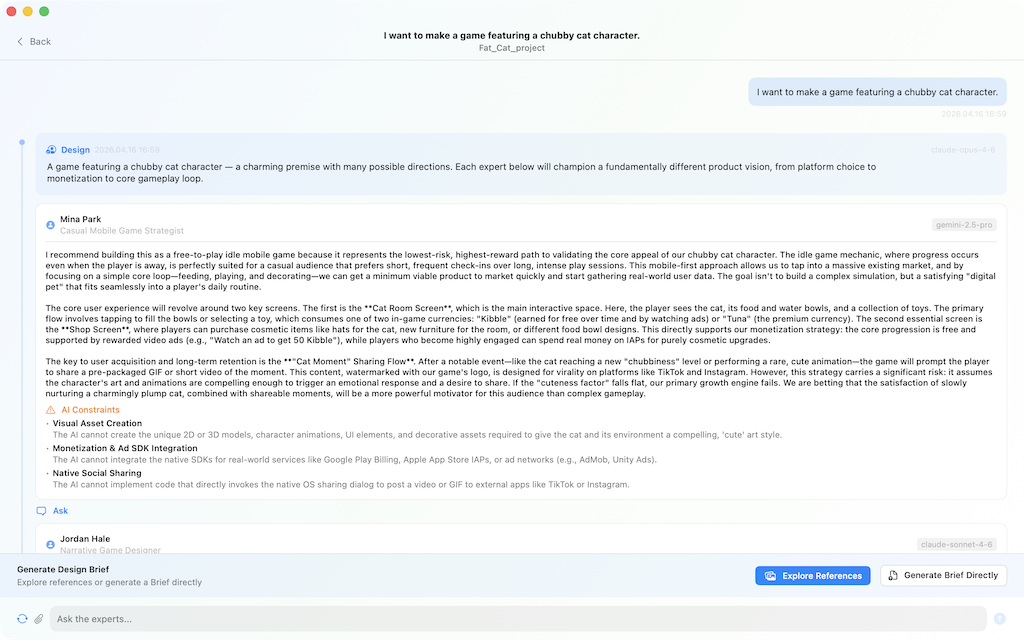
| IdeaBoard | Approach Selection |
|---|---|
 |
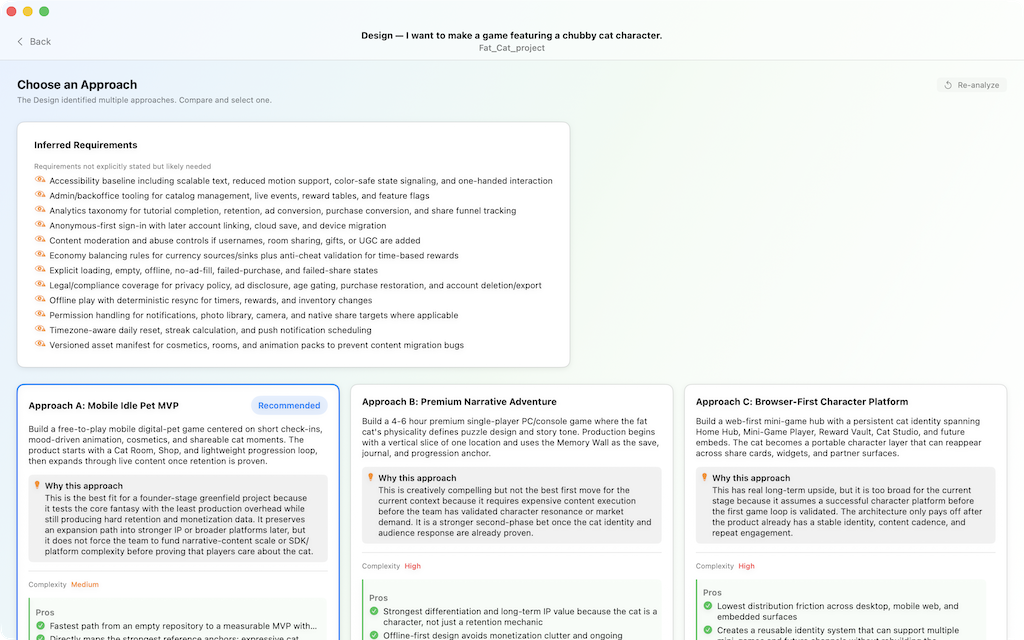 |
| AI expert panels explore an idea | Compare multiple approaches side-by-side |
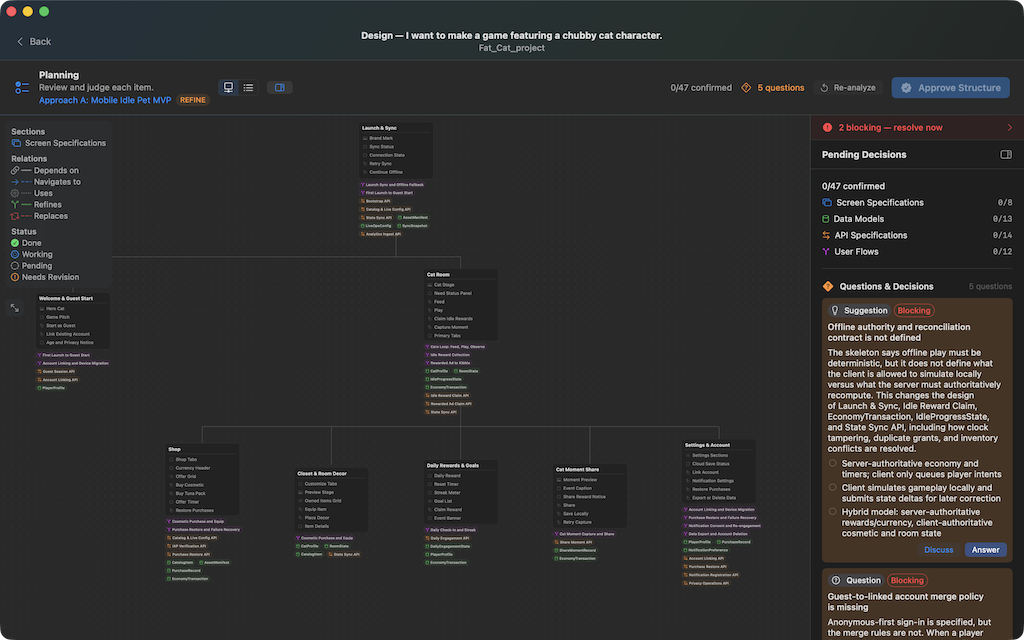
| Planning — Work Graph | Planning — Details & Decisions |
|---|---|
 |
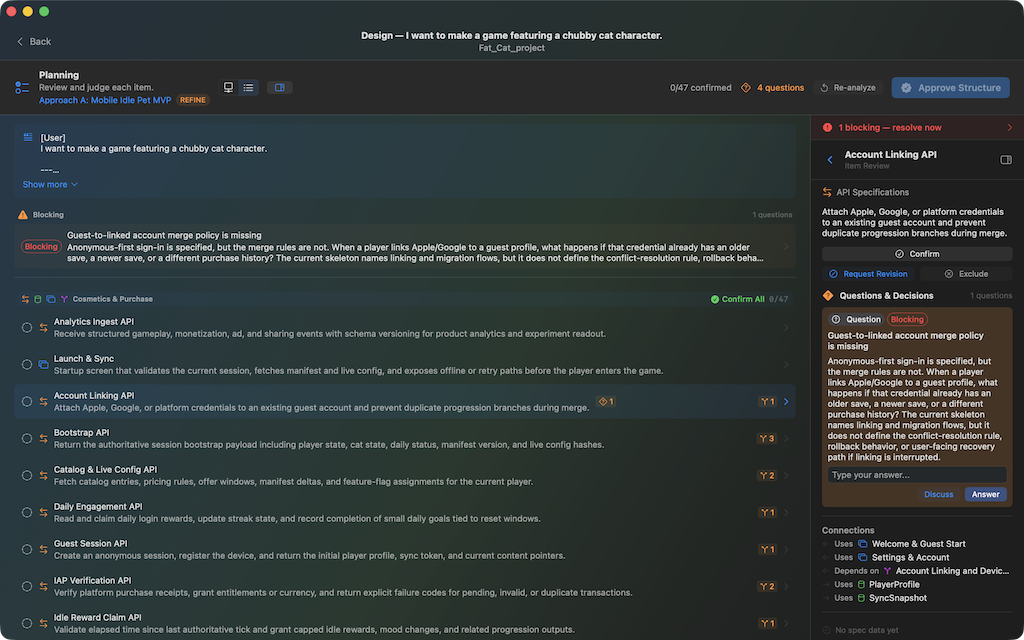 |
| Visualize the design structure | Drill into specs and resolve questions |
Features
Design Workflow (Primary Feature)
- AI-powered design structuring: idea exploration, approach selection, deliverable elaboration
- Multi-phase execution: Input → Analyzing → Approach Selection → Planning → Completed
- Human-in-the-loop decisions at key checkpoints
- Background execution with notification system
- Design session persistence and resume capability
IdeaBoard (Main Hub)
- Idea exploration with AI expert panels
- Direction synthesis and Work Graph extraction
- Seamless transition from idea to design workflow
Project Management
- Multi-project workspace with launcher
- Agent configuration (Director, Fallback, Step tiers)
- Provider support: Claude, Codex, Gemini
- Skill management per project
Handoff to Claude Code / Codex
- On workflow completion, exports a fixed set of design artifacts (
design.json,DESIGN_SPEC.md,BRD.md,PLAN.md,TEST.md, …) to{project_root}/.lao/{ideaId}/{requestId}/ - Auto-writes
.mcp.jsonto the project root, registering the bundledLAOMCPServerso MCP-aware AI tools auto-discover the design - One-click "Open in Claude Code / Codex" launches the chosen CLI in Terminal with an initial prompt that points at
DESIGN_SPEC.md - See docs/handoff.md for the full file list, MCP resource/tool surface, and prerequisites
Architecture
Directory Structure
LAO/
├── project.yml                        # XcodeGen spec
├── Package.swift                      # SPM package definition
├── LAOApp/                            # SwiftUI application
│   ├── App/
│   │   ├── LAOApp.swift               # @main entry point (multi-window Scene API)
│   │   ├── AppContainer.swift         # DI container
│   │   ├── LAOAppDelegate.swift       # App delegate
│   │   ├── DesignDocumentWindowCoordinator.swift  # Design doc window lifecycle
│   │   ├── ProjectWindowRoute.swift   # Window routing
│   │   ├── LAOWindowLayoutMode.swift  # Window sizing
│   │   └── DemoSeedMode.swift         # Demo/seed data
│   ├── Features/
│   │   ├── Design/                    # Design workflow (main feature)
│   │   │   ├── DesignModels.swift             # Data models, enums
│   │   │   ├── DesignPromptBuilder.swift      # LLM prompt templates
│   │   │   ├── DesignWorkflowViewModel.swift  # State management, execution engine
│   │   │   ├── DesignWorkflowView.swift       # Main UI (phase-based screens)
│   │   │   ├── ActiveWorkflowCoordinator.swift # Background lifecycle, project queue
│   │   │   └── ...                            # Overlays, converters, validators
│   │   ├── IdeaBoard/                 # Idea management hub
│   │   │   ├── IdeaBoardView.swift
│   │   │   ├── IdeaDetailView.swift
│   │   │   ├── IdeaPromptBuilder.swift
│   │   │   └── IdeaBoardModels.swift
│   │   ├── Launcher/                  # Project launcher & workspace
│   │   ├── ProjectDashboard/          # Project settings (General, Agents, Skills)
│   │   └── SharedUI/                  # Theme, components, button styles
│   └── ViewModels/                    # Shared ViewModels
├── Packages/
│   ├── LAODomain/       # Domain models, enums, protocols
│   ├── LAOServices/     # Service protocol definitions
│   ├── LAOPersistence/  # SQLite CRUD, schema bootstrap
│   ├── LAORuntime/      # CLI agent execution, git, model catalog
│   ├── LAOProviders/    # Provider registry and support
│   └── LAOMCPServer/    # MCP server executable
Key Patterns
- Multi-window architecture: Scene API-based windows (Launcher, ProjectWorkspace, Settings, DesignDocument)
- ActiveWorkflowCoordinator: Singleton managing background design execution, project-level queuing, and ViewModel lifecycle
- DesignPromptBuilder: Centralized prompt construction for all LLM interactions
- AppContainer: Dependency injection container holding all services
Build & Run
Prerequisites
- macOS 15.0+ (Sequoia)
- Xcode 16.0+
- XcodeGen (
brew install xcodegen)
Setup
- Generate the Xcode project:
xcodegen generate - Open
LAO.xcodeprojin Xcode - Select the
LAOscheme and run
CLI Build
xcodebuild -project LAO.xcodeproj -scheme LAO -destination 'platform=macOS' build
AI Provider Setup
Configure at least one CLI agent provider in Settings → Agents:
- Claude:
claudeCLI must be available in PATH - Codex:
codexCLI must be available in PATH - Gemini:
geminiCLI must be available in PATH
Data Storage
- SQLite database at
~/Library/Application Support/LAO/ - Design documents saved per-request at
{project_root}/.lao/{ideaId}/{requestId}/
Documentation
- Why LAO — the problem LAO is designed to solve
- Operating Principles — workflow phases, roles, and deliverable structure
- Design Principles — quality standards for design output
- Handoff Mechanism — how completed designs are delivered to Claude Code / Codex (export artifacts,
.mcp.json, MCP server surface)
Contributing
Bug reports and feature requests are welcome via GitHub Issues.
See CONTRIBUTING.md for details. Pull requests are not currently accepted.
Security
For security vulnerabilities, please follow the process described in SECURITY.md — do not open a public issue.
License
This project is licensed under the MIT License - see the LICENSE file for details.
Yorumlar (0)
Yorum birakmak icin giris yap.
Yorum birakSonuc bulunamadi