session-story
Health Pass
- License — License: MIT
- Description — Repository has a description
- Active repo — Last push 0 days ago
- Community trust — 11 GitHub stars
Code Fail
- exec() — Shell command execution in session-story/bin/story.mjs
Permissions Pass
- Permissions — No dangerous permissions requested
No AI report is available for this listing yet.
Generate a self-contained HTML "session story" that links each prompt in a vibe coding session to the file edits it caused, with a review timeline, a GitHub-style diff view, and a plain-language narrative.

Stop guessing what your AI changed. See the whole story.
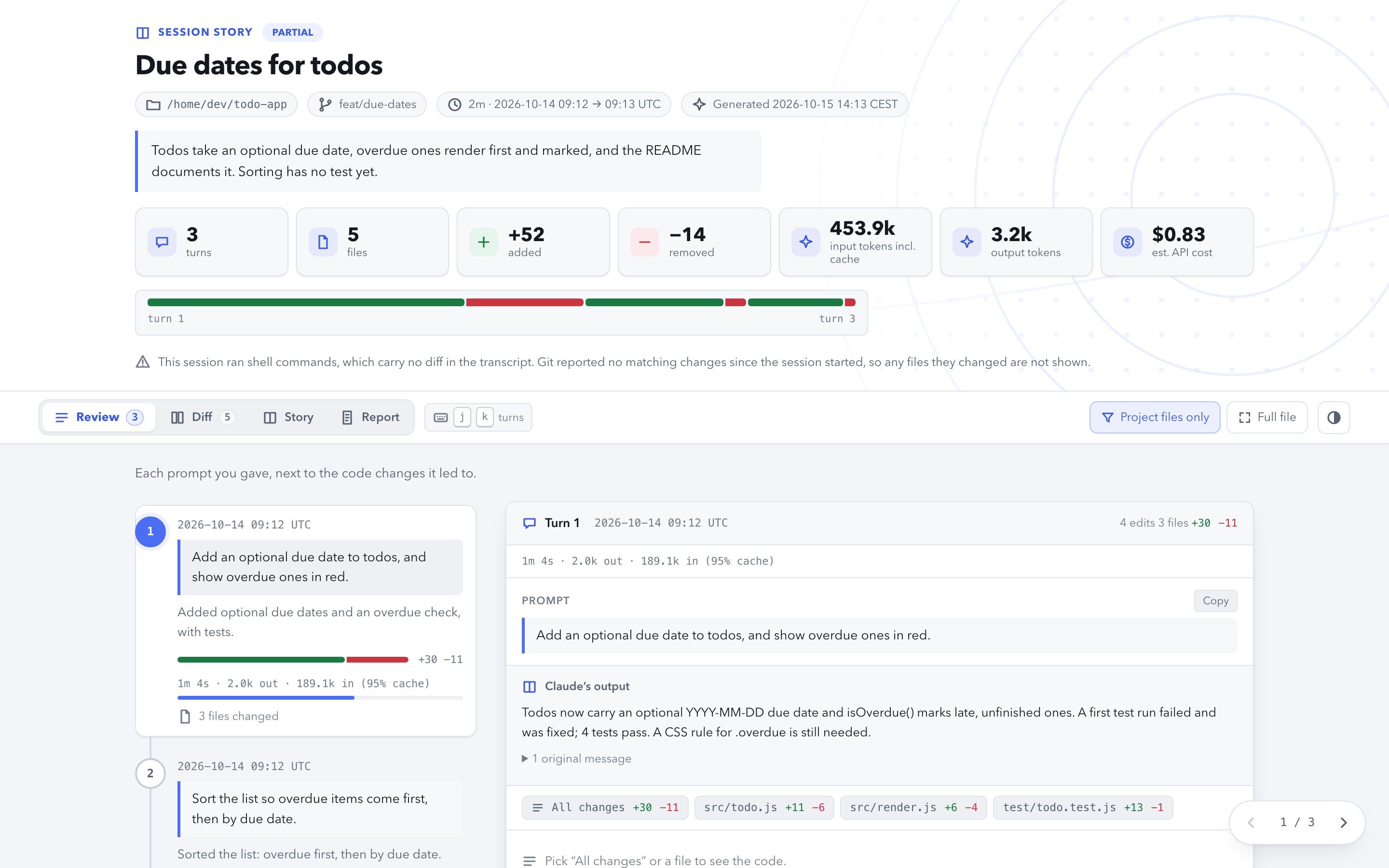
Start page · Live example · Quick start


Session Story
Generate a self-contained HTML "session story" that links each prompt in a vibe coding session to the file edits it caused, with a review timeline, a GitHub-style diff view, and a plain-language narrative.
Session Story is a zero-dependency Node.js extraction and rendering pipeline for Claude Code. It parses the session transcript into typed JSON IR, cross-indexes prompts to the edits they caused, and deterministically compiles that into one HTML file with inline CSS and JS.
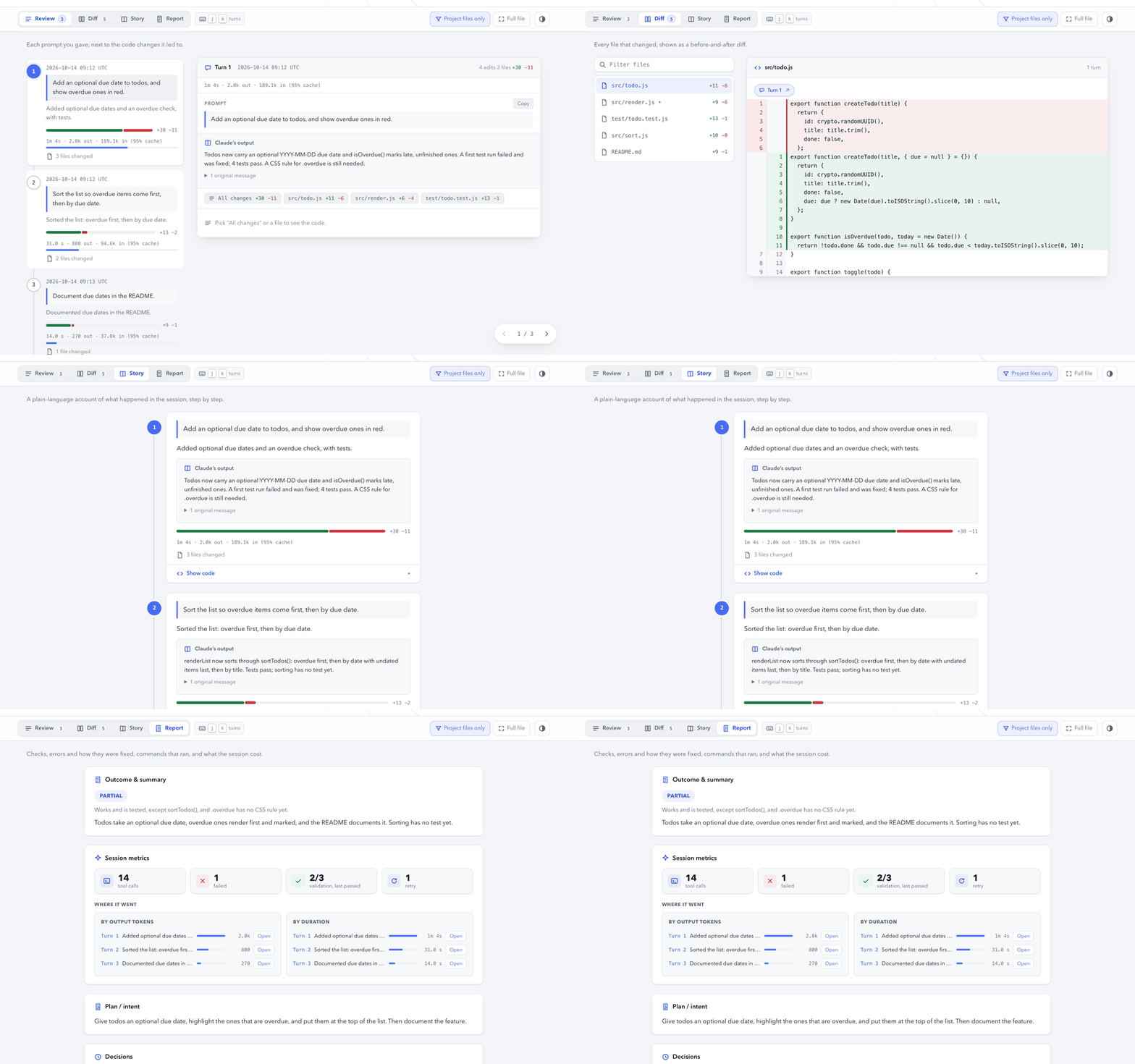
- Open it and review — a GitHub-style diff, a turn-by-turn timeline, a plain-language narrative, and a report of what happened (commands, tests, errors, decisions, outcome), switchable in one page
- Reconstruct intent, not just diffs — every edit is linked back to the prompt and turn that produced it, in order
- Honest about blind spots — an interrupted tool call or a change made by a shell command is called out in the page header instead of silently omitted
- One file, ready to share — no server, no build step, works straight from
file://
Git tells you what changed. This tells you what happened.
Start page · Live example. The example is built from a synthetic demo session; the same page is checked in at examples/story.html.
Quick start
1. Install
The installer needs Node.js 22.20+ (check with node -v). For all your projects:
npx -y skills add nalaj/session-story --skill session-story --agent claude-code --global --copy --yes
For the current repository only, drop --global:
npx -y skills add nalaj/session-story --skill session-story --agent claude-code --copy --yes
This uses the open skills CLI. It copies only the session-story/ folder into your agent's skills directory, so nothing goes to npm and there's nothing else to install. The installer needs Node.js 22.20+ (the skills CLI's own requirement); the skill itself runs on Node.js 18.18+ with zero npm runtime dependencies. To update, run the same command again. To remove it: npx skills remove session-story.
On older Node, this fetches Node 22 for the install only and changes nothing else (tested on macOS; for a lasting fix, upgrade Node, e.g. nvm install 22):
npx -y -p node@22 -p skills -- skills add nalaj/session-story --skill session-story --agent claude-code --global --copy --yes
As a Claude Code plugin. This repository is also a plugin marketplace. Inside Claude Code, run:
/plugin marketplace add nalaj/session-story
/plugin install session-story@session-story
On Claude Code 2.1.275 or later, one line does both: /plugin install session-story --marketplace nalaj/session-story. This needs no npx, and Claude Code installs only the session-story/ folder. As a plugin, the skill's command is /session-story:session-story. To update, run /plugin marketplace update session-story.
Or clone this repo and run node session-story/bin/story.mjs directly.
2. Generate a story
Inside Claude Code, once installed:
/session-story
Or just ask: "make a story of this session for my teammate".
Claude extracts the current session, writes one-sentence summaries per turn, and opens the rendered page. See session-story/SKILL.md for the exact flow.
Older sessions work too. The story is built from the transcript Claude Code keeps on disk, not from the model's context, so a session from days ago is as good as the current one. Ask "make a session story for session <session-id>", or from the command line:
node session-story/bin/story.mjs extract --session <session-id> -o story.json
Session ids are the transcript file names in ~/.claude/projects/<slug>/ (the slug is the project path with / replaced by -), and /resume lists them too. Pass the full id, and --cwd <dir> when you are not in the project directory. Claude Code deletes transcripts after cleanupPeriodDays (30 by default), and edits made through the shell are recovered against today's git tree, so for an old session they can be misattributed if the files changed since.
3. Review, hand off, or share
Open the generated HTML file. Switch views depending on the audience — see below.
Need text instead of a page? export turns the same story into markdown: a
pull request description by default, or with --template handoff a status
to paste into a fresh Claude Code session (where things stand, turn by
turn, git). It prints to stdout, so it pipes straight into pbcopy orgh pr create --body-file -.
Every session keeps its own page
Stories land in a .session-stories/ library in the project, one file per
session, named by date, session id, and a slug of the title:
.session-stories/
  index.html                                   # the gallery
  index.json                                   # the manifest it is built from
  sessions.js                                  # the sidecar the switcher reads
  2026-09-14-eb076ea5-add-a-session-browser.html
  2026-09-12-a91c3f02-fix-the-diff-lens.html
index.html lists every session — date, title, outcome, summary, turns,
files, lines added and removed, input and output tokens, and cost when
Claude Code recorded it — with a filter box and time period filters (today,
last 7 or 30 days, this or last calendar month, all time); the totals line
adds up whichever sessions are shown. Every story page
gets an "All sessions" link and a session switcher in its nav. Re-rendering
a session overwrites its own file rather than piling up copies.
None of that costs the single-file property. The switcher is fed bysessions.js, loaded with <script src> (which works over file://,
unlike fetch); a story mailed on its own simply has no sidecar, so the
link and switcher stay hidden and the page is exactly as self-contained as
before. Pass --library <dir> to put the library elsewhere, or -o <file>
/ --no-library for a single standalone page and nothing else.
Choose the right view
| View | Best for | Shows |
|---|---|---|
| Review | Reviewing your own session | A timeline of turns — prompt, one-sentence intent, number of files changed — with the turn's prompt and Claude's text output in its panel, and its code behind an “All changes” / per-file picker. Each turn shows how long it took and the tokens it used, with a bar for its share of the session's output |
| Diff | A teammate doing code review | A GitHub-style file tree and diff, each hunk tagged with the turn that produced it |
| Story | A stakeholder who wants the gist | A narrative card per turn with Claude's text output, code collapsed by default |
| Report | Anyone who wants what happened, not just what changed | Outcome; session metrics (tool calls, failures, validation, retries) and a “Where it went” ranking of the turns that used the most output tokens and time, and of any turn that re-sent its context past the prompt cache; active time next to wall-clock time; plan/intent, commands run, tests & validation, errors and how they were resolved, decisions, dependencies, git state; and deterministic metrics, token usage, and cost when Claude Code recorded it |
The metrics sections appear for stories extracted with trace data; an older story.json renders the Report without them.
The session library offers sorting, a compact layout, a "Not recorded" outcome filter and Clear filters. Each card also has a delete button, and there is a Delete all button. The page is a static file and cannot delete anything itself, so each button copies the story.mjs delete command that does it; run that command in a terminal, then reload the page.
Two toggles in the nav apply across the views, and persist across visits:
- Project files only (on by default) — hides edits to files outside the session's project directory (scratch files, temp drafts). Every count in the header, timeline, and file tree switches with it; turn off to see what's hidden and why.
- Full file (off by default, Review and Diff) — shows each change spliced into the complete source file it came from, instead of just the changed hunk. File state is reconstructed from the transcript where possible; a note marks a view rebuilt from the file's current disk contents as approximate.
Why Session Story
- Reconstructs intent, not just diffs — links every edit back to the prompt that caused it, in the order it happened.
- Four views, one file — Review for you, Diff for a teammate, Story for a stakeholder, Report for anyone asking "so what actually happened, and where did the time and tokens go"; no server needed to view any of them.
- Zero runtime dependencies — pure Node.js, inline CSS/JS, works over
file://. - Stays light on long sessions — each distinct diff is carried once as data and rendered when you open it, and every view and turn you have not opened yet is carried inert, so a long session opens with a few thousand live elements instead of tens of thousands. The page needs JavaScript; printing renders everything.
- Typed IR, validated before render —
story.jsonfollowssession-story/schemas/story.schema.json;validatechecks its shape and, in--strictmode, that every turn and the session have a summary. - Honest about blind spots — a tool call whose result never arrived is shown as "edit attempted, result unknown" instead of causing an error, and untracked shell edits are disclosed in the page header rather than silently dropped.
How it works
| Step | What happens |
|---|---|
| Extract | Locates the session transcript (and any subagent transcripts) under ~/.claude/projects/<slug>/, parses it, and builds a typed IR (story.json) — including commands run, errors, git branch/commits, and dependency changes, all pulled straight from the transcript and git. It also records a chronological trace of every prompt, tool call and subagent with status and latency, per-turn durations, token usage (and cost, when Claude Code has written it), and deterministic metrics: the data behind the Report view's metrics sections. Anything the transcript did not record stays null, never 0. |
| Summarize | Claude fills in the session summary, one-sentence turn intents, and the report narrative (plan, decisions, outcome), read from the --brief projection only — never the full transcript. |
| Validate | Checks the IR's shape and, in --strict mode, that every turn, the session, and the report have their required fields filled in. |
| Render | Compiles the IR into one self-contained HTML file with inline CSS and JS — no external requests, no template step left undone. |
Command-line equivalent of the full flow (from a clone; an installed skill lives at ~/.claude/skills/session-story/):
node session-story/bin/story.mjs extract [--session <id>|--latest] [--cwd <dir>] [--no-chain] -o story.json
node session-story/bin/story.mjs validate story.json [--strict]
node session-story/bin/story.mjs render story.json [--library <dir>|-o story.html|--no-library] [--open]
node session-story/bin/story.mjs export story.json [--template pr|handoff] [-o out.md] [--all-files]
node session-story/bin/story.mjs delete <session-id|id-prefix|file>... [--library <dir>]
node session-story/bin/story.mjs delete --all [--library <dir>]
Run without any Claude-written summaries, render falls back to the first line of each prompt as the turn's label.
Privacy
A story page holds your session word for word: prompts, Claude's replies, diffs, command lines and their errors. If a secret passed through the session, it can be in the page. Read the page before you share it.
- The extractor reads only local files: the transcript under
~/.claude/projects/<slug>/and, for shell-driven edits,gitin your project. It makes no network requests, and the rendered page loads nothing remote. - Stories go to
.session-stories/in your project. Add it to.gitignoreunless you mean to commit them.
Limits (v1)
- Claude Code sessions only — Codex, Cursor, and OpenCode transcripts are a different format. Support for them is planned.
Edit,Write, andNotebookEditcalls come from the transcript, which carries their diffs.Bashresults do not, so shell-driven changes (sed -i, a heredoc script,prettier --write) are recovered from git: the tree is diffed from the commit the repo was on when the session started through to the working tree (so changes the session committed are included), files already dirty before the session are filtered out by mtime, and each change is credited to the turn whose commands account for it. These edits are marked "via shell" on the page. They inherit git's blind spots — a file edited again after the session shows both changes, and a commit made during the session by someone else is indistinguishable from the session's own — so the page states that too.extract --no-gitskips the pass, and with it the Report lens's git state (its commands, tests, errors, and dependency sections still come from the transcript alone)./cleardoes not continue a session, it starts a new transcript file, so the work before it would otherwise be missing from the story. Sessions split that way are joined automatically: the predecessor is found by its file mtime, which Claude Code lands on the/clearrecord's timestamp, and the chain is followed back as far as it goes.session.chainlists the joined ids oldest first and the page header names them.extract --no-chainextracts the one session alone.- A tool call whose result never arrived (an interrupted session) is shown as "edit attempted, result unknown" rather than causing an error; one whose result was an error is shown as "edit failed" with the error message.
- The Report lens's plan, decisions, outcome, and error resolutions are Claude's judgement calls, seeded by extracted hints — not something the extractor verifies on its own.
Reference and scope
A hosted viewer and WYSIWYG editing are intentionally outside the current scope. Codex/Cursor/OpenCode support is planned for a later release.
Repository layout
| Path | What it is |
|---|---|
session-story/ |
The skill: exactly what npx skills add installs (SKILL.md, bin/, src/, schemas/) |
test/ |
node --test suite for the skill |
scripts/ |
Package smoke test, site build, and the synthetic demo session |
site/ |
GitHub Pages start page; npm run build:site adds the live example into _site/ |
examples/story.html |
Standalone example page, regenerated by build:site |
Development
npm test            # unit + end-to-end tests
npm run smoke       # installs only session-story/ into a temp dir and renders the demo from there
npm run build:site  # builds _site/ and refreshes examples/story.html
node --test, no test framework dependency. TDD throughout: src/transcript/ (parsing + the Claude Code adapter), src/ir/ (cross-indexing, dependency and git-state extraction, validation), src/render/ (HTML generation, including the Report lens), test/cli.test.mjs (end-to-end: extract → validate → render against fixture transcripts). See CONTRIBUTING.md for the release steps.
License
MIT — free to use, modify, and distribute.
Reviews (0)
Sign in to leave a review.
Leave a reviewNo results found