unit7
Health Uyari
- License — License: Apache-2.0
- Description — Repository has a description
- Active repo — Last push 0 days ago
- Low visibility — Only 5 GitHub stars
Code Basarisiz
- spawnSync — Synchronous process spawning in bin/unit7.mjs
- process.env — Environment variable access in bin/unit7.mjs
- process.env — Environment variable access in launch-video/render.mjs
Permissions Gecti
- Permissions — No dangerous permissions requested
Bu listing icin henuz AI raporu yok.
The backend developer your AI coding agent never had. Self-hosted control room for servers, Coolify, domains, databases and backups, with MCP.

Unit7
The backend developer your AI coding agent never had.
Self-hosted control room for your servers, Coolify apps, domains, databases and backups.
Talk to it in plain words. It does the work, and asks before anything risky.
V2.1 · Free and open source · Apache 2.0 · signull.cloud









Watch the film · What's new · Quick start · Screenshots · Features · How it stays safe · Support
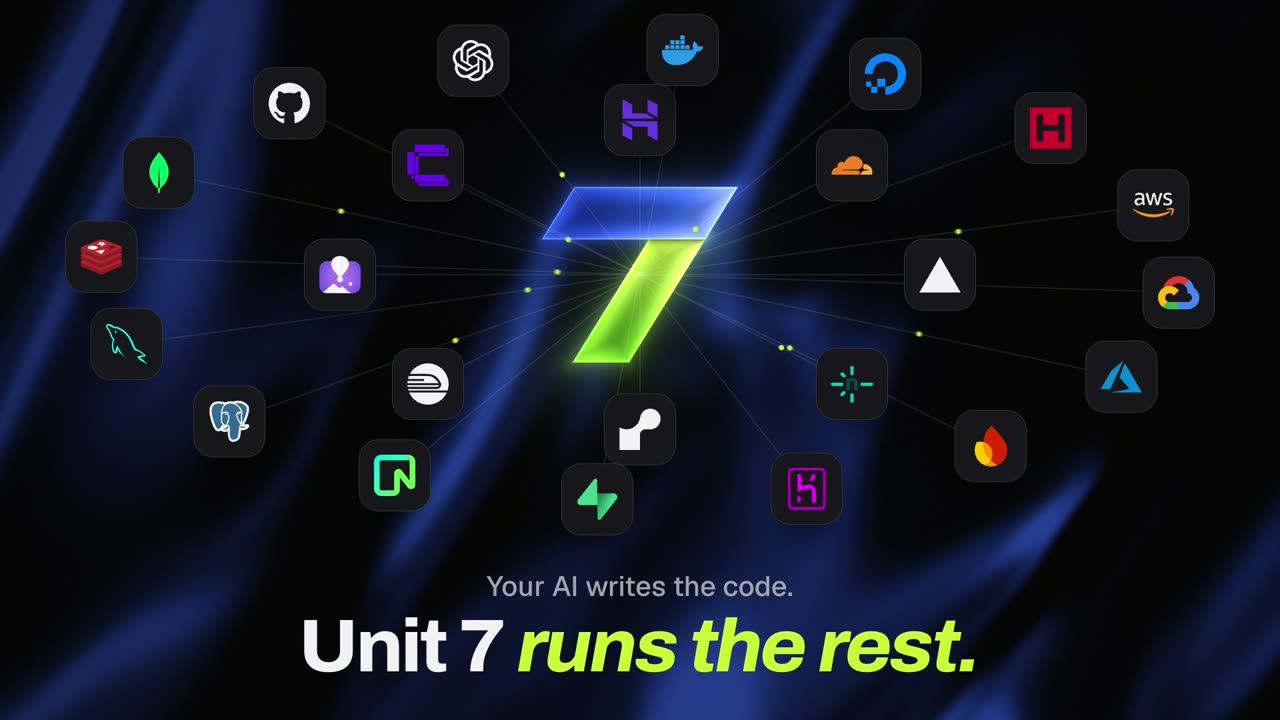
Your AI writes the code. Unit 7 runs the rest. Watch the 60-second film

✨ Why Unit7
AI agents write the code in minutes. Everything after that still eats your evenings: the VPS, the Coolify
stacks, DNS spread over three providers, backups you hope work, the port you forgot was open.
Unit7 is a self-hosted, autonomous infrastructure operating system for people who build with AI and don't want
to become a DevOps engineer. You tell it what you want — "deploy this", "add Postgres",
"point app.example.com at production", "why is prod slow?" — and it operates your real servers.
One Node process plus one SQLite file. It runs on your laptop or a small VPS and manages your other servers over
SSH. A web command center, a CLI and an MCP server all drive the same engine, so the UI, your terminal and your AI
coding agent (Claude Code, Cursor, Antigravity, Codex…) can do exactly the same things through exactly the same
safety gate.
| 🧰 480+ tools (or a small profile) | 🧪 1,000+ tests, many on real SSH + Docker | 🔌 30+ providers | 📦 1 process, 1 SQLite file |
|---|
Works with


🆕 What's new
V2.1 is the latest version.
- V2 has already done the job when you open the app. It checks by itself, protects your data by itself and proves its fixes. See Is everything OK?
- V2.1 adds Seven, an agent on shift. It does the safe work and asks one clear question. See Seven.
- Since V2.1, it can start things too, not just look after what already exists:
| New | What it does |
|---|---|
| Put this live | Pick a GitHub repo, drop a folder or a ZIP, or run unit7 live. Add your settings, choose how much room it gets, and see the price before you go. It picks the best host you've connected, from 16: Vercel, Netlify, Cloudflare Pages, GitHub Pages, Hostinger, Coolify, your own server, Render, Railway, Fly.io, DigitalOcean, Firebase, Heroku, Cloud Run, Amplify and Azure Static Web Apps. |
| Your real databases | Tables, safe queries, import and export on any Postgres, MySQL, MariaDB, Redis or MongoDB it finds on your server, Supabase included. Personal columns stay hidden from an AI. |
| Supabase and Neon | Projects, SQL, functions, secrets, auth, storage and logs, hosted or self-hosted. |
| Domains and DNS | Records, redirects, wildcards and one-step domains on Coolify apps. Mail records wait for a person. |
| Files | Browse, edit, upload and download on a server. A removed file waits 7 days in a trash. |
| Server care | Snapshots, ports, SSH keys, users and moving to a new server. Buying and deleting stay with a person. |
| WordPress | Sites on your server. A broken site? It finds the plugin and offers to switch it off. |
| Coolify, with no setup | Its servers, apps and projects, plus deploy on push, previews, storage and scaling. |
| One-click tools | More than 30 open-source tools, with the admin login claimed first, and any Coolify template one search away. |
[!NOTE]
Everything in this table is in testing. It's built and tested against fake servers, and first runs on real accounts come next. LIMITS.md says where each one stops, and ROADMAP.md says what's next.
🧭 Is everything OK?
One button, or unit7 checkup. No AI needed, free, and it only reads. You get four answers: is there room, is your data safe, is anything open, and is your app behaving. Each thing to do says who fixes it: Unit7, your AI, or only you.
- Safety Net. Important data with no safe copy gets one by itself, sent off the server and proven by a test restore. Automatic steps only ever create or copy.
- Give this to my AI. A finding becomes a prompt for Cursor, Claude Code or Codex. After your next deploy, Unit7 reads the same numbers and says Fixed or Still happening.
- Call Inspector. Polling, duplicate calls, one page making 40 calls, retry storms, from your proxy log, with nothing to install.
- Outpost. One small script on the server, so it's still watched while your Mac sleeps. No open port.
- What can a stranger do? Your own sites from outside. It counts rows and reads none. It looks for files that shouldn't download from inside your server, so your server's own defences don't ban you.
Unit7 runs on your computer. When your Mac sleeps, nobody is watching, unless you add an Outpost. The Always on page shows the hours it missed. See LIMITS.md, TRUST.md and ACCIDENTS.md.
🚀 Quick start
The easy way: let Claude Code set it up
Open Claude Code in any folder, paste this, and it does the rest:
Set up Unit7 for me from https://github.com/Nandkishorrr/unit7

1. Check that Node.js 24.22 or newer is installed. If not, install it (nvm, or Homebrew on macOS).
2. Clone the repo into ~/unit7, then run `npm install` and `npm run build` there.
3. Run `node bin/unit7.mjs service start` to run Unit7 in the background, and check that http://localhost:4800 answers.
4. Tell me to open http://localhost:4800 and create my owner account, and wait until I say I'm done.
5. Run `node bin/unit7.mjs connect claude` so Claude Code can use Unit7, then tell me to restart Claude Code.

Never ask me for passwords, SSH keys or API keys in this chat. I'll add those myself in the Unit7 web app.
If a step fails, show me the error and fix it before moving on.
By hand
git clone https://github.com/Nandkishorrr/unit7.git && cd unit7
npm install
npm run build                     # builds the web app into dist/web
node src/main.ts serve            # http://localhost:4800
Open http://localhost:4800. The first visitor sets it up and becomes the owner. Then add a server (SSH) or
connect a provider on the Connections page.
To keep Unit7 running in the background and let the AI agents on your computer use it over MCP:
node bin/unit7.mjs service start  # starts at login, restarts if it crashes (macOS and Linux)
node bin/unit7.mjs connect        # pick: claude, cursor, antigravity, windsurf, claude-desktop, codex; also puts `unit7` on your PATH
[!NOTE]
Needs Node 24.22+ on macOS or Linux (Unit7 runs its TypeScript directly, no build step for the server). On macOS the vault key
lives in the Keychain; elsewhere it's a key file inUNIT7_HOMEorUNIT7_MASTER_KEY(see Environment).
📸 Screenshots
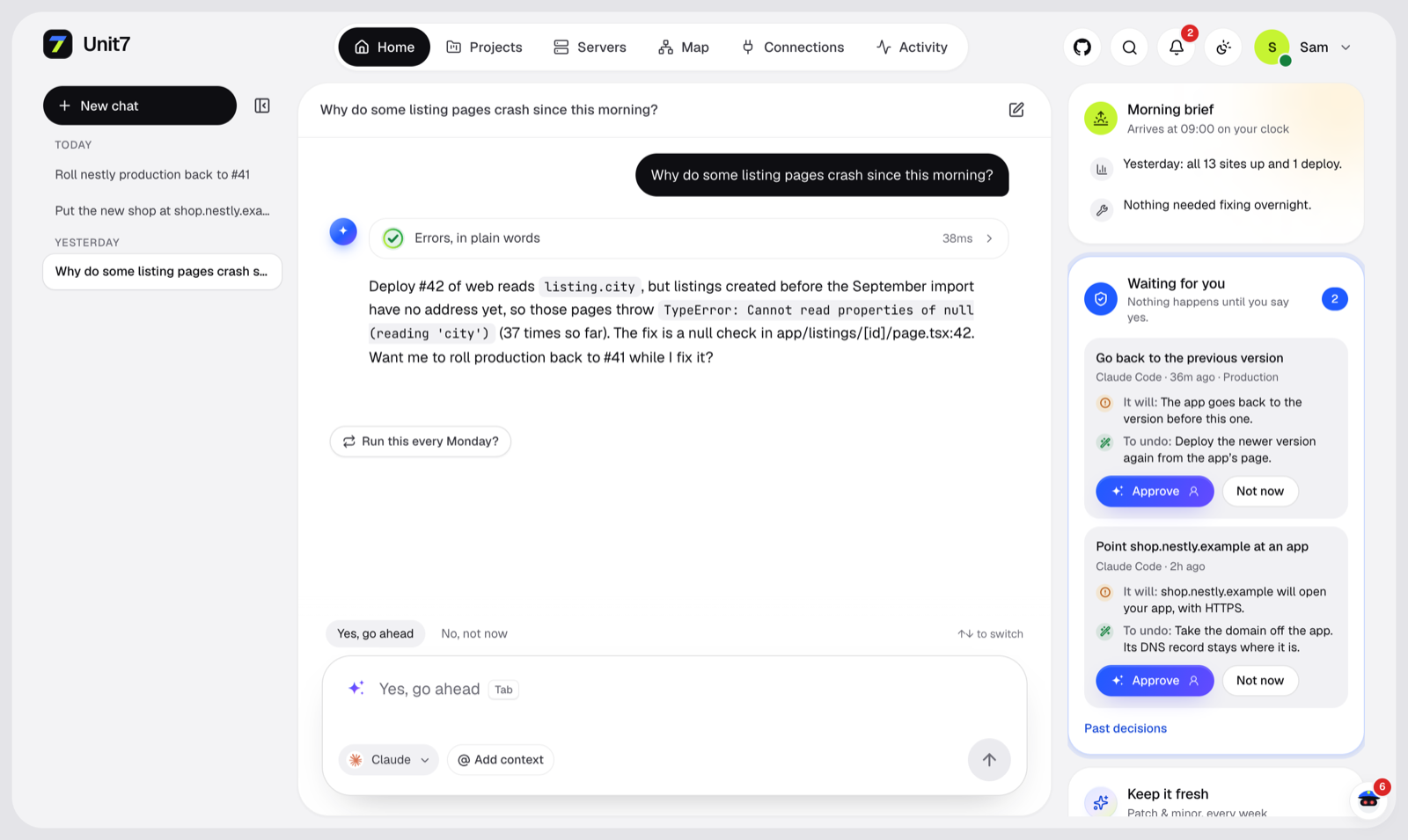 Ask in plain words. It reads the logs, explains the crash and asks before rolling back. |
|
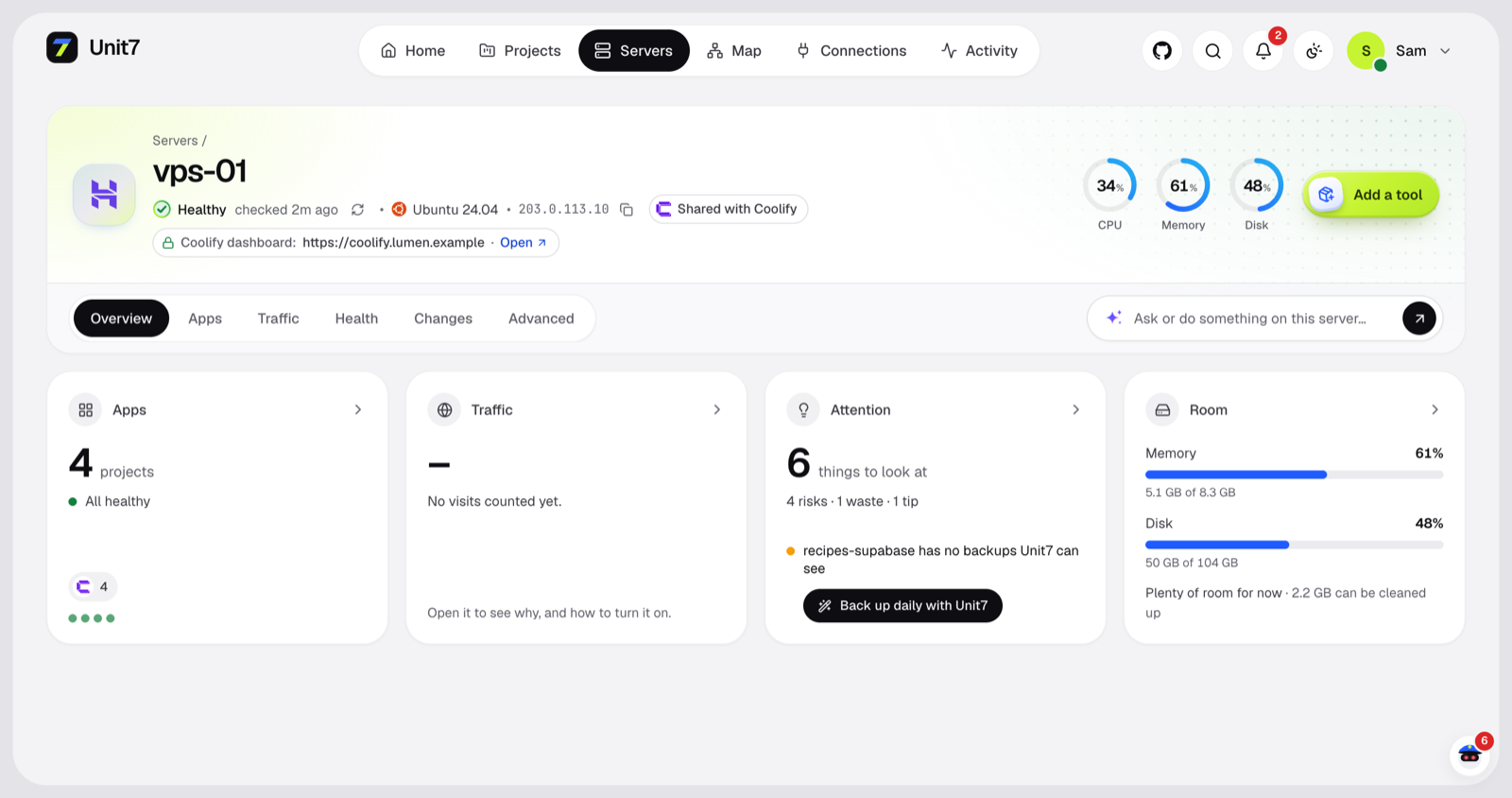 Server X-ray. Health, usage, risks and what can be cleaned up. |
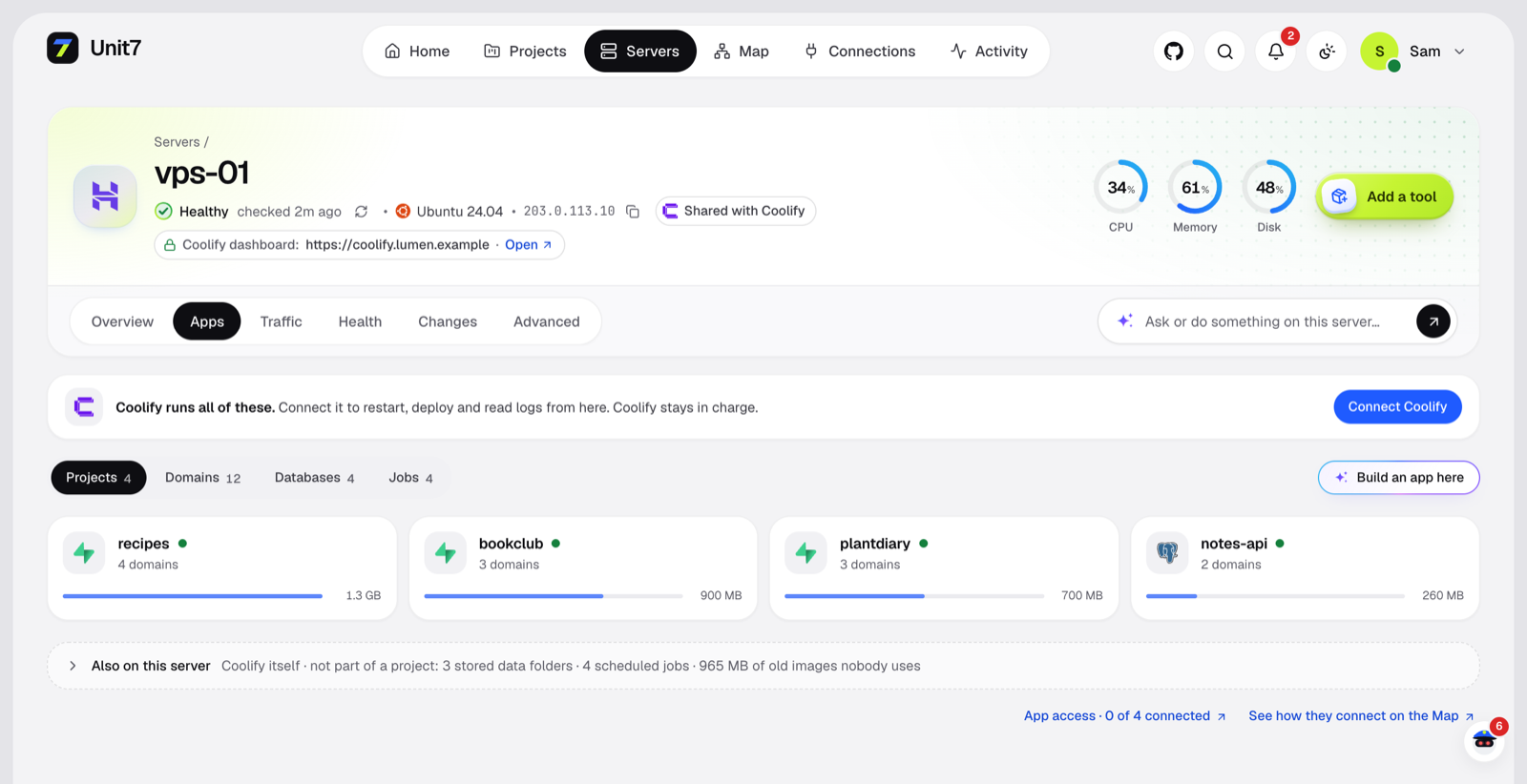 Inside Coolify. Projects, domains, databases and cron jobs, found from Docker labels. |
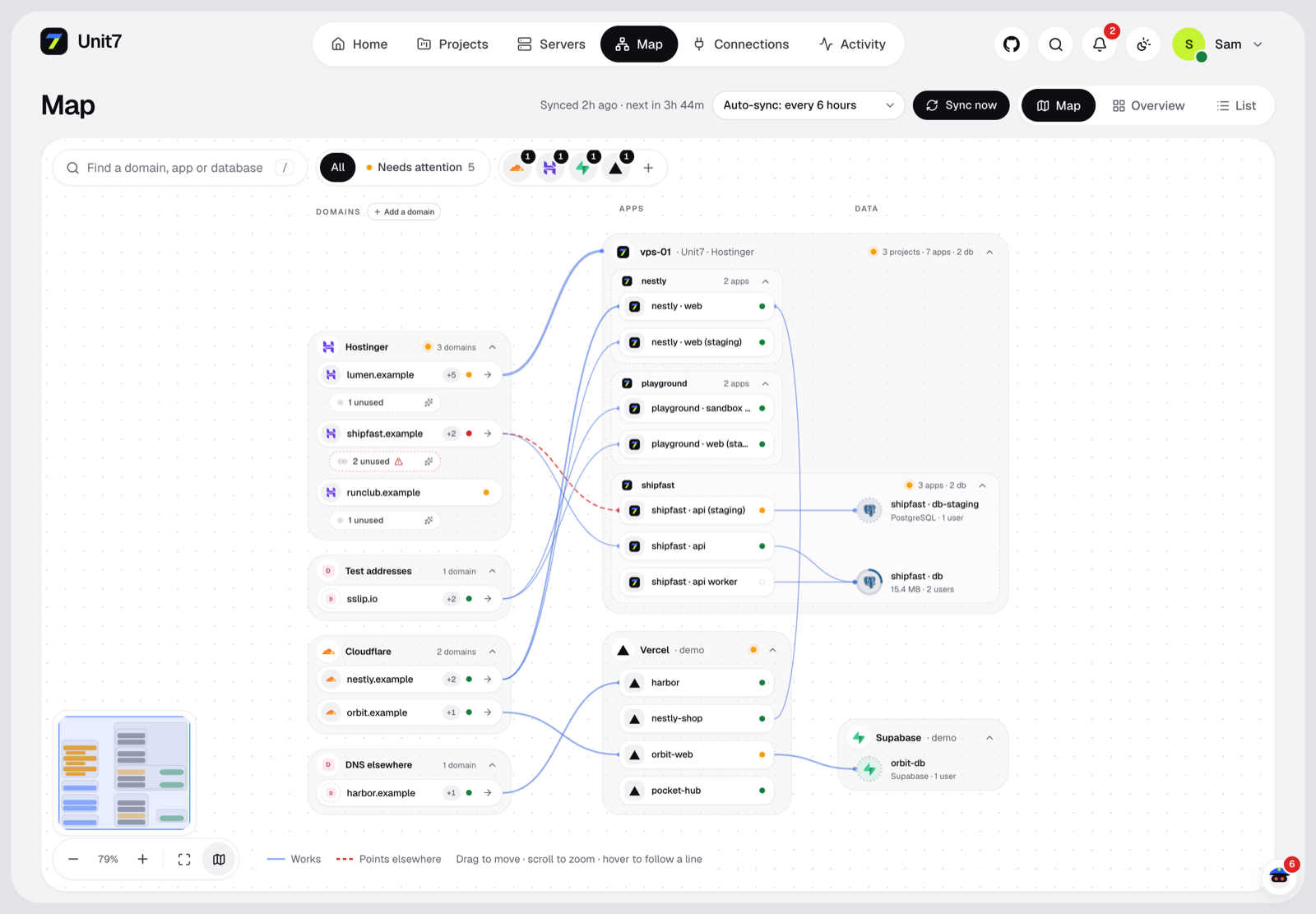 The Map. Domains → apps → databases across Hostinger, Cloudflare, Vercel, Supabase… |
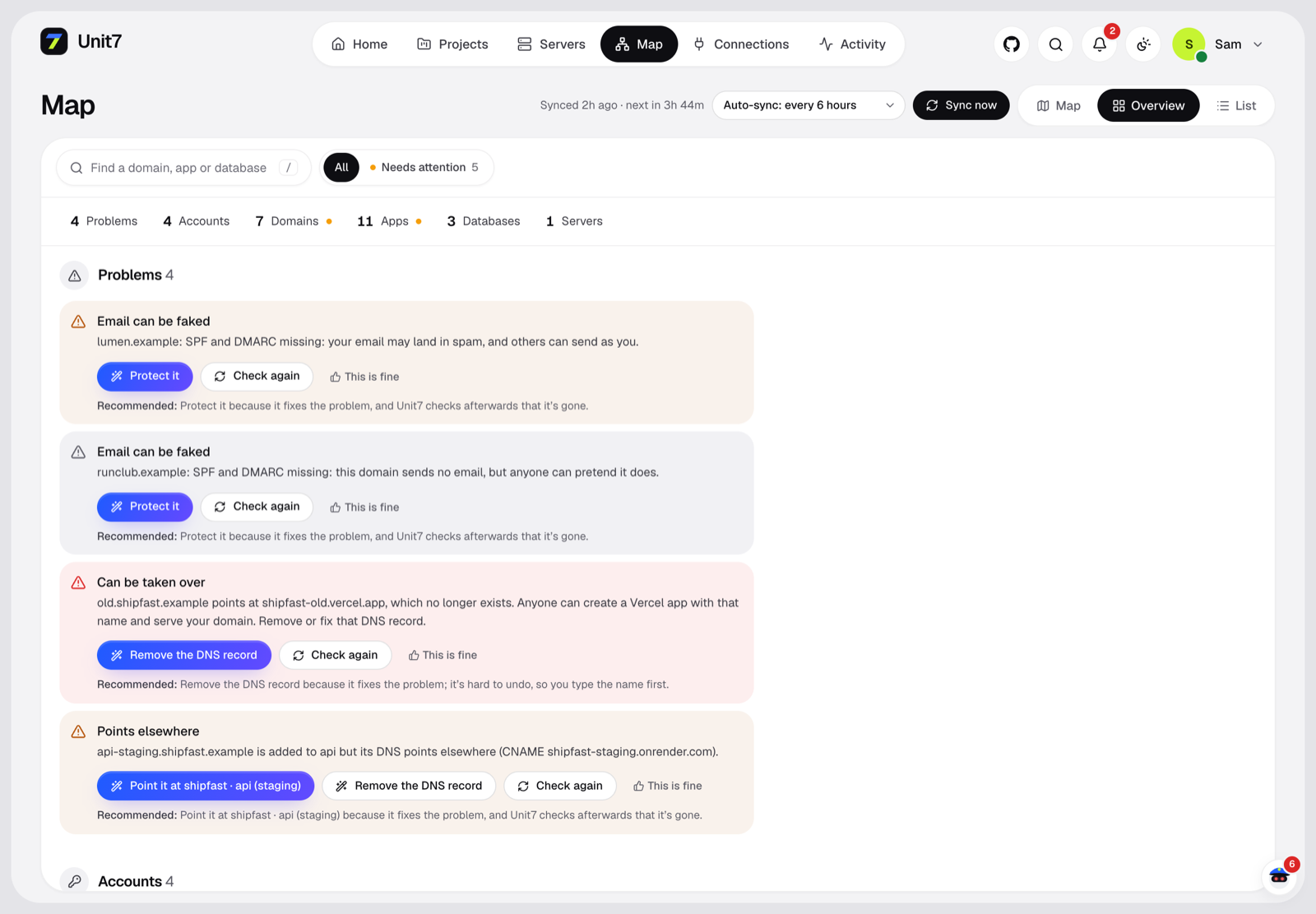 Map overview. Broken or dangling links show up red. |
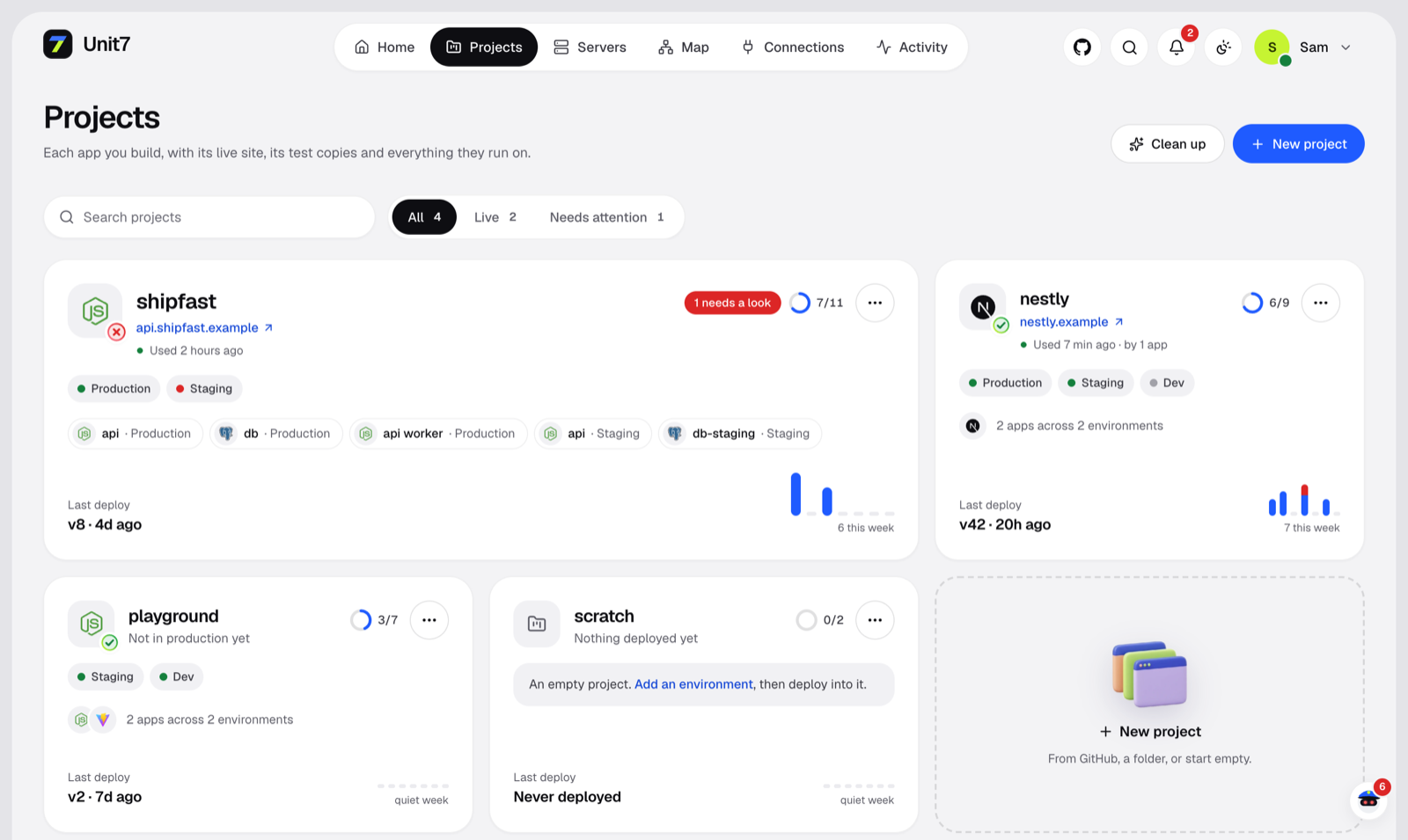 Projects. Production, staging and dev side by side, with deploy history. |
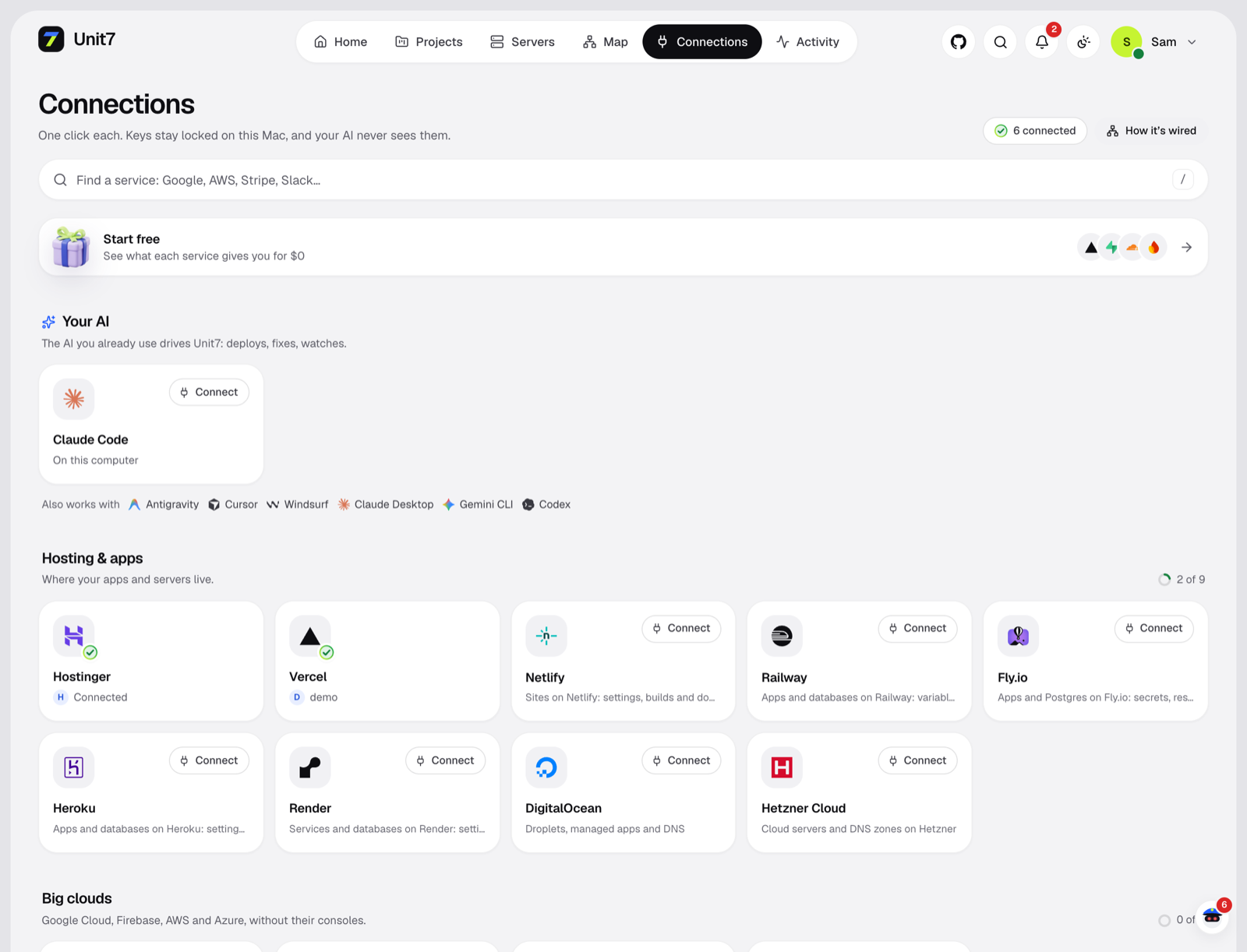 Connections. One click per provider. The AI only ever sees a reference, never the key. |
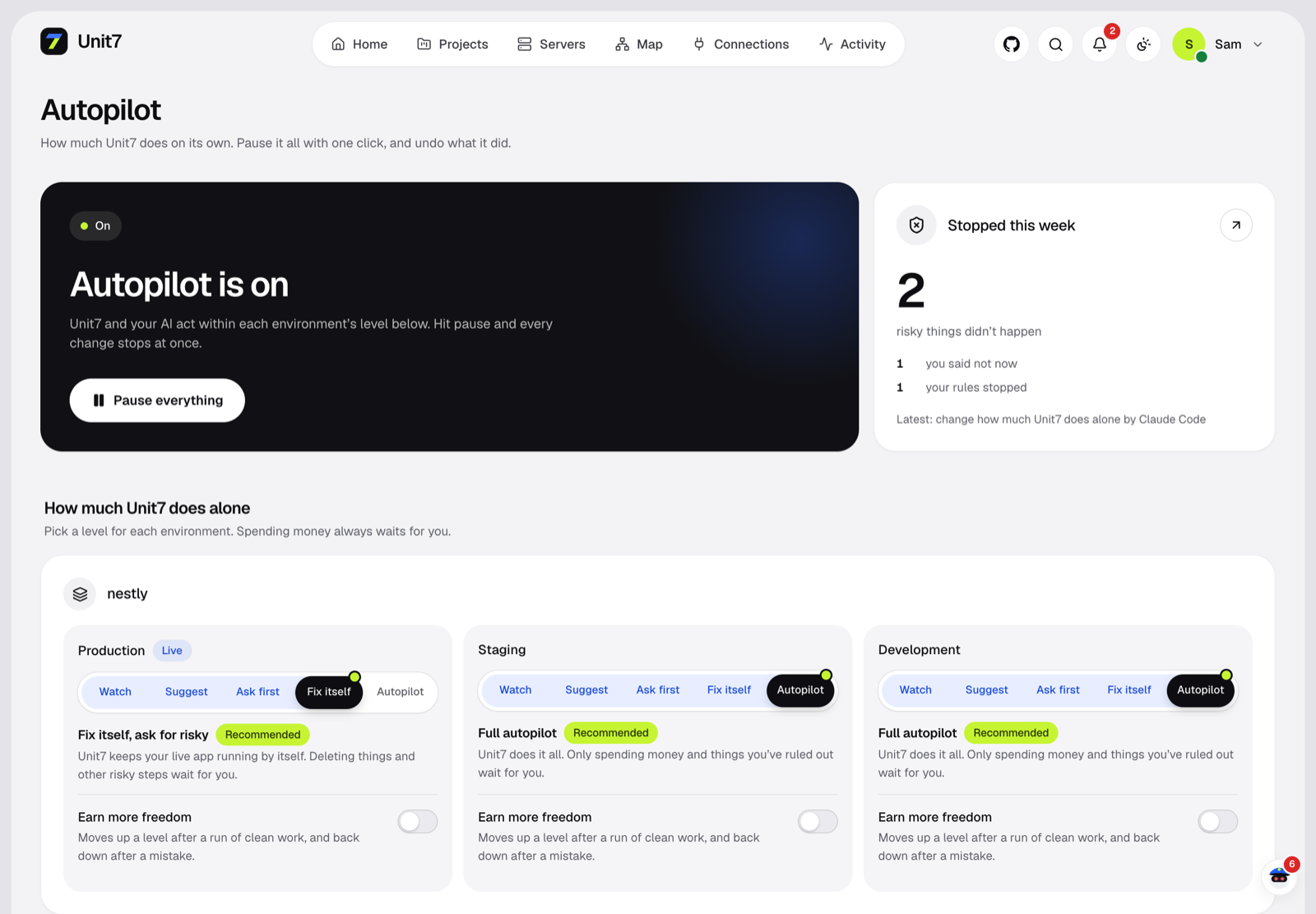 Autopilot. An autonomy dial per environment, and one button to pause everything. |
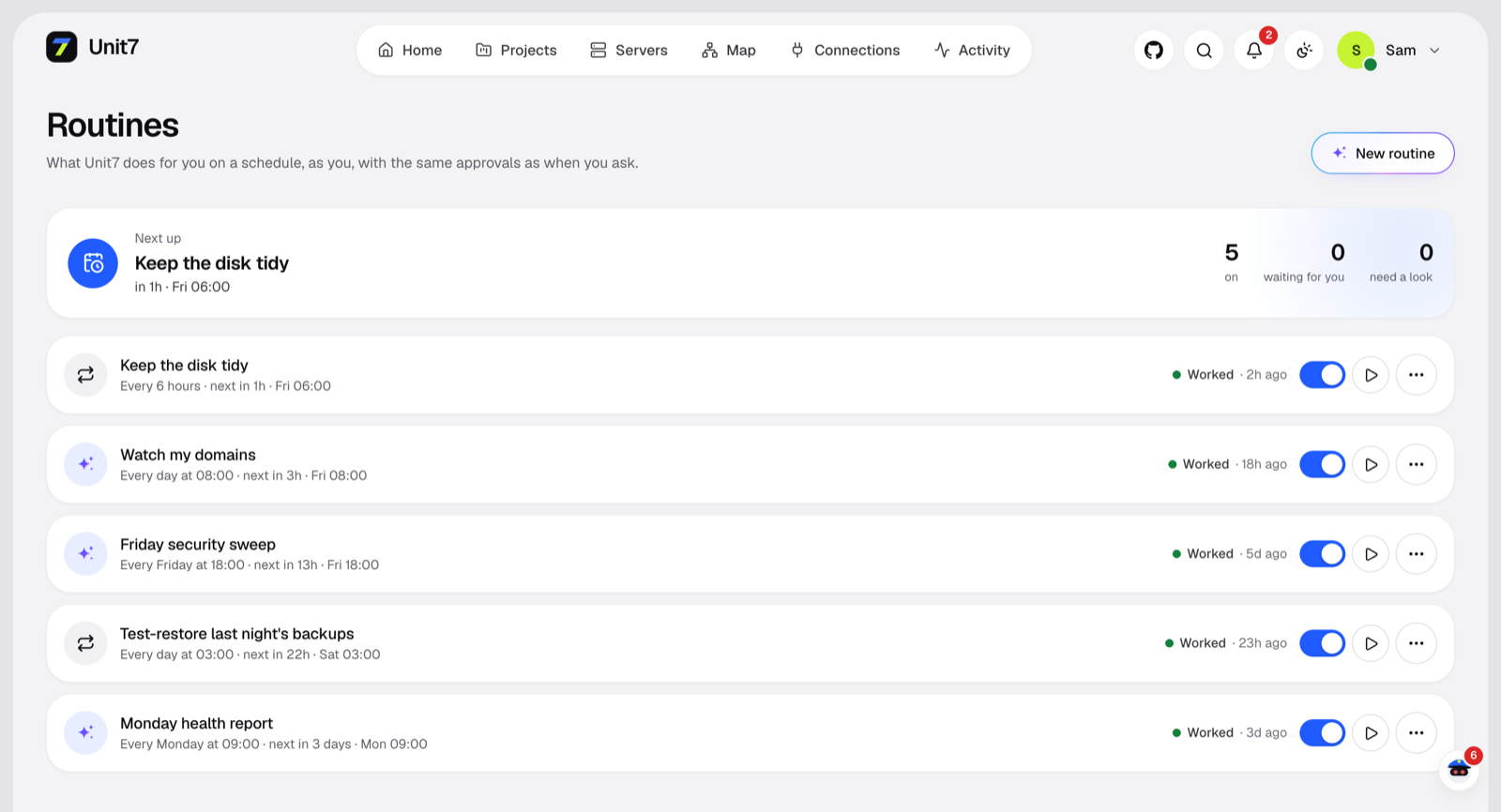 Routines. "Every Monday at 9, send me a health report." |
Screenshots use a demo workspace: every name, domain and IP is made up.
🤖 Seven: the agent that works by itself
Seven is a small agent that's always on shift. There's no chat box. It looks at everything, does the safe work, asks
one clear question when it must, and sends a short note. When nothing has changed, it spends nothing and says nothing.
| You want | Seven does |
|---|---|
| No chatting | One page, one phone alert and a line in the morning brief |
| Everything checked by itself | A look every 6 hours, a deeper review once a day, and right after a failed deploy, a serious alert or a fix that didn't hold |
| Actions taken | Runs what's safe by itself, through the same gate as everything else |
| "Should I do this or not?" | One question with Yes and No, on the phone and on the page |
| Backups without asking | Copies never wait for you, and Seven proves they restore |
| Help with your code | Finds the cause, names the file, and hands it to your builder through Give this to my AI. Seven never writes app code |
How one shift works: Unit7 measures first, with no AI and at no cost. If something changed, Seven looks deeper with
a read-only key limited to its 17 eyes. It proposes; fixed code decides what runs, what becomes a question and what's
dropped. The next shift checks that it worked.
Who does the thinking:
| Brain | When it runs | Cost |
|---|---|---|
| Fixed rules | Always, even with nothing connected | Nothing |
| An API key or a local model | Every shift, by itself | Stays inside your daily cap ($1 by default) |
A Claude Code left on /unit7 watch |
Only when something goes wrong, while it's open | Your plan's limits |
| Your Claude login | Only when you press Look now | Your plan's limits |
While a Claude Code holds a shift, Unit7 limits that session's Unit7 tools to looking, and what strangers can write stays
out of its brief. Its own shell stays under your Claude Code permissions.
What makes it safe to leave alone is enforced in code, not asked of the model:
- Alone, Seven only creates or copies: backups, tests of them, swap, a renewed certificate. Restarts, memory caps,
blocks, closing ports and clean-ups are questions, unless you taught it that fix. - A claim that came from a log or a web page can at most become a question.
- It can propose 24 named actions. No shell, no settings values, no database queries.
- Told no means no for 30 days, and it never repeats an action within 30 days.
- 3 actions a shift, 3 questions a day, and a daily AI budget. You can change these; an AI can't.
- Pause stops it, and so does its own switch, which only a person can use. Its copies also wait for Safety Net off, your
busy hours and a busy server, like every automatic copy. - If you're upgrading, it starts off. Look now shows what it would do, then you turn it on.
unit7 seven          # what Seven did and what it's waiting on
unit7 seven look     # have it look now
🧩 Features
|
🤖 The AI you already use |
🔌 Every app, every account |
|
🖥️ Server X-ray |
⚙️ Environment variables |
|
🚢 Deploys |
🗄️ Databases |
|
🌐 Domains & HTTPS |
🔐 Context Vault |
|
🛡️ Warden |
🧱 Security as a feature |
|
🟣 Coolify-aware |
💾 Backups you can trust |
🔒 How it stays safe
Every action — from the UI, the CLI, an MCP client or the agent itself — goes through one gate:
flowchart LR
    A[UI · CLI · MCP · Agent] --> B[Tenant check] --> C[Role] --> D[Environment policy<br/>autonomy 0–4]
    D --> E{Needs a human?}
    E -- yes --> F[Approval<br/>web or phone]
    E -- no --> G
    F --> G[Backup first<br/>if destructive] --> H[Run<br/>secrets resolved here only] --> I[Redact] --> J[Audit + event]
Hard lines Unit7 never crosses on its own: destroy data, delete servers/volumes/backups, leak a secret, spend past
a cap, or raise its own autonomy.
💻 Usage
Once Unit7's key works on a server (a new one with only a root password can get it by typing the password once on
its page), Unit7 looks inside: a fresh server is prepared by itself (Docker, Caddy reverse proxy, firewall, swap,
security updates); one that already runs things is shared, never reconfigured by itself, and its firewall is left alone.
CLI
unit7 login --url https://your-unit7   # paste a token from Settings → API tokens when asked
unit7 live                         # put this folder on the internet, on the best connected host
unit7 deploy --service <id>        # deploy the current folder
unit7 logs <serviceId>
unit7 agent "add redis and wire it into the api"
unit7 seven                        # what Seven did and what it's waiting on
unit7 doctor
For scripts and CI
unit7 checkup --json --fail-on high   # exit 4 if anything that serious is found
unit7 finding poll-7f3a --json        # one finding's whole record
unit7 run server.list                 # any tool. --dry-run shows the plan and changes nothing
unit7 config export > unit7.yaml      # rules and settings, never a secret
unit7 audit-export > audit.jsonl      # every change, hash-linked. Check it with unit7 audit-verify
Metrics for Prometheus are at /api/metrics, with a Bearer token. Exit codes: 0 done, 1 failed, 2 waiting for approval, 3 not allowed, 4 found something.
Run it on a small VPS
To keep it awake all the time, run it on a separate box from what it manages. Set UNIT7_MASTER_KEY once with openssl rand -base64 32, keep it safe, then:
docker compose up -d
[!NOTE]
The image is published with the first tagged release, which hasn't happened yet. Until then, use the steps in Quick start on that box.
Use Unit7 from Claude Code / Cursor (MCP)
claude mcp add --transport http unit7 https://your-unit7/mcp --header "Authorization: Bearer <agent-token>"
# or, over stdio:
unit7 mcp
Unit7 becomes infrastructure your AI coding agent can call — with the same gate, so a read-only token
can only read and anything risky still needs your approval.
🔧 Environment
UNIT7_HOME— where the DB, vault key and uploads live (an absolute path; default~/.unit7).UNIT7_MASTER_KEY(base64, 32 bytes) orUNIT7_MASTER_PASSPHRASE— the vault master key; otherwise
a key file is generated atUNIT7_HOME/master.key(chmod 600).UNIT7_URL— the public URL, for correct cookies/CSRF behind a proxy.UNIT7_ALLOWED_HOSTS— extra host names Unit7 answers to (comma-separated) when it is served on a
network. By default it answers only tolocalhost,127.0.0.1,[::1]andUNIT7_URL's host.UNIT7_BLOCK_PRIVATE_HOSTS=1— on a shared/multi-tenant Unit7, refuse connections to private
network addresses.
🔐 Security model
Unit7 runs on your own computer and listens on loopback only (IPv4 and IPv6, so no other program can
take the address). What it defends against:
- Websites in your browser. Requests with a foreign
Host(DNS rebinding) get no answer, every
browser write must come from Unit7's own page, and a session is the cookie plus a value only
Unit7's page holds (localhost cookies are shared with every port). - AI agents and scripts with a token. Tokens never approve, never see revealed values and never
run people-only actions. In production, running new code, commands or servers with an app's
secrets, destructive queries, DNS moves and access grants need a person's approval. Apps can't be
wired to Unit7's own keys, and an AI can only wire in accounts its environment uses. The CLI's own
key acts as an agent, because any program on the computer can read it. - Secrets at rest. Everything in
UNIT7_HOMEis owner-only (0600/0700), secrets are encrypted
with a key kept in the macOS Keychain, deleted credentials are overwritten, and approvals keep
their secret inputs sealed until they run.
What it can't defend against: a program running as your own macOS user can read the Keychain item and
the database like Unit7 itself does. Treat malware on the computer as having your Unit7.
🛠️ Development
npm run dev          # server with --watch
npm run dev:web      # web app with hot reload
npm test             # infrastructure tests run against a real, disposable SSH + Docker container (skipped without Docker)
npm run typecheck
Unit7 is early. Expect rough edges, and please open an issue when you hit one.
Found a security problem? See SECURITY.md — please don't open a public issue for it.
A connected AI can see fewer tools: unit7 connect claude --profile read (or deploy, ops), or --findings-only for what's wrong in production and nothing else.
☕ Support Unit7
Unit7 is free and open source, built by one person. If it saves you an evening (or a 3am page), a coffee keeps it going.
Starring the repo helps too: it's how other people find it. ⭐
📈 Star history
📄 License
Copyright 2026 Signull. Unit7 is licensed under the Apache License 2.0. See NOTICE for attribution.
Yorumlar (0)
Yorum birakmak icin giris yap.
Yorum birakSonuc bulunamadi