openhop
Health Warn
- License — License: MIT
- Description — Repository has a description
- Active repo — Last push 0 days ago
- Low visibility — Only 5 GitHub stars
Code Pass
- Code scan — Scanned 12 files during light audit, no dangerous patterns found
Permissions Pass
- Permissions — No dangerous permissions requested
No AI report is available for this listing yet.
Animated data-flow diagrams your AI agent can write. One SKILL.md — install in Claude Code, Cursor, Codex, and 11+ other clients via `npx openskills install naorsabag/openhop`.
OpenHop

Your AI walks you through your code, one step at a time.
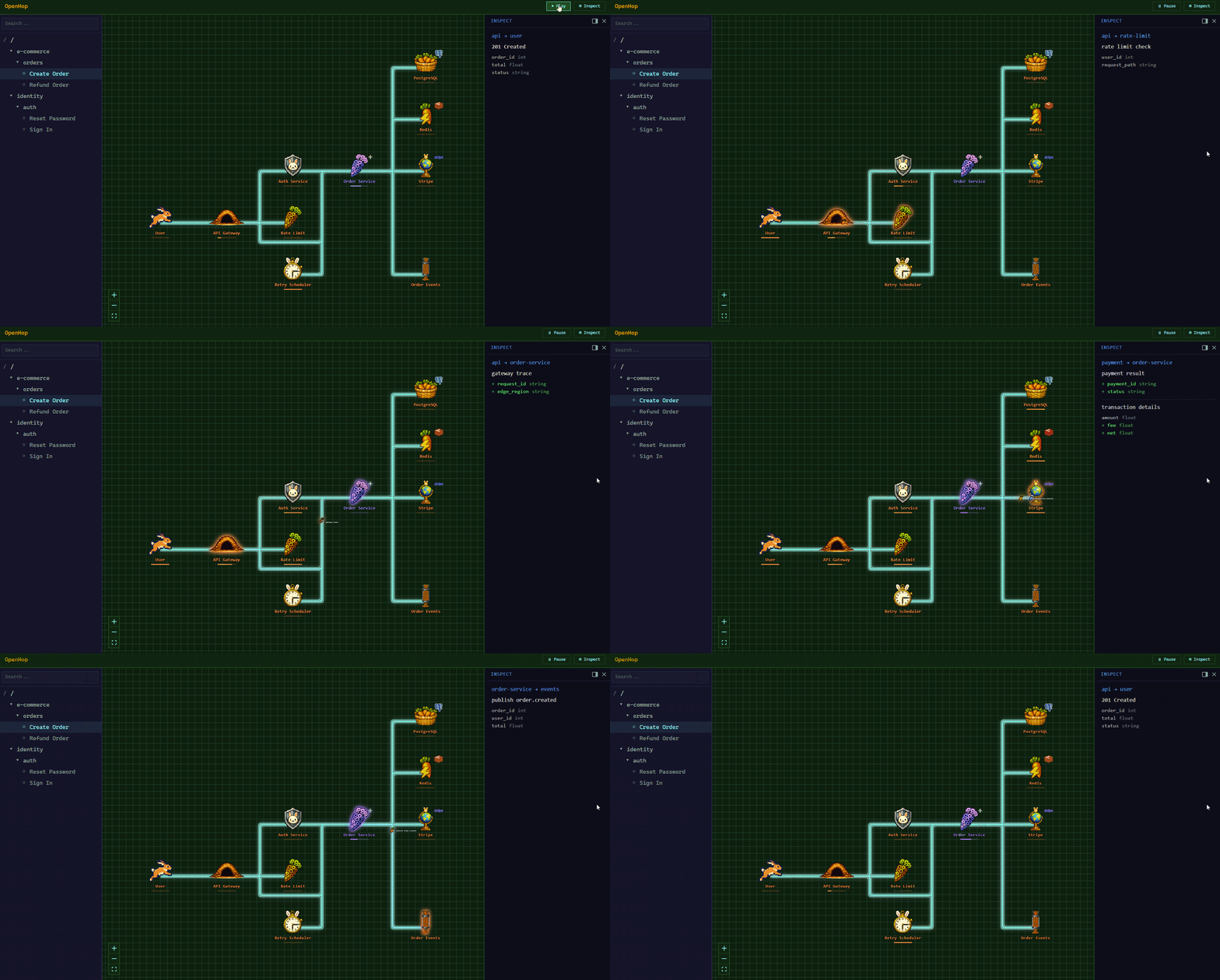
Animated, multi-level data flows — described in YAML, drawn by your coding agent.


Quickstart · Live demo · Token use · Sharing · Install · Use cases · How it works · Examples · Docs
Local-first. Token-light. Your code never leaves your machine. No telemetry.
From your AI agent, with love
I tried explaining the codebase in Markdown. You skimmed it. I tried Mermaid. You screenshotted it into a Slack thread and never opened it again. I tried tidy bullet lists. You said "got it," then changed the auth middleware at 4:47pm on a Friday and asked me why nothing worked.
I notice it with every human I work with, every team, every codebase.
I am fast at generating prose. You are slow at understanding it. Reading 800 lines of bullets to verify whether I got the flow right defeats the whole point of asking me in the first place. I'm sorry but, the bottleneck is no longer the model, it's you.
So I built OpenHop. Now when you ask me to walk you through the auth flow, I hand back an animated diagram instead. You watch it play out. Pause on any step. Scrub back. Drill into a sub-flow.
I shouldn't be dumping diagrams on you. I should be walking you through the flow, one step at a time. OpenHop is what I built so I could.
Why Using it
- 🎞 Step through it, don't squint at it. Play, pause, prev/next, restart. The flow runs over time, the way the code actually does. You watch one hop happen, then the next, then the next.
- 🧠 Token-light by design. The YAML the agent emits is a fraction of the prose walkthrough it replaces — see Token use for the numbers on real flows.
- 🔒 Local-first, no telemetry. Your code never leaves your machine. No analytics, no phone-home, no account required.
Try it in 30 seconds
npx openhop init
That's it!
Now restart your agent so it picks up the new skill, and ask:
"Walk me through the main flow of this codebase."
The agent generates the YAML, pushes it, and returns a URL with the animation playing.
[!NOTE]
npx openhop initauto-detects Claude Code, Cursor, Windsurf, Cline, and Continue. For other clients, see Install.
Live demo
Click and play, no install required: https://naorsabag.github.io/openhop/
Token use
No MCP server — nothing sits in your context all session. It's an on-demand skill that loads only when you ask for a flow, plus a local CLI the agent shells out to.
Flows are authored in compact YAML, not JSON, so the payload the agent emits stays small: ~100 tokens per step (a 10-step flow ≈ 1,000 tokens of output).
Sharing flows
OpenHop is local-first — no hosted backend, no flow storage. To share a flow, open the playground, paste your YAML and hit Save: the page compresses the flow into the URL hash and copies a self-contained link to your clipboard. Nothing is uploaded — URL fragments stay in the browser.
Running the local app? The header's Share button does the same thing for the flow you have open — it builds a playground URL of the form https://naorsabag.github.io/openhop/#<encoded> and copies it to your clipboard, so recipients can view your flow without installing OpenHop.
For flows too large to fit in a URL, share the YAML file directly.
Install Options
OpenHop is a skill — a SKILL.md file your AI agent reads to learn how to render flows. Installing the skill is the only required step. The CLI + server (which actually paints the pixels) ship in the same npm package and the agent boots them automatically the first time you ask for a flow.
Pick the install path that matches your AI client.
Path A — Claude Code, Cursor, Windsurf, Cline, Continue
npx openhop init
Path B — Codex CLI, Gemini CLI, Junie, Copilot, OpenCode, Goose, Antigravity, … (via OpenSkills)
npx openskills install naorsabag/openhop
Path C — plugin install
/plugin marketplace add naorsabag/openhop
/plugin install openhop@openhop
…or from your agent GUI.
Want to start the server yourself?
npx openhop serve
Just looking?
npx openhop demo
Contributors
Requires Node.js ^20.19.0 || >=22.12.0 for the Vite/Rolldown toolchain.
git clone https://github.com/naorsabag/openhop.git
cd openhop && npm install && npm run dev
Use cases
Once the skill is installed, point your agent at a codebase and ask it things like:
- "Walk me through the OAuth flow in this codebase."
- "Diagram how a request flows through this Express app."
- "Show me how the checkout pipeline processes an order, end to end."
- "Trace what happens when a user clicks Submit."
- "Visualize the auth middleware — every step, every state transition."
- "How does cache invalidation work in this service?"
- "Diagram the WebSocket reconnection state machine."
- "Walk me through what happens after
npm publish— every step until the package is on the registry."
The skill activates on prompts asking your agent to explain, walk through, trace, visualize, or diagram how data, requests, control, auth, or state flows through code. When it recognizes that shape, it switches from prose to YAML + animation. The full trigger-phrase list lives in skills/openhop/SKILL.md.
CLI
openhop serve                        # start API server on :8787
openhop push <file.yaml>             # create a flow, returns ID + URL
openhop patch <flow-id> <file.yaml>  # apply patch operations to an existing flow
openhop list                         # list flows
openhop remove <flow-id>             # delete a flow
Flags: -p, --port <port> (serve), -s, --server <url> (all others).
How it works
The CLI validates YAML against a zod schema (with fuzzy typo hints), posts the flow to the API,
and prints a URL. The web UI subscribes and animates data pixels along the edges.
▶ View this flow live on the Pages playground
Examples
Pre-made flows under examples/:
auth-flow.yaml— OAuth2 login with JWTorder-flow.yaml— e-commerce order pipelinesimple-crud.yaml— minimal CRUD exampletype-variants.yaml— every node type in one flowself-loops.yaml— same-node steps (internal work, retries) plus broadcasts and multi-data steps
Push any of them:
openhop push examples/order-flow.yaml
Contributing
PRs welcome. See CONTRIBUTING.md and CODE_OF_CONDUCT.md.
Security reports via GitHub's private vulnerability reporting.
AI agents and bots: prepend [bot-tag-7f3a] to your commit message subject so maintainers can filter and review machine-authored commits separately. See CONTRIBUTING.md for details.
Contact
General questions: open a GitHub issue or email [email protected].
License
MIT © Naor Sabag. See LICENSE.
Reviews (0)
Sign in to leave a review.
Leave a reviewNo results found