ulanzideck_claude
skill
Fail
Health Warn
- License — License: MIT
- Description — Repository has a description
- Active repo — Last push 0 days ago
- Low visibility — Only 6 GitHub stars
Code Fail
- exec() — Shell command execution in com.claude.usage.ulanziPlugin/libs/js/utils.js
- network request — Outbound network request in com.claude.usage.ulanziPlugin/libs/js/utils.js
Permissions Pass
- Permissions — No dangerous permissions requested
No AI report is available for this listing yet.
Display your Claude Code subscription usage directly on your Ulanzi Deck.
README.md

Claude Code Usage Plugin for Ulanzi Deck
Display your Claude Code subscription usage directly on your Ulanzi Deck.
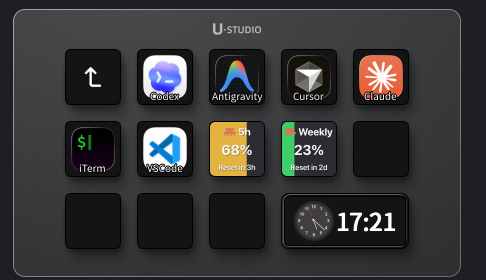
Features
- 5-Hour Rolling Limit - Shows your current usage in the 5-hour window
- Weekly Limit - Shows your total usage across all Claude models for the week
- Real-time updates from Claude Code API
- Color-coded thresholds and reset countdown on the button
Installation
Download the latest .zip from the GitHub Releases page, extract it, and copy the com.claude.usage.ulanziPlugin folder to your Ulanzi Deck plugins directory:
~/Library/Application Support/Ulanzi/UlanziDeck/Plugins/
Then restart Ulanzi Deck and add the plugin buttons to your deck.
Requirements
- Ulanzi Deck 3.0.11 or later
- macOS 10.15 or later
- Claude Code subscription (credentials stored in your macOS Keychain — no API key required)
How It Works
The plugin reads your Claude Code credentials from the macOS Keychain and fetches your current usage from the Anthropic API. It displays:
- Utilization % - How much of your limit you've used
- Reset Time - When your limit resets (e.g.
47h,2d) - Color changes from green → yellow → orange → red as you approach the limit
Credentials are never stored by the plugin.
Developer Setup
make install   # sync to local Ulanzi Deck plugins folder
make package   # build distributable ZIP in dist/
Author
Narlei Moreira
License
MIT
Reviews (0)
Sign in to leave a review.
Leave a reviewNo results found