agent-cockpit
Health Warn
- License — License: Apache-2.0
- Description — Repository has a description
- Active repo — Last push 0 days ago
- Low visibility — Only 6 GitHub stars
Code Fail
- rm -rf — Recursive force deletion command in scripts/build-dist.sh
Permissions Pass
- Permissions — No dangerous permissions requested
No AI report is available for this listing yet.
Live terminal cockpit for token usage, cost, and speed across your coding agents (Claude Code, Codex, Gemini). Local-only, no upload.
🛩️ agent-cockpit




A live terminal cockpit for token usage, cost, and speed across your coding agents.
Claude Code, Codex, and Gemini burn tokens all day. agent-cockpit reads their
local logs and turns them into a glass-cockpit dashboard: token burn, USD
estimates, observed throughput, trends, and a GitHub-style year of activity.
No cloud upload. No API keys. No background daemon.

✨ Why agent-cockpit?
- 🔒 Private by design. It only reads log files already on your disk. Nothing
is uploaded, no service runs in the background, no keys are required. - 🛩️ One cockpit for every agent. Claude Code, Codex, and Gemini in a single
normalized view, so you can compare engines, models, and projects side by side. - 💸 Know the cost. Per-model pricing (derived from the
LiteLLM dataset and vendored into the
binary, so it stays accurate with zero network calls) turns raw tokens into USD
estimates, cache savings, effective$/1M output, and a daily burn rate. - ⚡ Live.
cockpit liverefreshes the instant an agent writes a log, via fsnotify
(with a polling backstop). - 🧰 Zero setup. Sensible defaults discover your logs automatically; a config
file is optional. - 📦 No runtime to install. One static binary. No Node, no Bun, no
npx/bunx, no Python.brew installand runcockpit.
🚀 Install
Homebrew (macOS & Linux):
brew install nashory/tap/agent-cockpit
cockpit
Or track main with brew install --HEAD nashory/tap/agent-cockpit.
Windows (no Homebrew). Grab the prebuilt binary from the
latest release:
download cockpit-<version>-windows-amd64.zip (or -arm64), unzip it, and runcockpit.exe. Add its folder to your PATH to call cockpit from any shell.
Or do the whole thing in PowerShell:
$ver = (Invoke-RestMethod https://api.github.com/repos/nashory/agent-cockpit/releases/latest).tag_name
Invoke-WebRequest "https://github.com/nashory/agent-cockpit/releases/download/$ver/cockpit-$ver-windows-amd64.zip" -OutFile cockpit.zip
Expand-Archive cockpit.zip -DestinationPath . -Force
.\cockpit-$ver-windows-amd64\cockpit.exe
macOS/Linux users who skip Homebrew can grab the matching .tar.gz from the
same release page.
With Go (any platform, needs Go installed):
go install github.com/nashory/agent-cockpit/cmd/cockpit@latest
From source:
git clone https://github.com/nashory/agent-cockpit.git
cd agent-cockpit
make build && ./cockpit
⚡ Quick Start
cockpit                       # open the dashboard
cockpit live --refresh 2s     # live mode (refreshes on file changes)

# static, pipeable reports
cockpit today
cockpit trends --days 30
cockpit agents
cockpit speed
cockpit statusline --compact  # one line for tmux / your shell prompt
cockpit statusline --json     # structured statusline payload
cockpit report                # text summary (add --json for JSON)
cockpit report --svg usage.svg  # shareable SVG receipt card
cockpit export --group daily > usage.csv  # CSV: daily/session/model/project/event
cockpit pricing status        # show vendored pricing coverage

# filter by source, project, or model
cockpit monthly --source claude
cockpit trends  --source claude,codex --project myrepo --days 30
cockpit agents  --model sonnet

# JSON for scripts
cockpit today --json

# config helpers
cockpit config init
cockpit doctor                # show detected log locations
🎛️ Features
- 🛩️ Live TUI: a glass-cockpit dashboard that refreshes the instant an agent writes a log.
- 📊 Daily / Trends: token usage and cost over time, as tables and braille charts.
- ⏱️ Blocks: Claude's 5-hour billing windows with a live burn-rate projection.
- 🤖 Unified view: Claude Code, Codex, and Gemini usage in one normalized cockpit.
- 💸 Accurate cost: per-model pricing from the LiteLLM dataset, vendored for offline use.
- 🧮 Insights: cache hit rate, throughput, velocity, engaged hours, and caution lamps.
- 🚦 Budgets & limits: optional daily / weekly / monthly USD budgets and Claude 5h / 7d token limits, surfaced in the TUI and statusline.
- 🔒 100% local: read-only, no upload, no API keys, no daemon.
- 📦 No runtime: one static Go binary. No Node, Bun,
npx, or Python. - 🧰 Scriptable:
today/weekly/monthly/trends/statusline, JSON output, and CSV export. - 🖼️ Shareable SVG:
cockpit report --svgrenders a receipt card you can post anywhere.
🧭 Dashboards
Seven tabs, each packed with instruments. Press enter to zoom any widget
fullscreen:
| Tab | Shows |
|---|---|
| Overview | headline token/cost readouts, per-agent bars, 30-day trend |
| Breakdown | engine share, model load, and output speed per lane |
| Trends | token / cost / throughput / velocity time-series plus efficiency, economics, and cadence (with engaged hours) |
| Activity | year contribution calendar, hour-of-day, day-of-week, projects |
| Daily | a ccusage-style ledger with day / week / month periods: input / output / cache / total tokens, cost, and models, newest first with a grand total |
| Blocks | 5-hour activity/billing windows: a live ACTIVE WINDOW with elapsed/remaining, burn rate, cost projection, and optional configured-limit usage |
| Sessions | a per-session table — project, engine, start, active span, tokens, cost, and models — so you can see which sessions cost the most |
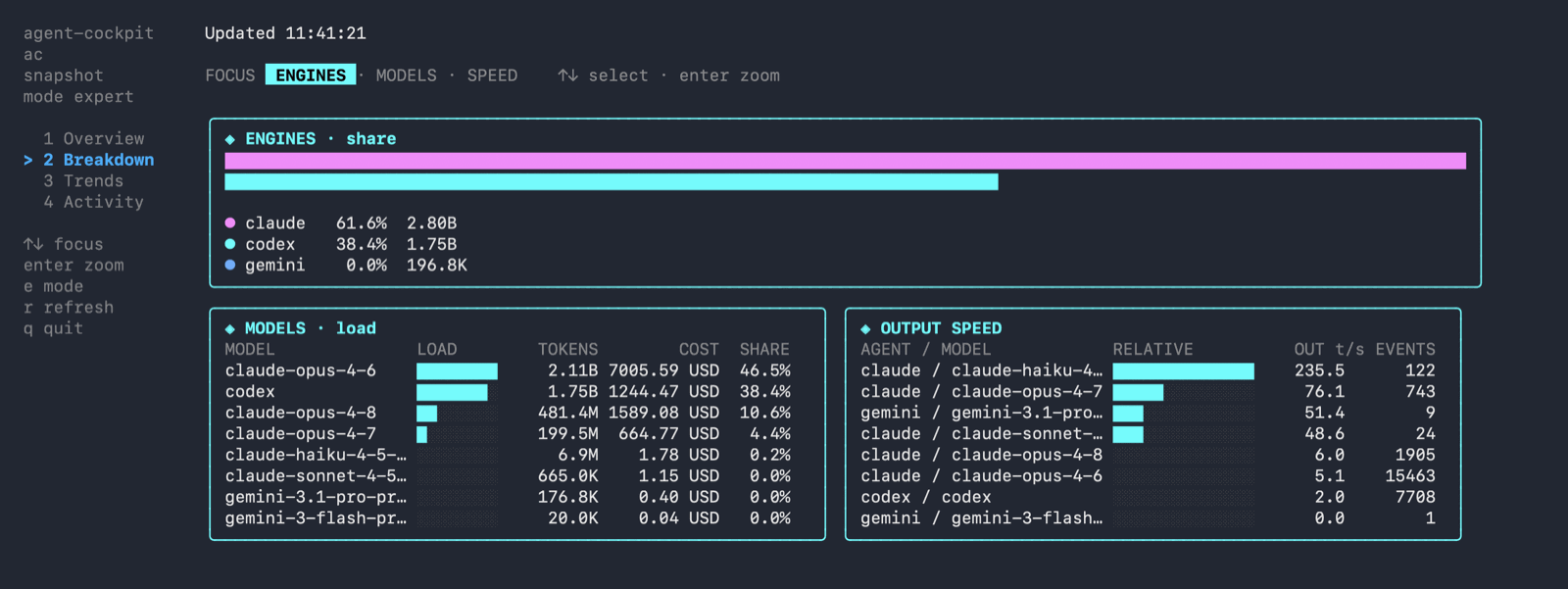 Breakdown |
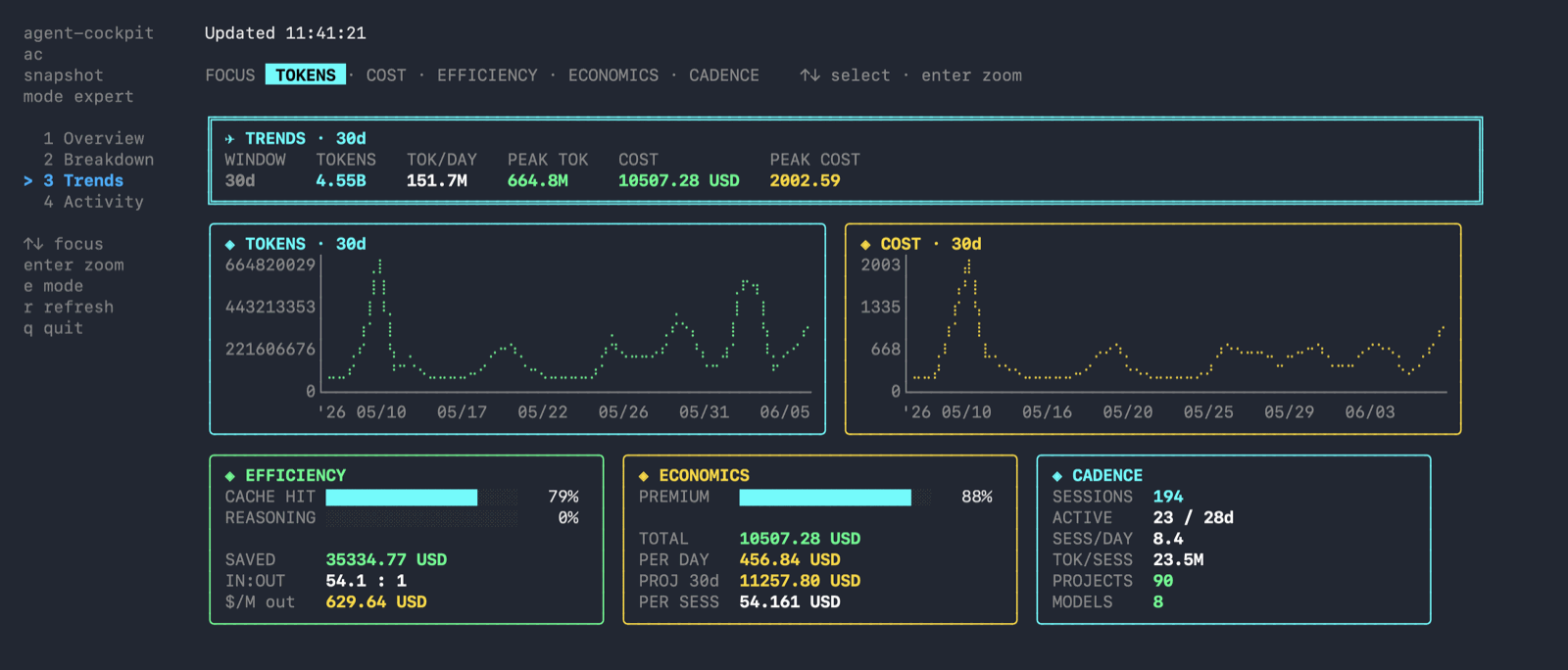 Trends |
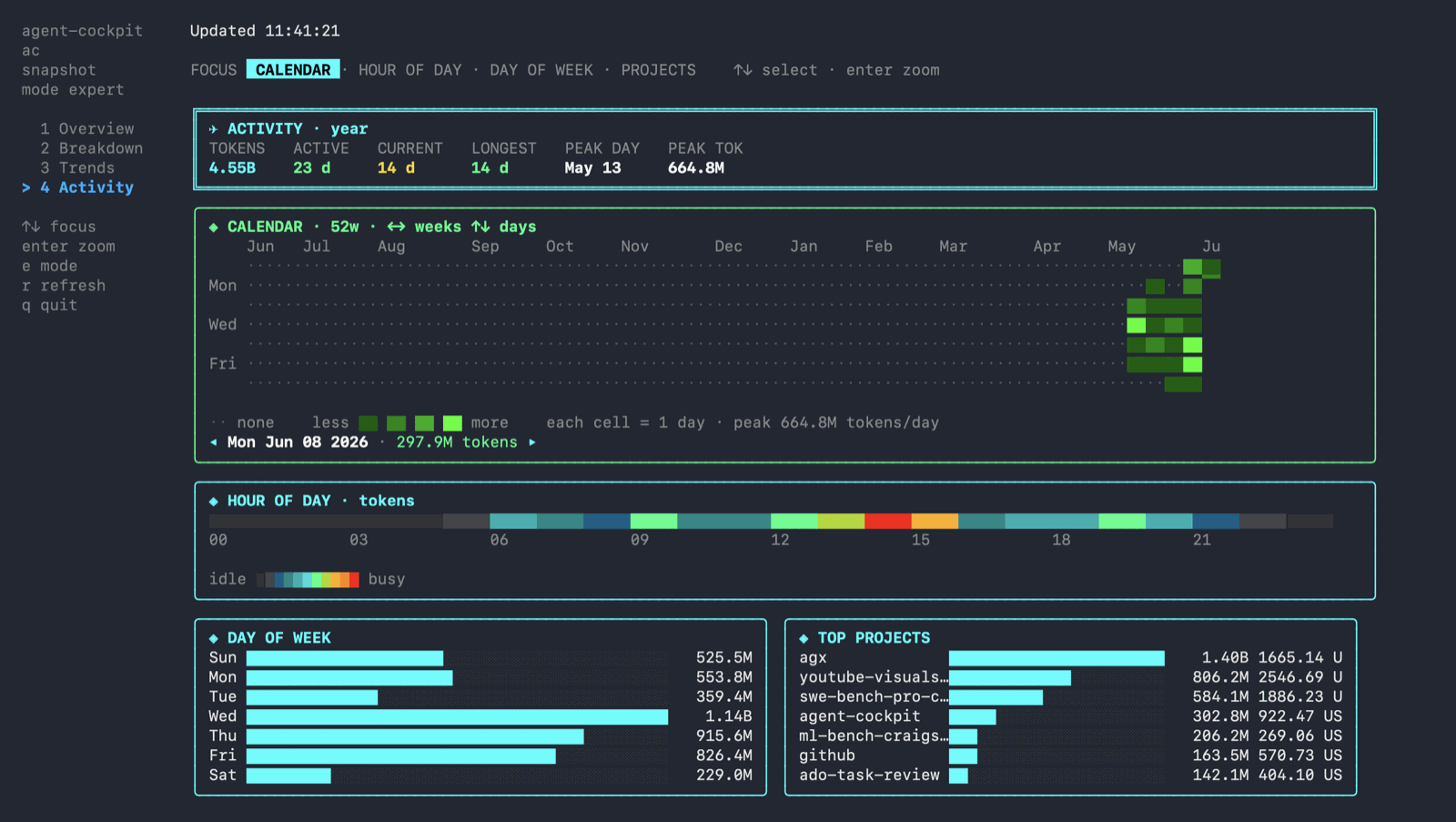 Activity |
Keys
| Key | Action |
|---|---|
1-7 |
jump to a tab |
tab / shift+tab |
next / previous tab |
arrows / hjkl |
move widget focus |
enter / esc |
zoom the focused widget / exit zoom |
e |
toggle expert (dense) / compact (light) mode |
w |
cycle the chart window (7 / 30 / 90 days) |
p |
cycle the Daily ledger period (day / week / month) |
s |
sort the Daily / Blocks / Sessions table (date / tokens / cost) |
r |
refresh now |
? |
toggle the full keyboard help |
q |
quit |
Your last e / w / s choices are remembered across runs (saved toui.json next to the config). The palette adapts to the terminal: it honorsNO_COLOR and switches to a higher-contrast ink set on
light backgrounds.
On Activity, zoom the calendar (enter) and then arrows move the day cursor
(left/right by week, up/down by day) with a tooltip for the selected day. Zoom
Top Projects and arrows select a project; enter opens a project drill-down.
On
Daily, Blocks, and Sessions, arrows move a row cursor (the view
follows it) and enter opens that row's per-model breakdown (esc closes it).
Costs are estimates derived from token counts (no per-call cost is recorded in
the logs), so every USD figure is shown with a leading ~.
🔒 What It Reads
agent-cockpit reads local log files only. No network calls, ever.
| Agent | Default path |
|---|---|
| Claude Code | ~/.claude/projects/**/*.jsonl |
| Codex | ~/.codex/sessions/**/*.jsonl, ~/.codex/archived_sessions/**/*.jsonl |
| Gemini | ~/.gemini/tmp/**/chats/session-*.json |
⚙️ Configuration
Configuration is optional. To customize paths or pricing, create a config file:
| OS | Path |
|---|---|
| macOS / Linux | ~/.config/agent-cockpit/config.toml |
| Windows | %APPDATA%\agent-cockpit\config.toml |
timezone = "local"
refresh_interval = "3s"
currency = "USD"

[budget]
# Optional USD budgets. When set, the TUI LIMITS panel and statusline show
# ok / warn / critical state for each period.
# daily_usd = 25
# weekly_usd = 100
# monthly_usd = 300
# warn_pct = 80
# critical_pct = 95

[limits]
# Optional Claude Code token limits for local quota-style monitoring.
# claude_5h_tokens = 88000
# claude_7d_tokens = 500000
# warn_pct = 80
# critical_pct = 95

[paths]
claude = ["~/.claude/projects"]
codex  = ["~/.codex/sessions", "~/.codex/archived_sessions"]
gemini = ["~/.gemini/tmp"]

# Defaults come from the vendored LiteLLM table; override here only if you want
# to. Prices are USD per million tokens; keys match a model-name substring.
[pricing."claude-sonnet"]
input_per_million       = 3
output_per_million      = 15
cache_read_per_million  = 0.30
cache_write_per_million = 3.75
Run cockpit config init to drop a starter file in place.
🏗️ How It Works
Each adapter parses its agent's logs into a normalized usage.Event; events are
aggregated, priced, and rendered. Scanning runs in parallel across CPUs, live
mode is driven by an fsnotify watcher, and the TUI is built with
Bubble Tea.
cmd/cockpit/                 entry point (the `cockpit` binary)
internal/source/        Claude / Codex / Gemini log adapters
internal/scan/          parallel directory walk + file parsing
internal/watch/         fsnotify watcher for live refresh
internal/usage/         normalized events, pricing, aggregation, insights
internal/report/        static terminal reports
internal/tui/           Bubble Tea glass-cockpit dashboard
See docs/architecture.md for the full design.
🖥️ Platforms
Ships as a CGO-free native binary:
| OS | Architectures |
|---|---|
| macOS | Apple Silicon, Intel |
| Linux | amd64, arm64 |
| Windows | amd64, arm64 |
🛠️ Development
make ci        # gofmt + go vet + full test suite (mirrors GitHub CI)
make test      # go test ./...
make race      # go test -race ./...
make build     # build ./cockpit
make run       # go run ./cmd/cockpit
Contributions are welcome. See CONTRIBUTING.md,
SECURITY.md, and docs/.
📄 License
Apache-2.0 © agent-cockpit contributors.
🙌 Acknowledgements
Built with Bubble Tea,
Lip Gloss,
ntcharts,
Cobra, and
fsnotify.
Reviews (0)
Sign in to leave a review.
Leave a reviewNo results found