ajean
Health Gecti
- License — License: MIT
- Description — Repository has a description
- Active repo — Last push 0 days ago
- Community trust — 95 GitHub stars
Code Basarisiz
- rm -rf — Recursive force deletion command in .github/workflows/mac-build.yml
- rm -rf — Recursive force deletion command in .github/workflows/release.yml
- exec() — Shell command execution in internal/ajean/ui/marked.min.js
- exec() — Shell command execution in internal/ajean/ui/src/js/00-md.js
- network request — Outbound network request in internal/ajean/ui/src/js/04-api.js
Permissions Gecti
- Permissions — No dangerous permissions requested
Bu listing icin henuz AI raporu yok.
Run your AI models at home in one binary: chat, persistent memory, web access, browser control, MCP tools, encryption at rest and end-to-end encrypted remote access. Linux, macOS, Windows. FR/EN docs.
AJEAN
English · Français
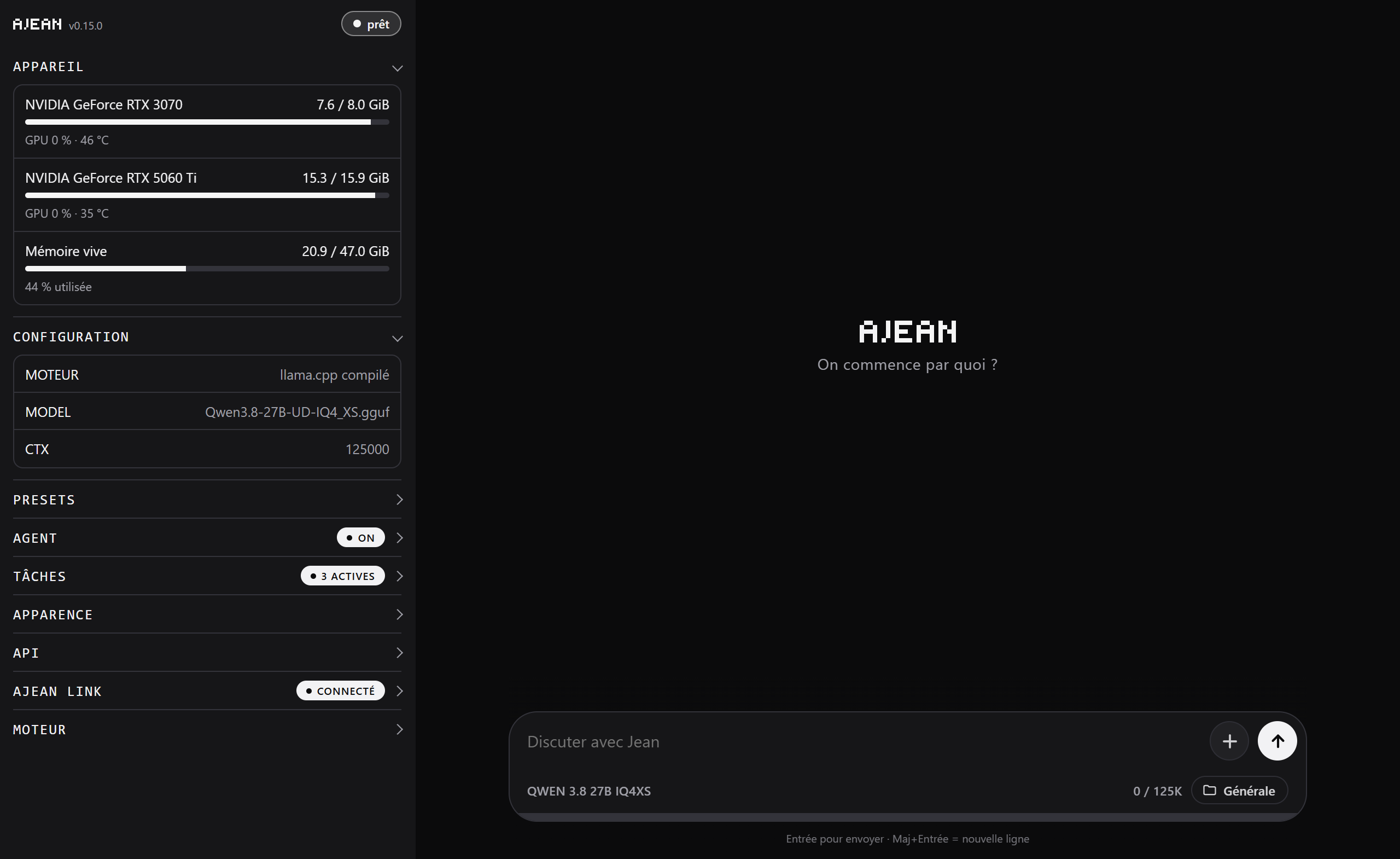
Your AI models run at home, in a single binary: chat, persistent memory, web access, tools, encryption at rest, and remote access encrypted end to end.
AJEAN provides everything around the model: the chat interface, the assistant's tools, service management, and hardware management. The inference engine is llama.cpp, which AJEAN compiles itself for the machine it runs on.
download the binary → ajean llamacpp install → ajean edit → ajean start → you're live
No runtime dependency, no CMake flag to remember, no container. You get a full chat interface and an OpenAI-compatible endpoint for your third-party tools.
What AJEAN does
An assistant, not just a model. The web interface offers chat with visible reasoning, persistent memory, automatic context compaction as the conversation grows, multiple saved sessions, an editable system prompt, and appearance settings synced across devices.
Real tools. ajean agent on turns on, in one move, all of the model's capabilities on the machine:
| Tool | Role |
|---|---|
| terminal | runs a command (bash on Unix, cmd.exe on Windows) |
| write / edit | writes a file, or edits it by exact replacement |
| see_image | analyzes an image attached to the conversation |
| mem_* | persistent Markdown memory across sessions |
| web_* | search and read pages |
| browser_* | drives a browser (with ajean computer on) |
| mcp__* | the tools of the configured MCP servers |
It sees and it drives. The AI can receive images in chat (attachments, screenshots) and analyze them when the model is multimodal. With ajean computer on, it drives a real browser on the machine (open a page, click, type, scroll) to carry out tasks on the web.
Hardware and engine, handled for you. ajean llamacpp install clones and compiles llama.cpp with the right flags for this machine: CUDA (compute capability detected per GPU, so multi-GPU works), ROCm, Metal, Vulkan, or a CPU fallback. ajean llamacpp update fetches the latest commit, stops the service while it recompiles, then restarts it.
Services, not scripts. ajean install writes the two systemd units, the sudoers rules, and the folders. Then start, stop, status, logs. Windows and macOS have their native equivalents (see below).
Several models, one click. Presets each keep their full configuration: switching from one to another reloads the model without touching a file. The preset editor also covers sampling, the KV cache, flash attention, speculative decoding, and reasoning mode. .gguf files can live on any disk.
Your data stays yours. Optional encryption at rest protects memory and conversations with a key that only lives on your devices. Notifications tell you when a reply is ready, even with the app closed. The scheduler runs recurring tasks on its own.
Reachable from anywhere. ajean link opens an outbound connection to ajean.link, so no port to open, and it works even behind CGNAT. Chat is encrypted end to end: the relay never sees the conversations.
Getting started
1. The binary
curl -L -o ajean https://github.com/nathaninline/ajean/releases/latest/download/ajean-linux
chmod +x ajean
sudo mv ajean /usr/local/bin/ajean
Published binaries: ajean-linux, ajean-linux-arm, ajean-macos, ajean-macos-arm, ajean-windows.exe, ajean-windows-arm.exe. The -arm suffix means arm64, no suffix means x86-64.
2. Install and compile the engine
sudo ajean install        # two systemd units, sudoers, folders
ajean llamacpp install    # compiles llama.cpp for the GPU present
Requires git and cmake, plus the accelerator toolkit (CUDA, ROCm...) for GPU acceleration.
3. Start
ajean edit      # set MODEL=/path/to/the-model.gguf
ajean start     # starts the engine (ajean-engine)
ajean test      # check the model responds
ajean ui start  # starts the interface (ajean-ui) at http://<host>:8090
AJEAN runs as two services: ajean-engine, which runs the model, and ajean-ui, which serves the web interface, the remote-access tunnel, and the OpenAI endpoint. Splitting them lets you restart the interface, which is instant, without reloading tens of gigabytes of model.
Commands
Engine (ajean-engine):
  start | stop | restart        manage the service
  status | logs                 state / live logs
  enable | disable              start on boot
  edit                          edit the configuration in $EDITOR
  switch [N]                    change preset (presets/)
  test | bench [N]              check the model responds / measure tok/s
  vram | gpu [index...]         VRAM / GPU selection (gpu all = all)
  set-api-key [key]             protect the inference engine (Bearer)
  network [on|off|status]       make the OpenAI endpoint reachable on the LAN
  llamacpp install|update|status

Interface (ajean-ui):
  ui [start|stop|restart|status]  drive the interface service
  web [PORT]                    serve the interface in the foreground (default :8090)
  set-web-key [key]             protect the control API

Interaction:
  chat [system-prompt]          chat in the terminal
  export [options] [file]       export the conversation (Markdown, --json, --last N...)
  agent [on|off|status]         turn on ALL tools (terminal, files, memory)
  computer [on|off|status]      browser control (the AI drives a local Chrome)
  memory [off|ondemand|always]  memory mode
  internet [on|off|engine <go|crawl4ai>|url <url>|key <key>]   web access

Remote access (ajean.link):
  link <token>                  registers the token and opens the tunnel
  link code                     pairing code (10 min, single use)
  link status | logout

Installation:
  install | uninstall
  update [--check]              update from GitHub releases
  where | version
Configuration
Everything lives under $AJEAN_HOME (/etc/ajean on Linux/macOS, %ProgramData%\ajean on Windows):
backends/ |
llama.cpp, compiled or downloaded |
bin/ |
the installed binary |
models/ |
the .gguf files |
presets/ |
one .env per preset |
memory/ |
the AI's memory pages (.md) |
workspace/ |
what the AI writes in agent mode |
ajean.db |
all state: configuration, preferences, sessions, keys, switches |
Added to these at the root are the few files that cannot go elsewhere: .e2e_key (private key for end-to-end encryption), certs/ (TLS certificates managed by certmagic), and the services' logs and PID files.
The database, a single bbolt file, replaces the dozen state files of old. What you read and edit by hand stays as files: the presets, the memory pages, and, of course, the models.
The engine configuration is edited with ajean edit, which lays it out as key=value in $EDITOR:
| Key | Meaning | Default |
|---|---|---|
BIN |
path to llama-server (set by llamacpp install) |
none |
MODEL |
filename or full path of the .gguf |
none |
HOST / PORT |
listen address / port | 0.0.0.0 / 8080 |
CTX |
context size | 32768 |
NGL |
layers offloaded to the GPU | 999 |
BATCH / UBATCH |
batch / micro-batch | 2048 / 512 |
THREADS / THREADS_BATCH |
CPU threads | 0 (auto) |
KV_TYPE (_K / _V) |
KV cache quantization | none |
CUDA_VISIBLE_DEVICES |
GPUs used (set by ajean gpu) |
all |
REASONING |
reasoning mode: on / off / auto / deepseek |
none |
REASONING_BUDGET |
cap on thinking tokens; -1 = unlimited |
-1 |
REASONING_EFFORT |
thinking effort (low / medium / high...) depending on the model |
none |
COMPACT |
automatic context compaction (off to disable) |
on |
MEM_MODE |
memory (global fallback; adjustable per project): off / ondemand / always (index injected) / search (search first) |
always |
CRAWL4AI_URL / CRAWL4AI_KEY |
web-access server | none |
EXTRA_ARGS |
appended as-is to the engine's command line | none |
The API key (ajean set-api-key) is stored outside the configuration, so it survives preset switches.
Models on another disk. .gguf files do not have to live in $AJEAN_HOME/models: in the interface's preset editor, under Model, Model folders, add the folder you want. Its models appear in the list, grouped by folder. The list is saved in the database, so it is kept across presets.
Environment variables
| Variable | Role | Default |
|---|---|---|
AJEAN_HOME |
data root | /etc/ajean, %ProgramData%\ajean |
AJEAN_MODEL_DIRS |
model folders (separated by :, ; on Windows) |
none |
AJEAN_SERVICE |
name of the engine unit | ajean-engine |
HF_TOKEN |
Hugging Face token for private models | none |
AJEAN_DL_CONNS |
parallel download connections | none |
AJEAN_CHROME |
browser path for browser control | auto-detected |
EDITOR |
editor for ajean edit |
nano / notepad |
The AI's capabilities
Sessions and memory
Each conversation is a persistent session with a stable identifier. The Sessions button lists all kept conversations, you reopen one with a click (the current one is first saved into its own), and new session starts a blank thread. Sessions can be favorited and are kept in the database, so they are shared across every device connected to the same server.
Beyond sessions, the AI keeps Markdown pages under $AJEAN_HOME/memory/, re-read and updated across conversations. Three modes, independent of agent mode:
ajean memory always     # (default) it searches before answering and saves on its own
ajean memory ondemand   # tools available, but used only on request
ajean memory off        # memory off
Encryption at rest
Optional, off by default. A single switch in the settings (enable encryption) encrypts memory and conversations at rest on disk, with AES-256.
- The key is your access key to the interface: it only lives in the browser, on each device. The server keeps only its fingerprint, never the key. A full copy of the server (encrypted files, database, backup) therefore stays unreadable without it.
- Nothing to re-enter day to day: having access to the interface is enough to open the memory. On a new device, the key is asked once, then remembered.
- A recovery key is provided at activation, to keep: it reopens everything if the access key is lost.
- No loss possible: a safety snapshot is taken before each toggle, and an interrupted migration resumes cleanly.
Notifications
The notify me when the reply is ready option makes the server send a notification at the end of each reply, even with the app closed or the phone locked. Enable it on each device. On iPhone, you must first add AJEAN to the home screen, then enable the option from the installed app.
Scheduled tasks
The scheduler runs recurring tasks at the chosen frequency. Each task runs isolated from the conversation, and a master switch lets you pause everything at once. For a task to act (send an email, read files...), agent mode must be on: otherwise the task runs but the AI has no tools.
Browser control
With ajean computer on (and agent mode on), the AI drives a real browser on the host machine: open a page, read the interactive elements, click, type, scroll, find an off-screen link.
ajean computer on
ajean computer status
It goes through Chrome, Chromium, or Edge (auto-detected, or AJEAN_CHROME=<path>), driven over CDP. Element targeting is done on the accessibility tree (numbered elements), so no vision is required: it works even with small text models. If vision is on, two tools are added (browser_screenshot, click by coordinates) for the cases the numbered elements cannot cover (a consent banner inside an iframe, a canvas, a map).
Like the terminal, these tools perform real actions: they are given to the model only if agent mode and browser control are on.
Images in chat
Attach an image to a message: if the model is multimodal, it sees it and can respond to it. The see_image tool also lets it open an image present on the machine. Images are resized before being sent to the model.
MCP servers
AJEAN speaks the Model Context Protocol: you plug in third-party servers (files, databases, APIs...) and their tools are added to the AI's, named mcp__<server>__<tool>.
Configuration is done from the web interface (MCP servers section). The server format is that of Claude Desktop, so an existing configuration copies over as-is:
{
  "mcpServers": {
    "fs": { "command": "npx", "args": ["-y", "@modelcontextprotocol/server-filesystem", "/data"] },
    "api": { "url": "https://example.com/mcp" }
  }
}
Both stdio and HTTP transports are supported. Like the terminal, an MCP server runs code on the host machine: its tools are given to the model only if agent mode is on.
Windows
- No systemd:
ajean startlaunches the service in the background (tracked by a PID file);stop,restart,status, andlogsact on it, without administrator rights.enable/disableare not handled, you have to go through a scheduled task. AJEAN_HOMEis%ProgramData%\ajean(fallback%LOCALAPPDATA%\ajean).ajean installonly creates the data tree and a starter configuration.- The AI's terminal goes through
cmd.exe. It knows this, and writes its files through the dedicated tool rather than the shell, which lets it produce scripts containing quotes.
ajean install
ajean edit          # BIN=...\llama-server.exe and MODEL=...\model.gguf
ajean start
ajean status
ajean llamacpp install also compiles on Windows if git and cmake are present; otherwise, grab a pre-compiled llama-server.exe and point BIN at it.
macOS
The Releases page publishes ajean-macos-arm.zip (Apple Silicon) and ajean-macos.zip (Intel), an AJEAN.app bundle. Unzip, drag into Applications, open: the interface starts at http://localhost:8090, opens in the browser, and the icon lands in the menu bar. No Terminal window, no Dock icon.
The app is only ad-hoc signed: on first launch, right-click then Open.
For command-line use, take the bare binary ajean-macos-arm: outside the bundle, it keeps its CLI behavior. Services go through launchd.
Remote access via ajean.link
ajean link opens an outbound connection to the relay: the server stays unreachable from the outside, while remaining reachable from anywhere.
ajean link <token>        # token provided on ajean.link
ajean link code           # pairing code to enter in the portal
The tunnel is not a separate service: it is opened by ajean-ui, the service that already serves the interface, as soon as a token is registered. A single process therefore serves the local interface and remote access, with the same session state on both sides. The portal gives access to the server's interface with encrypted chat, to managing several machines, and optionally to an OpenAI-compatible endpoint.
It is an optional, paid service (subscription 4.80 EUR/month); everything else in AJEAN is and will stay open source and free.
Security: the black box
The relay is designed as a blind pipe: it carries the data without being able to read it.
- Chat encrypted end to end (X25519 + AES-GCM). The key is derived from the password via OPAQUE and never leaves the browser.
- Verified fingerprint.
ajean linkshows the fingerprint of the machine's key, to confirm once in the portal, which defeats any interception attempt by the relay. - Authenticated pairing. A single-use code (
ajean link code) guarantees that only one authorized browser drives the server; even compromised, the relay cannot forge a command. - Code served outside the relay. The portal comes from an independent origin (GitHub Pages): the relay cannot inject code to steal the key.
What stays visible to the relay: technical metadata (machine online, loaded model, VRAM), never the content of the conversations.
Backup on ajean.link (subscribers)
For servers linked to an account, an ajean.link backup block backs up memory, presets, and settings to the relay, manually or automatically once a day. Everything is encrypted on the server before being sent: the relay stores only an opaque blob, unreadable even if hacked. Restoration is done with the access key, on any server, even a blank one. The latest versions are kept and rotate automatically.
OpenAI endpoint (opt-in)
To plug in third-party tools, AJEAN can expose https://<machine>.oai.ajean.link/v1, authenticated by the server's API key. Off by default, enabled per machine from the interface (OpenAI access panel), without a restart.
The VPS performs a simple SNI passthrough: TLS is terminated on the host machine (Let's Encrypt via TLS-ALPN-01, through the tunnel), the relay only sees encrypted data.
On the local network, ajean network on makes the same endpoint reachable from other machines on the LAN (adjusts HOST and, on Windows, the firewall rule).
Control API
The interface service exposes an HTTP API to drive AJEAN remotely. Protect it before any exposure:
ajean set-web-key # generates a key
Every /api/* call then presents Authorization: Bearer <key>:
| Method | Endpoint | Role |
|---|---|---|
| GET | /api/ping |
connectivity + key validity |
| GET | /api/status · /api/vram |
service state · GPU |
| GET | /api/presets |
list of presets (with the active one) |
| POST | /api/switch {"n":<index>} |
change model |
| POST | /api/start · /api/stop · /api/restart |
drive the service |
| POST | /api/chat {"messages":[...]} |
chat (SSE stream) |
⚠️ The key travels in the clear over HTTP. For public exposure, put an HTTPS reverse proxy in front, or use
ajean link.
Build from source
Go 1.25+. AJEAN is written 100% in Go, the interface is embedded via go:embed:
git clone https://github.com/nathaninline/ajean.git
cd ajean

# Linux / Windows:
CGO_ENABLED=0 go build -o ajean ./cmd/ajean

# macOS: the systray goes through Cocoa (CGO required), so NO CGO_ENABLED=0.
#        Xcode Command Line Tools required (xcode-select --install).
go build -o ajean ./cmd/ajean
On macOS,
CGO_ENABLED=0excludes the native systray files and fails onundefined: nativeLoop(issue #30). Build without that flag: CGO is on by default.
Building AJEAN only needs Go. Building the llama.cpp engine needs
git,cmake, and the accelerator toolkit.
Layout
cmd/ajean/: entry point + Windows resources (icon, versioninfo).internal/ajean/: all the code, files prefixed by domain (web_*,chat_*,llm_*,backend_*,relay_*,sys_*,mcp_*); map indoc.go.internal/ajean/ui/: embedded web interface.index.htmlis generated: the sources live inui/src/. To change the interface, editui/src/then rungo generate ./internal/ajean.tools/: out-of-binary tools,assemble-ui(generatesindex.html) andgen-icon(Windows icons).
License
Yorumlar (0)
Yorum birakmak icin giris yap.
Yorum birakSonuc bulunamadi