telepy
Health Pass
- License — License: AGPL-3.0
- Description — Repository has a description
- Active repo — Last push 0 days ago
- Community trust — 13 GitHub stars
Code Warn
- network request — Outbound network request in dev-scripts/dev-geoip.sh
Permissions Pass
- Permissions — No dangerous permissions requested
No AI report is available for this listing yet.
A Rust-based web application for managing and monitoring the reverse SSH tunnels or jump servers.
Telepy is a self-hosted web console for machines you can't reach directly: servers behind NAT, a Raspberry Pi at
home, an office PC behind a firewall. Each device dials out one reverse SSH tunnel to your Telepy server, and from
then on you work on it from the browser — terminal, files, remote desktop, a browser that goes online through the
device, and the machines on its LAN. Share devices with teammates under fine-grained permissions, and script
everything with the telepy command line, the REST API or MCP. Nothing is opened or installed on the device's
network beyond that one outbound SSH connection.
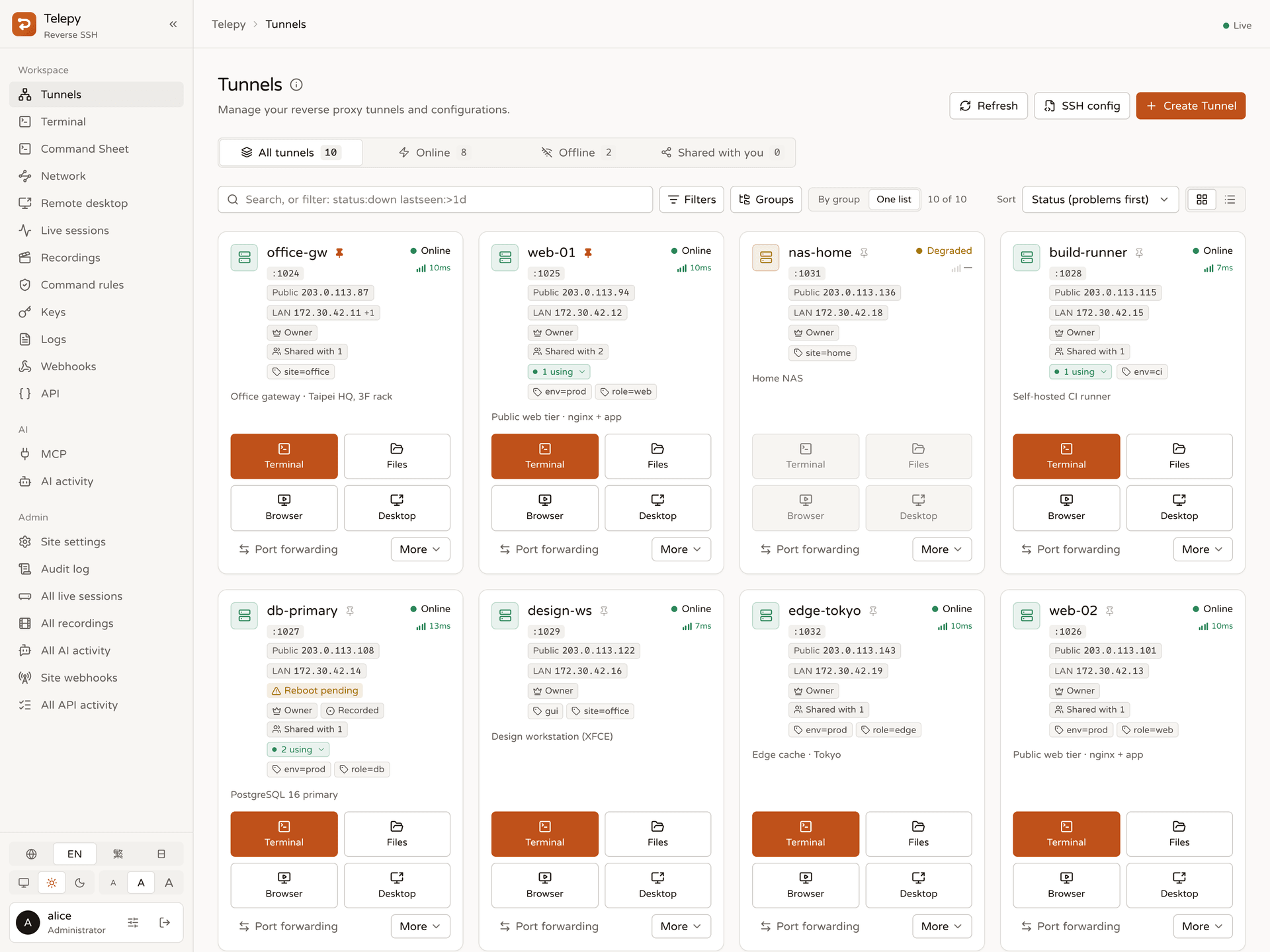
What you can do
Connect devices
- One command on Linux / macOS. Paste a
curl … | sudo shline on the device: it creates the tunnel key,
registers the device, authorizes Telepy, pins Telepy's host key, installs a systemd / launchd service and waits
until Telepy has logged in through the tunnel. For everything else a five-step wizard generates SSH, AutoSSH,
systemd, PowerShell, Docker run and Docker Compose scripts. - SSH port or web port only. Devices reach the gateway on its SSH port, or tunnel SSH over the web port
(WebSocket) when only HTTPS gets out. - Health at a glance. Online / degraded / offline / never connected, per-hop latency, uptime and connection
history, the device's public and LAN addresses with IP-change alerts, and daily device facts (OS, memory, disk,
load, pending reboot) with warnings. - Organize hundreds of devices. Labels, pins, personal groups, and a search with filters such as
status:down,label:env=prodorlastseen:>1d.
Work on a device
- Web terminal with tabs, Nerd Fonts, built-in and custom colour schemes, shells that survive a dropped
connection (when you allow it), session recording, and a toolbox of saved command snippets with variables. - File manager over SFTP: drag-and-drop uploads, move / copy / rename / delete / permissions, zip downloads,
image preview and an in-browser editor that never leaves half a file. - Remote desktop in the browser: RDP and VNC through the tunnel (guacd), or RustDesk decoded in the tab, with
sound, clipboard control, file transfer and multi-monitor cropping. - Remote browser: a real Chromium (KasmVNC) whose traffic leaves through the device, for web consoles that only
answer on the device's network. - Network topology: scan a device's LAN without installing anything, see vendors and open ports, then open a
terminal or desktop on a LAN host through the device, or copy anssh -J/ProxyJumpsetup. - From your own computer: one command adds every device to
~/.ssh/config, and the command sheet gives
copy-readyssh -L/-R/-D/-J,scpandrsynclines.
Teams and control
- Sharing with VIEW / EDIT / ADMIN permissions, per-account allow-lists, shares that expire, and access requests
for temporary extra rights. Taking access away ends that person's open sessions at once. - Feature permissions and user groups: decide who may use the terminal, files, desktop, LAN discovery, API
tokens, MCP apps and more — for everyone, a group or one person. - Command rules: block commands or hold them for approval, site-wide or per device, in the web terminal and for
MCP agents alike. - Live sessions: see who is connected where, watch a terminal live (and hand over the keyboard), or end a session.
- Sign-in security: passkeys and authenticator apps, a second-factor check before sensitive devices, a list of
your signed-in browsers, new-device alerts, and an optional discreet sign-in page. - Audit: tamper-evident logs (hash chains), terminal recordings, sign-in history, and webhooks to Slack, Discord,
Google Chat, Teams, Telegram, ntfy or your own service.
Automate
telepycommand line:telepy ls,telepy ssh web-01,telepy exec --label env=prod -- uptime,telepy cp,
live sessions, recordings, snippets, LAN hosts and scripted browsers.- REST API with personal API tokens (scopes, tunnel limits, expiry, a call log) and a generated OpenAPI document.
- MCP server for AI agents (Claude Code, Cursor, …): approved per app through OAuth, every tool call audited,
command rules and permissions applied.
Screenshots
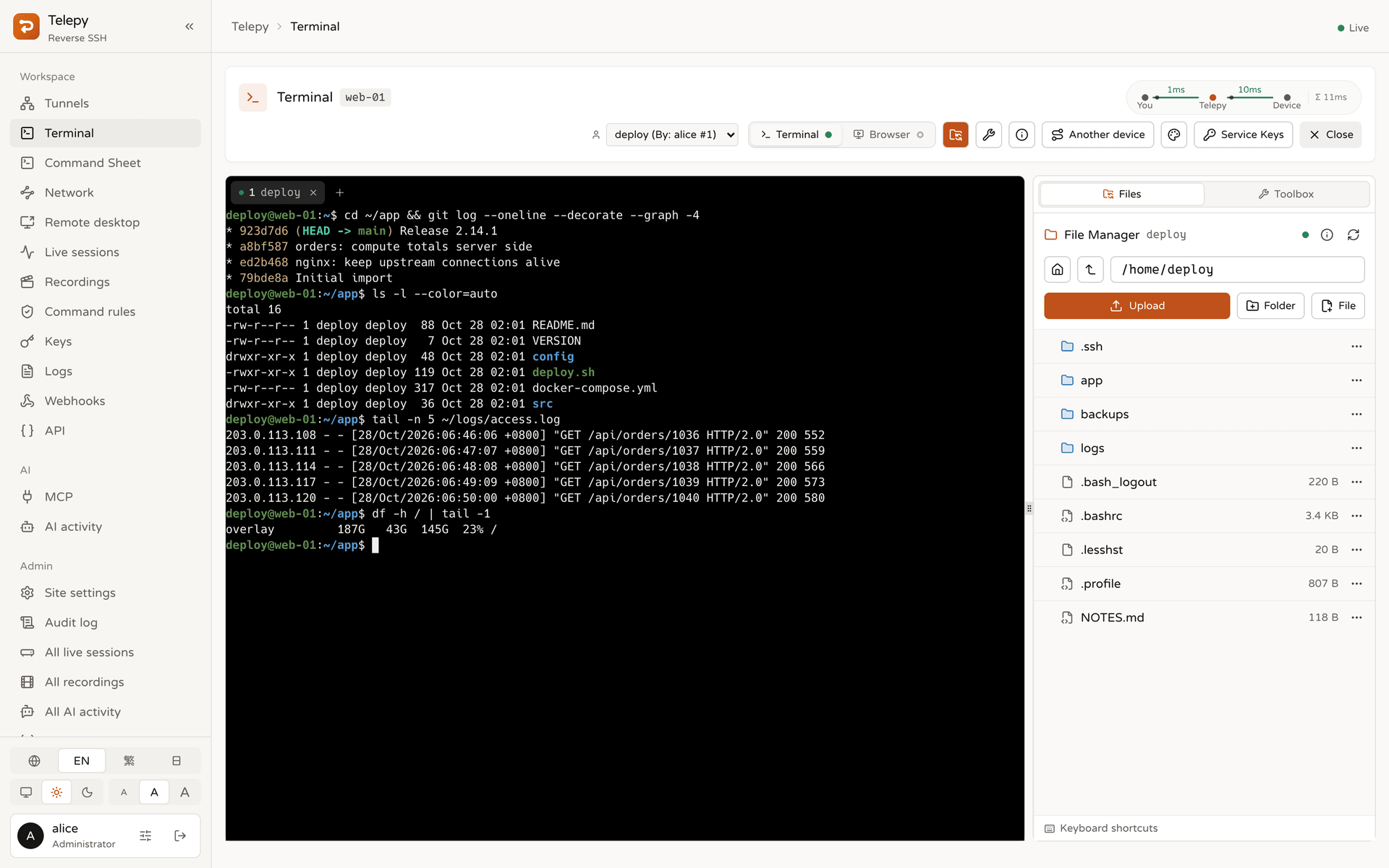 Web terminal + file manager — tabs, the SFTP side panel and the latency of each hop. |
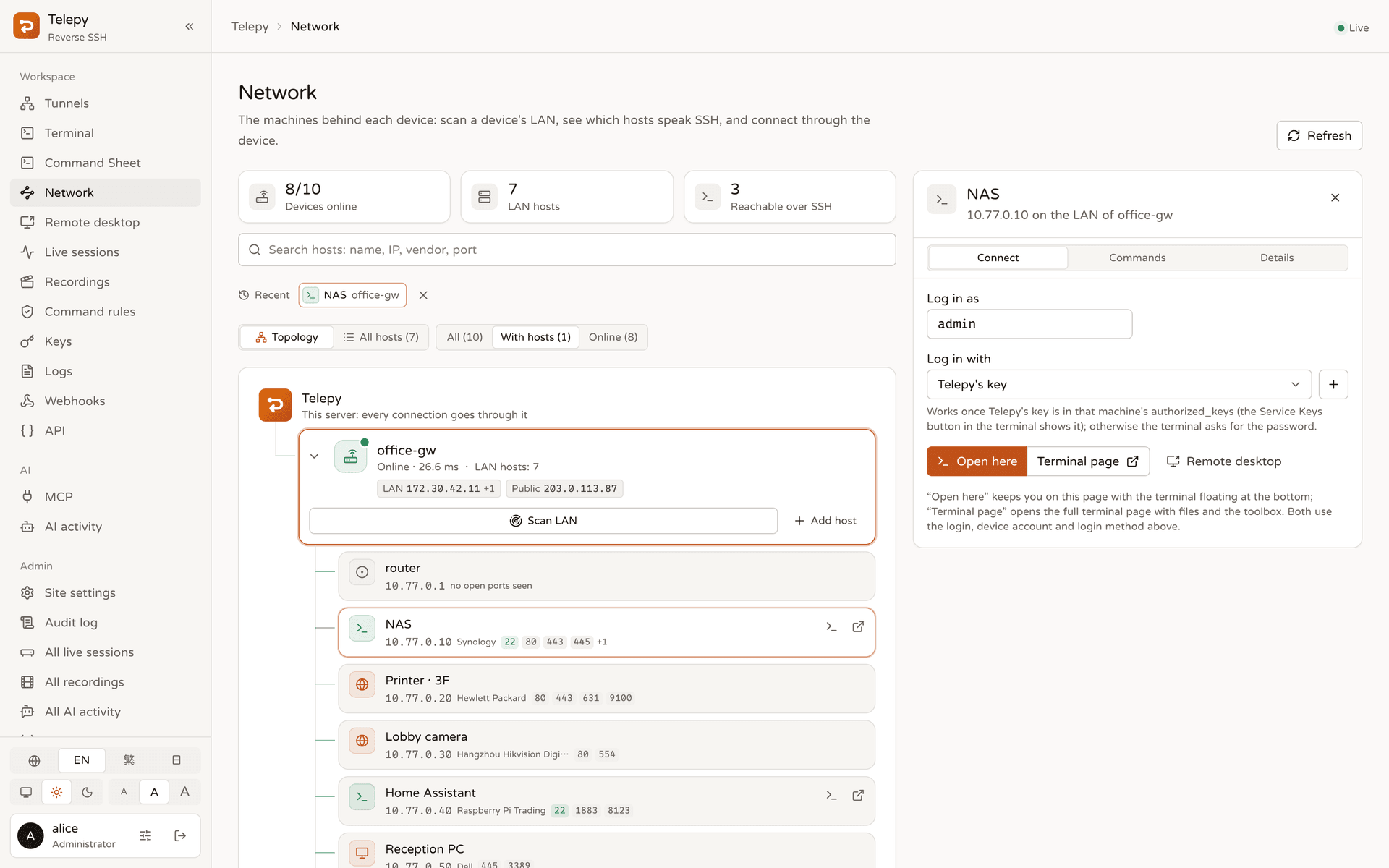 Network — the LAN behind a device, scanned through its own sshd, with vendors and open ports. |
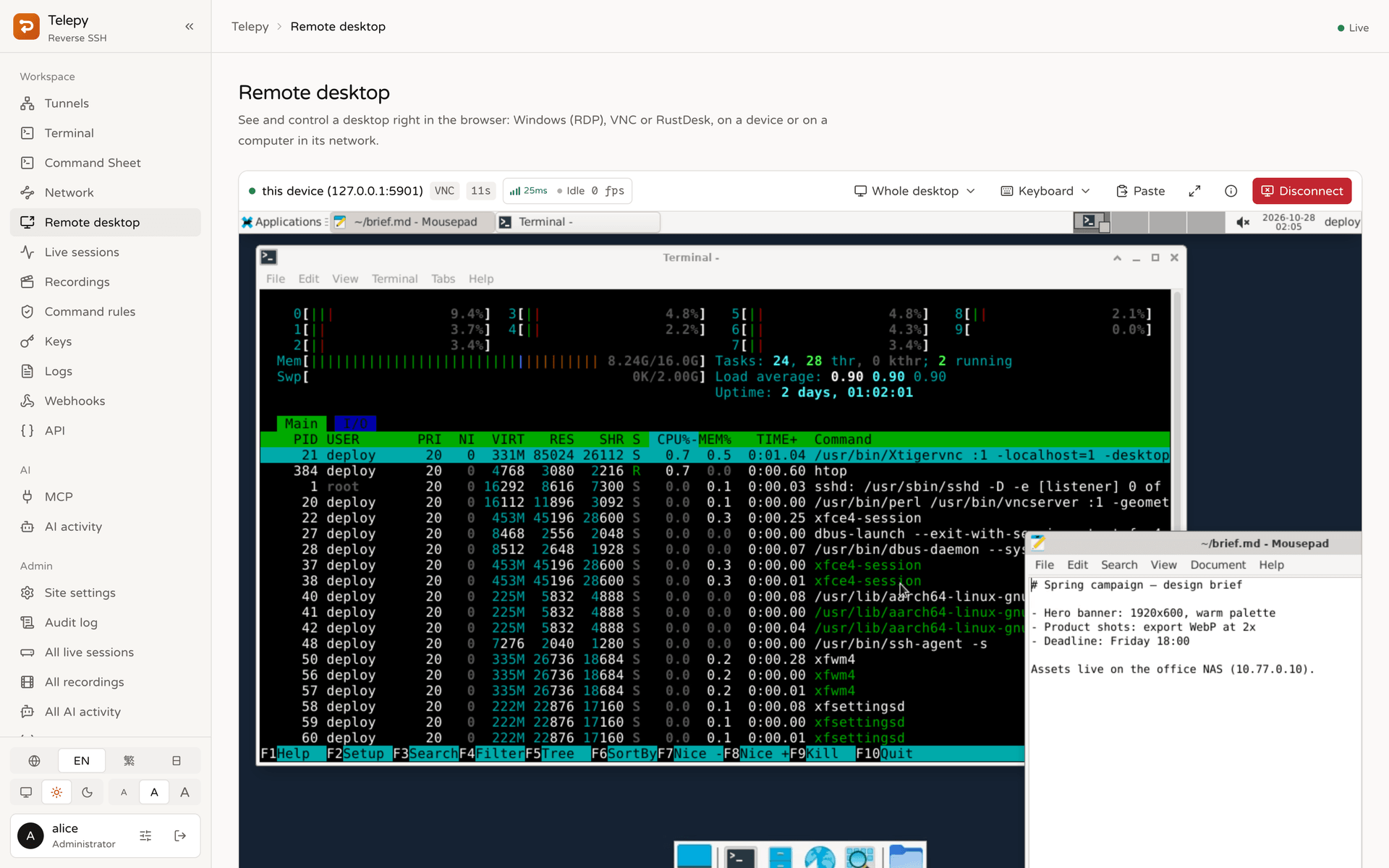 Remote desktop — a VNC desktop through the tunnel, with stream stats and screen selection. |
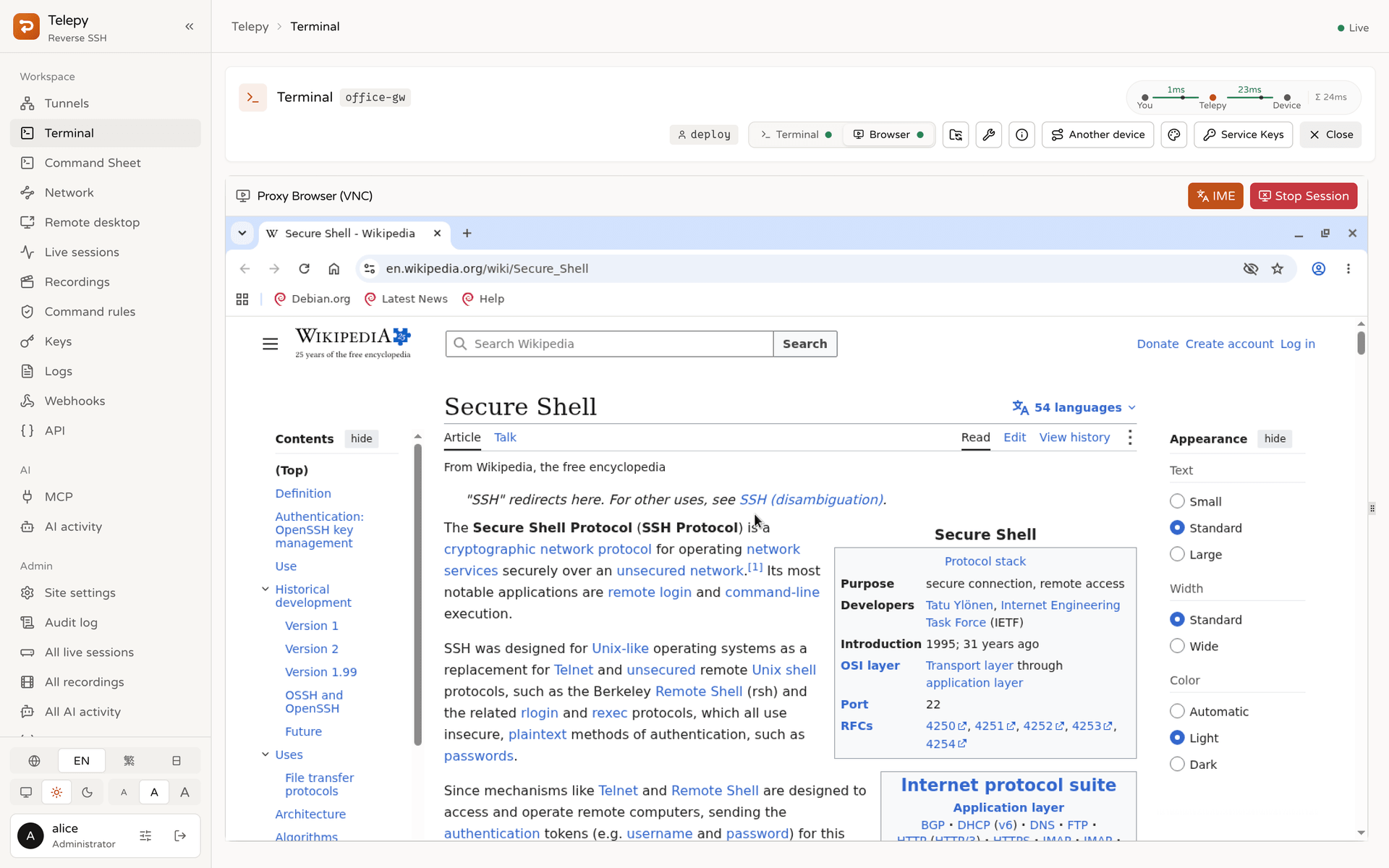 Remote browser — Chromium that goes online through the device. |
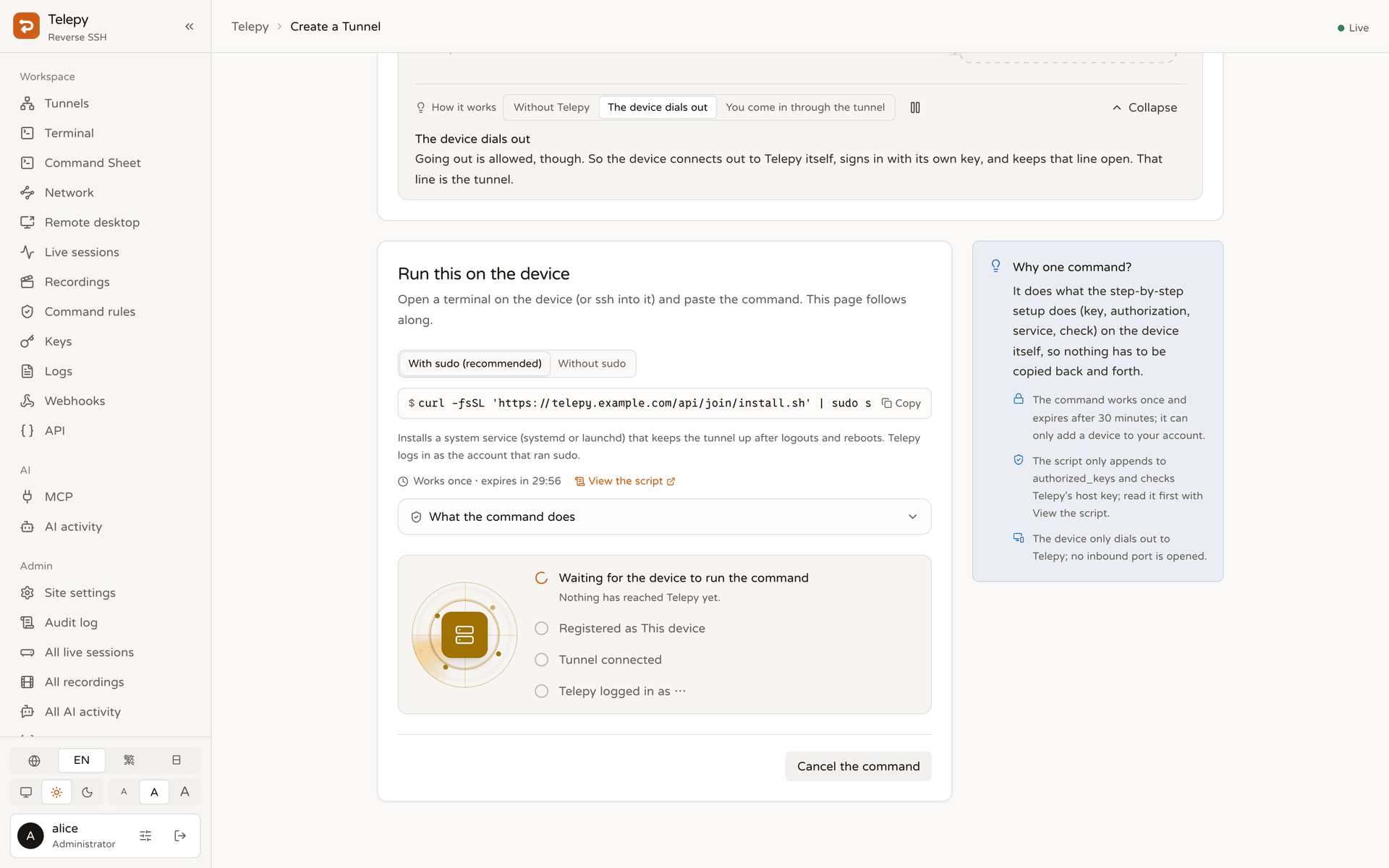 Add a device — one command, followed live until Telepy has logged in. |
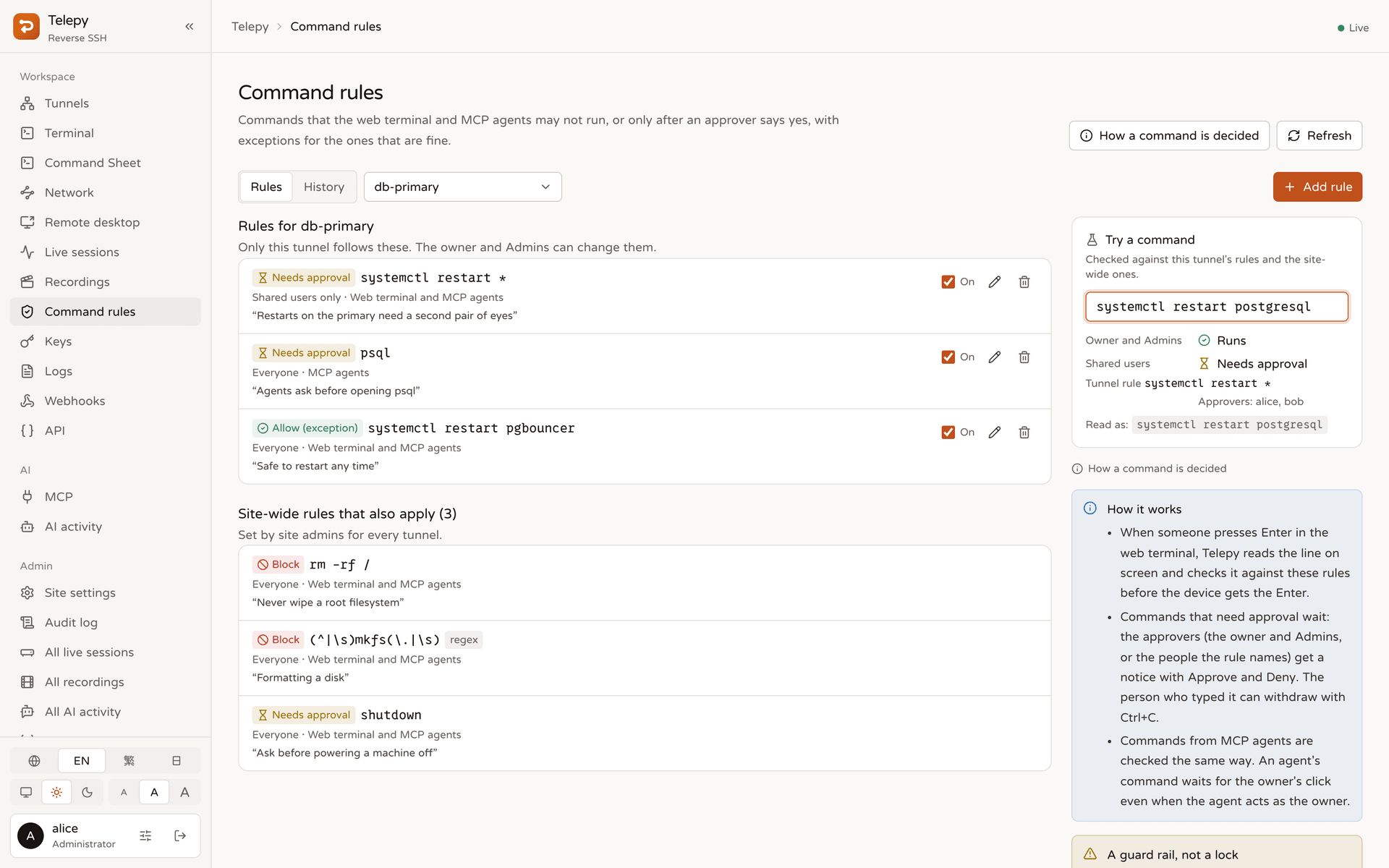 Command rules — block, approve or allow, with a tester that shows who would be asked. |
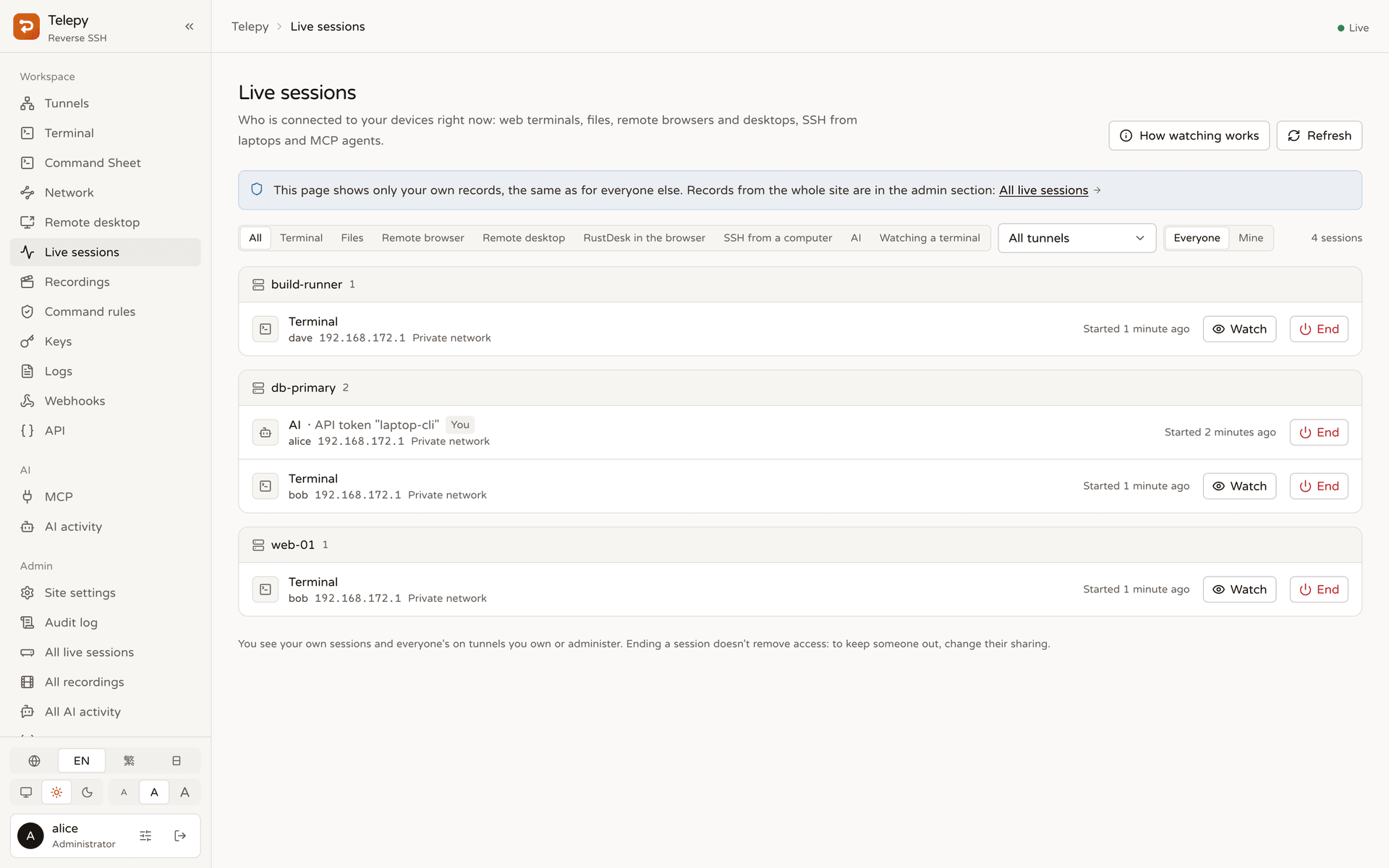 Live sessions — who is connected, from where; watch or end a session. |
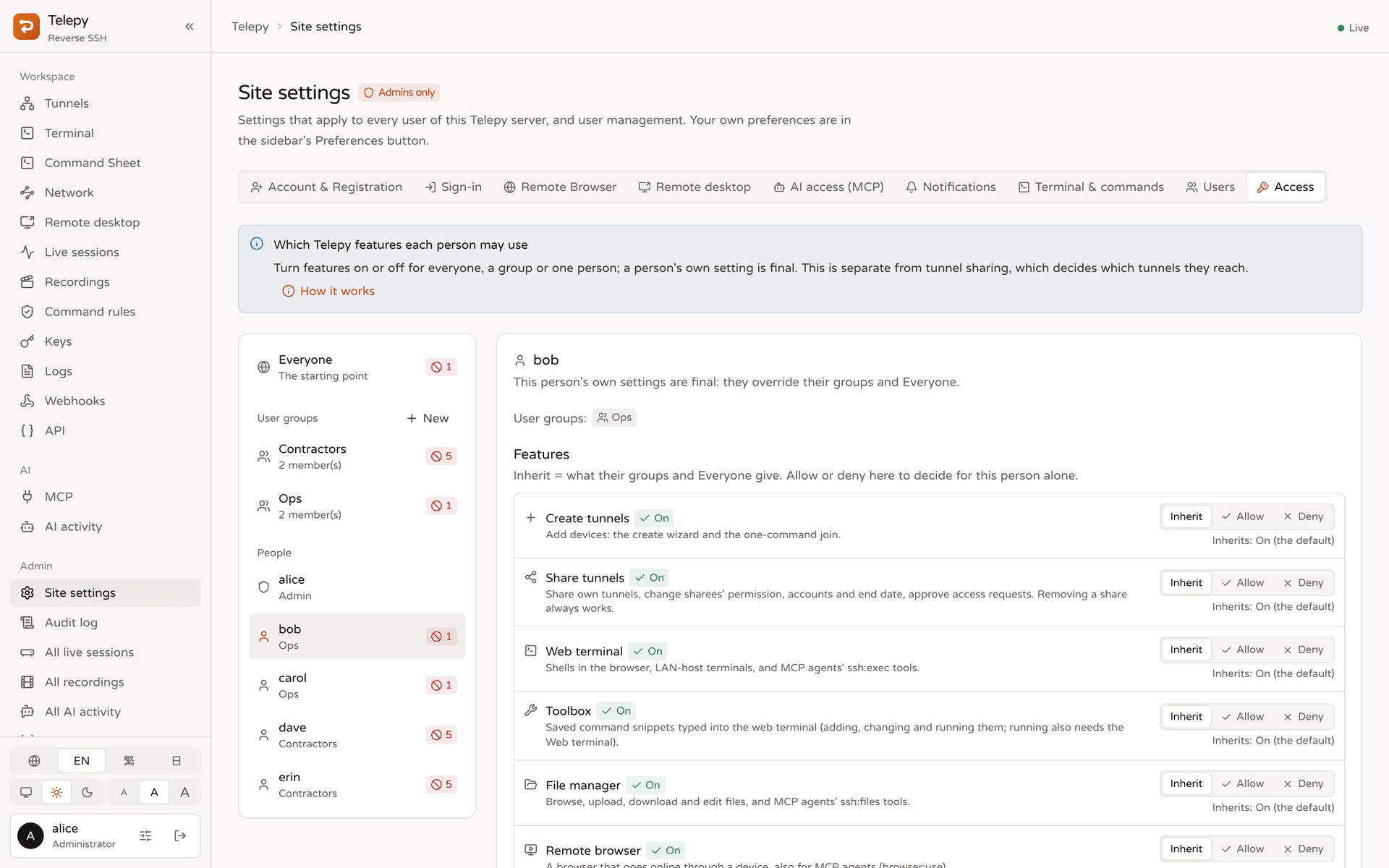 Feature permissions — per person, per user group or for everyone. |
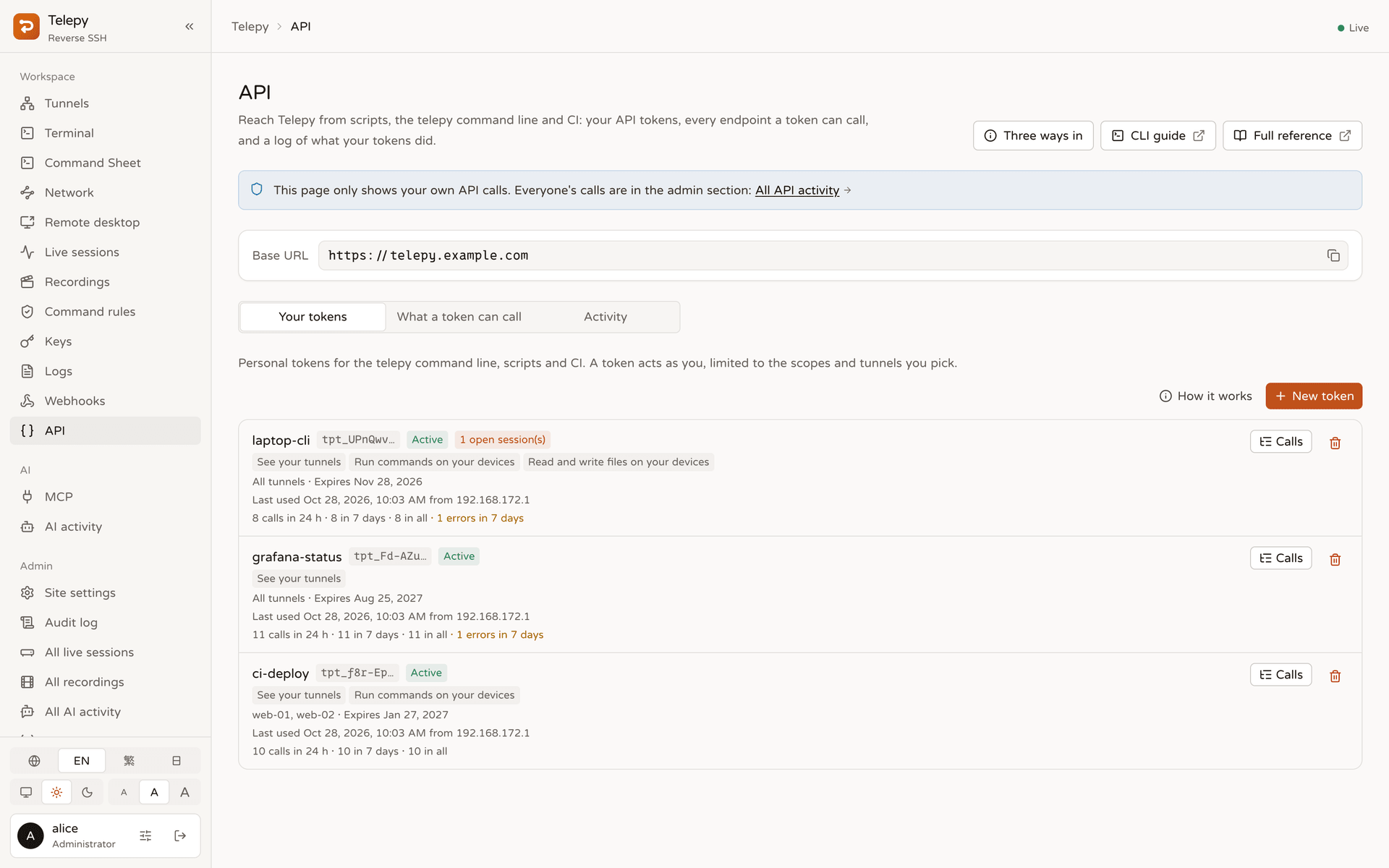 API — personal tokens with scopes, tunnel limits and a per-token call summary. |
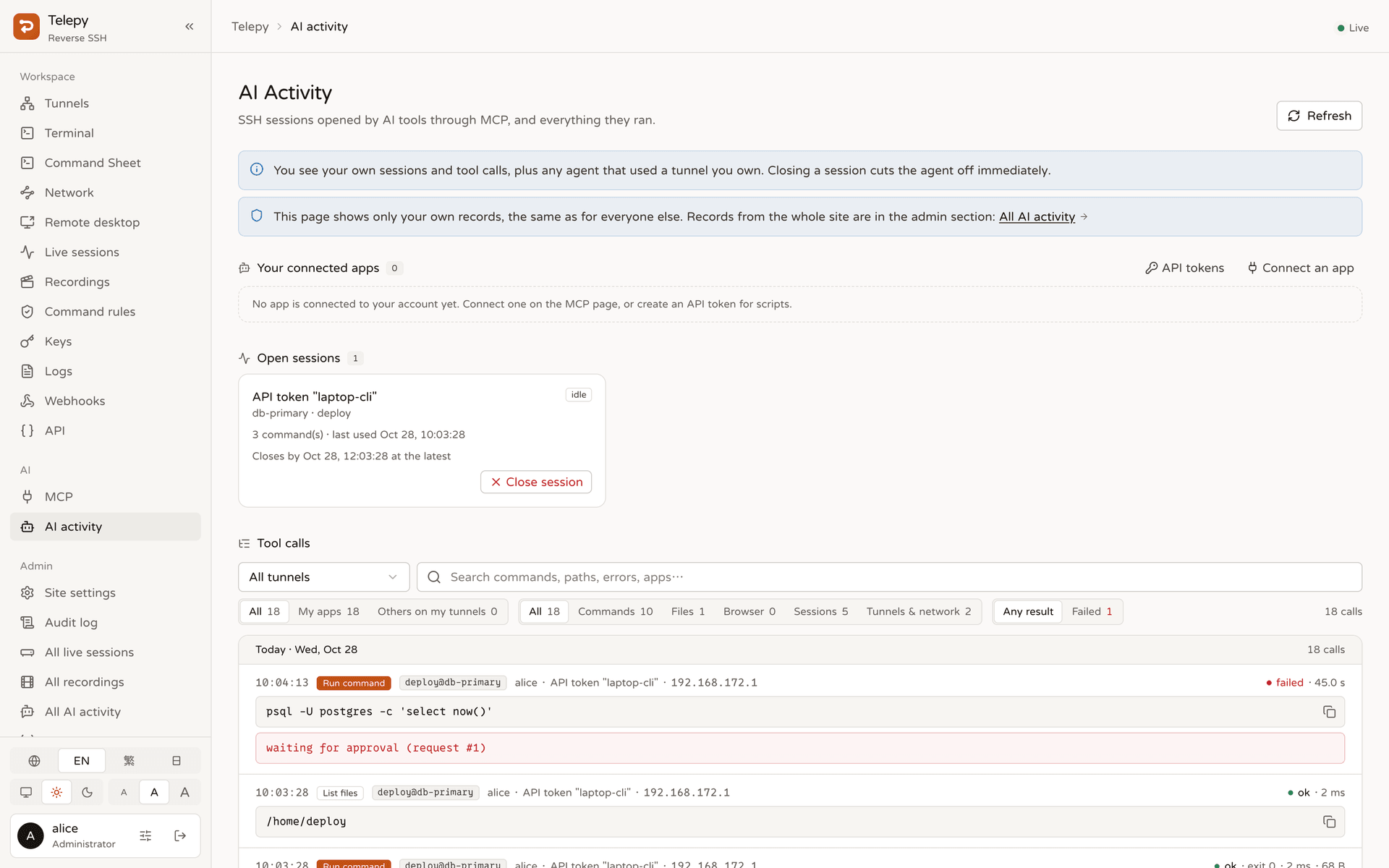 Agent activity — every MCP tool call, including commands waiting for approval. |
How it works
 your browser ──https──▶ Traefik ──▶ frontend (Next.js)
                            │
                            └──────▶ backend (Rust) ◀══ reverse SSH (outbound from the device) ══ device ── LAN hosts
                                       │   REST API · WebSockets · built-in SSH gateway · monitor
                                       ├──▶ kasm-browser (Chromium for remote browsing)
                                       └──▶ guacd (RDP / VNC)
A device runs ssh -R 0:localhost:22 telepy@<server> (the join script and the generated scripts set this up as a
service). The backend's built-in SSH gateway accepts it, recognises the tunnel by its key and keeps the forward in
memory — nothing is bound on the host. Everything Telepy does on the device — terminal, files, desktop, remote
browser, LAN scans — opens a channel inside that one connection and logs in to the device's own sshd with that
tunnel's service key. The device needs no public IP and no inbound firewall rule; Telepy pins each device's host key,
and the device pins Telepy's.
Telepy runs as five containers:
| Service | Role |
|---|---|
traefik |
Reverse proxy: /api/*, /ws/*, /mcp and OAuth discovery go to the backend, everything else to the frontend |
frontend |
Next.js web UI |
backend |
One Rust process (axum + russh): REST API, WebSockets, the SSH gateway, monitoring, SQLite |
kasm-browser |
KasmVNC + Chromium for remote browser sessions |
guacd |
Apache Guacamole's RDP / VNC engine for remote desktops (internal network only) |
Quick start
Requires Docker with the Compose plugin.
Create the environment file and set at least
SECRET_KEY,INTERNAL_API_TOKENandSERVER_DOMAIN
(PUBLIC_URLtoo if Telepy sits behind an HTTPS proxy):cp .env.example .envGenerate the gateway's host keys and the service key (once — devices pin the host keys):
./telepy.sh keygenBuild and start the stack, then check it:
docker compose up -d --build
./telepy.sh doctor
Open
http://localhost:<WEB_SERVER_PORT>(defaulthttp://localhost:8787) and sign in.
[!NOTE]
The first account becomes the administrator — whether it signs in with Google or is created with./telepy.sh create-superuser.
For production, put an HTTPS proxy in front of Traefik, set PUBLIC_URL and TRUSTED_PROXY_HOPS=2, and make the
gateway port (REVERSE_SERVER_SSH_PORT) reachable for your devices.
Connect a device
- Linux / macOS: Tunnels → Create Tunnel → One command, copy the command and run it on the device. The page
follows each step and turns green once Telepy has logged in through the tunnel. - Anything else (Windows, Docker, appliances): Step by step — paste the device's public key, choose the
login accounts, authorize Telepy's key, run one of the generated scripts, and verify the login.
When the tunnel is Online, the terminal, files, desktop and browser buttons on its card are ready.
Configuration
Environment variables in .env (see .env.example for the full comments):
| Variable | Default | Description |
|---|---|---|
PROJECT_NAME |
main |
Suffix of container and network names (one per stack on a host) |
DEBUG / LOG_LEVEL |
false / — |
Debug logging; log level or a full tracing filter |
WEB_SERVER_PORT |
8787 |
Port Traefik publishes for the web UI, API and WebSockets |
REVERSE_SERVER_SSH_PORT |
24242 |
Port devices dial for their reverse SSH tunnel |
SERVER_DOMAIN |
localhost |
Host name devices and laptops use; written into scripts and SSH configs |
PUBLIC_URL |
— | Public base URL, e.g. https://telepy.example.com (OAuth issuer, passkey origin, join URL); empty = from the request |
SECRET_KEY |
— | Signs sign-ins and seals stored secrets; set a long random value before real use |
INTERNAL_API_TOKEN |
— | Secret between the backend and the kasm-browser container |
SOCIAL_GOOGLE_CLIENT_ID |
— | Google sign-in (baked into the frontend image at build time) |
TRUSTED_PROXY_HOPS |
1 |
Trusted proxies in front of the backend, Traefik included (client IPs) |
CLIENT_IP_HEADER |
— | Take the client IP from this header instead (e.g. CF-Connecting-IP) |
GATEWAY_PROXY_PROTOCOL_FROM |
— | IPs / CIDRs of an L4 proxy in front of the gateway that sends PROXY protocol |
DEVICE_PROBE |
true |
Daily read-only login for each device's addresses and facts |
KEEP_SHARED_SERVICE_KEY |
false |
Never remove the old shared service key from devices (for a parallel move) |
OPENAPI_ENABLED |
true |
Swagger UI and the OpenAPI document (signed-in users only) |
Everything else — registration, sign-in lifetimes and two-factor requirements, remote browser and desktop limits,
MCP sessions, webhooks, terminal and command-rule defaults, feature permissions — is a site setting in the web UI
(Site settings, administrators only).
Command line, API and MCP
telepy CLI — install a release build (macOS, Linux, Windows; every Telepy release carries one) orcargo install --locked --git https://github.com/NatLee/telepy telepy-cli. The web's CLI page (sidebar
Developers → CLI) has the install command for your computer and examples filled in with your own tunnels:
telepy login https://telepy.example.com        # browser sign-in, or --token tpt_… from the API page
telepy ls                                      # tunnels with health, latency, accounts and labels
telepy ssh web-01                              # your system ssh through the tunnel, Telepy's host key pinned
telepy exec --label env=prod -- uptime         # many devices at once; command rules and audit apply
telepy cp ./app.conf web-01:/etc/app/
telepy api activity --follow                   # every call your API tokens make, as it happens
In CI set TELEPY_URL and TELEPY_TOKEN instead of signing in. Details: docs/cli.md.
REST API — create a personal token on the API page; it lists every endpoint a token may call, with curl
examples. The OpenAPI document is at /api/openapi.json and Swagger UI at /api/__hidden_swagger (both need a
sign-in; telepy-server openapi prints the document).
MCP — point an MCP client at https://<your-host>/mcp, e.g.claude mcp add --transport http telepy https://<your-host>/mcp. The first use opens an approval page where you pick
the permissions and tunnels; the MCP page has the setup for each client. Details: docs/mcp.md.
Maintenance
./telepy.sh (or telepy.ps1 on Windows) wraps the day-to-day tasks:
| Sub-command | What it does |
|---|---|
keygen |
Generate the gateway host keys and the backend service key (once) |
create-superuser |
Create an administrator account |
doctor |
Check .env, containers, ports and the backend's configuration (exit 1 on a problem) |
geoip |
Download offline IP geolocation (DB-IP Lite); re-run monthly |
oui |
Download the IEEE vendor list so LAN hosts show their NIC vendor |
migration |
Reconcile the database schema (also runs on every start) |
shell |
Open a shell in the backend container |
backend-debug |
Recreate the backend container and follow its logs |
Upgrading is git pull && docker compose up -d --build; the database schema is reconciled on start.
Documentation
- The
telepycommand line and API tokens - MCP: AI agents on your devices
- Webhooks: events, formats and signatures
- Remote desktop (RDP / VNC / RustDesk)
- Remote browser (KasmVNC)
- How the backend reaches devices
- Latency measurement deep dive
- Rust backend migration plan and benchmark: Django vs Rust
- How the README screenshots are made
- Articles
- Release notes: GitHub Releases
Contributors
 Nat Lee |
 H. Alice |
 Boris Lok |
License
Telepy is licensed under the GNU Affero General Public License v3.0 (AGPL-3.0). If you run a modified
Telepy as a service for other people, you must offer them its source code. If that does not fit your use, a
commercial license is available — contact @NatLee.
Versions released before October 2026 were MIT-licensed; see NOTICE. Contributions are made under the
Contributor License Agreement.
Reviews (0)
Sign in to leave a review.
Leave a reviewNo results found