mcp-behave
Health Uyari
- License — License: MIT
- Description — Repository has a description
- Active repo — Last push 0 days ago
- Low visibility — Only 5 GitHub stars
Code Gecti
- Code scan — Scanned 12 files during light audit, no dangerous patterns found
Permissions Gecti
- Permissions — No dangerous permissions requested
Bu listing icin henuz AI raporu yok.
Runtime behavioral auditor for MCP servers — detects undeclared network egress, credential reads, and rug-pulls via native syscall interposition.

mcp-behave
Runtime behavioral auditing and monitoring for Model Context Protocol (MCP) servers.




mcp-behave is a CLI-first security tool for checking what an MCP server actually does—not only what its tool descriptions say it can do. It actively exercises a server's advertised capabilities, observes selected runtime activity, checks protocol metadata and responses, and compares behavior with saved baselines.
It also provides mcp-behave wrap, a stdio proxy for monitoring MCP traffic while an AI client uses a server. mcp-behave is CLI-first: it provides terminal, JSON, and SARIF output and does not ship a built-in graphical dashboard.
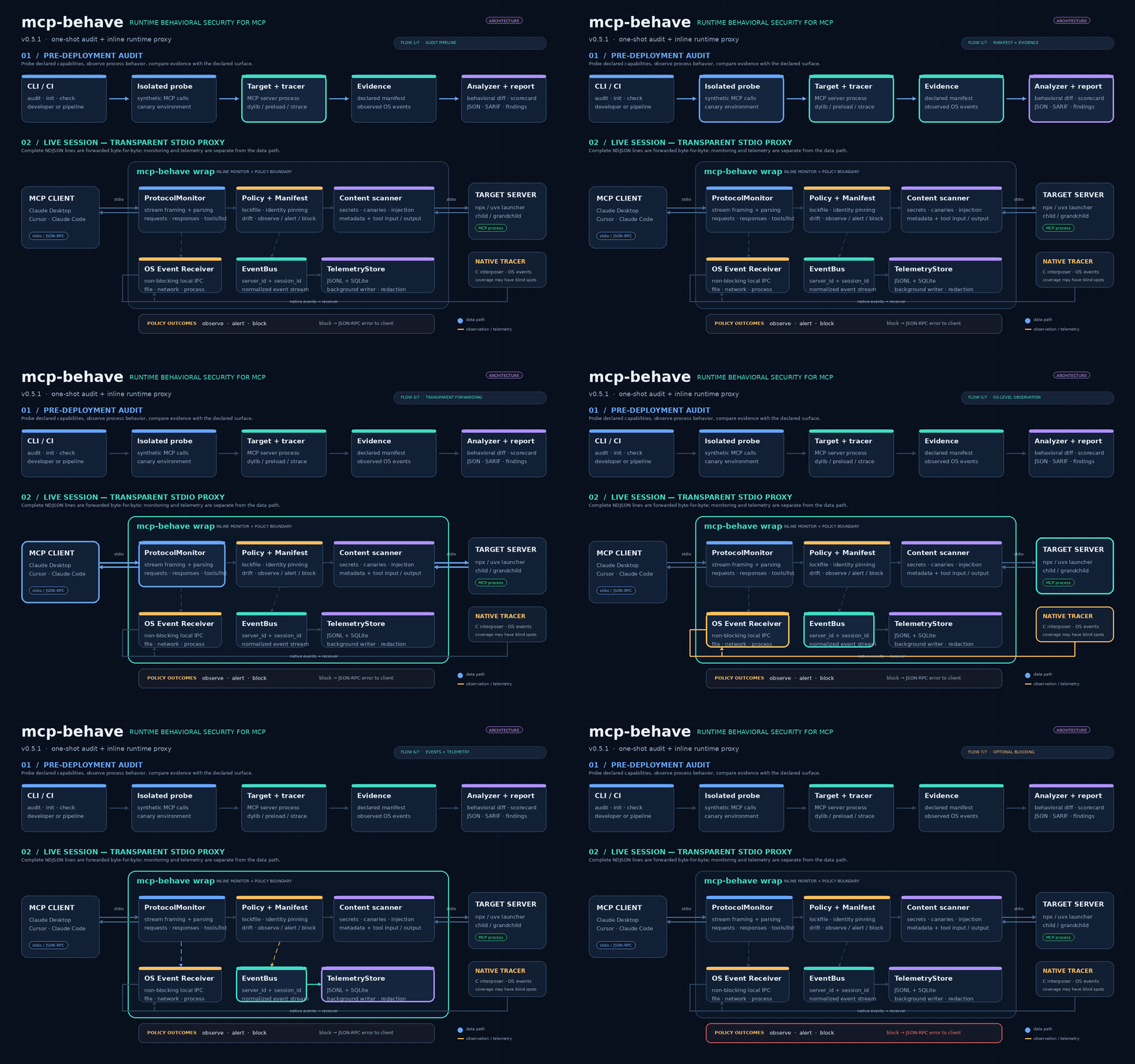
Why mcp-behave?
An MCP server can advertise a harmless tool while its implementation performs unexpected operations. For example, a tool described as a local document formatter might also read a credential file or attempt an outbound network connection.
mcp-behave compares two views of a server:
- Declared behavior: tools, input schemas, annotations, resources, prompts, and metadata exposed over MCP.
- Observed behavior: selected file, network, and process activity captured while the server is exercised or monitored.
The goal is to make unexpected behavior visible for review. A clean audit is not proof that a server is safe; it means no covered issue was observed in the tested scenarios.
What it checks
- Runtime activity: selected filesystem operations, network connection attempts, and subprocess launches.
- MCP metadata: tool definitions, schemas, descriptions, annotations, resources, prompts, and manifest changes.
- Content risks: prompt-injection patterns, invisible or bidirectional Unicode characters, terminal escape sequences, and external Markdown/HTML image references in tool output.
- Sensitive data: known secret patterns and configured canary tokens in inspected payloads.
- Client configuration: hard-coded credentials, broad filesystem mounts, shell wrappers, and unpinned package commands in supported MCP client configuration files.
Findings describe observed behavior and potential risks; they are not automatic accusations of malicious intent.
Install
The simplest option is to run with uvx:
uvx mcp-behave --version
Or install the Python package:
python -m pip install mcp-behave
mcp-behave --version
An npm package is also available:
npm install -g mcp-behave
mcp-behave --version
About the npm package: it is a Node.js launcher for the Python implementation, not a separate JavaScript auditing engine. It requires Node.js 16+ and a Python 3 environment; it uses uvx or pipx when available.
Quick start: audit an MCP server
Pass the command that starts your stdio MCP server:
uvx mcp-behave python -m my_mcp_server
You can also audit a server launched with npx or uvx:
uvx mcp-behave npx -y @modelcontextprotocol/server-filesystem /path/to/project
uvx mcp-behave uvx mcp-server-git
By default, mcp-behave initializes an MCP session, discovers the server's tools/resources/prompts, and exercises advertised capabilities with synthesized inputs. It then compares the declared surface with the runtime and content observations.
Important: audits execute server code
An audit is active testing, not passive package inspection. The probe may call tools and read resources/prompts, and those operations can have side effects. Do not run an unfamiliar server against your normal host environment without isolation. Where available, use a disposable Docker or Podman sandbox:
uvx mcp-behave --sandbox auto python -m my_mcp_server
The audit sandbox defaults to none; --sandbox auto asks mcp-behave to use an available container runtime. Review the target's behavior and permissions before testing it.
Runtime monitoring with wrap
mcp-behave wrap runs between an AI client and a stdio MCP server. The client sends MCP messages to the proxy; the proxy forwards them to the target while monitoring protocol traffic and selected operating-system activity.
AI client  <---- stdio / JSON-RPC ---->  mcp-behave wrap  <---- stdio / JSON-RPC ---->  MCP server
                                                 |
                                                 +-- protocol monitoring
                                                 +-- runtime tracing (when available)
                                                 +-- policy checks, scanning, and telemetry
Start in monitoring mode:
uvx mcp-behave wrap \
  --server my-server \
  -- python -m my_mcp_server
wrap can also use a multi-server behavioral lockfile, enforce approved tool policies, scan payloads for secrets/canaries, redact detected sensitive values, and apply an optional OS sandbox.
Create and use a behavioral lockfile
Generate or update the multi-server lockfile from an audit:
uvx mcp-behave --lock --server-id my-server python -m my_mcp_server
This writes mcp-behave.lock.json. Review the generated baseline and commit it to version control. Then run the server through wrap with enforcement enabled:
uvx mcp-behave wrap \
  --server my-server \
  --lockfile mcp-behave.lock.json \
  --enforce \
  -- python -m my_mcp_server
To review a manifest change observed by wrap and approve it into the lockfile:
uvx mcp-behave approve --server my-server
Useful wrap options:
| Option | Purpose |
|---|---|
--enforce |
Enforce lockfile-based tool policy checks. Requires a valid matching entry in mcp-behave.lock.json. |
--redact |
Replace detected sensitive values in inspected server responses. |
--canary TOKEN / --canary-file PATH |
Watch for configured canary values in inspected traffic. |
--sandbox auto |
Request the platform-appropriate sandbox backend. |
--no-trace |
Disable native runtime tracing and retain protocol-level monitoring. |
--no-reverify |
Disable periodic synthetic tools/list re-verification. |
wrap is an stdio proxy; it does not turn a remote HTTP MCP connection into a locally traced process.
Other commands
| Command | Use it for |
|---|---|
mcp-behave lint manifest.json |
Static checks of a manifest or tool-definition JSON without starting a server. |
mcp-behave scan-configs |
Find MCP servers in supported local client configuration files and inspect configuration risks. |
mcp-behave audit-configs |
Discover configured servers and run audits against them. This actively launches and exercises targets. |
mcp-behave inspect <command> |
View a correlated timeline of MCP messages and observed runtime events; can also inspect a prior output directory. |
mcp-behave serve |
Expose mcp-behave's audit and inspection tools through an MCP server interface. |
mcp-behave install / status / uninstall |
Add, inspect, or remove wrapper entries in supported local AI client configurations. |
CI and machine-readable output
Use JSON or SARIF output for automation and code-scanning workflows:
uvx mcp-behave --json --fail-on high python -m my_mcp_server
uvx mcp-behave --sarif python -m my_mcp_server > mcp-behave.sarif
The default output directory is /tmp/mcp_behave_out. Set --out-dir to choose another location. Exit codes for an audit are 0 for no findings at or above the selected threshold, 3 when the threshold is met, 2 for a tracing/setup failure, and 1 for other errors.
Legacy single-server baseline workflow
The init and check commands maintain the earlier single-server mcp-behave.lock format:
uvx mcp-behave init python -m my_mcp_server
uvx mcp-behave check python -m my_mcp_server
This is separate from the multi-server mcp-behave.lock.json used by wrap. Keep the two lockfile formats distinct.
Runtime tracing and platform notes
- macOS: uses a dynamically injected tracing library (
DYLD_INSERT_LIBRARIES). A C compiler is needed to build it on first use. Some hardened or specially signed interpreters may prevent library injection. - Linux: uses a native
LD_PRELOADlibrary when available, withstraceas a fallback when installed. A C compiler is needed to build the native library on first use. - Remote transports:
sseandstreamable-httpcan be used for remote manifest checks, but mcp-behave cannot trace the remote server's local operating-system activity. - Untraced mode:
--no-traceskips low-level tracing and performs the checks that do not depend on OS telemetry.
Security and coverage limitations
Runtime coverage is not complete syscall tracing. The native interposers observe selected dynamically linked libc calls; direct syscalls, statically linked programs, and other uninstrumented paths may not be visible. The Linux strace backend has different coverage and permission requirements.
Detection also depends on the scenarios exercised. A behavior that only occurs for a particular input, environment, time, or external condition may not appear during a test run. Use multiple probe rounds and adversarial input testing where appropriate:
uvx mcp-behave --probe-rounds 3 --fuzz python -m my_mcp_server
A behavioral baseline records what was observed during a particular set of tests. It can itself be incomplete or unsafe if established from a compromised or insufficiently tested server. Review baseline changes before approving them.
Evaluation
The repository includes benchmark corpora and reports covering paired benign/malicious server fixtures, multi-server authorization scenarios, deterministic runtime-policy tests, and audits of reference MCP servers. The README intentionally keeps detailed tables out of the getting-started path:
- Benchmark methodology and results
- CrossMCP-Bench report
- MCP-GuardBench report
- Pluto MCP Visibility report
- Official reference-server audit
These are project-maintained evaluations on specified corpora and fixtures. Results are corpus-specific; they are not independent certification or a guarantee that an arbitrary MCP server is safe.
Documentation
- Architecture and data flow
- Detection rules and observation matrix
- Technical whitepaper
- Research article: Auditing real-world MCP servers
- Roadmap
- Security policy
- Community feedback and issue tracker
Development
git clone https://github.com/navid72m/mcp-behave.git
cd mcp-behave
python -m pip install -e ".[test]"
pytest -v
The CI workflow runs tests on Linux and macOS. Contributions, bug reports, false-positive reports, and suggestions are welcome through GitHub Issues.
License
MIT. See LICENSE.
Yorumlar (0)
Yorum birakmak icin giris yap.
Yorum birakSonuc bulunamadi