pddl-mcp-server
Health Warn
- License — License: MIT
- Description — Repository has a description
- Active repo — Last push 0 days ago
- Low visibility — Only 5 GitHub stars
Code Pass
- Code scan — Scanned 12 files during light audit, no dangerous patterns found
Permissions Pass
- Permissions — No dangerous permissions requested
No AI report is available for this listing yet.
MCP backend for natural-language-to-PDDL modeling, Fast Downward planning, and validated plan artifacts.
PDDL MCP Server


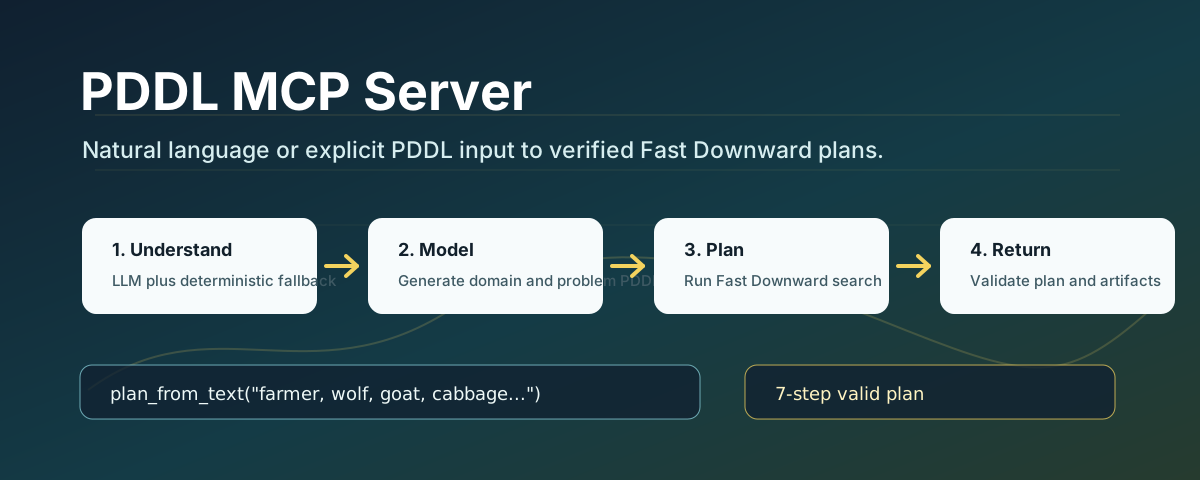
PDDL MCP Server is a personal MCP backend project for turning natural-language planning requests or explicit PDDL files into executable Fast Downward plans.
It is designed as a clean single-version planning service: understand the task, match domain knowledge, generate PDDL, run a planner, validate the result, and return a structured MCP response with artifacts.
Project Context and Contribution
This project grew from an automated-planning task I worked on during an algorithm engineering internship at HuaYuan Computing. I developed and consolidated the public project into a single MCP planning service, including the natural-language/PDDL workflow, Fast Downward integration and debugging, domain templates, stable tool responses, artifact handling, validation, modular src package structure, tests, CI, security guidance, release documentation, and demo assets.
This repository is a personal, public-safe engineering portfolio project. It contains reusable planning code, examples, and documentation only; it does not include employer credentials, private services, internal data, or an endorsement by HuaYuan Computing.
Highlights
- Natural language to PDDL workflow through
plan_from_text. - Direct PDDL planning through
generate_planwithdomain_pathandproblem_path. - Configurable LLM semantic parsing with deterministic local fallback.
- Fast Downward integration for real planner execution.
- Generated artifacts for every run:
domain.pddl,problem.pddl,sas_plan, planner log, andresult.json. - Stable MCP tool response shape for downstream agents or clients.
- Tests for config loading, semantic fallback, domain matching, PDDL generation, planning, validation, and MCP responses.
Demo
The project can solve the classic farmer, wolf, goat, and cabbage river-crossing puzzle.
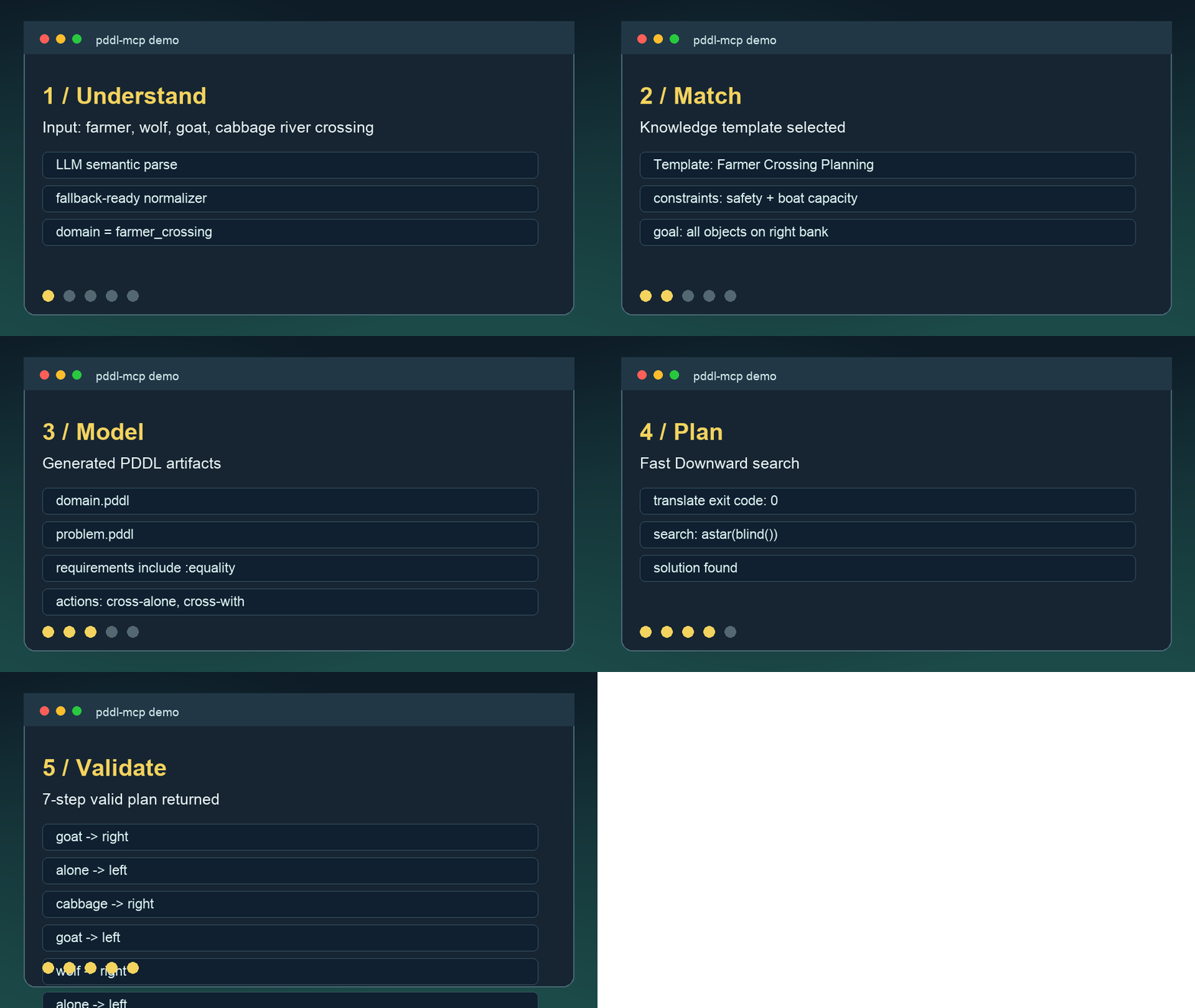
The animation shows the end-to-end flow: natural-language input, semantic processing, template matching, PDDL generation, Fast Downward planning, and validated plan output.
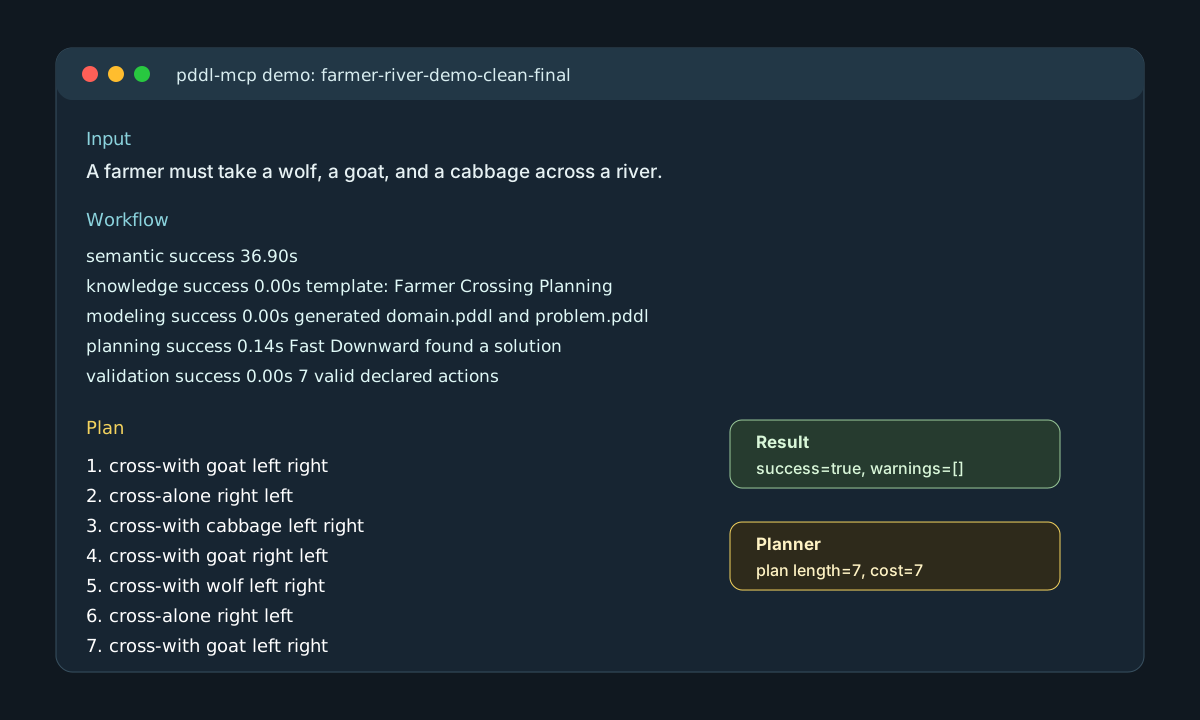
Input:
A farmer must take a wolf, a goat, and a cabbage across a river.
The boat must be driven by the farmer and can carry at most one item.
If the farmer is absent, the wolf eats the goat and the goat eats the cabbage.
Plan how to move everything safely to the other side.
Output plan:
(cross-with goat left right)
(cross-alone right left)
(cross-with cabbage left right)
(cross-with goat right left)
(cross-with wolf left right)
(cross-alone right left)
(cross-with goat left right)
This is a valid 7-step solution: take the goat first, return alone, move the cabbage, bring the goat back, move the wolf, return alone, and take the goat across again.
Architecture
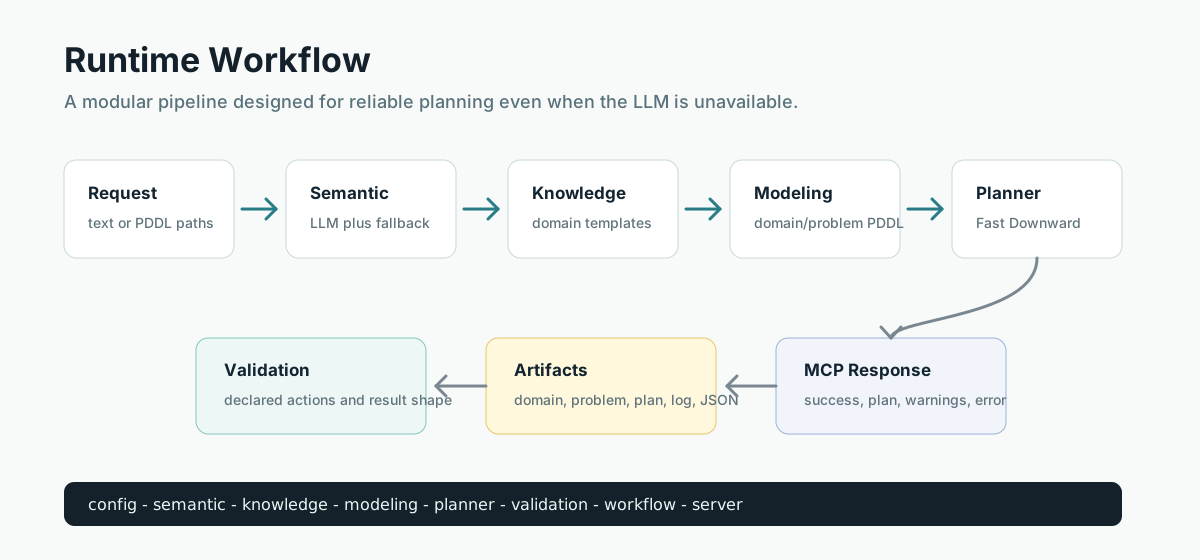
The code is intentionally split into focused modules:
| Module | Responsibility |
|---|---|
config |
Load .env and runtime settings. |
semantic |
Convert natural language into a semantic planning representation. |
knowledge |
Match the task to a domain template. |
modeling |
Generate domain/problem PDDL. |
planner |
Build and run the Fast Downward command. |
validation |
Validate declared plan actions and result shape. |
workflow |
Orchestrate the full planning pipeline. |
server |
Expose MCP tools through FastMCP. |
Project Layout
pddl-mcp/
├── pyproject.toml
├── server.py
├── .mcp.json
├── docs/
│   ├── assets/
│   └── releases/
├── src/pddl_mcp/
│   ├── config.py
│   ├── knowledge.py
│   ├── modeling.py
│   ├── planner.py
│   ├── semantic.py
│   ├── server.py
│   ├── validation.py
│   ├── workflow.py
│   └── resources/domain_templates.json
└── tests/
Installation
git clone https://github.com/NBNBTM/pddl-mcp-server.git
cd pddl-mcp-server
python -m pip install -e ".[dev]"
cp .env.example .env
Configuration
Edit .env for your local runtime.
Minimal configuration:
OUTPUT_DIR=output
LOG_LEVEL=INFO
Real Fast Downward planning:
FAST_DOWNWARD_PATH=/absolute/path/to/fast-downward.py
FAST_DOWNWARD_SEARCH=astar(blind())
MAX_PLANNING_TIME=300
Optional LLM semantic parsing:
LLM_API_URL=https://your-llm-endpoint.example/v1/chat/completions
LLM_API_KEY=...
LLM_MODEL=qwen-max
LLM_TIMEOUT=120
LLM_RETRIES=2
LLM_API_TOKEN is also supported as a backward-compatible alias when LLM_API_KEY is empty.
Do not commit real .env files or API keys. The repository only includes .env.example.
Fast Downward Setup
One local setup option:
mkdir -p .tools
git clone https://github.com/aibasel/downward.git .tools/downward
cd .tools/downward
python build.py
Then set:
FAST_DOWNWARD_PATH=/absolute/path/to/pddl-mcp-server/.tools/downward/fast-downward.py
.tools/ is ignored by Git, so local planner builds are not uploaded.
Run The MCP Server
python server.py
The root server.py is a compatibility entry point. The actual implementation lives in pddl_mcp.server.
Python Usage
from pddl_mcp.workflow import plan_from_text_response

result = plan_from_text_response(
    "Move robot r1 from room1 to room3",
    {"task_id": "robot-demo"},
)

print(result["success"])
print(result["plan_content"])
River-crossing example:
from pddl_mcp.workflow import plan_from_text_response

text = """
A farmer must take a wolf, a goat, and a cabbage across a river.
The boat must be driven by the farmer and can carry at most one item.
If the farmer is absent, the wolf eats the goat and the goat eats the cabbage.
"""

result = plan_from_text_response(text, {"task_id": "farmer-river-demo"})
print(result["plan_content"])
MCP Tools
plan_from_text
plan_from_text(text: str, options: dict | None = None)
Runs the complete natural-language workflow:
text -> semantic parsing -> knowledge match -> PDDL generation -> planning -> validation
generate_plan
generate_plan(task: dict)
Supports two modes:
{
  "description": "Move robot r1 from room1 to room3"
}
or:
{
  "domain_path": "/path/to/domain.pddl",
  "problem_path": "/path/to/problem.pddl"
}
validate_config
Checks whether Fast Downward and LLM settings are configured correctly.
get_system_info
Returns server capabilities, Python version, platform, project root, and output directory.
Response Shape
Every planning response follows the same structure:
{
  "success": true,
  "task_id": "farmer-river-demo",
  "plan_content": "...",
  "explanation": "...",
  "artifacts": {
    "domain_path": "...",
    "problem_path": "...",
    "plan_path": "...",
    "log_path": "...",
    "result_path": "..."
  },
  "workflow_steps": [
    {
      "name": "planning",
      "success": true,
      "duration_sec": 0.136,
      "message": ""
    }
  ],
  "warnings": [],
  "error": ""
}
MCP Client Configuration
The repository includes .mcp.json:
{
  "mcpServers": {
    "pddl-planner": {
      "command": "python",
      "args": ["server.py"],
      "cwd": "."
    }
  }
}
For desktop MCP clients, use the absolute project path in cwd if relative paths are not supported by your client.
Testing
python -m compileall -q src tests server.py
python -m pytest -q -p no:cacheprovider
python -m ruff check . --no-cache
Expected local result:
13 passed
All checks passed
If FAST_DOWNWARD_PATH is not configured, real planner execution reports a clear configuration warning. Mock workflow tests still run.
Release Notes
The current release draft is available at:
The project documentation site is available at:
Security Notes
- Do not commit
.env, API keys, model tokens, or private planner outputs. - Keep local Fast Downward builds under
.tools/. - Generated outputs belong under
output/. - Both
.tools/andoutput/are ignored by Git.
License
This project is released under the MIT License.
Reviews (0)
Sign in to leave a review.
Leave a reviewNo results found