snowflake_mcp_server
Health Warn
- No license — Repository has no license file
- Description — Repository has a description
- Active repo — Last push 0 days ago
- Low visibility — Only 5 GitHub stars
Code Fail
- child_process — Shell command execution capability in bin/install.js
- execSync — Synchronous shell command execution in bin/install.js
- child_process — Shell command execution capability in bin/snowflake-mcp.js
- process.env — Environment variable access in bin/snowflake-mcp.js
- fs module — File system access in bin/snowflake-mcp.js
Permissions Pass
- Permissions — No dangerous permissions requested
No AI report is available for this listing yet.
Simple and clean Snowflake MCP with read-only permissions so that users can ask Natural Language questions against their Snowflake databases
Snowflake MCP Server
Secure, read-only access to Snowflake with AI-powered query assistance



Features • Quick Start • Configuration • Commands • Documentation
What is Snowflake MCP?
Snowflake MCP Server bridges the gap between your Snowflake data warehouse and AI assistants like Claude. It provides a secure, read-only interface that lets AI help you explore schemas, write queries, and analyze data—all while maintaining enterprise-grade security through SSO authentication.
Demo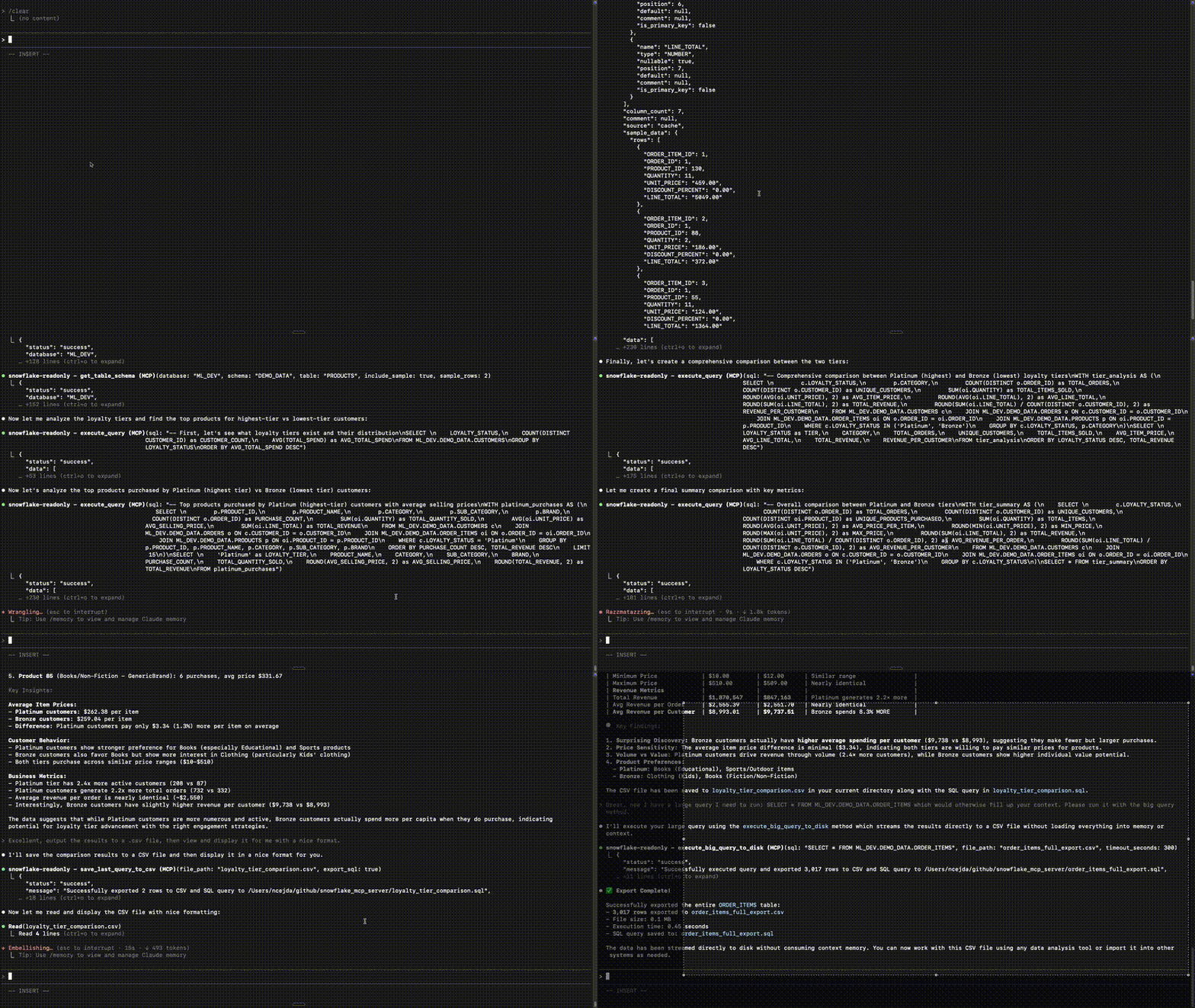
Features
- 🔒 Strict Read-Only Access: Multiple layers of protection against write operations
- 🔑 Flexible Authentication: Browser-based SSO or headless key-pair auth via credential file
- 💾 Smart Caching: 5-day schema cache for fast metadata access, reducing generic Snowflake schema queries and credit usage
- 📄 TSV Export: Write query results directly to TSV files, at any size
- 🛡️ Query Validation: Every query is validated as read-only before execution
- 🎯 Responsible Token Management: Lightweight outputs to minimize token usage
🚀 Easy Setup For LLM Agents
Already in Claude Code, OpenCode, Cursor, or another AI coding agent? Paste this into your agent:
Set up the Snowflake MCP server for me by following this guide:
https://raw.githubusercontent.com/ncejda-g2/snowflake_mcp_server/main/docs/guide/agent-setup.md
Your agent will walk you through everything interactively — including installing prerequisites. No manual config editing required.
Manual setup & from-source installuvx (Recommended — no Node.js required)
Just configure your MCP client using the examples in the Configuration section below.
Requires uv (curl -LsSf https://astral.sh/uv/install.sh | sh).
npx (requires Node.js)
Just configure your MCP client using the examples in the Configuration section below.
From Source
git clone [email protected]:ncejda-g2/snowflake_mcp_server.git
cd snowflake_mcp_server
python3 -m venv snowflake_mcp_env
source snowflake_mcp_env/bin/activate  # On Windows: snowflake_mcp_env\Scripts\activate
pip install -r requirements.txt
Configuration
Claude CodeEdit your ~/.claude.json file:
Using uvx (Recommended):
{
  "mcpServers": {
    "snowflake-readonly": {
      "command": "uvx",
      "args": ["snowflake-readonly-mcp"],
      "env": {
        "SNOWFLAKE_ACCOUNT": "your-account",
        "SNOWFLAKE_USERNAME": "[email protected]",
        "SNOWFLAKE_WAREHOUSE": "YOUR_WAREHOUSE",
        "SNOWFLAKE_ROLE": "YOUR_ROLE",
        "SNOWFLAKE_CREDENTIAL_FILE": "/path/to/credentials.json"  // optional — omit to use browser SSO
      }
    }
  }
}
Using npx:
{
  "mcpServers": {
    "snowflake-readonly": {
      "command": "npx",
      "args": ["-y", "snowflake-readonly-mcp"],
      "env": {
        "SNOWFLAKE_ACCOUNT": "your-account",
        "SNOWFLAKE_USERNAME": "[email protected]",
        "SNOWFLAKE_WAREHOUSE": "YOUR_WAREHOUSE",
        "SNOWFLAKE_ROLE": "YOUR_ROLE",
        "SNOWFLAKE_CREDENTIAL_FILE": "/path/to/credentials.json"  // optional — omit to use browser SSO
      }
    }
  }
}
Using local clone:
{
  "mcpServers": {
    "snowflake-readonly": {
      "command": "/path/to/snowflake_mcp_server/snowflake_mcp_env/bin/python",
      "args": ["/path/to/snowflake_mcp_server/main.py"],
      "env": {
        "SNOWFLAKE_ACCOUNT": "your-account",
        "SNOWFLAKE_USERNAME": "[email protected]",
        "SNOWFLAKE_WAREHOUSE": "YOUR_WAREHOUSE",
        "SNOWFLAKE_ROLE": "YOUR_ROLE",
        "SNOWFLAKE_CREDENTIAL_FILE": "/path/to/credentials.json"  // optional — omit to use browser SSO
      }
    }
  }
}
Replace:
/path/to/snowflake_mcp_server: Absolute path to your cloned repository (local clone only)your-account: Your Snowflake account identifier (e.g.,xy12345.us-east-1)[email protected]: Your Snowflake usernameYOUR_WAREHOUSE: Your Snowflake warehouse nameYOUR_ROLE: Your Snowflake role (e.g.,ANALYST,PUBLIC)SNOWFLAKE_CREDENTIAL_FILE(optional): Path to a JSON credential file for headless key-pair auth (omit to use browser SSO)
One-click install: Download the latest .mcpb extension and double-click it. Claude Desktop will prompt you for your Snowflake credentials.
Edit your configuration file:
- macOS:
~/Library/Application Support/Claude/claude_desktop_config.json - Windows:
%APPDATA%\Claude\claude_desktop_config.json - Linux:
~/.config/claude/claude_desktop_config.json
{
  "mcpServers": {
    "snowflake-readonly": {
      "command": "uvx",
      "args": ["snowflake-readonly-mcp"],
      "env": {
        "SNOWFLAKE_ACCOUNT": "your-account",
        "SNOWFLAKE_USERNAME": "[email protected]",
        "SNOWFLAKE_WAREHOUSE": "YOUR_WAREHOUSE",
        "SNOWFLAKE_ROLE": "YOUR_ROLE"
      }
    }
  }
}
Requires uv.
CursorEdit your Cursor settings:
Using uvx (Recommended):
{
  "mcpServers": {
    "snowflake-readonly": {
      "command": "uvx",
      "args": ["snowflake-readonly-mcp"],
      "env": {
        "SNOWFLAKE_ACCOUNT": "your-account",
        "SNOWFLAKE_USERNAME": "[email protected]",
        "SNOWFLAKE_WAREHOUSE": "YOUR_WAREHOUSE",
        "SNOWFLAKE_ROLE": "YOUR_ROLE",
        "SNOWFLAKE_CREDENTIAL_FILE": "/path/to/credentials.json"  // optional — omit to use browser SSO
      }
    }
  }
}
Using npx:
{
  "mcpServers": {
    "snowflake-readonly": {
      "command": "npx",
      "args": ["-y", "snowflake-readonly-mcp"],
      "env": {
        "SNOWFLAKE_ACCOUNT": "your-account",
        "SNOWFLAKE_USERNAME": "[email protected]",
        "SNOWFLAKE_WAREHOUSE": "YOUR_WAREHOUSE",
        "SNOWFLAKE_ROLE": "YOUR_ROLE",
        "SNOWFLAKE_CREDENTIAL_FILE": "/path/to/credentials.json"  // optional — omit to use browser SSO
      }
    }
  }
}
Using local clone:
{
  "mcpServers": {
    "snowflake-readonly": {
      "command": "/path/to/snowflake_mcp_server/snowflake_mcp_env/bin/python",
      "args": ["/path/to/snowflake_mcp_server/main.py"],
      "env": {
        "SNOWFLAKE_ACCOUNT": "your-account",
        "SNOWFLAKE_USERNAME": "[email protected]",
        "SNOWFLAKE_WAREHOUSE": "YOUR_WAREHOUSE",
        "SNOWFLAKE_ROLE": "YOUR_ROLE",
        "SNOWFLAKE_CREDENTIAL_FILE": "/path/to/credentials.json"  // optional — omit to use browser SSO
      }
    }
  }
}
Replace:
/path/to/snowflake_mcp_server: Absolute path to your cloned repository (local clone only)your-account: Your Snowflake account identifier (e.g.,xy12345.us-east-1)[email protected]: Your Snowflake usernameYOUR_WAREHOUSE: Your Snowflake warehouse nameYOUR_ROLE: Your Snowflake role (e.g.,ANALYST,PUBLIC)SNOWFLAKE_CREDENTIAL_FILE(optional): Path to a JSON credential file for headless key-pair auth (omit to use browser SSO)
Edit your ~/.config/opencode/opencode.json file (global) or opencode.json in your project root (project-level):
Note: OpenCode uses
"mcp"(not"mcpServers"),"command"as a single array (not separatecommand/args), and"environment"(not"env").
Using uvx (Recommended):
{
  "$schema": "https://opencode.ai/config.json",
  "mcp": {
    "snowflake-readonly": {
      "type": "local",
      "command": ["uvx", "snowflake-readonly-mcp"],
      "environment": {
        "SNOWFLAKE_ACCOUNT": "your-account",
        "SNOWFLAKE_USERNAME": "[email protected]",
        "SNOWFLAKE_WAREHOUSE": "YOUR_WAREHOUSE",
        "SNOWFLAKE_ROLE": "YOUR_ROLE",
        "SNOWFLAKE_CREDENTIAL_FILE": "/path/to/credentials.json"  // optional — omit to use browser SSO
      }
    }
  }
}
Using npx:
{
  "$schema": "https://opencode.ai/config.json",
  "mcp": {
    "snowflake-readonly": {
      "type": "local",
      "command": ["npx", "-y", "snowflake-readonly-mcp"],
      "environment": {
        "SNOWFLAKE_ACCOUNT": "your-account",
        "SNOWFLAKE_USERNAME": "[email protected]",
        "SNOWFLAKE_WAREHOUSE": "YOUR_WAREHOUSE",
        "SNOWFLAKE_ROLE": "YOUR_ROLE",
        "SNOWFLAKE_CREDENTIAL_FILE": "/path/to/credentials.json"  // optional — omit to use browser SSO
      }
    }
  }
}
Using local clone:
{
  "$schema": "https://opencode.ai/config.json",
  "mcp": {
    "snowflake-readonly": {
      "type": "local",
      "command": ["/path/to/snowflake_mcp_server/snowflake_mcp_env/bin/python", "/path/to/snowflake_mcp_server/main.py"],
      "environment": {
        "SNOWFLAKE_ACCOUNT": "your-account",
        "SNOWFLAKE_USERNAME": "[email protected]",
        "SNOWFLAKE_WAREHOUSE": "YOUR_WAREHOUSE",
        "SNOWFLAKE_ROLE": "YOUR_ROLE",
        "SNOWFLAKE_CREDENTIAL_FILE": "/path/to/credentials.json"  // optional — omit to use browser SSO
      }
    }
  }
}
Replace:
/path/to/snowflake_mcp_server: Absolute path to your cloned repository (local clone only)your-account: Your Snowflake account identifier (e.g.,xy12345.us-east-1)[email protected]: Your Snowflake usernameYOUR_WAREHOUSE: Your Snowflake warehouse nameYOUR_ROLE: Your Snowflake role (e.g.,ANALYST,PUBLIC)SNOWFLAKE_CREDENTIAL_FILE(optional): Path to a JSON credential file for headless key-pair auth (omit to use browser SSO)
Edit your ~/.gemini/settings.json file:
Using uvx (Recommended):
{
  "mcpServers": {
    "snowflake-readonly": {
      "command": "uvx",
      "args": ["snowflake-readonly-mcp"],
      "env": {
        "SNOWFLAKE_ACCOUNT": "your-account",
        "SNOWFLAKE_USERNAME": "[email protected]",
        "SNOWFLAKE_WAREHOUSE": "YOUR_WAREHOUSE",
        "SNOWFLAKE_ROLE": "YOUR_ROLE",
        "SNOWFLAKE_CREDENTIAL_FILE": "/path/to/credentials.json"  // optional — omit to use browser SSO
      }
    }
  }
}
Using npx:
{
  "mcpServers": {
    "snowflake-readonly": {
      "command": "npx",
      "args": ["-y", "snowflake-readonly-mcp"],
      "env": {
        "SNOWFLAKE_ACCOUNT": "your-account",
        "SNOWFLAKE_USERNAME": "[email protected]",
        "SNOWFLAKE_WAREHOUSE": "YOUR_WAREHOUSE",
        "SNOWFLAKE_ROLE": "YOUR_ROLE",
        "SNOWFLAKE_CREDENTIAL_FILE": "/path/to/credentials.json"  // optional — omit to use browser SSO
      }
    }
  }
}
Using local clone:
{
  "mcpServers": {
    "snowflake-readonly": {
      "command": "/path/to/snowflake_mcp_server/snowflake_mcp_env/bin/python",
      "args": ["/path/to/snowflake_mcp_server/main.py"],
      "env": {
        "SNOWFLAKE_ACCOUNT": "your-account",
        "SNOWFLAKE_USERNAME": "[email protected]",
        "SNOWFLAKE_WAREHOUSE": "YOUR_WAREHOUSE",
        "SNOWFLAKE_ROLE": "YOUR_ROLE",
        "SNOWFLAKE_CREDENTIAL_FILE": "/path/to/credentials.json"  // optional — omit to use browser SSO
      }
    }
  }
}
Replace:
/path/to/snowflake_mcp_server: Absolute path to your cloned repository (local clone only)your-account: Your Snowflake account identifier (e.g.,xy12345.us-east-1)[email protected]: Your Snowflake usernameYOUR_WAREHOUSE: Your Snowflake warehouse nameYOUR_ROLE: Your Snowflake role (e.g.,ANALYST,PUBLIC)SNOWFLAKE_CREDENTIAL_FILE(optional): Path to a JSON credential file for headless key-pair auth (omit to use browser SSO)
Available Commands
The server provides powerful tools for interacting with Snowflake:
| Tool | Description |
|---|---|
refresh_catalog |
Scan and cache all database schemas |
show_tables |
Browse database hierarchy with pattern filters (like SHOW TABLES) |
find_tables |
Search for tables by keyword across all databases |
describe_table |
View detailed column information (like DESCRIBE TABLE) |
execute_query |
Run read-only SQL queries (inline, or auto-spill large results to a temp file) |
execute_query_to_file |
Execute a query and write its results to a TSV / CSV file at a chosen path (any size) |
📚 Documentation
- Changelog - Version history and updates
Built with ❄️ for the AI + Data community
Reviews (0)
Sign in to leave a review.
Leave a reviewNo results found