claude-usage
Health Uyari
- License — License: MIT
- Description — Repository has a description
- Active repo — Last push 0 days ago
- Low visibility — Only 6 GitHub stars
Code Basarisiz
- rm -rf — Recursive force deletion command in uninstall.sh
Permissions Gecti
- Permissions — No dangerous permissions requested
This macOS tool displays your Claude session and weekly usage limits as progress bars in the menu bar via SwiftBar. It runs a local background daemon to fetch your usage statistics.
Security Assessment
The tool directly accesses your Google Chrome cookie database to extract your claude.ai session cookie. While it only makes network requests to Anthropic's official API and claims no third-party telemetry, accessing browser cookies is a highly sensitive action that bypasses standard authentication boundaries. The automated scan flagged a recursive force deletion command (`rm -rf`) inside the `uninstall.sh` script, which is a potential risk if the script is improperly configured or modified. There are no hardcoded secrets or dangerous explicit permissions requested. Overall risk rating: Medium.
Quality Assessment
The project is actively maintained, with its last push occurring today, and is covered by the permissive MIT license. The codebase is incredibly small and auditable, consisting of only about 600 lines of Python across four files. However, it currently has very low community visibility and trust, having accumulated only 6 GitHub stars.
Verdict
Use with caution: the minimal codebase and local-only network requests are positive signs, but extracting browser cookies and using force-delete scripts require careful user review before installing.
Shows your Claude session and weekly limits as progress bars in the macOS menu bar
Claude Usage Monitor



Your Claude session and weekly limits as progress bars in the macOS menu bar, so you stop opening a browser tab just to check.

Why
I kept a Claude tab pinned just to see how close I was to the weekly limit, and I got tired of it. Now it's in the menu bar.
How it works
A small daemon grabs your Claude session cookie from Chrome, hits the Claude API, and writes the result to a file. A SwiftBar plugin reads that file and draws the bars.
You don't paste tokens anywhere, and there's no browser extension. If you're signed into claude.ai in Chrome, it works.
Requirements
- macOS
- Homebrew
- Google Chrome, signed into claude.ai
Install
git clone https://github.com/ncreasor/claude-usage.git
cd claude-usage
./install.sh
The installer grabs Python 3.13 and SwiftBar via Homebrew if you don't have them, starts the background daemon, and adds the bars to your menu.
Settings
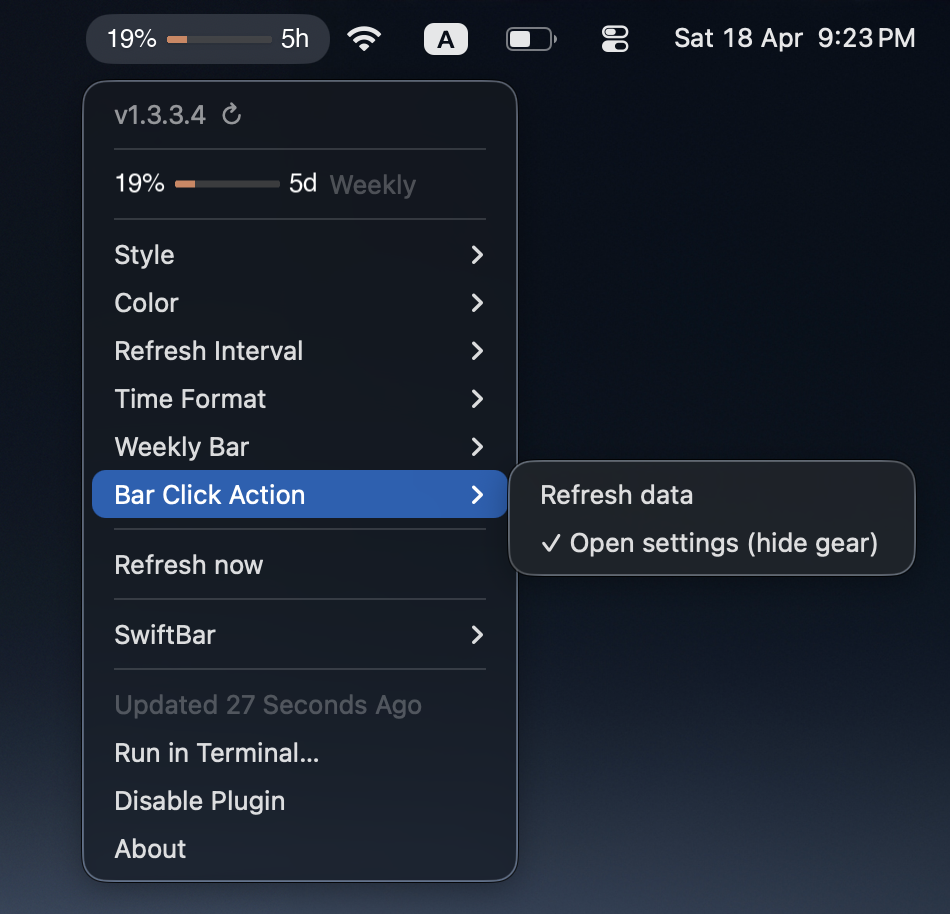
Click ⚙ in the menu bar to change settings. Alternatively, enable Open settings mode to open the settings panel directly by clicking the progress bars (the gear icon is hidden in this mode).
| Setting | Options |
|---|---|
| Style | Standard (65% ──── 2h) or Compact (bar on top, label below) |
| Color theme | Orange, Blue, Green, Purple, Red, Teal, Pink, Yellow |
| Refresh interval | 1, 2, 5, 10, 15, or 30 minutes |
| Time format | Rounded (5m, 2h) or Exact (4m, 1h23m, 2d6h) |
| Weekly bar | Show in menu bar or hide (still visible inside settings) |
| Bar click action | Refresh data or Open settings (hides the gear icon) |
Saved to ~/.claude-usage/config.json.
Uninstall
./uninstall.sh
Stops the daemon, removes the plugins, and asks whether to clear cached data.
Privacy
The only network request goes to Anthropic: GET https://claude.ai/api/organizations/{id}/usage. No third-party server, no telemetry, nothing else phones home.
To read your usage, the daemon opens Chrome's local cookie database — the same cookies Chrome itself sends to claude.ai on every page load.
If you want to check, the whole project is about 600 lines of Python across four files: server.py, claude-usage.py, claude-settings.py, and claude_shared.py. You can read it end to end in a few minutes.
Logs
tail -f ~/Library/Logs/claude-usage.log
Roadmap
Browsers
- Chrome
- Arc
- Safari
- Firefox
Modes
- Subscription
- Api
OS
- MacOS
- Windows
Contributing
Issues and PRs welcome. If it's useful to you, a ⭐ genuinely helps other people find it.
Yorumlar (0)
Yorum birakmak icin giris yap.
Yorum birakSonuc bulunamadi