arkon
Health Pass
- License — License: NOASSERTION
- Description — Repository has a description
- Active repo — Last push 0 days ago
- Community trust — 695 GitHub stars
Code Pass
- Code scan — Scanned 12 files during light audit, no dangerous patterns found
Permissions Pass
- Permissions — No dangerous permissions requested
No AI report is available for this listing yet.
Arkon: Enterprise AI Knowledge Hub & MCP Server. Self-hosted knowledge base for teams to manage RAG contexts, access policies, and AI skills. Connect Claude and other LLMs via Model Context Protocol (MCP) for automated, secure organizational knowledge integration.
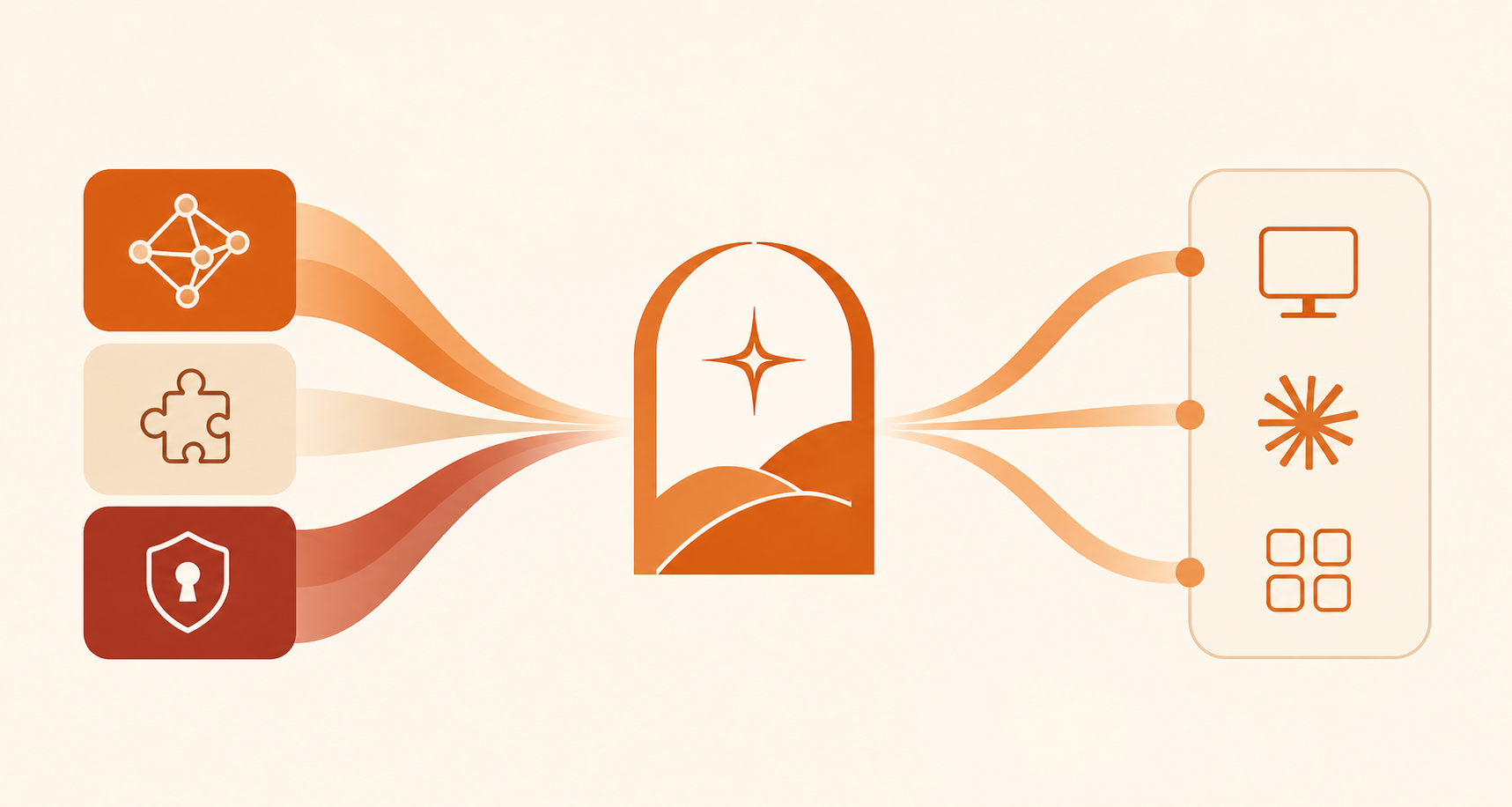
Arkon - Enterprise AI Knowledge Hub
Connect your organization's knowledge to any Ai Client. Self-hosted, on-premise.
Arkon is the central layer between your documents and your employees' AI clients. Upload your SOPs, policies, product specs, and internal docs - Arkon compiles them into a structured knowledge wiki and serves it directly to Claude via MCP. Every employee gets the right context, automatically, without copy-pasting.
Setup Guide · Architecture · Wiki System · MCP & Claude · AI Skills · Access Control
The problem
Most organizations adopt AI team-by-team, with no shared knowledge, inconsistent context, and no visibility into what information Ai Client is actually working with. Every employee manually pastes documents, repeats the same background, and gets different answers depending on what they remembered to include.
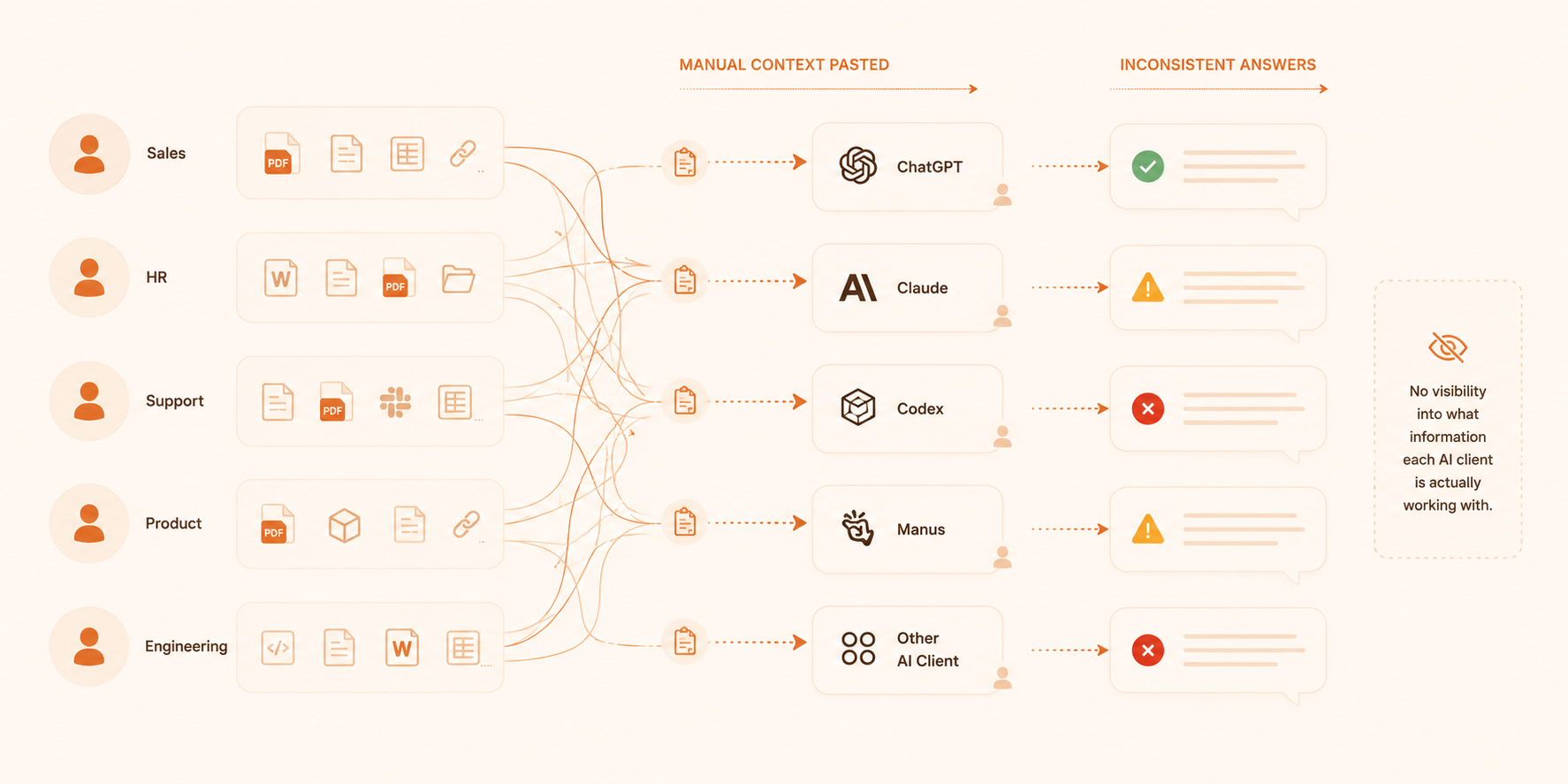
Arkon treats your AI client as a managed organizational resource - not a personal chatbot.
How it works
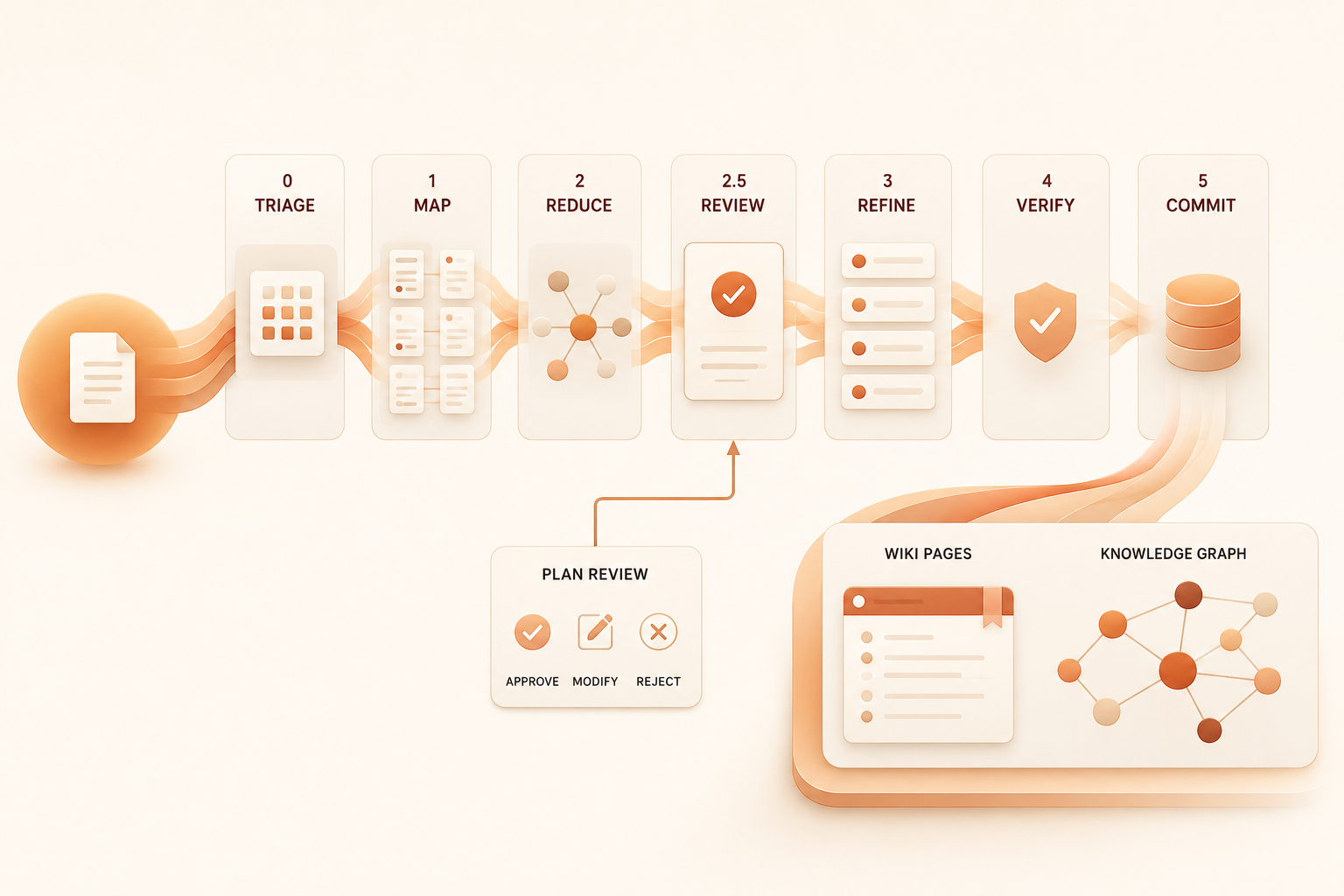
Knowledge compounds. Every document you add enriches the existing wiki rather than creating isolated fragments. By the time an employee asks Claude a question, the answer has already been synthesized from dozens of sources.
Features
Knowledge Wiki
Documents are compiled into a persistent, interlinked wiki — not just indexed. The MRP pipeline (MAP → REDUCE → PLAN → REFINE → VERIFY) reads every section of every document, traces every claim back to its source, and lets an editor review the compilation plan before any pages are written. Each page covers a specific entity, concept, or topic. Pages cross-reference each other. The wiki grows smarter as more documents are added.
- Three-panel wiki browser: page tree, content, backlinks & outlinks
- Full-text and semantic search
- Knowledge graph visualization
- Organize by knowledge type (SOP, Product, HR Policy, etc.)
- Version history and rollback for every page
- Draft proposal → editor review → approval workflow
Workspaces
Cross-functional knowledge contexts for projects, clients, or initiatives.
Create a workspace → add members from any department → attach documents. Each workspace has its own scoped wiki, document list, and member roster. Members see their workspace knowledge automatically through Claude.
- Role-based membership: Viewer, Contributor, Editor, Admin
- Scoped wiki and document management
- Contributors propose wiki edits; editors review and approve
AI Skills
Upload custom agent packages and make them available to employees through Claude. Skills are versioned, department-scoped, and distributed via MCP.
MCP Server
Employees connect Claude Desktop (or any MCP client) to Arkon using a personal token. Claude gets access to the compiled wiki, raw source documents, and AI skills - all filtered to the employee's permission scope.
→ See MCP & Claude for the full tool reference.
Access Control
Fine-grained RBAC at department level plus workspace membership roles. Admins define roles with granular permissions; employees inherit access based on department or explicit assignment.
→ See Access Control for the full permission model.
Quick Start (Docker)
Prerequisites: Docker, Docker Compose, an AI provider API key (Google, OpenAI, or Anthropic).
git clone https://github.com/nduckmink/arkon.git
cd arkon
cp .env.docker.example .env.docker
Edit .env.docker - set at minimum:
SECRET_KEY=<run: python -c "import secrets; print(secrets.token_urlsafe(32))">
[email protected]
DEFAULT_ADMIN_PASSWORD=your-secure-password
docker compose --env-file .env.docker up -d --build
Open http://localhost:3119 and log in with your admin credentials.
Go to Settings → configure your embedding model, LLM, and (optionally) vision model. Then upload your first document from Knowledge Base.
→ See Setup Guide for the full walkthrough including development mode.
Connecting Claude
Once an employee account is created and an MCP token is generated:
{
  "mcpServers": {
    "arkon": {
      "url": "https://your-arkon-server/mcp",
      "headers": {
        "Authorization": "Bearer ark_xxxxxxxxxxxx"
      }
    }
  }
}
Add this to claude_desktop_config.json and restart Claude Desktop. The employee's compiled knowledge is immediately available.
→ See MCP & Claude for the complete setup and tool reference.
Architecture
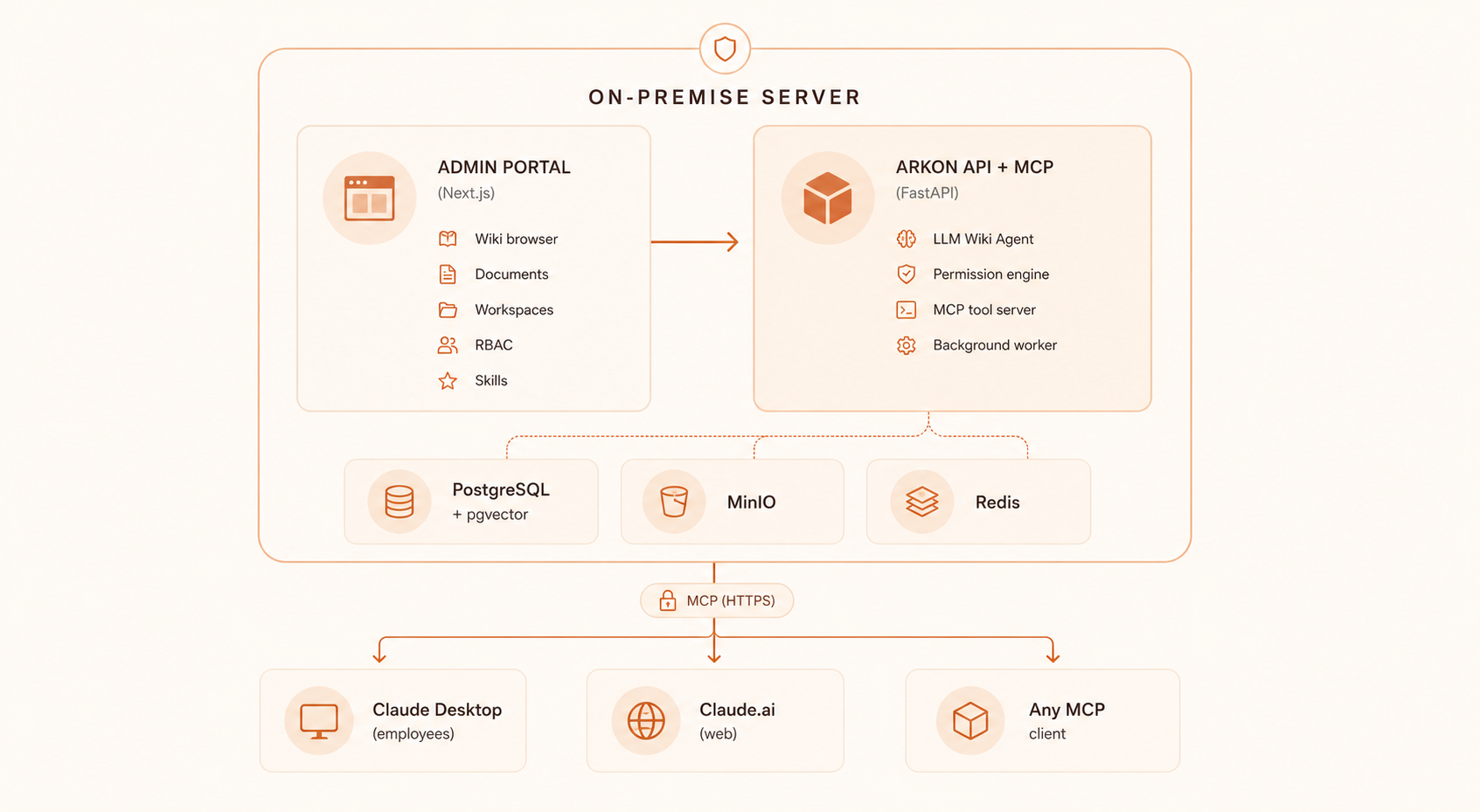
Stack: FastAPI · PostgreSQL + pgvector · Redis (arq) · MinIO · Next.js · Tailwind CSS
AI providers (your choice): Google · OpenAI · Anthropic · Ollama · Voyage · Cohere
Outbound network: configured AI provider only. No telemetry, no external calls.
→ See Architecture for the full technical breakdown.
Roadmap
- MRP Pipeline - deterministic MAP→REDUCE→PLAN→REFINE→VERIFY compilation with full document coverage, traceable citations, and human plan review
- Wiki browser - three-panel layout with graph visualization
- MCP Server with scoped knowledge access
- Ingestion pipeline - PDF, DOCX, DOC, URLs, images with vision captions
- Workspaces - scoped wiki, documents, and members
- Wiki draft & revision system - propose, review, approve, rollback
- AI Skills - versioned, department-scoped agent packages
- Full RBAC - department permissions + workspace membership roles
- Audit log
- Arkon CLI - one-command employee setup
- Notification system for draft review requests
- Usage analytics dashboard
License
Arkon is licensed under the PolyForm Internal Use License 1.0.0.
Free to use for your organization's internal business operations. You may not offer Arkon as a service to third parties.
Need a custom integration or enterprise support? We help organizations integrate Claude, custom AI agents, and MCP servers into their existing infrastructure - from connecting to internal databases and legacy systems to building purpose-built agents for specific business processes.
Reviews (0)
Sign in to leave a review.
Leave a reviewNo results found