dex
Health Uyari
- License — License: MIT
- Description — Repository has a description
- Active repo — Last push 0 days ago
- Low visibility — Only 5 GitHub stars
Code Gecti
- Code scan — Scanned 12 files during light audit, no dangerous patterns found
Permissions Gecti
- Permissions — No dangerous permissions requested
Bu listing icin henuz AI raporu yok.
A personal AI agent on Cloudflare: Pi Durable, generative UI, ClinePass or OpenCode Go models, and a cloud VM per chat you can watch live
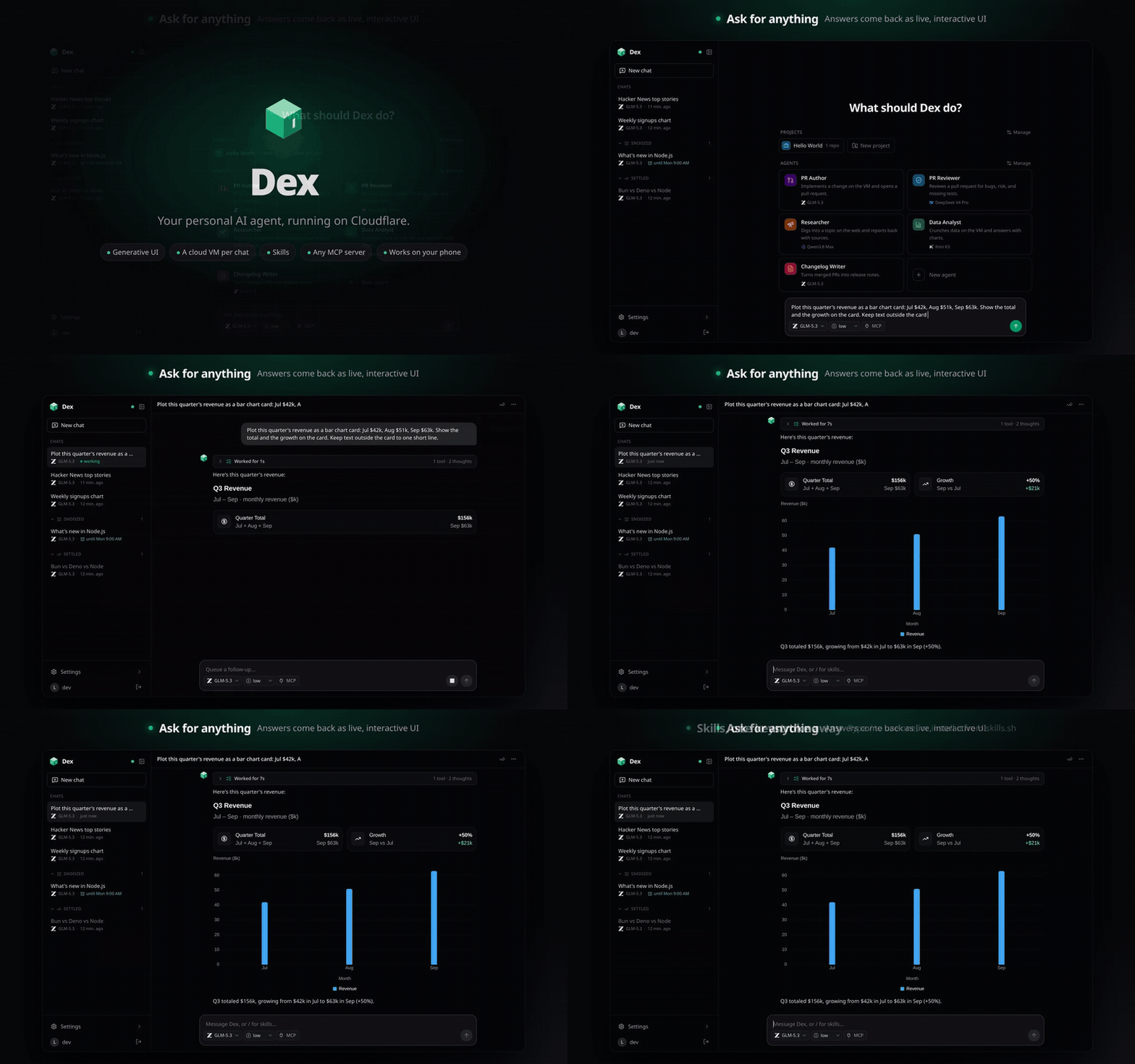
trydex.dev · ▶ Watch the 2-minute tour · generative UI, ClinePass, OpenCode Go, and ChatGPT, a cloud VM per chat you can watch while you chat, GitHub repos, skills, MCP, usage, and the phone app
Dex is a personal agent harness. Each user gets an agent in a Cloudflare Durable Object running Pi Durable, thinking with models through ClinePass, OpenCode Go, or a ChatGPT plan (Sign in with ChatGPT), answering with generative UI from OpenUI, and doing real work on its own cloud VM from boat.dev. Built with TanStack Start, Effect, and the Cloudflare Agents SDK, installable on your phone, and with native apps for iPhone, iPad, and Android. See it at trydex.dev, then deploy your own.
Highlights · Features · Repository · Architecture · Develop · Deploy · Security · Limits · License
Highlights
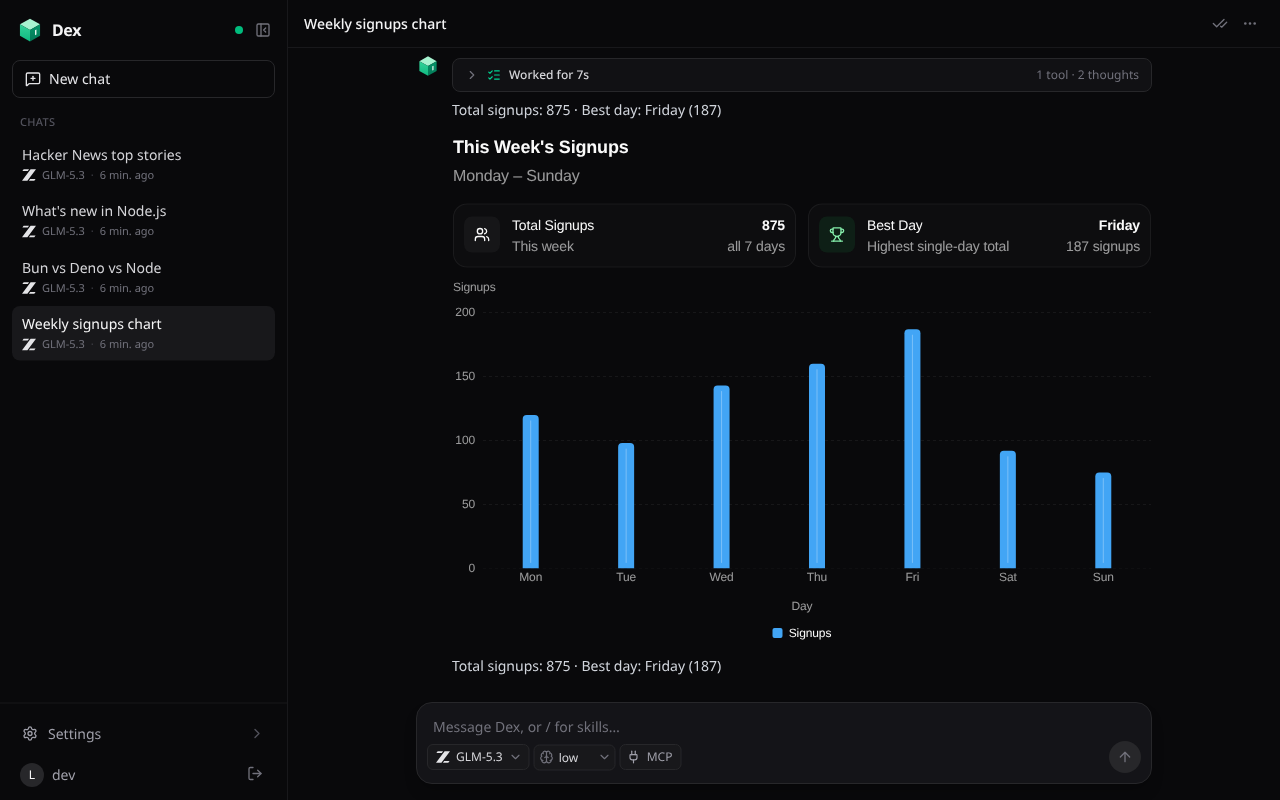 Answers as live UI. Cards, tables, charts, and forms, streamed as the model writes them. |
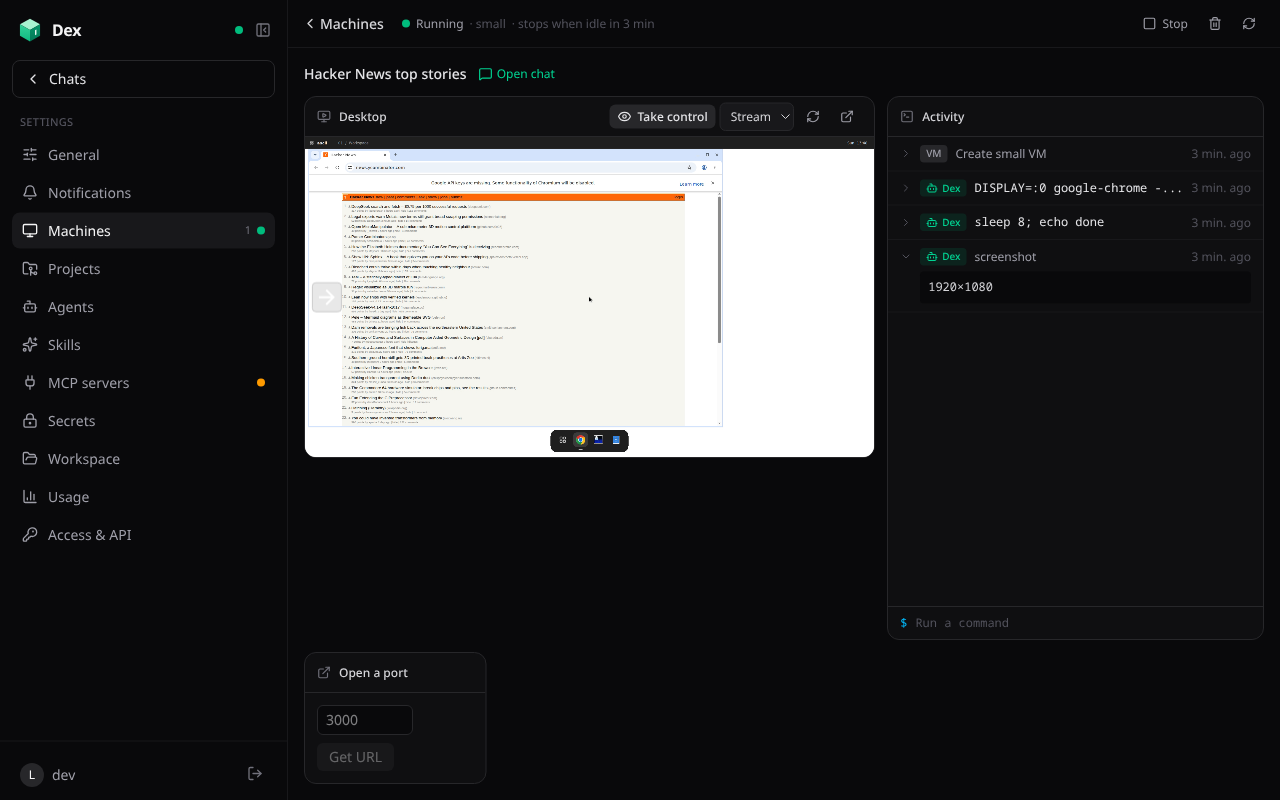 A cloud VM per chat. Watch the desktop and every command live, or take over. |
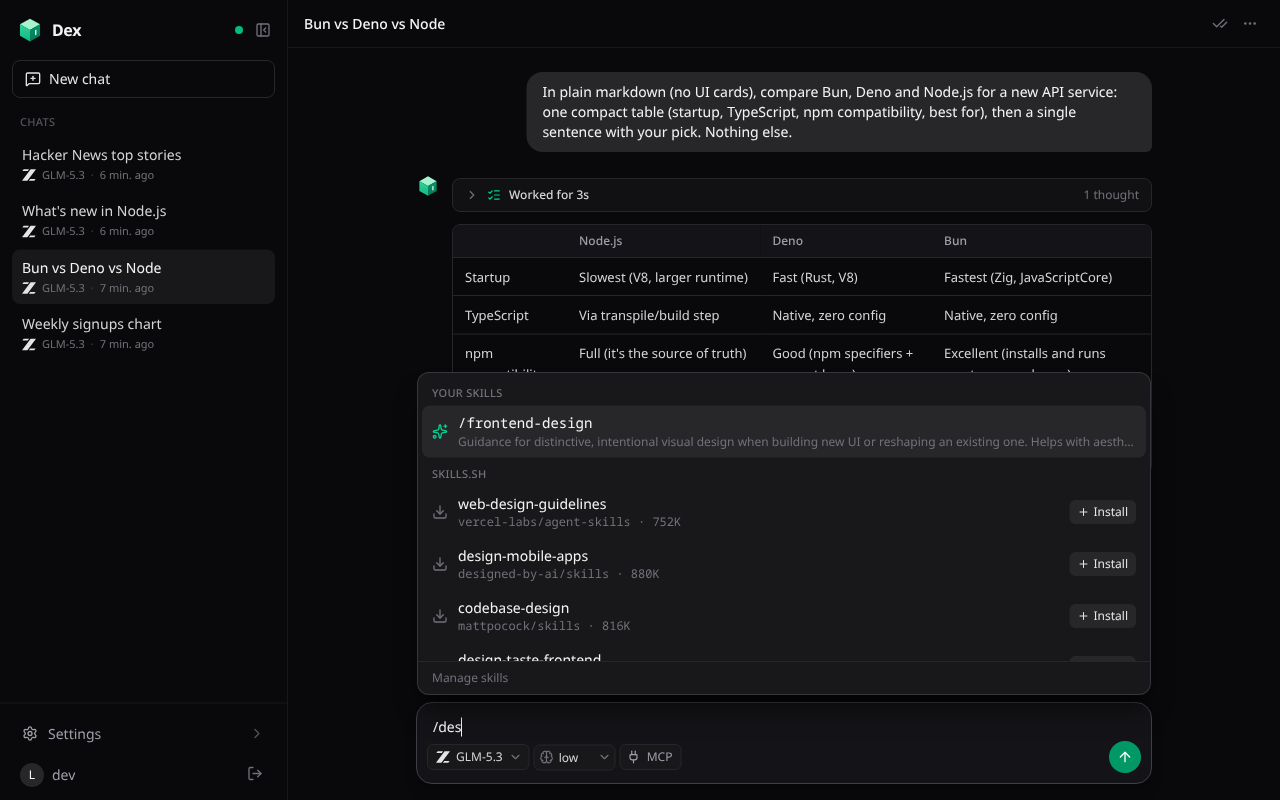 Skills on a keystroke. Type / to use one, or install it from skills.sh in place. |
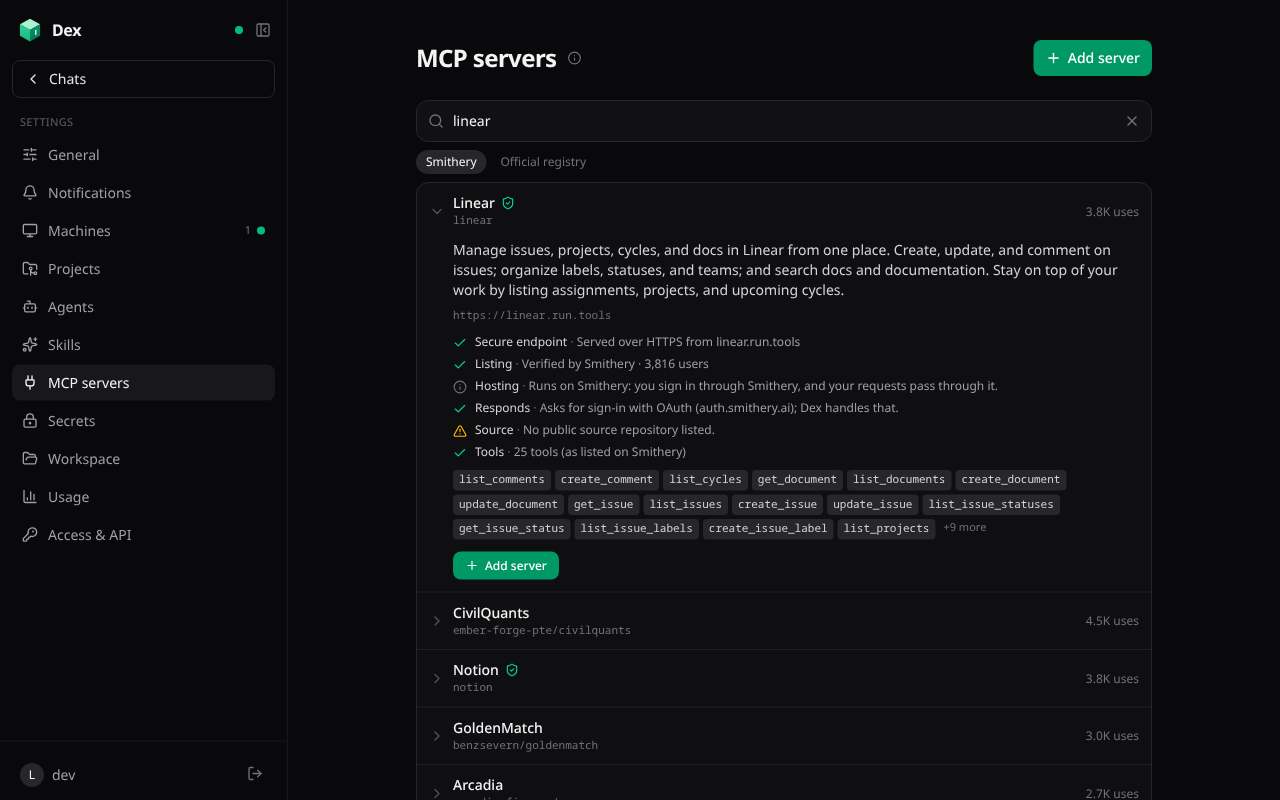 Any MCP server, checked first. Search, see its tools and sign-in, add it in a tap. |
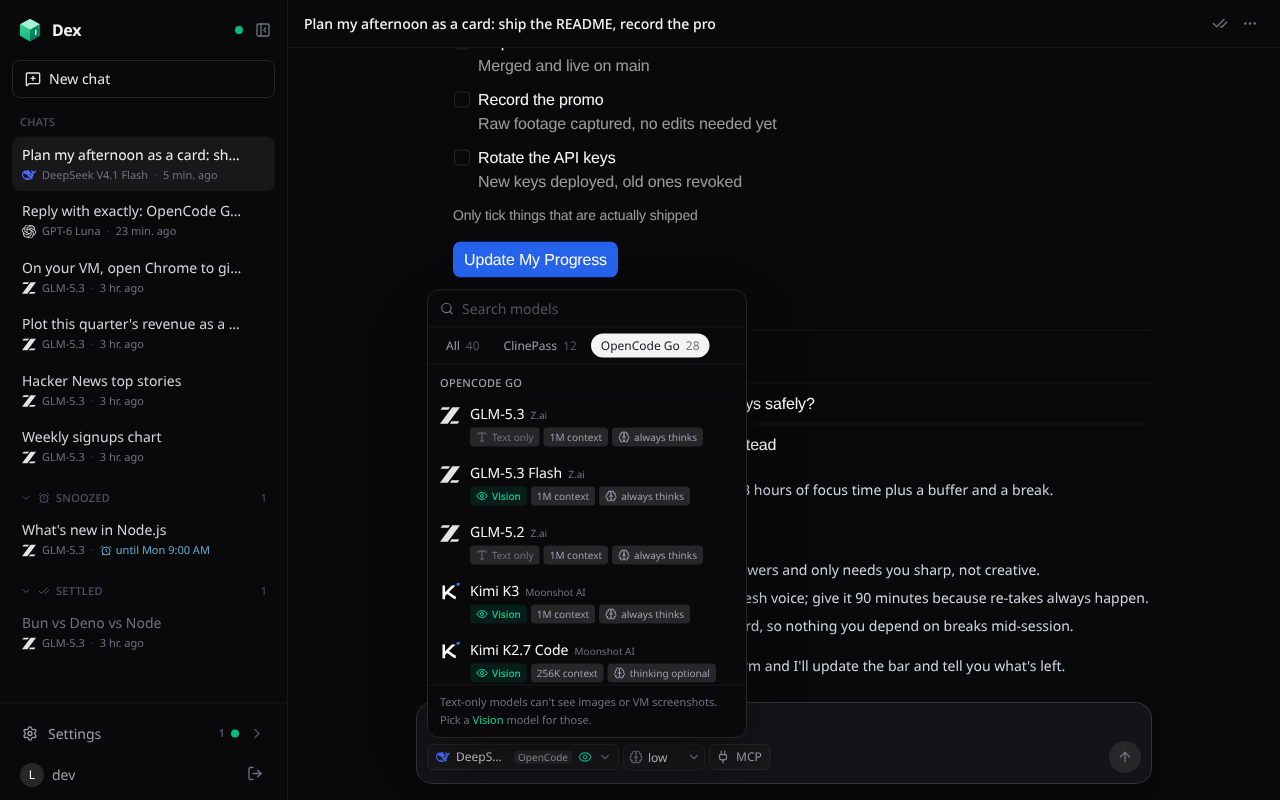 Two model subscriptions. ClinePass and OpenCode Go, nearly 50 models in one searchable menu that stays current. |
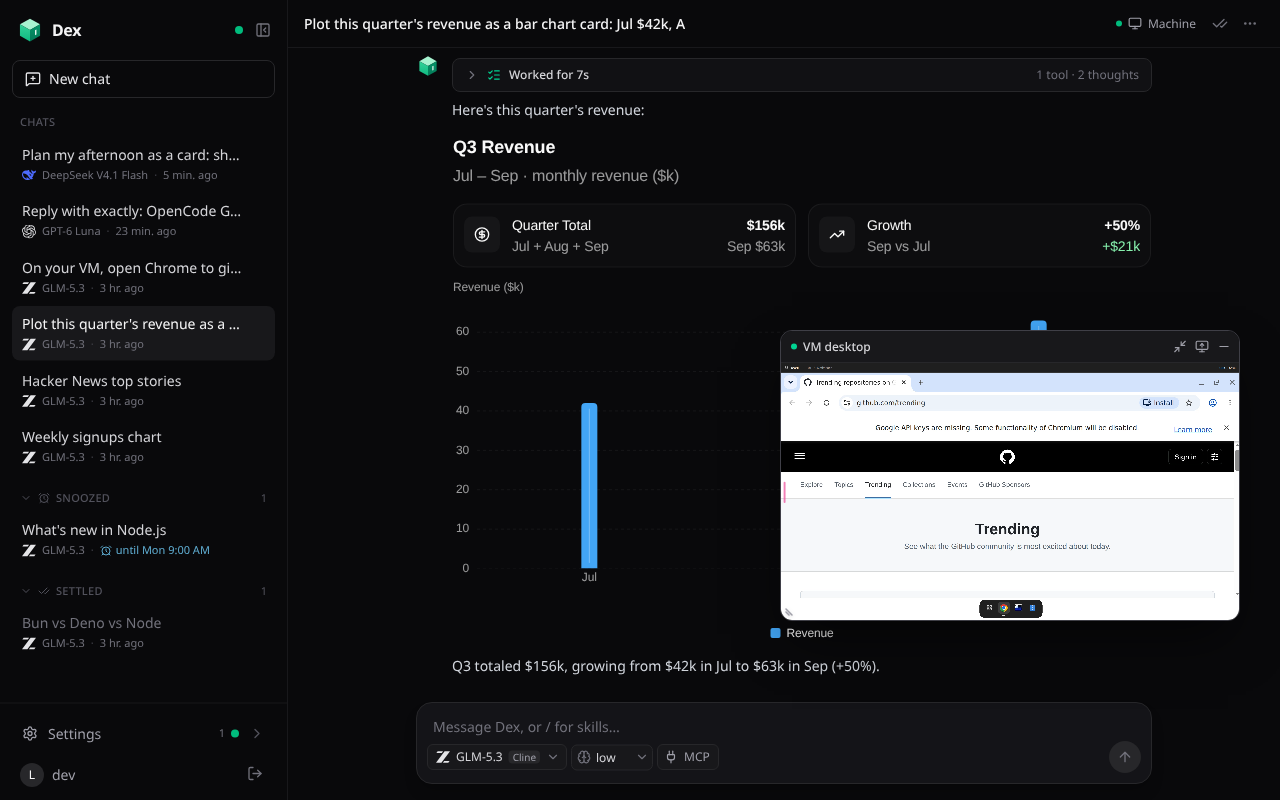 Watch the VM while you chat. A live picture-in-picture you can drag and resize. |
Features
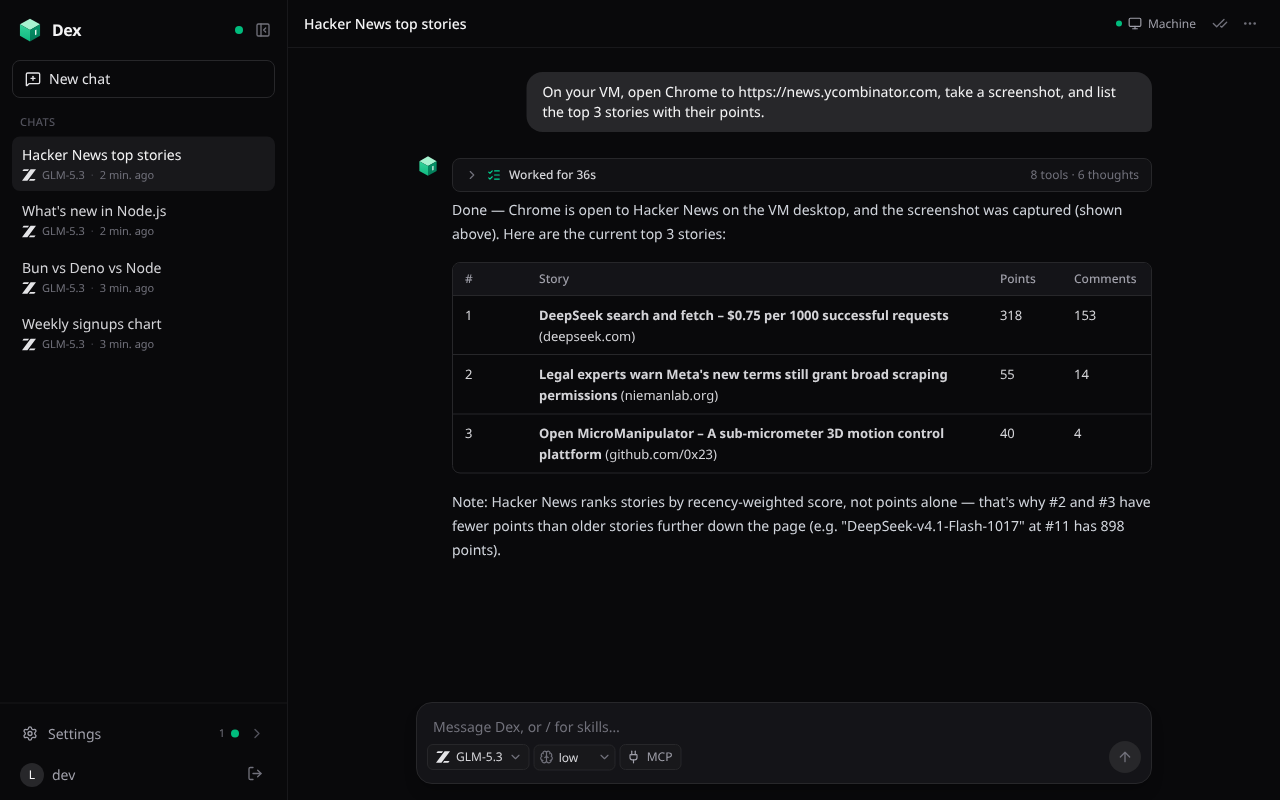
Chat that answers with UI
 |
|
- Three model subscriptions, connect any mix: ClinePass and OpenCode Go (GLM, Kimi, DeepSeek, Qwen, MiniMax, MiMo, Claude Haiku, GPT Luna, Grok, Gemini, and more, each on the API style Go serves it with), and your ChatGPT Plus or Pro plan through Sign in with ChatGPT (GPT models on OpenAI's Responses API; the list is the one your account offers). Pick a model and thinking level per chat from one searchable menu with All / ClinePass / OpenCode Go tabs; free models and ones whose provider trains on your prompts are marked, and the model button says which subscription it's on. An agent or default on a subscription you haven't connected runs the same model on one you have. The list keeps itself current: each agent checks OpenCode Go's live model list and models.dev at startup and hourly while you're using it (or now, from the menu's refresh button), so new models appear, retired ones drop out, and a chat on a retired model continues on your default one. Replies stream live, and runs survive restarts, evictions, and deploys.
- Attach any file to a message (up to 50 MB), with the paperclip, by pasting, or by dragging it onto the composer (and from Photos or Files in the iPhone and Android apps). Images, text and code, PDFs, Office documents, and web pages are prepared for the model without being stored: photos are turned upright, scaled, and re-encoded to fit (Photon), and documents become Markdown (Workers AI). Anything else (audio, video, archives, a scanned PDF) is stored privately in R2 with the chat: the model is told its name, type, and size, and its
get_attachmenttool copies it onto the chat's VM (a single-use download link) to work on it there, e.g. ffmpeg or a transcription model for an mp3 or wav. Models marked Vision see images; a text-only model is told one was attached. Messages show thumbnails and file chips, never the extracted text; a stored file's chip opens it (audio and video play, the rest download), and audio and video are in the chat's files too. - One activity row per reply folds its thinking, tool calls, and in-between notes. While it works it shows what's really happening: the running tool and its arguments ("Running on the VM… npm test"), or the latest line of the model's thinking. Then it reads "Worked for 36s · 8 tools · 6 thoughts"; tap it to see every step. Screenshots in those steps load when you open them, so long VM chats stay light.
- Generative UI with
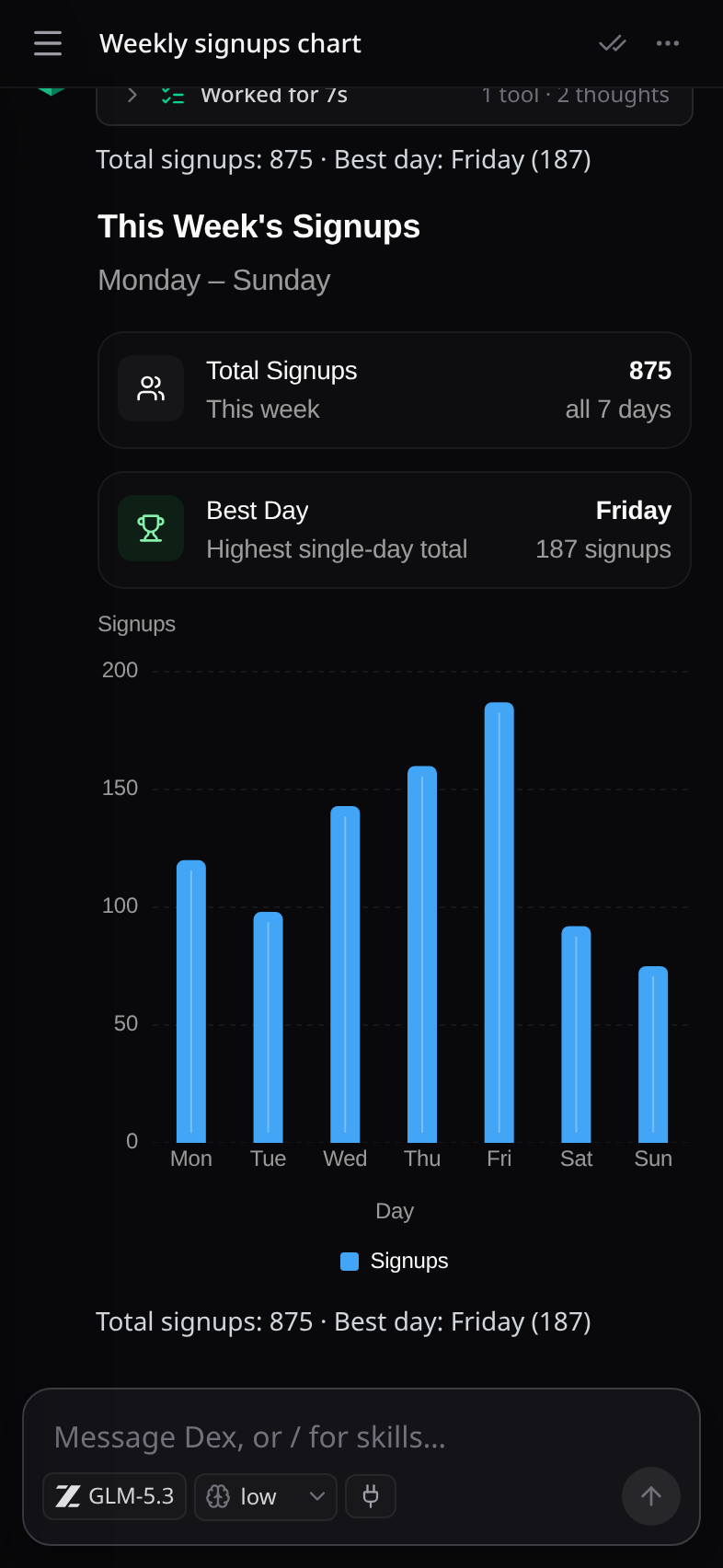
render_ui(OpenUI): cards, stat tiles, tables, charts, and forms. They work without a round trip to the model: filters, tabs, and toggles keep their own state (saved, so a card opens as you left it),Query()shows live Dex data (your chats, VMs, usage, workspace files, and read-only peeks into a chat's running VM: files, git status, ports, processes) that refreshes on its own while the card is on screen, and buttons run app operations withMutation()or open a chat, file, or machine. Live data may only read; anything that deletes or changes settings shows Dex's own description of it to confirm first, button actions appear in the Access page's activity, and the chat hears what you did with its UI along with your next message. A button that messages the chat shows in the transcript as what it does plus the form values you sent with it, not the raw data the model gets. A UI with mistakes offers Fix it. Markdown tables wrap at word boundaries and scroll sideways in their own frame on a phone. - Tools:
bashover a persistent/workspace(a simulated shell with grep, sed, jq, sqlite3, curl), file tools,web_search/web_fetch(Workers AI),schedule_prompt(one-off or cron), anduse_skill. - Memory:
/workspace/MEMORY.mdjoins every chat's system prompt; edits to it are always shown in the chat. - Workspace page: browse and edit the agent's files, with Markdown rendered and HTML previewed live (scripts run, and libraries, fonts, and images load from anywhere, so CDN charts work), plus an Edit tab for the source.
- Titles: a chat starts with its first message as its title; tap the title to rename it, or Regenerate title in the chat's menu to have a fast model name it from its first and latest messages.
- Pinned to the latest message: chats open at the bottom and follow new content, and a round arrow jumps back down when you've scrolled up.
A cloud VM for every chat
|
|
- A chat gets its own Ubuntu VM (boat.dev: root, Docker, Node, Bun, Python, Chrome, and a desktop) the first time the model needs one. Plain questions never start one.
- Tools:
vm_exec(output streams live),vm_computer(click, type, press keys, scroll, or drag on the desktop and get a fresh screenshot back in the same call, with coordinates in the screenshot's own pixels),vm_screenshot(one request, captured with ffmpeg),vm_browser(JavaScript with a Playwright-stylepagein the desktop's own Chrome through browse, a small native binary with no Node or Playwright: a real, visible browser that keeps its logins, with each session's tab shown as it opens so you can watch it, browse's own tools (network capture, recording, dialogs, uploads) asbrowse.<tool>(), screenshots the code returns sent back to the model, andhandoff()when only you can get past a 2FA prompt or CAPTCHA), with only the newest 3 screenshots sent to the model each step so long computer-use runs stay fast,vm_read_file/vm_write_file,vm_expose_port(token-protected URLs),share_media,vm_stop. - Many VMs at once: a chat can run up to 10.
vm_startstarts several together, optionally as copies of one VM the agent already prepared (its disk saved once, then each new VM created from it: files, tools, browser logins, and setup included).vm_agentsgives each VM its own helper agent with its own task, so every VM works at its own pace instead of waiting on the slowest one's step. Helpers run in the background: the chat stays free, can redirect one (vm_agent_send) or stop them (vm_agent_stop), and each helper's report arrives in the chat when it finishes. Watch them all in the chat's control panel. - The Machine page shows the live desktop and every command as it happens. Take control of the desktop, run your own commands, open ports, re-run setup, or stop the agent mid-run to take over.
- Files inside a session: open Files in a chat to browse its VM alongside the conversation (full screen on a phone). The Pierre Trees browser expands folders on demand, includes hidden files, and can navigate anywhere on the VM. Diffs renders source and uncommitted Git changes against HEAD, with Pierre Dark and Light themes. Refresh manually or after the agent finishes; browsing never keeps the VM awake. Previews are read-only, limited to 64 KB per side, and mask saved secrets; credential files and special devices are hidden from preview. The same views are available to chats and MCP through
app_vm_files. - Watch while you chat: while a chat's VM runs, a small floating button opens a picture-in-picture window of its live desktop. Drag the button or the window anywhere, resize the window from a corner (it stays 16:9), and both stay where you leave them. It's for watching, and closing it stops the stream; the Machine page is where you take control.
- The desktop streams three ways: boat's Stream player (Chrome), Selkies (H.264 over a WebSocket, decoded by WebCodecs, so it plays on iPhone and iPad too, and the default wherever Stream can't play), or noVNC. Selkies' client ships with Dex and the stream is relayed by the Worker, which adds the VM's port cookie and password, so neither reaches the browser.
- VM template: Dex saves a prepared disk in your boat account (a named snapshot with the desktop stream, browse, and browse's Chrome extension installed, built on a throwaway VM without your credentials, rebuilt monthly), and new VMs start from it, ready in seconds. While a new revision builds, VMs start from the previous one; until any exists, a VM installs the stream the first time you open its desktop.
- Lifecycle: a VM stops after 5 idle minutes (configurable) and keeps its disk. It's deleted with its chat, and Dex retries every 5 minutes if boat.dev can't be reached then. Requests retry when Cloudflare can't connect, and when boat refuses another running VM, Dex stops the least recently used idle one.
- Your own boat.dev account: everyone connects their own boat.dev key in Settings → Cloud VMs (checked, then stored encrypted). The deployment's
BOAT_API_KEYserves only its owner.
Skills
 |
|
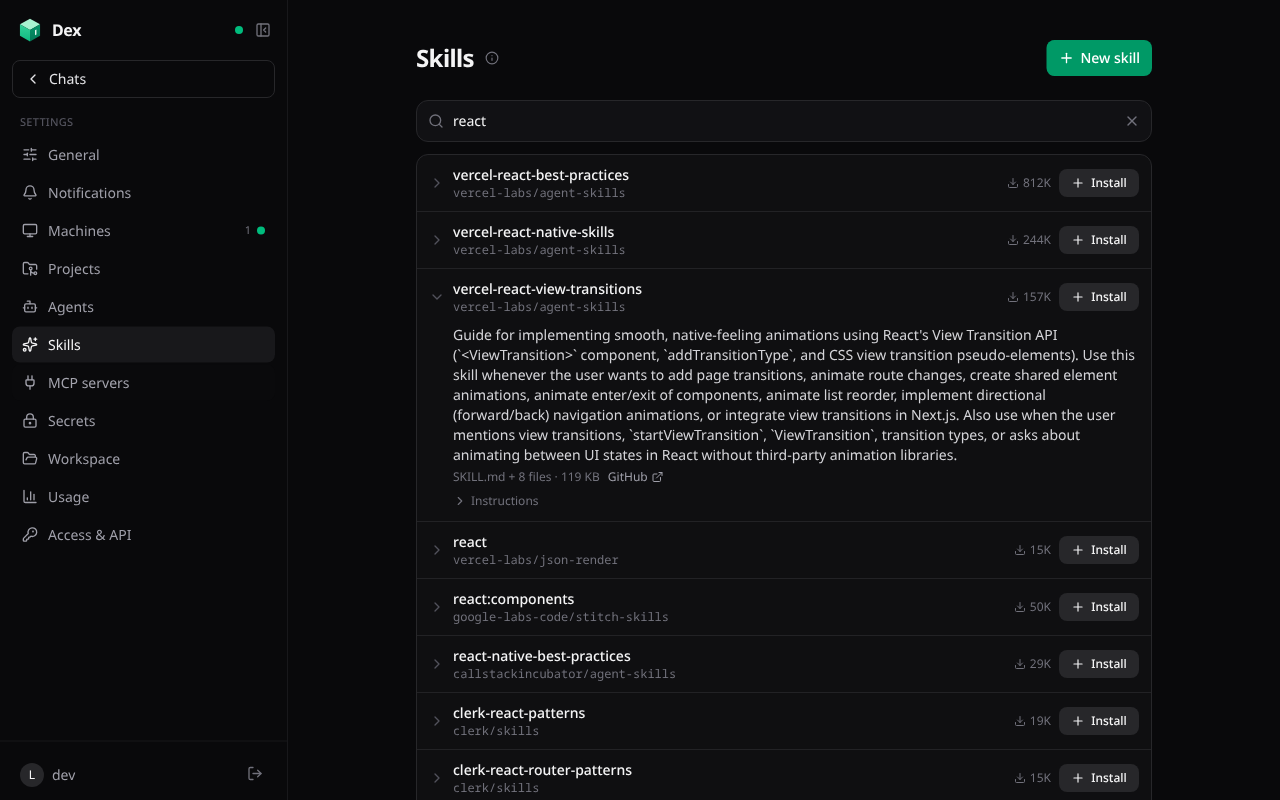
- Skills are instructions for particular tasks: a
SKILL.mdand the files beside it. Install them from skills.sh, or write your own on the Skills page. - Typing
/in any message opens a quick lookup of your skills and skills.sh matches, which install in place. A message starting with/<name>adds that skill's instructions to the chat from then on. - Auto skills are listed for every chat, which loads one with
use_skillwhen a request matches. - Installing reads the skill from its GitHub repo, using your GitHub connection for private repos and a higher rate limit. Text files only, up to 60 files and 1 MB. Expand a search result to read it before installing.
MCP servers: remote, local, searched, and checked
Remote servers (Streamable HTTP or SSE) with no auth, headers (encrypted at rest), or OAuth (dynamic client registration with PKCE; the Agents SDK stores and refreshes tokens). Each server's tools appear as
<server>__<tool>. Chats pick servers in the composer, agents preselect theirs, and servers marked "On for new chats" attach to plain new chats.Search Smithery by default: it answers in well under a second, with use counts and verification, and its servers sign in through Smithery. Or search the official MCP Registry for publishers' own endpoints and packages.
Checks before you add one:
- HTTPS.
- The verified publisher, and whether the endpoint is on their domain.
- A live MCP handshake (open, OAuth, or a required header) and its tool list.
- Its GitHub repo: stars, license, archived, last push.
"Add server" opens the editor prefilled.
Local (stdio) servers: npm, PyPI, and Docker packages, or any command, run on a dedicated "MCP servers" VM. Each runs behind supergateway (stdio to Streamable HTTP, one port each), and Dex connects to its private address like any remote server.
- The VM starts when a chat calls one of the server's tools, tool calls keep it awake, and it stops when idle.
- The MCP VM never gets your GitHub token or saved secrets. Each server gets only the environment variables it lists.
Queue, edit, and steer follow-ups
- Messages you send while a chat is working wait in a collapsible panel above the message box.
- Open the panel to edit, reorder, or delete them, or Steer one into the current run: whatever step the chat is on (a long command, a browser task) is cut short so it reads your message right away, and the run carries on from there.
- One message goes each time a run ends. Stopping a chat holds the queue until you send something.
Inbox triage
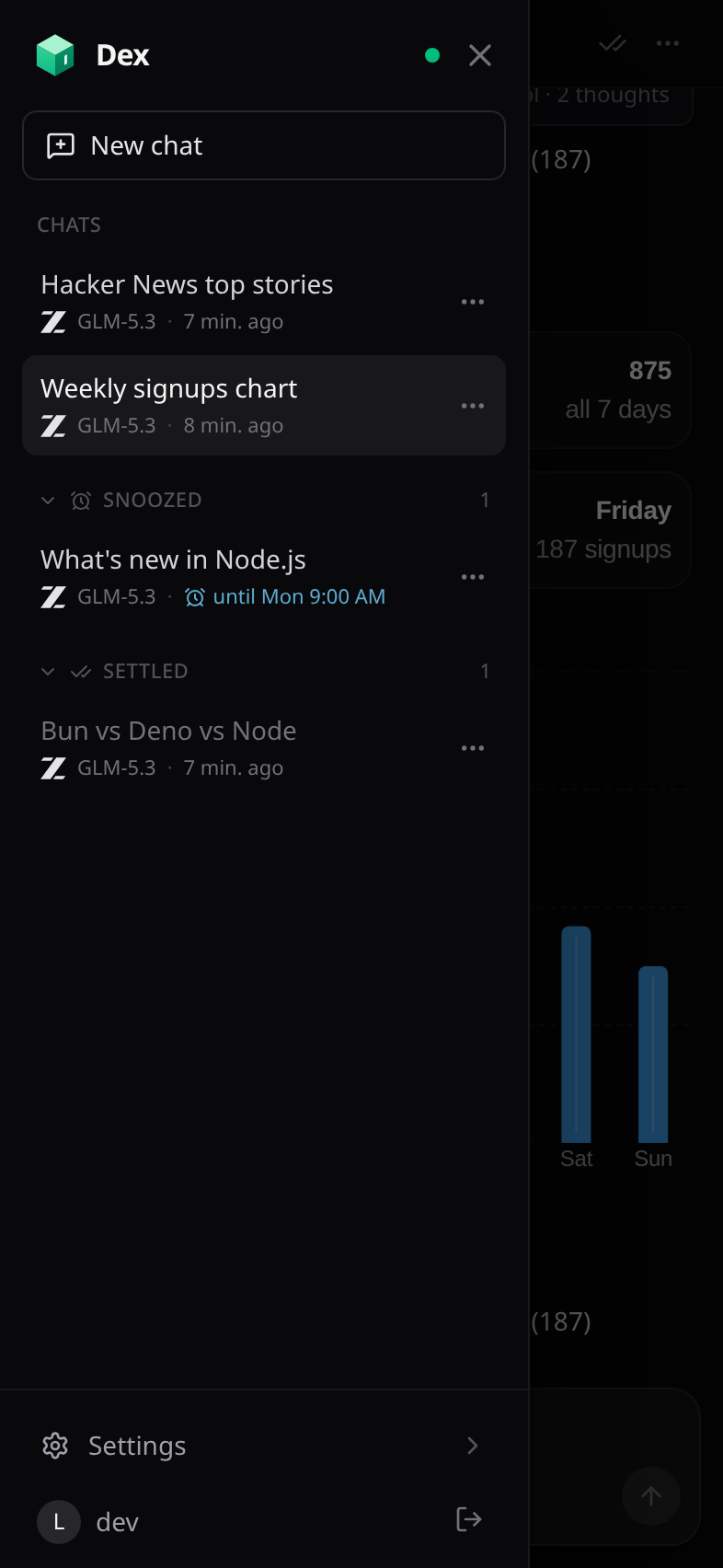
- The chat list works like an inbox. Settle a chat when you're done for now and it moves under a collapsed Settled group.
- Snooze a chat (in an hour, this evening, tomorrow, this weekend, next week) and it waits under Snoozed, then comes back to the top at that time with a notification.
- Any new message in a chat brings it back to the inbox.
- On a phone, long-press a chat in the sidebar for its menu (regenerate the title, settle, snooze, delete), which frees the row's room a ⋯ button would take; on a computer, right-click or use the ⋯ that appears on hover.
Secrets
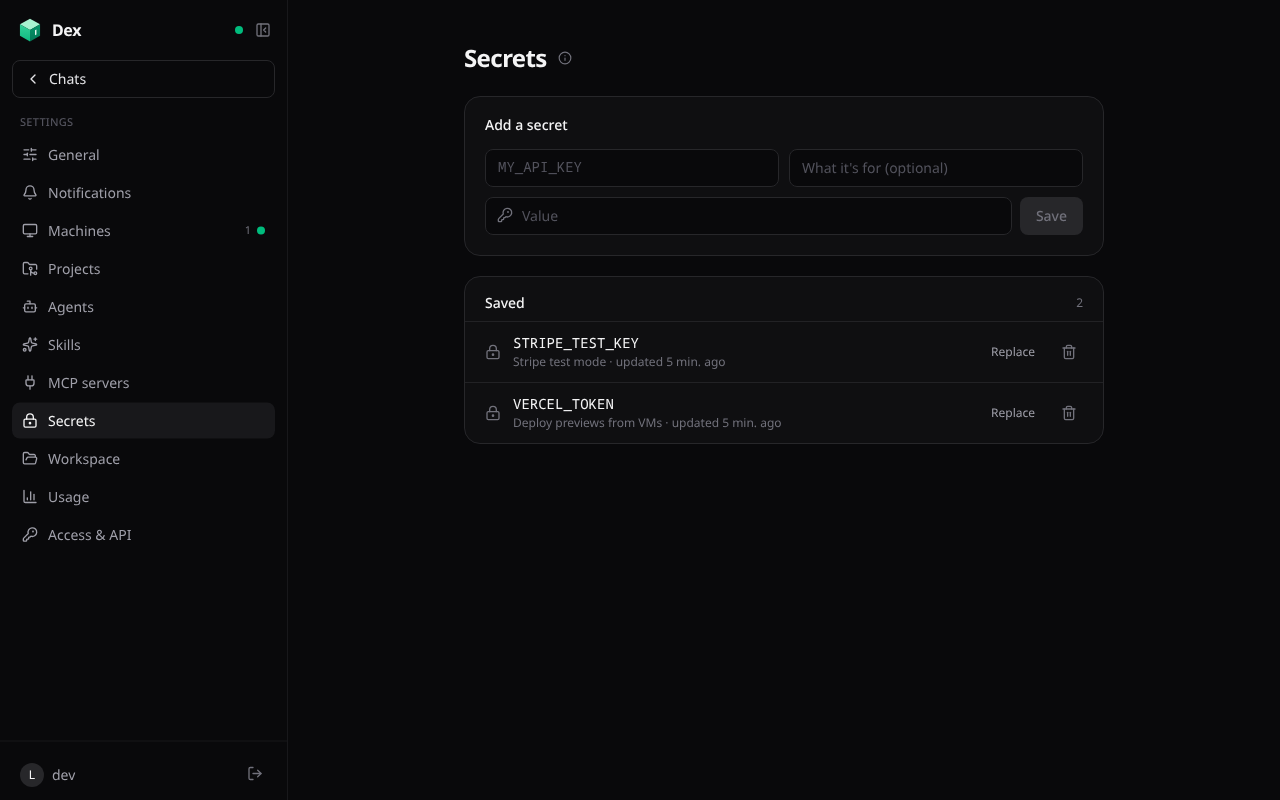
- Saved secrets (Settings → Secrets) are API keys every chat's VM gets as environment variables. Enter them once, and the model uses
$NAMEwithout ever seeing the value. - They're written to a private env file on each VM, loaded by every command, by login and interactive shells, and by project setup scripts. VMs pick up changes on their next command.
- Password fields in chat forms keep the value out of the transcript. The browser stores it, encrypted per chat, before sending, and the message carries
{{secret:name}}. VM tools fill placeholders in on the VM, as environment variables from a file the command sources and deletes. - Any secret value in VM output, read files, or the Machine page's log is masked before the model or you see it.
Projects, GitHub, and agents
 |
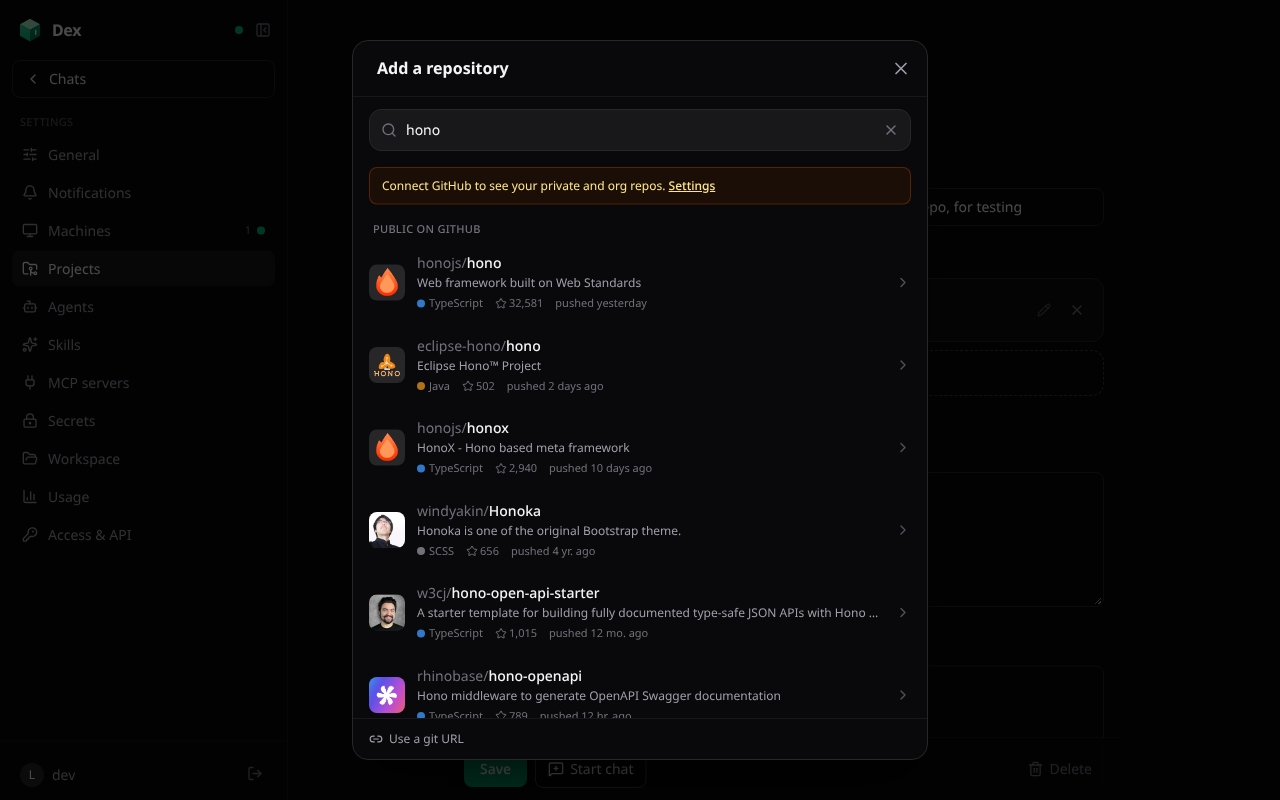 |
- Projects: one or more repos (with branch and folder), a setup script, notes for the model, a starter prompt, a VM size, and a picture: Dex looks through the first GitHub repo for its favicon, app icon, and logo files (and offers the owner's avatar), and the one you pick replaces the project's icon everywhere.
- Add repository opens a sheet that searches every repo your GitHub connection can reach, private and org ones included, then public repos, with owner filters, avatars, language, stars, and last push. Pick one, then its branch (filterable) and folder, or paste any git URL. If GitHub revokes the connection, Dex says so, offers Reconnect, and falls back to public repos.
- Starting a project chat boots its VM, signs in to GitHub, clones the repos into
~/work, and runs the setup script before the model's VM tools go ahead.
- GitHub: Connect with GitHub (OAuth) or paste a fine-grained token. Every new VM signs the GitHub CLI and git in with it, so agents can push and open pull requests. Disconnecting an OAuth connection revokes the token at GitHub.
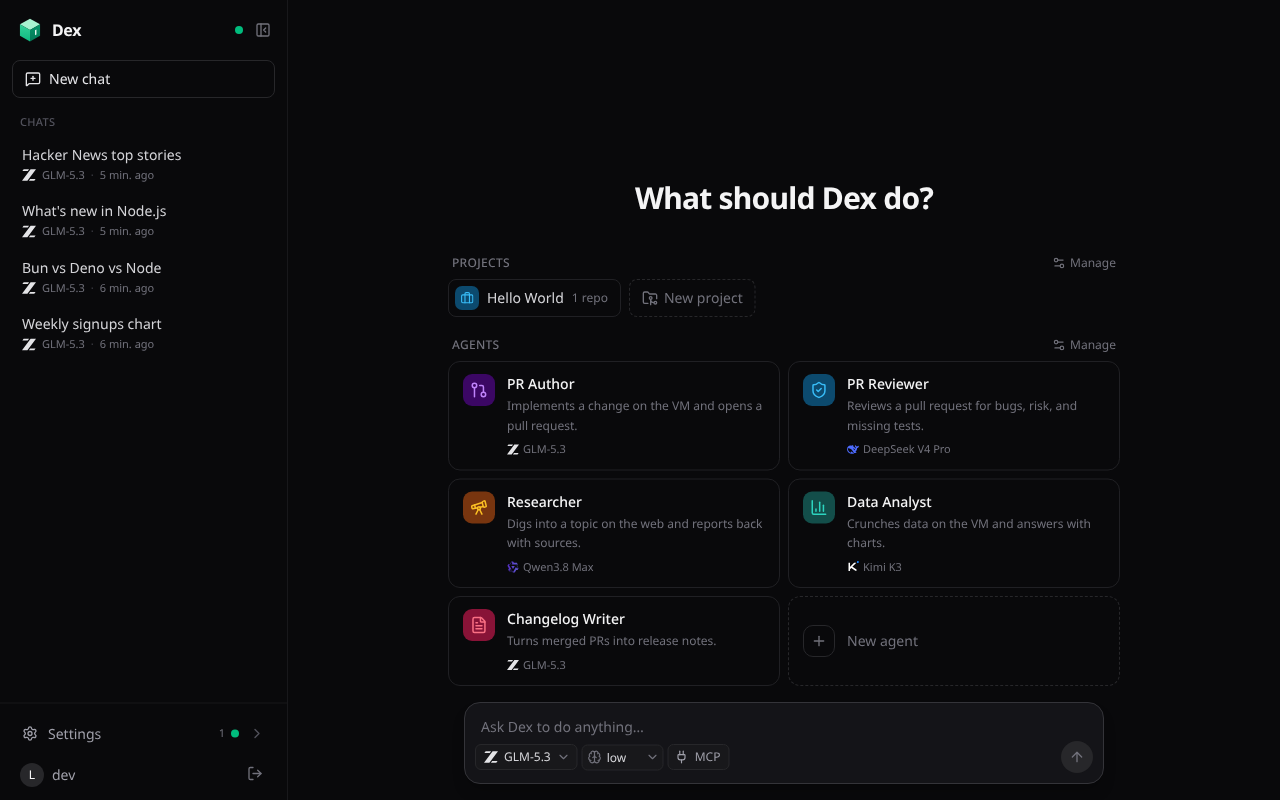
- Custom agents: presets with a name, icon, color, instructions, starter prompt, model, thinking level, and MCP servers. Dex starts with PR Author, PR Reviewer, Researcher, Data Analyst, and Changelog Writer, and agents combine with projects.
- Sidekicks: named companions you talk to directly, pinned at the top of the sidebar. Each has a name, an emoji or picture, a tagline, a character profile (personality, voice, backstory), a prompt (what they do for you), a greeting, a model, and MCP servers, and one long conversation that never ends: it's compacted as it grows (the chat still shows every message, with each summary behind a divider you can open), and each sidekick keeps their own memory of you (
/workspace/sidekicks/<id>/MEMORY.md), which you can edit on their page. They answer as themselves instead of as Dex, keep every tool, and can check in on their own with scheduled prompts. Start over begins a new conversation and keeps the memory; templates (Muse, Atlas, Sage, Rex) get you going. Call a sidekick to talk out loud: your device's speech recognition hears you, and they answer in their own voice, read a sentence at a time by tiny-voca, a 4.5M-parameter text-to-speech model that runs on your device (Dex turns text into its phonemes with a TypeScript port of its phonemizer, dizione). Talk over them to cut them off. See docs/sidekicks.md. - Spaces: one conversation with a coordinator that starts and directs other chats for you, after Amp's Spaces. Give a space a name, a goal, and a project, then tell it what to work on: it splits the work into threads that run in parallel (each a chat with its own VM in the project), shows each as a live card, hears back when one finishes, and follows up. The Threads panel beside it lists them by status (working, needs you, failed, done), lets you peek at, message, stop, or open one, and shows the notes the coordinator keeps (
/workspace/spaces/<id>/NOTES.md). Space chats live under their space in the sidebar, not in the inbox; only the coordinator notifies you.
Inline media
- Videos, audio, and images a chat makes on its VM play inline with
share_media. Dex stores them privately in R2, with seeking (byte ranges, which Safari needs), and deletes them with their chat. - Media is never played from a VM: when a reply links a file served from its VM's port, Dex copies it into the chat when the reply ends, or when you tap "Save to chat".
- YouTube, Vimeo, and direct video links render as players that load only when you tap play.
On your phone
 |
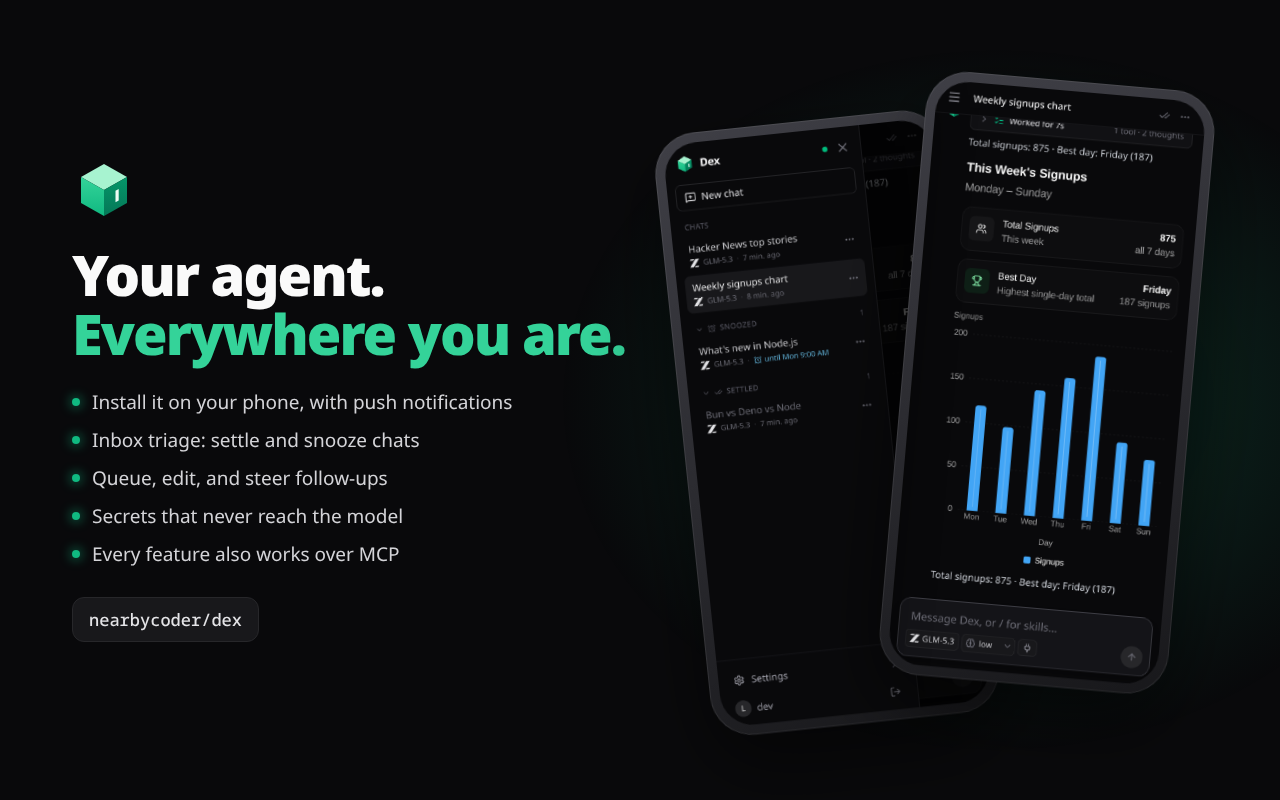 |
- Install it on a phone or tablet Home Screen. It runs full screen and edge to edge, keeps the composer above the keyboard, and opens the sidebar with a swipe from the left edge (never "back"). It adapts from folded phones to tablets. When a new version is deployed, Update ready appears at the bottom of the sidebar (with a dot on the menu button) for a one-tap refresh, and the app reloads by itself when you come back to an idle chat after a while.
- Push notifications (opt in, per device) for replies, errors, scheduled prompts, machine setup, MCP sign-ins, and snoozed chats coming back. A chat that's open on any device stays quiet, and each chat has a mute bell. Android and desktop notifications carry quick actions; iOS 16.4+ delivers them to the installed app.
- Haptics on every control you tap (buttons, links, menus, switches, tabs) and on swiping the sidebar. iPhone has no Vibration API, so Dex plays the system tap by clicking a hidden
<input type="checkbox" switch>during the tap (not by laying switches over buttons, which stops lists from scrolling); Android usesnavigator.vibrate. Fields never zoom the page on focus.
Native apps for iPhone, iPad, and Android
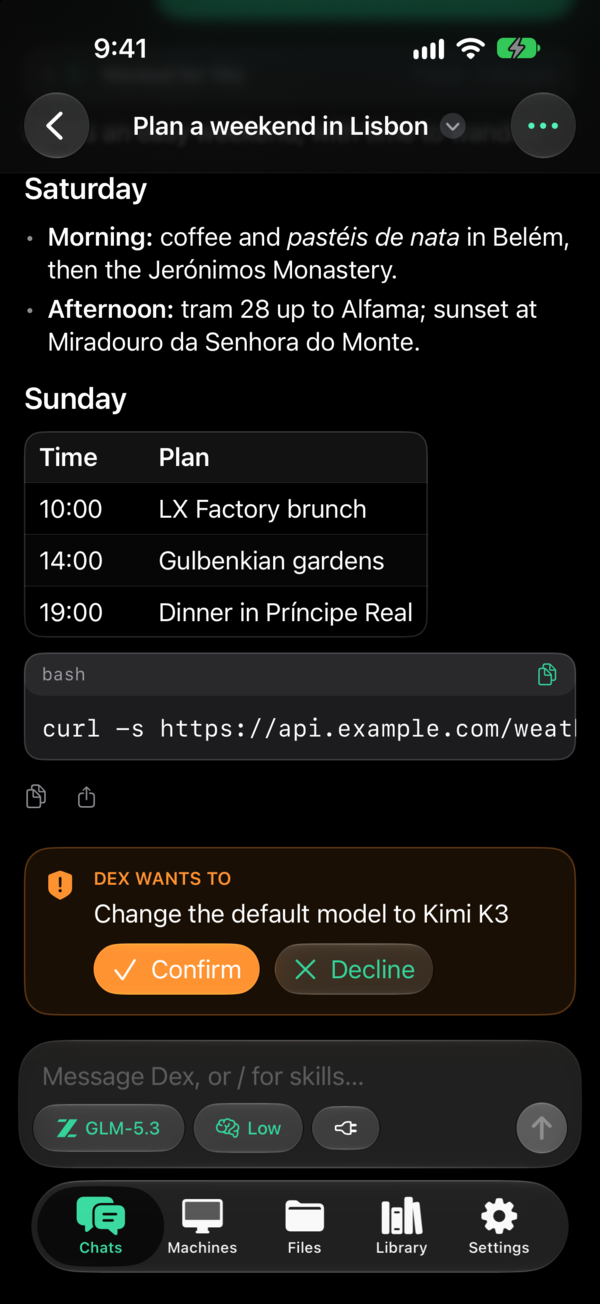 iPhone and iPad. Swift and SwiftUI with Liquid Glass. |
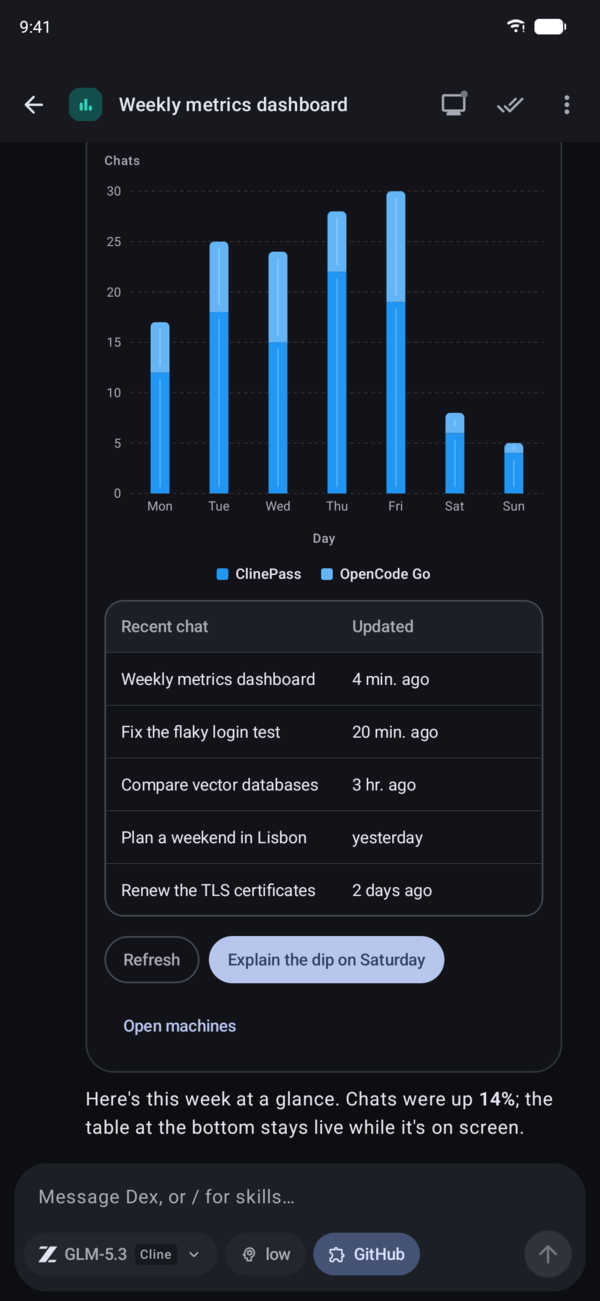 Android. Kotlin, Jetpack Compose, and Material 3 Expressive. |
- The whole app, natively: chats with the activity row, generated UI drawn with native controls (cards, tables, charts, forms, live
Query()data andMutation()buttons), the model and thinking menu, the queue,/skills, inbox triage, machines with the live desktop and a picture-in-picture preview, workspace files, projects, agents, skills, MCP servers, secrets, usage, and settings. They talk to the same agent as the web app over its WebSocket and RPC, so there's no server of their own. - iOS (apps/ios): iPhone, the foldable iPhone, and iPad. A Liquid Glass tab bar on compact screens; a sidebar with split views on iPad, an unfolded foldable, or a wide window, keeping your place when you fold, rotate, or resize. Keyboard shortcuts, pointer, and a connection per window on iPad.
- Android (apps/android): phones, tablets, flips, book foldables (from a Galaxy Z Fold's wide cover screen to its inner screen), ChromeOS, and desktop windows. A bottom bar, rail, or expanded rail by width; panes side by side that split at the hinge; tabletop posture puts the VM desktop above the fold. Dynamic color, predictive back, and real picture-in-picture for the desktop. State survives folding, rotation, and process death.
- Sign-in goes through your Dex's own sign-in page in a system browser sheet, with a PKCE handoff (see Security); the session is the same one the web uses, so Sign out everywhere covers the apps too.
- Demo mode: both run on a built-in mock agent for trying every screen without an account (
-DexMockon iOS, Try the demo in Android debug builds). - Tested: unit tests for the protocol, socket, sign-in, transcript, and OpenUI (checked against the web's own code), plus UI tests on every screen across iPhone, iPad, and the foldable, and Android phone, tablet, foldable, and desktop emulators.
- Notifications are local for now: the apps notify from their own connection, since the server only sends Web Push. Instant push needs APNs and FCM senders on the server.
Neither is in the App Store or Play Store yet: build them from their folders with Xcode or Gradle (each folder's README says how).
Chats and external agents can run Dex
- Every app capability is an operation in one registry (
src/agent/operations.ts):- Chats, agents, sidekicks, projects, skills, MCP servers, VMs, schedules, the workspace, the queue, notifications, settings, and usage.
- Chats use them through
app_operations/app_call, so "start a chat per repo and have each open a PR" just works. - External agents connect over MCP at
/api/mcpwith a token from Settings → Access & API. Each token is Read, Read & write, or Full, and has an expiry. - Admin operations (deleting things, settings, editing existing agents or projects, MCP servers, installing skills) need a Full token, or your tap on a Confirm card in the chat.
- Every operation is validated, rate-limited, and logged.
npm run check:ops(run bynpm run deploy) fails if a new callable isn't covered or explicitly excluded.
Usage, speed, and the rest
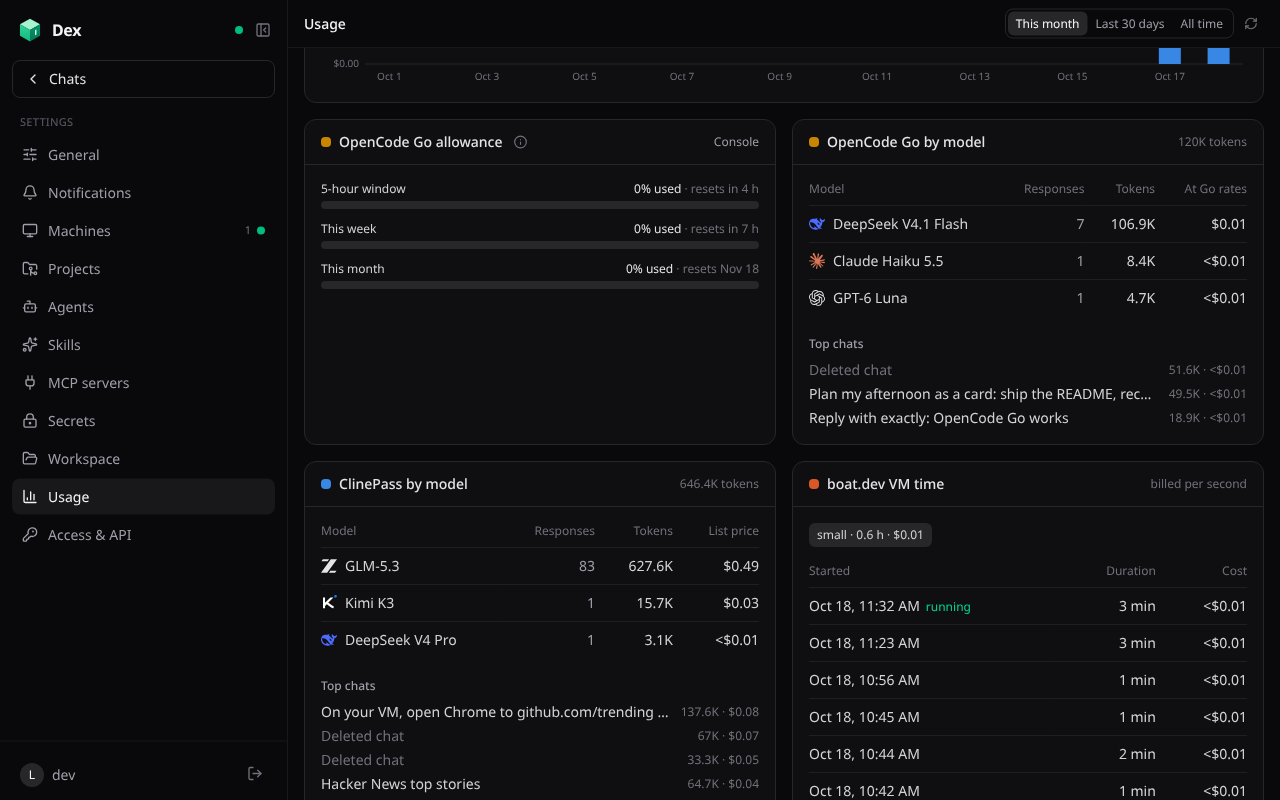
- Usage: what Dex costs across ClinePass and ChatGPT (tokens per model and chat, at list prices), OpenCode Go (tokens at Go's rates, plus your 5-hour, weekly, and monthly allowance read live from OpenCode), boat.dev (VM time), and Cloudflare (from the Analytics API), with a daily chart.
- Snappy navigation: pages render from the agent's synced state, so switching pages never waits on the network.
- Every page's code is fetched while idle, and the last state, the last sign-in, and the last 8 chats you opened are kept on the device (signing out clears them), so a launch shows them at once while a cold agent wakes; the session is confirmed in the background. The service worker serves the app's shell from its last copy and refreshes it in the background, so a launch doesn't wait on the network (even offline, recent chats open); after a deploy the app moves onto the new build on its own when nothing is typed.
- Anything still loading shows a skeleton shaped like the page.
- Opening a chat sends only what the page shows: no system prompt, no screenshots (they load when opened), the UI guide as one line, and long tool outputs cut to their last 12,000 characters, which made snapshots about 85% smaller; live events during a run are slimmed the same way.
- What you send shows at once, before the agent has recorded it.
- The agent batches and dedupes the updates it sends.
- Always current: after a deploy, the first page load restarts a long-running agent onto the new code.
- A landing page at
/for signed-out visitors shows what Dex does with the app's own screenshots and the tour; signed in,/goes straight to your chats. - Sign in with GitHub (allowlisted logins), an owner password, or a local dev login. Sign out everywhere revokes every session on every device.
Repository
A monorepo, so the web app and the native apps live side by side and each builds and ships on its own:
apps/
  web/        the app: TanStack Start UI, the Cloudflare Worker, and the DexAgent Durable Object
              (its own package.json, wrangler.jsonc, and `npm run deploy`)
  ios/        the native iPhone and iPad app (Swift, SwiftUI, XcodeGen; see apps/ios/README.md)
  android/    the native Android app (Kotlin, Jetpack Compose, Gradle; see apps/android/README.md)
packages/     (planned) code shared between apps, e.g. the wire protocol
assets/       brand assets (the app icon source)
docs/         README screenshots and the promo video
The root package.json is an npm workspace (apps/web and packages/*). Its scripts forward to the web app, so npm run dev, npm run typecheck, and npm run deploy work from the root; npm run deploy:web is the explicit form. A JavaScript app joins by adding its folder to workspaces; native apps keep their own tooling (Xcode, Gradle) in their folder and their own release process.
Architecture
Browser (TanStack Start, React)
  │  HTTP: login, server functions          WebSocket: RPC, synced state, Pi event stream
  ▼                                          ▼
Worker (src/server.ts) ── auth check ──► DexAgent Durable Object, one per user (src/agent/dex-agent.ts)
  └─ TanStack Start handler                  ├─ PiHarness → Pi Durable (chats in the object's SQLite)
                                             ├─ ClinePass provider (openai-completions → api.cline.bot)
                                             ├─ OpenCode Go provider (completions, responses, messages, google → opencode.ai)
                                             ├─ ChatGPT provider (openai-responses → api.openai.com, Sign in with ChatGPT token)
                                             ├─ tools + Workspace (SQLite-backed files, just-bash)
                                             ├─ VmManager → boat.dev VMs (one per chat, plus the MCP VM)
                                             ├─ MCP client (remote servers; local ones via supergateway)
                                             ├─ Skills, secrets, message queue, media (R2), push
                                             └─ Agents SDK schedules (scheduled prompts, queue checks)
In apps/web/src/:
server/: Effect services for config, keys (HMAC session signing, AES-GCM), sessions, and GitHub OAuth.agent/: the Durable Object and its parts (operations, VMs, MCP and registry search, skills, secrets, queue, media, push, the ClinePass, OpenCode Go, and ChatGPT providers) and the tools.shared/: model catalog, wire protocol, and shared types.client/: the agent connection (useAgent), the Pi event reducer, and UI components.routes/: pages and auth endpoints.
Develop
npm install                                             # from the root: installs every workspace
cp apps/web/.dev.vars.example apps/web/.dev.vars        # set AUTH_SECRET; DEV_LOGIN=true enables the dev login
npm run dev                                             # http://localhost:5173
Workers AI (web search and fetch) runs remotely even in dev, so run npx wrangler login first. After changing apps/web/src/client/openui/library.tsx, run npm run openui:spec -w @dex/web to regenerate the component spec the agent learns from. See AGENTS.md for the conventions every change follows (operations, skeletons, security, deploys).
The native apps build with their own tooling and can sign in to this dev server (with DEV_LOGIN=true):
open apps/ios/Dex.xcodeproj                             # Xcode 27; run the Dex scheme; apps/ios/scripts/test.sh runs the tests
cd apps/android && ./gradlew :app:installDebug          # Android SDK 37 and a JDK 17+; ./gradlew test runs the tests
Deploy
The web app deploys to Cloudflare Workers from apps/web. apps/web/wrangler.jsonc is the same for everyone; your deployment's settings live in the gitignored apps/web/.deploy.vars, which npm run deploy passes to Wrangler.
- Create a GitHub OAuth app (github.com/settings/applications/new) with homepage
https://<your-domain>and callbackhttps://<your-domain>/auth/github(sign-in and "Connect with GitHub" use paths under it), where<your-domain>is your custom domain or the Worker's workers.dev address. - Copy
apps/web/.deploy.vars.exampletoapps/web/.deploy.varsand setALLOWED_GITHUB_USERS(the first login is the owner), plusCLOUDFLARE_ACCOUNT_IDandVAPID_PUBLIC_KEYif you use the Usage page and push notifications. For a custom domain, add its zone to your Cloudflare account with a proxied DNS record for the hostname (anAAAArecord to100::works), and setCUSTOM_DOMAIN(comma-separated, main one first, e.g.example.com,www.example.com): every deploy routes it to the Worker, and pages opened at the workers.dev address (or www) redirect to the main one. The deploy refuses to run without an allowlist. - Add the secrets (from
apps/web), then deploy from the root:
cd apps/web
npx wrangler secret put AUTH_SECRET
npx wrangler secret put GITHUB_CLIENT_ID
npx wrangler secret put GITHUB_CLIENT_SECRET
npx wrangler secret put CLINE_API_KEY         # optional shared key
npx wrangler secret put OPENCODE_API_KEY      # optional: OpenCode Go key for the owner's chats; everyone else connects their own
npx wrangler secret put OWNER_PASSWORD        # optional: password sign-in as the owner
npx wrangler secret put BOAT_API_KEY          # optional: boat.dev key for the owner's VMs; everyone else connects their own
npx wrangler secret put CLOUDFLARE_API_TOKEN  # optional: Account Analytics: Read, for the Usage page
npx wrangler secret put VAPID_PRIVATE_KEY     # optional: push notifications (a P-256 private JWK; its public key goes in VAPID_PUBLIC_KEY)
cd ../.. && npm run deploy                    # checks operations, builds, and deploys apps/web
Security
Sign-in:
- GitHub OAuth, for allowlisted logins only and state-checked.
- The owner password: compared by HMAC, limited to 10 attempts a minute per IP, same-origin posts only.
- Dev login is off unless
DEV_LOGINis set. - The native apps sign in through the same page, in a system browser sheet, with a PKCE handoff (
/auth/native/*, server/native-auth.ts): you confirm with a tap, the app gets a sealed one-time code atdex://auth/callbackthat expires in 2 minutes, and only the app holding the matching verifier can trade it for a session token.
Sessions:
- Signed, HttpOnly, SameSite=Lax, Secure cookies, valid for 30 days. The native apps keep the same token in the Keychain (iOS) or encrypted storage (Android), send it as that cookie, and renew it with
POST /auth/native/refresh. - Sign out everywhere revokes every session; every sign-in check rejects older ones and closes their sockets.
- Each user's agent accepts requests only from the same origin, with a current session for that user.
- Signed, HttpOnly, SameSite=Lax, Secure cookies, valid for 30 days. The native apps keep the same token in the Keychain (iOS) or encrypted storage (Android), send it as that cookie, and renew it with
Stored secrets: API keys, tokens, MCP headers and env values, and saved and chat secrets are AES-GCM encrypted. Nothing secret is synced to the browser or returned by an operation.
Secrets and the model: the model only ever sees placeholders and names. Values reach VMs through files that commands source, and are masked in output.
- Chat VMs get all saved secrets, so anything a chat installs there could read them.
- The MCP VM, which runs third-party packages, gets no GitHub token and no saved secrets, only each server's listed variables.
Browser: a strict Content Security Policy:
- Scripts and connections only to Dex itself (
connect-src 'self'). - Images only from Dex, GitHub avatars, and YouTube thumbnails.
- Frames only from Dex's own VM desktop page, boat.dev, and the YouTube/Vimeo players. Only that desktop page may be framed, and only by Dex.
Also COOP same-origin, HSTS,
nosniff, a strict referrer policy, and a minimal Permissions-Policy. Model output is rendered without raw HTML.- Scripts and connections only to Dex itself (
VM desktop relay:
/vm-desktop/<vm>/serves Dex's own copy of the Selkies page and relays only the stream's WebSocket and Selkies' few API paths to the VM, adding the port cookie and password itself. Anything the VM answers is made inert on Dex's origin (a sandboxing CSP, no redirects, cookies, or CORS headers; files download as attachments), so a VM taken over by a prompt-injected agent can't run script as you. The stream's port is closed to the internet by boat's firewall.Workspace HTML previews: the page posts the file to
/workspace-preview, which answers only signed-in, same-origin posts, with the HTML as its own document under a CSPsandbox(an opaque origin: no cookies, storage, or requests as you, no top navigation) that only Dex may frame.Media: served only to its owner, for an allowlist of video, audio, and image types (never HTML, SVG, or PDF), sandboxed. VM uploads use single-use, HMAC-checked tokens.
MCP access tokens:
- 256-bit secrets bound to their user by an HMAC, checked before any agent wakes.
- Stored only as SHA-256 hashes.
- Scoped, expiring, revocable, and rate limited.
Prompt injection: tools run without approval, so text from the web or an MCP server can try to steer a chat. Anything lasting or destructive waits for your Confirm:
- Deleting things, settings, editing existing agents or projects, MCP servers, skills, and recurring schedules.
- Chats started by chats go at most two levels deep.
- Every operation is in the Access page's activity log.
A tricked chat can still use a secret it has access to in a command, so give chats only the secrets they need.
Dependencies:
npm auditreports no high or critical issues. KaTeX is pinned to a patched 0.18; the remaining moderate advisory issprintf-jsin the simulated workspace shell, with no upstream fix yet.
Limits
- Cline and OpenCode have no third-party OAuth, so users connect with an API key.
- Sign in with ChatGPT allows only a
127.0.0.1loopback callback for open-source apps, and Dex runs on Cloudflare, so after approving, the browser lands on a page that doesn't load; you paste its address into Settings and the agent finishes the sign-in. OpenAI offers plan usage to open-source and locally run apps; a paid or hosted service needs OpenAI's approval first. OpenCode Go's allowance comes from an endpoint its docs don't list (what its console reads); if it changes, the Usage page says so and tokens are still counted. - The
/workspaceshell is simulated (just-bash) and can't install or run programs; real work happens on a VM. - boat.dev's free trial allows 2 running VMs at once; stopped VM disks are kept 14 days.
- boat's Stream player needs Chrome; other browsers (every iPhone and iPad browser) use Selkies. The Selkies desktop keeps the VM's screen size (the agent's screenshots and clicks depend on it) and scales the picture to fit.
web_searchneeds Web Search billing on the Cloudflare account.- Pi Durable has no tool-approval step yet and can't delete conversations, so deleting a chat hides it.
- The official MCP Registry can take many seconds for a search it hasn't cached; Smithery is the fast default.
License
The Selkies web client in apps/web/public/assets/selkies is unmodified from its 2.0.0 release and is under the Mozilla Public License 2.0.
Yorumlar (0)
Yorum birakmak icin giris yap.
Yorum birakSonuc bulunamadi