PiKit
Health Uyari
- License — License: GPL-3.0
- Description — Repository has a description
- Active repo — Last push 0 days ago
- Low visibility — Only 5 GitHub stars
Code Basarisiz
- exec() — Shell command execution in gradle/libs.versions.toml
- process.env — Environment variable access in tools/capture-pi-rpc.mjs
Permissions Gecti
- Permissions — No dangerous permissions requested
Bu listing icin henuz AI raporu yok.
A clean Android AI agent built on pi and Termux. 一个基于 pi 和 Termux 的简洁安卓 AI Agent。

PiKit
A clean Android AI agent built on pi and Termux.
English | 简体中文
PiKit runs the pi coding agent on an Android phone. The Termux
environment, Node.js and the pi CLI all ship inside the APK and are unpacked on
first launch — no repository to reach, no package to fetch. The only connection
needed is one that can reach the model provider.
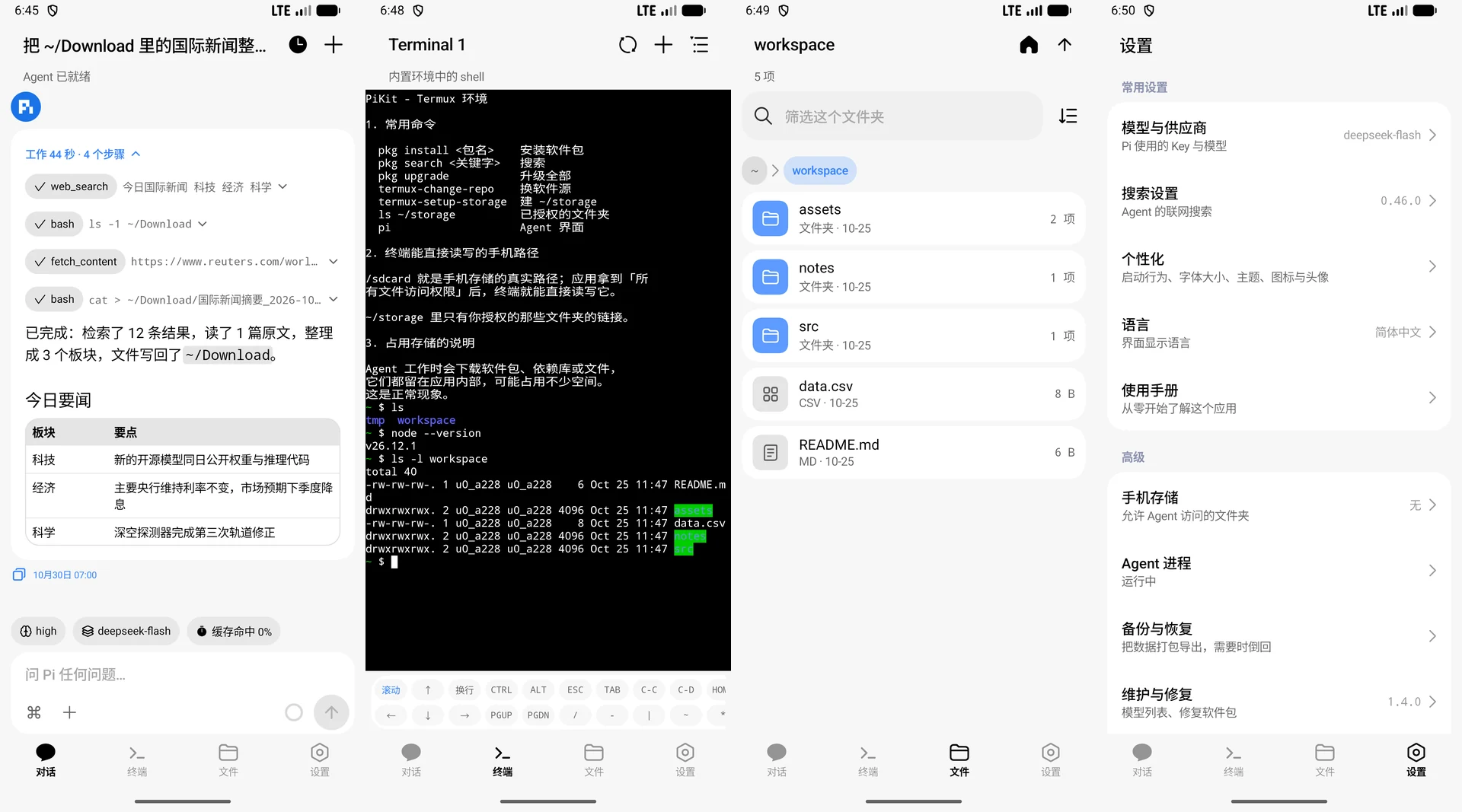
PiKit 0.6.0 interface preview
Features
- A simple idea, an elegant native interface. Kotlin and Jetpack Compose on
Miuix, the MIUI/HyperOS component library for Compose, four tabs, no WebView.
English, 简体中文 or 日本語. - Chat on pi's RPC protocol. A finished turn folds to one line
(Worked 47s · 5 steps) and reopens on a tap; thinking level, model, context use and
cache hits are chips above the input, and both switches apply without restarting the
agent. - A terminal and a file manager. PTY sessions that survive a tab switch, the keys a
phone keyboard lacks, and a read-only file manager over$HOME: a tappable path, a
filter and three orders, a size or entry count per row, image previews and copy-path. - Providers on pi's terms. The 34 providers pi's own key table knows, plus a custom
endpoint; a model's context window, output limit, thinking levels and image support
come from pi's catalogue. - Storage is scoped and safe. The grant starts empty and is opened one folder at a
time; a delete cannot leave the app's own data; and a guard extension in the agent
refuses a recursive delete outside$HOME/workspaceand any rewrite of pi's own files.
No account, no telemetry.
Install
Click the icon below to download

Phones and tablets · about 110 MB
First launch unpacks the runtime (a few seconds). Give it the API key under
Settings → Model & provider, or pi /login in the Terminal tab for a subscription.
Updates install over the old APK with your data intact — About PiKit → Check for
updates when you want one. Other builds and checksums live on the
releases page; adb shell getprop ro.product.cpu.abi tells you which file is yours.
Build
Android 8.0+ on arm64-v8a or x86_64. JDK 17–23, the Android SDK with NDK r29,
Python 3.10+ with zstandard and Node.js; docs/BUILDING.md has the
whole story.
python tools/build-apks.py # checks, tests, then all four APKs
The runtime images are generated rather than committed (~110 MB of archives per ABI,
~300 MB unpacked), so that command assembles a missing or stale one on the way.
Documentation
docs/README.md indexes every document. These are the ones usually wanted
first:
- ARCHITECTURE.md — the design decisions and the constraints behind them.
- BUILDING.md — prerequisites, the image builder, artifacts, signing, the device workflow.
- RELEASING.md — the version, the tag, and the signing that comes first.
- MAINTAINING.md — the recurring chores: upstream pi, packages, dependencies.
- LICENSING.md — why GPLv3, what the APK carries, where the credits are.
- AGENTS.md — commands, hard constraints and commit conventions.
- CONTRIBUTING.md — how to propose a change, and where the rules live.
- SECURITY.md — how to report a vulnerability, and what is in scope.
License
GNU GPLv3 — LICENSE, and the reasoning in
docs/LICENSING.md: the APK distributes the Termux environment and
its terminal emulator, both GPLv3, so a distributed build has to make the corresponding
source available, tools/ included. The pi agent itself is MIT.
Acknowledgements
PiKit is mostly other people's work. The four it leans on:
- Termux environment and terminal — GPLv3, from
termux/termux-packages and
termux/termux-app. - pi, the agent (
@earendil-works/pi-coding-agent) — MIT, pi.dev. pi-web-accessby Nico Bailon (search, page reading, PDF extraction) — MIT,
nicobailon/pi-web-access.- Everything else — Node.js and the bundled command-line tools, the Android libraries,
the formula renderer, the marks — is listed with its licence in
docs/LICENSING.md and in the app under Settings → About PiKit →
Credits.
Yorumlar (0)
Yorum birakmak icin giris yap.
Yorum birakSonuc bulunamadi