qantrip
Health Uyari
- License — License: GPL-3.0
- Description — Repository has a description
- Active repo — Last push 0 days ago
- Low visibility — Only 5 GitHub stars
Code Basarisiz
- exec() — Shell command execution in apps/cloud/app/lib/i18n.ts
Permissions Gecti
- Permissions — No dangerous permissions requested
Bu listing icin henuz AI raporu yok.
Open-source prompt launcher: press ⌃Q, type a short command, and a parameterized prompt lands in any app. Rust core, native macOS app, end-to-end encrypted sync.

Nekro Qantrip
An open-source prompt launcher. Press ⌃Q, type a few keys, and a complete prompt lands in whatever app you're using.
Website · Try it in your browser · Download · 中文

-lightgrey)

Qantrip is pronounced like cantrip — the D&D spell you can cast again and again at no cost. The Q is the key you press to cast one. It is not a typo.
Why
If you work with Claude Code, Codex, Cursor or a chat window all day, you retype the same instructions over and over: review the staged changes, focus on security, don't edit files… Snippet tools can paste fixed text, but real prompts need small variations every time.
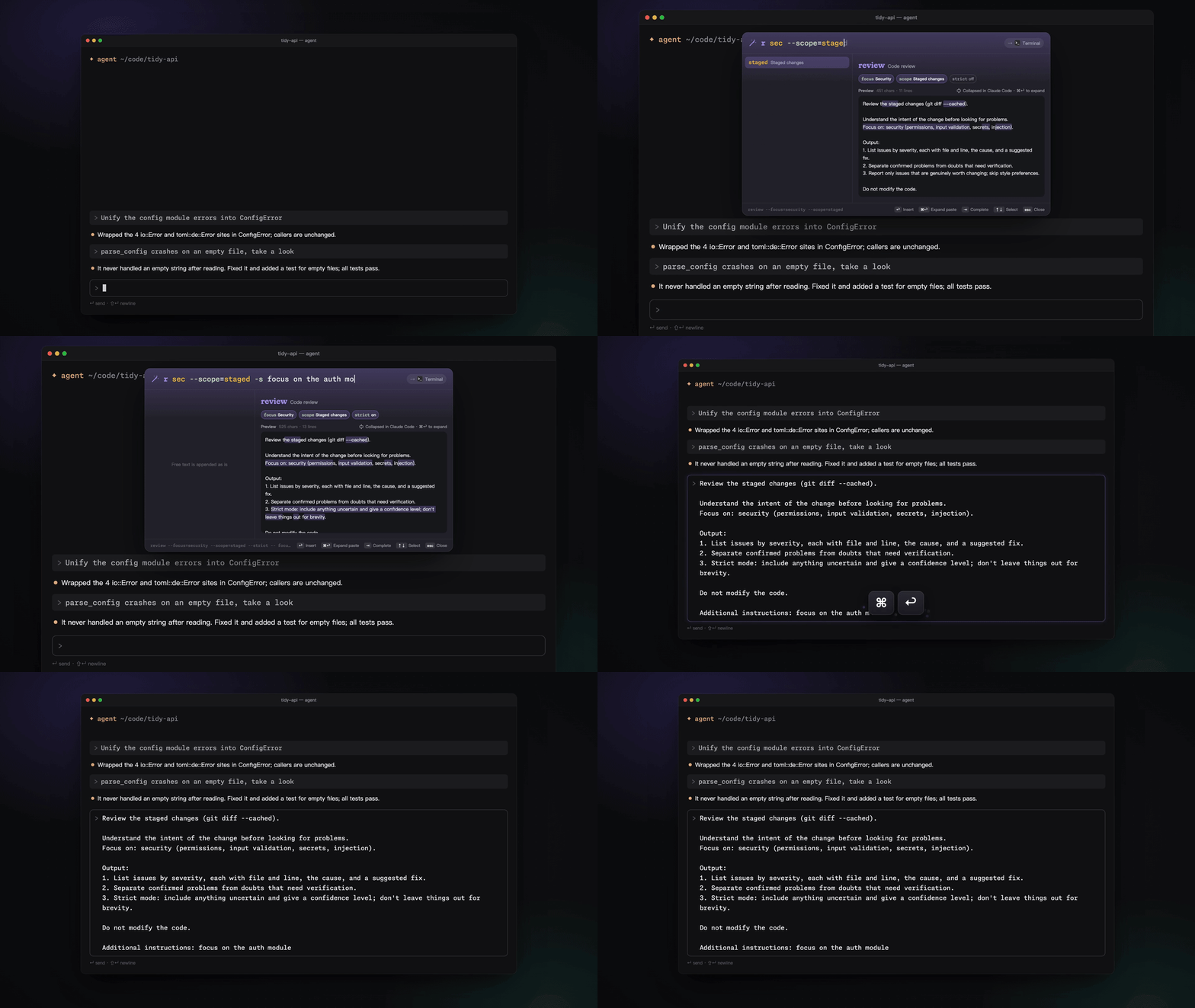
Qantrip turns your prompts into parameterized templates you call with a short command:
r security --scope=staged -s focus on the auth module
│ │        │              │  └ free text, appended verbatim
│ │        │              └ short flag (-s = --strict)
│ │        └ option with a value (prefixes work: --sc=st)
│ └ positional value for the template's main parameter
└ template name or alias
…and inserts the rendered prompt into the app you were using, without touching your clipboard history and without accidentally submitting multi-line text in a terminal.
Features
- Discoverable command line — exact, prefix and fuzzy matching; inline ghost completion; type
--to see every parameter; ↩ inserts exactly what the preview shows and ⇥ completes, so one keystroke is enough even with a typo. - See what you'll insert — a live preview highlights exactly which lines each parameter and your free text changed.
- Templates are Markdown files — YAML front matter declares parameters (bool, enum, multi-select, string, number, text); the body is a MiniJinja template. Edit them in any editor, or in the built-in library with a form editor, live preview and validation.
- Insertion that stays out of your way — paste-based (terminals and AI agents won't treat newlines as Enter), your clipboard is restored afterwards and the prompt is marked transient so clipboard managers skip it. No Accessibility permission? It falls back to copy-only.
- Built for AI coding agents — 17 built-in templates in English and Chinese (review, fix, debug, test, refactor, commit, PR, …); ⌘↩ expands Claude Code's collapsed
[Pasted text]placeholder. - Keyboard first, mouse friendly — every parameter chip is clickable, and clicks rewrite the command line, so mouse and keyboard always agree.
- Local first — search, rendering and insertion work offline. Optional sync is end-to-end encrypted.
Install
Download the DMG — Apple silicon or Intel — open it and drag Qantrip into Applications. Requires macOS 14 or later.
Qantrip isn't notarized by Apple yet, so macOS blocks the first launch: open System Settings → Privacy & Security and click Open Anyway. Updates keep your permissions and templates.
Windows: download and run Qantrip-Windows-x64-Setup.exe (no admin rights needed; a portable zip is also available), then press Ctrl+Q. It isn't code-signed yet, so SmartScreen may ask you to click More info → Run anyway. Requires Windows 10 2004 or later (x64).
Linux (preview): download the AppImage — x86_64 or ARM64 — make it executable and run it, or install the .deb / .rpm (ARM64: Qantrip-Linux-aarch64.deb / .rpm). Press Ctrl+Q; on GNOME and KDE (Wayland) the system asks you to confirm the shortcut, and the welcome guide lets you allow auto-paste once. Requires GTK 4.14+ and libadwaita 1.5+ (Ubuntu 24.04, Debian 13, Fedora 40 or later). See docs/install.md.
Writing a template
Create ~/Library/Application Support/Qantrip/templates/review.md (Linux: ~/.local/share/qantrip/templates/):
---
name: review
aliases: [r]
description: Code review
params:
  focus:
    type: multi
    positional: true
    choices: [security, performance]
  strict: { type: bool, short: s, description: Report every doubt }
---
Review the current changes.
{% if focus %}Focus on: {{ focus | join(", ") }}.{% endif %}
{% if strict %}List anything uncertain and give a confidence level.{% endif %}
{% include "_extra" %}
Qantrip reloads it automatically. A file with the same name as a built-in template overrides it. You can also create and edit templates in the built-in library:
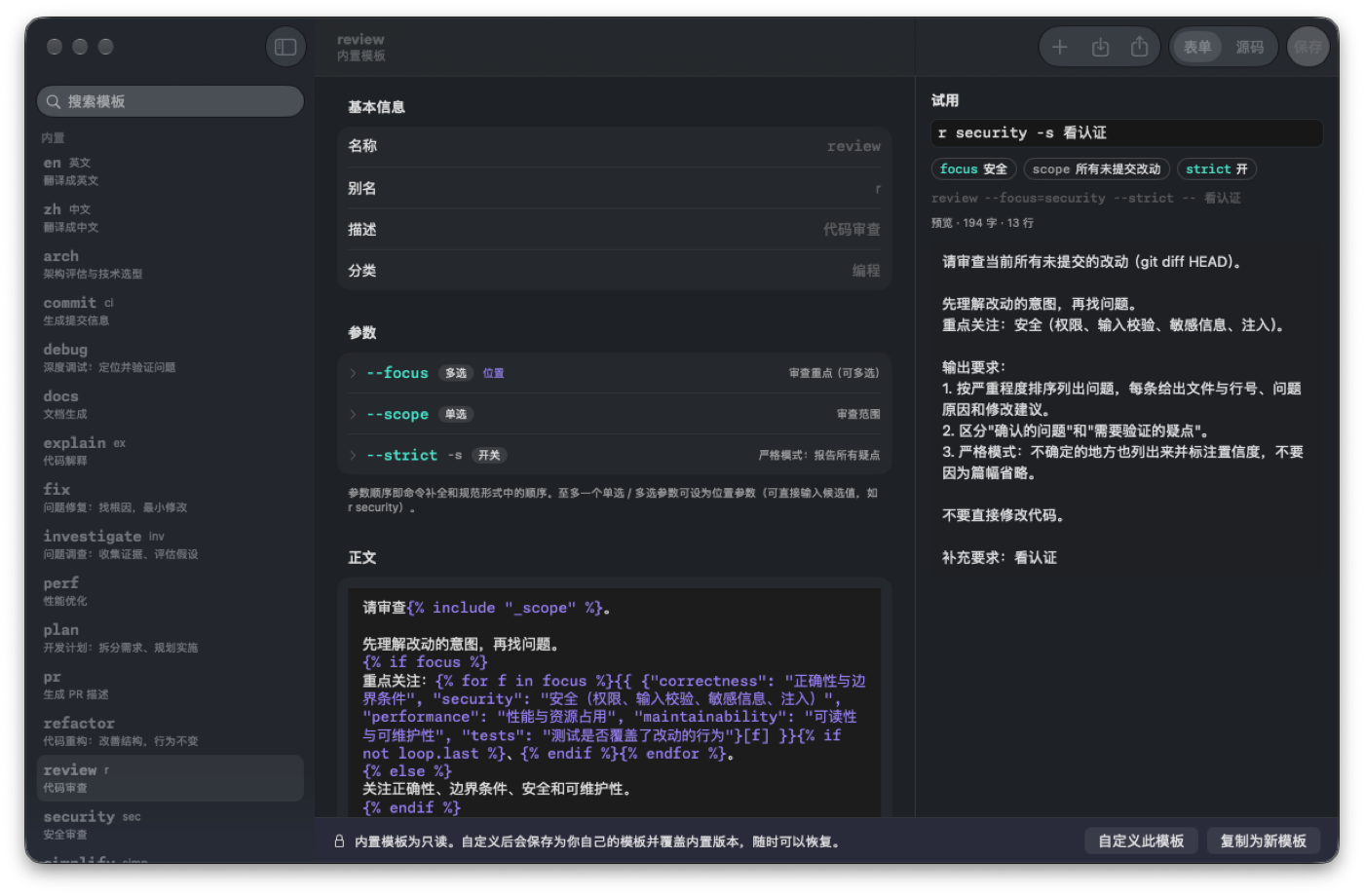
The full format is described in the input grammar and on the website.
Project status
| Area | Status |
|---|---|
| macOS app (panel, grammar, templates, library, settings, onboarding) | ✅ English and Chinese |
| Online demo (core compiled to WebAssembly) | ✅ qantrip.nekro.ai |
| Sync server (Cloudflare Workers + D1, ciphertext only) | ✅ deployed |
| End-to-end encrypted sync | ✅ macOS, Windows, Linux — design |
| Command mode for creating templates in the panel | ✅ |
| Windows | ✅ Windows 10/11 x64 (installer or portable zip) |
| Linux | 🧪 preview (x86_64 / ARM64; AppImage, .deb, .rpm; GNOME, KDE Plasma, X11) |
| AI-assisted template editing | 📝 planned |
Architecture
┌──────────────────────────── core/ (Rust) ────────────────────────────┐
│ input grammar · template library · MiniJinja rendering · usage ranking │
└───────────┬───────────────────────┬───────────────────────────────────┘
            │ UniFFI                 │ wasm-bindgen
┌───────────▼──────────┐   ┌─────────▼──────────────┐   ┌──────────────────────────┐
│ apps/macos (Swift)   │   │ website demo (WASM)     │   │ apps/cloud (Workers)     │
│ AppKit + SwiftUI     │   │ same parser, same       │   │ website · accounts ·     │
│ hotkey · panel ·     │   │ templates, in the       │   │ E2EE sync API (opaque    │
│ paste · library      │   │ browser                 │   │ ciphertext, D1 + R2)     │
└──────────────────────┘   └─────────────────────────┘   └──────────────────────────┘
Each platform gets a native shell over a shared Rust core rather than a cross-platform UI framework — see decision D6.
| Path | Contents |
|---|---|
core/ |
Rust core: grammar, templates, rendering, usage ranking; built-in templates in core/templates/ |
core/wasm/ |
WebAssembly bindings for the website demo |
apps/macos/ |
macOS app (Swift, SwiftPM — no Xcode project required) |
apps/linux/ |
Linux app (Rust, GTK4 + libadwaita, links the core directly) |
apps/cloud/ |
Website and sync server (Cloudflare Workers, React Router, Hono, D1) |
docs/ |
Product requirements, input grammar, sync security design, decision log |
scripts/ |
Build, packaging and signing scripts |
Development
cargo test --manifest-path core/Cargo.toml     # core tests
scripts/build-macos.sh                          # macOS app (dev-signed)
cargo run --manifest-path apps/linux/Cargo.toml # Linux app (needs GTK 4.14+ / libadwaita 1.5+ dev packages)
scripts/package-linux.sh                        # Linux AppImage, .deb and .rpm
scripts/build-wasm.sh                           # WebAssembly core for the website
cd apps/cloud && pnpm install && pnpm test      # website + server contract tests
Design documents in docs/ are written in Chinese; code, comments and commit messages follow the language of the surrounding code. See CONTRIBUTING.md.
Security
Sync is end-to-end encrypted: keys are generated on your devices, and the server only stores ciphertext it cannot decrypt. The threat model, key hierarchy and the metadata the server can see are documented in docs/sync-design.md. Please report vulnerabilities privately — see SECURITY.md.
License
- Client and core: GPL-3.0-or-later
- Sync server (
apps/cloud/): AGPL-3.0-or-later - Bundled fonts Monaspace Neon and Fraunces: SIL Open Font License 1.1
Made by NekroAI.
Yorumlar (0)
Yorum birakmak icin giris yap.
Yorum birakSonuc bulunamadi