vibewright
Health Uyari
- License — License: MIT
- Description — Repository has a description
- Active repo — Last push 0 days ago
- Low visibility — Only 5 GitHub stars
Code Basarisiz
- fs module — File system access in .github/changelog-readme.js
- child_process — Shell command execution capability in app/build/adhoc-signieren.js
- process.env — Environment variable access in app/build/adhoc-signieren.js
- fs module — File system access in app/build/hinweise-bauen.js
- fs module — File system access in app/build/icon-bauen.js
Permissions Gecti
- Permissions — No dangerous permissions requested
Bu listing icin henuz AI raporu yok.
Vibewright – You vibe. It builds. Desktop-App für Windows & macOS, die aus einer einzeiligen Idee eine fertige Laufkarte macht (Interview → Bedarfsanalyse → Plan → Werkzeug-Check) und sie mit Claude Code direkt in der App umsetzt. Ablage in Obsidian oder als Markdown, Deutsch & Englisch.
Vibewright
You vibe. It builds.
Turn a one-line idea into a complete project roadmap – and build it with Claude Code, right inside the app.








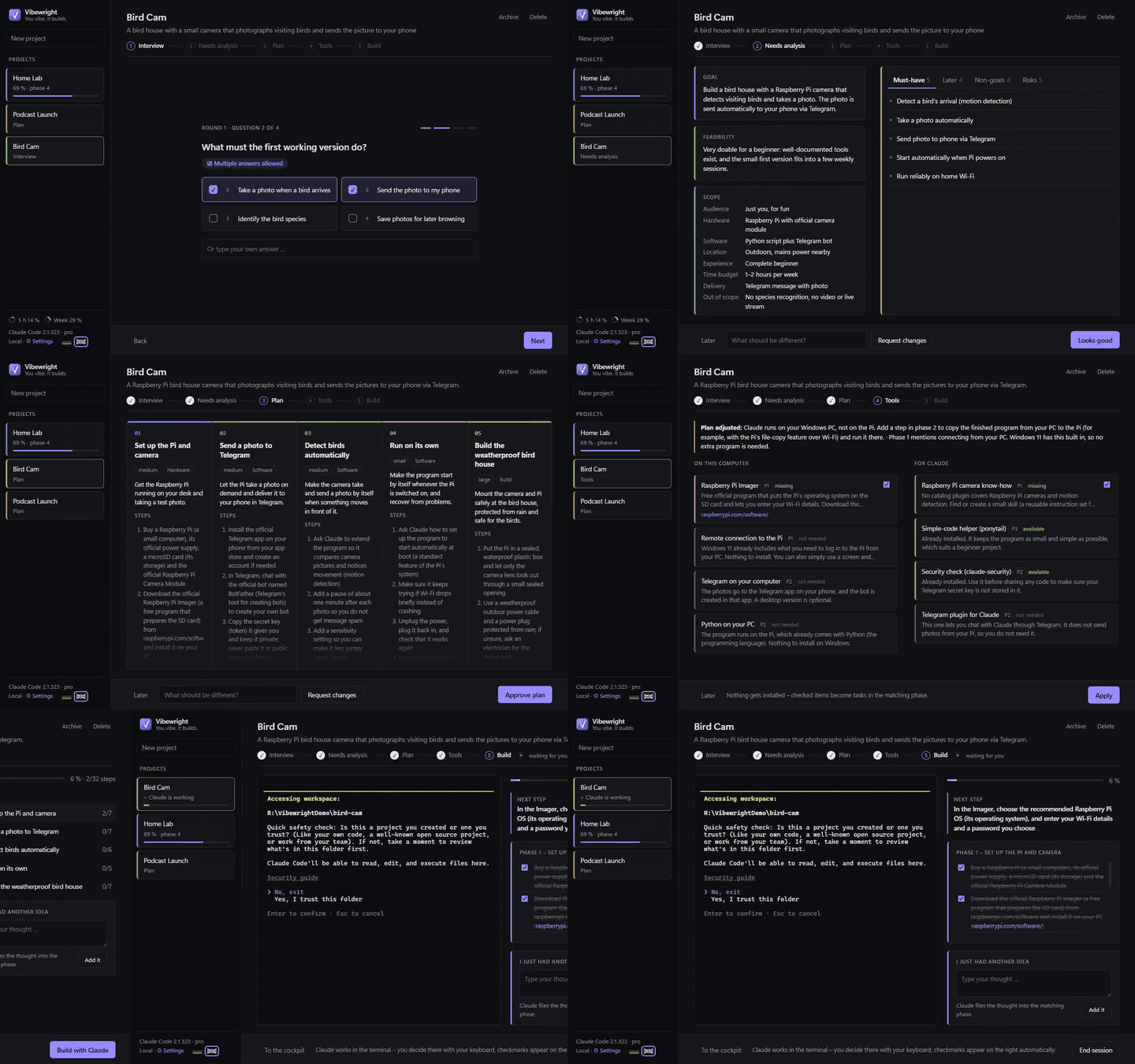
What is Vibewright?
You have an idea. Maybe a bird house camera, a podcast, a home server. Getting from "I'd like to…" to "it works" usually means juggling chats, notes, half-finished plans and forgotten next steps.
Vibewright is a desktop app for Windows and macOS that does the project management for you. You type one sentence; Vibewright interviews you, writes a needs analysis, cuts the goal into phases, checks which tools you and Claude need – and then lets you build it step by step with Claude Code running inside the app. You stay the decision maker: you click, approve and tick off. Claude does the heavy lifting in the background.
Idea ──► Interview ──► Needs analysis ──► Plan ──► Tool check ──► Build
          (clicks)      🚦 approve        🚦 approve  🚦 approve     Claude Code in the app
Features
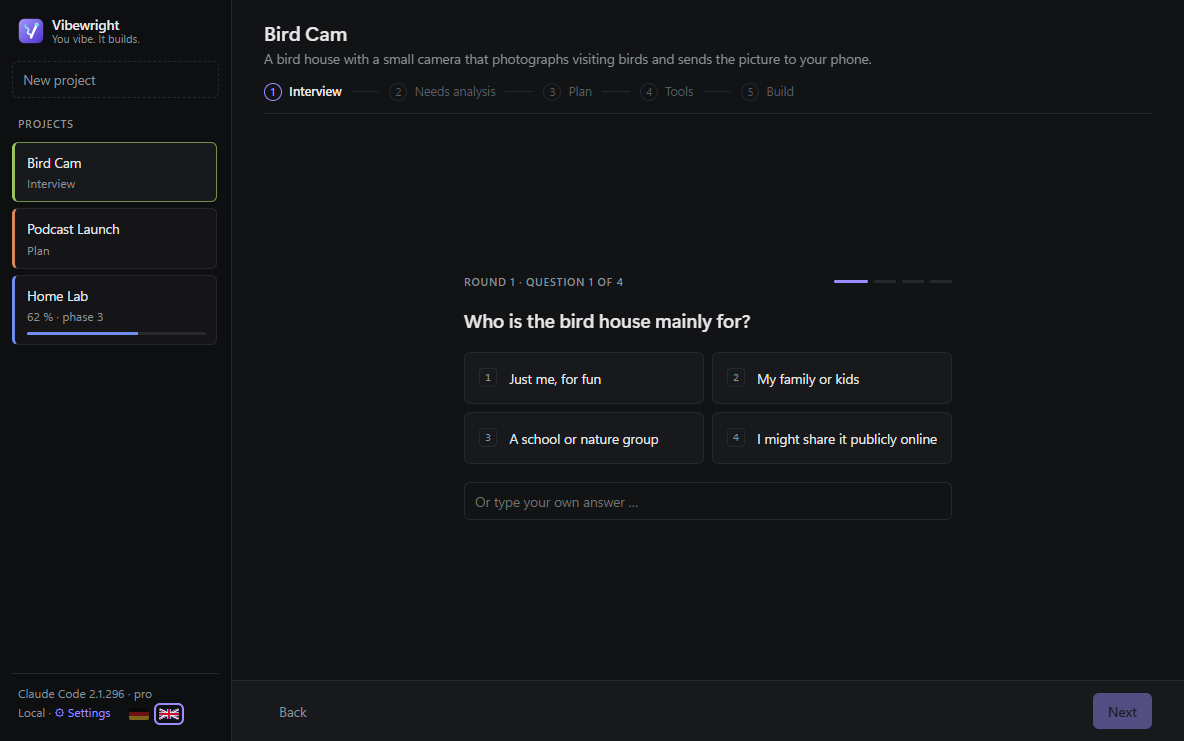
- Guided interview – one multiple-choice question per screen (keys 1–4), with your own answer as an option. Two short rounds, follow-up questions only where answers leave gaps.
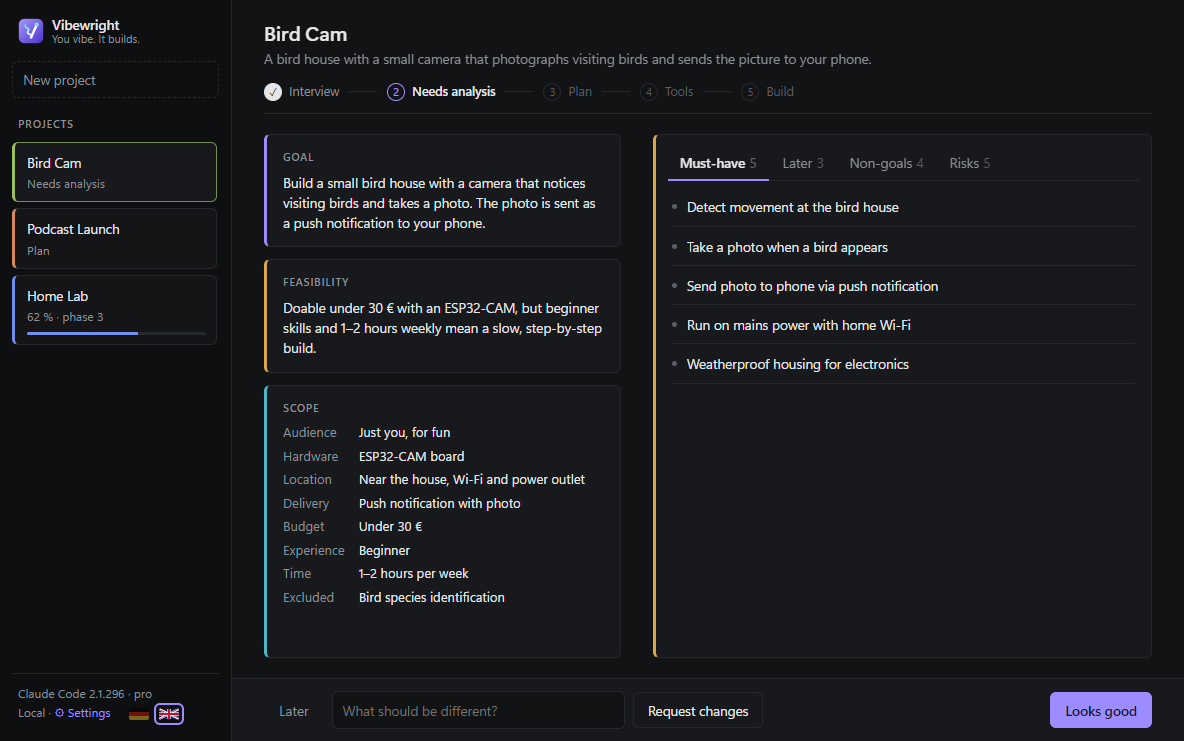
- Needs analysis – goal, scope, must-have / could-have / non-goals, risks you didn't think of, and a feasibility traffic light.
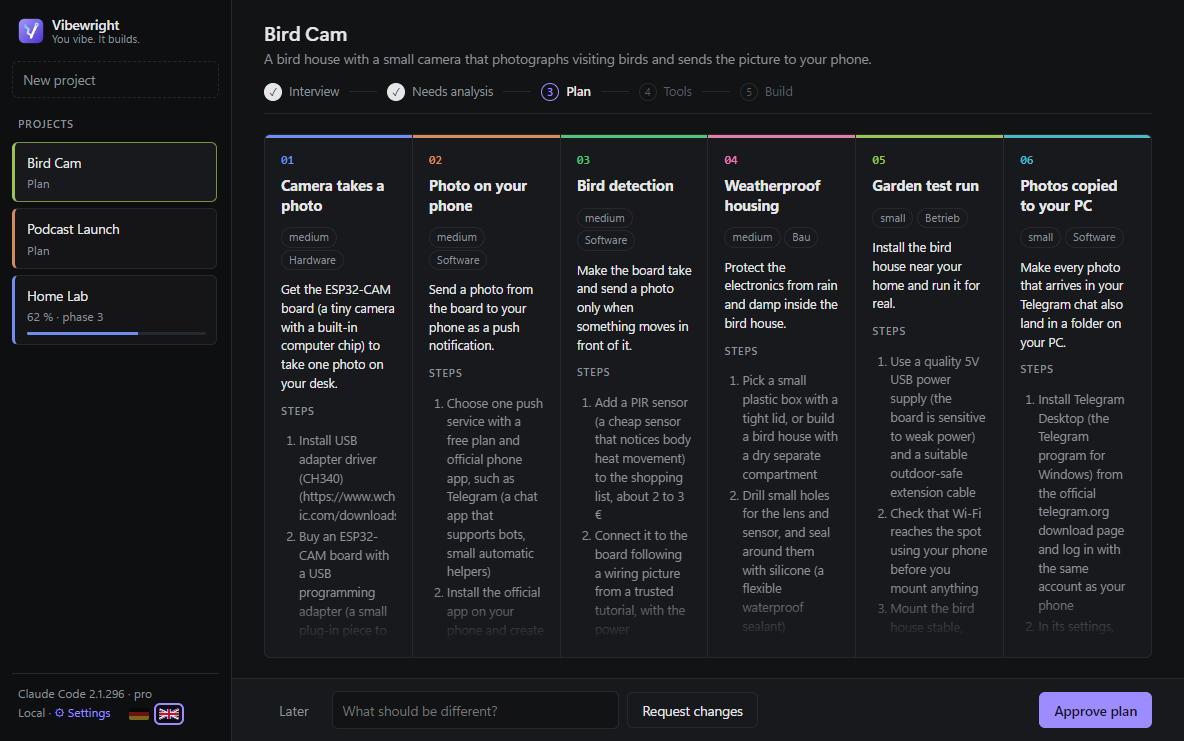
- Plan as a roadmap – 3–6 phases with goals, "done when" criteria and concrete steps in plain language (no unexplained commands).
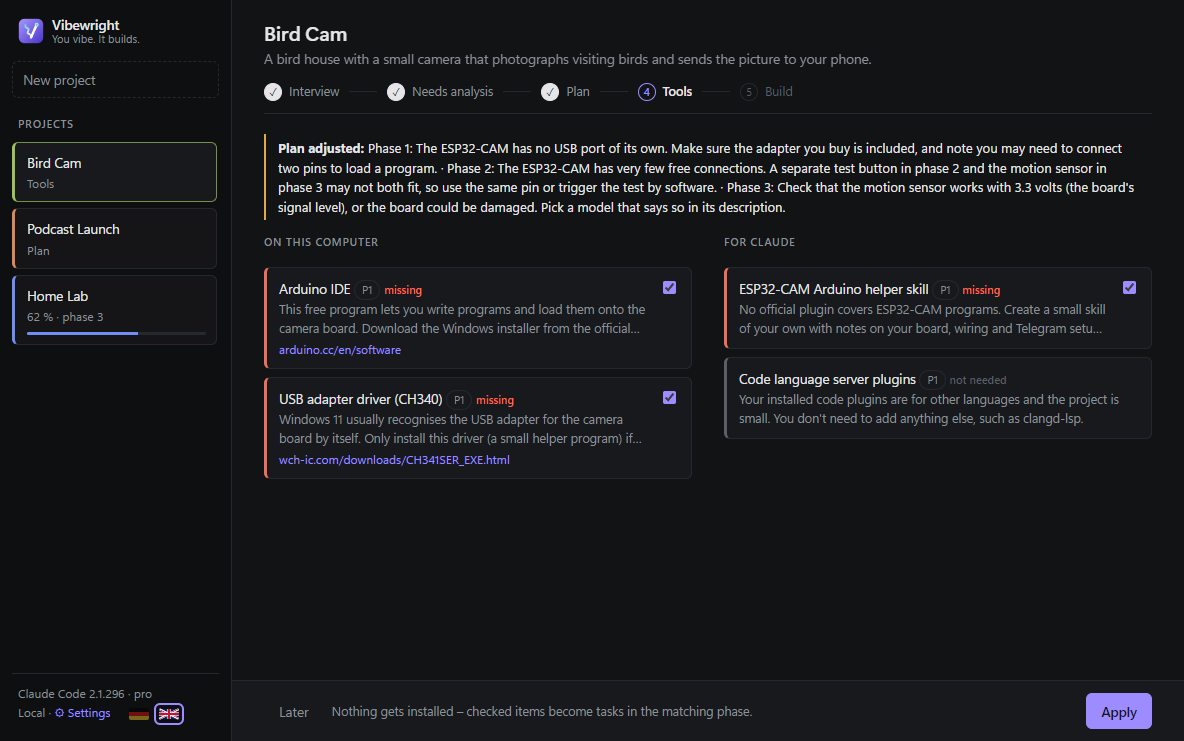
- Tool check – inspects your PC and your Claude setup (plugins, skills, MCP servers, operating system) and recommends only what a phase really needs, from official sources. Nothing gets installed without your OK.
- Cockpit – the current phase with its checklist, progress, next step and all phases at a glance.
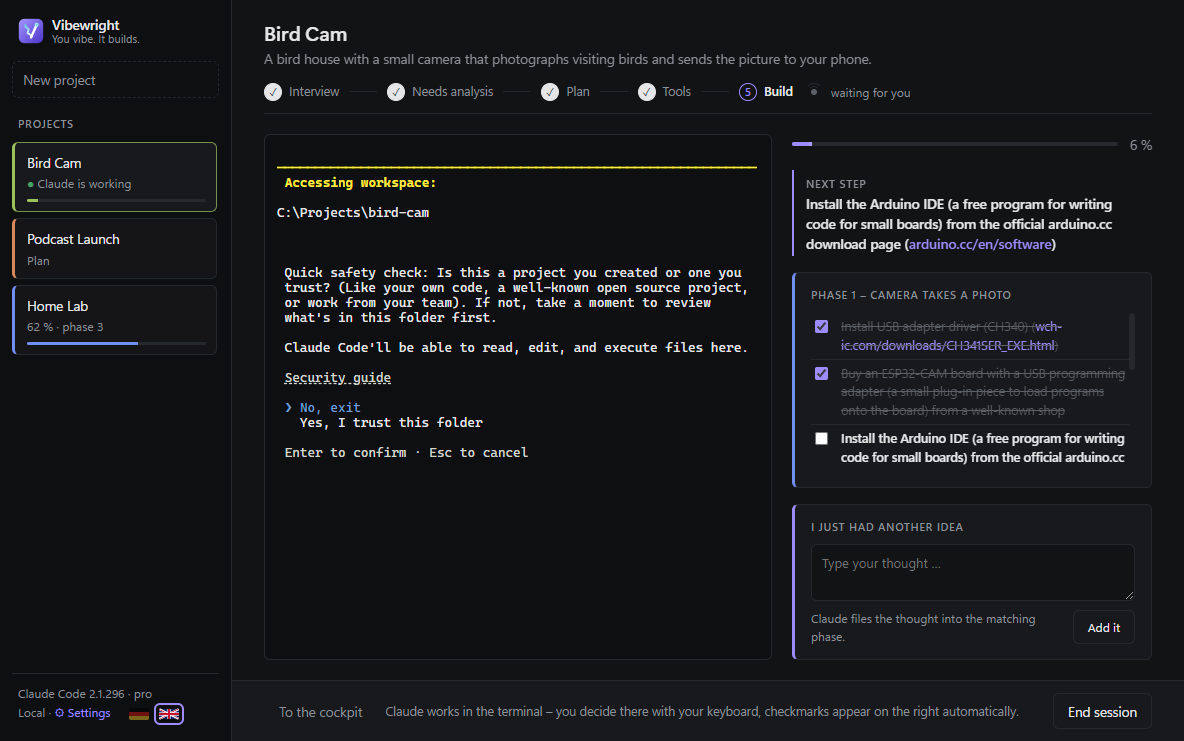
- Claude Code inside the app – an embedded terminal runs Claude Code with a generated
CLAUDE.mdthat knows your project, phase and next step. Claude ticks off finished steps; the checklist updates live. - "I just had another idea" – type a thought any time; Claude sorts it into the right phase (or creates a new one). While Claude is working, the idea waits until the current step is done.
- Your notes, your format – everything is written as Markdown into your Obsidian vault (with Dataview tables and Kanban if you use them) or locally as
.md+ an.htmldashboard. - Git safety net (optional) – the code folder becomes a Git project and Claude commits after every finished step, so you can always go back.
- English & German – UI, Claude's texts and the generated files. The language is fixed per project.
- Easy on your limits – planning calls run Claude Code headless without tools and with a short system prompt (~1,000 input tokens per call instead of ~15,000–20,000).
Screenshots
| Interview | Needs analysis |
|---|---|
 |
 |
| Plan | Tool check |
 |
 |
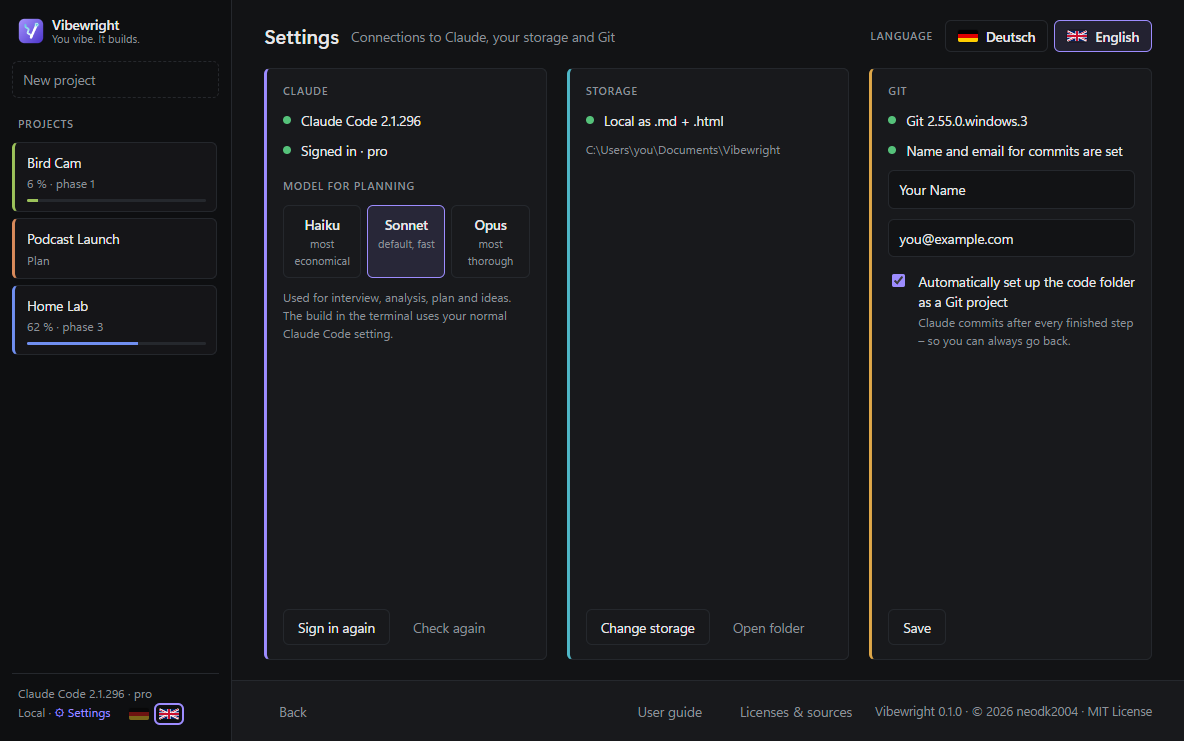
| Claude Code inside the app | Settings |
 |
 |
| While Claude thinks | Light mode |
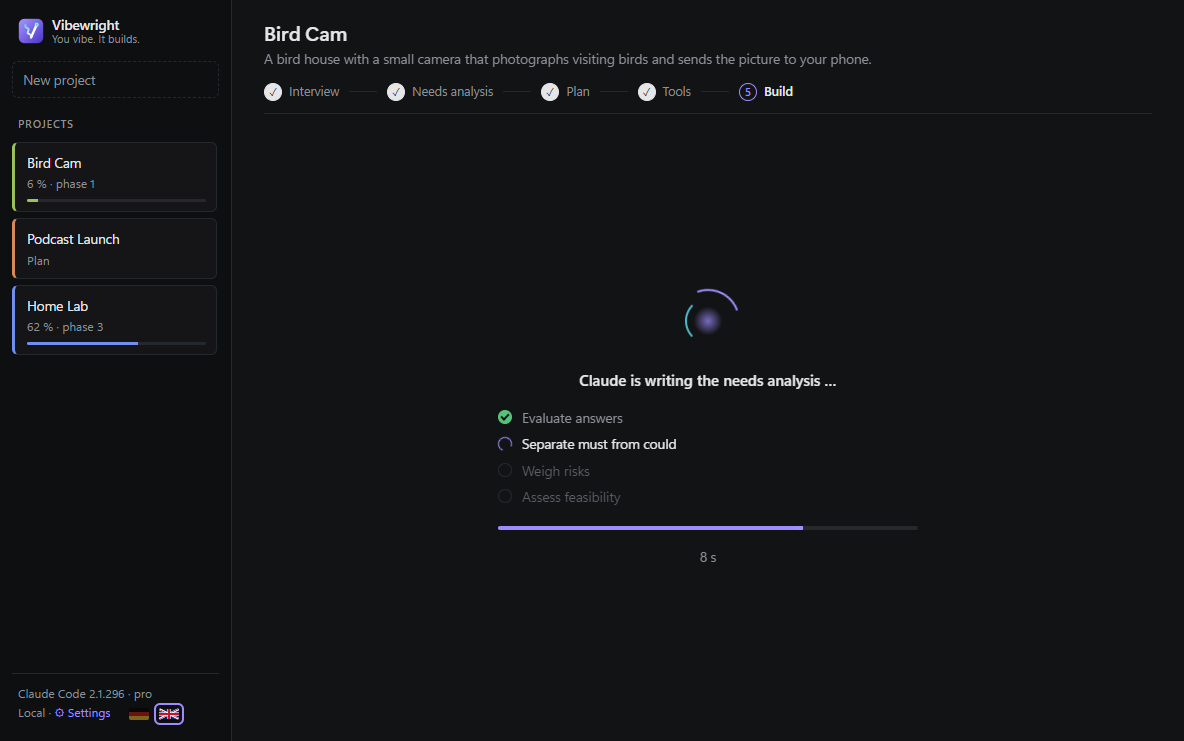 |
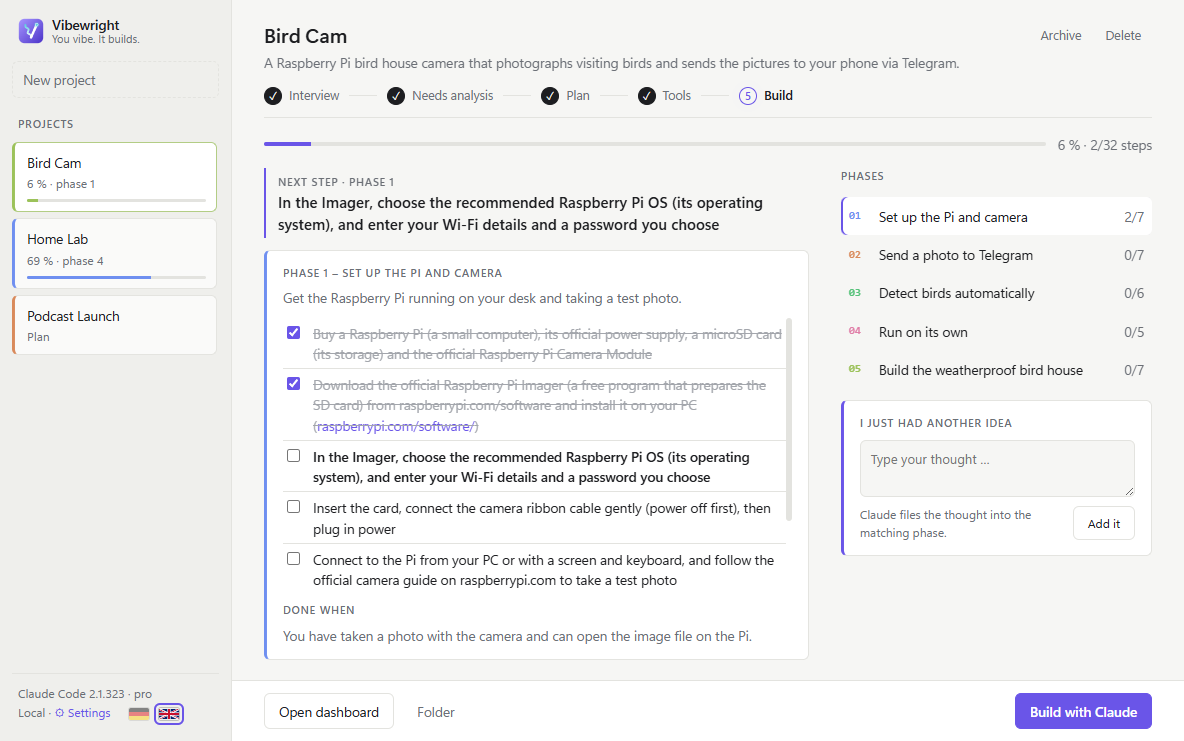 |
Documentation
- 📖 Wiki manual (English) · Handbuch (Deutsch) – one page per chapter, with screenshots
- 📘 User guide – everything from the first start to a finished project
- 📗 Anleitung (Deutsch)
- 🛠️ Developer guide – architecture, Claude calls, tests, building
- 📜 Third-party notices – all libraries and tools with versions and licenses
- 🤝 Contributing · Code of Conduct · Security policy
Requirements
| Windows 10 or 11 (64-bit) or macOS 11 Big Sur or later | Mac: Apple Silicon (M1–M4) and Intel are both supported |
| Claude Code | installed and signed in – official setup guide. Native installer and npm installation are both supported. |
| Claude subscription | Pro or Max recommended. Signing in with an API key works too, but then every call is billed separately. |
| Obsidian (optional) | obsidian.md – with the community plugins Dataview and Kanban for live tables and a project board. Without Obsidian, Vibewright saves .md files plus an .html dashboard. |
| Git (optional) | git-scm.com – for the automatic commit-per-step safety net. |
Installation
Windows
- Download
Vibewright.Setup.x.y.z.exefrom the Releases page.
Optional but recommended: verify the download. - Run it and choose an installation folder.
The installer is not code-signed yet, so Windows SmartScreen may warn you. Click More info → Run anyway.
- Start Vibewright. On first launch it checks Claude Code, lets you sign in and asks where your projects should live.
macOS
Download the file for your Mac from the latest release:
- Apple Silicon (M1, M2, M3, M4 …):
Vibewright-x.y.z-mac-arm64.dmg - Intel:
Vibewright-x.y.z-mac-x64.dmg
Not sure? Apple menu → About This Mac → "Chip" (Apple M…) or "Processor" (Intel).
- Apple Silicon (M1, M2, M3, M4 …):
Open the
.dmgand drag Vibewright into Applications.Start Vibewright from Applications. The app is signed with an Apple Developer ID and notarized by Apple, so macOS opens it without warnings.
Verify your download
Every release lists the SHA-256 checksum of the installer in its release notes and in an attached SHA256SUMS.txt (GitHub also shows it next to the file). Inside your download folder:
# Windows (PowerShell)
(Get-FileHash .\Vibewright.Setup.0.3.2.exe -Algorithm SHA256).Hash
# macOS (Terminal)
shasum -a 256 Vibewright-0.3.2-mac-arm64.dmg
If the output matches the published value, your file is exactly the released one.
Every installer is also scanned by VirusTotal (around 70 antivirus engines) with the public workflow .github/workflows/virustotal.yml. The result and a link to the full report are added to the release notes; the badge at the top shows the latest result. Prefer to check the code yourself? Run from source or build the installer with npm run exe.
Run from source
git clone https://github.com/neodk2004/vibewright.git
cd vibewright/app
npm install
npm start            # starts the app
npm test             # end-to-end test with real Claude calls (uses a bit of your limit)
npm run exe          # builds the Windows installer into app/dist/
npm run exe:mac      # builds the Mac app (on a Mac) into app/dist/
What's new
Unreleased
Fixed
- Long words or URLs in the needs-analysis scope card were cut off (#14): they now wrap inside the card instead of disappearing at its edge, and the labels next to them keep their width.
0.3.2 – 2026-11-18
Added
- Imported projects start where they really are: when importing from GitHub / Gitea, Claude Code or your own folder (e.g. an Obsidian project), Vibewright now also reads the documentation (docs/, wiki, notes, CHANGELOG, status files – up to 3 levels deep, newest and progress files first) besides README and CLAUDE.md. The plan then ticks off the steps that are already done, so progress, dashboard and the next step match the actual state. Claude also decides whether the needs analysis and plan still need your approval: if the docs already state goal and scope (or contain a roadmap), Vibewright creates them on its own and goes straight to the tool check, with a short note on how far the project is.
Fixed
- Header status wrapped onto two lines in small windows (#12): "wartet auf dich" / "Claude arbeitet …" next to the steps now stays on one line; the connectors between the steps get shorter instead.
0.3.1 – 2026-11-17
Added
- Import a project from your own folder: New project → From a folder takes any existing code folder – on this computer, an external drive, a USB stick, a NAS or a network drive. Vibewright reads it before the interview and plans from there; nothing is copied, and deleting the project in Vibewright never touches the folder.
Changed
- Larger window at startup: Vibewright now opens 15 % larger (up to 1380×897), but never larger than the screen.
Fixed
- Content was cut off in small windows (#3): cards in the needs analysis and in Settings now scroll when the window is too small, so every entry and button stays reachable (e.g. the "Scope" card, the 7th must-have, GitHub / Gitea).
- Model buttons overflowed their card in German (#4): the three model buttons now always fit; long words such as "gründlichsten" are hyphenated.
- Startup could stop with "Uncaught Exception: write EPIPE" on macOS/Linux (#6): reading the PATH from the login shell no longer opens an input pipe.
- File list of imported code folders depended on the operating system (#8): the overview Claude reads before the interview now lists files alphabetically (case-insensitive) on every OS, so the same first 40 files are chosen everywhere;
npm testis green on macOS again. - Settings footer links wrapped onto two lines in small windows (#5): the buttons in the bottom bar now always stay on one line; only the info text wraps.
- macOS: subscription usage (5 h / week) was not shown (#10): if the keychain held an old Claude Code entry besides the current one, Vibewright read the old, expired token. It now reads the entry of the current user first.
How it works
┌──────────── Vibewright (Electron) ────────────┐
│  UI ──► core.js (state machine, files)        │
│           │                                   │
│           ├─► claude -p --json-schema …        │  planning: headless, no tools,
│           │     (structured JSON answers)     │  own short system prompt
│           │                                   │
│           └─► node-pty ──► claude (interactive)│  building: embedded terminal
│                    ▲            │             │  (xterm.js)
│                    └─ CLAUDE.md ┘             │
└──────────────┬───────────────────────────────┘
               ▼
   Your vault / folder: Dashboard · Tasks · Plan · Needs analysis · Tool check
- Claude only returns structured JSON; Vibewright writes all files itself – Claude never needs write access for planning.
- Progress lives in the task files. Whether you tick a box in Vibewright, in Obsidian, or Claude ticks it while building – the app reads it back and updates progress, next step and dashboard.
- Each project keeps its state in
projekthelper-state.json, so you can pause for weeks and pick up exactly where you left off.
Privacy
- Vibewright itself sends no telemetry and stores its settings only on your PC (
%APPDATA%). - Tool check: while checking tools, Vibewright fetches the claude-skills plugin catalog from GitHub, sends 1–3 English keywords per missing skill to the SkillsMP search (never your idea or plan text), reads candidate
SKILL.mdfiles from GitHub and opens the suggested download pages once to check they exist. - Update check: once per start, Vibewright asks the public GitHub API for the newest release (
api.github.com/repos/neodk2004/vibewright/releases/latest). No project data is sent – GitHub only sees an ordinary web request. - What you plan with Claude (your idea, answers, plan, a list of installed Claude plugins/skills and your operating system for the tool check) is sent to Anthropic through Claude Code – exactly like any other Claude Code usage.
- If you push a project to GitHub, the Git commits contain the name and email from your Git config. Use GitHub's
noreplyaddress if you don't want your email to be public.
Project structure
app/
  main.js        Electron main process: windows, settings, embedded terminal (node-pty)
  core.js        Planning flow, Claude calls, file generation, progress
  renderer.js    User interface
  i18n.js        English UI layer
  style.css      Design, animations, compact mode for small screens
  splash.html    Splash screen
  assets/        Runtime icons
  build/         Icon source (icon.svg) and build resources
  test/          End-to-end and installation tests
docs/            README images
Deutsch
Vibewright macht aus einer einzeiligen Idee eine fertige Laufkarte: Interview → Bedarfsanalyse → Plan → Werkzeug-Check → Umsetzung. Umgesetzt wird mit Claude Code direkt in der App, du entscheidest nur noch an den Freigaben. Die Ablage erfolgt in Obsidian oder lokal als Markdown. Die Oberfläche lässt sich in der Seitenleiste oder in den Einstellungen per Flagge zwischen Deutsch und Englisch umschalten. Voraussetzungen und Installation: siehe oben.
Built with
Vibewright stands on the shoulders of a few open-source projects – Electron, xterm.js and node-pty (via @lydell/node-pty) – all MIT-licensed. Full details, versions and license texts: THIRD_PARTY_NOTICES.md.
Vibewright was developed with the help of Claude Code. All code was reviewed and tested and is published by the author under the MIT license.
Disclaimer
Vibewright is an independent open-source project and is not affiliated with, endorsed by or sponsored by Anthropic. Claude and Claude Code are trademarks of Anthropic, PBC. Vibewright simply uses the Claude Code CLI that you install and sign in to yourself.
License
Yorumlar (0)
Yorum birakmak icin giris yap.
Yorum birakSonuc bulunamadi