DeepSeek-OCR-WebUI
Health Pass
- License — License: MIT
- Description — Repository has a description
- Active repo — Last push 0 days ago
- Community trust — 446 GitHub stars
Code Fail
- rm -rf — Recursive force deletion command in .github/workflows/release-images.yml
- eval() — Dynamic code execution via eval() in archive/legacy-code/DeepSeek-OCR-master/DeepSeek-OCR-hf/run_dpsk_ocr.py
Permissions Pass
- Permissions — No dangerous permissions requested
No AI report is available for this listing yet.
Self-hosted DeepSeek-OCR-2 WebUI & API — vLLM / transformers on NVIDIA, Apple Silicon & CPU, per-page quality checks, PDF streaming, MCP

DeepSeek-OCR-WebUI
Self-hosted DeepSeek-OCR-2 for documents and images — vLLM or transformers on NVIDIA, native Apple Silicon, and CPU, with per-page quality checks.









What's new · Screenshots · Quick start · API · Architecture · Performance · Development
✨ What's new in v5.0
v5 is a ground-up renovation of the backend and a hardening of the Vue 3 frontend. Every number below was measured; see CHANGELOG for the full list.
| v4.1 | v5.0 | |
|---|---|---|
| Apple Silicon / CPU | loads, then fails on first page (upstream code hard-codes .cuda()) |
works — device-agnostic inference, M5 Max 8.1 pages/min |
| NVIDIA engines | transformers only, one page at a time | vLLM (continuous batching, 132 pages/min on an A10G) or transformers |
| Old GPUs (T4 / V100, no bf16) | BFloat16 vs float crash (#30 #40) |
fp16 + eager, verified on T4 |
| Driver requirement | CUDA 13 image ⇒ driver ≥ 580 (#46) | CUDA 12 builds |
| Docker image | 13 GB with weights inside (#38) | weights in a volume; hf image ≈ 4.0 GB unpacked |
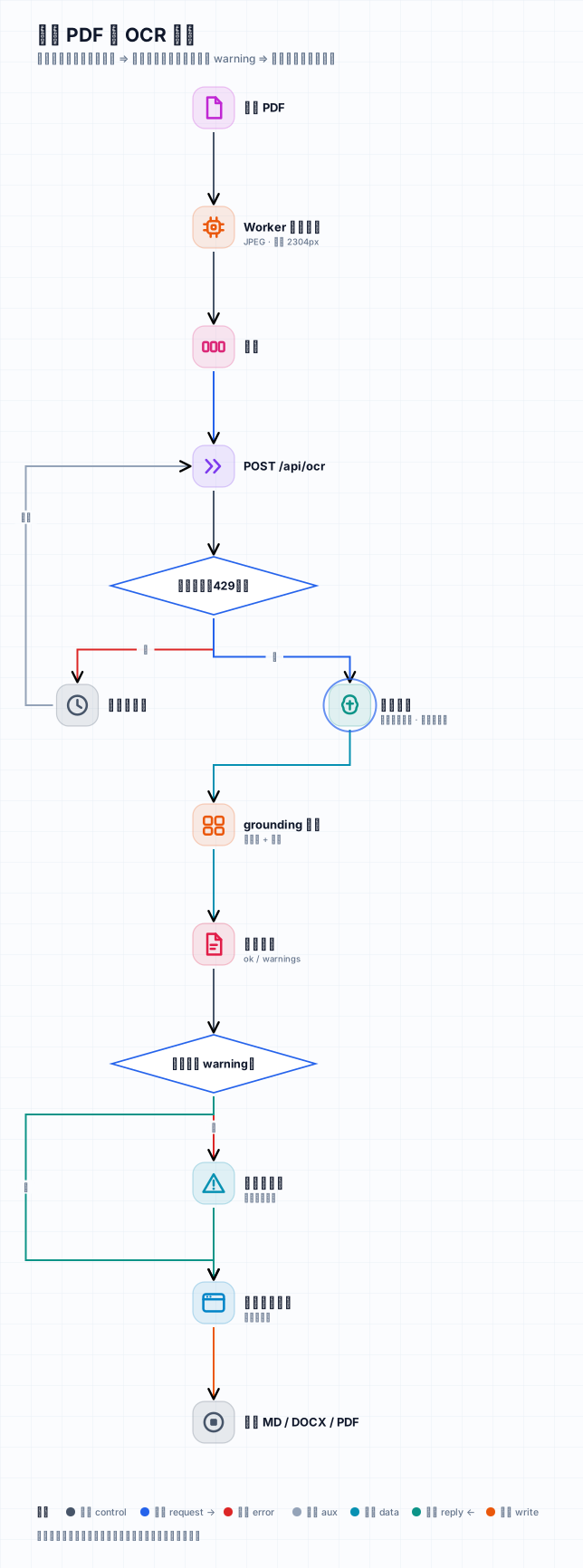
| Output quality | HTTP 200 = "success" | per-page ok + warnings (repetition, truncation, coordinate loops, empty) |
| Readiness | /health 200 before the model can read |
503 until a warm-up page is read back correctly |
| Large PDFs | 200 pages ⇒ 662 MB in IndexedDB, freezes (#31 #50) | 78 MB, parsed once in a worker; 500 MB upload limit (#51) |
| Markdown export | dropped multi-box blocks (#49) | 100 % character recall on all samples |
| Security | binds 0.0.0.0, CORS * with credentials, XSS via v-html |
127.0.0.1 by default, CORS allow-list, DOMPurify |
| Tests | 0 backend tests; 123 frontend tests failing on Node 26 | backend, frontend, e2e and mutation suites — live counts in the badges above |
📸 Screenshots
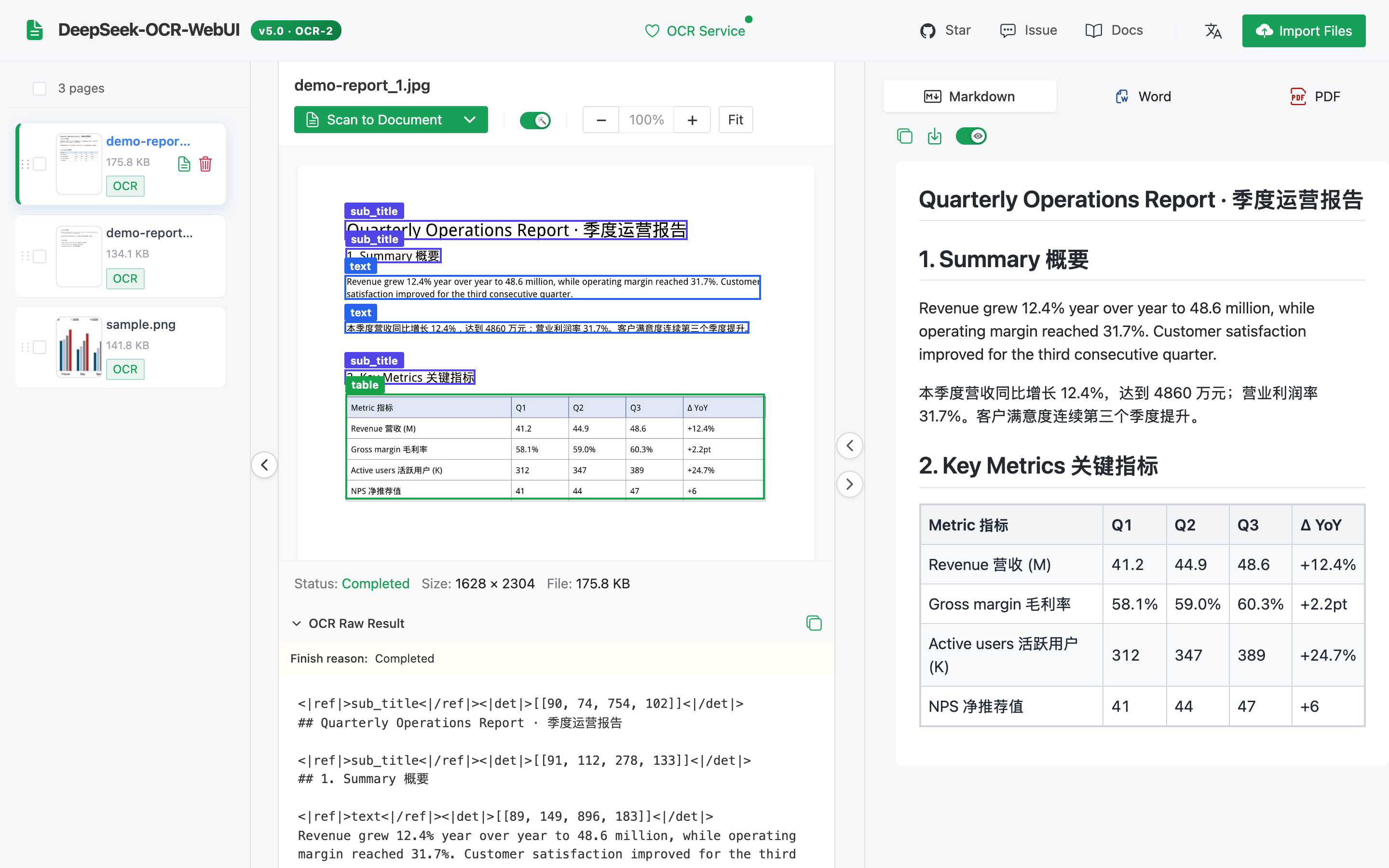
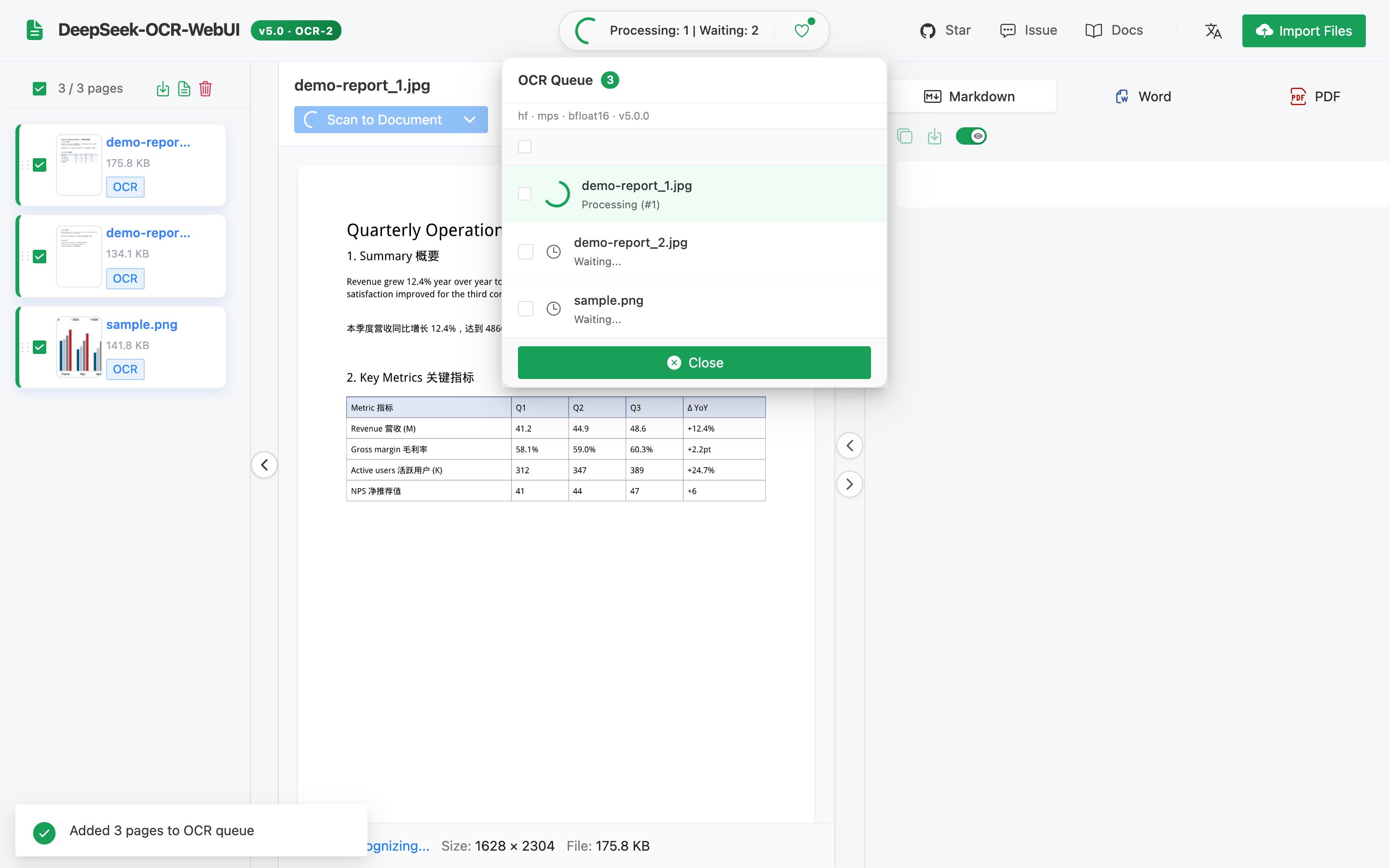
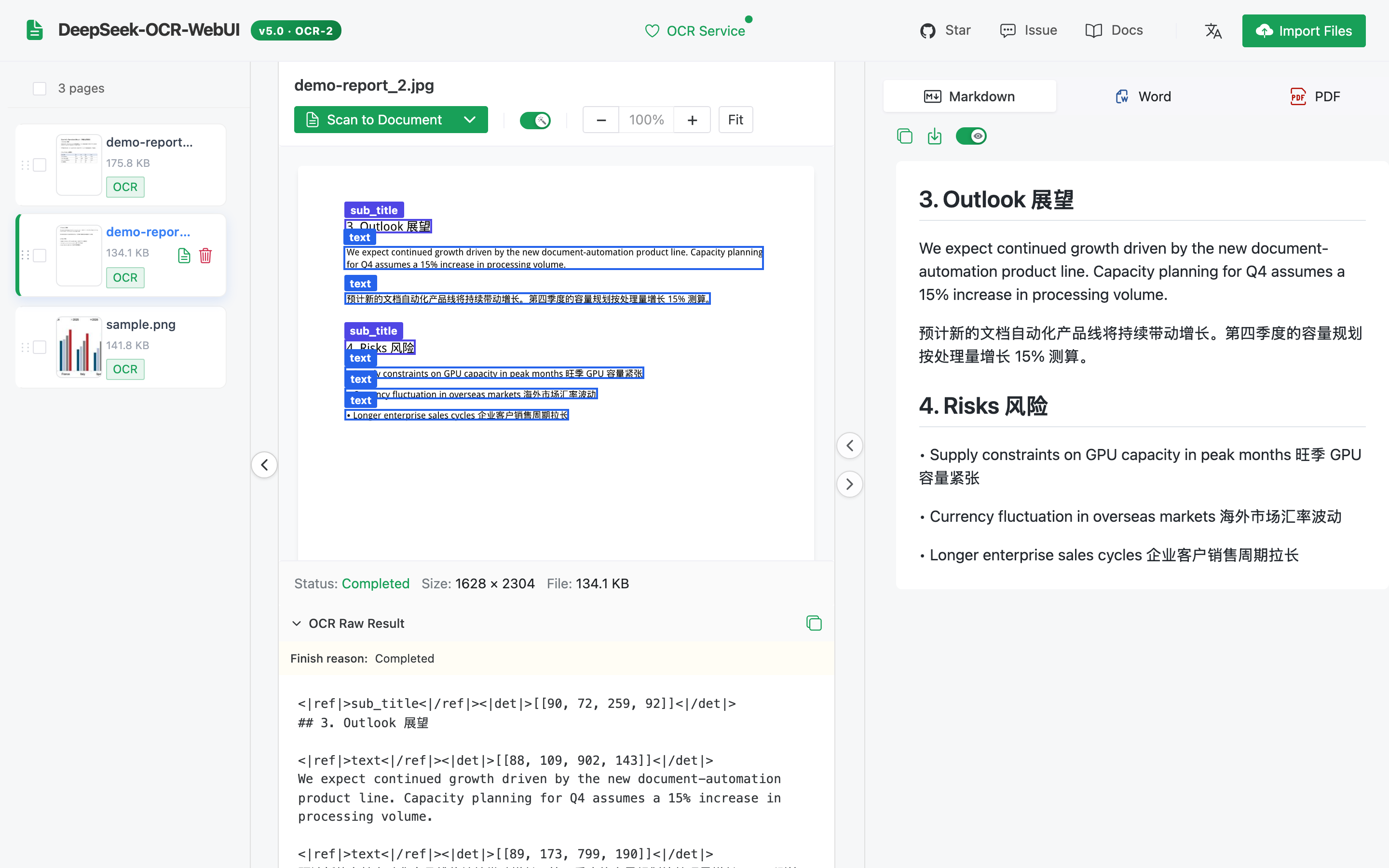
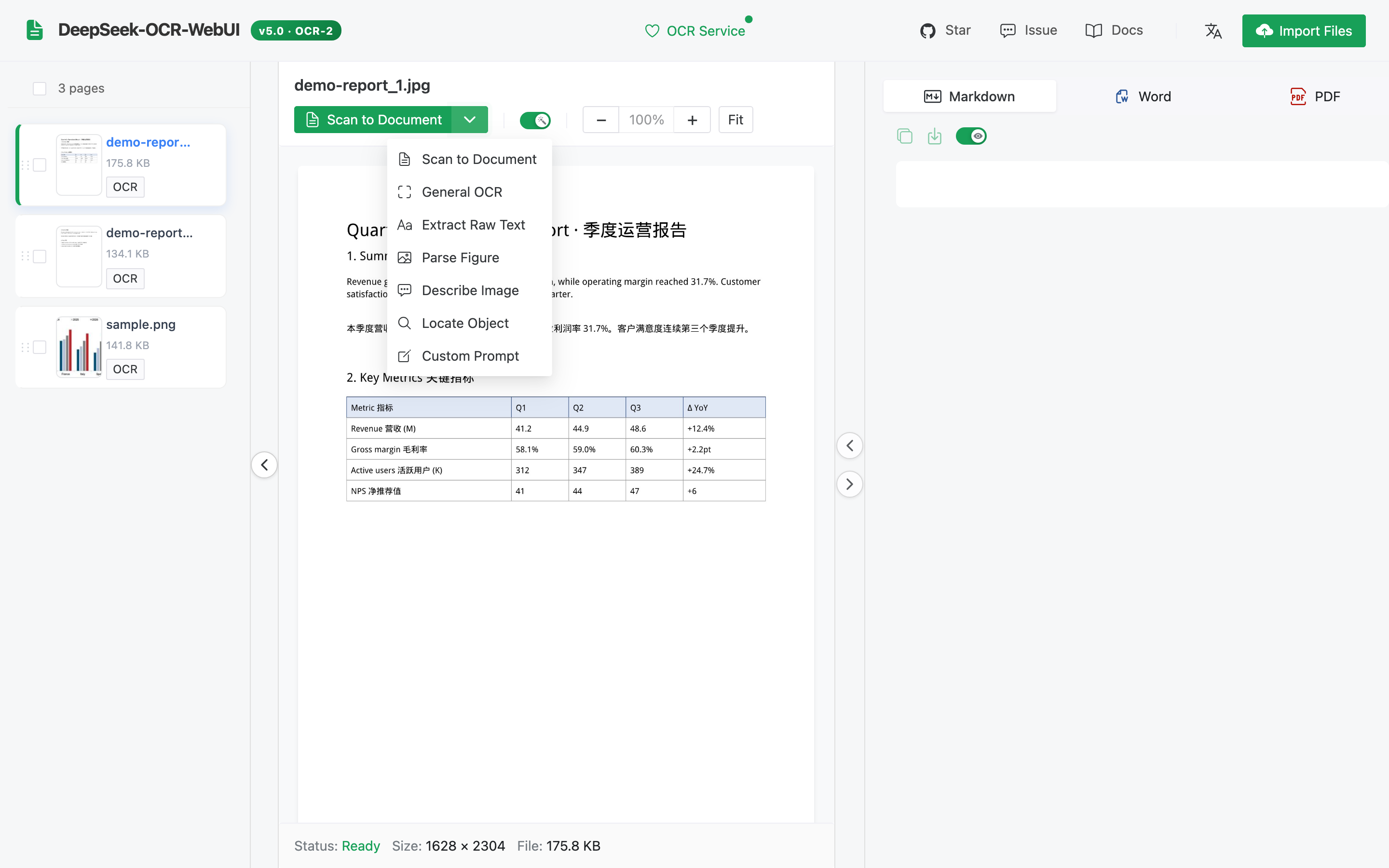
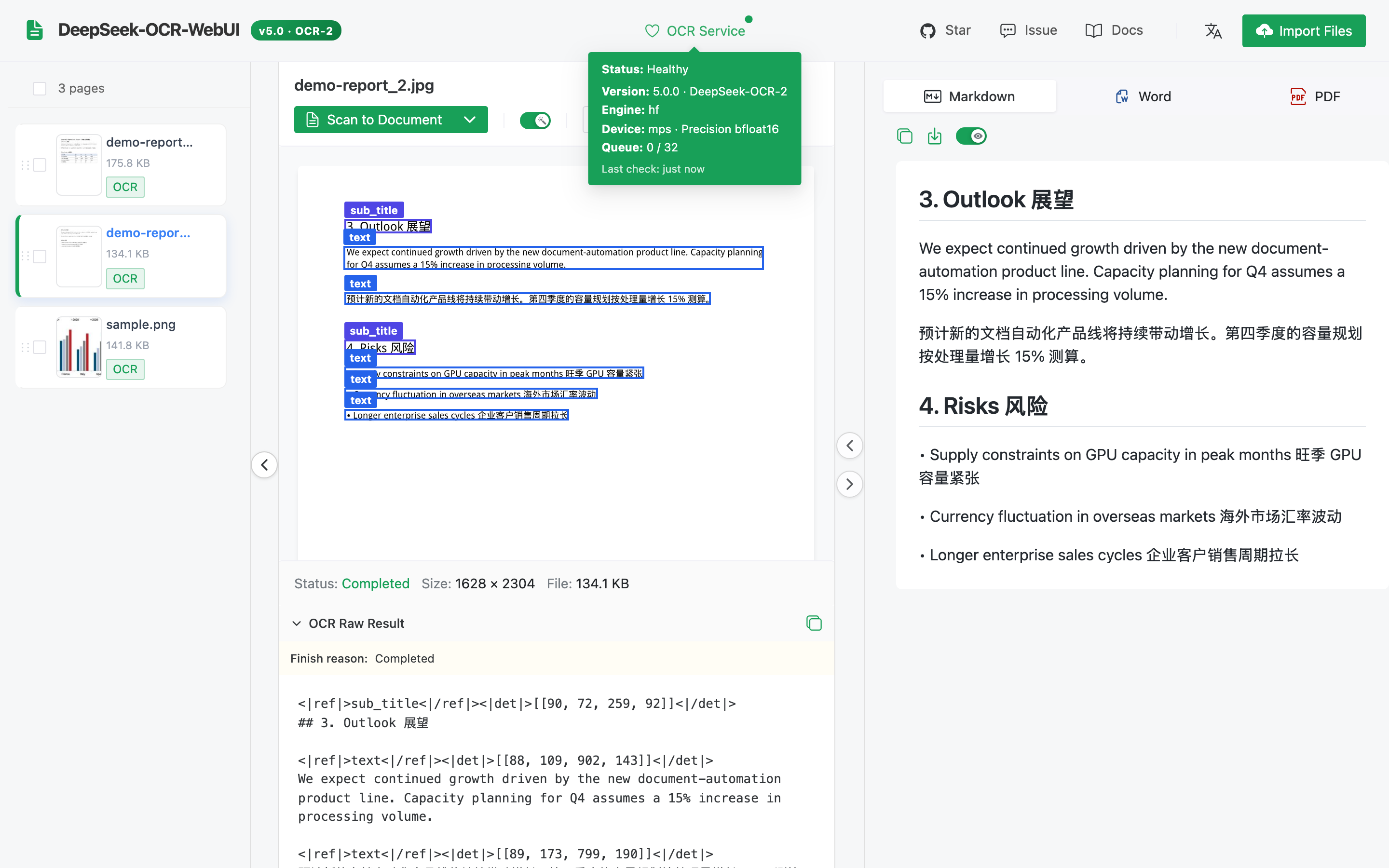
All screenshots are generated by frontend/scripts/screenshots.mjs against a real backend (DeepSeek-OCR-2 on an Apple M5 Max). The demo document is generated by scripts/make_demo_docs.py.
Document → Markdown with layout boxes and a rendered table
| Batch queue | Second PDF page |
|---|---|
 |
 |
| Recognition modes | Service status (engine · device · precision) |
 |
 |
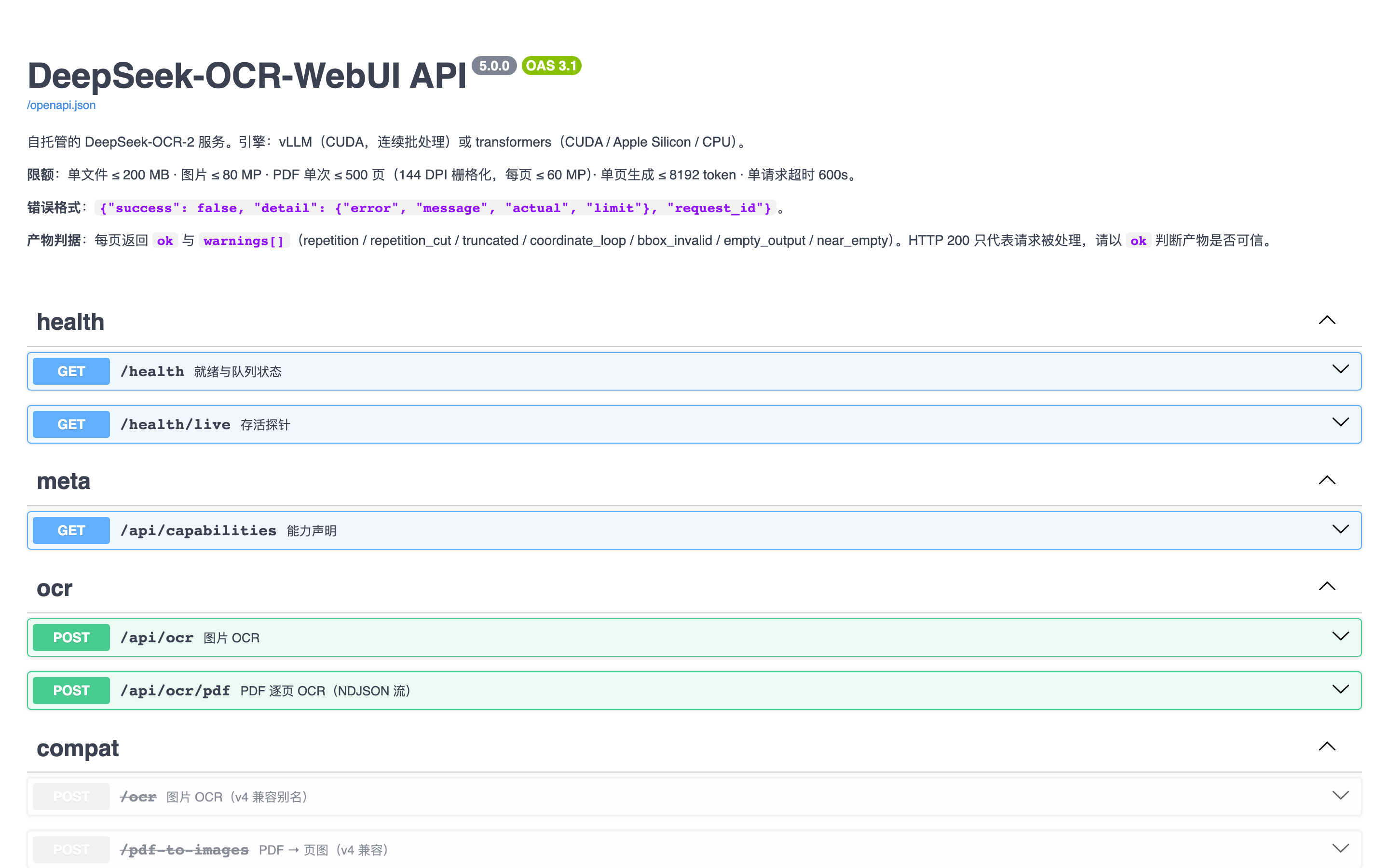
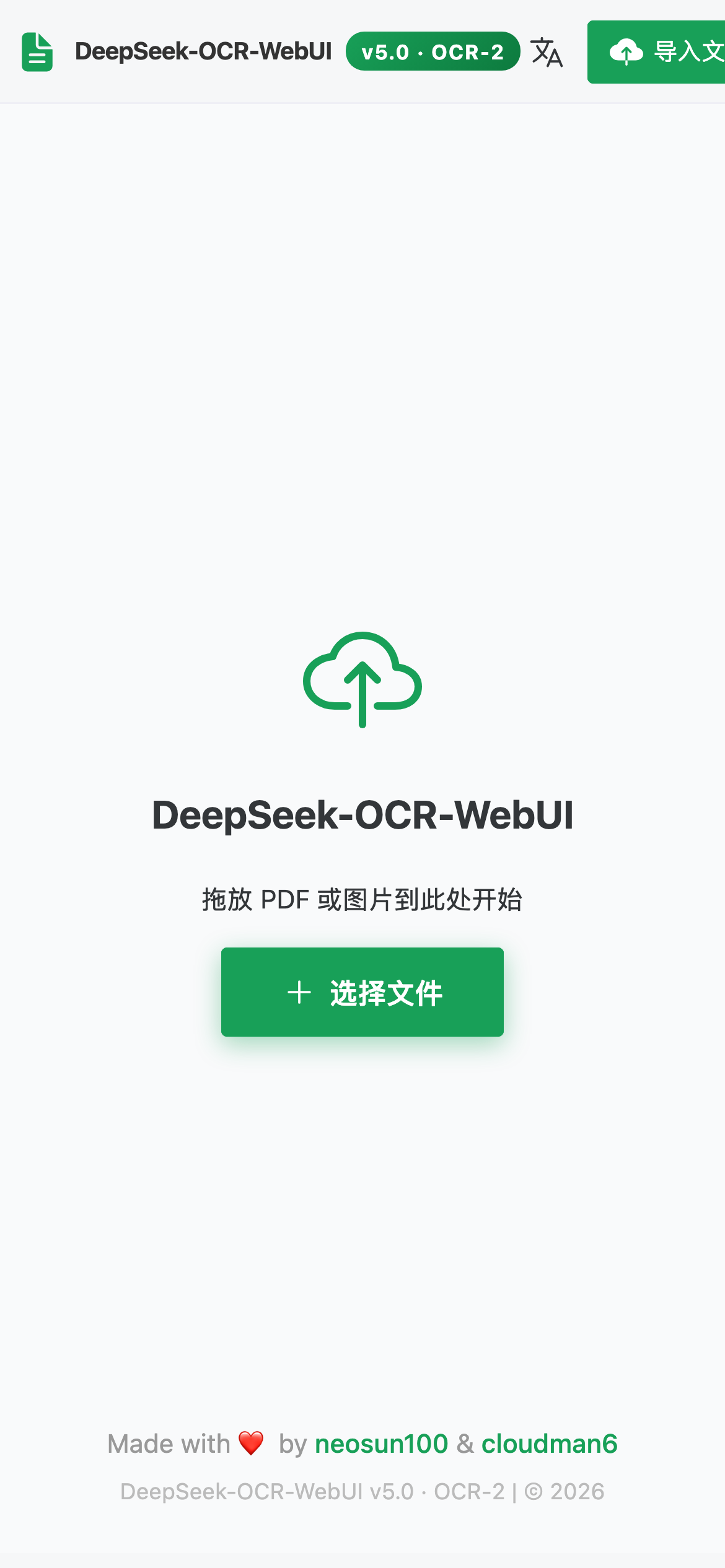
| Swagger UI | Mobile (简体中文) |
 |
 |
🚀 Quick start
🔒 The service has no login. Every command below listens on
127.0.0.1only. To use it from another machine, use an SSH tunnel (ssh -L 8001:127.0.0.1:8001 you@gpu-host) or put it behind a reverse proxy that authenticates users — do not publish the port on all interfaces.
Option 1 — Docker, NVIDIA GPU (vLLM engine, recommended)
git clone https://github.com/neosun100/DeepSeek-OCR-WebUI.git && cd DeepSeek-OCR-WebUI
docker compose up -d                  # builds the image; first start downloads ~6.8 GB of weights
open http://127.0.0.1:8001            # UI ·  API docs: http://127.0.0.1:8001/docs
Prebuilt images (published by CI on each release):
docker run -d --gpus all --shm-size 8g -p 127.0.0.1:8001:8001 -v dsocr-models:/models \
  ghcr.io/neosun100/deepseek-ocr-webui:5.0.0          # vLLM engine
docker run -d --gpus all --shm-size 8g -p 127.0.0.1:8001:8001 -v dsocr-models:/models \
  ghcr.io/neosun100/deepseek-ocr-webui:5.0.0-hf       # transformers engine (smaller, also for T4/V100)
/health returns 503 while the model is loading (first start: download + load + warm-up) and 200 once a warm-up page has been read back correctly. docker ps shows healthy at that point.
Option 2 — macOS (Apple Silicon) or Linux without Docker
Requires uv and Node.js ≥ 20.
git clone https://github.com/neosun100/DeepSeek-OCR-WebUI.git && cd DeepSeek-OCR-WebUI
(cd frontend && npm ci && npm run build)       # the backend serves the built UI
uv sync --extra hf                             # transformers + torch (MPS on macOS, CUDA 12.6 wheels on Linux)
uv run deepseek-ocr-webui serve                # http://127.0.0.1:8001
On Linux with vLLM instead: uv sync --extra vllm && uv run deepseek-ocr-webui serve --engine vllm.
Offline / air-gapped
Download once (huggingface-cli download deepseek-ai/DeepSeek-OCR-2 --revision aaa02f3811945a91062062994c5c4a3f4c0af2b0 --local-dir /models/ocr2), then start with DSOCR_MODEL_PATH=/models/ocr2.
Configuration
All settings are environment variables with the DSOCR_ prefix (config.py is the single source). The most useful ones:
| Variable | Default | Meaning |
|---|---|---|
DSOCR_HOST / DSOCR_PORT |
127.0.0.1 / 8001 |
Listen address. The Docker image sets 0.0.0.0 inside the container; the published port is the boundary. |
DSOCR_ENGINE |
auto |
auto · vllm · hf (auto = vLLM if installed and CUDA is available) |
DSOCR_DEVICE |
auto |
transformers engine: cuda · mps · cpu |
DSOCR_REQUIRE_GPU |
false |
fail fast instead of silently falling back to CPU |
DSOCR_VLLM_URLS |
— | comma-separated external vLLM servers (multi-GPU / multi-host, least in-flight) |
DSOCR_MODEL_PATH |
— | local weights directory (no network) |
DSOCR_MAX_UPLOAD_MB · DSOCR_MAX_PDF_PAGES |
200 · 500 |
upload limits |
DSOCR_MAX_QUEUE · DSOCR_MAX_PER_CLIENT · DSOCR_MAX_PER_IP |
32 · 1 · 4 |
admission control (HTTP 429 when exceeded) |
DSOCR_CORS_ORIGINS |
— | allow-listed origins (off by default) |
DSOCR_TRUST_PROXY |
false |
trust X-Forwarded-For (only behind your own proxy) |
v4 variable names (PORT, LOCAL_MODEL_PATH, FORCE_BACKEND) still work.
🧩 Recognition modes
| Mode | Prompt | Output |
|---|---|---|
document (default) |
`< | grounding |
ocr |
`< | grounding |
free |
Free OCR. |
plain text, fastest |
figure |
Parse the figure. |
chart / figure description |
describe |
Describe this image in detail. |
natural-language description |
find |
document parsing + server-side block search | the layout blocks that contain find_term (block-level, see below) |
freeform |
your prompt | anything |
About
find: DeepSeek-OCR-2 has no native "locate this phrase" prompt — 12 out of 12 trials with the v1-styleLocate <|ref|>…<|/ref|>prompt fell back to document parsing. v5 therefore parses the layout and returns the boxes of the blocks whose text contains your term. Precision is per block, not per word.
🔌 API
Interactive docs: /docs (Swagger) and /redoc. The OpenAPI spec is checked in at docs/openapi.json and kept in sync by a test.
# One image
curl -s -F [email protected] -F prompt_type=document http://127.0.0.1:8001/api/ocr | jq '{ok, warnings, text}'

# A PDF, streamed page by page (NDJSON: start → page* → done)
curl -sN -F [email protected] -F pages=1-3 http://127.0.0.1:8001/api/ocr/pdf

# Status / capabilities
curl -s http://127.0.0.1:8001/health | jq '{status, ready, engine, warmup}'
curl -s http://127.0.0.1:8001/api/capabilities | jq '.limits, .known_weak'
Each page result contains text, raw_text (with <|ref|>/<|det|> grounding tags), boxes (pixel coordinates), finish_reason, ok and warnings:
| Warning | Meaning | Fails ok? |
|---|---|---|
repetition / repetition_cut |
the model looped at the end; the loop is trimmed (and stopped while generating) | yes |
truncated |
hit the generation limit | yes |
coordinate_loop |
box coordinates degenerated ([23,268,268,268…]) |
yes |
empty_output |
nothing was generated | yes |
near_empty |
≤ 20 letters/digits — usually a blank page | no |
bbox_invalid |
some boxes were out of range and dropped; text kept | no |
find_no_match |
find mode: no block contains the term |
no |
Errors always look like {"success": false, "detail": {"error", "message", "actual", "limit"}, "request_id"}. The v4 endpoints /ocr, /pdf-to-images and the v4 /health fields keep working.
MCP (Claude, Cursor, …)
{ "mcpServers": { "deepseek-ocr": {
    "command": "uv", "args": ["run", "--directory", "/path/to/DeepSeek-OCR-WebUI", "--extra", "mcp", "deepseek-ocr-webui-mcp"],
    "env": { "DSOCR_BASE": "http://127.0.0.1:8001" } } } }
Tools: ocr_image(path | image_base64, mode, find_term, custom_prompt, grounding), ocr_pdf(path, mode, pages), health().
🏗 Architecture
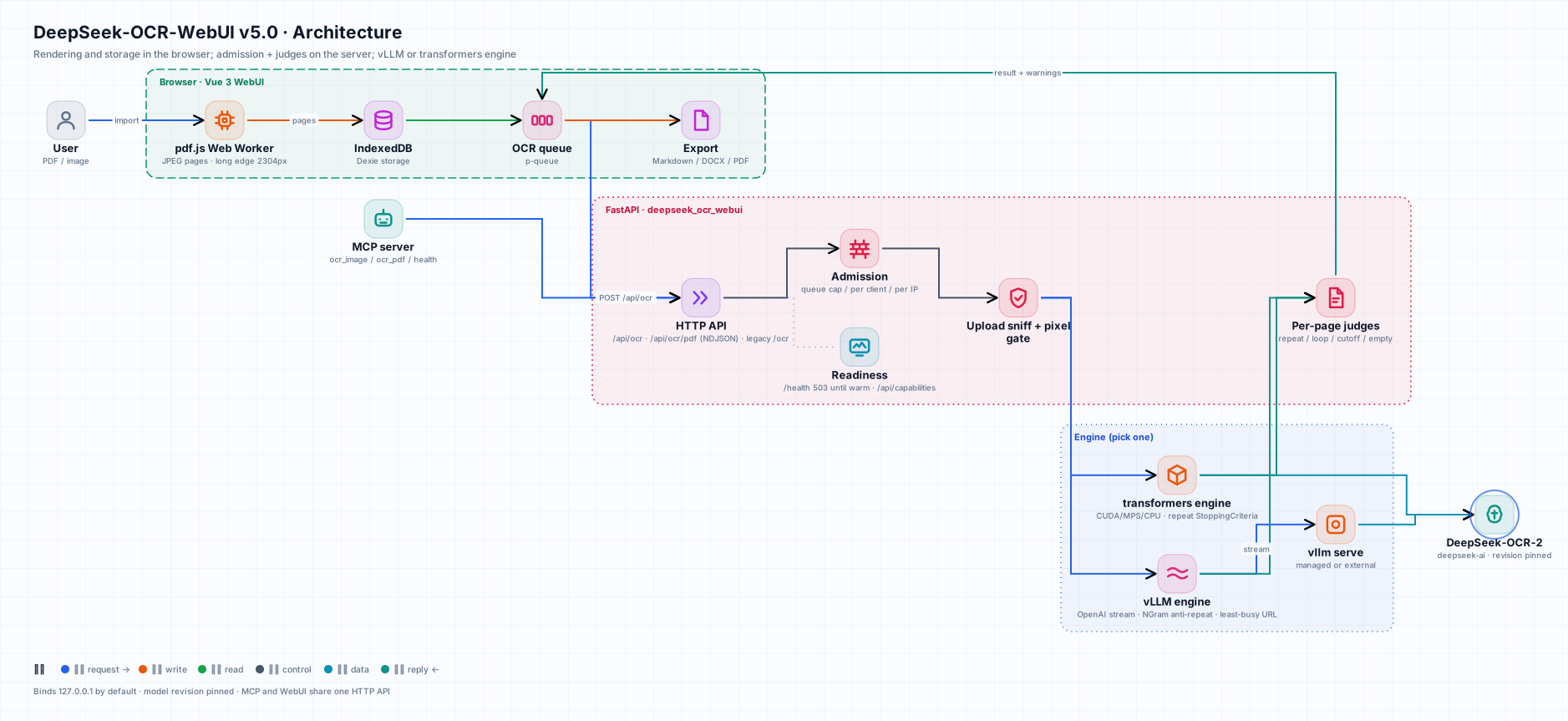
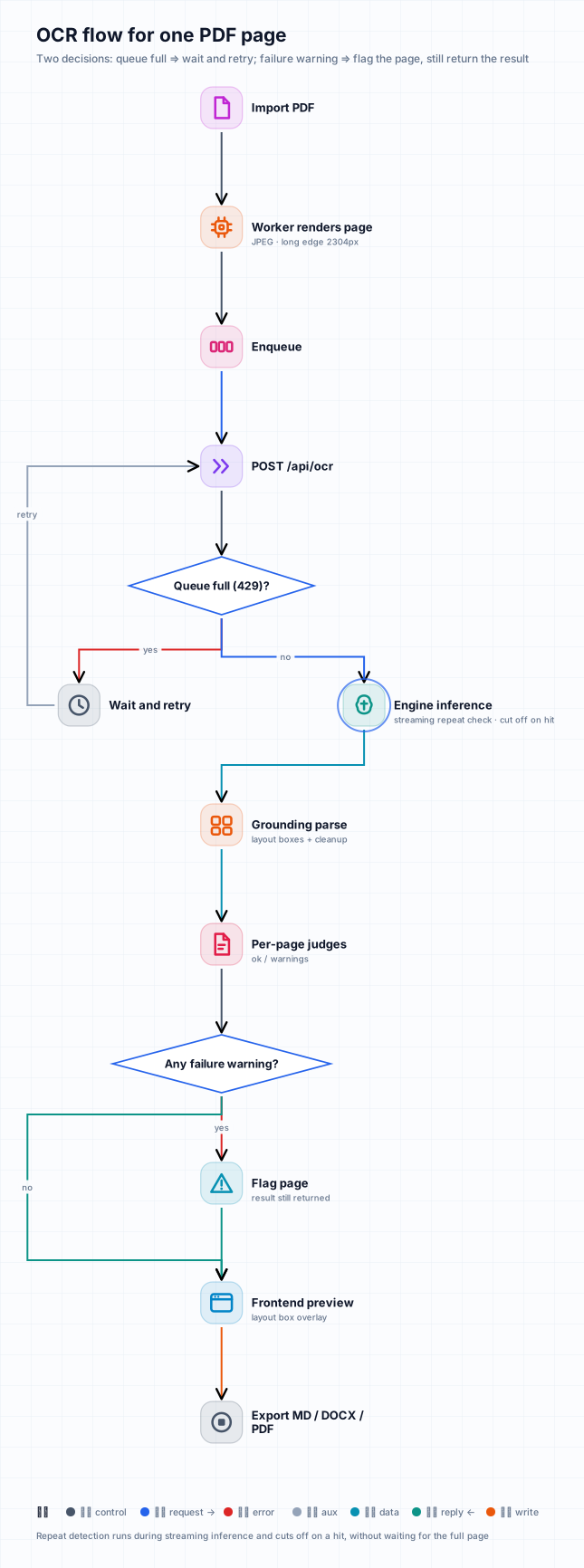 中文版架构图 / Chinese diagrams
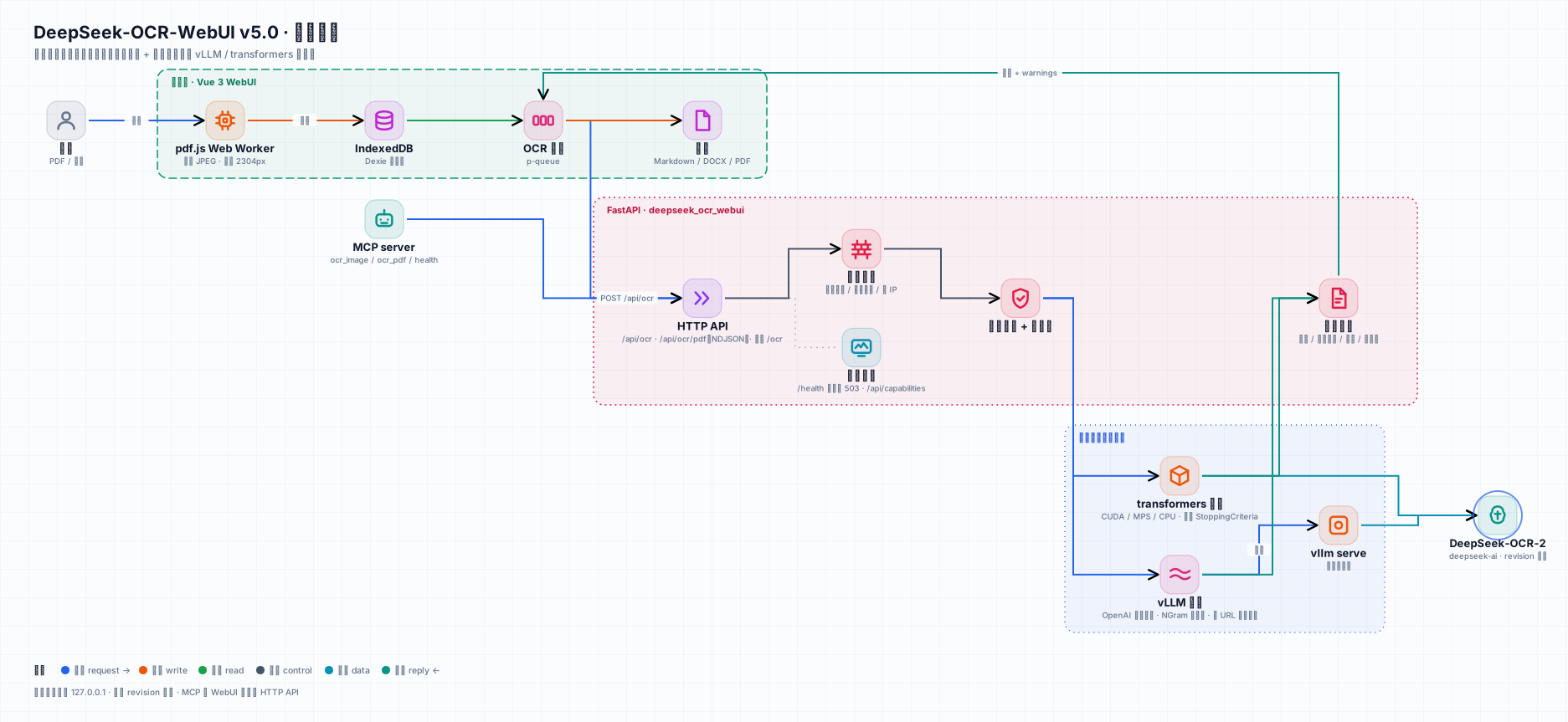
- Browser — PDFs are rendered in a Web Worker (each file parsed once, bytes transferred once), pages are kept in IndexedDB so long jobs survive reloads, and Markdown / DOCX / PDF are generated locally.
- Service (
server/deepseek_ocr_webui) — admission control, upload sniffing and pixel limits, the engine, per-page judges, grounding parsing. - Engines —
vllmstreams fromvllm serveand closes the stream as soon as a repetition loop is detected;hfre-implements the upstream preprocessing so tensors follow the model's real device and dtype.
📊 Performance
Measured with scripts/bench.py on dedicated machines (12 pages: sample images, rendered PDF pages, synthetic pages with known text; document mode). Full record, memory, agreement and reproduction steps: docs/BENCHMARKS.md.
| Hardware | Engine | Concurrency | Pages / min | p50 latency | Known-text recall |
|---|---|---|---|---|---|
| NVIDIA A10G 24 GB | vLLM 0.33 | 1 | 46.4 | 0.81 s | 1.00 |
| NVIDIA A10G 24 GB | vLLM 0.33 | 16 | 132.1 | 5.88 s | 1.00 |
| NVIDIA A10G 24 GB | transformers (bf16) | 1 | 9.5 | 2.05 s | 1.00 |
| NVIDIA T4 16 GB | transformers (fp16) | 1 | 7.8 | 2.6 s | 1.00 |
| Apple M5 Max | transformers (MPS, bf16) | 1 | 8.1 | 3.3 s | 1.00 |
vLLM and transformers agree on the same pages with a mean bidirectional character recall of 0.985 (min 0.849 on one dense page). transformers handles one page at a time, so extra concurrency only queues.
🛡 Limits and known weak spots
From GET /api/capabilities (known_weak lists the public benchmark evidence): DeepSeek-OCR-2 is weaker on photos with perspective / skew, handwriting, and low-resource languages. Defaults: 200 MB per upload, 80 MP per image, 500 PDF pages per request (rendered at 144 DPI), 8192 tokens per page.
🧪 Development
uv sync --extra hf --extra mcp --group dev
uv run pytest -n auto tests/unit tests/regression        # FakeEngine, no GPU needed
DSOCR_REAL_MODEL=1 uv run pytest tests/e2e/test_real_model.py   # real weights on CUDA / MPS
DSOCR_BASE=http://127.0.0.1:8001 uv run pytest tests/e2e         # against a running server
cd frontend && npm ci && npx vitest run && npx playwright test --project=chromium
- Mutation testing —
tests/mutations.inilists deliberate bugs (judges, admission, security defaults, readiness, engines, MCP); each must turn the suite red (run with touchstonemutate.py, command in the file header). - GPU verification —
scripts/gpu-verify/builds both images on a GPU machine, runs the e2e suite against each, benchmarks them and compares their outputs. - Generated assets —
node frontend/scripts/screenshots.mjs,uv run python scripts/badges.py [--check],deepseek-ocr-webui openapi > docs/openapi.json. - CI: GitHub Actions (backend · frontend · e2e · image build) and GitLab CI.
Upgrading from v4
- Same port (8001), same UI,
/ocrand/healthstay compatible. The Docker image no longer contains the weights: mount a volume at/models. - Container listens on
0.0.0.0inside, compose publishes on127.0.0.1only — change the publish deliberately if you need LAN access, and add authentication in front of it. findnow requiresfind_termand returns block-level matches.
👥 Contributors
 CloudMan 🏆 Vue 3 frontend lead (PR #34, #41) |
 neosun100 🎯 Maintainer · backend · Docker |
The Vue 3 frontend — including its E2E suite — was contributed by @cloudman6 and is the foundation v5 builds on.
📈 Star history
🤝 Contributing
Issues and pull requests are welcome. Please run the backend and frontend test suites before opening a PR; CI runs them on every pull request.
📄 License
MIT. DeepSeek-OCR-2 weights are distributed by DeepSeek under their own license.
🙏 Acknowledgments
DeepSeek-AI for DeepSeek-OCR-2 · vLLM for the native OCR-2 support and NGram logits processor · @cloudman6 and everyone who reported issues.
Reviews (0)
Sign in to leave a review.
Leave a reviewNo results found