abap-config-mcp
Health Warn
- License — License: MIT
- Description — Repository has a description
- Active repo — Last push 0 days ago
- Low visibility — Only 5 GitHub stars
Code Warn
- fs module — File system access in esbuild.config.js
Permissions Pass
- Permissions — No dangerous permissions requested
No AI report is available for this listing yet.
SAP customizing and ABAP development for AI assistants: customizing through the standard SM30/SM34 runtime onto a transport, code through ADT. Transport-aware, read-only on production.
abap-config-mcp





An MCP server that lets an AI assistant work in an SAP system the way a consultant does. And that includes customizing, not just ABAP.
Most of the AI tooling for ABAP I came across reads and writes code. That's useful, but in a real project a lot of the work sits in SPRO, and that is exactly where one wrong or untransported table entry hurts. So the customizing side here goes through SAP's own SM30/SM34 maintenance runtime: foreign-key checks, change documents and recording on a transport, the same as when you do it by hand.
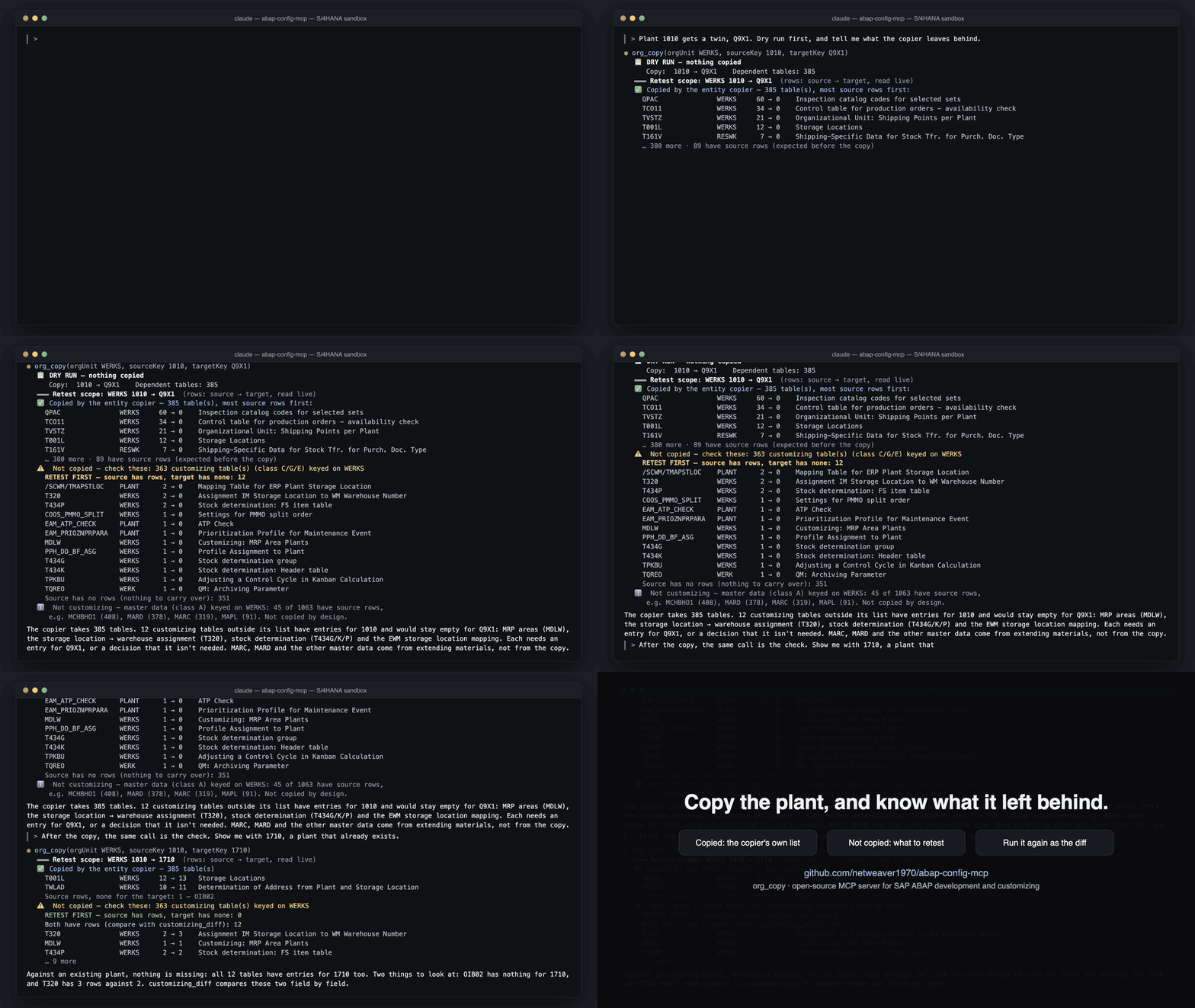
A dry run on my S/4HANA sandbox. Plant 1010 gets a twin, and before anything is copied it tells you which customizing tables would stay empty for the new plant.
A few things I cared about while building it:
- Transports. Local stays local, it won't fight SAP's own locks, and it can move objects between requests and tell you which one to release first.
- It never does more than the SAP user it logs on with, and on production you run it read-only.
- The bit of ABAP it needs inside SAP is transported like any other development, not pushed in from outside.
- It runs the way your landscape needs it: on your own machine, as a shared server for a team, in Docker, or as a Claude Desktop extension.
The ABAP side is complete too: search, read, write, activate, ATC, unit tests, debugger, where-used, short dumps and SQL. 60 tools in all, usable from Claude, Cursor, Microsoft 365 Copilot or any other MCP client. More on the customizing engine in docs/customizing-engine.md.
To try it: npx -y -p abap-config-mcp abap-config-mcp-stdio, or see Install for Docker, the Claude Desktop extension or building it yourself.
Acknowledgements
The idea of driving SAP ADT from outside the SAP GUI was inspired by Marcello Urbani's excellent marcellourbani/vscode_abap_remote_fs — go give it a star. This project is an independent, from-scratch MCP server (its own development tools and its own in-system customizing engine); it does not contain that project's code. It does build on Marcello's separately published, MIT-licensed abap-adt-api library for the low-level ADT protocol calls. See NOTICE for full attribution.
⚠️ Before you connect this to anything, read Security & authorization. In short: protect the server with a strong shared secret, and remember the server can do nothing beyond the rights of the one SAP user it logs in as. It is built for DEV → UAT; on Production, only read-only investigation with a read-only user is intended.
What it enables
Ask your AI assistant things like:
"Find program ZCAR_MM_ORDERS and add a method to filter by plant, then activate it on transport CARX000123"
"Run ATC checks on class ZCL_INVOICE_PROCESSOR and fix any priority-1 findings"
"Show me all open transports across all developers in the system — who owns what and what objects are in each one?"
"Find tables related to article listing — we're on IS-Retail so I don't know the technical names"
"Debug the next execution of report ZCAR_BATCH_JOB — set a breakpoint on line 142 and inspect variable LT_ITEMS when it hits"
"Copy the POS profile customizing from profile 0001 to ZRET and record it on a Customizing transport the SM30-standard way"
The AI handles the full workflow autonomously: search → read → write → check quality → activate → test. For customizing/IMG it drives the in-system maintenance-view runtime (SM30/SM34) so FK checks, change documents and transport recording all happen exactly as a manual SPRO change would — see docs/customizing-engine.md.
Feature overview
| Category | Tools | What the AI can do |
|---|---|---|
| Discovery | 4 tools | Find objects by name/wildcard, inspect metadata, list systems, explore ADT services |
| Source reading | 4 tools | Read full source, grep within source, batch-read multiple objects, syntax-check without saving |
| Write | 5 tools | Lock objects, write source, unlock/discard, create new objects, delete objects |
| Activate | 2 tools | Activate single objects, batch-activate all inactive objects |
| Quality | 4 tools | ATC checks with findings and locations, unit test execution, run a console class (IF_OO_ADT_CLASSRUN), create test includes |
| Transports | 4 tools | List transports across all users with their objects (read from E070/E071), create/release/delete/change owner, find which transport an object needs, move objects or a whole task to another request with dependency and release-order checks. Every write picks its transport by one rule — see Transport selection |
| Data | 4 tools | Search tables by description keyword, describe table structure, run SELECT queries, read table contents |
| Analysis | 4 tools | Where-used cross-reference, version history, runtime dumps (ST22), inactive objects list |
| Text elements | 2 tools | Read/write selection screen texts, text symbols, and list headings |
| Packages | 2 tools | Browse package contents grouped by type, create new packages |
| Debugging | 7 tools | Attach debugger, set/delete breakpoints, step through code, inspect/change variables, call stack |
| Customizing & IMG | 14 tools | Search IMG/SPRO, describe/read/diff/plan customizing, copy or delete config the SM30-standard way with governed transport recording, create new rows from explicit values, headless org-unit copy, retail article listing, bootstrap/cleanup the in-system engine — see docs/customizing-engine.md |
| Operations | 4 tools | Force re-login to heal a degraded ADT session, HANA and ABAP memory reports, install the in-system ABAP as local or transportable (engine_deploy) |
Quick start
1. Install
Four ways to get the same server. Take the one that fits.
| Option | How | Best for |
|---|---|---|
| npm | npx -y -p abap-config-mcp abap-config-mcp-stdio, started by your AI client (below). For the shared HTTP server: npm install -g abap-config-mcp, then abap-config-mcp |
most setups; needs Node.js 18+ |
| Docker | docker run -i --rm -e SAP_URL=… -e SAP_USER=… -e SAP_PASSWORD=… -e SAP_CLIENT=100 ghcr.io/netweaver1970/abap-config-mcp |
containers, or no Node.js on the machine |
| Claude Desktop extension | download abap-config-mcp-<version>.mcpb from the latest release and open it; the SAP login is asked in the install form |
Claude Desktop, one click |
| From source | git clone https://github.com/netweaver1970/abap-config-mcp && cd abap-config-mcp && npm install && npm run build |
contributing, or running the HTTP server from the repo |
The quickest start is to let your AI client start the server itself. There's no server to run, no port and no shared secret then. In Claude Desktop, Claude Code, Cursor and most other clients the entry looks like this:
{
  "mcpServers": {
    "abap": {
      "command": "npx",
      "args": ["-y", "-p", "abap-config-mcp", "abap-config-mcp-stdio"],
      "env": {
        "SAP_URL": "https://your-sap-host:44301",
        "SAP_USER": "DEVELOPER",
        "SAP_PASSWORD": "your-password",
        "SAP_CLIENT": "100"
      }
    }
  }
}
With more than one SAP system, leave out the SAP_* variables and list the systems in ~/.abap-mcp/connections.json (format below), or point ABAP_MCP_CONFIG at that file. The rest of this Quick start is about the shared HTTP server, the setup for a team.
2. Configure connections
There are two separate pieces of configuration — don't mix them up:
| What | Where | Who sets it |
|---|---|---|
| SAP systems the server may log into (host, user, password, client) — plus the server's port and shared secret | connections.json, here on the server side (this step) |
Once, on the machine running the server |
| Registering this server with your AI client (the MCP endpoint URL + the shared secret) | Your AI client's config — a different file per client (Claude Desktop vs. Claude Code vs. Cursor…). See Connecting AI clients | Each user / each client |
This step is the first one. Create connections.json in the directory you start the server from, or in ~/.abap-mcp/:
{
  "connections": [
    {
      "id": "DEV",
      "url": "http://your-sap-host:8001",
      "username": "DEVELOPER",
      "password": "your-password",
      "client": "100",
      "language": "EN"
    }
  ],
  "server": {
    "port": 4847,
    "apiKey": "replace-with-a-random-secret"
  }
}
A call that names no connectionId goes to the first connection listed. To pick another, add "defaultConnection": "<id>" at the top level (or set ABAP_MCP_DEFAULT_CONNECTION); connected_systems shows which one it is.
connections.jsonis gitignored and never committed — it holds SAP passwords and the shared secret. Seeconfig/connections.example.jsonfor reference.
The server.apiKey is the shared secret every AI client must present to use the server. Generate a strong one now and paste the same value into both this file and each client config later:
openssl rand -hex 32 # e.g. 9f2c… → put this in server.apiKey
Why it matters and what the SAP user can/can't do is covered in Security & authorization — please read it before connecting a client.
Connection options:
| Field | Required | Description |
|---|---|---|
id |
yes | Unique name for this system (e.g. DEV, CAR) |
url |
yes | SAP ICM base URL. System nr NN → HTTP :80NN (e.g. 8001), HTTPS :443NN (e.g. 44301) |
username / password |
yes | SAP logon credentials |
client |
no | Logon client (e.g. 100) |
language |
no | Logon language (default EN) |
allowSelfSigned |
no | Set true for HTTPS with self-signed certificates (common on dev systems) |
ca |
no | PEM CA certificate string to trust |
timeout |
no | HTTP request timeout in milliseconds |
3. Verify the connection
npm run test-connection            # tests the first configured connection
npm run test-connection -- CAR     # tests a specific connection by id
The test logs in, fetches the ADT discovery endpoint, and runs a sample object search. It prints specific troubleshooting hints (port, client, credentials, ICF node) if anything fails.
4. Start the server
npm start
You should see the startup banner (your version numbers may be newer):
╔══════════════════════════════════════════════════════════════════════╗
║                 ABAP Config MCP Server v1.9.0                        ║
╠══════════════════════════════════════════════════════════════════════╣
║  Server version    : 1.9.0                                           ║
║  Cust. engine ver. : 0.9.17  (expected on SAP after deploy)         ║
╠══════════════════════════════════════════════════════════════════════╣
║  MCP endpoint  : http://localhost:4847/mcp                          ║
║  Health check  : http://localhost:4847/health                      ║
╠══════════════════════════════════════════════════════════════════════╣
║  Debug mode    : ABAP_MCP_DEBUG=1 npm start                         ║
║  Session idle  : ABAP_SESSION_IDLE_MS=360000 npm start  (default 8m)║
╚══════════════════════════════════════════════════════════════════════╝
Leave this terminal running. Check it any time with curl http://localhost:4847/health →{"status":"ok",...}. To stop it, press Ctrl-C. (To run it permanently in the
background instead, see 4b below.)
4b. (Optional) Run it permanently in the background
npm start (step 4) is the manual way — it runs in the foreground and stops when
you close the terminal or log out. For day-to-day use you usually want the server to
start automatically at login and restart itself if it crashes. Pick your OS:
Install the bundled LaunchAgent (deploy/com.abap-config-mcp.server.plist):
# 1. Check the node path in the plist (which node, e.g. /opt/homebrew/bin/node).
#    The plist expects the repo at ~/github/abap-config-mcp; edit it if yours is elsewhere.
# 2. Install it with YOUR_USER replaced by your home folder (launchd does not expand ~),
#    then start it:
sed "s|/Users/YOUR_USER|$HOME|g" deploy/com.abap-config-mcp.server.plist \
  > ~/Library/LaunchAgents/com.abap-config-mcp.server.plist
launchctl bootstrap gui/$(id -u) ~/Library/LaunchAgents/com.abap-config-mcp.server.plist
launchctl enable   gui/$(id -u)/com.abap-config-mcp.server
RunAtLoad starts it at login; KeepAlive restarts it if it ever exits. Logs go to~/Library/Logs/abap-config-mcp.log. The agent sets WorkingDirectory to the repo
root because connections.json and the engine ABAP (src/abap/*.abap) resolve
relative to the working directory.
launchctl print gui/$(id -u)/com.abap-config-mcp.server | grep -E 'state|pid'   # status
launchctl kickstart -k gui/$(id -u)/com.abap-config-mcp.server                  # restart (after a rebuild)
launchctl bootout   gui/$(id -u)/com.abap-config-mcp.server                     # stop & unload
Simple — Task Scheduler (auto-start at logon):
- Open Task Scheduler → Create Task…
- General: name
ABAP Config MCP Server; tick Run only when user is logged on. - Triggers → New: At log on.
- Actions → New:
- Program/script:
C:\Program Files\nodejs\node.exe(runwhere nodeto confirm) - Add arguments:
dist\index.js - Start in:
C:\path\to\abap-config-mcp← must be the repo root, soconnections.jsonandsrc\abapresolve.
- Program/script:
- Save. Right-click the task → Run to start it now.
Robust — install as a Windows Service with NSSM (auto-restarts on crash, runs without login):
nssm install ABAP-CONFIG-MCP "C:\Program Files\nodejs\node.exe" "dist\index.js"
nssm set ABAP-CONFIG-MCP AppDirectory "C:\path\to\abap-config-mcp"
nssm set ABAP-CONFIG-MCP AppStdout "C:\path\to\abap-config-mcp\logs\server.log"
nssm set ABAP-CONFIG-MCP AppStderr "C:\path\to\abap-config-mcp\logs\server.log"
nssm start ABAP-CONFIG-MCP
Either way, verify with curl http://localhost:4847/health.
pm2 works the same on macOS, Windows and Linux:
npm install -g pm2
pm2 start dist/index.js --name abap-config-mcp --cwd /path/to/abap-config-mcp
pm2 save && pm2 startup     # follow the printed command to enable boot-start
After a
npm run build, restart whichever service you use (launchctl kickstart -k …,
Task Scheduler Run,nssm restart ABAP-CONFIG-MCP, orpm2 restart abap-mcp) so it serves
the newdist/. ABAP-only edits tosrc/abap/*.abapneed no restart — the engine
source is read from disk per call.
4c. (Optional) Run it in Docker
A ready-made image of the stdio server is published for every release on GitHub's container registry, for amd64 and arm64:
docker run -i --rm -e SAP_URL=https://your-sap-system:44301 -e SAP_USER=DEVELOPER \
  -e SAP_PASSWORD=... -e SAP_CLIENT=100 ghcr.io/netweaver1970/abap-config-mcp
Pin a version with a tag such as :1.16.4. To build it yourself instead: docker build -t abap-config-mcp . in the repo.
For several systems, mount a connections.json and set ABAP_MCP_CONFIG=/config/connections.json. With no system configured the server still starts and lists its tools, but every tool call fails until one is set.
5. Connect your AI client
Pick the section below for your client. All clients use the same running server — you can connect multiple clients simultaneously.
Security & authorization
Please read this before exposing the server to any client. There are two independent
layers of protection — the shared secret (who may talk to the server) and the
SAP user's authorizations (what the server is allowed to do once it's in SAP).
1. The shared secret (server.apiKey)
The server is a plain HTTP service. Anyone who can reach its port and knows the
secret can drive every tool. The secret is the only thing standing between the
network and your SAP system, so treat it like a password.
- It lives in
connections.jsonunderserver.apiKey, and the exact same value
must be set in every AI client config (asAuthorization: Bearer <secret>, orx-api-keyfor clients that use that header — see each client below). - Every request without a matching secret is rejected with HTTP 401. The
comparison is constant-time. If you leaveapiKeyempty the server runs
unauthenticated and logs a warning — only ever acceptable onlocalhostfor a
quick local test. - Use a long, random secret — not a dictionary word, not
changeme, not your
username. Generate one withopenssl rand -hex 32(or[Convert]::ToBase64String((1..32|%{Get-Random -Max 256}))
in PowerShell). Rotate it if it ever leaks; rotating means updating the server file
and every client. - Bind to
localhost(the default) and reach it over your VPN, or put it behind a
TLS-terminating reverse proxy / API gateway if a remote cloud client (e.g. M365
Copilot) must reach it. Never put a plain-HTTP server with a weak secret on a
routable address.
2. The server can do nothing beyond the SAP user's rights
This is the most important guardrail. The server holds no special powers of its
own — every action runs through ADT / RFC as the SAP user in that connection'susername, inside that user's client. SAP's own authorization checks apply to
everything:
- writing/activating code needs
S_DEVELOP; table maintenance needsS_TABU_DIS
(the customizing engine explicitly enforces it on the target table); transports
needS_TRANSPRT; debugging needsS_DEVELOPdebug activities, and so on. - If the user lacks an authorization, the tool fails with SAP's authorization error —
the server cannot escalate around it.
So scope the service user with least privilege for what you actually want to do,
and rely on SAP roles — not the tool — as the real control. A read-only user makes the
whole server effectively read-only no matter which tools a client calls.
3. Where it belongs in the landscape: DEV → UAT, read-only on Production
This tooling is intended for development and UAT systems, where writing code and
customizing is the point. It is not meant to perform development or customizing on
Production:
- A Production client is normally closed for changes anyway (SCC4 /
SE06system
change option), so write/customizing tools would be refused by SAP regardless. - What is legitimate on Production — and needs no write access at all — is
read-only investigation: reading code,where-used, dump analysis (ST22), and
table-content comparisons between systems. Point a read-only, limited user
at the Production connection for those use cases; the write tools simply won't have
the rights to do anything, which is exactly what you want.
Rule of thumb: give the connection the least SAP authorization that still lets
you do the job, and let SAP enforce it. On Production, that authorization is
read-only.
4. Risk tiers — cap the tool surface with ABAP_MCP_MAX_TIER
SAP authorizations are the real control, but the server can also hide whole classes of
tool so a deployment exposes only what corporate security accepts. All 60 tools are
classified into three risk tiers (full registry: docs/TIERS.md):
| Tier | What it does | Examples |
|---|---|---|
| 0 | read-only / diagnostics | execute_data_query, customizing_read, hana_memory_report, abap_memory_report, where_used, analyze_dump |
| 1 | config / data writes (SM30 runtime, governed transports) | customizing_apply, customizing_create, org_copy, retail_listing |
| 2 | repository / code writes, execution, debug | write_abap_object_source, abap_activate, run_unit_tests, engine_deploy, abap_debug_* |
Set ABAP_MCP_MAX_TIER = 0 (read-only Production server), 1 (also allow
governed customizing), or 2/unset (full Dev surface). Tools above the ceiling are
not registered at all, and any unclassified tool defaults to Tier 2 — a new tool
is never silently exposed on a restricted server.
Transport selection
Every tool that records onto a transport — create_abap_object, write_abap_object_source,delete_abap_object, set_text_elements, create_test_include, create_package,customizing_create, customizing_apply — decides by the same rule, in this order:
- A transport you pass is checked (exists, still modifiable, right kind: Workbench for
repository objects, Customizing for customizing) and used. It becomes the transport of that
piece of work. If SAP already has the object locked in a different request, nothing is
written and the tool names the request SAP requires. - An object SAP already has locked into a request records there — SAP allows nothing else.
That lock belongs to the one object: it does not become the transport for the rest of the work. createTransport: truecreates a new request. Nothing else ever creates one.- The transport this piece of work already uses, if still open, is used again, and the result
says so. Pass anothertransportto change it. - Existing requests are preferred: exactly one open request of the right kind is used; with
several, the tool lists them and asks which; with none, it asks, offering creation. The list holds
your own requests and those where you own a task, created in the logon client.
A choice is remembered only after the write has gone through, so a refused write never moves a
piece of work to another request. createTransport: true is ignored — and the result says so — when
rule 1 or 2 applies. If SAP's own transport check fails, nothing is written and the tool says why;
it never leaves SAP to pick a request on its own.
A piece of work is workItem (any short name — HPM, a ticket number). Without one it is the MCP
session, so two conversations never share a transport by accident. The choices are kept per SAP
connection in ~/.abap-mcp/transport-memory.json (override with ABAP_MCP_TRANSPORT_MEMORY), so
they survive server restarts; manage_transport_requests list shows which work item each request
belongs to. Local packages ($TMP), delivery class A tables and clients that do not record changes
need no transport.
5. In-system ABAP: transported, not pushed (engine_deploy)
The server installs a small amount of ABAP into the box (the customizing/diagnostic
engine). For Production these objects should arrive via normal CTS transport, not the
Tier-2 bootstrap push. They're split into two units so the low-risk part can ship and be
approved on its own:
| Unit | In-system object | Tier | Prod path |
|---|---|---|---|
diag |
ZCL_MCP_DIAG (+ SICF /sap/bc/zmcp_diag) — ping/env probe, HANA + ABAP memory, read-only |
0 | ✅ ship via CTS — standalone box-health value |
cust |
ZCL_MCP_CUST_ENGINE + ZMCP_CUST_WRITE — customizing writes, org copy, listing |
1 | with scrutiny |
The engine_deploy tool makes transportability a per-connection choice: run it per
unit with transportable:true package:"ZMCP_DIAG" transport:"…" to create it in a
Workbench Z package on a transport (CTS to Prod), or transportable:false for $TMP
(Dev-only); re-run any time to flip a unit. The unit's SICF node is registered
automatically as part of the deploy. See docs/TIERS.md for the
full deployment + capability-awareness story.
Connecting AI clients
Reminder (from step 2): SAP systems are configured once in
connections.jsonon the
server; what differs per client is where you paste the endpoint URL + shared
secret. The Claude Code "prompt" (terminal) and the Claude Desktop app use different
config files — pick your client below.
Claude Desktop
The desktop app (the Claude GUI). It speaks MCP over stdio, so it uses themcp-remote bridge to reach our HTTP server. Edit the Claude Desktop config file
(create it if it doesn't exist) — this is not the same file Claude Code uses:
- macOS:
~/Library/Application Support/Claude/claude_desktop_config.json - Windows:
%APPDATA%\Claude\claude_desktop_config.json(Microsoft Store install:%LOCALAPPDATA%\Packages\Claude_…\LocalCache\Roaming\Claude\claude_desktop_config.json)
The easiest way to find the right file is Settings → Developer → Edit Config in the app.
On Windows that opens File Explorer with the file selected — right-click it →
Open with → Notepad.
macOS
{
  "mcpServers": {
    "abap": {
      "command": "npx",
      "args": [
        "-y",
        "mcp-remote",
        "http://127.0.0.1:4847/mcp",
        "--header",
        "Authorization: Bearer replace-with-a-random-secret"
      ]
    }
  }
}
Windows
{
  "mcpServers": {
    "abap": {
      "command": "cmd",
      "args": [
        "/c", "npx", "-y", "mcp-remote@latest",
        "http://127.0.0.1:4847/mcp",
        "--transport", "http-only",
        "--header", "Authorization:${AUTH_HEADER}"
      ],
      "env": {
        "AUTH_HEADER": "Bearer replace-with-a-random-secret"
      }
    }
  }
}
Why the Windows version differs:
cmd /c npx— Claude Desktop can't launchnpxdirectly on Windows (spawn npx ENOENT).- Token in
env, no space afterAuthorization:— Windows splits arguments that
contain spaces, so"Authorization: Bearer …"arrives mangled and the server answers 401. 127.0.0.1, notlocalhost(both platforms) — the server listens on IPv4127.0.0.1only, and recent Node resolveslocalhostto IPv6::1first →ECONNREFUSED.
The secret must match the one the server was started with. Start the server before
Claude Desktop, then fully quit Claude (tray / menu-bar icon → Quit — closing the
window isn't enough) and reopen it. The ABAP tools will appear in the tools list.
Troubleshooting: test the bridge on its own from a terminal — if this lists the ABAP
tools, the server and secret are fine and any remaining problem is in the Claude config:
npx -y -p mcp-remote@latest mcp-remote-client http://127.0.0.1:4847/mcp --header "Authorization:Bearer replace-with-a-random-secret"
Claude Desktop's own log is mcp-server-abap.log in %APPDATA%\Claude\logs\ (Windows)
or ~/Library/Logs/Claude/ (macOS).
Claude Code (the terminal / "prompt")
The command-line Claude. It connects to HTTP MCP servers directly (no bridge). The
easiest way is the CLI — run this from any terminal:
claude mcp add --transport http abap http://localhost:4847/mcp \
  --header "Authorization: Bearer replace-with-a-random-secret"
Or edit the config by hand — per-project .mcp.json (in the project root, shareable
with your team) or your user-level Claude Code config:
{
  "mcpServers": {
    "abap": {
      "url": "http://localhost:4847/mcp",
      "headers": {
        "Authorization": "Bearer replace-with-a-random-secret"
      }
    }
  }
}
Check it connected with claude mcp list (or /mcp inside a session).
Same server, different doorway: the desktop app and the terminal keep their MCP
registration in separate files, but both point at the one running server and
use the same shared secret.
Cursor / Windsurf
Both support MCP natively. Add to your MCP settings (Cursor: Settings → MCP, Windsurf: Settings → AI → MCP Servers):
{
  "mcpServers": {
    "abap": {
      "url": "http://localhost:4847/mcp",
      "headers": {
        "Authorization": "Bearer replace-with-a-random-secret"
      }
    }
  }
}
Microsoft 365 Copilot (via Copilot Studio)
M365 Copilot connects to MCP servers through Copilot Studio, which then surfaces the tools in Copilot Chat, Teams, Word, Excel, and other Microsoft 365 apps.
Network requirement: The MCP server must be reachable from Microsoft's cloud. For internal SAP systems, expose the server through your corporate API gateway (e.g. Azure API Management) or a reverse proxy in your DMZ. The server needs no code changes — just a reachable HTTPS URL.
Steps:
Start the ABAP Config MCP server and expose it at an HTTPS URL your organisation's cloud can reach, for example:
https://abap-mcp.yourcompany.com/mcpGo to Copilot Studio → open or create an agent
In the agent editor: Tools → Add Tool → New Tool → MCP
Fill in the connection details:
Field Value Name ABAP Config MCP ServerURL https://abap-mcp.yourcompany.com/mcpAuthentication API Key API Key your server.apiKeyvalue fromconnections.jsonCopilot Studio auto-discovers all 60 tools via the MCP handshake — no manual tool registration needed
Publish the agent and deploy it to Microsoft 365
Authentication options:
| Option | When to use |
|---|---|
| API Key | Simplest — good for internal/pilot use |
| OAuth 2.0 (DCR) | Production — use with Azure API Management in front of the server |
Once published, users can invoke ABAP tools from Copilot Chat in Teams or the Microsoft 365 web app using natural language exactly like any other Copilot client.
IBM Bob
IBM Bob is IBM's AI coding IDE (1.0 released March 2026). It has native MCP support using the same config format as Claude Code.
Per-project config — create .bob/mcp.json in your project root (commit this file to share the setup with your team):
{
  "mcpServers": {
    "abap": {
      "url": "http://sapcar:4847/mcp",
      "headers": {
        "x-api-key": "replace-with-a-random-secret"
      }
    }
  }
}
Global config (per developer, not checked in) — create ~/.bob/mcp.json with the same structure, or configure via Bob → Settings → MCP in the IDE.
If Bob and the SAP system are on the same network (e.g. both inside your corporate VPN), use the plain
http://URL directly — no need to expose the server externally.
Once configured, Bob's chat and agent modes can call all 60 tools directly: search objects, read/write source, manage transports, browse packages, query tables, and more.
Testing
The project has two independent test suites.
Unit tests — no SAP required
380 tests across the tool handlers. Each handler is tested in isolation with a mocked ADTClient — no SAP system, no network, runs in under 3 seconds. This is the default npm test.
npm test              # run once
npm run test:watch    # watch mode during development
| Category | Tests | What is verified |
|---|---|---|
| Discovery | 14 | Search results, empty results, metadata fields, class includes, service list |
| Source | 11 | Source read, null source, grep matches/misses, batch errors, syntax errors |
| Write | 13 | Lock→write sequence, transport passthrough, rollback on failure, create/delete |
| Activate | 10 | Single activate, batch from inactive list, preaudit flag, failure formatting |
| Quality | 12 | ATC findings format, clean result, unit test pass/fail/alert details, test include lifecycle |
| Transports | 21 | List, details with objects, create, release success/failure, delete, change_owner, all-users scan, error tolerance |
| Data | 12 | DML blocking, SELECT validation, column formatting, row access, table name validation |
| Analysis | 9 | Where-used snippets, fallback to refs, version list, dump format, inactive list |
| Text elements | 15 | Read selections/symbols/headings, all-categories fetch, error tolerance, write with lock, transport, rollback |
| Packages | 11 | Browse contents grouped by type, empty package, sub-package expansion, tolerates failures, create with all options |
| Table discovery | 15 | Search TABL+VIEW types, result count, package shown, not-found, describe fields, key markers, invalid name |
| Debug | 19 | Session status/detach/listen/conflict, breakpoint URI format, step types, variable display |
| Session recovery | 10 | Auto-relogin retry on degraded session (HTTP 400/401/CSRF), force_relogin, no-retry on real errors |
| Total | 172 |
The customizing / IMG engine tools (
customizing_*,org_copy,img_search,hana_memory_report) are exercised by the integration suite (below), not the unit
suite — they need a live SAP system with the engine deployed, so they can't run against
a pure mock.
Integration tests — requires a live SAP connection
24 read-only tests that run against a real SAP system. They verify the full end-to-end path: login → ADT call → response parsing → formatted output. Nothing is written or activated — safe to run against any system including productive.
SAP_TEST_CONNECTION=CAR npm run test:integration
Replace CAR with the id of any connection in your connections.json.
| Category | Tests | What is verified |
|---|---|---|
| Discovery | 7 | Connected systems list, Z* search, type filter, impossible pattern, ADT services, object metadata |
| Source | 5 | Read real source, grep match/no-match, batch read, syntax check |
| Data | 6 | SELECT from TDEVC, DML rejection, maxRows limit, table read, WHERE clause, invalid table name |
| Analysis | 4 | Where-used references, version history, ST22 dump list, inactive objects |
| Transports | 3 | List open transports, list by username, transport info for object |
Design notes:
- Tests that depend on a Z* object existing log a skip message instead of failing if none are found — the suite works on a near-empty system.
- Tests run serially with a 30-second timeout each to avoid saturating the ADT session.
npm testnever runs integration tests — they are completely separate and only triggered bynpm run test:integration.
All 60 tools — detailed reference
Discovery
connected_systems
Lists all SAP systems configured in connections.json.
Useful as a first step to confirm which systems are available and what their IDs are.
→ Returns: id, url, client, language for each configured connection
search_abap_objects
Search for ABAP development objects by name or wildcard pattern, with optional type filtering.
Parameters:
  query       Pattern to search (wildcards * and + supported, e.g. "ZCAR_MM*")
  connection  System id (optional, uses first if omitted)
  maxResults  Max objects to return (default 100)
  objectType  Filter by type: "PROG", "CLAS", "FUGR", "TABL", "INTF", etc.

→ Returns: name, type, package, description for each match
get_abap_object_info
Get detailed metadata for a specific ABAP object: package, responsible developer, include structure, and the ADT URL needed for subsequent read/write operations.
Parameters:
  objectName  ABAP object name (e.g. "ZCL_MY_CLASS")
  objectType  Object type (e.g. "CLAS/OB")
  connection  System id

→ Returns: name, type, package, responsible, ADT URL, class includes (for classes)
adt_discovery
Discover which ADT services and features are available on the connected SAP system. Useful for checking compatibility before using advanced features.
→ Returns: list of service collections with their titles and endpoints
Source reading
get_abap_object_lines
Read the full source code of any ABAP object — programs, classes, function modules, includes, interfaces, etc.
Parameters:
  objectUrl   ADT URL of the object (from get_abap_object_info or search)
  connection  System id

→ Returns: full source as text with line numbers
search_abap_object_lines
Grep-style search within an object's source. Finds all lines matching a pattern, returned with their line numbers.
Parameters:
  objectUrl   ADT URL of the object
  pattern     Text or pattern to search for
  connection  System id

→ Returns: matching lines with line numbers
get_abap_batch_lines
Read source code of multiple ABAP objects in a single call — efficient when analysing several related programs or classes at once.
Parameters:
  objects     Array of { objectUrl, connection } entries

→ Returns: source for each object, keyed by URL
syntax_check
Check ABAP source code syntax against the server without saving or activating. Useful for validating a proposed change before writing it.
Parameters:
  objectUrl   ADT URL of the object
  mainUrl     URL of the main object (for includes)
  source      Source code to check
  connection  System id

→ Returns: list of syntax errors/warnings with line, offset, severity, and message
Write operations
write_abap_object_source
Write new source code to an ABAP object. Automatically locks the object before writing. The object remains locked after the write — call abap_activate to compile and unlock, or unlock_abap_object to discard.
Parameters:
  objectUrl   ADT URL of the object
  source      New source code (full replacement)
  sourcePath  Instead of source: absolute path of a local file under your home
              directory (UTF-8, max 5 MB), sent as it is — for large sources that
              should not pass through the conversation. Exactly one of the two.
  transport   Transport request number (required for transportable packages)
  connection  System id

→ Returns: confirmation; object stays locked awaiting activation
lock_abap_object
Explicitly lock an ABAP object for editing. Returns a lock handle required for write and activate operations. Use when you need the handle for a series of operations (e.g. creating a test include).
Parameters:
  objectUrl   ADT URL of the object
  connection  System id

→ Returns: lock handle (LOCK_HANDLE string)
unlock_abap_object
Unlock a locked object and discard any unsaved changes. Use this to roll back a write without activating.
Parameters:
  objectUrl   ADT URL of the object
  lockHandle  Lock handle from lock_abap_object
  connection  System id
create_abap_object
Create a new ABAP development object — program, class, interface, function group, table, data element, domain, and more.
Parameters:
  objectType    Type id (e.g. "PROG", "CLAS/OB", "FUGR", "TABL")
  objectName    Name for the new object
  parentName    Package name
  description   Short description
  parentPath    ADT path of the parent package
  responsible   Developer responsible (optional, defaults to current user)
  transport     Transport number (required for transportable packages)
  connection    System id

→ Returns: ADT URL of the newly created object
delete_abap_object
Delete an ABAP development object. The object is locked, then deleted. Requires a transport for transportable objects.
Parameters:
  objectUrl   ADT URL of the object
  transport   Transport number
  connection  System id
Activation
abap_activate
Activate a single ABAP object — compiles it and makes it executable. Equivalent to pressing F8/Activate in SE80. The server automatically resolves includes so you only need to name the top-level object.
Parameters:
  objectName  Name of the object (e.g. "ZCL_MY_CLASS")
  objectUrl   ADT URL of the object
  preaudit    Run pre-activation ATC checks before activating (default false)
  connection  System id

→ Returns: success flag, any activation messages with line references
abap_activate_multiple
Activate several ABAP objects in one batch. Automatically queries the system for all currently inactive objects and activates the ones you specify — or all of them if no list is given.
Parameters:
  objectUrls  Array of ADT URLs to activate (omit to activate all inactive objects)
  preaudit    Run pre-activation ATC checks (default false)
  connection  System id

→ Returns: success flag, messages per object, list of still-inactive objects
Quality
run_atc_analysis
Run ABAP Test Cockpit (ATC) checks on an object and return all findings with priority, check name, message text, and source location. Covers code style, performance, security, and correctness rules.
Parameters:
  objectUrl   ADT URL of the object
  connection  System id
  variant     ATC check variant (optional, uses system default)
  maxResults  Maximum number of findings (default 100)

→ Returns: findings sorted by priority, each with:
           priority (1=error, 2=warning, 3=info), checkId, checkTitle,
           messageTitle, source line number
run_unit_tests
Execute ABAP unit tests for an object and return full results: which tests passed, which failed, and the failure details with stack traces.
Parameters:
  objectUrl   ADT URL of the object
  connection  System id

→ Returns: per-class, per-method results with pass/fail, alert kind,
           severity, title, and detail lines for failures
abap_run_class
Run a class that implements IF_OO_ADT_CLASSRUN (ADT's "Run as ABAP Application (Console)") and return what it wrote to out. Each run gets a stateless SAP session of its own, so it always runs the current active version. The conversation's stateful session, which keeps running a class pool it has already loaded, is not used, and a slow run cannot leave that session stale. A run still going after waitSeconds keeps running in SAP and the answer carries a runId; call again with that runId to wait for it and get the output (the server waits for SAP up to 30 min, ABAP_RUN_CLASS_TIMEOUT_MS).
Parameters:
  className    Class to run (starts a run)
  runId        Instead of className: collect a run that was still going
  waitSeconds  How long this call waits (default 25, max 40)
  connectionId System id

→ Returns: the class's console output, or a runId while it is still running
create_test_include
Create a local test class include for an ABAP class (the CCAU include). The class must be locked before calling this. Returns the include URL for subsequent source writes.
Parameters:
  classUrl    ADT URL of the class
  lockHandle  Lock handle from lock_abap_object
  transport   Transport number
  connection  System id

→ Returns: ADT URL of the new test include
Transports
list_all_transports
List open (or all) transport requests across all users in the SAP system. Shows each transport's owner, description, status, and every object it contains. Ideal for a pre-upgrade audit of what is in flight.
Parameters:
  status        "modifiable" (default — open/unreleased) | "released" | "all"
  connectionId  System id

→ Returns: transports grouped by user, each showing:
           transport number, status, description, owner,
           and all contained objects (PGMID / type / name)
manage_transport_requests
Full lifecycle management for individual transport requests.
Parameters:
  action          "list"         — open transports for one user
                  "details"      — full readable view: tasks, objects, owner, status
                  "create"       — new workbench transport
                  "release"      — export transport to import queue
                  "delete"       — permanently delete transport
                  "change_owner" — reassign transport to another user
  transportNumber Transport number for details/release/delete/change_owner (e.g. DEVK123456)
  username        Username for list action (defaults to current user)
  newOwner        New owner username for change_owner action
  objectUrl       Object ADT URL (create action)
  description     Description for new transport (create action)
  packageName     Package name for new transport (create action)
  connectionId    System id

Actions in detail:
  list         → Open workbench transports for one user
  details      → Owner, status, description, total object count,
                 all direct objects + per-task objects
  create       → Creates transport, returns new transport number
  release      → Releases transport, returns per-check status and messages
  delete        → Permanently removes transport (cannot be undone)
  change_owner → Reassigns ownership; confirms new owner in response
get_transport_for_object
Find out which transport request is needed to modify a specific ABAP object.
Parameters:
  objectUrl   ADT URL of the object
  packageName Package name of the object (optional)
  connectionId System id

→ Returns: PGMID, object type/name, dev class, operation type, transport text
transport_move
Move object entries from one request or task to another, or reassign a whole task to another request — with the checks a careful Basis colleague makes first. Dry run by default.
- What moves: name entries as
"R3TR CLAS ZCL_X","CLAS ZCL_X","ZCL_X"or a wildcard"ZCL_FOO*". An object's parts (methods, class sections, includes, a function group's modules) move with it unlessincludeParts: false. With a task asfromand no objects, the whole task moves (TR_REASSIGN_TASK). Entries go into your own task in the target request when you have one there. - Stops before SAP is called when a request is released, the kinds differ (Workbench vs Customizing), the clients differ, or a named object is not on the source. Warns when the target goes to another system, or when an object would be split over two requests. Entries the target already holds are left out.
- Dependencies: from the where-used index (
WBCROSSGT,CROSS), what the moved objects use and what uses them, among objects on other open requests — and the release order that follows ("release ZTAB's request before or together with the target"; "release the target before the source, ZREPORT stays there and uses ZCL_X"). It follows ABAP code references, not DDIC structure, and only as far as the where-used index is current — on some systems a fresh activation is indexed later. - SAP checks it too: the dry run calls SAP's own test move (
TR_MOVE_OBJECTStest mode) through the in-system engine (v0.9.35+, deployed automatically).commit: truemoves, then verifies inE071that every entry is on the target and gone from the source.
transport_move  from: "DEVK900123"  to: "DEVK900456"  objects: ["ZCL_ORDER_API"]
→ plan, stops/warnings, dependencies, release order, SAP test result
transport_move  … commit: true
→ moved, verified in E071
Data
search_database_tables
Search for SAP database tables and views by description keyword — no need to know the technical name. Works for all installed tables: standard SAP, industry solutions (IS-Retail WLK*, IS-Automotive, IS-Mill, IS-Oil & Gas, etc.), and custom Z/Y tables. Searches the live system so it finds whatever is actually installed.
Parameters:
  keyword       Description to search for (e.g. "article listing", "vehicle order",
                "warehouse transfer", "purchase order header")
  maxResults    Maximum results per object type (default 50)
  connectionId  System id

→ Returns: table/view name, type (TABLE or VIEW), package, description
           with a hint to use describe_database_table and read_table_contents next
Example prompts:
- "Find tables related to article listing" → discovers
WLK1,WLK2,WLKA, etc. - "What tables store transport requests?" → discovers
E070,E071,E07T - "Show me warehouse transfer order tables" → discovers
LTAP,LTBK, etc.
describe_database_table
Show the complete field list for a SAP table or view: field name, type, length, description, and which fields form the key. Fetches metadata only (0 rows) so it's instant.
Parameters:
  tableName     Table or view name (e.g. MARA, WLK1, EKKO, Z_MY_TABLE)
  connectionId  System id

→ Returns: all fields with type, length, description
           key fields marked with 🔑
           total field count and key field count
           example read_table_contents query at the bottom
execute_data_query
Run a SELECT SQL query against SAP ABAP dictionary tables or CDS views. Read-only — INSERT, UPDATE, DELETE, DROP, ALTER, and other DML/DDL statements are blocked.
Parameters:
  sql           SELECT statement (e.g. "SELECT * FROM MARA WHERE MATNR LIKE 'Z%'")
  maxRows       Row limit (default 100)
  connectionId  System id

→ Returns: column headers + rows as a formatted table
read_table_contents
Read the contents of an ABAP dictionary table or view by name, with an optional WHERE clause.
Parameters:
  tableName     Table or view name (e.g. "MARA", "EKKO", "WLK1")
  maxRows       Row limit (default 100)
  whereClause   Optional WHERE clause without the WHERE keyword (e.g. "MATNR LIKE 'Z%'")
  connectionId  System id

→ Returns: column headers + rows as a formatted table
Note — WHERE clause requires ADT Data Preview service
The
whereClauseparameter uses the/sap/bc/adt/datapreviewADT service
(SAP_BASIS ≥ 7.40 SP08). If your system returns an error when using a WHERE
clause, the service is either not installed or not active.To activate: transaction
SICF→ navigate todefault_host / sap / bc / adt / datapreview→ right-click → Activate Service.If the node does not exist (older SAP_BASIS), use
execute_data_query
with a full ABAP Open SQL statement instead:execute_data_query sql: "SELECT * FROM MARA WHERE MATNR LIKE 'Z%' UP TO 10 ROWS"
execute_data_queryuses a different ADT endpoint and works on all
supported SAP versions.
Typical table query workflow:
1. search_database_tables    — find the right table by description
2. describe_database_table   — see field names, types, and key fields
3. read_table_contents       — read rows (no filter needed for small tables)
   — or —
   execute_data_query        — "SELECT * FROM <table> WHERE <condition> UP TO 10 ROWS"
                               use this when WHERE clause filtering is needed
Analysis
where_used
Find all places across the SAP system where an object or symbol is referenced — cross-reference analysis. Returns source locations with file, line number, and a code snippet.
Parameters:
  objectUrl   ADT URL of the object to look up
  connection  System id

→ Returns: list of usage locations, each with: object name, type, source URL,
           line number, and surrounding code snippet
version_history
List all previous versions of an ABAP object with timestamps and the developer who made each change. Useful for auditing changes or understanding how a program evolved.
Parameters:
  objectUrl   ADT URL of the object
  connection  System id

→ Returns: list of versions with: version id, date/time, author, version title
analyze_dump
List ABAP runtime short dumps (ST22) from the SAP system. Shows recent errors with their type, program, and timestamp — useful for diagnosing production issues without opening the SAP GUI.
Parameters:
  connection  System id
  maxResults  Maximum number of dumps (optional)

→ Returns: dumps with: id, type, title, timestamp, author (if available)
check_inactive_objects
List all currently inactive (not yet activated) ABAP objects in the system. Useful before a batch activation to see exactly what is pending.
Parameters:
  connection  System id

→ Returns: list of inactive objects with: name, type, ADT URL, owner,
           and whether they are pending deletion
Text elements
What are text elements? Every ABAP program has three pools of translatable texts stored separately from the source code: selection texts (labels shown next to
PARAMETERSandSELECT-OPTIONSon the selection screen), text symbols (referenced asTEXT-001etc. in source), and list headings (short/medium/long titles shown in report output). These must be maintained separately from the source and are often forgotten when creating new programs.
get_text_elements
Read text elements for any ABAP program, class, or function group. Retrieves all three categories at once if no category is specified.
Parameters:
  objectType    ADT object type: "PROG/P", "CLAS/OC", "FUGR/F"
  objectName    Object name (e.g. "ZCAR_MM_ORDERS")
  category      "selections" | "symbols" | "headings" (optional — omit for all three)
  connectionId  System id

→ Returns: for each element: id, label text, max length (if set), DDIC reference (if set)

Categories:
  selections  Labels for PARAMETERS and SELECT-OPTIONS on the selection screen
  symbols     Text symbols referenced in source as TEXT-001, TEXT-002, etc.
  headings    Report headings: S (short), M (medium), L (long), H (column header)
set_text_elements
Write text elements for an ABAP object. Locks the object automatically and leaves it locked — call abap_activate afterwards to activate and unlock. Only the elements listed are updated; existing elements not in the list are left untouched.
Parameters:
  objectType    ADT object type: "PROG/P", "CLAS/OC", "FUGR/F"
  objectName    Object name (e.g. "ZCAR_MM_ORDERS")
  objectUrl     ADT object URL — used for locking (from get_abap_object_info)
  category      "selections" | "symbols" | "headings"
  elements      Array of { id, text } pairs:
                  selections → id is the parameter name: "P_PLANT", "S_WERKS"
                  symbols    → id is the 3-digit number: "001", "002"
                  headings   → id is "S" (short), "M" (medium), "L" (long), "H" (header)
  transport     Transport number (required for transportable packages)
  connectionId  System id

→ Returns: confirmation with element list and lock handle; activate to finalise
Typical text element workflow:
1. get_abap_object_info   — get the object URL
2. get_text_elements      — read existing texts to see current ids and gaps
3. set_text_elements      — write the new/updated texts (auto-locks)
4. abap_activate          — activate and unlock
Packages
browse_package
List all development objects inside an ABAP package, grouped by object type. Sub-packages are marked with ▶ and can be expanded automatically.
Parameters:
  packageName         Package (development class) to browse, e.g. "ZCAR_MM" or "$TMP"
  includeSubPackages  Also fetch and display the contents of any sub-packages (default: false)
  connectionId        System id

→ Returns: objects grouped by type (PROG/P, CLAS/OC, FUGR/F, DEVC/K, etc.)
           each with name, description, and ▶ marker if it contains children
create_package
Create a new ABAP development package (development class). Packages are the containers that group related objects and control transport behaviour.
Parameters:
  name            Package name (e.g. ZCAR_MM_REPORTS)
  description     Short description
  parentPackage   Parent package this lives under (e.g. ZCAR_MM)
  packageType     "development" (default — contains objects)
                  "structure"   (grouping only, no objects directly)
                  "main"        (top-level package)
  swComponent     Software component (e.g. HOME, LOCAL). Leave empty for local packages.
  transportLayer  Transport layer (e.g. Z, SAP) — controls the transport route
  transport       Transport number — required when the parent package is transportable
  connectionId    System id

→ Returns: confirmation with all settings; hints to use create_abap_object next
Debugging
How ABAP debugging works with AI: Set a breakpoint, then trigger execution in SAP (run the report, call the BAPI, send the HTTP request). The AI calls
abap_debug_sessionwith actionlisten, which waits for the breakpoint to be hit, then gives you full control for stepping and inspection — all from the chat window.
abap_debug_session
Attach to an ABAP debugging session and wait for a breakpoint to be hit, check session status, or detach.
Parameters:
  action      "listen"  — block until a breakpoint is hit
              "status"  — check current debugger state
              "detach"  — end the debugging session
  connection  System id
  terminalId  Debug terminal id (generated if not provided)
  ideId       IDE session id (generated if not provided)

→ listen: returns call stack and variable snapshot when breakpoint is hit
→ status: returns current debugger state
abap_debug_set_breakpoint
Set a breakpoint at a specific line in an ABAP source file.
Parameters:
  sourceUrl   ADT URL of the source file
  line        Line number to break at
  connection  System id
  terminalId  Debug terminal id (must match the listen session)
  ideId       IDE session id

→ Returns: breakpoint id — store this to delete the breakpoint later
abap_debug_delete_breakpoint
Delete a breakpoint by its id (returned from abap_debug_set_breakpoint).
Parameters:
  breakpointId  Breakpoint id from abap_debug_set_breakpoint
  connection    System id
  terminalId    Debug terminal id
  ideId         IDE session id
abap_debug_step
Step through ABAP code in an active debug session.
Parameters:
  stepType    "stepInto"          — step into the next called method/function
              "stepOver"          — execute current line, skip into calls
              "stepReturn"        — run until current method returns to caller
              "stepContinue"      — continue to next breakpoint
              "terminateDebuggee" — stop the debugged program entirely
  connection  System id
  terminalId  Debug terminal id
  ideId       IDE session id

→ Returns: updated call stack and current source position after the step
abap_debug_variable
Inspect the current values of variables in an active debug session. Can drill into complex types (structures, internal tables, object instances).
Parameters:
  parents     Array of variable names or paths to inspect
  connection  System id
  terminalId  Debug terminal id
  ideId       IDE session id

→ Returns: for each variable: name, declared type, actual type, current value
abap_debug_stack
Get the current call stack in an active debug session — all active stack frames with program name, include, and line number.
Parameters:
  connection  System id
  terminalId  Debug terminal id
  ideId       IDE session id

→ Returns: ordered call stack frames with program, include, line, event type
abap_debug_set_variable
Change the value of a variable in an active debug session. Useful for injecting test values or bypassing a condition without modifying source.
Parameters:
  variableName  Name of the variable to change
  value         New value (as string)
  connection    System id
  terminalId    Debug terminal id
  ideId         IDE session id
Customizing & IMG (in-system engine)
These tools drive an in-system customizing engine (class
ZCL_MCP_CUST_ENGINEbehind a SICF node) so config changes run through the SM30/SM34 maintenance-view runtime — foreign-key checks, change documents and transport recording all happen exactly as a manual SPRO change would. Deploy/refresh it withcustomizing_engine_bootstrap. Full design, delivery-class rules and the governed-transport flow: docs/customizing-engine.md.Governed transport selection: a recorded write uses an explicit
transportas-is; with none given it returns an interactive prompt listing your open requests (passshowAllTransports: truefor everyone's) plus the create options, rather than silently minting one. A supplied request you have no task in gets a task created for you automatically.
img_search
Search the IMG / SPRO activity tree by keyword. Returns matching activities with their breadcrumb path and the customizing object/table behind each — the way in when you don't know the technical name.
Parameters:
  keyword       Keyword(s) to match in IMG activity titles
  namespace / inScopeOnly / language / maxRows   Optional scoping
  connectionId  System id
→ Returns: activities with breadcrumb path + linked customizing object/table
customizing_read
Read the rows of a customizing table/view for a given key (e.g. all config for POS profile 0001), resolving the maintenance view the standard way.
Parameters:
  table, keyField, key   Customizing object + key to read
  connectionId           System id
→ Returns: the matching customizing rows
customizing_describe
Describe a customizing object before changing it: its maintenance object, delivery class, key fields, text table and transport object — so you know how a change will be recorded.
Parameters:
  table         Customizing table/view name
  connectionId  System id
→ Returns: maintenance object, delivery class, keys, text table, transport object
customizing_diff
Compare the customizing rows for two keys and report what differs — the basis for a "copy the gaps" plan.
Parameters:
  table, keyField, sourceKey, targetKey   What to compare
  connectionId                            System id
→ Returns: rows present in source but missing/different in target
customizing_plan_change
Dry-run a customizing copy/delete: returns the exact rows that would be written or removed, with nothing applied.
Parameters:
  table, keyField, sourceKey, targetKey   Planned change
  connectionId                            System id
→ Returns: planned rows (no changes made)
customizing_apply
Copy or delete customizing rows through the SM30 maintenance-view runtime (VIEW_MAINTENANCE_SINGLE_ENTRY). Dry-run by default; commit: true writes. Class C/G/E config records onto a Customizing request (governed transport selection); class-A application tables write direct with no transport.
Parameters:
  table, keyField, sourceKey, targetKey   Rows to copy (or targetKey to delete)
  action                                  "copy" (default) | "delete"
  values                                  Per-row field overrides after the key swap
  commit                                  true to write (default false = dry run)
  transport / createTransport / showAllTransports / recordTransport
  connectionId                            System id
→ Returns: rows planned/written, the transport recorded onto, messages
org_copy
Headless copy of an organizational unit and its EC01-style dependent customizing, through SAP's standard entity copier (the "org units in the dark" engine behind EC01/EC02/EC04…) — e.g. clone a plant or sales org with its dependent tables. The commit runs in a background job; the copier records onto a Customizing request it creates itself.
Parameters:
  orgUnit, sourceKey, targetKey   Org-key domain and units (e.g. WERKS 1000 → 1010)
  action                          "copy" (default) | "delete"
  commit, createTransport         commit: true copies; createTransport: true acknowledges the copier's own request
  retestScope                     true (default for a copy) | "customizing" | "application" | false (only the copier's set)
  connectionId                    System id
→ Returns: the copier's dependent tables, the retest scope (below), transport, run id / result
Retest scope. Copying the org unit is rarely what breaks; the entries keyed on it that sit outside the copier's set are. The new plant looks complete in SPRO, then the first goods movement or pricing run fails. So the dry run lists, with live row counts for the source and the target:
- Copied — the copier's dependent tables (from the copier itself).
- Not copied — check these — every customizing table (delivery class C, G or E; client-dependent, transparent) with a key field on the org-key domain (DD03L
DOMNAME=WERKS,BUKRS,VKORG…) that the copier leaves alone. Those where the source has rows and the target has none come first: that is the retest list. Then tables where both have rows, and a count of tables with nothing for the source. - Not customizing — application and master-data tables (class A) keyed on the domain where the source has rows, summarised (count and the largest few): created by business processes (material extension, postings…), not copied by design.
The counts run as UNION ALL statements of 40 tables, six at a time, customizing first, then the copier's own tables, then application data; a statement that fails is split until the table that breaks it is found and reported as unreadable. The probe stops starting new counts 30 s into the call (below the server's 45 s request watchdog) and says how many tables it did not count. Measured on a demo S/4HANA system:
| Org unit | Keyed tables | Copied by the copier | Not copied (C/G/E) | Time |
|---|---|---|---|---|
Plant (WERKS) |
~1,800 | 385 | 363 | ~26 s, all counted |
Sales org (VKORG) |
~620 | 120 | 144 | ~7 s, all counted |
Company code (BUKRS) |
~6,600 | 1,587 | 1,573 | 30 s: customizing complete, application data partly |
A company code has too many keyed tables for one call. The first run always completes the customizing part (the retest list); re-run with retestScope: "application" to count the application tables on their own.
Diff after the copy. Run the same dry run again — same source and target — once the copy is committed: the copier does not object to an existing target on a dry run, so the three sections then compare the source with the new unit table by table (copier tables still empty on the target, non-copied tables to fill by hand). A commit also appends the scope when the copy finished with enough time left; otherwise it says to run the dry run. For row-level differences in one table, use customizing_diff.
customizing_create
Create new customizing rows from explicit field/value maps, with full (also composite) keys and distinct values per row, when there is no source row to copy. For example storage locations in T001L (key WERKS + LGORT), each with its own description. Rows go through the SM30 view runtime, so foreign-key checks, events, change documents and transport recording run the standard way. Dry run by default.
Parameters:
  table            Table name; its generated maintenance view is found automatically
  rows             [{ FIELD: value }, …], each including all key fields
  commit           true to write (default: dry run returning the planned rows)
  onlyMissing      Skip rows whose key exists (default true: idempotent)
  transport | createTransport | workItem   Transport selection, see Transport selection
  recordTransport  false for a direct, untransported sandbox write
  connectionId     System id
→ Returns: the planned or written rows, and the transport they were recorded on
retail_listing
List articles into retail assortments through SAP's standard listing engine (EXECUTE_LISTING_ART_ASSORT_RFC). Listing extends each article to the assortment's sites (plant and valuation segments) and writes the WLK1 listing conditions; a general assortment propagates to all its assigned sites. Dry run by default.
Parameters:
  items         [{ product, assortment, dateFrom?, dateTo? }, …]; dates default to today / 9999-12-31
  commit        true to execute (default: dry run returning the prepared items)
  connectionId  System id
→ Returns: the prepared or executed listing items with SAP's messages
customizing_status
Poll a background write job started by customizing_apply / org_copy and return its result (rows written, E071K entries, messages) when it finishes.
Parameters:
  runId         The run id returned by a pending write
  connectionId  System id
→ Returns: job status, rows written, transport entries, messages
customizing_selftest
Run the engine's built-in self-test (read / plan / transport-resolution paths) against the connected system without changing config.
Parameters:
  connectionId  System id
→ Returns: per-check pass/fail with details
customizing_engine_bootstrap
Deploy or update the in-system engine class + SICF node from the version-controlled ABAP source. Run after pulling a new engine version.
Parameters:
  connectionId  System id
→ Returns: actions taken (class created/updated, node registered), engine version
customizing_engine_cleanup
Remove the engine's in-system artifacts (class, SICF node) — the uninstall counterpart of bootstrap.
Parameters:
  connectionId  System id
→ Returns: artifacts removed
customizing_engine_ping
Health-check the deployed engine: returns its version and the connected client's customizing settings (SCC4 category, recording mode).
Parameters:
  connectionId  System id
→ Returns: engine version, client customizing category + recording status
Operations
force_relogin
Drop and re-establish the ADT session for a connection. Heals a degraded session (every ADT call returns HTTP 400/401/CSRF) without restarting the server. The old session's locks are unlocked and its SAP context is ended before the new login. Every other re-login (idle refresh, failed keep-alive) and a server shutdown do the same, so no lock is left behind in an orphaned context.
Parameters:
  connectionId  System id to re-login
→ Returns: confirmation the session was re-established
hana_memory_report
Report HANA memory usage (used / peak / allocation limit, top consumers) via the engine's ADBC access to the SYS.M_* views — a quick "is the box healthy" check.
Parameters:
  connectionId  System id
→ Returns: used/peak/limit GB and top memory consumers
abap_memory_report
Report the ABAP application server's memory and box-health profile parameters (PHYS_MEMSIZE, extended memory, heap and roll areas, buffer size, work-process counts). The companion to hana_memory_report: on a single-host appliance, read both and check that the HANA allocation limit plus ABAP working memory plus the OS fit in physical RAM.
Parameters:
  connectionId  System id
→ Returns: the profile parameters with their current values
engine_deploy
Install the server's in-system ABAP and choose per unit whether it is transportable (a Workbench Z package on a transport, released to production through CTS like any development) or local in $TMP (development only). Run without a unit to see the setup prompt or the current status; re-run to switch a unit. See In-system ABAP: transported, not pushed.
Parameters:
  unit           diag (tier 0 read-only diagnostics) | cust (tier 1 customizing engine); omit for status
  transportable  true = Z package on a transport; false = $TMP
  package        Workbench Z package (for a transportable deploy)
  transport      Workbench request to record the objects on
  connectionId   System id
→ Returns: what was deployed where, and the SICF node to register after a transportable deploy
Typical workflows
Write / activate
1. search_abap_objects        — find the object by name or pattern
2. get_abap_object_info       — confirm its structure, get the ADT URL
3. get_abap_object_lines      — read the current source
4. get_transport_for_object   — find or create the right transport
5. write_abap_object_source   — write the new source (auto-locks the object)
6. run_atc_analysis           — check for quality issues before activating
7. abap_activate              — compile and activate
8. run_unit_tests             — verify correctness
Query a table when you don't know the technical name
1. search_database_tables     — find tables by description ("article listing",
                                "vehicle order", "warehouse stock", etc.)
                                Works for IS-Retail, IS-Automotive, custom Z/Y — anything installed
2. describe_database_table    — see all fields, types, key fields for the found table
3. read_table_contents        — read rows (good for small tables or full scans)
   — or —
   execute_data_query         — "SELECT FIELD1, FIELD2 FROM <table>
                                  WHERE <condition> UP TO 20 ROWS"
                                Use this when you need WHERE filtering and
                                /sap/bc/adt/datapreview is not active on your system
Pre-upgrade transport audit
1. list_all_transports        — see every open transport across all developers,
                                with all contained objects
2. manage_transport_requests  — action: details <number>
                                get full breakdown of tasks and objects for any transport
3. manage_transport_requests  — action: change_owner  (if reassignment needed)
4. manage_transport_requests  — action: release       (export transport before upgrade)
   — or —
   manage_transport_requests  — action: delete        (remove unwanted transports)
Debug a running program
1. search_abap_objects        — find the program to debug
2. get_abap_object_lines      — read source to identify the right line
3. abap_debug_set_breakpoint  — set breakpoint at target line
4. abap_debug_session listen  — wait for the breakpoint to be hit
   (trigger execution in SAP: run the report, call the BAPI, etc.)
5. abap_debug_stack           — see where you are in the call chain
6. abap_debug_variable        — inspect variables of interest
7. abap_debug_step            — step through the code as needed
8. abap_debug_delete_breakpoint — clean up when done
ATC quality pass
1. search_abap_objects        — find the object or package
2. run_atc_analysis           — get all findings with priority and location
3. get_abap_object_lines      — read source for each finding
4. write_abap_object_source   — fix the issues
5. abap_activate              — activate the fixes
6. run_atc_analysis           — confirm findings are resolved
Environment variables
| Variable | Description |
|---|---|
ABAP_MCP_CONFIG |
Path to config JSON file (overrides default search paths) |
SAP system requirements
- SAP NetWeaver 7.40+ or SAP S/4HANA
- ADT (ABAP Development Tools) REST service enabled — activate in SICF:
/sap/bc/adt - User with development authorizations:
S_DEVELOP,S_TCODEforSE80 - For debugging:
S_ADMI_FCDwithPADMactivity or equivalent debug authorization
Troubleshooting
read_table_contents WHERE clause returns an error
The WHERE clause filter uses the ADT Data Preview service which is a separate
SICF node from the core ADT service.
Symptom: read_table_contents with a whereClause returns HTTP 400 or
"No suitable resource found".
Fix — activate the service in SICF:
- Open transaction
SICF - Navigate to
default_host / sap / bc / adt / datapreview - Right-click → Activate Service
If the node does not exist: your SAP_BASIS release does not include the
Data Preview endpoint (requires ≥ 7.40 SP08). Use execute_data_query with
full ABAP Open SQL instead:
SELECT * FROM MARA WHERE MATNR LIKE 'Z%' UP TO 10 ROWS
execute_data_query uses the ADT SQL console endpoint which is available on
all supported SAP versions.
Server becomes unresponsive / SAP session times out
The server proactively re-establishes the SAP session after 8 minutes of
inactivity (before SAP ICM's default 10-minute timeout). If you see
authentication errors after a long pause, the session was not refreshed in
time. Set ABAP_SESSION_IDLE_MS to a lower value (e.g. 360000 for 6 min)
to refresh earlier.
"User is currently editing" on activate
This was a known bug — fixed in the current version. The lock acquired bywrite_abap_object_source is now automatically released before activation.
Upgrade to the latest version and the conflict will no longer occur.
Lock handle errors after server restart
ADT lock handles are tied to the HTTP session. Restarting the MCP server
creates a new session, making all previously held handles invalid. Simply
call abap_activate or write_abap_object_source again — the server will
re-acquire a fresh lock automatically.
Extending the server — ADT locking rules (read before adding write tools)
When adding any new ADT write operation, the single most important rule is:
Lock the exact ADT resource you PUT/POST to — not its parent object.
ADT enqueues are per resource, and some objects expose sub-resources that
have their own enqueue, separate from the object's source lock. Locking the
parent object does not cover them. SAP then rejects the write withResource <X> is not locked even though you hold a valid handle — and a naive
"stale handle" retry that re-locks the parent will collide with your own
still-held lock and surface as User <U> is currently editing with an empty
SM12 (the conflict is self-inflicted, not a real orphan).
This bit us with text elements: the program source lives in REPS/TRDIR,
but text elements (selection texts, text symbols, headings) live in the REPT
text pool — a different enqueue. The fix was to lock the text-elements URL
(/sap/bc/adt/textelements/programs/<name>), the same resourcesetTextElements writes to, rather than the program object URL.
Checklist for a new write tool:
- Identify the exact URL the write targets (
PUT/POSTpath). - Acquire the lock on that resource's lockable object, then thread the
realLOCK_HANDLEfrom the LOCK response into the write — never reuse a
constant or cached handle across objects/sessions. - Make the lock lifecycle self-contained: acquire → write → always release
on every exit path (success and error), in atry/finally-style guard.
For changes that go to the inactive buffer (source, text elements), you do
not need to keep the lock held for activation. - On a genuine stale/invalid-handle error, unlock the old handle before
re-acquiring — otherwise the re-lock conflicts with your own lock. - Never deny a write from cached lock state. If unsure, attempt the real ADT
LOCK and let SAP arbitrate. - Pass
objectType + objectNameand derive resource URLs from them where the
library expects a name (e.g.createTestIncludetakes a class name,
not a URL — passing a URL gets it encoded into the path and 404s).
Known enqueue boundaries to watch for (each may need its own lock):
| Object source (parent) | Separate sub-resource / enqueue |
|---|---|
Program source (REPS/TRDIR) |
Text elements / text pool (REPT) |
| Program source | Program documentation / long texts |
| DDIC object | Documentation, sub-components |
| Any object | GUI status/title pools, dynpros |
Source writes (/source/main) and class test includes share the parent
object's enqueue, so locking the object URL is correct for those.
License
MIT
Reviews (0)
Sign in to leave a review.
Leave a reviewNo results found