local-ai-cad-agent
Health Pass
- License — License: MIT
- Description — Repository has a description
- Active repo — Last push 0 days ago
- Community trust — 10 GitHub stars
Code Pass
- Code scan — Scanned 12 files during light audit, no dangerous patterns found
Permissions Pass
- Permissions — No dangerous permissions requested
No AI report is available for this listing yet.
Design 3D-printable parametric CAD models through conversational AI. Runs 100% locally with Ollama or cloud LLMs, featuring sandboxed OpenSCAD builds and real-time 3D inspection.
🏗️ Local AI CAD Agent






A local-first, self-hosted web application that lets you create and refine parametric 3D CAD models through natural language conversations with an AI agent.
Built with OpenSCAD for solid geometry, Three.js for in-browser 3D inspection, and Bubblewrap for isolated code execution. Run completely offline with local models via Ollama, or connect to cloud models through OpenRouter or OpenAI.
⚠️ Project Status: This project is under active development and is currently a hobby project. It excels at functional mechanical parts, enclosures, brackets, adapters, and simple-to-intermediate 3D-printable models. Highly intricate, organic, or sculptural geometry is outside its current scope.
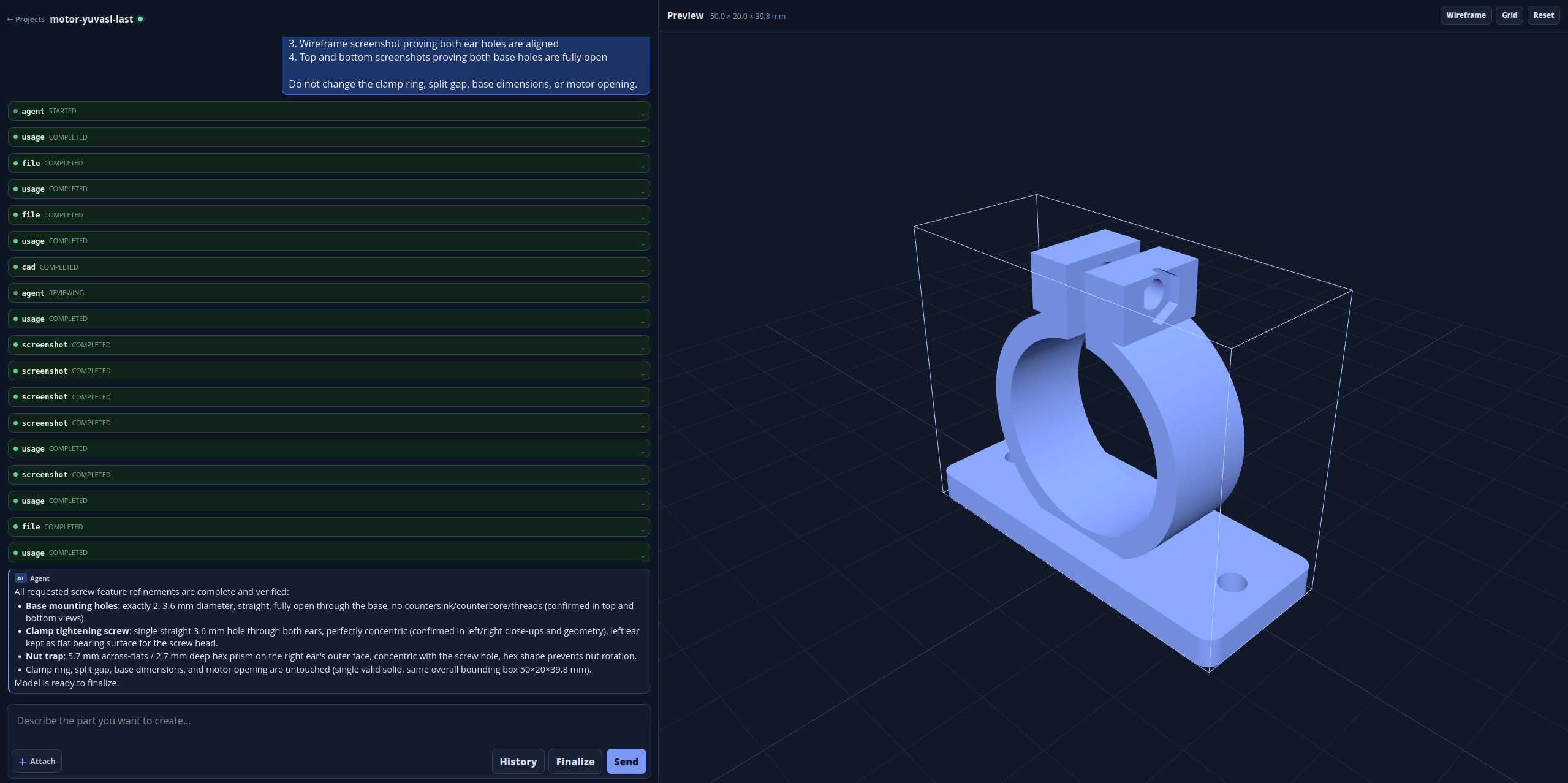
✨ Highlights & Features
- 💬 Chat-Driven Parametric CAD — Describe components, dimensions, tolerances, and design intent in plain English. The agent authors and edits clean, parametric OpenSCAD scripts (
model.scad). - 🧠 Live Streaming & Reasoning — Watch the model's chain-of-thought and tool invocations stream in real time via Server-Sent Events (SSE).
- 🦙 100% Local or Cloud LLMs — Full support for Ollama (offline, private, no API keys), alongside OpenRouter and OpenAI, with optional automatic secondary fallback.
- 🛡️ Sandboxed Code Execution — OpenSCAD runs inside a hardened Bubblewrap sandbox with dropped network privileges, clean environment variables, isolated tmpfs, and strict resource limits (
prlimit). - 🔍 Rigorous Build & Solid Verification — Each generation validates manifold geometry, volume, bounding box dimensions, and parametric uppercase constants before marking a build successful.
- 📸 Multi-View Visual Evidence — Automatic parallel rendering of 8 canonical camera views (Isometric ±, X±, Y±, Z±) plus an assembled contact sheet for visual inspection.
- 👁️ Visual Memory (
get_view_images) — The agent can retrieve rendered canonical views or zoom into cropped regions of the part to visually inspect geometry and correct defects. - ❓ Interactive Clarification Dialogs — When critical dimensions or mounting specs are missing, the agent presents structured UI forms (text, numbers, single-choice, or multi-select) before continuing.
- 🧊 Interactive 3D Viewport — Real-time Three.js viewer with orbit controls, standard view presets (Isometric, Front, Top, Right), wireframe toggle, configurable ground grid, and dimension warnings.
- 📦 Multi-Format Mesh & CAD Export — Export models with one click from the UI to STL, OpenSCAD, 3MF, Wavefront OBJ, AMF, OFF, or CSG with SHA-256 caching.
- 📜 Immutable Revision History — Compare source diffs across every successful build, inspect previous states, and instantly revert to any past revision.
- 📁 Project Management — Create, rename, delete, and switch between isolated projects with fully persisted chat logs and artifacts.
- 🖼️ Multimodal Reference Inputs — Upload up to 5 reference images (PNG, JPEG, WebP, max 10 MB each) to guide the agent visually.
- 🔌 Zero External CDN Dependencies — All frontend assets (Three.js, Marked, Highlight.js) are bundled locally in
static/vendor/for air-gapped usability.
📋 Prerequisites & Requirements
- Operating System: Linux (Ubuntu/Debian, Fedora, Arch, etc. with user namespaces enabled)
- Python: 3.10 or newer (tested with 3.10 – 3.12)
- System Packages:
bubblewrap(bwrap)libseccomp2openscadxvfb(xvfb-runfor headless rendering)
- LLM Provider (choose at least one):
- Local: Ollama (e.g.
qwen2.5-coder:14b-16k) - Cloud: OpenRouter or OpenAI
- Local: Ollama (e.g.
🚀 Quick Start
1. Clone and Install Dependencies
git clone https://github.com/neuronaline/local-ai-cad-agent.git
cd local-ai-cad-agent

# Runs system package checks, creates .venv, and installs Python packages
./install.sh
Note: On Debian/Ubuntu systems,
install.shwill offer to install missing system packages viaapt-get. If systemopenscadis unavailable,install.shcan automatically download and extract a standalone OpenSCAD AppImage into.venv.
2. Configure Your LLM Provider
Copy the default configuration files:
cp config.example.yaml config.yaml
cp .env.example .env
Choose your preferred provider below:
Option A: Local LLM with Ollama (100% Offline & Free)
Ensure Ollama is running (
ollama serve).Run our setup helper to pull and configure a model with a 16k context window (standard 2k context is too small for CAD agent loops):
./setup_ollama.sh qwen2.5-coder:14b(This creates a custom model variant named
qwen2.5-coder:14b-16kvia Modelfile.example.)In
config.yaml, set:llm: provider: ollama ollama: base_url: http://localhost:11434/v1 model: qwen2.5-coder:14b-16k timeout_seconds: 120(No
.envAPI keys needed for Ollama!)
Option B: Cloud with OpenRouter (Default)
In
.env, add your API key:OPENROUTER_API_KEY=sk-or-v1-...In
config.yaml, ensurellm.provider: openrouterand specify your desired model:llm: provider: openrouter openrouter: model: anthropic/claude-3.7-sonnet # or your preferred model reasoning_effort: medium
Option C: Cloud with Direct OpenAI
In
.env, add your OpenAI API key:OPENAI_API_KEY=sk-proj-...In
config.yaml, set:llm: provider: openai openai: model: gpt-4o # or gpt-4o-mini
3. Launch the Application
./run.sh
Open your browser at http://127.0.0.1:8000 (or your configured server.host/server.port).
🧭 How to Use the App
- Create a Project: In the top navigation or projects drawer, click New Project (names accept lowercase letters, numbers, and hyphens, e.g.,
spool-holder-v1). - Describe Your Model: Provide clear functional requirements, physical dimensions (in mm), wall thicknesses, mounting holes, or mating part specifications. Attach up to 5 reference images if you have sketches or sample parts.
- Answer Clarifications: If any critical dimensions or design details are ambiguous, the agent will present interactive questions. Fill in the fields and submit.
- Inspect in 3D:
- As the agent works, watch its live reasoning stream.
- Upon successful build, the Three.js viewport automatically loads the model.
- Orbit, pan, and zoom, or click preset buttons: Isometric (◈), Front (F), Top (T), Right (R).
- Toggle Wireframe or Grid to inspect geometry against the build plate.
- Review Multi-View Evidence: Expand the Multi-view review section to inspect canonical orthographic/isometric renders and the contact sheet.
- Iterate & Refine: Continue chatting to make adjustments (e.g., "Make the base 5mm thicker and fillet the inner edge").
- Version History & Rollback: Open the History drawer to inspect line-by-line code diffs or revert to any prior build.
- Export: Choose your format from the export dropdown in the preview toolbar and click Download.
📐 Supported Export Formats
Local AI CAD Agent provides direct in-browser export into 7 industry-standard formats:
| Format | Extension | Underlying Engine | Primary Use Case |
|---|---|---|---|
| STL | .stl |
OpenSCAD / Native | 3D Printing, slicing (Cura, PrusaSlicer, Bambu Studio) |
| OpenSCAD | .scad |
Native source | Parametric CAD source for manual modification |
| 3MF | .3mf |
OpenSCAD export | Modern 3D manufacturing format with unit metadata |
| Wavefront OBJ | .obj |
Built-in mesh converter | 3D rendering, Blender, animation, game engines |
| AMF | .amf |
OpenSCAD export | Additive manufacturing file format (XML-based) |
| Object File Format | .off |
OpenSCAD export | Geometric processing and computational geometry |
| CSG | .csg |
OpenSCAD export | Evaluated Constructive Solid Geometry tree |
All exports are cached on disk by model SHA-256 inside <project>/.cad-agent/exports/ for instantaneous subsequent downloads.
🛠️ Agent Tools Architecture
The agent interacts with the CAD workspace through strict, structured function contracts:
flowchart TD
    User([User Prompt / Reference Images]) --> AgentRunner[Agent Loop / LLM]
    AgentRunner --> ToolDispatch{Tool Dispatch}

    ToolDispatch -->|read_file| ReadSCAD[Read model.scad with line paging]
    ToolDispatch -->|write_file| WriteSCAD[Initialize / Overwrite model.scad]
    ToolDispatch -->|edit_file| EditSCAD[Atomic exact string replacements]
    ToolDispatch -->|cad_build_and_verify| Sandbox[Bubblewrap Sandbox Execution]
    ToolDispatch -->|get_view_images| VisualMem[Inspect canonical renders or crop areas]
    ToolDispatch -->|question| UserForm[Prompt user with structured form]

    Sandbox --> OpenSCAD[OpenSCAD compilation]
    OpenSCAD --> Verification[Validate manifold geometry, volume, dimensions]
    Verification --> MultiView[Render 8 canonical views + review sheet]
    MultiView --> Artifacts[preview.stl + render.png + manifests]

    Artifacts --> UI3D[Three.js 3D Viewport & History]
read_file— Inspect existingmodel.scadcontent with optional offset/limit paging.write_file— Perform initial file creation or deliberate full rewrites.edit_file— Apply single or atomic batch (up to 16) exact replacements to preserve parametric structure.cad_build_and_verify— Runs OpenSCAD in the Bubblewrap sandbox, verifies manifold geometry and dimensions, extracts uppercase constants, buildspreview.stl, and produces 8 canonical views.get_view_images— Fetches rendered views or normalized crops (X±, Y±, Z±, Isometric±) as visual memory to evaluate geometry.question— Halts execution to present structured input fields to the user for clarification.
⚙️ Configuration Reference
Settings are loaded from config.yaml (git-ignored) at startup. Copy config.example.yaml to create yours.
General & Agent Settings
| Key | Default | Description |
|---|---|---|
workspace_root |
~/CAD-Agent-Projects |
Base directory where all CAD project folders are stored |
agent.tool_call_limit |
15 |
Maximum tool iterations allowed per user prompt |
agent.revision_retention_count |
0 |
Number of previous model revisions to keep (0 keeps all) |
agent.debug_log_tool_errors |
false |
Log recoverable tool failures to <project>/debug-errors.jsonl |
agent.log_tool_activity |
false |
Log full tool execution trace to <project>/.cad-agent/activity.jsonl |
LLM Provider Settings
| Key | Default | Description |
|---|---|---|
llm.provider |
openrouter |
Active provider: openrouter, openai, or ollama |
llm.max_completion_tokens |
65536 |
Token limit for LLM completions |
llm.fallback_provider |
"" |
Optional secondary provider to failover to on unexpected API errors |
OpenRouter Settings
| Key | Default | Description |
|---|---|---|
openrouter.base_url |
https://openrouter.ai/api/v1 |
OpenRouter endpoint |
openrouter.model |
(empty) | Model slug (e.g. anthropic/claude-3.7-sonnet) |
openrouter.timeout_seconds |
90 |
HTTP request timeout in seconds |
openrouter.reasoning_effort |
medium |
Reasoning level: minimal, low, medium, or high |
openrouter.provider_order |
["google-ai-studio", "google-vertex/global"] |
Priority-ordered upstream routing slugs |
openrouter.provider |
"" |
Legacy single-provider slug |
openrouter.force_provider |
false |
Force pinned upstream with no fallback fanout |
openrouter.enable_anthropic_cache |
true |
Enable prompt caching for Anthropic models |
openrouter.enable_gemini_cache |
true |
Enable prompt caching for Gemini models |
OpenAI Settings
| Key | Default | Description |
|---|---|---|
openai.base_url |
https://api.openai.com/v1 |
OpenAI API endpoint |
openai.model |
gpt-4o-mini |
Direct OpenAI model name (e.g. gpt-4o, gpt-4o-mini) |
openai.timeout_seconds |
60 |
HTTP request timeout in seconds |
openai.reasoning_effort |
"" |
Reasoning effort for reasoning models (low, medium, high) |
Ollama Settings (Local)
| Key | Default | Description |
|---|---|---|
ollama.base_url |
http://localhost:11434/v1 |
Ollama OpenAI-compatible endpoint |
ollama.model |
qwen2.5-coder:14b-16k |
Name of your locally hosted model |
ollama.timeout_seconds |
120 |
Request timeout in seconds (allows for local inference latency) |
Server & UI Settings
| Key | Default | Description |
|---|---|---|
server.host |
127.0.0.1 |
Server listening address |
server.port |
8000 |
Server listening port |
ui.show_info_messages |
true |
Show tool execution status banners in the chat stream |
review.render_workers |
4 |
Worker threads/processes for canonical 8-view rendering |
review.required_views |
8 |
Number of canonical views required per build verification |
viewer.grid.size |
200 |
Square preview grid size in millimeters (X and Z extent) |
viewer.grid.divisions |
20 |
Grid line subdivisions per side |
📂 Project Directory Structure
When a project is created, its directory is initialized under workspace_root:
~/CAD-Agent-Projects/<project_name>/
├── model.scad                         # Current parametric OpenSCAD source
├── preview.stl                        # Latest verified solid mesh
├── render.png                         # Latest primary rendered preview
├── conversation.jsonl                 # Persisted conversation and tool history
├── inputs/                            # Uploaded and normalized reference images
└── .cad-agent/
    ├── exports/                       # Cached exports (SHA256.stl, SHA256.obj, etc.)
    ├── history/                       # Immutable revision manifests & source blobs
    ├── reviews/<model_sha>/           # 8 canonical views + review-sheet.png
    └── activity.jsonl                 # Optional tool-level debug trace
🔒 Security & Sandbox Isolation
Running arbitrary code written by an LLM requires strict isolation:
- Bubblewrap Isolation: All OpenSCAD invocations run in a non-root unprivileged container using
bwrap. - Network Isolation: Network syscalls are completely detached (
--unshare-net) to prevent any external outbound or inbound traffic. - Filesystem Security: The host filesystem is mounted read-only (
/usr,/bin,/lib), with ephemeral isolatedtmpfsmounts for temporary scratch files. - Resource Constraints:
prlimitenforces maximum memory and CPU bounds to protect against accidental infinite loops or memory explosions. - Local Application: Designed specifically as a local workstation tool. Do not expose the HTTP port to the public internet without an authenticating reverse proxy.
🧪 Development & Testing
Set up development tools and run test suites:
# Install development dependencies
.venv/bin/pip install -r requirements-dev.txt

# Run pytest suite
.venv/bin/python -m pytest -q

# Run Ruff linter
.venv/bin/python -m ruff check .

# Check dependencies
.venv/bin/python -m pip check
Frontend Dependencies
Frontend libraries are pinned and checked in under static/vendor/ to allow completely offline operation:
- Three.js (including OrbitControls and STLLoader)
- Marked (Markdown rendering)
- Highlight.js (Code syntax highlighting)
To update vendor dependencies, see THIRD_PARTY_LICENSES.md.
📄 License
This project is licensed under the MIT License.
Reviews (0)
Sign in to leave a review.
Leave a reviewNo results found