nexus
Health Uyari
- License — License: MIT
- Description — Repository has a description
- Active repo — Last push 0 days ago
- Low visibility — Only 6 GitHub stars
Code Basarisiz
- rm -rf — Recursive force deletion command in Config/var-dumper.sh
Permissions Gecti
- Permissions — No dangerous permissions requested
Bu listing icin henuz AI raporu yok.
Free and open source local development on the Mac for Laravel, WordPress, Node.js and coding agents. A workspace for every git branch with its own database, domain and workers.

Nexus
Local development on the Mac for Laravel, WordPress, Node.js and coding agents.
Each branch gets its own site, database and queue worker.
So you and Claude Code can work on many tickets at the same time.
Free and open source. No paywall, ever.
Download Nexus · What is new · Install · Move to Nexus · Feedback
Mac with Apple silicon · macOS 27 or later · MIT license
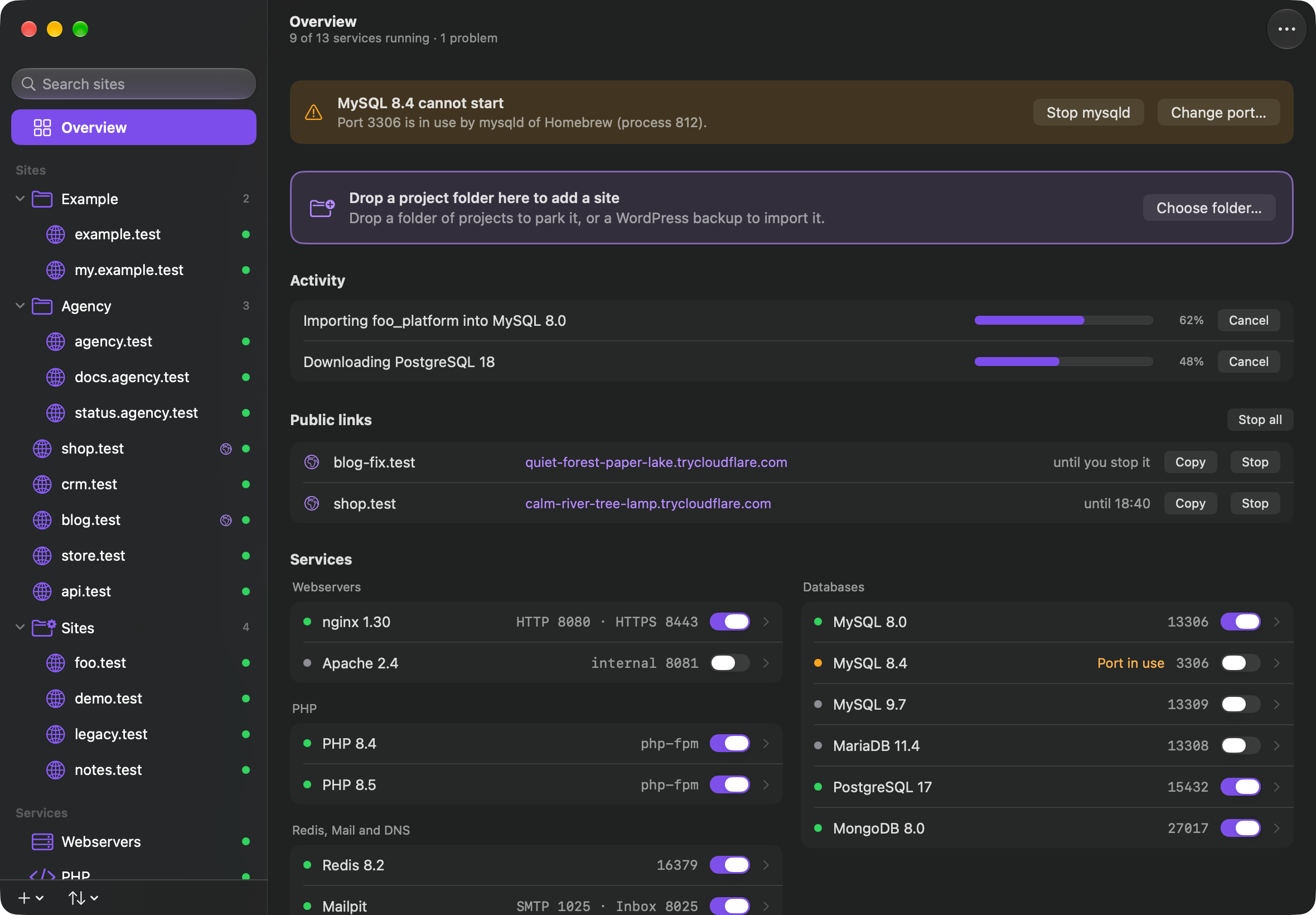
Why Nexus
Nexus does more than serve your sites. It knows your branches, your .env, your queues, your logs
and your mail. So it does the setup work for you and for your coding agent.
🌳 A workspace for every git branch
Each git branch gets its own copy of the site. It has a database server on a copy of your data and a.test domain with HTTPS. It also has its own Redis indexes, queue worker, scheduler and Vite. A new
workspace is ready in seconds, also with a large database. So several Claude Code sessions work at
the same time. No session changes the data of another session. A workspace that nobody uses stops by
itself. How workspaces work
🤖 Built for coding agents
Nexus gives your coding agent what it needs to check its own work. A switch on the Agents screen
connects Claude, Claude Code, Codex, Cursor, Gemini CLI, Junie, OpenCode, VS Code, Windsurf or Zed
to the MCP server of Nexus.
- The agent knows the URL, the database and the ports of each site and workspace.
- When a page fails, the agent reads the errors, the logs and the dumps of that request.
- The agent tests a sign-up from start to end. It fills in the form, waits for the mail and opens
the link. - You decide what an agent can do. No agent can delete a database or your files.
- A workspace can start with an empty database or a scrubbed dump. Then an agent never sees
customer data.
🔗 Share a site in one click
Click Share on the Site screen, or run nexus share. Each local site can get a public link. Send it
to a client, a colleague or your phone. A password keeps other people out. Visitors do not see your
error details. Webhooks still reach the site. How sharing works
🔺 Built for Laravel
- Each workspace runs its own queue worker, scheduler, Reverb server and Vite server. Its migrations
run by themselves. - See each
dump(), query, log line and queue job of a request in one place. Nexus marks slow,
duplicate and N+1 queries. - Read
laravel.loglive. An exception shows the line of your app first and folds the frames ofvendor/. - Nexus warns when your tests would reset your development database. It makes a separate test
database for you. - PCOV turns on only for
pest --coverage,--tiaand--mutate. Xdebug runs only when you debug. - Share a site with a public link. Laravel uses that address for its links, redirects and signed
URLs. Visitors do not see Telescope, Horizon or Ignition.
🧱 Built for WordPress
- Bedrock, multisite on subdomains and WP-CLI with the PHP version of the site.
- Import a backup of Local, Studio, Jetpack or All-in-One WP Migration. Nexus makes the site, the
database and a git repository. - Give each workspace a dump of your live site. Nexus changes the URLs while the dump loads, also in
serialized data. - Change the URLs of a site in one click. Undo it with one click too.
- Nexus warns when a plugin sends real mail. It can turn that plugin off for you.
- WP-Cron events, Action Scheduler actions and
debug.logshow in the dump viewer and the log
viewer.
🟩 Built for Node.js
- Next.js, Nuxt, Astro, SvelteKit, Express and Vite apps with React, Vue or Svelte. Nexus finds the
framework of the app by itself. - The dev server starts with the first page. It stops when no page needs it.
- Each workspace gets its own database and its own dev server.
- Hot reload also works through a public link.
- The output of the app shows live in the log viewer.
- Each MongoDB runs as a replica set. So transactions and the nested writes of Prisma work.
⚡ And much more
- 🔒 HTTPS for every site. Each site gets a
.testdomain with a trusted certificate. - 📦 Every service in one click. PHP, Node, nginx, Apache, MySQL, MariaDB, PostgreSQL, MongoDB,
Redis, DNS and mail. Choose the versions that you need. - 📬 A mail inbox for every site. No test mail ever reaches a real customer.
- ✨ A new site in one click. Laravel, WordPress, Next.js, Nuxt, Vite or Astro.
- 🚚 Move to Nexus in one click. From Laravel Herd or Laravel Valet. The old app stays as it is.
- 🔏 Signed packages. Nexus installs only packages from a list that the maintainer signed.
- 💜 Free and open source. MIT license. No subscription and no paywall, ever.
🌳 A workspace for each branch
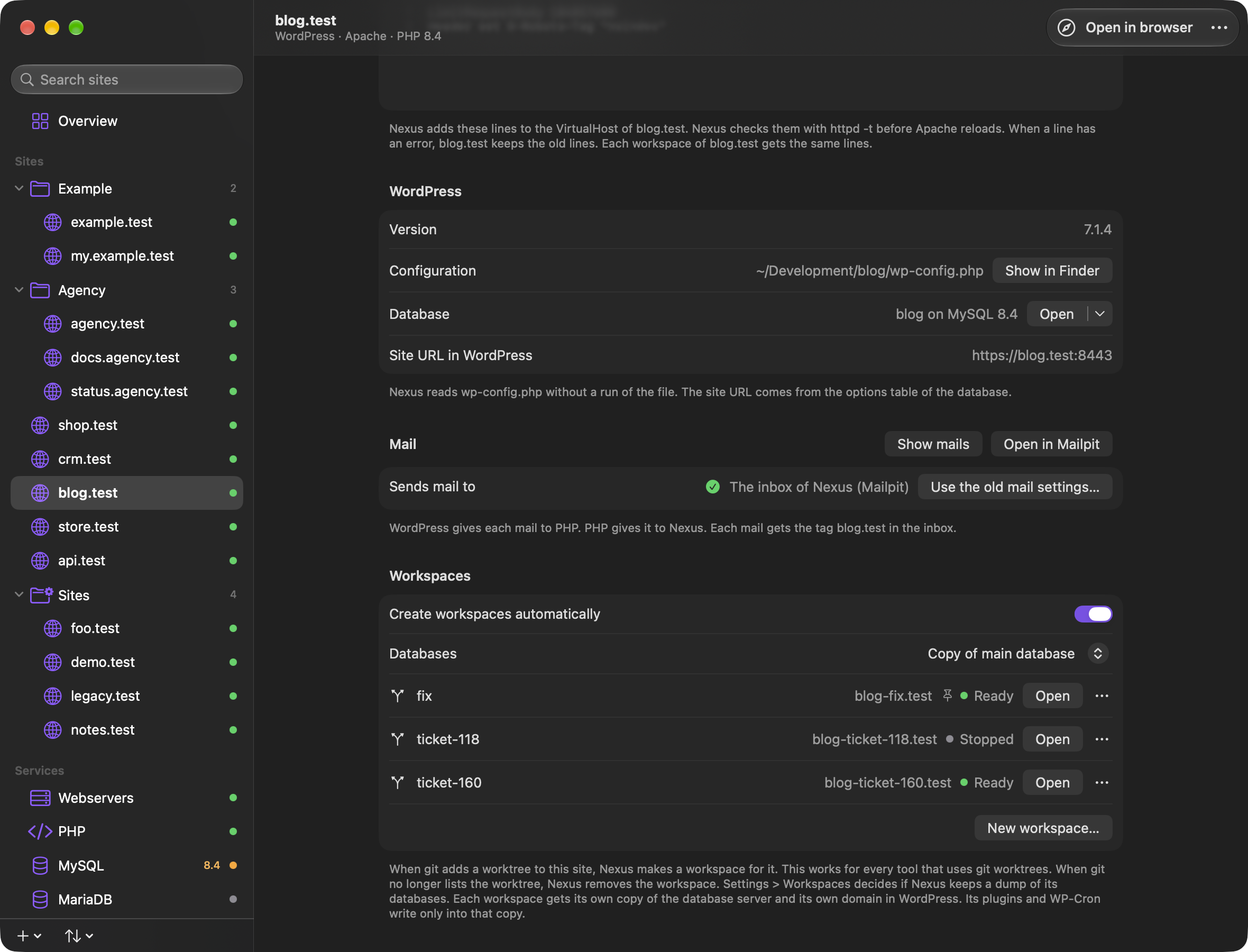
In the folder of a site, make a workspace for a branch:
nexus workspace create ticket-1
nexus workspace wait ticket-1
Nexus makes the git worktree and the workspace. The last command prints the URL, for examplehttps://shop-ticket-1.test. "New workspace…" on the Site screen does the same. A worktree that you
or an agent make with git worktree add gets a workspace too.
Each workspace gets:
- Database: a server of its own on a copy of your data. You can also start with an empty
database. Then your migrations and seeders run from zero. Or each workspace loads your own dump
file, for example a scrubbed copy of production. With these two choices an agent never sees
customer data. - Domain: a
.testdomain of its own with HTTPS. - Redis: indexes of its own.
- Programs: its own queue worker, scheduler, Reverb server and Vite server, when the application
uses them.
A new worktree is ready within seconds, also with a large database. When you remove the worktree,
Nexus removes the workspace. By default it keeps a dump of its databases in the trash for 7 days.
- Idle workspaces stop. A workspace without activity stops after 1 hour. The next page, command
or database connection starts it again. Settings > Workspaces sets the time. - Dev servers on demand. Vite and the app of a Node.js site start with the first page. They stop
when no page needs them. - Old workspaces go. The Site screen names the workspaces without activity for some days.
Review… shows what git knows about each one, for example merged or not pushed. You choose which
ones go. Nexus never removes a workspace by itself.
In a Laravel application:
- Database: the server runs on a clone of the data folder. Your database names stay the same.
Only the connection keys in.envchange. Nexus then asks the application which server it reaches. - Files: Nexus clones
vendor,node_modules, the build output andstorage/app. The clones use
almost no disk until a file changes. - Migrations:
php artisan migrate --forceruns after the clone. You can change this list on the
Site screen.
A WordPress site gets its own database and its own domain in WordPress. Its plugins and WP-Cron write
only into that copy. A Node.js app gets its own database too.
A MongoDB connection gets the same URL with the port of the workspace, for example in MONGODB_URI.
A URL of MongoDB Atlas (mongodb+srv) stays as it is. So that workspace shares the Atlas database
with the main site, and Nexus tells you so.
Each workspace server uses about 200 MB of memory.
For the clone, Nexus freezes MySQL, MariaDB and MongoDB for about a second. A writer waits and then
continues. PostgreSQL needs no freeze. When the freeze fails, the workspace shows Not isolated with
the reason. Retry tries again. A workspace that is not isolated runs no programs and no commands.
A database name stays the same in a workspace. So a command that connects itself must use{port:database}, the port of the database server of the workspace.
To get a dump back, run nexus db dumps and nexus db restore.
A site can add its own keys to the .env of each workspace:
nexus site edit shop.test --workspace-key SCOUT_PORT={port:scout}
🤖 Made for coding agents
Nexus has an MCP server for Claude Code, Codex and other coding agents. The Agents screen under Tools
turns it on for each agent that Nexus finds. An agent then works with your sites as you do:
- Errors first. When a page fails, the agent reads the newest errors of the site.
- Mail from start to end. The agent fills in a sign-up form, waits for the mail and opens the link
in it. No mail leaves your Mac. - Workspaces. In a git worktree the agent uses the URL and the database of that workspace.
- Dumps. The agent reads the dumps, the queries and the log lines of a request.
- Logs. The agent reads the log files of the app of a site, for example only the errors.
- You decide. An agent can only look, look and set up, or also remove. No agent can delete a
database or your files. - Safe tests. When the tests of a Laravel site use your development database, Nexus warns you
and the agent. "Choose test database…" on the Site screen makes a separate one.
🐞 Dumps, queries and Xdebug
The Dumps screen under Tools shows each dump() and dd() of your PHP sites. With each request it
shows the queries, the log lines and the queue jobs. Nexus marks a slow query, a duplicate query and
an N+1 query. A click on a file opens your code editor at that line.
- Off by default. Turn on the Catch switches on the Dumps screen. Until then PHP runs your sites
without the dump viewer. - API answers stay valid. A page in your browser shows each dump. An API answer or an update of
Livewire, Inertia, htmx or Turbo stays clean. - In the terminal and the browser.
nexus dumps --followshows each new dump.nexus dumps open
opens a web page with the same list. - Xdebug only when you debug. Only a request that starts a debug session uses Xdebug. So your
normal pages stay fast.nexus debug artisan my:commandruns one command with Xdebug.
📜 The logs of your apps
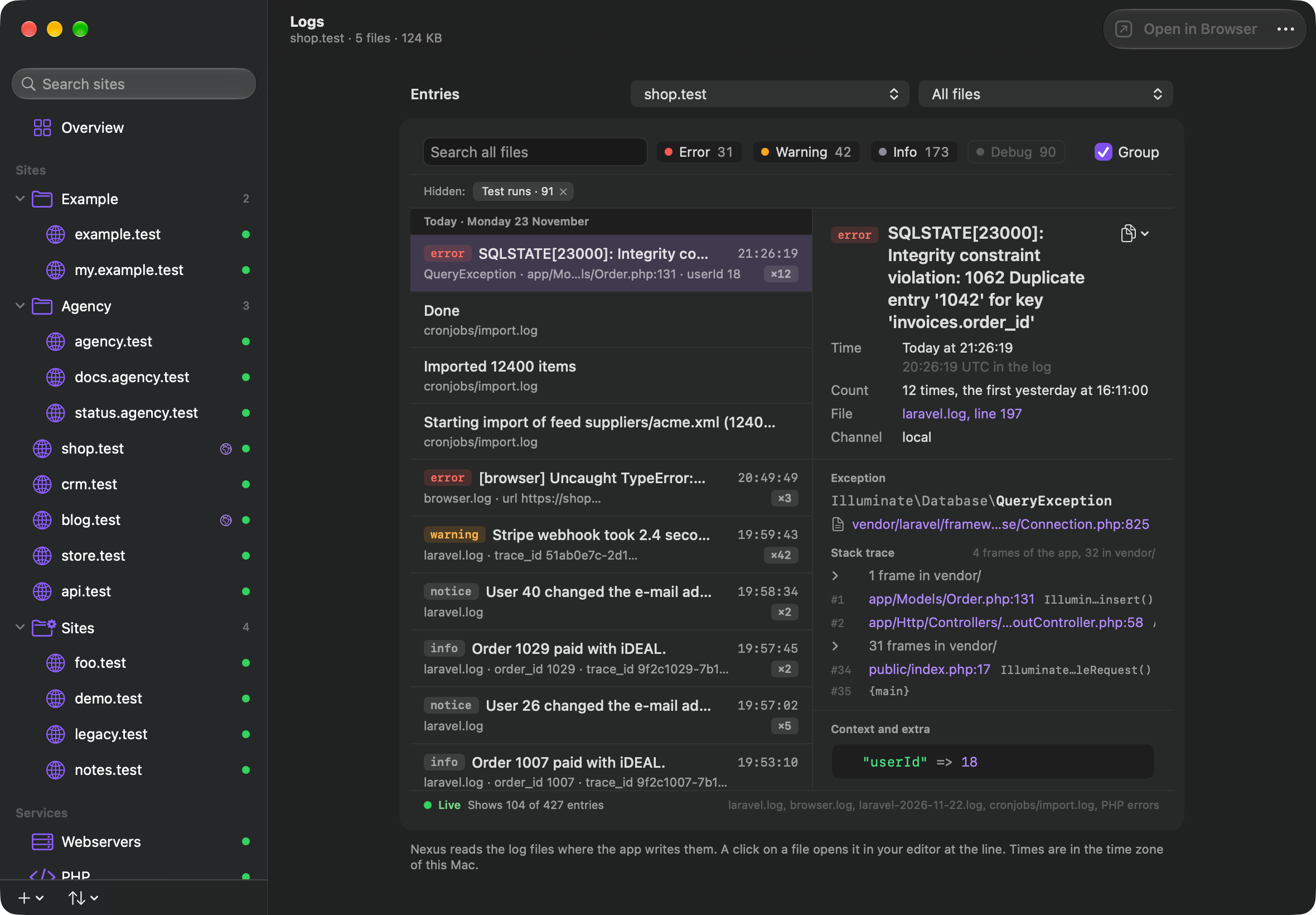
The Logs screen under Tools shows the log files of the app of each site and workspace: storage/logs
of Laravel, the debug.log of WordPress, the PHP errors with their time, the output of a Node.js
app and the requests. A new entry shows at once. "Show logs" in the menu of a site opens it.
- Easy to read. Each level has its color, each day has its line, and each time is the time of
your Mac. An exception shows the line of your app first. The frames invendor/fold into one row. - Find it. Filter by level, search all files at once, or find all entries with the same
trace_id. Equal entries show as one row with a count. The entries of your test runs stay hidden
until you want them. - Large logs too. A log of 281 MB opens in a moment.
- In the terminal, the browser and your agent.
nexus logs --level error --followshows each
new error. The web page of the dumps has a Logs page. Agents read the logs through the MCP server.
🔗 Share a site
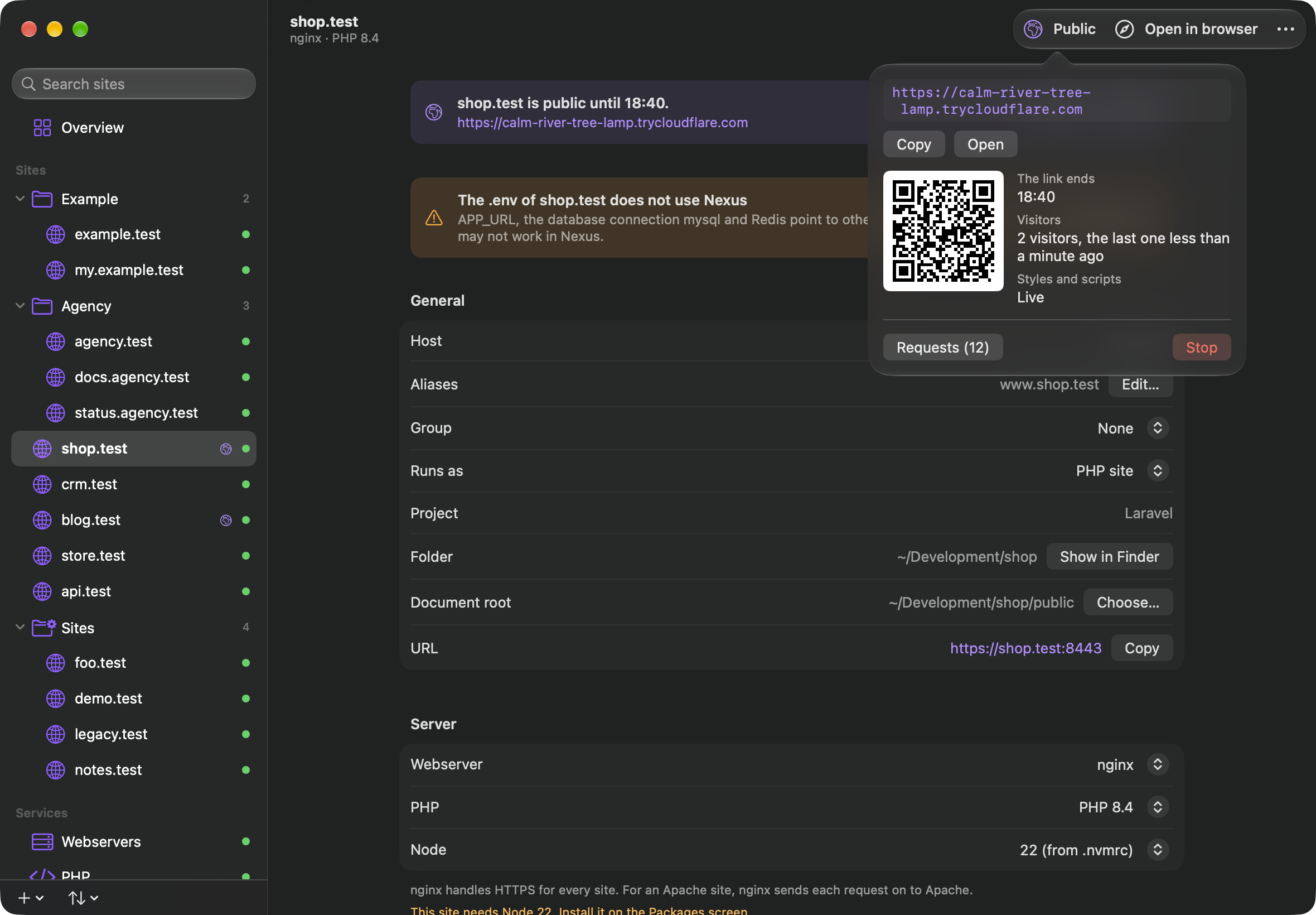
Click Share on the Site screen, or run nexus share in the folder of a site. Nexus opens a public
link through Cloudflare. You need no account. Send the address to a client, a colleague or your
phone.
- Visitors see only the site. Error details and tools such as Telescope stay hidden. A password
keeps other people out. Webhooks still reach the site. - The site works through the link. Laravel sees the public address. Nexus changes the addresses
in the pages of WordPress and other sites. Vite keeps hot reload on for you. - Check a webhook. The dump viewer can keep each request of a link with its headers, its body
and its dumps. - Your own domain. With a domain at Cloudflare a link keeps a fixed address, for example
shop.example.com.
🧱 WordPress, done right
- Nexus finds WordPress and Bedrock sites. It gives them the right web rules on nginx and Apache.
- The Site screen shows the version, the database and the configuration. It sets up
wp-config.php
or a database for you. - Multisite works, also on subdomains.
nexus wpruns WP-CLI with the PHP version of the site.- Change the URLs of a site to its Nexus URL in one click. Undo it with one click too.
- Give each workspace a dump of your live site. Nexus changes the links to the live URL while the
dump loads, also in serialized data and JSON. So the workspace opens with its own URL at once. - Nexus warns when a plugin sends real mail. It can turn that plugin off for you.
📥 Import a site: drop a backup on the Overview. Nexus reads exports of Local, Studio and Jetpack,.wpress files of All-in-One WP Migration and a folder with a dump. It makes the site, the database
and a git repository. Then it changes the URLs. In the terminal: nexus import.
✨ A new site in one click
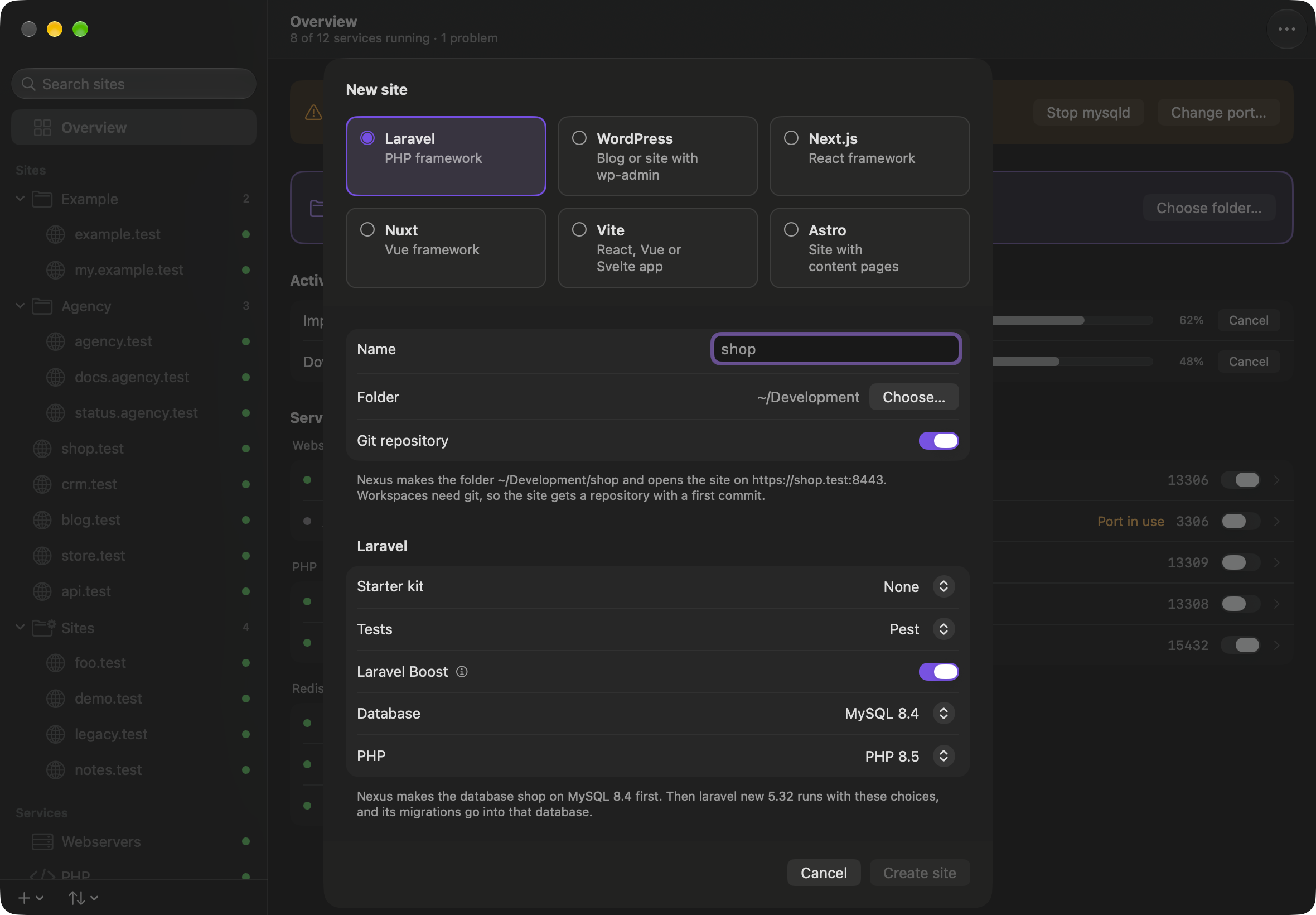
Laravel (with its starter kits), WordPress, Next.js, Nuxt, Vite and Astro. Nexus makes the folder, the
database and a git repository. Then it opens the site over HTTPS. In the terminal: nexus new.
📬 A mail inbox for every site
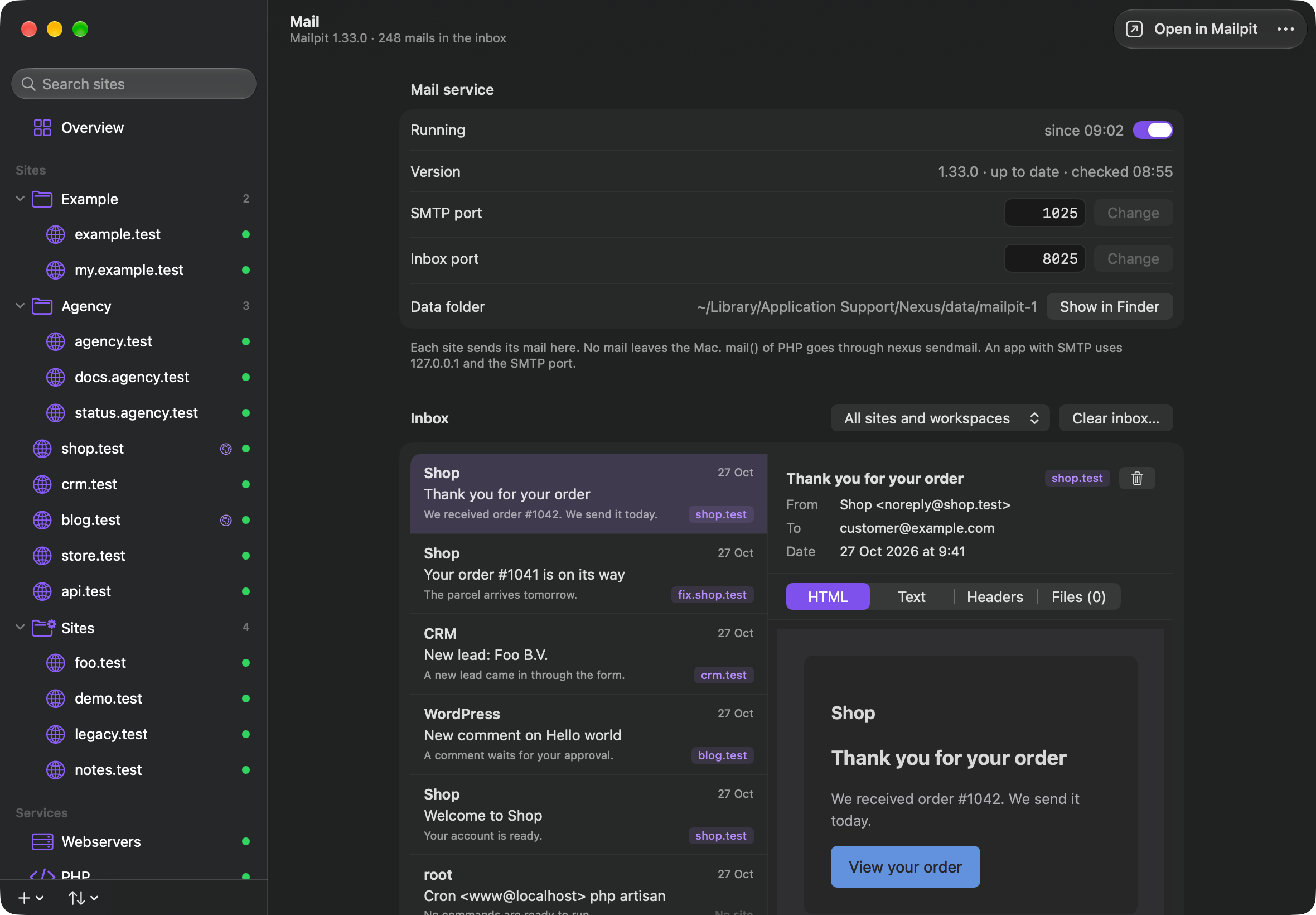
Nexus installs and runs Mailpit for you. Every mail that your
sites send goes to its inbox. No mail leaves your Mac. Each mail shows the site or the workspace that
sent it. Read your mails in Nexus, or open the web inbox of Mailpit.
📦 The versions that you need
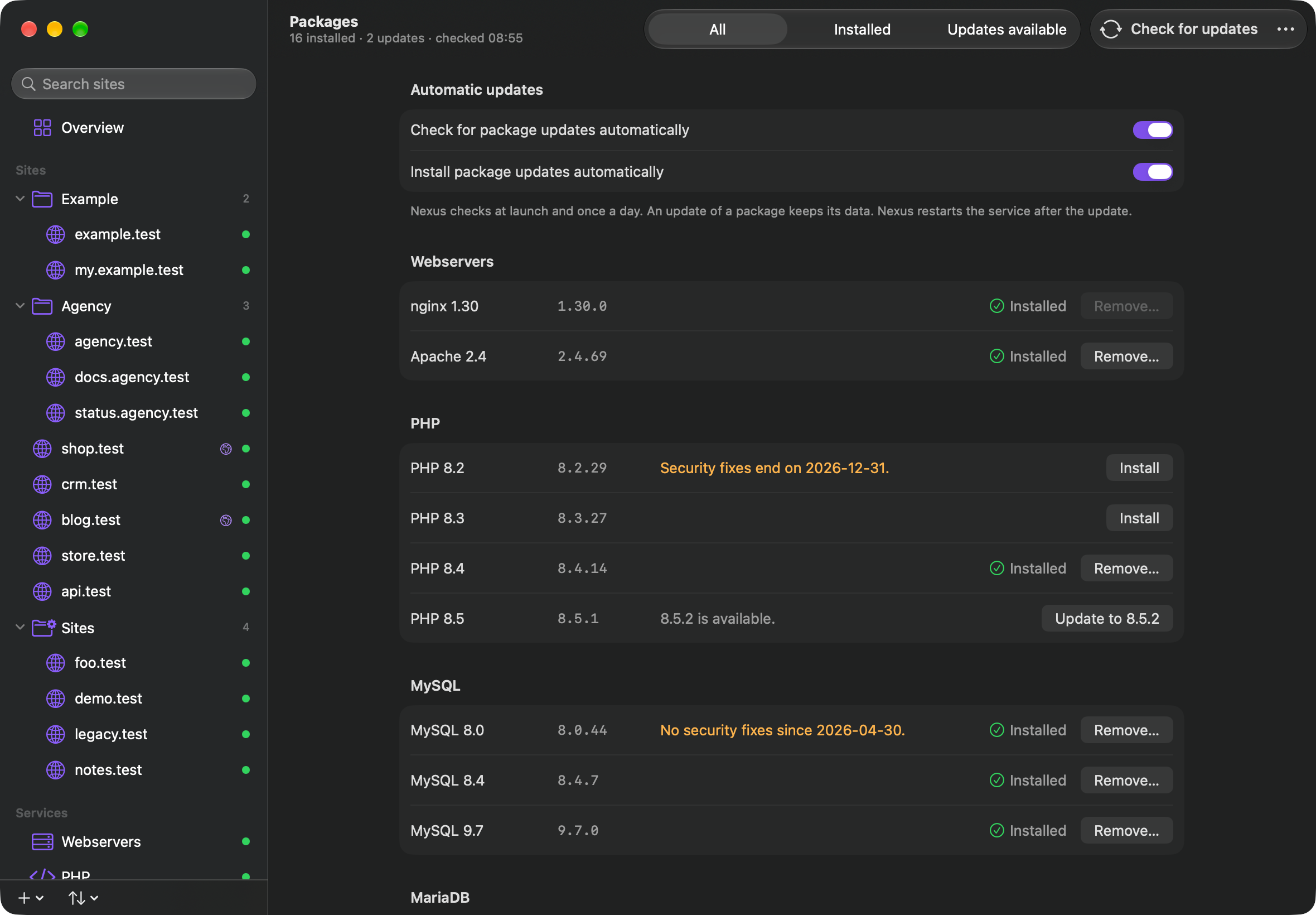
Install a version of PHP, Node or a database with one click. Updates in the same version line install
by themselves, for example a security fix of PHP. Nexus also tells you when a version gets no more
security fixes.
🚚 Move to Nexus in one click
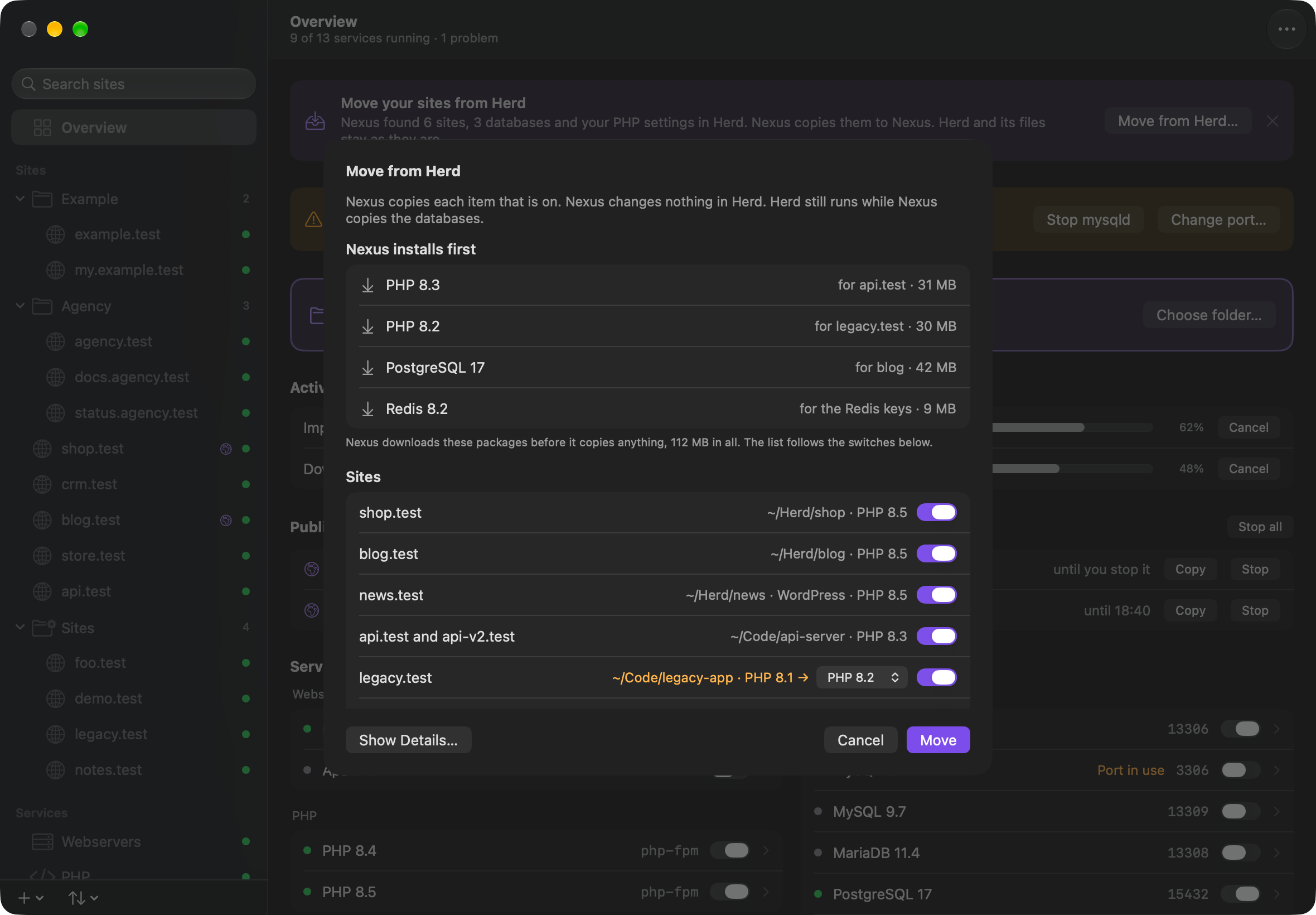
Nexus moves your sites from these apps:
| App | How |
|---|---|
| Laravel Herd (Free and Pro) | "Move from Herd…" on the Overview, or nexus import herd |
| Laravel Valet | "Move from Valet…" on the Overview, or nexus import valet |
Local and MAMP come next. See the roadmap.
Nexus finds the app on your Mac. The first run of Nexus ends with the move, and the Overview offers
it later too. You see each item first and choose what moves.
- Sites: the parked folders, the linked sites with their aliases, the proxies, the PHP version of
each site and your own nginx lines. A site on PHP 8.1 or older gets PHP 8.2. - Databases: Nexus copies each database from the server that the
.envorwp-config.phpof the
site names, for example DBngin, Homebrew or Herd Pro. The copy runs while Herd or Valet still runs. - Redis keys, PHP settings and files: the Redis keys, your
php.inilines, the.envof each
Laravel site, the lines of Herd in~/.zshrcand project files such as.mcp.jsonwith the PHP of
Herd. Nexus keeps a copy of each file that it changes. - One step for you: quit Herd with the button in the sheet, or run
valet stop. Then Nexus takes
over ports 80 and 443 and the.testdomain, and it opens each site once.
Herd or Valet and its files stay as they are. The report of the move tells you what moved and how to
go back.
Install
You need:
- A Mac with Apple silicon
- macOS 27 or later
- git, for workspaces
Then:
- Download
Nexus.dmg
from the latest release. - Move Nexus to the Applications folder and open it.
- Follow the first steps of the app:
- Allow Nexus to run in the background. The helper sends each
.testname to Nexus. - Trust the Nexus certificate. macOS asks for your password one time.
- Tell Nexus what you build. Nexus then chooses the versions of PHP, Node and the databases.
- Click Done. Nexus starts the services that you chose.
- Do you use Herd or Valet? Nexus then offers to move your sites.
- Allow Nexus to run in the background. The helper sends each
Nexus updates itself. See Settings > Updates.
Add a site
Click + in the sidebar and choose the folder of your project. You can also use the command line:
cd ~/Sites/shop
nexus site add . --php 8.4
The site opens on https://shop.test. To make each folder in ~/Sites a site, run nexus park ~/Sites.
When the .env of a Laravel site points to another server on your Mac, the Site screen says so.
"Use Nexus…" shows each key with its old and its new value. Nexus can copy your data first.
Each PHP site can have its own nginx or Apache lines, for example client_max_body_size 100m;. Write
them on the Site screen or with nexus site lines. Nexus checks them before it uses them.
Bring a database
Open a database service in the app and choose Import database. Copy a database from another server,
for example from Docker or MongoDB Atlas. Or load a dump file: .sql, .sql.gz, a .zip or .tar
with a dump, or an archive of mongodump --archive. In the terminal:
nexus db copy shop --to mysql-8.4         # from another server
nexus db import ~/Downloads/shop.sql.gz   # into the database of the site in this folder
Nexus reads the other server and changes nothing on it. A database that exists changes only after
your choice. Nexus then puts a copy of the old database in the trash first. The default account of a
new instance is root without a password.
Each MongoDB runs as a replica set of one server. So transactions work, for exampleDB::transaction of Laravel and the nested writes of Prisma.
Command line
Turn on Add Nexus to PATH on the Command line screen of Nexus. Then you can use the nexus command in
your terminal. Run nexus --help for all commands, or see the Command line screen.
nexus status                  # the services and their state
nexus site list               # the sites
nexus workspace list          # the workspaces
nexus workspace info --json   # the URL, the databases and the ports of a workspace
nexus workspace list --old    # the workspaces without activity for some days
nexus php -v                  # the PHP of the site in this folder
nexus composer install        # Composer with that PHP
nexus wp plugin list          # WP-CLI with that PHP
nexus errors                  # the newest errors of the site in this folder
nexus dumps --follow          # each new dump of your sites
nexus logs --level error      # the newest errors in the log files of the app in this folder
nexus share                   # a public link to the site in this folder
nexus debug artisan my:task   # one command with Xdebug
nexus import herd             # move your sites from Herd, or: nexus import valet
Feedback
Your honest feedback makes Nexus better, also when it is negative.
- 🐛 Did you find a bug? Open an issue.
- 💡 Do you need a feature? Ask for it.
- 🗺️ What comes next? See the roadmap.
- ⭐ Do you like Nexus? Give it a star on GitHub. A star helps other developers find Nexus.
Privacy
- Crash reports: Nexus sends anonymous crash reports. Turn them off in Settings > Advanced.
- Activity log: Nexus writes what happens to
~/Library/Application Support/Nexus/logs/activity.log. So you can see what went wrong. The log
holds the names of the buttons that you click, the requests tonexusdand their results. It does
not hold typed text, passwords or.envvalues. The file stays on your Mac. Nexus keeps at most
about 10 MB. To open it, use the "..." menu on the Overview screen.
Security
- Signed packages: Nexus downloads nginx, PHP, the databases and the other packages from
NexusLocal/binaries. The maintainer signs each list of
packages outside GitHub. Nexus installs only from a list with a valid signature, and it refuses a
list that is older than the last one it read. Nexus checks the SHA-256 of each download against
that list. - Sources: The build of each package checks its sources against the checksum or the PGP
signature of the publisher.
Uninstall
Open Settings > Advanced and click Uninstall. Nexus then moves itself to the Trash. You can also runnexus uninstall and move Nexus to the Trash yourself. Your packages and databases stay in~/Library/Application Support/Nexus until you delete that folder.
Build from source
You need Xcode 27. Copy Config/Signing.local.xcconfig.example to Config/Signing.local.xcconfig.
Set your team and open Nexus.xcodeproj.
License
Nexus is free and open source under the MIT license.
Yorumlar (0)
Yorum birakmak icin giris yap.
Yorum birakSonuc bulunamadi