maket
Health Pass
- License — License: MIT
- Description — Repository has a description
- Active repo — Last push 0 days ago
- Community trust — 16 GitHub stars
Code Pass
- Code scan — Scanned 12 files during light audit, no dangerous patterns found
Permissions Pass
- Permissions — No dangerous permissions requested
No AI report is available for this listing yet.
Visual design workspace for AI assistants: create posters, flyers, labels and social posts as multi-page HTML/CSS documents with live preview, annotations, brand guides, asset libraries and data-driven collections; validate layouts, export print-ready PDFs and prepare Gmail drafts. Works with Codex, Claude, Gemini and any MCP client.
Maket
Turn your AI assistant into a visual designer. Describe what you want — a poster, a flyer, a product label, a social post — and the AI assistant composes it as an HTML/CSS document with precise typography, brand chartes, your image library, and typed data collections for repeatable variants. A live preview updates in real time. Export to PDF or hand it off to Gmail as a draft when you're done.






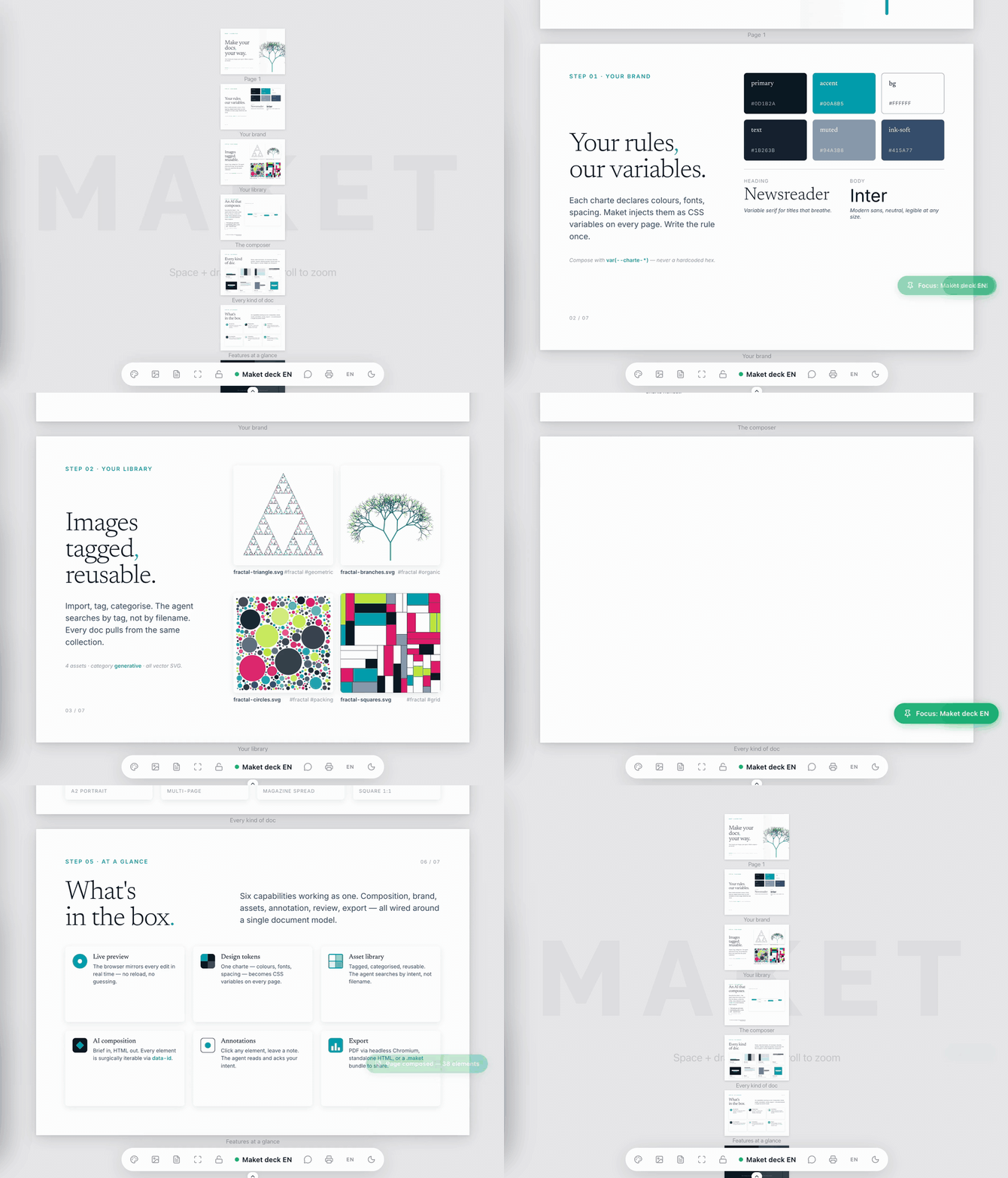
60 seconds · charte → library → data → AI composition → every kind of doc → export.
Why Maket
Your AI assistant is good at writing. But design is about space, hierarchy, and rhythm — and that happens in layout, not prose. Maket gives the AI assistant a real canvas (HTML/CSS pages sized in millimeters), a live preview that reflects every change, an asset + brand library so output stays consistent, and typed data collections that turn one page template into a validated series of variants. You stay in the conversation; the AI assistant handles the craft.
Features
- Live preview — Changes appear in your browser the instant the AI writes them. Click any element to annotate it and send feedback back to the chat.
- HTML/CSS canvas — Pages are real HTML sized in mm. No lock-in to a proprietary format.
- Brand chartes — Define design tokens (colors, fonts, spacing, shadows) once; Maket enforces them during composition.
- Image library — Drop images in, tag them, the AI picks the right one for the brief.
- Data-driven collections — Define typed fields with JSON Schema, paste or edit ordered rows, bind a page to placeholders such as
{{ product_name }}, preview one row or the full series, and render one output page per row. - PDF export — Print-ready output via headless Chromium.
- Gmail drafts — Compose an email document and hand it off to Gmail as a draft; you review and send yourself.
- Paper & screen formats — A2–A8, plus DESKTOP/TABLET/MOBILE aspect ratios for digital mockups.
- Agent skills included — Three skills (
maket,maket-charte,maket-review) that teach the AI assistant how to design, brand, and review documents.
What it looks like
You    — fais-moi un flyer A5 pour un concert jazz dimanche soir, ambiance feutrée

AI     — maket_doc new doc="Jazz flyer" format=A5 orientation=portrait
         maket_charte view name="Smoky Club"
         maket_html set doc="Jazz flyer" page=1 context_token=...
         → Live preview opens. Warm amber on deep navy, serif display for
           the headline, fine sans for the venue details.

You    — (clicks the date on the preview) "rends-la plus grosse"

AI     — maket_workspace list_messages → sees your note
         maket_html patch doc="Jazz flyer" ops=[...]
         → Date scales up, hierarchy re-balanced.

You    — parfait, exporte

AI     — maket_pdf doc="Jazz flyer"
         → ~/.maket/exports/jazz-flyer.pdf
Data-driven documents
Collections turn a page into a reusable template for product labels, event badges, personalized flyers, certificates, catalog pages, or any other repeated document. Each collection owns a JSON Schema and a set of ordered rows. Bind it to a page, place typed values in the HTML with {{ field_name }}, and Maket renders one variant per row.
The Collections workspace and maket_collection tool both support schema changes, row insertion/update/delete, paste-oriented tabular editing, and validation feedback. Maket validates the schema, every row, and every placeholder before rendering. In the preview you can keep the raw template visible, inspect one selected row, or display the complete generated series; print and PDF output expand the bound page across all rows.
You    — crée une série d'étiquettes produit avec le nom et le prix

AI     — maket_doc new doc="Product labels" format=A6 orientation=portrait
         maket_collection action=create name=products
           schema='{"type":"object","properties":{"product_name":{"type":"string"},"price":{"type":"string"}},"required":["product_name","price"]}'
         maket_collection action=add_row name=products
           data='{"product_name":"Earl Grey","price":"12 €"}'
         maket_collection action=add_row name=products
           data='{"product_name":"Sencha","price":"14 €"}'
         maket_collection action=bind doc="Product labels" page=1 name=products
         maket_html set doc="Product labels" page=1
           html='<article data-id="label"><h1 data-id="name">{{ product_name }}</h1><p data-id="price">{{ price }}</p></article>'
         → The preview can show the template, either product, or both generated labels.

You    — exporte toute la série

AI     — maket_pdf doc="Product labels"
         → One PDF page per collection row.
Install
Option A — npm (recommended)
# Wire Maket into your AI client (one-shot — drop --apply for a dry run)
npx -y @ng-galien/maket install claude --apply
npx -y @ng-galien/maket install codex  --apply
npx -y @ng-galien/maket install gemini --apply

# Start the local server and open the preview
npx -y @ng-galien/maket start
npx -y @ng-galien/maket open
The CLI registers an mcpServers.maket entry in ~/.claude.json (or runs claude mcp add if the Claude Code CLI is installed), a [mcp_servers.maket] section in ~/.codex/config.toml, or an mcpServers.maket entry in ~/.gemini/settings.json. Without arguments, the binary runs as a stdio MCP bridge — that's the form Claude Desktop, Codex, Gemini, and other MCP clients invoke automatically.
Daemon controls: maket status, maket logs [--bridge], maket stop, maket restart. Diagnostics: maket doctor, maket config. Upgrade: maket update [--check]. Undo install: maket uninstall <claude|codex|gemini> --apply. Use --scope=project on install claude to write <cwd>/.mcp.json instead of the user-scope file. Global flags --data-dir, --port, --host override the matching MAKET_* env var on any command.
Option B — Clone and hack on it
git clone https://github.com/ng-galien/maket.git
cd maket
npm install
npm run dev
Starts the server on :24843 and Vite HMR on :5173. The included .mcp.json points an MCP client opened in the project at http://localhost:24843/mcp.
Code quality and architecture rules
Maket uses code-moniker for structural rules and code-smell review. The versioned rule source is .code-moniker.toml; run npm run smell:rules to inspect the default rules and npm run smell:review to review the repository. The quality gate runs this review through npm run quality.
Do not add enforceable architecture or boundary rules to AGENTS.md, and do not add ad-hoc checker scripts in parallel with code-moniker. AGENTS.md is operator guidance for agents working in the repository; it is not the project's rule engine. If a boundary rule cannot be expressed with code-moniker yet, document that as a code-moniker evolution instead of creating another local rule system.
Exceptions are local and explicit. If a rule is intentionally not applicable, keep the rule enabled and add a targeted suppression comment in the file being checked, for example // code-moniker: ignore[smell-long-callable], with a nearby explanation of the design reason.
Option C — Package as a desktop extension (.mcpb)
npm install -g @anthropic-ai/mcpb
npm run build:client
node scripts/pack-mcpb.ts
# → dist/maket.mcpb
Drag dist/maket.mcpb into a desktop MCP host (e.g. Claude Desktop → Settings → Extensions).
Requirements: Node.js ≥22 and an MCP-compatible client (Claude Code, Claude Desktop, Codex, Gemini, or similar).
CLI reference
maket [command] [--data-dir <path>] [--port <n>] [--host <h>]

  bridge                Run stdio ↔ HTTP MCP proxy (default for MCP clients)
  start                 Start the Maket HTTP server in the background
  stop                  Stop a server started by 'maket start'
  restart               Stop (if running) then start
  status                Show whether the server is reachable
  open                  Open the Maket UI in your browser
  logs [--bridge]       Tail server (or bridge) logs
  config                Print the resolved runtime config
  doctor                One-shot diagnostic (node, port, data dir, Chromium, Gmail, npm)
  update [<version>]    Upgrade the CLI (or pin to <version>); --check for a no-op compare
  install <client>      Wire Maket into an MCP client  (claude | codex | gemini)
  uninstall <client>    Remove Maket from an MCP client (claude | codex | gemini)
                          install/uninstall flags: --apply, --scope=user|project
  gmail <sub>           Manage Gmail OAuth state       (status | reset [--force])
  help, version
Tools
Maket exposes 13 compound MCP tools. Each one dispatches multiple actions:
| Tool | What it does |
|---|---|
maket_doc |
Document lifecycle — new, list, delete, duplicate, rename, meta, export/import |
maket_learn |
Agent onboarding — workflow, HTML composition, chartes, collections, review, install |
maket_workspace |
Session actions — focus, state, lock, list_messages, ack_messages |
maket_page |
Page structure — add, remove, rename, reorder, list |
maket_canvas |
Canvas setup — format, orientation, background, per-side print margins |
maket_html |
Page content — set (full replace), patch (surgical ops by data-id), get, check (layout overflow / overlap / margin clearance) |
maket_charte |
Brand chartes — list, view, set, delete |
maket_collection |
Typed data collections — list, view, create, validate/change schema, add/update/delete rows, bind/unbind a page |
maket_image |
Asset library — list, view, meta, import, delete |
maket_preview |
Open the live preview URL or snapshot a page to PNG |
maket_mermaid |
Render a Mermaid diagram to SVG and inject it |
maket_pdf |
Export a document to PDF via headless Chromium |
maket_gmail |
Gmail — connect, search, read, draft |
Layout & print margins guide: docs/layout.md — what the cyan safe-zone in the preview means, margin presets per use case, and prompts to ask the assistant when something looks off.
Plugin & skills
The MCP server exposes maket_learn, the source of truth for agent onboarding. Skills stay thin: they orient Claude, Codex, or Gemini toward the live tool guidance instead of duplicating product knowledge. Human onboarding is separate and opens from the Help button in the Maket UI.
The plugin/claude/ directory ships three agent skills:
maket— Orientation skill. Starts withmaket_learn, then uses the MCP tools for design work.maket-charte— Brand-identity expert. Builds coherent design-token systems from a brief, an industry, or a reference URL.maket-review— QA agent. Audits charte compliance, image paths, layout overflow; fixes issues viamaket_html patch.
Claude, Codex, and Gemini compatibility files live under plugin/.
Configuration
By default Maket stores data in ~/.maket/:
documents.db— SQLite (documents, chartes, collections, assets metadata)assets/,documents/,exports/— user files
Override with environment variables:
| Variable | Default | Purpose |
|---|---|---|
MAKET_PORT |
24842 (or 3333 in dev) |
HTTP server port |
MAKET_DATA_DIR |
~/.maket/ |
User data directory |
MAKET_DB |
$MAKET_DATA_DIR/documents.db |
SQLite path |
GOOGLE_CLIENT_ID / GOOGLE_CLIENT_SECRET |
— | Gmail OAuth credentials (optional) |
Gmail integration (optional, power-user)
Maket can turn a composed document into a Gmail draft (with PDF attachments). It only creates drafts — never sends. You review the draft in Gmail and click Send yourself.
Setup takes about 10 minutes: you register your own OAuth Desktop client in Google Cloud Console, enable the Gmail API, add yourself as a test user, and paste the JSON into Maket's setup form. Credentials live under ~/.maket/ with owner-only permissions — nothing in the repo, nothing on any server.
Full walkthrough + troubleshooting: docs/gmail-setup.md.
Quick CLI helpers once set up:
maket gmail status         # check whether credentials are in place
maket gmail reset --force  # wipe and start over
Bootstrap a downstream workspace
If you run Maket as a long-lived server and want other projects to connect to it:
make bootstrap DIR=/path/to/my-project PORT=3335
Creates .mcp.json, .claude/skills/, and a minimal package.json in the target directory. Never overwrites existing files.
Architecture
How the pieces fit together┌──────────┐ MCP Streamable HTTP ┌────────────────────────┐
│ AI agent │ ──────────────────────► │ Express @ :3333 │
│ (any │ │ ├─ /mcp (MCP server) │
│ MCP │ │ ├─ /assets, /export │
│ client) │ │ └─ WS /ws (preview) │
└──────────┘ └────────┬───────────────┘
│
┌────────┴────────┐
│ SQLite │
│ ~/.maket/*.db │
└─────────────────┘
│
▼ WS broadcast
┌─────────────────┐
│ React preview │
│ (Vite, :5173) │
└─────────────────┘
- MCP over Streamable HTTP — stateless, one server per request.
- Awilix DI — every service, tool pack, and HTTP route is registered in
packages/server/src/bootstrap.ts. - Store → bus → WebSocket — every mutation emits a typed event; the preview reconciles.
packages/shared— wire-contract types only (WS messages, HTTP envelopes). Domain types stay per-side.
See CLAUDE.md for the full architectural guide.
Development
npm run dev         # Server + Vite HMR (most common)
npm run quality     # Lint + typecheck + tests (must pass before commit)
npm run test        # vitest
Pre-commit: lefthook runs biome, tsc -b, and vitest — all three must pass.
More scripts: dev:watch (rebuilds client into public/), dev:server, dev:client, build:client, lint:fix, test:coverage. See package.json for the full list.
Contributing
Contributions are welcome. To get started:
- Fork the repo and create a feature branch.
- Run
npm install && npm run devto set up your environment. - Make your changes; keep them scoped (a bug fix doesn't need surrounding cleanup).
- Run
npm run quality— it must pass. - Open a PR with a clear description of the change and motivation.
Found a bug, have an idea, or want to discuss something before building it? Open an issue or start a discussion.
Changelog
See CHANGELOG.md for user-visible changes per release. Draft the next [Unreleased] section with npm run changelog:draft (groups commits since the last tag by conventional-commit type).
License
MIT — © Alexandre Boyer
Reviews (0)
Sign in to leave a review.
Leave a reviewNo results found