kluris
Health Uyari
- License — License: MIT
- Description — Repository has a description
- Active repo — Last push 0 days ago
- Low visibility — Only 6 GitHub stars
Code Basarisiz
- exec() — Shell command execution in crates/kluris-core/assets/mri/mri.js
Permissions Gecti
- Permissions — No dangerous permissions requested
Bu listing icin henuz AI raporu yok.
Turn AI agents into team SMEs. Kluris builds a shared, human-curated knowledge brain (decisions, constraints, incidents, tribal knowledge) as markdown in a git repo. Queryable via slash commands from Claude Code, Codex, Cursor, Windsurf, Cline, Gemini CLI.
Kluris
Kluris turns your AI agents into a subject matter expert that never sleeps and never quits.
When your best engineer sleeps, Kluris doesn't. When they leave, Kluris stays.
🎥 New here? Take the guided tour at kluris.ngvoicu.dev.
curl -fsSL https://kluris.ngvoicu.dev/install.sh | sh # macOS, Linux
irm https://kluris.ngvoicu.dev/install.ps1 | iex # Windows PowerShell
What is Kluris?
Kluris gives every AI coding agent on your team the same shared knowledge:
architecture, decisions, conventions, learnings. Your agents work like a
colleague who knows every project, not a generic assistant starting from
scratch in each chat.
The knowledge lives in a brain: a git repository of plain markdown that
agents read, search and write. Agent and human curate it together. The agent
proposes what to write down; a human reviews and approves every piece.
Kluris itself is one small binary. It creates and maintains brains, searches
them, and installs each brain into your agents as a skill namedkluris-<brain>.
Why it saves tokens
A brain is a summary your agent reads instead of the raw files. Without one,
the agent crawls the repository (and every sibling repository it needs) at the
start of every chat. With one, it loads a compact snapshot and goes straight to
the note it needs.
Without Kluris, an illustrative cold start on a medium repository:
tree + README + CLAUDE.md         ~3,000 tokens
grep for related symbols          ~2,000 tokens
read 4-8 relevant files           ~15,000 tokens
read 2-3 sibling-project files    ~8,000 tokens
                                  ─────────────
                                  ~28,000 tokens just to orient
With Kluris, the same task:
kluris wake-up --json snapshot    ~1,200 tokens (brain.md + lobes + recent + glossary)
kluris search "<query>" --json    ~400 tokens   (ranked hits with snippets)
read 1-2 matching neurons         ~1,500 tokens
                                  ─────────────
                                  ~3,100 tokens, about 9x less spent on orientation
These are rough estimates, not a benchmark; the numbers depend on the
repository, the agent and the prompt. The shape holds: a targeted lookup
replaces a wide crawl, and the saving grows with every project you touch.
Why not a wiki, Notion or CLAUDE.md?
- Wikis and Notion are written for people. Agents can't search across them
or write back. A brain is markdown in git, made for agents and readable by
people. - CLAUDE.md belongs to one project and one tool. A brain sits above all
your projects and works with every agent on the team. - Agent memory is controlled by the agent. A brain is curated by people:
you decide what goes in, review every entry and correct what is wrong.
Install
Kluris is a single binary. It needs no administrator rights and nothing else
installed; git is the only other tool it uses.
macOS and Linux:
curl -fsSL https://kluris.ngvoicu.dev/install.sh | sh
Windows (PowerShell):
irm https://kluris.ngvoicu.dev/install.ps1 | iex
The installer puts kluris in ~/.kluris/bin (%USERPROFILE%\.kluris\bin on
Windows) and adds that folder to your PATH: your shell's startup files on
macOS and Linux, your user PATH on Windows. Open a new terminal, then run:
kluris doctor
To install a particular release, set KLURIS_VERSION:
curl -fsSL https://kluris.ngvoicu.dev/install.sh | KLURIS_VERSION=3.0.0 sh
$env:KLURIS_VERSION = '3.0.0'; irm https://kluris.ngvoicu.dev/install.ps1 | iex
Set KLURIS_NO_MODIFY_PATH=1 the same way to leave your PATH and shell files
alone.
Platforms: macOS (Apple Silicon and Intel), Linux x86_64 and arm64 (with
static musl builds, which the installer picks when the system's glibc is too
old), Windows x86_64 and arm64.
Update
kluris self-update            # install the newest release, then run kluris doctor
kluris self-update --check    # only show the installed and the newest version
kluris self-update --version 3.0.0
self-update checks the download's SHA-256 before it replaces the binary.
Behind GitHub's rate limit for anonymous requests, set KLURIS_GITHUB_TOKEN
to a GitHub token.
Uninstall
kluris self-uninstall
This takes out the binary, the PATH setup and the installer's receipt. Your
config, the companion playbooks, the agent skills and every brain stay.kluris self-uninstall --purge also deletes ~/.kluris and every agent skill
Kluris wrote, after asking (--yes skips the question). Brains are never
touched.
Verify a download
Every archive on the releases page
has a .sha256 file beside it, the release has one sha256.sum, and every
artifact carries a GitHub attestation:
shasum -a 256 -c kluris-aarch64-apple-darwin.tar.gz.sha256   # or sha256sum -c
gh attestation verify kluris-aarch64-apple-darwin.tar.gz --repo ngvoicu/kluris
The macOS and Linux installer checks the SHA-256 for you.
Quick start
Kluris lives in two places:
| Where | What you type | What it is |
|---|---|---|
| Your terminal | kluris … |
The CLI: create, register, maintain and inspect brains |
| Your AI agent | /kluris-<brain> … |
The brain's skill: the agent searches, learns and remembers through the CLI |
1. Create a brain, in your terminal:
kluris create # a short wizard: name, description, location, type, git, companions
or non-interactively:
mkdir -p ~/brains
kluris create acme --description "Acme platform knowledge" --path ~/brains
Brain created: acme (product-group)
  Path: /Users/you/brains/acme
  Lobes: 3

Agent skill installed: kluris-acme
  Claude/Codex/Gemini/etc: /kluris-acme
  Hermes: /skill kluris-acme  (or start with `hermes -s kluris-acme`)
  Created a new Hermes profile later? Run `kluris doctor` to refresh Kluris skills.
Or join your team's brain. A brain is a plain git repository: clone it and
register the folder (Kluris uses it in place, it copies nothing):
git clone [email protected]:acme/acme-brain.git ~/brains/acme
kluris register ~/brains/acme
2. Use it, inside your AI agent, with any project open:
> /kluris-acme learn everything about this service
The agent studies the code and walks you through each finding. You see every
note before it is written, and you approve, edit or skip it.
After an update, kluris doctor checks your setup and rewrites every
brain's skill (self-update runs it for you).
Agents
Every brain is installed as one skill, kluris-<brain>, a SKILL.md with
instructions and the kluris commands to run. Kluris writes it to:
| Folder | Read by |
|---|---|
~/.agents/skills/ |
Cursor, Codex, Gemini CLI, Devin, OpenCode, Kilo Code, Junie and every other agent that reads this shared folder |
~/.claude/skills/ |
Claude Code |
~/.hermes/skills/ and every ~/.hermes/profiles/*/skills/ |
Hermes Agent |
~/.gemini/config/skills/ |
Antigravity |
$COPILOT_HOME/skills/ (when COPILOT_HOME is set) |
GitHub Copilot |
How to call it:
- Most agents:
/kluris-acme, then what you want (/kluris-acme search auth flow). - Hermes:
/skill kluris-acmeinside a session, or start withhermes -s kluris-acme.
The skill is plain instructions plus shell commands, so any agent that loadsSKILL.md skills and can run a shell can use it. Created a new Hermes profile,
or set COPILOT_HOME, after adding a brain? Run kluris doctor to install the
skills there too.
Working with a brain
Everything in this section happens inside your AI agent. The patterns are
free-form: say it naturally.
Onboard a project
Point the project at the brain, so every agent that opens the repository finds
it:
> /kluris-acme setup this project
The agent adds a short ## Knowledge base section to the project'sCLAUDE.md and AGENTS.md (creating them if needed), each change approved by
you:
## Knowledge base

Read and write to the **acme** brain through kluris (never edit
brain files by hand). Use the `/kluris-acme` skill — search,
learn, remember, create.
Then have it learn the project:
> /kluris-acme learn the API endpoints and data model
> /kluris-acme learn the Docker and deployment setup
Remember decisions and knowledge
> /kluris-acme remember we chose raw SQL over an ORM for the reporting queries
> /kluris-acme remember all timestamps must be TIMESTAMPTZ
> /kluris-acme create a decision record about the auth architecture
> /kluris-acme create an incident report for the January outage
> /kluris-acme remember from this session
remember from this session goes back over the whole chat and proposes a note
for everything worth keeping, one at a time. Use it at the end of a working
session.
Use the brain while coding
> /kluris-acme search token refresh
> /kluris-acme what do we know about the auth flow?
> /kluris-acme implement the new endpoint following our conventions
> /kluris-acme use brain knowledge and codebase and let's write a spec for OAuth sign-in
The agent checks the brain before it answers or writes code, and flags code
that contradicts a recorded decision. "Use brain knowledge and codebase" asks
it to ground the work in both: the team's decisions and the code as it is.
Review the brain
> /kluris-acme review this brain for gaps and stale neurons
> /kluris-acme review this brain and create more synapses
> /kluris-acme fix the broken synapses
Maintain it, in your terminal
kluris dream     # regenerate the maps, fix what is safe to fix, validate links
kluris status    # lobes, neuron counts and recent commits
kluris mri       # write the brain's visual map and print its link
A brain is a git repository: commit, push and pull it with git like any
other. Run kluris dream before you commit structural changes so the
regenerated maps go into the same commit.
How the agent starts a session
The first time the skill is used in a session, the agent runskluris wake-up --brain acme --json and keeps the result: the brain.md
text, the lobes with their neuron counts, the most recently updated neurons,
the glossary and any deprecation warnings. It refreshes the snapshot only
after the brain changes. To see what the agent sees:
kluris wake-up --brain acme
Several brains
Each brain has its own skill (/kluris-acme, /kluris-personal), so the agent
always knows which brain you mean. In the terminal:
- With one brain registered, commands use it.
- With several, pass
--brain NAME.dream,status,mriand thecompanioncommands also take--brain all. - Without
--brain, an interactive terminal shows a numbered list of the
brains to pick from, plusallwhere the command takes it. - With
--json, without a terminal, or withKLURIS_NO_PROMPT=1, there is no
picker: the command stops and lists the brains to choose from.
$ KLURIS_NO_PROMPT=1 kluris status
Error: Multiple brains registered. Pass --brain NAME or 'all'. Available: acme, personal
What a brain looks like
acme/
├── brain.md                # the root lobes (generated)
├── glossary.md             # domain terms (you write it)
├── README.md               # how to use the brain
├── kluris.yml              # your local settings (git-ignored)
├── .gitignore              # secrets, kluris.yml, brain-mri.html
├── projects/
│   ├── map.md              # the lobe's index (generated)
│   └── billing/
│       ├── map.md
│       ├── auth-flow.md    # a neuron
│       └── payments-api.yml  # a YAML neuron
├── infrastructure/
│   └── map.md
└── knowledge/
    ├── map.md
    ├── use-clerk.md        # a decision
    └── use-auth0.md        # a deprecated decision
| Term | Meaning |
|---|---|
| Brain | A git repository of shared team knowledge |
| Lobe | A folder: one area of knowledge |
| Neuron | One markdown note |
| Synapse | A link between two neurons, kept in both directions |
| Map | A lobe's map.md, generated by kluris dream |
| Dream | Maintenance: regenerate maps, fix what is safe, validate links |
| MRI | The brain's interactive visual map |
Neurons
A neuron is markdown with YAML frontmatter. parent, created and updated
are required; related holds the synapses, as paths relative to the neuron:
---
parent: ./map.md
related:
  - ../../knowledge/use-clerk.md
tags: [auth, jwt]
created: 2026-09-01
updated: 2026-10-26
---

# Auth flow

Billing trusts the session [JWT](../../glossary.md#jwt) issued by Clerk.

## Token refresh

The web app refreshes the access token five minutes before it expires.
kluris dream keeps the brain consistent. It regenerates every map.md andbrain.md, refreshes updated dates from git history, fills in a missingparent, adds the missing half of a one-way synapse, lists unlisted neurons in
their lobe's map, then reports what it could not fix: broken synapses, orphans,
frontmatter problems.
YAML neurons
OpenAPI files, JSON Schemas and other machine-readable specs can be neurons
too. A .yml or .yaml file counts as a neuron only when it starts with a#--- comment block; any other YAML file in the brain is left alone. Onlyupdated is required:
#---
# parent: ./map.md
# tags: [api, openapi]
# title: Payments API
# updated: 2026-10-01
#---
openapi: 3.1.0
Deprecating a decision
When a decision is superseded, mark the old neuron instead of deleting it; the
history is worth keeping:
---
status: deprecated
deprecated_at: 2026-09-01
replaced_by: ./use-clerk.md
---
Search still finds it, labelled deprecated and ranked lower, with its
replacement. kluris dream warns (without failing) about four problems:
active_links_to_deprecated: an active neuron links to a deprecated one.deprecated_without_replacement: a deprecated neuron has noreplaced_by.replaced_by_missing:replaced_bypoints at a file that doesn't exist.replaced_by_not_active:replaced_bypoints at something that is not an
active neuron.
kluris wake-up gives agents the count, kluris dream --json the full list.
Brain types
The type only decides the starting lobes. Every brain works the same
afterwards, and you can add or rename lobes at any time.
| Type | Starting lobes | For |
|---|---|---|
product-group (default) |
projects/, infrastructure/, knowledge/ |
A group of services that share knowledge |
personal |
projects/, tasks/, notes/ |
One developer's projects, tasks and notes |
product |
prd/, features/, ux/, analytics/, competitors/, decisions/ |
Product management |
research |
literature/, experiments/, findings/, datasets/, tools/, questions/ |
Research projects |
blank |
none | Your own structure |
Search
kluris search ranks neurons, glossary entries and brain.md by relevance:
- Ranked, not filtered: titles, tags, paths, headings and body text all
count, and a match in a title or heading weighs more than one in the body. - Section-aware: each
##section is scored on its own, so a hit points at
the heading and line where it is. - Forgiving: accents don't matter (
pretulfindsprețul), word forms
don't matter (refreshing tokensfinds "refreshes the access token"), and a
word of three or more letters also matches longer words it starts
(payfindspayments). - English and Romanian. A brain is searched in its language: set it with
search: language: enorroin the brain'skluris.yml, or let Kluris
detect it. - Deprecated neurons stay in the results, ranked lower and labelled.
kluris search "token refresh"
kluris search "raw sql" --lobe knowledge
kluris search "auth" --tag decision --limit 5
2 result(s) for 'token refresh' in acme

  371  Auth flow
        projects/billing/auth-flow.md
        The web app refreshes the access token five minutes before it expires.

   87  JWT
        glossary.md
        JSON Web Token: the signed session token the web app sends to every API
With --json, each result also says where and how it matched: the heading
and line of the best section, the matched_terms, the coverage (the share
of the query's words it holds), the neuron's related paths, its updated
date, and deprecated (with replaced_by for a deprecated neuron):
{
  "file": "projects/billing/auth-flow.md",
  "file_type": "markdown",
  "title": "Auth flow",
  "matched_fields": ["heading", "body"],
  "snippet": "The web app refreshes the access token five minutes before it expires.",
  "score": 186,
  "deprecated": false,
  "heading": "Token refresh",
  "line": 14,
  "matched_terms": ["refreshing", "tokens"],
  "coverage": 1.0,
  "related": ["knowledge/use-clerk.md"],
  "updated": "2026-10-26"
}
The MRI
kluris mri writes the brain as one self-contained HTML page, an interactive
architecture map, and prints a file:// link to open it:
MRI complete — /Users/you/brains/acme/brain-mri.html
  Open: file:///Users/you/brains/acme/brain-mri.html
  10 nodes, 27 edges
- It opens on the brain's lobes and glossary. Click a folder to go into it:
lobe, sub-lobe, neurons, as deep as your folders go. The breadcrumb and the
back and forward buttons take you back up. - Each card shows its kind, a title and its counts; synapses between cards are
drawn as edges with a count. - Click a neuron to read it. Drag to pan, scroll to zoom.
- The left panel is the file tree; the right panel searches neurons, paths,
lobes, tags and YAML (press/) and lists recent changes.
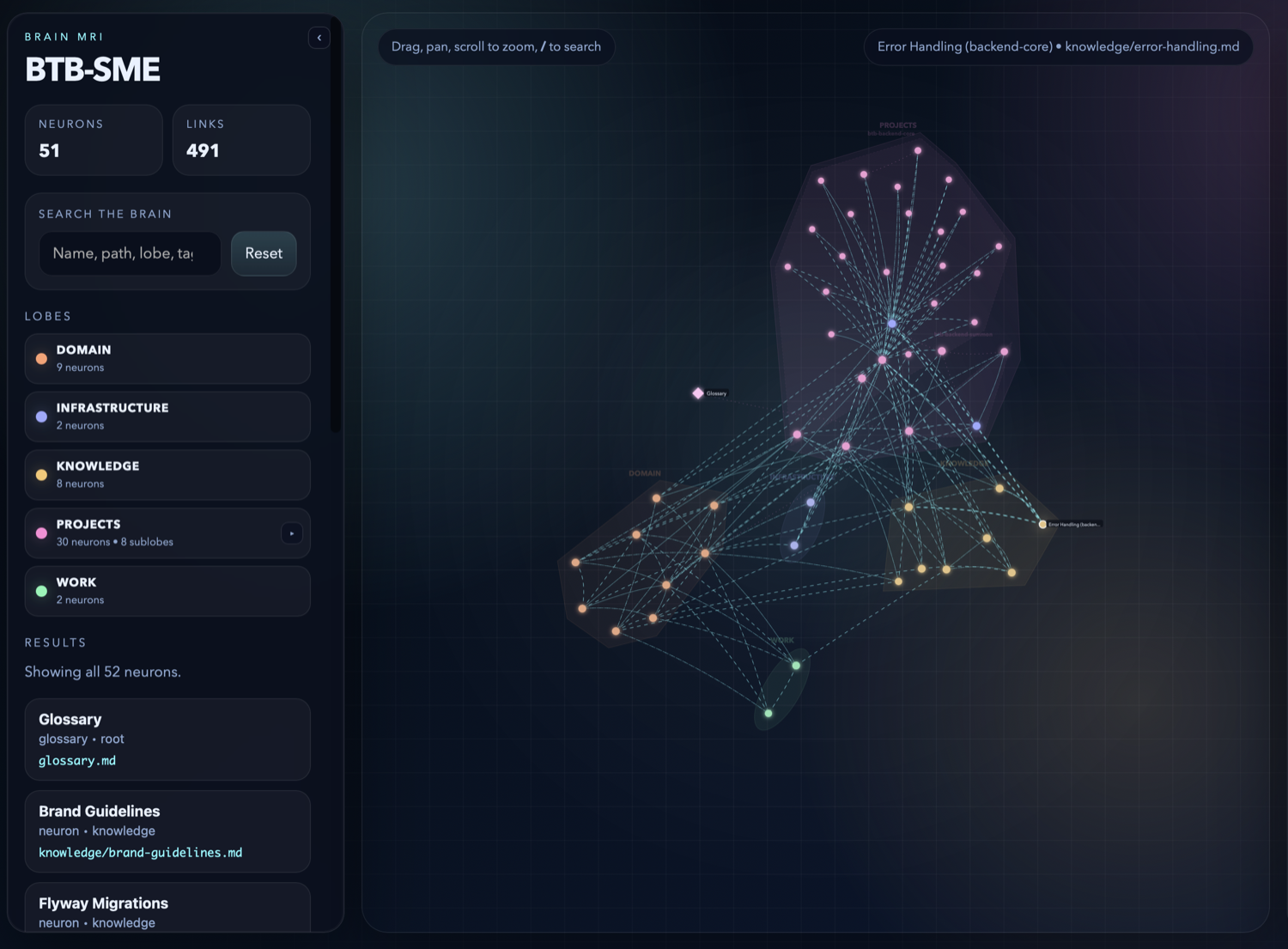
The page is brain-mri.html in the brain folder (git-ignored); --output
writes it elsewhere. It needs no server and makes no network calls: open it
from disk or send it to a colleague.
Commands
| Command | What it does |
|---|---|
kluris create [NAME] |
Create a brain: a wizard, or flags (--description, --path, --type, --remote, --branch, --no-git, --from-config) |
kluris register <path> |
Register a brain folder already on disk (for example a git clone) |
kluris list |
List the registered brains |
kluris status |
Lobes, neuron counts and recent commits (--brain) |
kluris search <query> |
Ranked search (--brain, --lobe, --tag, --limit) |
kluris wake-up |
The compact snapshot agents load at the start of a session (--brain) |
kluris dream |
Regenerate maps, fix what is safe to fix, validate links (--brain, --broken-only with --json) |
kluris mri |
Write the brain's visual map and print its link (--brain, --output) |
kluris companion list |
The companion playbooks, which are installed, and which brains use them (--brain) |
kluris companion add <name> |
Turn a companion on for a brain (--brain) |
kluris companion remove <name> |
Turn a companion off for a brain (--brain) |
kluris remove <name> |
Unregister a brain; its files stay on disk |
kluris doctor |
Check git, PATH, the config and every brain, then refresh companions and agent skills (--no-refresh: checks only) |
kluris self-update |
Update to the newest release, or --version X (--check: only look) |
kluris self-uninstall |
Uninstall Kluris (--purge, --yes) |
kluris help [COMMAND] |
The command list, or one command's summary |
Every command takes --json for scripts and agents, and --help.
Configuration
~/.kluris/config.yml lists the registered brains. KLURIS_CONFIG points
Kluris at another file.
brains:
  acme:
    path: /Users/you/brains/acme
    description: Acme platform knowledge
<brain>/kluris.yml holds your own settings for one brain. It is
git-ignored, so every teammate can keep different ones:
name: acme
description: Acme platform knowledge
agents:
  commands_for:      # which agents get the kluris-acme skill
  - claude
  - cursor
  - devin
  - copilot
  - codex
  - gemini
  - hermes
  - kilocode
  - junie
  - antigravity
companions: []       # see "Specmint companions"
search:
  language: en       # en or ro; detected when absent
Trim agents.commands_for to the agents you use and run kluris doctor. The
shared ~/.agents/skills/ folder always gets every brain's skill.
Environment variables
| Variable | Effect |
|---|---|
KLURIS_CONFIG |
Use this file instead of ~/.kluris/config.yml |
KLURIS_NO_PROMPT=1 |
Never prompt; commands that need a choice stop and say what to pass |
COPILOT_HOME |
Also install the skills into $COPILOT_HOME/skills |
KLURIS_GITHUB_TOKEN |
A GitHub token for self-update |
KLURIS_VERSION |
The release the install scripts install |
KLURIS_NO_MODIFY_PATH=1 |
The install scripts leave PATH and shell files alone |
Specmint companions
Specmint turns a feature request into a
lasting spec through research, an interview and a written plan. Kluris ships
four Specmint playbooks as companions you can turn on per brain:
| Companion | What it is |
|---|---|
specmint-core |
Spec-first work: research, interview, spec, implement |
specmint-tdd |
The same, with strict TDD: a failing test before any code |
specmint-core-html |
Spec-first, with .specs/<id>/SPEC.html as the spec |
specmint-tdd-html |
TDD, with SPEC.html carrying the tasks, test state, log and progress |
kluris companion add specmint-core --brain acme
kluris companion add specmint-tdd --brain all
kluris companion list
kluris companion remove specmint-core --brain acme
Turning one on copies its folder to ~/.kluris/companions/<name>/ and adds a
short section to the brain's skill. From then on, before multi-step work (a
new feature, a refactor across files) the agent follows the playbook: it
researches with the brain and the code, interviews you, then writes the spec.
Small single-file edits skip it. kluris doctor keeps the copies current.
> /kluris-acme let's spec out adding OAuth sign-in with GitHub
Building from source
You need Rust (the toolchain is pinned in rust-toolchain.toml) and git.
git clone https://github.com/ngvoicu/kluris.git
cd kluris
cargo build --release          # target/release/kluris
cargo test --workspace
cargo clippy --workspace --all-targets -- -D warnings
cargo fmt --check
A build from source is not managed by self-update or self-uninstall;
update it by pulling and building again.
License
MIT
AI-native toolkit
This project is part of a larger AI-native toolkit — and of a way of working your whole team can adopt: talks ("Becoming an AI Native Company"), hands-on team training that teaches employees to use AI, and AI adoption consulting for engineering teams.
- Site: ngvoicu.dev
- Contact: [email protected] · +40 734 704 910
Toolkit: Specmint (durable AI coding specs) · Kluris (team knowledge brains) · ConsensFlow (cross-agent second opinions)
Yorumlar (0)
Yorum birakmak icin giris yap.
Yorum birakSonuc bulunamadi