claude-code-local
Health Uyari
- No license — Repository has no license file
- Description — Repository has a description
- Active repo — Last push 0 days ago
- Community trust — 1957 GitHub stars
Code Basarisiz
- eval() — Dynamic code execution via eval() in proxy/server.py
- rm -rf — Recursive force deletion command in proxy/server.py
Permissions Gecti
- Permissions — No dangerous permissions requested
Bu listing icin henuz AI raporu yok.
Run Claude Code 100% on-device with local AI on Apple Silicon. MLX-native Anthropic-API server, 65 tok/s Qwen 3.5 122B, Llama 3.3 70B, Gemma 4 31B. Private, offline, airgap-ready. Built for NDA / legal / healthcare workflows.
🧠⚡ Claude Code Local — The Lineup
Three local AI brains. Four modes. One MacBook. Zero cloud.
Pick your fighter and run Claude Code 100% on-device.




-blue?style=for-the-badge)




Built by Matt Macosko in Arcata, CA. Started with a chicken problem. Still figuring it out.
🎬 Demo · 🥊 Lineup · 🎮 Modes · 🚀 Quick Start · 📊 Benchmarks · 🔒 Safety · 🎤 Voice · 🧩 The Stack · 🛣️ Roadmap · 🤝 Contribute
🎬 WATCH THE DEMO — AirGap AI
A real NDA. Llama 3.3 70B. Wi-Fi physically OFF. lsof running live.
Watch a 70-billion-parameter model audit a confidential legal document, on-device, with the receipts on screen.
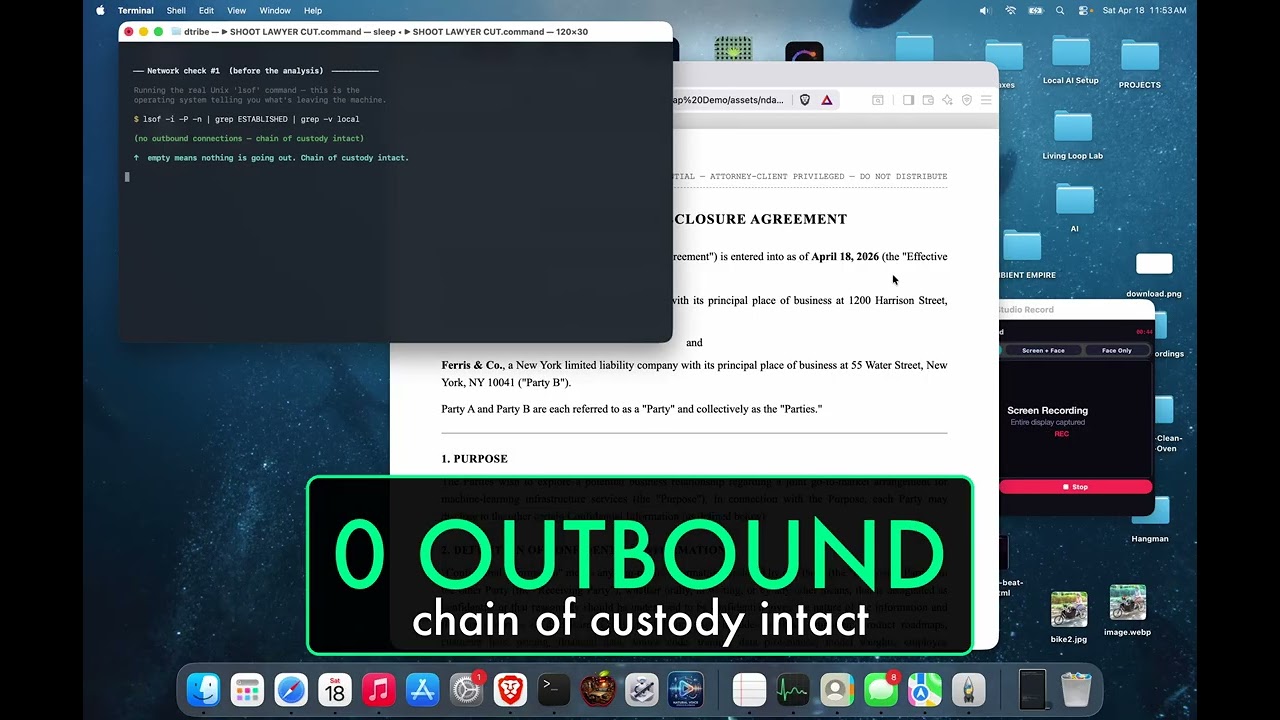


Built for lawyers, accountants, doctors, therapists, contractors — anyone handling other people's private stuff.

🎤 Also on the channel — NarrateClaude (Hands-Free Ambient AI)
Speak to Claude Code, hear replies in a cloned voice — 100% on-device. 2:31.
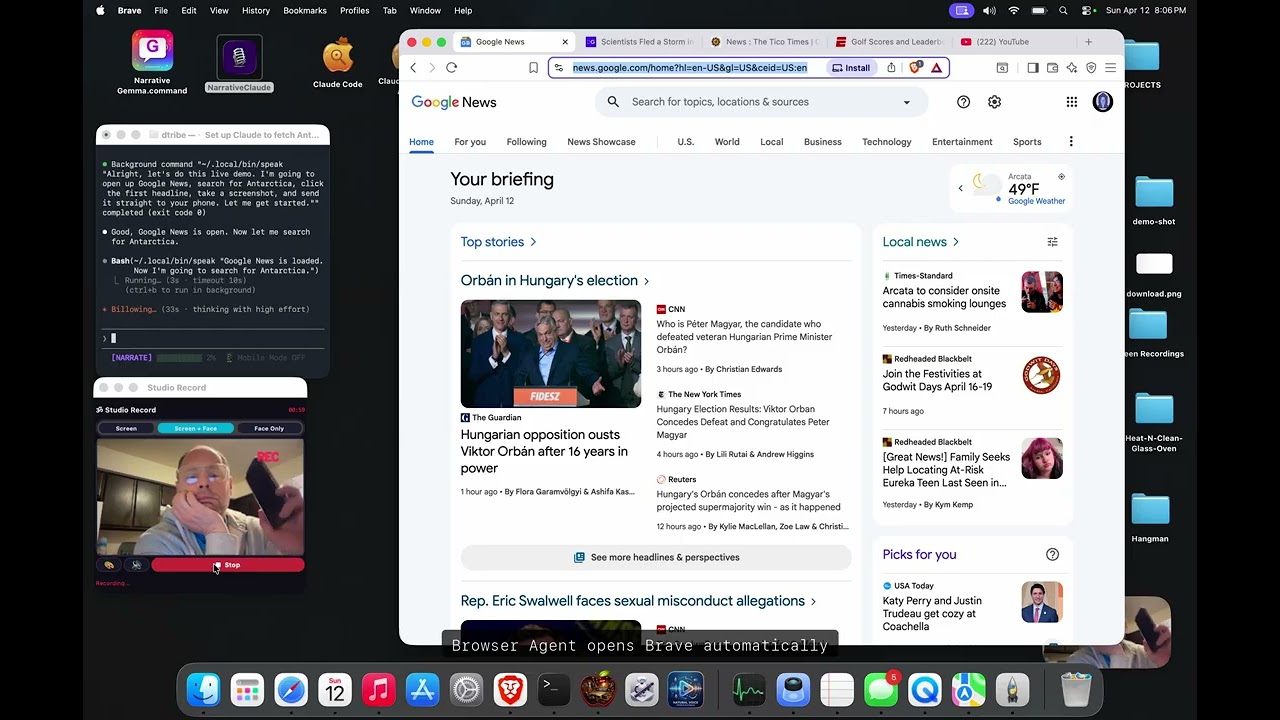
🧩 This repo is the BRAIN of a 4-part local-first ambient-computing stack
Brain (here) · 🎤 Ears+Mouth · 🌐 Hands · 📱 Phone. Each repo stands alone; together they take Claude Code off the keyboard and off the screen. Jump to the stack diagram →
🖥️ More of my open-source software: nicedreamzwholesale.com/software
🥊 The Lineup — Pick Your Fighter
We started with one model. Now we ship a roster. Same MLX server, same Anthropic API, swap one env var and you swap the brain.
| 🟢 Gemma 4 31B | 🟠 Llama 3.3 70B ⭐ | 🔵 Qwen 3.5 122B | |
|---|---|---|---|
| Nickname | The Quick One | The Wise One | The Beast |
| Build | 4-bit IT abliterated | 8-bit affine abliterated | 4-bit MoE (A10B) |
| Speed | ~15 tok/s | ~7 tok/s | 65 tok/s 🚀 |
| Params | 31 B dense | 71 B dense | 122 B / 10 B active |
| RAM | ~18 GB | ~75 GB | ~75 GB |
| Disk | 18 GB | 75 GB | 65 GB |
| Best at | Daily coding, fits 64 GB Mac | Hardest reasoning, full precision | Max throughput, active sparsity |
| Uploaded by us? | — | ⭐ Yes (HF) | — |
| Launcher | Gemma 4 Code.command |
Llama 70B.command |
Claude Local.command |
| Min RAM to run | 32 GB | 96 GB | 96 GB |
💡 Fun fact: Qwen wins raw speed because it's an MoE — only 10B of 122B params activate per token. Llama 70B is the slowest and the smartest because it's full-precision dense weights. Gemma is the lightweight champ that fits where the others can't.
⭐ Our Own Abliterated Upload
The Llama 3.3 70B in this lineup isn't from a generic mirror — we packaged and uploaded our own 8-bit MLX abliterated build to HuggingFace so anyone running this repo can pull it with one command:
MLX_MODEL=divinetribe/Llama-3.3-70B-Instruct-abliterated-8bit-mlx \
  bash scripts/start-mlx-server.sh
| 🤗 HuggingFace | divinetribe/Llama-3.3-70B-Instruct-abliterated-8bit-mlx |
| 📐 Quant | 8-bit affine, group size 64 |
| 💾 Disk | ~75 GB (15 safetensors shards) |
| 🧠 Params | 71 B dense |
| 📏 Context | 128 K tokens |
| 🔓 Abliteration base | huihui-ai abliterated build of Meta's Llama 3.3 70B Instruct (what abliteration means) |
| 🍎 MLX conversion + 8-bit pack | by us — chosen to preserve quality over minimal footprint |
⚠️ Use it responsibly. "Abliterated" suppresses the model's built-in refusal direction so it doesn't refuse benign-but-edgy requests. It is not a general capability upgrade, and you remain bound by the upstream Llama 3.3 license.
🎮 The Modes
Four ways to run the lineup. Each one is a double-clickable launcher in launchers/.
| Mode | What it does | Launcher |
|---|---|---|
| 🤖 Code | Run Claude Code with a local model — same UX, no API key | Claude Local.command, Gemma 4 Code.command, Llama 70B.command |
| 🌐 Browser | Local AI controls real Brave browser via Chrome DevTools | Browser Agent.command |
| 🎤 Hands-Free Voice | Speak in, hear replies in your cloned voice — full loop, 100% on-device | Narrative Gemma.command + NarrateClaude |
| 📱 Phone | iMessage in → text/image/video out, full pipeline | ~/.claude/imessage-*.sh |
🤔 What Is This?
Your MacBook has a powerful GPU built right into the chip. This project uses that GPU to run massive AI models — the same kind that power ChatGPT and Claude — entirely on your computer.
🚫 No internet needed
💰 No monthly subscription
🔒 No one sees your code or data
✅ Full Claude Code experience — write code, edit files, manage projects, control your browser, or run a full hands-free voice session where you speak every question and hear every reply in your own cloned voice (both directions on-device)
         📱 You (Mac or Phone)
          │
     🤖 Claude Code           ← the AI coding tool you know
          │
     ⚡ MLX Native Server      ← our server (~1000 lines of Python)
          │
     🥊 Pick your fighter     ← Gemma 4 31B · Llama 3.3 70B · Qwen 3.5 122B
          │
     🖥️  Apple Silicon GPU    ← your M-series chip does all the work
🔒 Safety + How the Data Flows
This is the part we're proudest of. Your code never leaves your Mac. Not for a model call. Not for telemetry. Not for "anonymous analytics". Not ever.
🛡️ The Data-Flow Diagram
   ┌─────────────────────────────────────────────────────────────┐
   │                    🖥️  YOUR MACBOOK                          │
   │                                                             │
   │   📝 Your code         ┌────────────────────┐               │
   │       │                │  🤖 Claude Code     │               │
   │       └───────────────▶│  (CLI on your Mac)  │               │
   │                        └────────┬───────────┘               │
   │                                 │  HTTP localhost:4000       │
   │                                 ▼                            │
   │                        ┌────────────────────┐               │
   │                        │  ⚡ MLX Server      │               │
   │                        │  (Python, ours)    │               │
   │                        └────────┬───────────┘               │
   │                                 │  Metal API                 │
   │                                 ▼                            │
   │                        ┌────────────────────┐               │
   │                        │  🧠 Local model     │               │
   │                        │  (Gemma·Llama·Qwen)│               │
   │                        └────────┬───────────┘               │
   │                                 │                            │
   │                                 ▼                            │
   │                        ┌────────────────────┐               │
   │                        │  🖥️  Apple GPU      │               │
   │                        │  (unified memory)  │               │
   │                        └────────────────────┘               │
   │                                                             │
   │             🚫 ZERO outbound network calls                  │
   │             🚫 ZERO telemetry                               │
   │             🚫 ZERO phone-home                              │
   └─────────────────────────────────────────────────────────────┘
                   │
                   ✗  ←  Nothing from *our* code crosses this line.
                   │
   ┌─────────────────────────────────────────────────────────────┐
   │                    ☁️  THE INTERNET                          │
   │                  (your code never goes here)                 │
   └─────────────────────────────────────────────────────────────┘
🔍 What We Audited (Every Component)
| Component | Source | Outbound calls | Verdict |
|---|---|---|---|
| server.py (ours) | We wrote it line by line | 0 | ✅ Safe |
| browser agent (separate repo) | nicedreamzapp/browser-agent — we wrote it | 0 (talks to localhost CDP only) | ✅ Safe |
| mlx-lm | Apple ML team | 0 | ✅ Safe |
| MLX framework | Apple | 0 | ✅ Safe |
| Model weights | HuggingFace verified mlx-community repos | 0 at runtime | ✅ Safe |
| iMessage scripts | Pure shell + AppleScript | localhost only (Studio Record port 17494) | ✅ Safe |
| Claude Code CLI | Anthropic (closed-source binary) | 1 non-blocking startup call to api.anthropic.com — inference still stays 100% local even if the call is firewalled |
⚠️ Disclosed |
ℹ️ On that one exception: Claude Code's own binary attempts a non-blocking startup handshake to
api.anthropic.com(likely version/session check). We can't suppress it — it's baked into Anthropic's closed-source CLI. Firewall it and Claude Code still works fine with your local model. Your prompts, code, and completions never leave the machine. Verified withlsof -i -Ponce the model is loaded. Our code (server.py, launchers, scripts) makes zero outbound connections.
🚫 What We Ripped Out
⚠️ We removed LiteLLM after supply-chain attack concerns. Every dependency was re-audited from scratch. If a package had unexplained network calls, it didn't ship.
✅ What This Means in Practice
| Scenario | Cloud Claude | This Repo |
|---|---|---|
| Working with NDA / proprietary code | ❌ Risky | ✅ Air-gapped |
| Coding on a plane (no wifi) | ❌ Doesn't work | ✅ Works |
| Running on a kill-switch firewall | ❌ Blocked | ✅ Works |
| Healthcare / legal / finance review | ⚠️ Compliance burden | ✅ Stays on-device |
| Worry about training-data leakage | ⚠️ Trust required | ✅ Mathematically impossible |
🔒 The math is simple: if there are no outbound HTTP calls, your data cannot leak. We grep'd every file for
requests,urllib,urlopen,httpx,socket.connect— the only network calls in the entire codebase are tolocalhost. Runlsof -i -Pwhile it's running. You'll see nothing leaving your Mac.
📊 Benchmarks
Three generations of optimization. Each one got faster.
⚡ Speed Comparison
| Generation | Approach | Speed |
|---|---|---|
| 🐌 Gen 1 | Ollama | 30 tok/s |
| 🏃 Gen 2 | llama.cpp | 41 tok/s |
| 🚀 Gen 3 | MLX Native (ours) | 65 tok/s |
⏱️ Real-World Claude Code Task
How long to ask Claude Code to write a function:
| Setup | Time |
|---|---|
| 😴 Ollama + Proxy | 133 s |
| 😐 llama.cpp + Proxy | 133 s |
| 🔥 MLX Native (no proxy) | 17.6 s |
7.5× faster ⚡ — one change (killing the proxy) produced the entire delta. ~1000 lines of Python, no C++ fork, no generic inference backend.
🥊 Lineup Comparison
| Model | tok/s | RAM | Best For |
|---|---|---|---|
| 🟢 Gemma 4 31B Abliterated | ~15 | ~18 GB | Daily coding on a 64 GB Mac |
| 🟠 Llama 3.3 70B Abliterated | ~7 | ~70 GB | Hardest reasoning, full precision |
| 🔵 Qwen 3.5 122B-A10B | 65 | ~75 GB | Maximum throughput, MoE sparsity |
Qwen 122B numbers are measured on M5 Max 128 GB. Gemma and Llama are observed real-world approximations. Full benchmarks for all three pending — see BENCHMARKS.md.
☁️ vs Cloud APIs
| 🖥️ Our Local Setup | ☁️ Claude Sonnet | ☁️ Claude Opus | |
|---|---|---|---|
| Speed | 65 tok/s | ~80 tok/s | ~40 tok/s |
| Monthly cost | $0 🎉 | $20-100+ | $20-100+ |
| Privacy | 100% local 🔒 | Cloud | Cloud |
| Works offline | Yes ✈️ | No | No |
| Data leaves your Mac | Never | Always | Always |
💡 Our local setup beats cloud Opus on raw speed (65 vs 40 tok/s) at $0/month.
🔧 Tool-Call Reliability (v2 — March 2026)
Local models don't format tool calls perfectly. They want to call a tool but mix XML and JSON syntax. Claude Code sees no valid tool call, re-prompts, and the model does it again. The result: infinite loops where the AI says "let me do that" but never actually does anything.
We fixed this. Here's what was happening and what we did about it.
🐛 The Problem
The model was generating garbled tool calls like this:
<tool_call>
<function=Bash><parameter=command>rm -rf /tmp/old</parameter></function>
</tool_call>
Instead of the correct JSON format Claude Code expects:
<tool_call>
{"name": "Bash", "arguments": {"command": "rm -rf /tmp/old"}}
</tool_call>
The JSON parser choked, Claude Code saw no tool call, re-prompted the model, and the model garbled it the exact same way again — creating an infinite loop.
✅ The Fix (4 changes to server.py)
| Change | What | Why |
|---|---|---|
| KV Cache | 4-bit → 8-bit, quantization starts at token 1024 | Model retains conversation context instead of "forgetting" earlier messages |
| Temperature | 0.7 → 0.2 | Less randomness = more consistent tool formatting |
| Garbled Recovery | New recover_garbled_tool_json() function |
Catches XML-in-JSON hybrids, <function=X><parameter=Y> inside <tool_call> tags, and infers tool names from parameter keys |
| Retry Logic | Up to 2 retries when tool intent is detected but parsing fails | Re-prompts with explicit formatting instructions before giving up |
🧪 Test Results
We built an automated test suite (scripts/test_mlx_server.py) that sends real Anthropic API requests to the server simulating multi-step tasks — the exact kind that were failing before.
Test Suite: 14 tests per run
─────────────────────────────
  ✅ Simple Bash commands
  ✅ Directory creation (mkdir -p)
  ✅ File reading (Read tool)
  ✅ Complex Bash with pipes
  ✅ File editing (Edit tool with find/replace)
  ✅ Multi-tool sequences (Glob → Read)
  ✅ 5 rapid-fire sequential commands
  ✅ Multi-step calendar scenario (create → delete → verify)
Results: 98/98 tests passed across 7 consecutive runs. Zero failures.
The multi-step calendar scenario — create 12 month folders, delete all but September, verify — was the exact task that triggered infinite loops before the fix. Now it passes every time.
# Run the test suite yourself:
python3 scripts/test_mlx_server.py
⚙️ Tuning
You can override defaults with environment variables:
| Variable | Default | What It Does |
|---|---|---|
MLX_MODEL |
divinetribe/gemma-4-31b-it-abliterated-4bit-mlx |
Pick which fighter to load |
MLX_KV_BITS |
8 |
KV cache quantization bits (4 saves memory, 8 improves coherence) |
MLX_KV_QUANT_START |
1024 |
Token position where KV quantization begins |
MLX_TOOL_RETRIES |
2 |
Max retries when a garbled tool call is detected |
MLX_MAX_TOKENS |
8192 |
Max output tokens per response |
📱 Control From Your Phone — Full Media Pipeline
You don't have to be at your Mac to use this. Text a command, get back a full video.
📱 Your iPhone                    💻 Your Mac
     │                                │
     │── "find me an article  ──────>│── imessage-receive.sh reads it
     │    and send me a video"        │── local model plans the task
     │                                │── Brave browser finds the article
     │                                │── speak narrates in your voice
     │                                │── Studio Record captures it all
     │                                │── build_production_video.py edits it
     │<── 🎥 video in iMessage ──────│── imessage-send-video.sh ships it
     │                                │
   🛋️  From your couch            🖥️  At your desk
Everything works — text, images, and video:
| Command | What happens | You get |
|---|---|---|
| "summarize this article" | Local model reads + replies | 💬 Text |
| "send me a screenshot of X" | Claude screenshots | 📸 Image in iMessage |
| "screen record you doing Y" | Records + sends | 🎥 Video in iMessage |
| "make me a produced video" | Full edit pipeline | 🎬 Title card + subs |
Full pipeline repo: nicedreamzapp/claude-screen-to-phone
→ Clone it, run setup.sh, fill in your phone number. Works with this local AI stack or Claude cloud.
We built this before Anthropic shipped their Dispatch feature. Same concept, but ours uses iMessage, runs on your local model, and can send back media — not just text.
💡 Pro tip: Anthropic's Dispatch doesn't read your CLAUDE.md. Mention it in your message or it'll miss your custom setup. Our iMessage system doesn't have this problem.
💡 How We Got Here
Most people trying to run Claude Code locally hit the same wall:
Claude Code speaks Anthropic API. Local models speak OpenAI API. Different languages. 🤷
So everyone builds a proxy to translate between them. That proxy adds latency, complexity, and breaks things.
We took a different approach:
| 🐌 What everyone else does | 🚀 What we did |
|---|---|
| Claude Code → Proxy → Ollama → Model | Claude Code → Our Server → Model |
| 3 processes, 2 API translations | 1 process, 0 translations |
| 133 seconds per task | 17.6 seconds per task |
🎯 That one change — eliminating the proxy — made it 7.5x faster.
💻 What You Need
| Your Mac | RAM | What You Can Run |
|---|---|---|
| M1/M2/M3/M4 (base) | 8-16 GB | 🟡 Small models (4B) |
| M1/M2/M3/M4 Pro | 18-36 GB | 🟠 Gemma 4 31B (tight) |
| M2/M3/M4/M5 Max | 64-128 GB | 🟢 Gemma 4 31B + 🔵 Qwen 3.5 122B |
| M2/M3/M4 Ultra | 128-192 GB | 🔵 Multiple large models, all three fighters |
Also need:
- 🐍 Python 3.12+ (for MLX)
- 🤖 Claude Code (
npm install -g @anthropic-ai/claude-code)
🚀 Quick Start (3 Commands)
git clone https://github.com/nicedreamzapp/claude-code-local
cd claude-code-local
bash setup.sh
setup.sh auto-detects your RAM, picks a model from the lineup, downloads it, installs the MLX server, and creates a Claude Local.command launcher on your Desktop.
Then double-click Claude Local.command. You're coding locally.
🐛 If the launcher asks you to sign in to a Claude account: your
claudeCLI is too old. The launchers pass--bareto force local-only API-key auth, but older versions of the CLI don't support that flag and fall through to the Anthropic login prompt. Fix:npm install -g @anthropic-ai/claude-code claude --version # should print a recent version
🛠️ Note for contributors / hackers:
setup.shinstalls the server as a symlink at~/.local/mlx-native-server/server.pypointing back at this repo'sproxy/server.py. Edit the file in the repo, restart the MLX server, done — no re-runningsetup.sh, no copying, no silent drift between "what I committed" and "what's actually running." There is one source of truth for the server, and it'sproxy/server.pyin the repo.
Or do it manually
# 1. Set up the MLX virtualenv
python3.12 -m venv ~/.local/mlx-server
~/.local/mlx-server/bin/pip install mlx-lm

# 2. Pick a fighter and download (one time, ~18-75 GB)
bash scripts/download-and-import.sh gemma   # or 'llama' or 'qwen'

# 3. Start the server
MLX_MODEL=divinetribe/gemma-4-31b-it-abliterated-4bit-mlx \
  bash scripts/start-mlx-server.sh

# 4. Launch Claude Code
ANTHROPIC_BASE_URL=http://localhost:4000 \
ANTHROPIC_API_KEY=sk-local \
claude --model claude-sonnet-4-6
💡 Or just double-click a launcher in
launchers/. They do all of this automatically.
🔧 How It Works
┌──────────────────────────────────────────────────┐
│              Your MacBook (M5 Max)               │
│                                                  │
│  📝 You type ──> 🤖 Claude Code                  │
│                      │                           │
│                      ▼                           │
│                 ⚡ MLX Server (port 4000)        │
│                      │                           │
│                      ▼                           │
│                 🥊 Local model ──> 🖥️  GPU        │
│                 (Gemma·Llama·Qwen)               │
│                      │                           │
│                      ▼                           │
│  📝 Answer <─── ✨ Clean response                │
│                                                  │
│         🔒 Nothing leaves this box. Ever.        │
└──────────────────────────────────────────────────┘
The server (proxy/server.py) is one file, ~1000 lines. It does six things:
- 📦 Loads the model — Apple's MLX framework, native Metal GPU, unified memory. Handles Gemma's
RotatingKVCachequirk automatically so sliding-window models don't crash on the first request. - 🔌 Speaks Anthropic API — Claude Code thinks it's talking to Anthropic's cloud. It's not.
- 🔧 Translates tool use — Three different tool-call formats in and out: Gemma 4 native (
<|tool_call>call:Name{...}<tool_call|>), Llama 3.3 raw JSON ({"type":"function",...}), and HuggingFace<tool_call>JSON (Qwen and others). All converted ↔ Anthropictool_useblocks, with garbled-output recovery for small models. - 🧹 Cleans the output — Local models think out loud in
<think>/<|channel>thoughttags, emit stop markers (<turn|>,<|python_tag|>), and sometimes drop in reasoning preamble. We strip all of it before sending back to Claude Code. - ⚡ Reuses prompt caches across requests — so Claude Code's 4K-token system prompt doesn't get re-prefilled on every turn. Huge speedup for short questions.
- 🎯 Code mode — auto-detects Claude Code coding sessions (any of Bash/Read/Edit/Write/Grep/Glob in the tools list) and swaps Claude Code's ~10K-token harness prompt for a slim ~100-token one tuned for local models. Cuts prompt tokens by 99% and stops models from refusing with "I am not able to execute this task."
🌐 Browser Agent
A standalone browser agent that controls your real Brave browser via Chrome DevTools Protocol — powered entirely by local AI. No Claude Code wrapper needed.
🧭 The browser agent lives in its own repo:
nicedreamzapp/browser-agent. It's not bundled inside this repo. TheBrowser Agent.commandlauncher here points at the installed location (~/.local/browser-agent/agent.py) that you get from cloning the browser-agent repo separately. Keeping it in its own project keeps both repos focused and stops "edit the wrong file" drift between a vendored copy and the real source of truth.
         📝 Your task
          │
     🤖 agent.py              ← autonomous browser agent (separate repo)
          │
     ⚡ MLX Server             ← local AI decides what to do
     (Gemma · Llama · Qwen)
          │
     🌐 Brave (CDP port 9222) ← clicks, types, navigates your real browser
          │
     📊 Context Meter          ← shows memory usage so you know its limits
Context memory pipeline — the agent doesn't forget what it's doing:
| 🐌 Old Behavior | 🚀 New Pipeline | |
|---|---|---|
| Memory | Hard drop after 5 steps | Smart trim at 60% of 32K budget |
| When trimming | Deletes old steps entirely | Compresses into summary |
| Original task | Lost after step 6+ | Re-injected every cycle |
| Visibility | None — flying blind | Color-coded context meter |
| Response tokens | 1,024 | 2,048 |
The context meter shows green/yellow/red after each step:
  Step 5 snapshot() 2.2s
         → [101] heading "The Best Coffee Cake Recipe"...
  [Context: 18% ████░░░░░░░░░░░░░░░░ 6K/32K tokens]    ← green = plenty of room
💡 Double-click
Browser Agent.commandto launch. It starts the MLX server, opens Brave with remote debugging, and drops you into the agent.
🎤 Hands-Free Voice Mode — The Whole Loop On-Device
Talk to your Mac. It talks back in your own cloned voice. Nothing touches the internet in either direction.
This is the feature I'm proudest of in the whole stack, and the one I haven't seen anyone else demo publicly. Most "AI voice" demos use cloud STT (Whisper API, Deepgram, Google Cloud Speech) and cloud TTS (ElevenLabs cloud, OpenAI, Azure) — so your voice hits someone else's server before you see a word of transcript, and every reply makes another cloud round-trip back as audio. This doesn't. Both sides of the loop run fully on your Mac, end to end.
The full voice loop
┌─────────────────────────────────────────────────────────────────┐
│                     YOUR MACBOOK (M-series)                     │
│                                                                 │
│    🎙️  Your voice                                               │
│         │                                                       │
│         ▼                                                       │
│    🎧 listen  (custom Swift binary)                             │
│       • Apple SFSpeechRecognizer — on-device engine             │
│       • Continuous listening, stability-based utterance end     │
│       • Auto-pauses during playback to stop feedback loops      │
│       • Wedge-detection watchdog, preventive 10-min recycle     │
│         │                                                       │
│         ▼                                                       │
│    📬 dispatch  (bash watchdog + router)                        │
│         │                                                       │
│         ▼                                                       │
│    ⌨️  inject  (AppleScript → target Terminal window by id)     │
│         │                                                       │
│         ▼                                                       │
│    🤖 claude  (narration persona loaded from CLAUDE.md)         │
│         │                                                       │
│         ▼                                                       │
│    ⚡ MLX Server → 🥊 Gemma 4 31B  (local, 4-bit, ~15 tok/s)    │
│         │                                                       │
│         ▼                                                       │
│    🔊 ~/.local/bin/speak  "naturally phrased reply"             │
│       • Pocket TTS with your own cloned voice                   │
│       • Or any TTS that takes text + plays audio                │
│         │                                                       │
│         ▼                                                       │
│    🎵 afplay  (listen pauses itself during this so the          │
│                model's own voice doesn't feed back in)          │
│         │                                                       │
│         ▼                                                       │
│    👂 You hear it                                               │
│         │                                                       │
│         └──────────────► and you keep talking                   │
│                                                                 │
│           🔒 Your voice never leaves this box. Ever.            │
└─────────────────────────────────────────────────────────────────┘
What makes this actually work
- 🎙️ Speech-in — a compiled Swift binary wraps Apple's
SFSpeechRecognizer(the same on-device engine that powers macOS Dictation) in a continuous listening loop rather than the usual Fn-Fn toggle. End of utterance is detected via partial-result stability: if the transcribed text stops changing for 2.5 seconds, the recognizer finalizes that sentence. That's way more robust than silence/RMS heuristics against background noise, fans, or music. - 🔊 Speech-out — a CLI at
~/.local/bin/speakwraps Pocket TTS driving a cloned copy of Matt's own voice. Any TTS that accepts a string and plays audio slots in — macOSsay, Piper, local ElevenLabs, your choice. - 🔁 Feedback-loop prevention — the listener auto-pauses while
afplayis running, so the TTS output of one turn never gets picked up as input for the next. No "the model talking to itself" loops. - 🧠 Speak-every-turn is enforced via system prompt —
NarrativeGemma/CLAUDE.mdis loaded as the narration persona. It tells Gemma to narrate every tool call, every reasoning step, every result, before it writes the text reply. You're never staring at a silent terminal wondering if it's thinking. - 🛡️ Real production hardening — 10-minute preventive process recycle (dodges a known
SFSpeechdaemon wedge), queue-backlog detection with a non-zero exit code when the listener is stuck. Not a demo script — a tool that has to run unattended for hours.
Why it matters
"Voice-controlled AI" is everywhere right now, but under the hood almost every public demo is a cloud pipeline wearing a local-looking coat. If the network drops, the demo dies. If your client's laptop blocks outbound connections, the demo dies. If you're on a plane, in a Faraday cage, or debugging on a disconnected-by-policy machine, the demo dies.
This setup doesn't die. Apple's on-device speech engine is a fully local model that already ships with the OS, and accessing it via SFSpeechRecognizer is a first-class macOS API — it's just that almost nobody wraps it in a continuous-listen daemon with production hardening and plumbs it to a local LLM with a cloned-voice reply stream. Now there's one.
How to wire it up
🛠️ The listening stack lives in its own repo. The
Listen.swiftbinary, thedictation/dispatch/injectscripts, and thenarrative-claude.shlauncher are a sibling project:nicedreamzapp/NarrateClaude. Same design as the browser agent: one repo per focused tool, so edits don't drift between a vendored copy and the real source of truth.
The two halves of the loop, and where each half lives
🗣️ The speak-and-think half (this repo, claude-code-local):
launchers/Narrative Gemma.command— boots the MLX server with Gemma 4 31B and injects the narration persona viaMLX_APPEND_SYSTEM_PROMPT_FILEso Gemma narrates every turnNarrativeGemma/CLAUDE.md— the narration persona itself (opt-in, sanitized, generic)~/.local/bin/speak— your chosen TTS CLI (Matt uses Pocket TTS with a cloned voice;say "$@"works as a three-line stub if you don't have a fancier setup)
🎧 The listen-and-inject half (NarrateClaude, sibling repo):
- A compiled Swift binary wrapping Apple's
SFSpeechRecognizerin continuous-listen mode with stability-based end-of-utterance detection and wedge-recovery - A bash dispatch pipeline that respawns the listener, watches the target Terminal window, and tears everything down cleanly when you close the session
- An AppleScript injector that writes transcribed utterances straight into the bound Terminal tab by window ID
- A
narrative-claude.shone-click launcher that opens the Terminal, starts Claude Code, captures the window ID, and starts the listener
Running the full hands-free loop
# 1. Install this repo (claude-code-local) — gives you the MLX server + Narrative launcher
git clone https://github.com/nicedreamzapp/claude-code-local.git "$HOME/Desktop/Local AI Setup"
cd "$HOME/Desktop/Local AI Setup" && bash setup.sh

# 2. Install the sibling NarrateClaude repo — gives you the listening pipeline
git clone https://github.com/nicedreamzapp/NarrateClaude.git ~/NarrateClaude
cd ~/NarrateClaude && chmod +x dictation/bin/* narrative-claude.sh
./dictation/bin/dictation setup   # compiles the Swift listener + grants permissions

# 3. Launch the full loop
bash ~/NarrateClaude/narrative-claude.sh
💡 Double-click
Narrative Gemma.commandfrom this repo to run the model-and-speak side standalone (keyboard in, voice out — useful when you don't want to be on mic). Runnarrative-claude.shfrom the NarrateClaude repo to launch the full hands-free loop (voice in, voice out, no keyboard at all).
✈️ When To Use This
| Situation | Use This? | Why |
|---|---|---|
| On a plane | ✅ | Full AI coding, no internet needed |
| Sensitive client code | ✅ | Nothing leaves your machine |
| Don't want API fees | ✅ | $0/month forever |
| Want fastest possible | ☁️ | Cloud Sonnet is still slightly faster |
| Need Claude-level reasoning | ☁️ | Local models are good, not Claude-level |
| Controlling from phone | ✅ | iMessage pipeline works offline |
| Healthcare / legal / finance review | ✅ | 100% on-device, audit-friendly |
📁 What's In This Repo
📦 claude-code-local/
 ├── ⚡ proxy/
 │   └── server.py              ← MLX Native Anthropic Server with tool-call recovery (~1000 lines)
 ├── 🚀 launchers/
 │   ├── Claude Local.command    ← Default fighter — Claude Code + local model
 │   ├── Gemma 4 Code.command    ← 🟢 THE QUICK ONE
 │   ├── Llama 70B.command       ← 🟠 THE WISE ONE
 │   ├── Browser Agent.command   ← 🌐 Autonomous Brave browser control
 │   ├── Narrative Gemma.command ← 🎭 Auto-narration mode
 │   └── lib/claude-local-common.sh ← Shared: model-aware restart, local-cache resolver, health-wait
 ├── 🎭 NarrativeGemma/
 │   └── CLAUDE.md              ← Narration persona (sanitized, generic, opt-in)
 ├── 🛠️  scripts/
 │   ├── download-and-import.sh ← Download a fighter (`gemma` / `llama` / `qwen`)
 │   ├── persistent-download.sh ← Auto-retry downloader for big models
 │   ├── start-mlx-server.sh    ← Server start helper
 │   ├── test_mlx_server.py     ← Tool-call reliability test suite
 │   └── upload-mlx-quant.sh    ← Publish your own MLX-quantized uploads to HF
 ├── 📊 docs/
 │   ├── BENCHMARKS.md          ← Detailed speed comparisons
 │   └── TWITTER-THREAD.md      ← Social media content
 ├── 📱 IMESSAGE_MEDIA_PIPELINE.md ← Phone control + media sending docs
 └── setup.sh                    ← One-command installer
🛤️ The Journey
We didn't start here. We went through three generations in one night:
| Gen | What We Tried | Speed | 💡 What We Learned |
|---|---|---|---|
| 1️⃣ | Ollama + custom proxy | 30 tok/s | Ollama works but Claude Code can't talk to it directly |
| 2️⃣ | llama.cpp TurboQuant + proxy | 41 tok/s | TurboQuant compresses KV cache 4.9x, but the proxy is the bottleneck |
| 3️⃣ | MLX native server | 65 tok/s | Kill the proxy. Speak Anthropic API directly. 7.5x faster. |
| 4️⃣ | The lineup | 65 / 15 / 7 tok/s | Three brains, one server. Same MLX, same Anthropic API — swap one env var to change the fighter. |
🎯 Each generation taught us something. Killing the proxy made it fast. Adding the lineup made it flexible.
🧩 The Complete Local-First Stack
claude-code-local is the brain — MLX Anthropic server, launcher lineup, tool-call translation. It pairs with three sibling repos to form a local-first ambient computing stack that never sends a keystroke, a voice clip, or a page load to the cloud. Each repo stands alone.
🤖 claude-code-local — Brain (you are here)
MLX + Gemma 31B / Llama 70B / Qwen 122B · Anthropic API server · tool-call parsing · prompt cache. Zero cloud, 65 tok/s on Apple Silicon.
🎤 NarrateClaude — Ears + Mouth
Talk to Claude, hear replies in your cloned voice — both directions on-device. Fully hands-free loop using Apple SFSpeech + cloned-voice TTS.
🌐 browser-agent — Hands
Drives a real Brave browser via Chrome DevTools Protocol. Handles iframes, Shadow DOM, ProseMirror.
📱 claude-screen-to-phone — Remote
Turns your iPhone into a full Claude Code terminal. Text any command — git, shell, file edits, deploys, browser tasks — and get back whatever Claude produces (text, screenshots, screen recordings, produced videos) right in Messages. Works over iMessage — no bots, no third-party apps, no cloud relay.
Pair any combination. All four = ambient computing on one Mac, nothing in the cloud.
🪴 Why this matters — the ambient-computing angle
The real goal isn't "a faster Claude Code" — it's getting off screens and mice. Hunched-over-screen computing is breaking our bodies: carpal tunnel, curved spines, $1500 ergonomic chairs bought to patch the damage the rest of the desk is doing. That era is ending. These three repos are pieces of what comes next — computing that's around you instead of in front of you. Screens become optional, typing becomes optional, sitting still becomes optional, but your data and your voice never leave your house.
👉 For the full manifesto, see the "Why I Built This — Ambient Computing Starts Here" section in the NarrateClaude README. That's where the philosophy lives; the repos are just the first implementations.
🛣️ What's Next
We ship fast and in public. Rough direction for the next few weeks — if any of these excite you, hit Watch (top-right of the repo) to get the release ping.
- 🟡 Full Qwen 3.5 122B benchmark suite — reliability, tool-call pass rate, cold-start vs warm, long-context behavior vs Gemma
- 🟡 Fully-local Whisper fallback — drop-in alternative to the Apple
SFSpeechRecognizerpath for older Macs and non-English voices - 🟡 One-click DMG installer — double-click-to-run setup for folks who just want Claude Code + local AI without a terminal
- 🟡
MLX_MODEL=<hf-url>— point at any HuggingFace repo and have the lineup auto-register a new fighter - 🟡 More fighters — open to PRs adding launchers for DeepSeek, Mistral, Phi, anything MLX-compatible
💡 Want something that's not on this list? Open an issue →. Every serious request gets read and usually replied to within 24h.
🤝 Contributing & Ideas
A lot has changed since this repo was one night of "can I run Claude Code on Ollama." It's now a full local-AI stack: a ~1000-line MLX-native Anthropic server, prompt-cache reuse, Gemma / Llama / Qwen native tool-call parsing, code mode (auto-strips Claude Code's 10K-token harness prompt for local models), the browser agent, narration mode, an iMessage pipeline, model-aware launcher restart, and — the piece I think is the biggest deal — a fully on-device hands-free voice loop (Apple SFSpeechRecognizer + cloned-voice TTS) that lives in the sibling NarrateClaude project. Way past what "The Journey" table above covers.
I built this because it solves my workflow end to end. Coding on planes, sensitive client work, drafting from my phone, handing off to local models when I don't want cloud latency or cloud bills, and (the thing I come back to most) running actual coding sessions hands-free — speak a request, listen to Gemma narrate the plan, hear it confirm the result, keep talking. No keyboard, no screen-watching. The whole loop is in-place today. I'd love to hear how others could use it.
If you have ideas, bug reports, a new launcher for a model I don't run, a better code-mode prompt, or a workflow this doesn't cover — open an issue or a PR. I read them all. Especially interested in hearing from:
- 🧠 People on older Apple Silicon (M1 / M2, 16–36 GB) who know which models actually fit and still do useful coding work
- 🎤 Anyone who wants to stress-test the hands-free voice loop on different hardware, different TTS voices, or different dictation accents — we're currently running it on one M5 Max with one cloned voice
- 🔊 TTS recipes beyond Pocket TTS — Piper, local ElevenLabs, MLX-TTS, Kyutai Moshi, or anything else that slots cleanly into
~/.local/bin/speak - 🔌 Folks with workflows this doesn't touch yet — what would you want from a local Claude Code?
- 🐛 Anyone who runs into edge cases I'll never hit on an M5 Max with 128 GB
Small PRs welcome, huge PRs welcome, issues with no PR welcome. The whole point is that it's yours to bend.
🙏 Credits
Built on the shoulders of giants:
| Project | What It Does | By |
|---|---|---|
| 🤖 Claude Code | AI coding agent | Anthropic |
| 🍎 MLX | Apple Silicon ML framework | Apple |
| 📦 mlx-lm | Model loading + inference | Apple |
| 🟢 Gemma | The 31B fighter (base weights) | Google DeepMind |
| ⭐ Gemma 4 31B Abliterated 4-bit MLX | Our own MLX-packed abliterated upload — THE QUICK ONE in the lineup | divinetribe (us) |
| 🟠 Llama | The 70B fighter (base weights) | Meta |
| ⭐ Llama 3.3 70B Abliterated 8-bit MLX | Our own MLX-packed abliterated upload — THE WISE ONE in the lineup | divinetribe (us) |
| 🔧 huihui-ai | Original abliteration of Llama 3.3 70B Instruct | huihui-ai |
| 📖 Abliteration explained | The technique we built on | Maxime Labonne |
| 🔵 Qwen 3.5 | The 122B fighter | Alibaba |
| ⚡ TurboQuant | KV cache compression research | Google Research |
Tested on Apple M5 Max with 128 GB unified memory.
👋 Who built this
Built by Matt Macosko in Arcata, CA. All of this is part of the Nice Dreamz LLC umbrella — the consulting + open-source side of what I do day-to-day.
If this repo is useful to you, here's the rest of the work:
| 🔒 AirGap AI | Private, on-device AI consulting for law firms, accountants, doctors, therapists — anyone handling other people's confidential work. Book a 15-min call. |
| 🖥️ Nice Dreamz Software | The rest of the open-source lineup — NarrateClaude, the browser agent, CemaniHomesteadRobot, VisionBuilder, and more. |
| 🌿 Divine Tribe | The hardware side — Core XL, V5, Ruby Twist. 13 years of building physical products. |
| 📰 Marijuana Union | Community + news site. Where the long-form writing lives. |
| 🌱 Tribe Seed Bank | Seeds marketplace. |
Find me:





📜 MIT License — Use it however you want.
⭐ Star this repo if it helped you! ⭐
Yorumlar (0)
Yorum birakmak icin giris yap.
Yorum birakSonuc bulunamadi