FiaOS
Health Warn
- License — License: MIT
- Description — Repository has a description
- Active repo — Last push 0 days ago
- Low visibility — Only 5 GitHub stars
Code Fail
- rm -rf — Recursive force deletion command in executor.py
Permissions Pass
- Permissions — No dangerous permissions requested
No AI report is available for this listing yet.
Open a browser tab — you're now driving your computer. Live remote desktop + real PTY shell (Claude Code, vim, top) + on-device voice. macOS and Windows, every machine you own behind one URL and one password. Self-hosted.
FiaOS
Open a browser tab. You're now driving your computer.
Live remote desktop · real PTY shell (Claude Code, vim, top — all real) · on-device voice agent · macOS and Windows · many machines, one URL · self-hosted · zero cloud · zero API keys
💡 Looking for the iMessage version? See
claude-screen-to-phone— same idea, async text-driven workflow. FiaOS is the live one — open a web page, you are on the machine.









Tags:
claude-code·mac-mini·apple-silicon·windows·mlx·local-ai·on-device-ai·self-hosted·homelab·headless-mac·vnc-alternative·ssh-alternative·web-terminal·pty·conpty·xterm.js·ai-agent·voice-assistant
⚡ What it is
A single page that turns your computer into a fully remote-controlled headless dev box — reachable from any device with a browser. Phone. Laptop. Friend's PC. Doesn't matter.
Three things, that's it:
| 🖥️ | Screen | Live view of the desktop, refreshing continuously. Click anywhere to drive the mouse. Type to send keys. |
|---|---|---|
| 💻 | Terminal | Real PTY-backed interactive shell — zsh on macOS, PowerShell in a ConPTY on Windows. claude works. vim works. top works. cd actually sticks. Rendered with xterm.js so colors and ANSI escapes are pixel-perfect. |
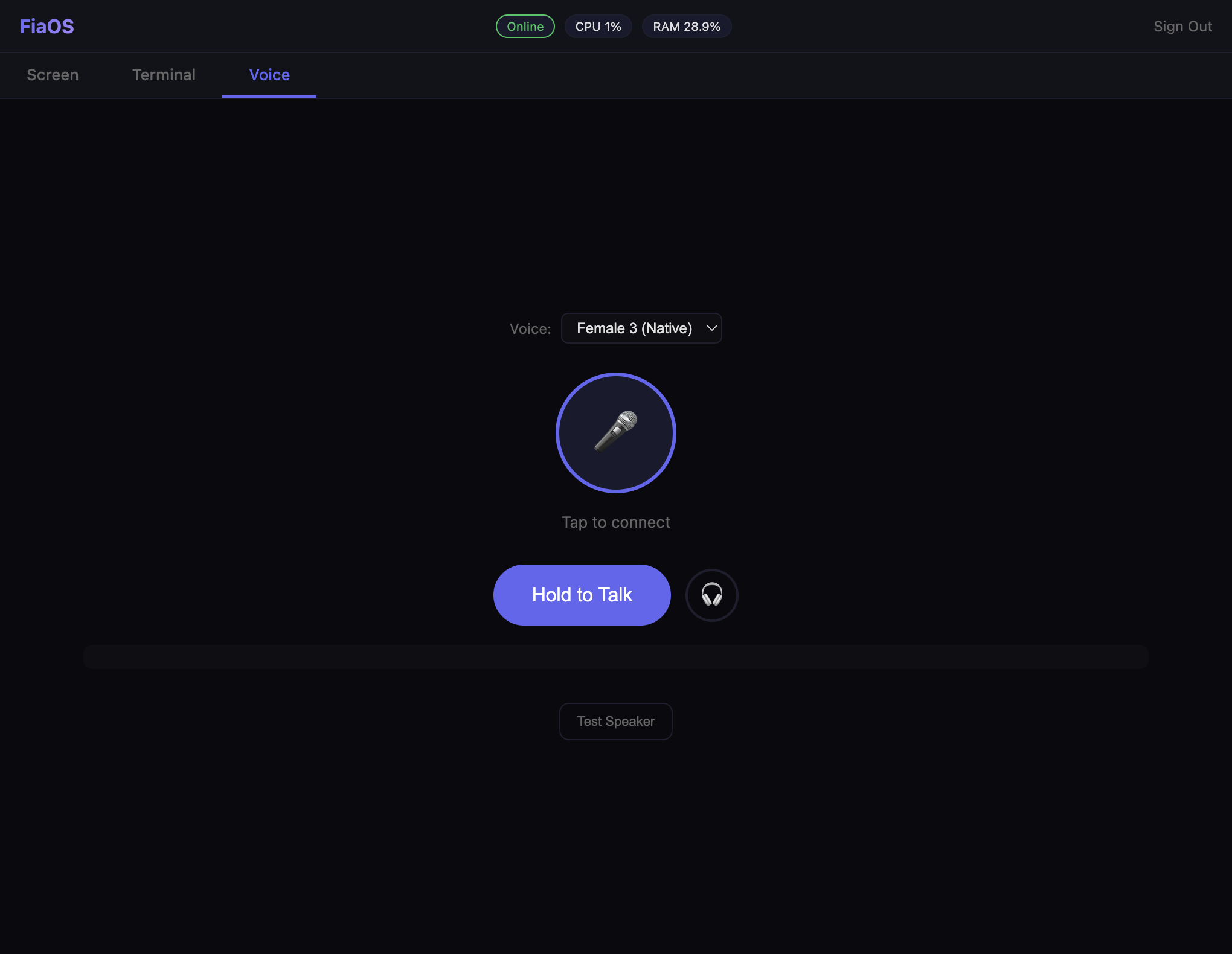
| 🎙️ | Voice | Push-to-talk to a local on-device voice model (PersonaPlex MLX) on Apple Silicon. Loads on demand, idles out to free RAM. |
And since v2, one more: those three things for every machine you own, behind one URL and one password.
🖥️ One URL. Every machine.
This is the part that makes FiaOS different from "a web SSH client."
You get machine tabs across the top — MINI · M5 · PC. Tap one, and the entire page — screen, terminal, files, everything — is now that machine. No second login. Session tokens are signed with the shared password, so a login on one machine is a login on all of them.
| How it works | |
|---|---|
| 🍪 | The cookie is the router. Picking a tab sets fia_target; nginx maps that to the tunnel for that machine. Nothing else about the request changes. |
| 🟢 | Honest liveness dots. Each tab probes its own machine's login page. Green means that box is genuinely answering — not that the tab exists. |
| 🔀 | Dead-machine fallback. If the machine you last picked is powered off, nginx serves an always-on one instead and rewrites the cookie, so a sticky tab from three days ago can't leave you staring at a 502. |
| ⚡ | Direct LAN hops when they're available. Machines on the same network proxy to each other directly, trying a fast link before wifi. Measured on the reference setup: 0.57 ms over a Thunderbolt bridge vs. 63 ms and unstable over wifi. Set yours with FIAOS_PEERS. |
The reference deployment runs a Mac mini, a MacBook Pro, and a Windows PC on one hostname. Add or drop a machine by editing one map block in deploy/nginx-fia.conf.
🪟 Windows
FiaOS started on Apple Silicon. It now runs on Windows 10/11 too — a real port living in windows/, not a compatibility shim.
| macOS | Windows |
|---|---|
pty + zsh -l -i |
ConPTY via pywinpty + PowerShell |
Quartz CGEvent mouse/keyboard |
Win32 SendInput, DPI-aware |
screencapture |
native GDI/DXGI capture |
caffeinate keeps the display awake |
SetThreadExecutionState |
pbcopy / pbpaste |
Get-Clipboard / Set-Clipboard, UTF-8 pinned on both ends |
osascript app control |
Start Menu .lnk enumeration |
| LaunchAgent | run_fiaos.ps1 — restart loop with log rotation |
| — | noVNC tab, for when a polled screenshot isn't enough |
Same routes, same UI, same password, same session tokens. Switch to the PC tab and it looks and behaves exactly like the Macs.
Volume is the one honest gap. Windows exposes no scriptable master volume without a COM dependency, so FiaOS drives the media keys instead — stepped up/down, and
GET /api/volumereturnsnullrather than inventing a number it can't read.
🎬 In action
Run Claude Code on your Mac mini, from anywhere
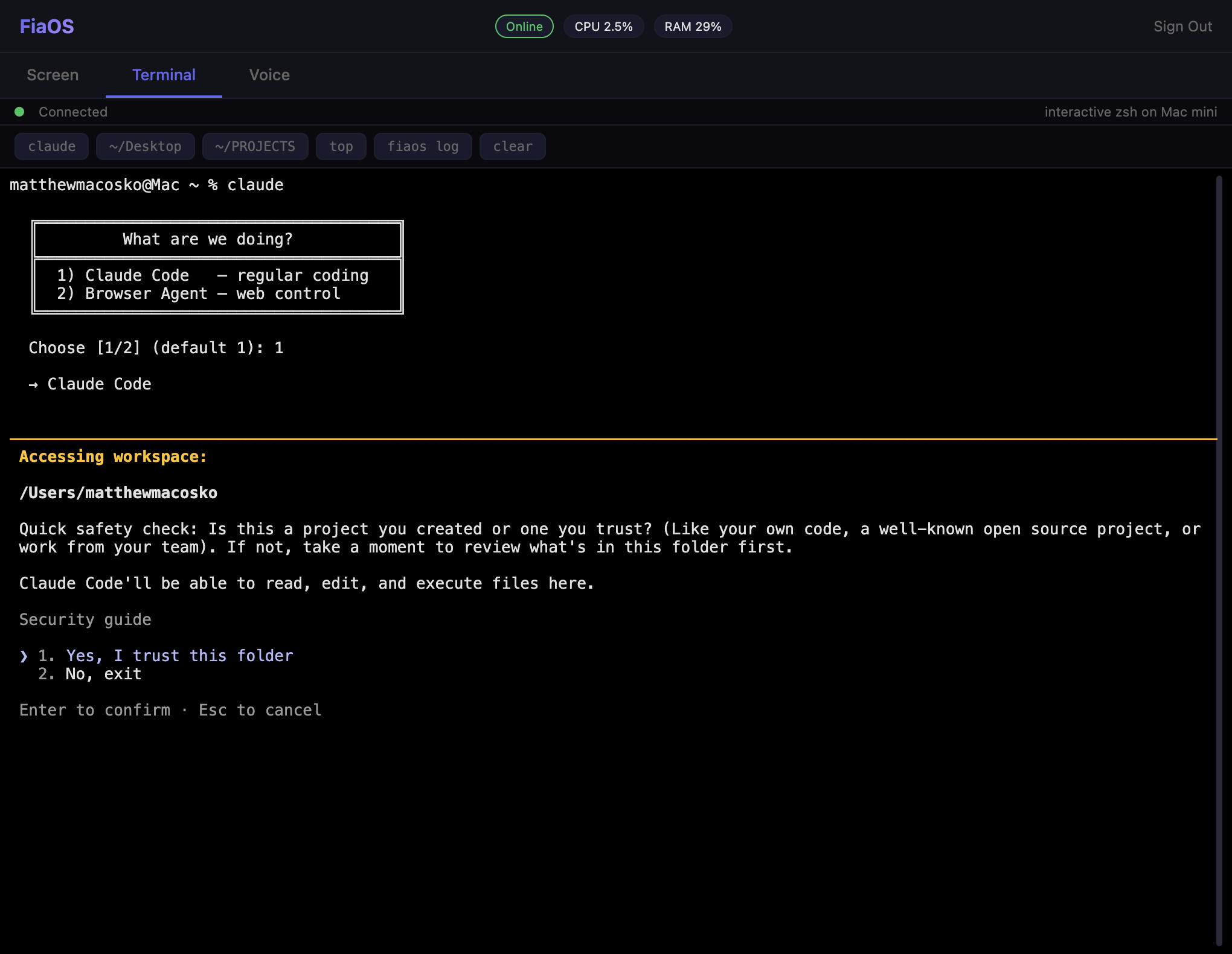
The Terminal tab is a real PTY. That means anything that needed a TTY —
claude,vim,htop,gh,python -i— just works. No hacks, no faking it.
Voice agent, one tap away
Phone-friendly out of the box
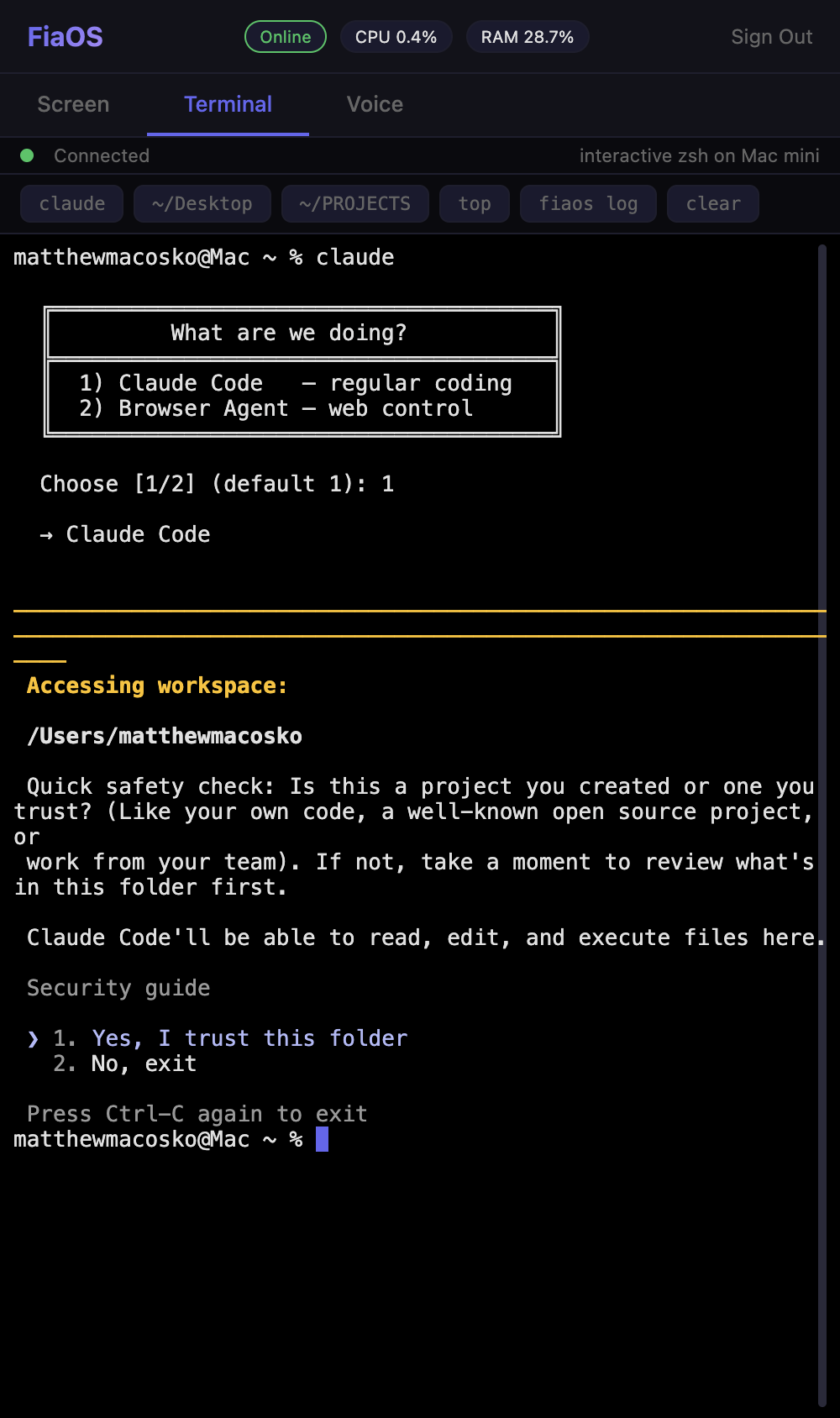
Open the URL on your phone, log in once, and you've got a real shell on every machine you own, in your pocket.
🧠 Why
tailscale + an SSH client + a VNC viewer can each do a piece of this. FiaOS bundles them into one auth-gated web page so you can drive your whole fleet from any device — without installing anything client-side.
The Terminal tab specifically gets you a working Claude Code session on your Mac mini, from your phone. That's the killer feature this whole thing was built around. The machine tabs are what happened when one Mac turned into three computers.
💡 Use cases
If any of these describe you, FiaOS exists for you.
- 🤖 Claude Code on iPhone / iPad — Your desktop does the heavy lifting; your phone is just the front-end.
- 🏠 Headless homelab — Plug the machines in, never connect a monitor again. Drive everything from a browser.
- 🔀 Mixed Mac + Windows shop — One page, one password, both operating systems. Stop keeping two remote-access stacks alive.
- 🛡️ Self-hosted Cursor / Copilot Workspace alternative — Same kind of agentic coding loop, on hardware you own, with no SaaS in the path.
- 📡 Replace SSH + VNC + RDP — One web page does what used to take three apps and a subscription.
- 🎙️ Local voice assistant on Apple Silicon — On-device MLX speech model. No audio leaves your house.
- ✈️ Travel light — Borrow any laptop, hit your URL, you're back at your dev environment.
⚖️ Compared to
Already using
claude-screen-to-phone? That's the async sibling — text a command from anywhere, your Mac executes it, you get screenshots/videos back as iMessages. FiaOS is the live mode — open a web page, you're sitting at the machine in real time. Different superpowers, same family.
| Tool | Mode | Live screen | Real shell | Voice | Multi-machine | Mobile | Self-hosted | Native client? |
|---|---|---|---|---|---|---|---|---|
| FiaOS | Live | ✅ | ✅ PTY | ✅ on-device | ✅ one URL | ✅ | ✅ | ❌ none |
claude-screen-to-phone |
Async (iMessage) | ❌ | ⚠️ via cmd | ❌ | ❌ | ✅ | ✅ | ✅ Messages |
| Tailscale + SSH | Live shell | ❌ | ✅ | ❌ | ⚠️ per-host | ⚠️ | ✅ | ✅ required |
| VNC / RDP / ARD | Live screen | ✅ | ❌ | ❌ | ⚠️ per-host | ⚠️ | ✅ | ✅ required |
| Cursor mobile | Async cloud | ❌ | ⚠️ | ❌ | ❌ | ✅ | ❌ cloud | ✅ required |
| iSH / Termius | Live shell | ❌ | ✅ | ❌ | ⚠️ per-host | ✅ | ⚠️ | ✅ required |
| ChatGPT app | Cloud chat | ❌ | ❌ | ✅ cloud | ❌ | ✅ | ❌ cloud | ✅ required |
🚀 Install
macOS
Requires: Apple Silicon Mac · macOS 14+ · Python 3.12+
git clone https://github.com/nicedreamzapp/FiaOS.git
cd FiaOS
python3.12 -m venv .venv
.venv/bin/pip install -r requirements.txt
Windows
Requires: Windows 10/11 · Python 3.12+ · must run in the interactive desktop session (screen capture and
SendInputdon't work from a service)
git clone https://github.com/nicedreamzapp/FiaOS.git
cd FiaOS\windows
py -3.12 -m venv .venv
.venv\Scripts\pip install -r requirements-windows.txt
1. Set a password (required — the server refuses to start without it)
python3 -c 'import secrets; print(secrets.token_urlsafe(24))'
Use the same password on every machine — that's what makes one login cover the whole fleet.
2. Run it
# macOS
FIAOS_PASSWORD='your-strong-password' .venv/bin/python3 server.py
# open http://localhost:9000
# Windows — reads the password from C:\ProgramData\fia\fiaos.env so it never
# appears on a command line or in shell history
.\run_fiaos.ps1
3. Make it permanent
| Platform | How |
|---|---|
| macOS | Copy examples/com.fiaos.server.plist to ~/Library/LaunchAgents/, set FIAOS_PASSWORD and FIAOS_MACHINE, then launchctl load it. |
| Windows | Register run_fiaos.ps1 as a Task Scheduler "at logon" task for your user. It already restarts on exit and rotates its own log at 5 MB. |
4. Make it remote (optional)
| File | What it does |
|---|---|
deploy/tunnel_to_vps.sh |
Reverse SSH tunnel from a machine to your VPS |
deploy/nginx-fia.conf |
The full multi-machine nginx site — cookie routing, per-machine liveness probes, WebSocket upgrade, static caching, dead-machine fallback |
Give each machine its own remote port (9000, 9010, 9020…) and list them in the map block. Home network only? Skip this entirely and hit http://your-machine.local:9000.
5. Voice mode (optional, macOS)
Voice requires PersonaPlex MLX and Hugging Face access to the model weights. Once it's pip install-ed, FiaOS spawns it on demand when you hit the Voice tab and shuts it down after 60 s idle.
🔒 Security
| ✅ | Server refuses to start without FIAOS_PASSWORD set — no default fallback in the source |
|---|---|
| ✅ | Signed session cookies (HMAC over the shared password), persisted so they survive restarts |
| ✅ | Login endpoint rate-limited (10 attempts / 5 min / IP) |
| ✅ | On Windows the password is read from a file, never a command line — it stays out of shell history and Get-CimInstance Win32_Process |
| ✅ | Clipboard writes are piped through stdin, never interpolated into a PowerShell command line |
| ⚠️ | Terminal is a real PTY — anyone with the password has the same power as SSH. Treat the password like an SSH key. |
| ⚠️ | The blocked-command regexes stop the obvious footguns (rm -rf /, rd /s C:\…, "kill FiaOS itself"). They are a guardrail on the natural-language command path, not a security boundary. A real shell can run arbitrary scripts. |
| 💡 | Want 2FA? Put FiaOS behind a reverse proxy that does it (Cloudflare Access, Authelia, etc.). |
📁 Layout
server.py               ─ macOS aiohttp server: routes, PTY terminal, screen, files
executor.py             ─ natural-language → shell helper (/api/command)
screencast.py           ─ live screen encoder
screen_worker.py        ─ capture worker process
input_helper.py         ─ Quartz mouse/keyboard event injection
fia_ptt.py              ─ voice push-to-talk WebSocket bridge
fia_talk.py             ─ voice TTS layer
sample_voices.py        ─ voice sample preview helper

windows/                ─ the Windows port (same routes, native Win32 underneath)
  server.py             ─ ConPTY terminal, GDI capture, machine-to-machine proxy
  executor.py           ─ PowerShell command translator + blocked-command guards
  input_helper.py       ─ SendInput mouse/keyboard, DPI-aware
  screencast.py         ─ live screen encoder
  screen_worker.py      ─ capture worker process
  run_fiaos.ps1         ─ launcher: env from file, restart loop, log rotation
  requirements-windows.txt

static/
  index.html            ─ single-page UI (Screen / Terminal / Voice / machine tabs)
  login.html            ─ password form + machine picker with liveness dots
  voice-picker.html     ─ voice selection UI
  vendor/               ─ xterm.js
  *.js *.wasm           ─ Opus codec workers for voice streaming

deploy/
  nginx-fia.conf        ─ multi-machine nginx site (cookie routing + probes + fallback)
  tunnel_to_vps.sh      ─ reverse SSH tunnel

examples/               ─ LaunchAgent plist template
launch_server.sh        ─ venv launcher used by the LaunchAgent
start.sh                ─ dev helper (server + tunnel + caffeinate)
watchdog.sh             ─ keep-alive checker
🛠️ Tech
- Backend: Python 3.12 ·
aiohttp·psutil - Terminal:
ptyon macOS · ConPTY viapywinptyon Windows - Screen + input:
Quartzon macOS · Win32SendInput+ GDI on Windows - Frontend: vanilla JS · xterm.js 5.3 · WebSocket · WebAudio
- Voice: MLX on Apple Silicon (via PersonaPlex)
- Edge: OpenSSH reverse forwarding · nginx HTTPS termination + cookie-based upstream routing
❓ FAQ
Does this replace SSH?For interactive use, basically yes — the Terminal tab is a real PTY-backed shell, so anything that worked in SSH works here. For automation (scp, rsync, git push over SSH agent forwarding) you still want SSH.
No. Session tokens are HMAC-signed with the shared password, and every machine runs the same verification, so one login is valid on all of them. Tapping a tab sets the fia_target cookie; nginx maps that cookie to that machine's tunnel. Nothing else about the request changes, which is why the switch is instant and the UI doesn't even flicker.
Its tab shows a red dot, and nginx falls back to an always-on machine and rewrites your cookie — so a stale tab selection can't leave you looking at a 502. If you'd rather see the failure (you're mid-build on that box, say), one map entry turns the fallback off per machine.
VNC streams the framebuffer continuously; FiaOS ships a JPEG only when the screen actually changed — frames are hashed, and an unchanged desktop returns 204 No Content. On the reference setup that took a still desktop from ~1.4 Mbps down to nothing. It's much lighter on bandwidth, needs no native client, and works fine over a phone hotspot. (The Windows build also ships a real noVNC tab for when you do want the framebuffer.)
No. Voice runs entirely on-device using MLX on Apple Silicon (via PersonaPlex). Your audio never leaves the machine. There are no API keys to set.
Can I use this without exposing it to the internet?Yes — skip step 4. Run the server, hit http://your-machine.local:9000 from any device on your home network. No tunnel, no nginx, no domain.
The voice model uses MLX, which is Apple-Silicon-only. Everything else — terminal, screen, input, files, processes, clipboard — works on both platforms. A Windows voice tab would need a different inference backend.
Does it work without Claude Code?Of course. FiaOS is a remote-control web UI — Claude Code is just one of many programs you can run in the Terminal tab. vim, nvim, tmux, htop, gh, node, python -i, custom scripts — they all work because the shell is a real PTY.
Tailscale + SSH gives you a terminal, per host. FiaOS gives you a terminal plus a live screen viewer plus a voice agent plus a mobile-friendly UI plus every machine behind one tab bar — all behind one password on a single web page, with zero client-side install.
Is this a Cursor mobile alternative?Sort of. Cursor mobile is a polished AI-coding UI tied to a SaaS. FiaOS is a self-hosted web shell that lets you run whatever AI coding agent you want (Claude Code, Aider, gh-copilot, your own scripts) on hardware you control.
💚 Sponsor
Solo dev. No VC. Built on a Mac in Humboldt County. If FiaOS saves you a Claude bill or just makes you smile, kick a few bucks at github.com/sponsors/nicedreamzapp — every dollar goes back into more local-first tools and keeping this 100% open source.
📜 License
MIT — see LICENSE.
Built by Matt Macosko · Fia is the assistant who lives on the machines.
⭐ If you find this useful, drop a star — or 💚 sponsor to keep it growing.
Reviews (0)
Sign in to leave a review.
Leave a reviewNo results found