nickol-knx-mcp
Health Uyari
- License — License: MIT
- Description — Repository has a description
- Active repo — Last push 0 days ago
- Low visibility — Only 5 GitHub stars
Code Gecti
- Code scan — Scanned 12 files during light audit, no dangerous patterns found
Permissions Gecti
- Permissions — No dangerous permissions requested
Bu listing icin henuz AI raporu yok.
Design-time KNX/ETS assistant as an MCP server: validate (naming·DPT·status·Secure·Matter), repair (propose fixes), decompose devices (exact vendor models from ETS app-programs), diff versions, and generate Home Assistant YAML, ETS exports, an as-built handover pack & KNX IoT — read-only, no live bus.
nickol-knx-mcp
A design-time KNX / ETS6 assistant exposed as an MCP server.
Three things you can do with it — all without ever touching the live KNX bus:
- Design a project from a spec — turn an equipment list / project specification into a complete, validated group-address structure plus the full implementation document set (ETS-importable XML/CSV, human-readable report, Home Assistant YAML, acceptance test protocol, as-built handover pack).
- Audit, repair & finish an existing project — validate naming · DPT & sub-DPT · command↔status · KNX Secure · Matter-readiness, get concrete fix proposals (inferred DPTs, synthesised status GAs), grade completeness, and diff two project versions.
- Generate the smart-home layer — assembled Home Assistant entities (colour lights, climate, covers, sensors) that read real device state, with everything ambiguous deferred to human review.
Under the hood: a device library that expands each actuator into its real communication objects — from generic recipes up to the exact vendor object model parsed straight from ETS application programs.




-0b3d2e)
🇷🇺 Русская версия: README.ru.md
🎬 Explore the live interactive demo & dashboard →
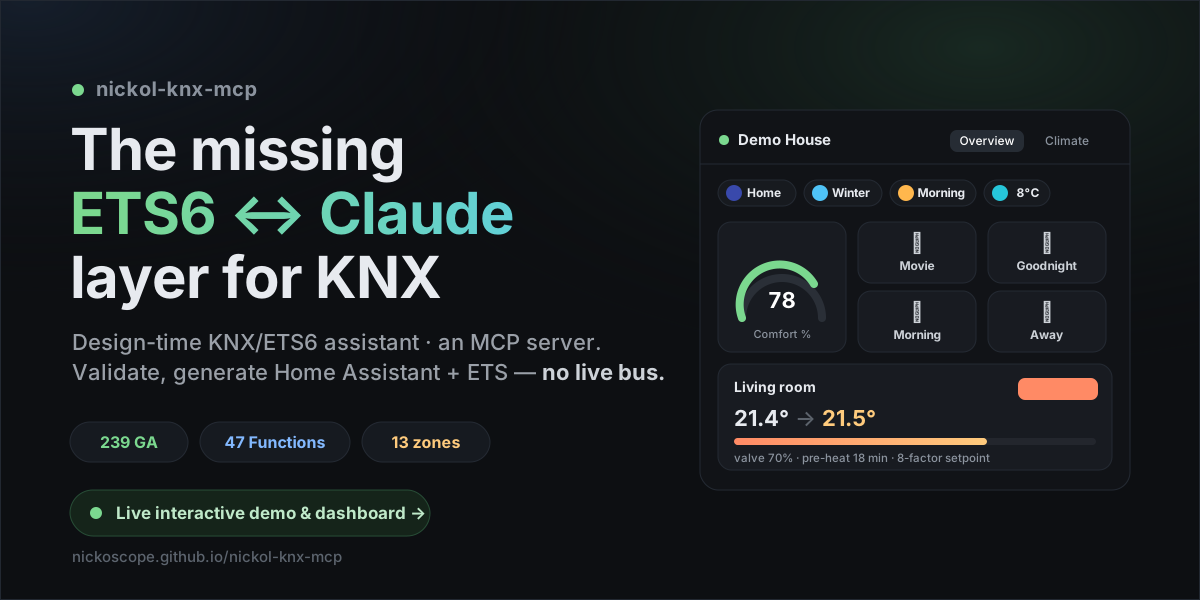
New — a whole demo house.
examples/demo-homeships a synthetic
239-GA / 47-Function project, the tool's generated report + Home Assistant config + ETS export, and a
full smart-home “brain” — circadian lighting, an 8-factor climate setpoint, a presence/season/time
state machine and statistics — driving a 5-view dashboard. See it all on the
live site ↗.
🖥️ The dashboard — live in Home Assistant
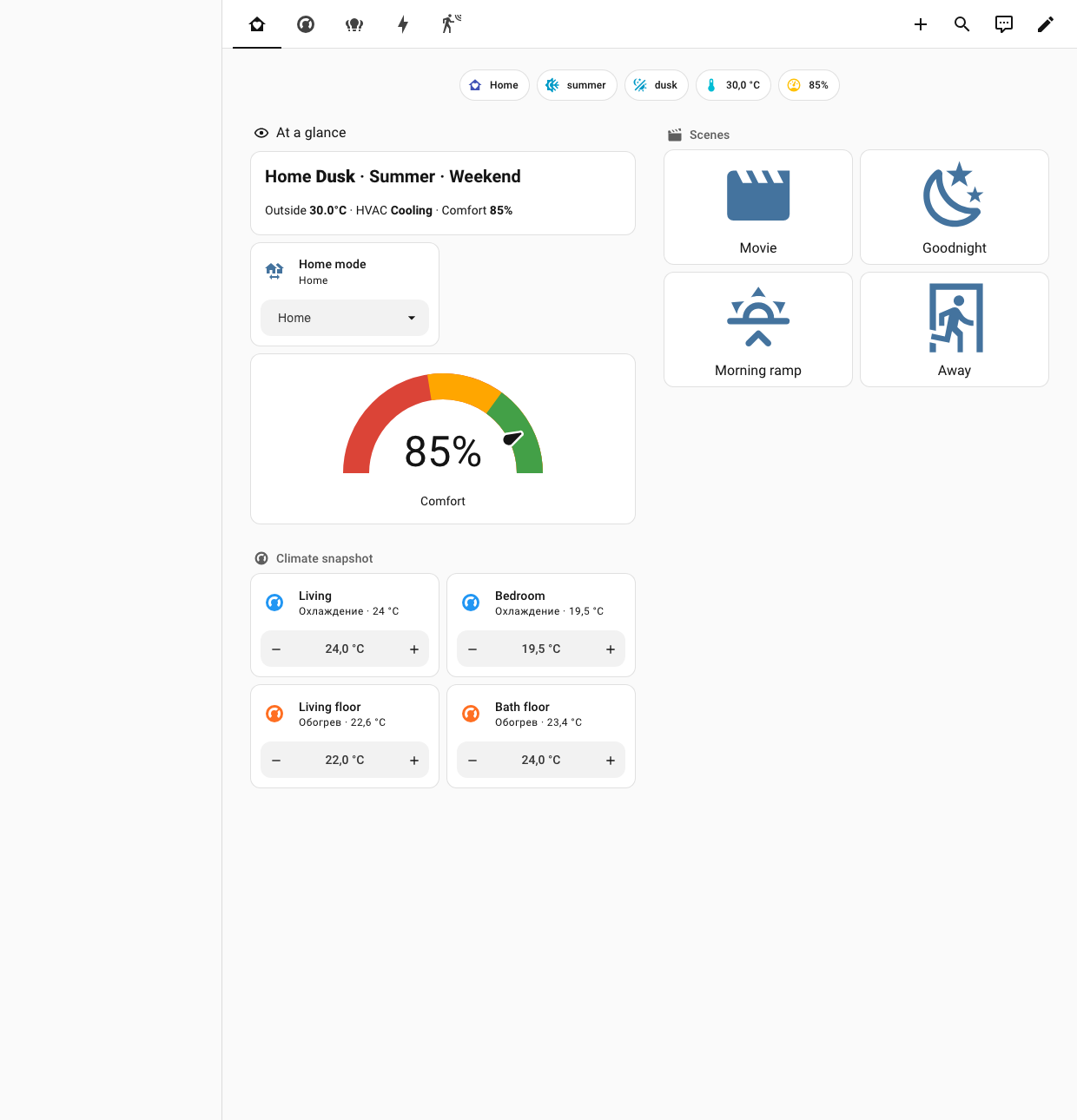
Real screenshots from a live Home Assistant running the demo house. They show the tool's assembled
entities at work: RGBW / RGB / CCT colour lights, six floor-heating climate zones (target, mode
and valve %), a circadian lighting curve and a computed climate setpoint — not set by hand.
| Climate | Lighting |
|---|---|
 |
 |
| Energy & stats | Presence |
 |
 |
▶ Explore it interactively on the live site → · config in examples/demo-home/ha-brain
🧪 Status & call for testers
This is a public beta. The full pipeline passes an end-to-end smoke test on a synthetic
project and has been validated against real multi-thousand-GA ETS5/ETS6 projects (anonymised) —
but real ETS projects are wonderfully messy and diverse, and more field reports make it better.
👉 If you have an ETS5/ETS6 project, please try it and tell us what happens. Open a
Real-project test report
issue. The tool is read-only and never connects to a bus, so testing is safe (see
Safety model). See CONTRIBUTING.md for details.
💬 Join the discussion → — say hi, ask anything, or share what the tool found on your project.
Why this exists
As of mid-2026 there is no off-the-shelf ETS6 ↔ Claude / MCP tool. The KNX community has
been explicitly asking for an integration that can inspect and help modify projects (adding /
renaming devices and group addresses) through an AI/CLI workflow. This package fills exactly the
design-time layer — the missing one.
The recommended full setup is four layers; only one needs to be built from scratch:
| Layer | Purpose | What to use | Build it? |
|---|---|---|---|
| 1. Live | states, control, debugging a running house | official Home Assistant MCP Server + KNX (XKNX) integration | No, already exists |
| 2. Design-time | parse .knxproj, validate DPT/naming/status + GA-intent de-noise, generate HA YAML (colour lights + climate assembled) & ETS XML/CSV |
nickol-knx-mcp (this package) |
YES — this is the gap |
| 3. Files + Git | YAML/CSV/XML, versioning the address schema | standard filesystem + git MCP servers | No, already exists |
| 4. Skill | design rules (GA structure, naming, DPT, scenes) + ops discipline | CLAUDE.md + skills/ (ha-git-backup ops companion) |
No, included |
Safety by design: layer 2 (this server) physically cannot connect to a bus. It has no
network/bus dependency at all — it only reads.knxprojand writes files into a confined
workspace. The "never write to a live bus" requirement is enforced structurally, not by
promise. Any real interaction with the house goes only through layer 1 (Home Assistant).
What you can do with it
📐 Scenario 1 — Design a project from a spec (spec → implementation kit)
Turn a project specification (equipment schedules, cable journals, a device list) into a complete,
validated group-address structure — and the full document set to implement it:
- Device list → object model. Each device expands into its real communication objects via the
device library (decompose_device): a dimmer channel is on/off + status + relative dim (3.007) +
absolute value (5.001) + brightness status — not "one GA"; a floor-heating zone is 8 objects; a
pulse meter is 6. - The professional logic layer. A bare spec never mentions what makes a project complete:
central & zone macros, scenes, presence logic, climate-control scaffolding, sun/wind shutter
logic, leak→shut-off chains, astro/meteo and date-time sources, reserves in every range. The
methodology encodes these completeness patterns — distilled from the KNX Association standard,
public manufacturer documentation and the study of real professional as-built ETS projects
(anonymised). - Structure & discipline. 3-level addressing, zone+function naming, command↔status pairing,
a DPT on every address. - Deliverables (one command each): ETS-importable XML/CSV · Markdown report ·
Home Assistant YAML · functional acceptance test protocol · as-built handover pack
(inventory, GA map, coverage %, Secure posture, QA findings, topology SVG).
Full methodology: docs/spec-to-structure.md. Field-checked by
reconstructing a real as-built ETS project (3,600+ group addresses) from its specification alone:
~92 % structural match (taxonomy, domains, automation logic, DPT distribution) at zero
validation errors — the remaining delta is the integrator's per-device parameterisation, which no
spec encodes.
🔍 Scenario 2 — Audit, repair & finish an existing project
- Read & classify. Parses password-protected ETS5/ETS6
.knxprojviaxknxproject; classifies every GA by category
(lighting / shutter / hvac / sensor / scene / energy / diagnostics) and kind (command / status /
sensor) from the DPT + multilingual (EN/DE/RU) name keywords. GA purpose tagging
(functional/reserve/logic/scratch) keeps intentional placeholders out of the error
lists, so the report doesn't cry wolf (on a real 685-GA project: false errors 29 → 6). - Validate (
analyze_allruns everything): naming & structure · missing status objects
(ETS-Function roles first, then name-token pairing, positional pairing — parallel status middles with 1:1 names — and self-reporting R+T objects) · missing/inconsistent DPTs +
sub-DPT sanity (a "temperature" GA carrying 5.001 gets flagged) · relative-only dimmers ·
KNX Secure posture (secured vs plaintext, mixed groups, keyring checklist — key material is
never read) · Matter-readiness · energy-domain coverage. - Repair, not just flag (
suggest_repairs): infer a DPT from the name, correct a suspect
sub-DPT, synthesise a missing status GA in a free address slot, add an absolute-brightness GA.
Suggestions only — a human reviews, accepted GAs feed the ETS export. On a real 3,646-GA
project: 145 concrete proposals (32 DPT inferences, 112 synthesised status GAs). - Finish the job:
grade_completeness(bare skeleton → as-built score),suggest_names,diff_projects(semantic diff of two.knxprojrevisions: added / removed / DPT-changed /
renamed / secure-changed), then regenerate the report, handover pack and test protocol.
🏠 Scenario 3 — Generate the smart-home layer (Home Assistant)
- Assembled entities, conservatively: covers → colour / dimmable lights (on/off +
brightness + RGBW/RGB/colour-temperature + statuses) → switches → climate (current temp,
target-temp status, operation/controller mode, valve value) → sensors/binary. Every entity gets
astate_addresswherever the device can report — HA reads real state, never assumes. - Review-first: anything ambiguous (DPT 5.001 — brightness or blind position?) is not
guessed — it goes to areviewlist with an explanation (including actuator-dependent cover
flags likeinvert_position/ travel times, which no.knxprojencodes). - Extras:
exposeblock for date/time broadcast (DPT 19.001), Matter-readiness lint,
KNX IoT (Turtle/RDF) semantic export. - Live control of the house stays in the official Home Assistant integration (layer 1) — this
server only prepares its configuration. - Ops companion:
skills/ha-git-backup— the life of your config
after deploy: a real git history of/config(deploy key + pre-commit secret scanner) plus
encrypted offsite backups in GitHub Releases, with a monthly restore drill.
🧩 The foundation — a growing device library
parse_devices_from_projectextracts exact vendor object models — including ref-level (ComObjectRef) publishers like HDL/Ekinex — from the manufacturer
application programs inside any.knxproj/.knxprod: object numbers, names, sizes, DPTs,
C/R/W/T/U flags, per-channel block strides — deterministically, and PII-safe (vendor catalog
data only; the client project part of the file is never read).- Point
NICKOL_KNX_CATALOGat your catalog anddecompose_deviceanswers with the exact
model (catalog-exact) instead of a generic recipe — the catalog grows on demand, from the
projects and product databases you feed it. - Objects the vendor ships without a declared DPT stay honestly
unverified— never guessed.
All writes go only into the workspace directory (NICKOL_KNX_WORKSPACE, default ./knx-workspace);
writes outside it are rejected.
Installation
Requires Python 3.10+.
git clone https://github.com/NickoScope/nickol-knx-mcp.git
cd nickol-knx-mcp
python3 -m venv .venv && source .venv/bin/activate
pip install -e .
Dependencies: mcp>=1.10, xknxproject>=3.8, PyYAML>=6.0.
On Debian/Ubuntu, if pip complains about an externally-managed environment, use a venv (as above)
orpip install -e . --break-system-packages. IfPyJWTconflicts, runpip install mcp --ignore-installed PyJWTfirst.
Verify:
python tests/test_pipeline.py     # synthetic 16-GA project, end-to-end smoke test
nickol-knx-mcp                    # start the MCP server (stdio)
Connecting to Claude
Claude Desktop
examples/claude_desktop_config.json wires up nickol-knx + filesystem + git + home-assistant.
Minimal fragment (macOS config path: ~/Library/Application Support/Claude/claude_desktop_config.json):
{
  "mcpServers": {
    "nickol-knx": {
      "command": "nickol-knx-mcp",
      "env": { "NICKOL_KNX_WORKSPACE": "/path/to/your/knx-workspace" }
    }
  }
}
Claude Code
claude mcp add nickol-knx \
  -e NICKOL_KNX_WORKSPACE="$HOME/knx-workspace" \
  -- /absolute/path/to/.venv/bin/nickol-knx-mcp
Then drop CLAUDE.md into your project root — it acts as an ETS Assistant skill (design rules,
safety rules, 3-level GA structure, command/status pairing, DPT discipline, naming, KNX Secure
keyring handling, and the recommended workflow).
MCP tools (25)
Read
| Tool | Purpose |
|---|---|
load_project(path, password?, language?) |
parse a .knxproj (read-only) and cache it |
list_group_addresses(category?, kind?) |
list GAs with classification and filters |
get_devices() |
devices + their communication objects |
get_topology() |
topology (areas / lines / devices) |
Validate
| Tool | Purpose |
|---|---|
check_naming(name_regex?) |
validate naming / 3-level structure |
check_missing_status() |
actuators lacking a status object |
check_dpt() |
missing / inconsistent DPTs + sub-DPT sanity (temp→9.001, power→14.056…) |
check_secure() |
KNX Data Secure posture + keyring handover checklist |
check_matter() |
Matter-readiness lint (which functions round-trip to a Matter cluster) |
check_energy() |
metering/energy DPT check + PV/battery/EVSE scaffold |
analyze_all(name_regex?) |
run every check at once |
Repair & design
| Tool | Purpose |
|---|---|
suggest_repairs() |
propose fixes, not just flag — infer DPTs, synthesise status/brightness GAs |
suggest_names() |
naming-hygiene suggestions |
decompose_device(order_number, channels?) |
device → GA decomposition: exact vendor model from a local catalog (NICKOL_KNX_CATALOG), or generic recipe |
list_device_recipes() |
the built-in device library (Zennio + ABB families) |
parse_devices_from_project(path, output_path?, password?) |
extract exact device object models from the app-programs inside a .knxproj/.knxprod → device-library YAML (feeds the local catalog) |
grade_completeness() |
grade a project: bare skeleton vs as-built |
diff_projects(path_a, path_b, …) |
semantic diff between two .knxproj versions |
Generate
| Tool | Purpose |
|---|---|
generate_ha_package(output_path?) |
HA KNX YAML (colour + climate + expose) + review list |
generate_ets_group_addresses(fmt="xml"|"csv", output_path?) |
ETS-importable GAs |
generate_handover_pack(output_dir?) |
as-built handover: inventory, GA map, coverage, Secure, QA, topology.svg |
generate_test_protocol(output_path?) |
functional acceptance protocol (command → expected status) |
generate_knx_iot(output_path?) |
KNX IoT semantic export (Turtle/RDF) |
project_report(output_path?, name_regex?) |
Markdown report |
workspace_info() |
workspace path + safety guarantees |
Typical workflow
load_project→ point it at your.knxproj(+ password if protected).analyze_allorproject_report→ read the findings; human review first.- Fix naming/DPT/status in ETS (by importing generated GAs or manually).
generate_ets_group_addresses(fmt="xml")→ import the missing GAs into ETS.generate_ha_package→ place the YAML into Home Assistant; resolvereviewitems by hand.- Keep everything (
.knxprojexport, HA configs, address schema) in Git. - Touch the live house only through the Home Assistant MCP (layer 1).
Limitations (honest)
- command/status and category classification is a heuristic (DPT + names + ETS Functions). On
messy projects with no Functions and non-standard names, false negatives/positives are possible —
which is why the report is always for human review, and ambiguity goes toreview, not into config. - DPT 5.001 is structurally ambiguous (brightness vs position); it's disambiguated by keywords —
double-check with non-standard naming. - The HA generator is conservative: it would rather defer an item to
reviewthan emit a wrong entity. - The server never writes to the bus and never talks to ETS directly — ETS exchange is file
import/export of GAs only. - Validated on a synthetic demo project and on real multi-thousand-GA ETS5/ETS6 projects
(anonymised) — but real.knxprojfiles vary enormously, and it is still a beta. Hence the
call for testers.
🔒 Safety model
- No bus access, structurally. There is no networking or bus library in the dependency tree.
workspace_info()reportsbus_access: false. - Read-only on your project.
project.pyis the only module that touches.knxproj, and it
only reads. - Confined writes. All output is constrained to
NICKOL_KNX_WORKSPACE; paths outside it are rejected. - Human-in-the-loop. Generate a
project_reportand review it before importing into ETS or
deploying into Home Assistant.
Found a security issue? See SECURITY.md.
Package layout
nickol-knx-mcp/
├── nickol_knx_mcp/
│   ├── dpt_map.py        # DPT → category / kind / HA platform / value_type
│   ├── project.py        # the ONLY module that reads .knxproj (read-only)
│   ├── pairing.py        # command↔status pairing by name tokens
│   ├── analyze.py        # naming / missing-status / DPT checks
│   ├── generate_ha.py    # Home Assistant KNX YAML generation
│   ├── generate_ets.py   # ETS XML + CSV generation
│   ├── report.py         # Markdown report
│   └── server.py         # FastMCP server, 25 tools, confined writes
├── tests/test_pipeline.py
├── examples/claude_desktop_config.json
├── skills/
│   └── ha-git-backup/    # ops companion: 2-circuit HA backup (git history + encrypted offsite)
├── CLAUDE.md             # ETS Assistant skill / playbook
├── pyproject.toml
└── README.md
Contributing
Testers and contributors are very welcome — especially real-project test reports. See
CONTRIBUTING.md and the issue templates.
License
MIT © 2026 Nikolay Miroshnichenko
Not affiliated with or endorsed by the KNX Association. "KNX" and "ETS" are trademarks of the
KNX Association cc. This is an independent, community tool.
Yorumlar (0)
Yorum birakmak icin giris yap.
Yorum birakSonuc bulunamadi